display NISSAN FRONTIER 2001 D22 / 1.G Owners Manual
[x] Cancel search | Manufacturer: NISSAN, Model Year: 2001, Model line: FRONTIER, Model: NISSAN FRONTIER 2001 D22 / 1.GPages: 290, PDF Size: 3.14 MB
Page 25 of 290
turn the passenger supplemental air bag
OFF.
The ON/OFF switch should ONLY
be used
to turn the passenger supplemental air bag
OFF when the following government criteria
exists:
cInfants (less than 1 year old) in rear
facing child restraints MUST
be placed
in the front passenger seat.
cChildren ages 1-12 years MUST
be
placed in the front passenger seat.
c
The passenger has a medical condition
which, according to a physician, causes
the air bag to pose a special risk and
makes the potential harm from the air-
bag greater than the potential harm
from turning off the air bag.
Seat belts and child restraints should al-
ways be properly used. See ªPrecautions
on seat belt usageº and ªChild restraintsº
later in this section for details.
To turn the passenger supplemental air bag
OFF, insert the ignition key in the passenger
supplemental air bag ON/OFF switch and
turn the switch clockwise to the OFF position.
Then remove the key. When the ignition is
turned to the ON or START position thepassenger air bag OFF indicator light will
illuminate to indicate the air bag is OFF. To
turn the passenger supplemental air bag ON,
insert the ignition key in the passenger
supplemental air bag ON/OFF switch and
turn the switch counter clockwise to the ON
position. Then remove the key. When the
ignition is turned to the ON or START posi-
tion the passenger air bag OFF indicator light
will illuminate for 7 seconds to indicate the
system is working properly and then go out to
indicate that the passenger supplemental air
bag is ON.
When the switch is turned to the ON posi-
tion, the passenger supplemental air bag is
enabled and could inflate in a frontal colli-
sion. When the switch is turned to the OFF
position, the passenger supplemental air
bag is disabled and will not inflate in a
frontal collision. The passenger supplemen-
tal air bag OFF indicator light on the instru-
ment panel illuminates when the passenger
supplemental air bag ON/OFF switch is
turned to the OFF position. The driver's side
supplemental air bag always remains en-
abled and is not affected by the passenger
supplemental air bag ON/OFF switch.
The passenger supplemental air bag light,displaying OFF in the center of the instru-
ment panel, monitors the position of the
passenger supplemental air bag ON/OFF
switch. When the ignition key is in the ON or
START position, the light illuminates for
about 7 seconds and then turns off if the air
bag is ON/OFF switch is in the ON position,
or stays on if the passenger supplemental
air bag ON/OFF switch is in the OFF posi-
tion.
WARNING
cDo not switch the air bag OFF unless
you meet the federal government cri-
teria outlined previously. This ve-
hicle (except Crew Cab models) is
equipped with seat belts with a(load
limiter(feature. The seat belts are
designed to work with the air bags to
reduce the risk of injury in a colli-
sion. The seat belts are designed to
release additional belt webbing dur-
ing some collisions to reduce the
concentration of force on the occu-
pant's chest area. In a collision with
the airbag turned OFF, the seat belt
may allow the occupant enough for-
ward movement to incur serious or
fatal injuries.
1-18Seats, restraints and supplemental air bag systems
ZX
Page 27 of 290

SUPPLEMENTAL AIR BAG
WARNING LABELS
Warning labels about the supplemental air
bag system are placed in the vehicle as
shown in the illustration.
SUPPLEMENTAL AIR BAG
WARNING LIGHT
The supplemental air bag warning light,
displaying
in the instrument panel,
monitors the circuits of the supplemental air
bag and pre-tensioner seat belt systems.
The circuits monitored by the supplemental
air bag warning light are the diagnosis sen-
sor unit, the supplemental air bag modules,
pre-tensioner seat belts and all related wir-
ing.
When the ignition key is in the ON or START
position, the supplemental air bag warning
WRS0061WRS0062
1-20Seats, restraints and supplemental air bag systems
ZX
Page 60 of 290

The trip odometer records the distance of
individual trips. Before each trip reset the
trip odometer.Push the reset knob to change the display
as follows:
ODO (odometer)!TRIP A!TRIP B!ODO.
Push and hold the reset knob for more than
1 second to reset either trip odometer.
AIC1120
2-4Instruments and controls
ZX
Page 115 of 290

Turn the power/volume control knob to the
right to increase volume or to the left to
decrease volume.
Adjusting tone quality and speaker bal-
ance.
To adjust Bass, Treble, Fader (Crew Cab
models only) or Balance, press the
knob for less than 1.5 seconds. A
beep signals entry into the audio adjustment
mode and BASS will appear in the display.
Rotate the
knob to adjust Bass
(BASS) to the desired level.
Press the
knob a second time and
TREB appears in the display. Rotate the
knob to adjust Treble (TREB) to the
desired level.
Press the
knob a third time and FAD
appears in the display (Crew Cab models
only). Fader (FAD) adjusts the sound be-
tween the front and rear speakers. Rotate
the
knob to adjust Fader (FAD) to the
desired level.
Press the
knob a fourth time and BAL
appears in the display. Balance (BAL) ad-
justs the sound between the right and left
speakers. Rotate the
knob to adjust
Balance (BAL) to the desired level.After 10 seconds, the radio or CD display
will reappear. Once the sound quality is set
to the desired level, press the
knob
repeatedly until the radio or CD display
reappears.
Heater, air conditioner and audio systems
4-11
ZX
Page 116 of 290

Clock operation
The clock is on in the display regardless of
what mode, media, or function the radio is in
as long as the ignition is in ACC or ON.
Clock set
To adjust the clock, press the
knob
for longer than 1.5 seconds. A beep signals
entry into the clock adjustment mode and
CL appears in the display. The hours will be
blinking. Rotate the
knob to adjust
the hours to the desired level.
Press the
knob a second time and
the minutes will start to blink. Rotate the
knob to adjust the minutes to the
desired level.
After 10 seconds, the radio or CD display
will reappear. Once the clock is set to the
desired level, press the
knob repeat-
edly until the radio or CD display reappears.
WHA0096
4-12Heater, air conditioner and audio systems
ZX
Page 118 of 290
SCAN tuning
Push the SEEK/SCAN tuning buttonor
for more than 1.5 seconds. SCAN ap-
pears in the display window. SCAN tuning
begins from high to low frequencies or low to
high frequencies, depending on which but-
ton is pressed. SCAN tuning stops at each
broadcasting station for five seconds. Push-
ing the button again during this five second
period stops SCAN tuning and the radio
remains tuned to that station.
Station memory operations
Six stations can be set for the AM band. 12
stations can be set for the FM band (six for
FM1, six for FM2).
1. Push the band select button (FM/AM) to
select AM, FM1, or FM2. The selected
band illuminates in the display.
2. Tune to the desired station.
3. Push the desired station select button for
more than 1.5 seconds. The radio mutes
when the select button is pushed.
4. When the indicator illuminates in the
display and the sound resumes, memo-
rizing is complete.5. Other station select buttons can be set in
the same manner.
If the battery cable is disconnected, or if the
radio fuse opens, the radio memory is can-
celled. In that case, reset the desired stations.
Compact disc (CD) player operation
Turn the ignition key to the ACC or ON
position and carefully insert the compact
disc into the slot with the label side up. The
compact disc is automatically pulled into the
slot and starts to play.
If the radio is already operating, it automati-
cally turns off and the compact disc begins
to play.
CAUTION
Do not force the compact disc into the
slot. This could damage the player.
CD button
When this button is pushed with the com-
pact disc loaded and the radio playing, the
radio turns off and compact disc starts to
play.
FF (Fast forward) REW
(Rewind)
When the
orbutton is pushed
while the compact disc is playing, the com-
pact disc plays at an increased speed while
fast forwarding or rewinding. When the but-
ton is released, the compact disc returns to
normal play speed.
APS (Automatic Program
Search) FF, APS REW
When the
button is pushed while the
compact disc is playing, the selection fol-
lowing the present one starts to play from
the beginning. Push or hold the
but-
ton several times to skip several selections.
Each time the button is pushed, the CD
advances one selection. (When the last
selection on the compact disc is skipped,
the first selection is played.)
When the
button is pushed, the se-
lection being played returns to the begin-
ning. Push or hold the
button several
times to skip back several selections. Each
time the button is pushed, the CD moves
back one selection.
4-14Heater, air conditioner and audio systems
ZX
Page 119 of 290

RPT (Repeat)
When the
repeat button is pushed
while the compact disc is playing, the play
pattern changes as follows.
1:The current selection is repeated.
MIX:Selections are played at random, not
following the sequence on the compact
disc. The same program may be repeated
twice.
Normal(no symbol): All selections are
played repeatedly in sequence.
When a new compact disc is inserted,
the play pattern automatically changes
to the(Normal(play pattern.
CD EJECT
When the
button is pushed with a com-
pact disc loaded, the compact disc ejects.
When the
button is pushed while the
compact disc is playing, the compact disc
ejects and the system turns off.
If the compact disc ejects and is not
removed within 10 seconds, it is pulled
back into the slot.DISC indicator light
CD IN appears on the display when a CD is
loaded with the system ON
CD care and cleaning:
cHandle a CD by its edges. Never touch
the surface of the disc. Do not bend the
disc.
cAlways place the discs in the storage
case when they are not being used.
cTo clean a disc, wipe the surface from
the center to the outer edge using a
clean, soft cloth. Do not wipe the disc
using a circular motion.
Do not use a conventional record cleaner
or alcohol intended for industrial use.
cA new disc may be rough on the inner
LHA0049
Heater, air conditioner and audio systems4-15
ZX
Page 122 of 290

right to increase volume or to the left to
decrease volume.
Adjusting tone quality and speaker bal-
ance
To adjust the audio levels for bass, treble,
fader and balance, push the AUDIO button
and adjust the level with the TUNE/FF-REW
orbuttons. Press the audio
button once for BAS (bass), twice for TRE
(treble), three times for FAD (fader) and four
times for BAL (balance). Once the audio
level is set the display will return back to
radio, cassette or CD display mode after 7
seconds or the AUDIO button can be
pressed again within 7 seconds to set the
next audio level. Pressing the AUDIO button
a fifth time will return the display back to
radio, cassette or CD display mode.
Fader adjusts the sound level between the
front and rear speakers, balance adjusts the
sound level between the right and left
speakers.
Clock operation
Pressing the clock button displays the clock.
AHA1128
4-18Heater, air conditioner and audio systems
ZX
Page 123 of 290
Clock set
Press the CLOCK button for more than 2
seconds the radio beeps and the hours
flash, use the TUNE/FF-REW
buttons to set the hour, press the
CLOCK button again until the radio beeps
and minutes flash, use the TUNE/FF-REW
buttons to set the minutes.
The display will return to regular clock dis-
play in 7 seconds or you may press the
CLOCK button again to return to the regular
clock display.
FM-AM radio operation
FM-AM band select
Push the
button to change from AM to
FM1 or FM2 reception.
The FM stereo indicator, ST, illuminates
during FM stereo reception. When the ste-
reo broadcast signal is weak, the radio
automatically changes from stereo to mon-
aural reception.
Tune (Tuning)
WARNING
The radio should not be tuned while
driving so full attention may be given to
vehicle operation.
Use the
andbuttons for manual
tuning. To move quickly through the chan-
nels, hold either of the tuning buttons down.
SEEK/SCAN tuning
SEEK tuning
Push the SEEK/SCAN tuning buttonor
for less than 1.5 seconds. SEEK tuning
begins from low to high frequencies or high
to low frequencies, depending on which but-
ton is pressed, and stops at the next broad-
casting station. If using the
button, once
the highest broadcasting station is reached,
the radio continues in the SEEK mode at the
lowest broadcasting station. If using the
button, once the lowest broadcasting
station is reached, the radio continues in the
SEEK mode at the highest broadcasting
station.
SCAN tuning
Push and hold the SEEK/SCAN tuning but-
ton
orfor more than 1.5 seconds.
SCAN illuminates in the display window,
and the radio station blinks. SCAN tuning
begins from low to high frequencies or from
high to low frequencies, depending on
which button is pressed. Scan tuning stops
at each broadcasting station for five sec-
onds. When scanning, SCAN is solid and
the radio station blinks. When temporarily
stopped on a station, SCAN blinks and the
station display is solid. Pushing the button
again during this five second period stops
SCAN tuning and the radio remains tuned to
that station.
Heater, air conditioner and audio systems
4-19
ZX
Page 124 of 290
Station memory operations
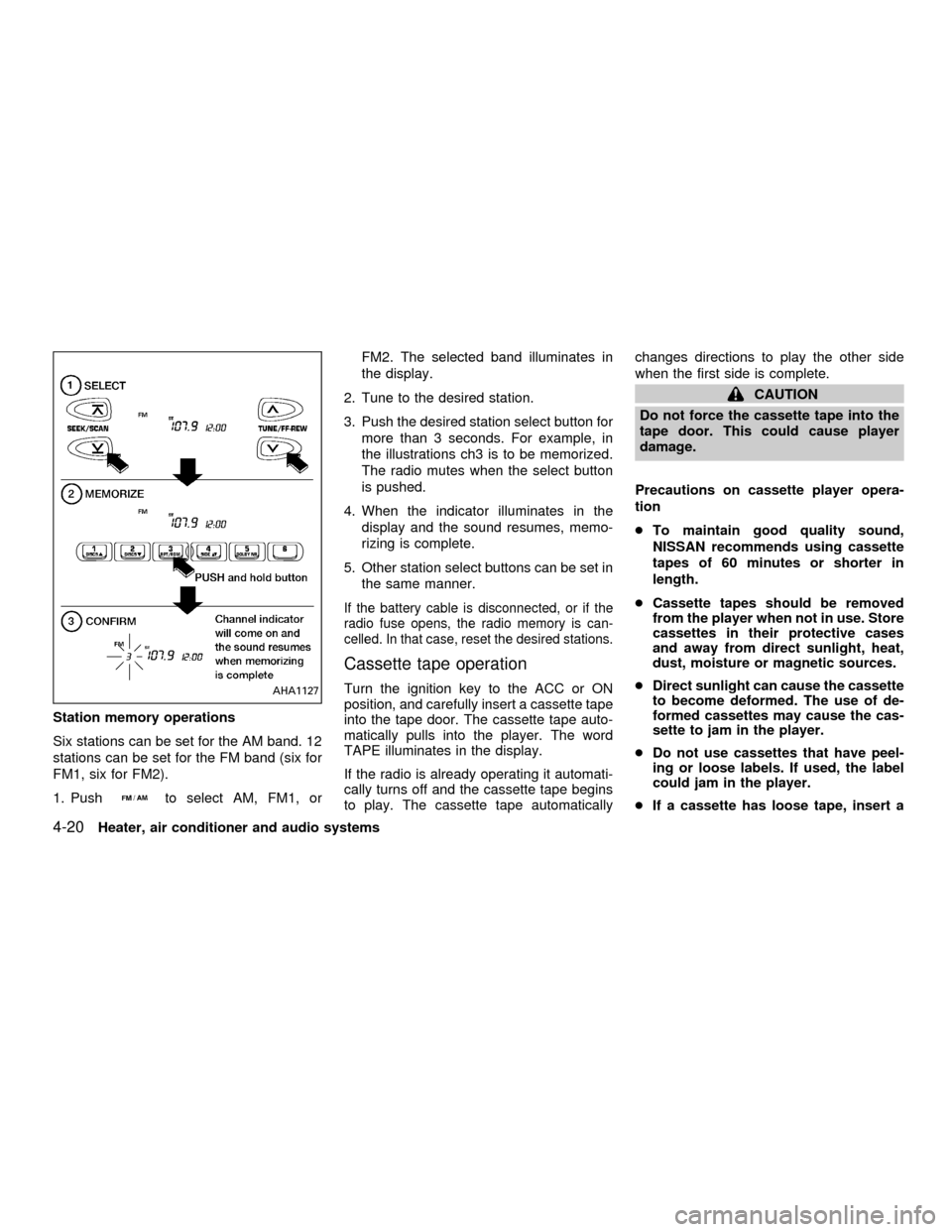
Six stations can be set for the AM band. 12
stations can be set for the FM band (six for
FM1, six for FM2).
1. Push
to select AM, FM1, orFM2. The selected band illuminates in
the display.
2. Tune to the desired station.
3. Push the desired station select button for
more than 3 seconds. For example, in
the illustrations ch3 is to be memorized.
The radio mutes when the select button
is pushed.
4. When the indicator illuminates in the
display and the sound resumes, memo-
rizing is complete.
5. Other station select buttons can be set in
the same manner.
If the battery cable is disconnected, or if the
radio fuse opens, the radio memory is can-
celled. In that case, reset the desired stations.
Cassette tape operation
Turn the ignition key to the ACC or ON
position, and carefully insert a cassette tape
into the tape door. The cassette tape auto-
matically pulls into the player. The word
TAPE illuminates in the display.
If the radio is already operating it automati-
cally turns off and the cassette tape begins
to play. The cassette tape automaticallychanges directions to play the other side
when the first side is complete.
CAUTION
Do not force the cassette tape into the
tape door. This could cause player
damage.
Precautions on cassette player opera-
tion
cTo maintain good quality sound,
NISSAN recommends using cassette
tapes of 60 minutes or shorter in
length.
cCassette tapes should be removed
from the player when not in use. Store
cassettes in their protective cases
and away from direct sunlight, heat,
dust, moisture or magnetic sources.
cDirect sunlight can cause the cassette
to become deformed. The use of de-
formed cassettes may cause the cas-
sette to jam in the player.
cDo not use cassettes that have peel-
ing or loose labels. If used, the label
could jam in the player.
cIf a cassette has loose tape, insert a
AHA1127
4-20Heater, air conditioner and audio systems
ZX