horn NISSAN FRONTIER 2005 D22 / 1.G Owners Manual
[x] Cancel search | Manufacturer: NISSAN, Model Year: 2005, Model line: FRONTIER, Model: NISSAN FRONTIER 2005 D22 / 1.GPages: 336, PDF Size: 7.24 MB
Page 12 of 336

1. Ventilators (P. 4-2)
2. Headlight/fog light (if so equipped)/turn
signal switch (P. 2-25)
3. Steering wheel switch for audio control
(if so equipped) (P. 4-25)
4. Driver supplemental air bag/horn
(P. 1-48, P. 2-30)
5. Meters, gauges and warning/indicator
lights (P. 2-3, 2-12)
6. Cruise control main/set switches
(if so equipped) (P. 5-17)
7. Windshield wiper/washer switch
(P. 2-24)
8. Storage (P. 2-35)
9. Audio system controls (if so equipped)
(P. 4-10)
10. Front passenger supplemental air bag
(P. 1-48)
11. Upper and lower glove box (P. 2-38)
12. Power outlet (P. 2-34)
13. Electronic locking rear differential
(E-Lock) system switch (if so
equipped) (P. 2-32)
Heated seat switches (if so equipped)
(P. 2-30)
Hill descent control (HDC) switch
(if so equipped) (P. 2-31)
WIC0816
INSTRUMENT PANEL
0-6Illustrated table of contents
ZREVIEW COPYÐ2005 Truck/Frontier(d22)
Owners ManualÐUSA_English(nna)
11/30/04Ðdebbie
X
Page 84 of 336

2 Instruments and controls
Instrument panel...................................2-2
Meters and gauges................................2-3
Speedometer and odometer.....................2-4
Trip computer (if so equipped)...................2-5
Tachometer....................................2-6
Engine coolant temperature gauge...............2-6
Fuel gauge....................................2-7
Engine oil pressure gauge (if so equipped)........2-8
Voltmeter (if so equipped).......................2-8
Compass and outside temperature display
(if so equipped)...................................2-9
Outside temperature display.....................2-9
Compass display..............................2-10
Warning/indicator lights and audible reminders......2-12
Checking bulbs...............................2-13
Warning lights................................2-13
Indicator lights................................2-17
Audible reminders.............................2-21
Security systems (if so equipped)..................2-21
Vehicle security system (if so equipped)..........2-21
NISSAN vehicle immobilizer system (NVIS)
(if so equipped)...............................2-23
Windshield wiper and washer switch...............2-24Switch operation..............................2-24
Rear window and outside mirror defroster switch
(if so equipped)..................................2-25
Headlight and turn signal switch....................2-25
Headlight control switch........................2-25
Daytime running light system (Canada only)......2-27
Instrument brightness control...................2-28
Turn signal switch.............................2-28
Fog light switch (if so equipped)................2-29
Hazard warning flasher switch.....................2-29
Horn............................................2-30
Cargo lamp switch...............................2-30
Heated seat (if so equipped).......................2-30
Vehicle dynamic control (VDC) off switch (if so
equipped).......................................2-31
Hill descent control (HDC) switch (if so equipped) . . . 2-31
Electronic locking rear differential (E-Lock) system
switch (if so equipped)............................2-32
Clutch interlock (clutch start) switch
(if so equipped)..................................2-33
Power outlet.....................................2-34
Storage.........................................2-35
Storage trays.................................2-35
ZREVIEW COPYÐ2005 Truck/Frontier(d22)
Owners ManualÐUSA_English(nna)
11/30/04Ðdebbie
X
Page 86 of 336

1. Ventilators (P. 4-2)
2. Headlight/fog light (if so equipped)/turn
signal switch (P. 2-25)
3. Steering wheel switch for audio control
(if so equipped) (P. 4-25)
4. Driver supplemental air bag/horn
(P. 1-48, P. 2-30)
5. Meters, gauges and warning/indicator
lights (P. 2-3, 2-12)
6. Cruise control main/set switches
(if so equipped) (P. 5-17)
7. Windshield wiper/washer switch
(P. 2-24)
8. Storage (P. 2-35)
9. Audio system controls (if so equipped)
(P. 4-10)
10. Front passenger supplemental air bag
(P. 1-48)
11. Upper and lower glove box (P. 2-38)
12. Power outlet (P. 2-34)
13. Electronic locking rear differential
(E-Lock) system switch (if so
equipped) (P. 2-32)
Heated seat switches (if so equipped)
(P. 2-30)
Hill descent control (HDC) switch
(if so equipped) (P. 2-31)
WIC0816
INSTRUMENT PANEL
2-2Instruments and controls
ZREVIEW COPYÐ2005 Truck/Frontier(d22)
Owners ManualÐUSA_English(nna)
11/30/04Ðdebbie
X
Page 106 of 336

The system helps deter vehicle theft but cannot
prevent it, nor can it prevent the theft of interior or
exterior vehicle components in all situations. Al-
ways secure your vehicle even if parking for a
brief period. Never leave your keys in the ignition,
and always lock the vehicle when unattended. Be
aware of your surroundings, and park in secure,
well-lit areas whenever possible.
Many devices offering additional protection, such
as component locks, identification markers, and
tracking systems, are available at auto supply
stores and specialty shops. Your NISSAN dealer
may also offer such equipment. Check with your
insurance company to see if you may be eligible
for discounts for various theft protection features.
How to arm the vehicle security
system
1. Close all windows.(The system can be
armed even if the windows are open.)
2. Remove the key from the ignition switch.
3. Close all doors. Lock all doors. The doors
can be locked with the key, power door lock
switch (if the door is opened, locked and
then closed) , or with the keyfob.Keyfob operation:
cPush the
button on the keyfob.
All doors lock. The hazard lights flash
twice and the horn beeps once to indicate
all doors are locked.
cWhen the
button is pushed with
all doors locked, the hazard lights flash
twice and the horn beeps once as a re-
minder that the doors are already locked.
The horn may or may not beep. Refer to
“Silencing the horn beep feature” in the
“Pre-driving checks and adjustments” sec-
tion later in this manual.
4. Confirm that the
indicator light comes
on. Thelight stays on for about 30
seconds. The vehicle security system is now
pre-armed. After about 30 seconds the ve-
hicle security system automatically shifts
into the armed phase. The
light begins
to flash once every 3 seconds. If, during the
30-second pre-arm time period, the door is
unlocked by the key or the keyfob, or the
ignition key is turned to ACC or ON, the
system will not arm.
cIf the key is turned slowly when locking
the door, the system may not arm. Fur-
thermore, if the key is turned beyond
the vertical position toward the unlockposition to remove the key, the system
may be disarmed when the key is re-
moved. If the indicator light fails to
glow for 30 seconds, unlock the door
once and lock it again.
cEven when the driver and/or passen-
gers are in the vehicle, the system will
arm with all doors closed and locked
with the ignition key in the OFF posi-
tion.
Vehicle security system activation
The vehicle security system will give the following
alarm:
cThe headlights blink and the horn sounds
intermittently.
cThe alarm automatically turns off after ap-
proximately 50 seconds. However, the alarm
reactivates if the vehicle is tampered with
again. The alarm can be shut off by unlocking
a door with the key, or by pressing the
button on the keyfob.
The alarm is activated by:
copening a door without using the key or
keyfob (even if the door is unlocked by using
the inside lock knob or the power door lock
switch) .
2-22Instruments and controls
ZREVIEW COPYÐ2005 Truck/Frontier(d22)
Owners ManualÐUSA_English(nna)
11/30/04Ðdebbie
X
Page 114 of 336
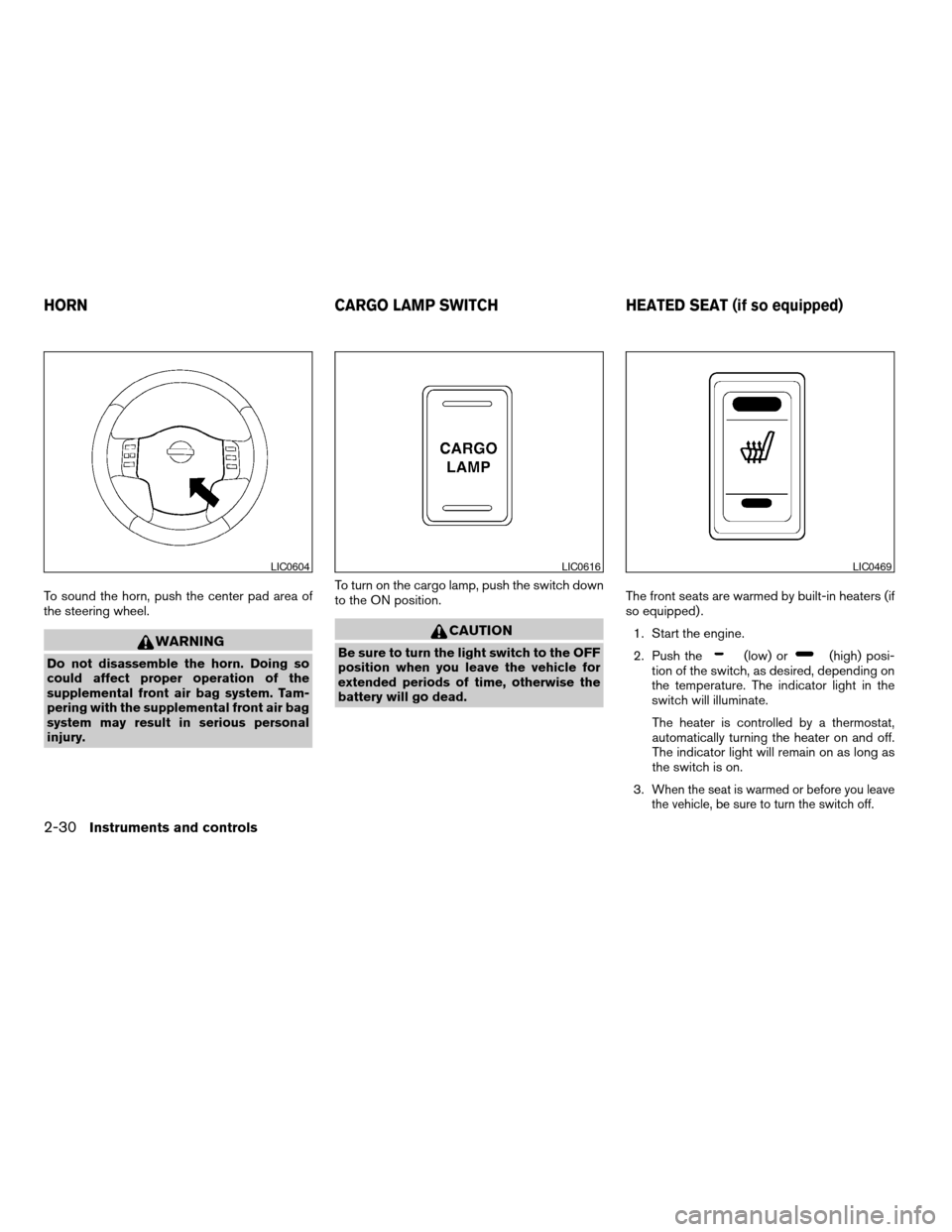
To sound the horn, push the center pad area of
the steering wheel.
WARNING
Do not disassemble the horn. Doing so
could affect proper operation of the
supplemental front air bag system. Tam-
pering with the supplemental front air bag
system may result in serious personal
injury.To turn on the cargo lamp, push the switch down
to the ON position.
CAUTION
Be sure to turn the light switch to the OFF
position when you leave the vehicle for
extended periods of time, otherwise the
battery will go dead.The front seats are warmed by built-in heaters (if
so equipped) .
1. Start the engine.
2. Push the(low) or(high) posi-
tion of the switch, as desired, depending on
the temperature. The indicator light in the
switch will illuminate.
The heater is controlled by a thermostat,
automatically turning the heater on and off.
The indicator light will remain on as long as
the switch is on.
3.
When the seat is warmed or before you leave
the vehicle, be sure to turn the switch off.
LIC0604LIC0616LIC0469
HORN CARGO LAMP SWITCH HEATED SEAT (if so equipped)
2-30Instruments and controls
ZREVIEW COPYÐ2005 Truck/Frontier(d22)
Owners ManualÐUSA_English(nna)
11/30/04Ðdebbie
X
Page 145 of 336

HOW TO USE REMOTE KEYLESS
ENTRY SYSTEM
Locking doors
1. Close all windows.
2. Remove the key from the ignition switch.
3. Close the hood and all doors.
4. Push the
button on the keyfob. All
the doors lock. The hazard warning lights
flash twice and the horn beeps once to
indicate all doors are locked.
cWhen the
button is pushed with
all doors locked, the hazard warning lightsflash twice and the horn beeps once as a
reminder that the doors are already
locked.
cIf a door is open and you push
the
button, the doors will lock
but the horn will not beep and the hazard
lights will not flash.
The horn may or may not beep. Refer to “Silenc-
ing the horn beep feature” later in this section for
details.
Unlocking doors
Push thebutton on the keyfob once.
cOnly the driver’s door unlocks.
cThe hazard warning lights flash once if all
doors are completely closed with the ignition
key in any position except the ON position.
cThe interior lights illuminate for 30 seconds
when the interior light switch is in the normal
operation position.
Push the
button on the keyfob again within
5 seconds.
cAll doors unlock.
LPD0209LPD0210
Pre-driving checks and adjustments3-7
ZREVIEW COPYÐ2005 Truck/Frontier(d22)
Owners ManualÐUSA_English(nna)
11/30/04Ðdebbie
X
Page 146 of 336

cThe hazard warning lights flash once if all
doors are completely closed.
The interior lights can be turned off without wait-
ing 30 seconds by inserting the key into the
ignition and turning to the ON or START position,
locking the doors with the keyfob or pushing the
interior light switch to the OFF position.
Auto relock
When thebutton on the keyfob is pushed,
all doors will lock automatically within 1 minute
unless one of the following operations is per-
formed:
cAny door is opened.
cA key is inserted into the ignition switch and
the key is turned from OFF to ON.
Using the panic alarm
If you are near your vehicle and feel threatened,
you may activate the panic alarm to call attention
by pushing and holding the
button on the
keyfob forlonger than 0.5 second.
The panic alarm and headlights will stay on for 25
seconds.
The panic alarm stops when:
cit has run for 25 seconds, or
cany button is pushed on the keyfob.
Silencing the horn beep feature
If desired, the horn beep feature can be deacti-
vated using the keyfob.
To deactivate:Press and hold the
andbuttonsfor at least 2 seconds.
The hazard warning lights will flash three times to
confirm that the horn beep feature has been
deactivated.
To activate:Press and hold the
andbuttonsfor at least 2 seconds
once more.
LPD0211LPD0262
3-8Pre-driving checks and adjustments
ZREVIEW COPYÐ2005 Truck/Frontier(d22)
Owners ManualÐUSA_English(nna)
11/30/04Ðdebbie
X
Page 147 of 336
The hazard warning lights will flash once and the
horn will sound once to confirm that the horn
beep feature has been reactivated.
Deactivating the horn beep feature does not si-
lence the horn if the alarm is triggered.
Using the interior lights
Push thebutton on the keyfob once to turn
on the interior lights.
For additional information, refer to “Interior lights”
in the “Instruments and controls” section earlier in
this manual.
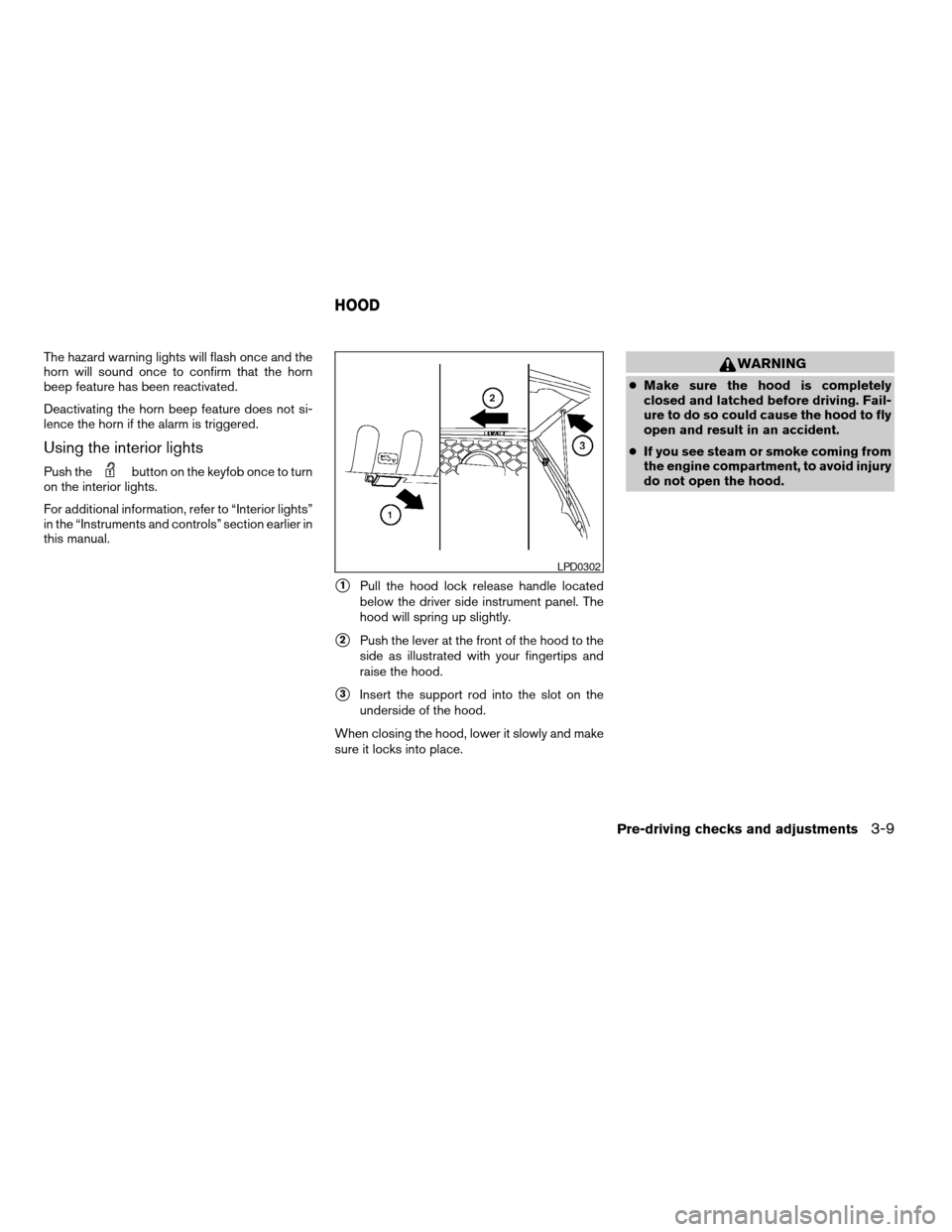
s1Pull the hood lock release handle located
below the driver side instrument panel. The
hood will spring up slightly.
s2Push the lever at the front of the hood to the
side as illustrated with your fingertips and
raise the hood.
s3Insert the support rod into the slot on the
underside of the hood.
When closing the hood, lower it slowly and make
sure it locks into place.
WARNING
cMake sure the hood is completely
closed and latched before driving. Fail-
ure to do so could cause the hood to fly
open and result in an accident.
cIf you see steam or smoke coming from
the engine compartment, to avoid injury
do not open the hood.
LPD0302
HOOD
Pre-driving checks and adjustments3-9
ZREVIEW COPYÐ2005 Truck/Frontier(d22)
Owners ManualÐUSA_English(nna)
11/30/04Ðdebbie
X
Page 325 of 336

G
Garage door opener, HomeLinkTUniversal
Transceiver...................2-50
Gascap.....................3-10
Gauge
Engine coolant temperature gauge.....2-6
Engine oil pressure gauge..........2-8
Fuel gauge..................2-7
Odometer...................2-4
Speedometer.................2-4
Tachometer..................2-6
Trip computer.................2-5
Trip odometer.................2-4
Voltmeter...................2-8
General maintenance..............8-2
Glove box....................2-38
H
Hazard warning flasher switch.........2-29
Head restraints..................1-6
Active head restraint.............1-7
Headlight and turn signal switch........2-25
Headlights....................8-28
Heated seats..................2-30
Heater
Heater and air conditioner controls.....4-2
Heater operation...............4-4
Hill descent control (HDC) switch.......2-31
Hill descent control (HDC) system......5-32
Hill start assist (HSA) system.........5-32
HomeLinkTUniversal Transceiver.......2-50
Hood release...................3-9Horn.......................2-30
I
Ignition switch..................5-7
Immobilizer system..........2-23, 3-2, 5-8
Important vehicle information label.......9-10
In-cabin microfilter...............8-20
Increasing fuel economy............5-19
Indicator lights and audible reminders
(See warning/indicator lights and audible
reminders)....................2-12
Inside automatic anti-glare mirror.......3-13
Inside mirror...................3-13
Instrument brightness control.........2-28
Instrument panel..............0-6, 2-2
Interior light...................2-48
ISOFIX child restraints.............1-34
J
Jump seat.....................1-6
Jump starting...................6-8
K
Key ........................3-2
Keyless entry system
(See remote keyless entry system).......3-6L
Labels
Air conditioner specification label.....9-11
Emission control information label.....9-11
Engine serial number............9-10
F.M.V.S.S. certification label........9-10
Vehicle identification number (VIN) plate . .9-9
Warning labels (for SRS)..........1-63
LATCH (Lower Anchors and Tethers for CHildren)
System......................1-34
License plate
Installing the license plate.........9-12
Light
Air bag warning light.........1-64, 2-17
Brake light (See stop light).........8-29
Bulb check/instrument panel........2-13
Bulb replacement..............8-29
Charge warning light............2-14
Fog light switch...............2-29
Headlight and turn signal switch......2-25
Headlights..................8-28
Interior light.................2-48
Light bulbs..................8-28
Low tire pressure warning light......2-15
Low washer fluid warning light.......2-16
Passenger air bag and status light .1-58, 2-19
Personal lights...............2-50
Security indicator light........1-58, 2-19
Warning/indicator lights and audible
reminders..................2-12
Lights
Map lights..................2-50
Lock
Child safety rear door lock..........3-6
10-3
ZREVIEW COPYÐ2005 Truck/Frontier(d22)
Owners ManualÐUSA_English(nna)
12/01/04Ðdebbie
X