clutch NISSAN FRONTIER 2010 Owner´s Manual
[x] Cancel search | Manufacturer: NISSAN, Model Year: 2010, Model line: FRONTIER, Model: NISSAN FRONTIER 2010Pages: 373, PDF Size: 6.21 MB
Page 13 of 373
15. Electronic locking rear differential
(E-Lock) system switch
(if so equipped) (P.2-34)
Heated seat switch (if so equipped)
(P. 2-32)
Hill descent control switch
(if so equipped) (P. 2-33)
Vehicle Dynamic Control (VDC) OFF
switch (if so equipped) (P. 2-32)
16. Shift selector (P. 5-13,5-17 )
17. 4WD shift switch (if so equipped)
(P. 5-22)
18. Climate controls (P. 4-2, P.4-10)
19. Hazard warning flasher switch (P. 2-30)
20. Ignition switch (P. 5-9)
21. Tilt steering wheel control
(if so equipped) (P. 3-12)
22. Cargo lamp switch (P. 2-31)
23. Clutch interlock (clutch start) switch
(if so equipped) (P. 2-35)
24. Outside mirror controls (if so equipped)
(P. 3-15)
Illustrated table of contents
0-7
Page 14 of 373
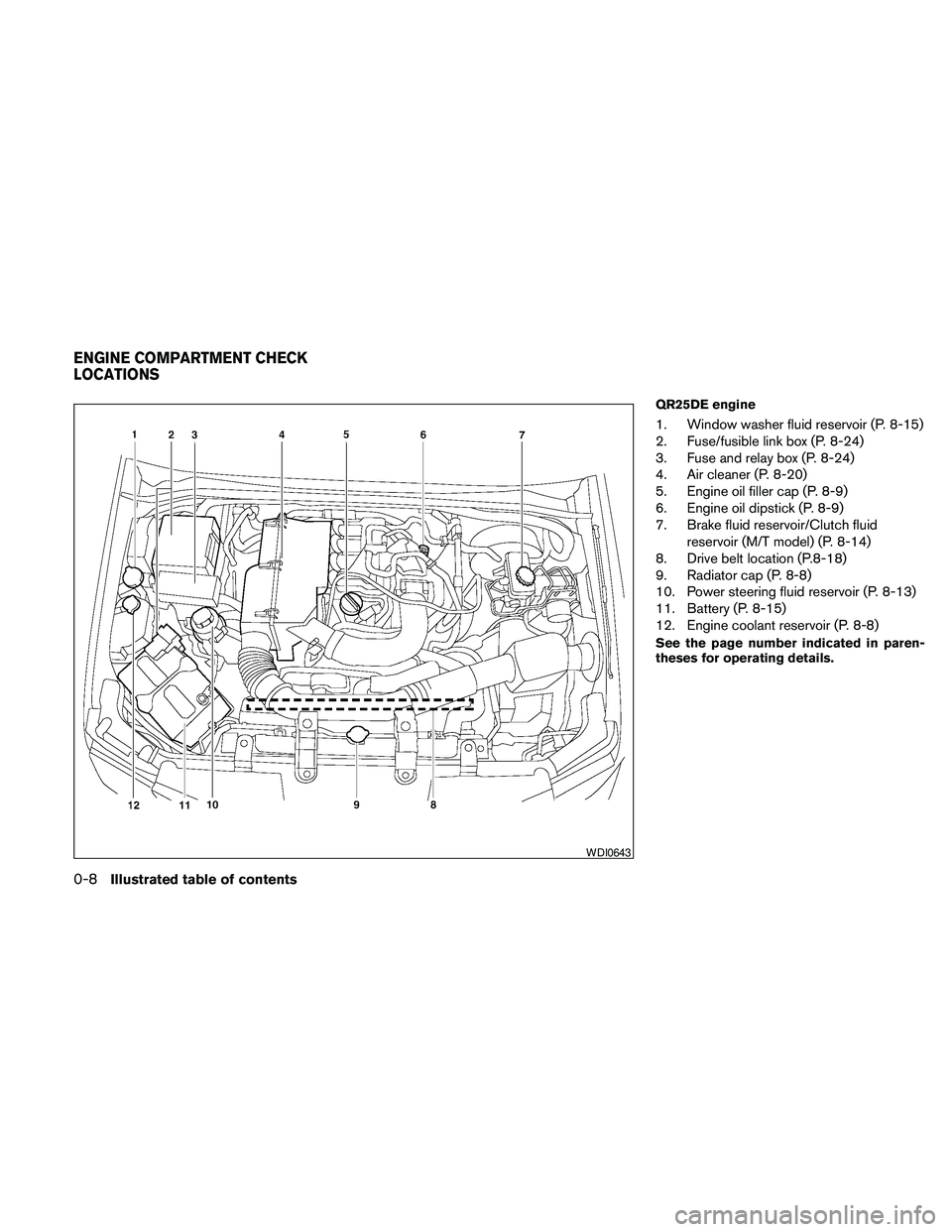
QR25DE engine
1. Window washer fluid reservoir (P. 8-15)
2. Fuse/fusible link box (P. 8-24)
3. Fuse and relay box (P. 8-24)
4. Air cleaner (P. 8-20)
5. Engine oil filler cap (P. 8-9)
6. Engine oil dipstick (P. 8-9)
7. Brake fluid reservoir/Clutch fluid
reservoir (M/T model) (P. 8-14)
8. Drive belt location (P.8-18)
9. Radiator cap (P. 8-8)
10. Power steering fluid reservoir (P. 8-13)
11. Battery (P. 8-15)
12. Engine coolant reservoir (P. 8-8)
See the page number indicated in paren-
theses for operating details.
WDI0643
ENGINE COMPARTMENT CHECK
LOCATIONS
0-8Illustrated table of contents
Page 15 of 373
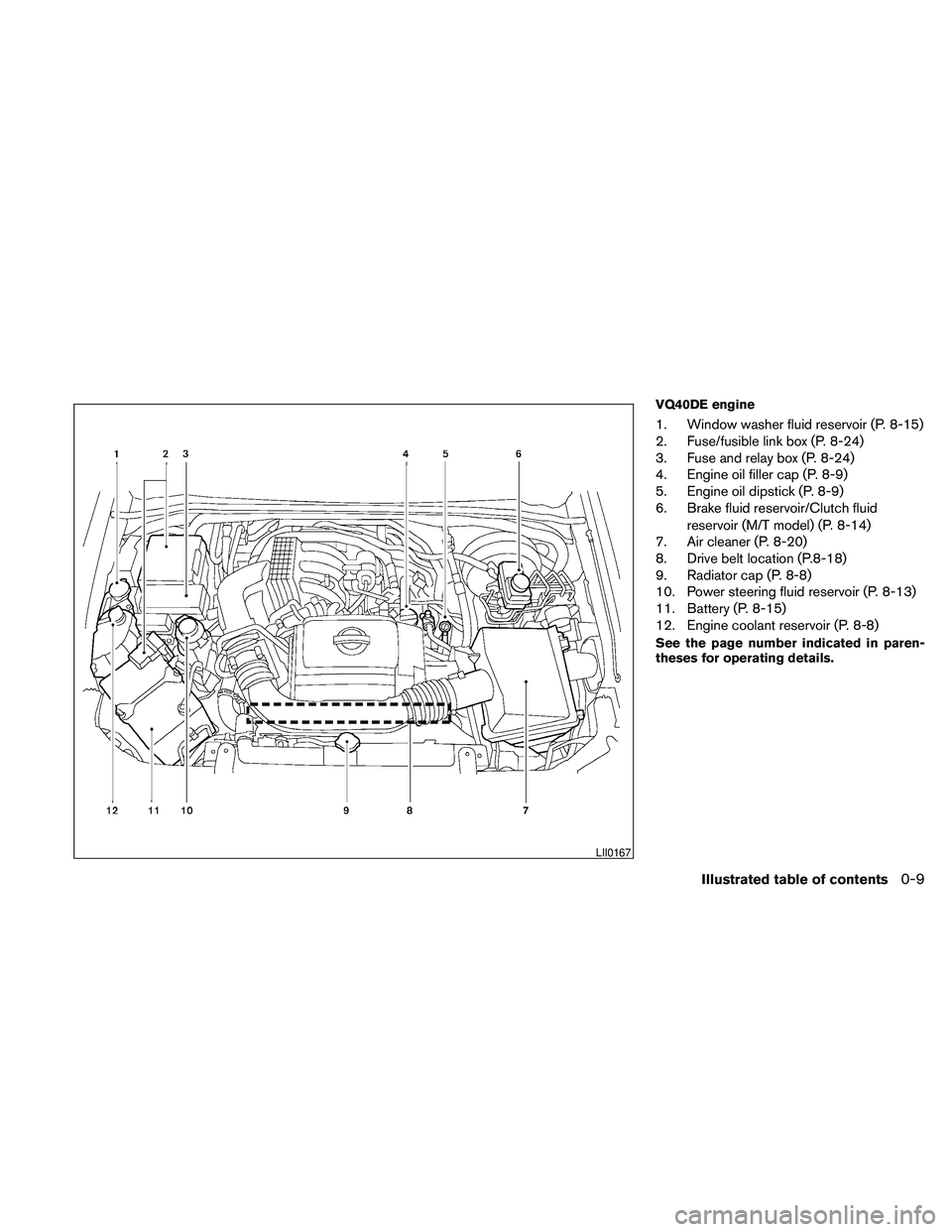
VQ40DE engine
1. Window washer fluid reservoir (P. 8-15)
2. Fuse/fusible link box (P. 8-24)
3. Fuse and relay box (P. 8-24)
4. Engine oil filler cap (P. 8-9)
5. Engine oil dipstick (P. 8-9)
6. Brake fluid reservoir/Clutch fluid
reservoir (M/T model) (P. 8-14)
7. Air cleaner (P. 8-20)
8. Drive belt location (P.8-18)
9. Radiator cap (P. 8-8)
10. Power steering fluid reservoir (P. 8-13)
11. Battery (P. 8-15)
12. Engine coolant reservoir (P. 8-8)
See the page number indicated in paren-
theses for operating details.
LII0167
Illustrated table of contents0-9
Page 92 of 373
2 Instruments and controls
Instrument panel...................................2-2
Meters and gauges................................2-3
Speedometer and odometer.....................2-4
Trip computer (if so equipped)...................2-5
Tachometer....................................2-6
Engine coolant temperature gauge...............2-6
Fuel gauge....................................2-7
Engine oil pressure gauge (if so equipped)........2-8
Voltmeter (if so equipped).......................2-8
Compass and outside temperature display
(if so equipped)...................................2-9
Outside temperature display.....................2-9
Compass display..............................2-10
Warning/indicator lights and audible reminders......2-13
Checking bulbs...............................2-14
Warning lights................................2-14
Indicator lights................................2-18
Audible reminders.............................2-22
Security systems (if so equipped)..................2-23
Vehicle security system (if so equipped)..........2-23
NISSAN vehicle immobilizer system
(if so equipped)...............................2-24
Windshield wiper and washer switch...............2-25Switch operation..............................2-25
Rear window and outside mirror defroster switch
(if so equipped)..................................2-26
Headlight and turn signal switch....................2-26
Headlight control switch........................2-26
Daytime running light system (Canada only)......2-29
Instrument brightness control...................2-29
Turn signal switch.............................2-30
Fog light switch (if so equipped)................2-30
Hazard warning flasher switch.....................2-30
Horn............................................2-31
Cargo lamp switch...............................2-31
Heated seat (if so equipped).......................2-32
Vehicle Dynamic Control (VDC) off switch
(if so equipped)..................................2-32
Hill descent control switch (if so equipped)..........2-33
Electronic locking rear differential (E-Lock) system
switch (if so equipped)............................2-34
Clutch interlock (clutch start) switch
(if so equipped)..................................2-35
Power outlet.....................................2-35
Storage.........................................2-36
Storage trays.................................2-36
Under-seat storage bins........................2-38
Page 95 of 373
15. Electronic locking rear differential
(E-Lock) system switch
(if so equipped) (P.2-34)
Heated seat switch (if so equipped)
(P. 2-32)
Hill descent control switch
(if so equipped) (P. 2-33)
Vehicle Dynamic Control (VDC) OFF
switch (if so equipped) (P. 2-32)
16. Shift selector (P. 5-13,5-17 )
17. 4WD shift switch (if so equipped)
(P. 5-22)
18. Climate controls (P. 4-2, P.4-10)
19. Hazard warning flasher switch (P. 2-30)
20. Ignition switch (P. 5-9)
21. Tilt steering wheel control
(if so equipped) (P. 3-12)
22. Cargo lamp switch (P. 2-31)
23. Clutch interlock (clutch start) switch
(if so equipped) (P. 2-35)
24. Outside mirror controls (if so equipped)
(P. 3-15)
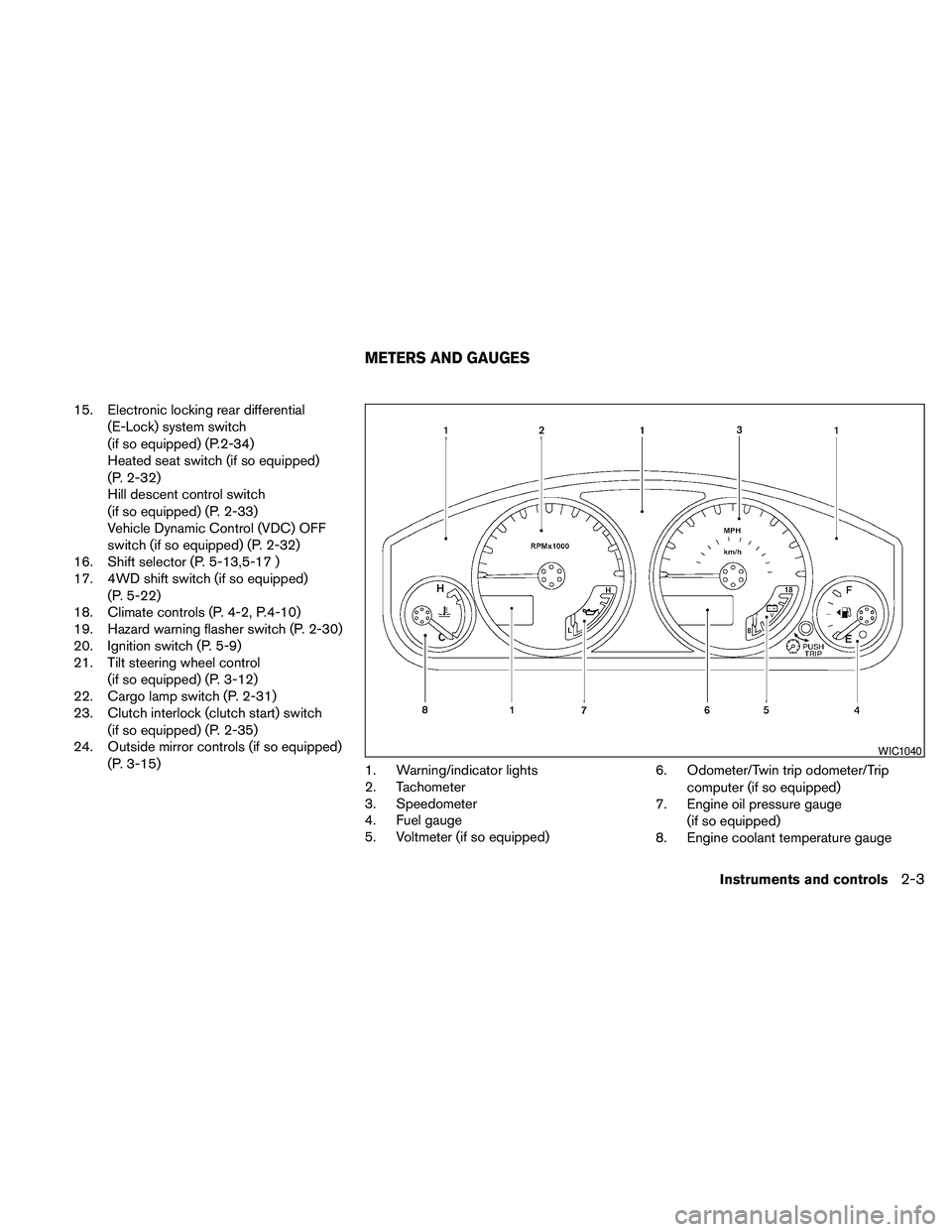
1. Warning/indicator lights
2. Tachometer
3. Speedometer
4. Fuel gauge
5. Voltmeter (if so equipped)6. Odometer/Twin trip odometer/Trip
computer (if so equipped)
7. Engine oil pressure gauge
(if so equipped)
8. Engine coolant temperature gauge
WIC1040
METERS AND GAUGES
Instruments and controls2-3
Page 108 of 373
The engine oil pressure warning light is not
designed to indicate a low oil level.Use the
dipstick to check the oil level. See “Engine oil” in
the “Maintenance and do-it-yourself” section of
this manual.
CAUTION
Running the engine with the engine oil
pressure warning light on could cause se-
rious damage to the engine almost imme-
diately. Such damage is not covered by
warranty. Turn off the engine as soon as it
is safe to do so.
4WD warning light (
model)
The 4WD warning light comes on when the igni-
tion switch is turned to ON. It turns off soon after
the engine is started.
If the engine or vehicle is not functioning properly,
the warning light will either remain illuminated or
blink. See “4WD warning light” in the “Starting
and driving” section.
CAUTION
cIf the warning light comes on or blinks
during operation, have your vehicle
checked by a NISSAN dealer as soon as
possible.
cDo not drive on dry hard surface roads
in the 4H or 4LO position. If the 4WD
warning light turns on when you are
driving on dry hard surface roads:
– in the 4H position, shift the 4WD shift
switch to 2WD.
– in the 4LO position for automatic
transmission models, stop the ve-
hicle and shift the shift selector to
the N position with the brake pedal
depressed and shift the 4WD shift
switch to 2WD.
– in the 4LO position for manual trans-
mission models, stop the vehicle and
shift the shift selector to the N posi-
tion with the clutch pedal depressed
and shift the 4WD shift switch to
2WD,
cIf the warning light is still on after the
above operation, have your vehicle
checked by a NISSAN dealer as soon as
possible.
Low fuel warning light
This light comes on when the fuel level in the fuel
tank is getting low. Refuel as soon as it is conve-
nient, preferably before the fuel gauge reaches E
(Empty) .There will be a small reserve of fuel
in the tank when the fuel gauge needle
reaches E (Empty) .
Low tire pressure warning light
Your vehicle is equipped with a Tire Pressure
Monitoring System (TPMS) that monitors the tire
pressure of all tires except the spare.
The low tire pressure warning light warns of low
tire pressure or indicates that the TPMS is not
functioning properly.
After the ignition switch is placed in the ON
position, this light illuminates for about 1 second
and turns off.
Low tire pressure warning:
If the vehicle is being driven with low tire
pressure, the warning light will illuminate.
When the low tire pressure warning light
illuminates, you should stop and adjust the
tire pressure of all 4 tires to the recom-
mended COLD tire pressure shown on the
2-16Instruments and controls
Page 111 of 373
Cruise set switch indicator
light (if so equipped)
The light comes on while the vehicle speed is
controlled by the cruise control system. If the light
blinks while the engine is running, it may indicate
the cruise control system is not functioning prop-
erly. Have the system checked by a NISSAN
dealer.
Electronic locking rear
differential (E-Lock) system on
indicator light (if so equipped)
This light comes on when the electronic locking
rear differential (E-Lock) system clutch is fully
engaged.
The indicator light flashes when the system is first
turned on. When the system fully engages, the
light remains on. If the switch is on and the
indicator light continues to flash, the system is
not engaged.
For additional information, see “Electronic lock-
ing rear differential (E-Lock) system switch” later
in this section and “Electronic locking rear differ-
ential (E-Lock) system” in the “Starting and driv-
ing” section of this manual.
4WD shift indicator light
(
model)
The light should turn off within 1 second after
placing the ignition switch in the ON position.
While the engine is running, the 4WD shift indi-
cator light will illuminate the position selected by
the 4WD shift switch.
The 4WD shift indicator light may blink
while shifting from one drive mode to the
other.
Front passenger air bag status
light
The front passenger air bag status light ()
will be lit and the passenger front air bag will be
OFF depending on how the front passenger seat
is being used.
For front passenger air bag status light operation,
see “Front passenger air bag and status light” in
the “Safety — Seats, seat belts and supplemental
restraint system” section of this manual.
High beam indicator light
(blue)
This blue light comes on when the headlight high
beams are on and goes out when the low beams
are selected.
The high beam indicator light also comes on
when the passing signal is activated.
Hill descent control system on
indicator light (if so equipped)
When the ignition switch is placed in the ON
position, this light comes on briefly and then turns
off.
The light comes on when the hill descent control
system is activated.
If the hill descent control switch is on and the
indicator light blinks, the system is not engaged.
If the indicator light does not come on or blink
when the hill descent switch is on, the system
may not be functioning properly. Have the system
checked by a NISSAN dealer.
For additional information, see “Hill descent con-
trol switch” later in this section and “Hill descent
control system” in the “Starting and driving” sec-
tion of this manual.
Instruments and controls2-19
Page 113 of 373
Slip indicator light for models
with ABLS (if so equipped)
This indicator light comes on if the active brake
limited slip is activated. If activated, the system
will apply braking to the slipping drive wheel(s) ,
giving the non-slipping wheel(s) more traction.
Slip indicator light for models
with VDC (if so equipped)
This indicator light will blink when the traction
control system is limiting wheel spin. Slippery
road conditions may exist if the slip indicator
blinks on. If this happens, adjust your driving
accordingly.
The slip indicator light also comes on when you
turn the ignition key to the ON position. The light
will turn off after about 2 seconds if the system is
operational. If the light does not come on or does
not go off, have the traction control system
checked by a NISSAN dealer.
If the battery is removed or discharged, the trac-
tion control system is disabled and the slip indi-
cator light will not turn off after 2 seconds when
the ignition switch is turned to the ON position.
To reset the system, you must perform the reset
procedure. Refer to “Vehicle Dynamic Control
(VDC) system” in the “Starting and driving” sec-
tion of this manual.If the light does not go off after performing the
reset procedure, have the traction control system
checked by a NISSAN dealer.
Transfer 4LO position indicator
light (
model)
The light should turn off within 1 second after
turning the ignition switch to ON.
This light comes on when the 4WD shift switch is
set in the 4LO position with the ignition switch in
the ON position.
The transfer case may be damaged if you shift the
switch while driving.
Make sure the transfer 4LO position indicator
light turns on when you shift the 4WD shift switch
to 4LO.
The indicator light may blink while shifting
from one drive mode to the other.
The 4LO indicator light must stop blinking and
remain illuminated or turn off before shifting the
transmission into gear. If the shift selector is
shifted from the N (Neutral) position to any other
gear when the 4LO indicator light is blinking, the
vehicle may move unexpectedly.When you shift between 4H and 4LO, follow the
instructions below:
cFor automatic transmission models, stop the
vehicle and shift the shift selector to the N
(Neutral) position with the brake pedal de-
pressed, then depress and turn the 4WD
shift switch to 4LO or 4H.
cFor manual transmission models, stop the
vehicle and shift the shift selector to the N
(Neutral) position with the clutch pedal de-
pressed, then depress and turn the 4WD
shift switch to 4LO or 4H.
You cannot move the transfer 4WD shift switch
between 4H and 4LO unless you stop the vehicle
and shift the shift selector to the N position with
the brake pedal (AT models) or clutch pedal (MT
models) depressed.
Turn signal/hazard indicator
lights
The appropriate light flashes when the turn signal
switch is activated.
Both lights flash when the hazard switch is turned
on.
Instruments and controls2-21
Page 127 of 373
WARNING
Pay special attention to your surround-
ings when using the clutch interlock
switch. The vehicle will move forward or
backward according to the gear selected.
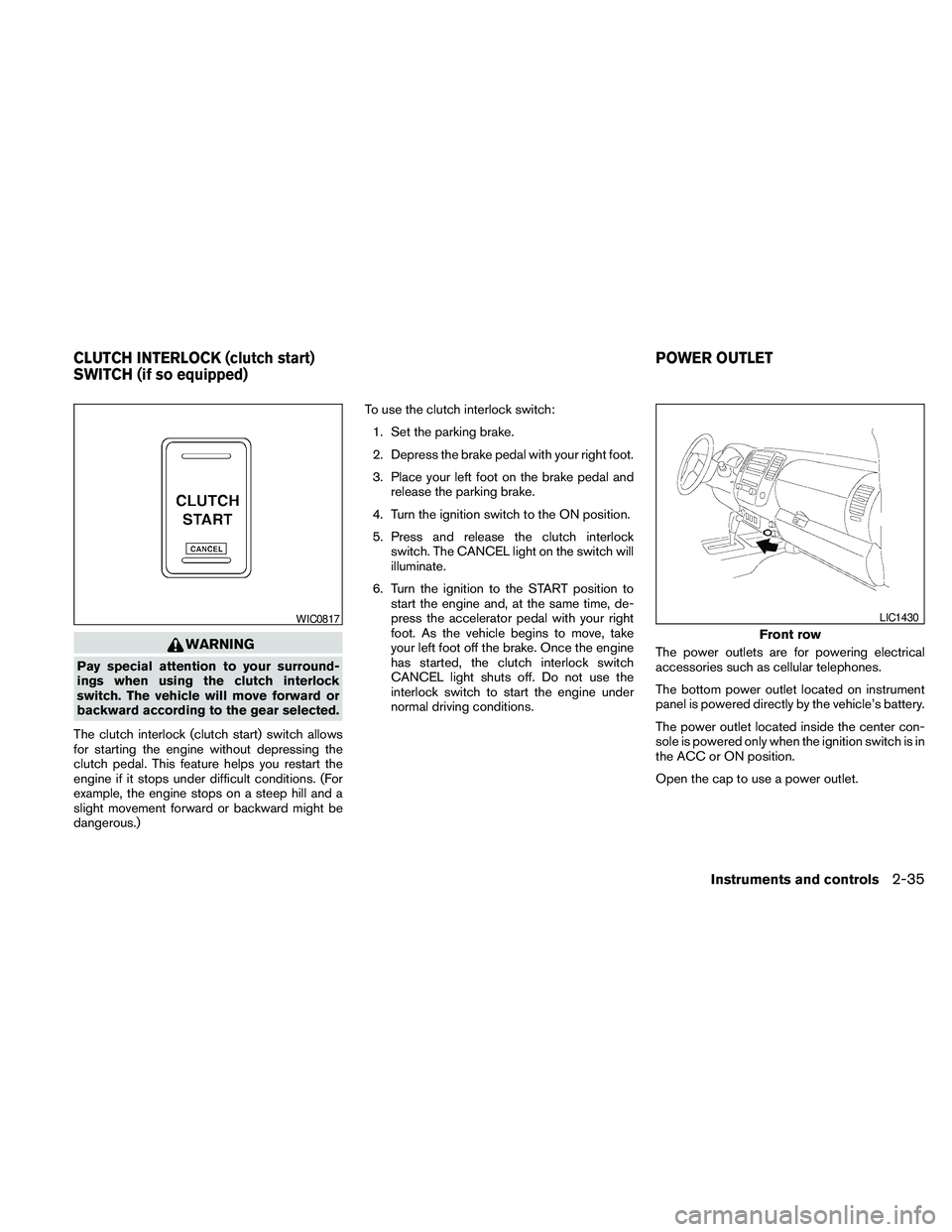
The clutch interlock (clutch start) switch allows
for starting the engine without depressing the
clutch pedal. This feature helps you restart the
engine if it stops under difficult conditions. (For
example, the engine stops on a steep hill and a
slight movement forward or backward might be
dangerous.)To use the clutch interlock switch:
1. Set the parking brake.
2. Depress the brake pedal with your right foot.
3. Place your left foot on the brake pedal and
release the parking brake.
4. Turn the ignition switch to the ON position.
5. Press and release the clutch interlock
switch. The CANCEL light on the switch will
illuminate.
6. Turn the ignition to the START position to
start the engine and, at the same time, de-
press the accelerator pedal with your right
foot. As the vehicle begins to move, take
your left foot off the brake. Once the engine
has started, the clutch interlock switch
CANCEL light shuts off. Do not use the
interlock switch to start the engine under
normal driving conditions.The power outlets are for powering electrical
accessories such as cellular telephones.
The bottom power outlet located on instrument
panel is powered directly by the vehicle’s battery.
The power outlet located inside the center con-
sole is powered only when the ignition switch is in
the ACC or ON position.
Open the cap to use a power outlet.
WIC0817
Front row
LIC1430
CLUTCH INTERLOCK (clutch start)
SWITCH (if so equipped)POWER OUTLET
Instruments and controls2-35
Page 226 of 373
cMany hills are too steep for any vehicle.
If you drive up them, you may stall. If
you drive down them, you may not be
able to control your speed. If you drive
across them, you may roll over.
cDo not shift gears while driving on
downhill grades as this could cause
loss of control of the vehicle.
cStay alert when driving to the top of a
hill. At the top there could be a drop-off
or other hazard that could cause an
accident.
cIf your engine stalls or you cannot make
it to the top of a steep hill, never at-
tempt to turn around. Your vehicle
could tip or roll over. Always back
straight down in R (Reverse) gear. Never
back down in N (Neutral) or with the
clutch depressed (manual transmission
vehicles) , using only the brake, as this
could cause loss of control.
cHeavy braking going down a hill could
cause your brakes to overheat and fade,
resulting in loss of control and an acci-
dent. Apply brakes lightly and use a low
gear to control your speed. Use the hill
descent control feature (if so
equipped) .cUnsecured cargo can be thrown around
when driving over rough terrain. Prop-
erly secure all cargo so it will not be
thrown forward and cause injury to you
or your passengers.
cTo avoid raising the center of gravity
excessively, do not exceed the rated
capacity of the roof rack (if so
equipped) and evenly distribute the
load. Secure heavy loads in the cargo
area as far forward and as low as pos-
sible. Do not equip the vehicle with tires
larger than specified in this manual.
This could cause your vehicle to roll
over.
cDo not grip the inside or spokes of the
steering wheel when driving off-road.
The steering wheel could move sud-
denly and injure your hands. Instead
drive with your fingers and thumbs on
the outside of the rim.
cBefore operating the vehicle, ensure
that the driver and all passengers have
their seat belts fastened.
cAlways drive with the floor mats in
place as the floor may become hot.cLower your speed when encountering
strong crosswinds. With a higher center
of gravity, your NISSAN is more af-
fected by strong side winds. Slower
speeds ensure better vehicle control.
cDo not drive beyond the performance
capability of the tires, even with 4WD
engaged.
cFor 4WD equipped vehicles, do not at-
tempt to raise two wheels off the
ground and shift the transmission to
any drive or reverse position with the
engine running. Doing so may result in
drivetrain damage or unexpected ve-
hicle movement which could result in
serious vehicle damage or personal
injury.
5-8Starting and driving