power NISSAN FRONTIER 2012 Owner´s Manual
[x] Cancel search | Manufacturer: NISSAN, Model Year: 2012, Model line: FRONTIER, Model: NISSAN FRONTIER 2012Pages: 384, PDF Size: 2.89 MB
Page 242 of 384
●If the engine is very hard to start in extremely
cold weather or when restarting, depress
the accelerator pedal a little (approximately
1/3 to the floor) and hold it and then crank
the engine. Release the key and the accel-
erator pedal when the engine starts.
●If the engine is very hard to start because
it is flooded, depress the accelerator
pedal all the way to the floor and hold it.
Crank the engine for 5-6 seconds. After
cranking the engine, release the accel-
erator pedal. Crank the engine with your
foot off the accelerator pedal by plac-
ing the ignition in the START position.
Release the key when the engine starts. If
the engine starts, but fails to run, repeat
the above procedure.
CAUTION
Do not operate the starter for more than
15 seconds at a time. If the engine does
not start, turn the key off and wait 10
seconds before cranking again, otherwise
the starter could be damaged.
4. Allow the engine to idle for at least 30 sec- onds after starting. Do not race the engine
while warming it up. Drive at moderate
speed for a short distance first, especially in
cold weather.
AUTOMATIC TRANSMISSION (if so
equipped)
WARNING
●Do not depress the accelerator pedal
while shifting from P (Park) or N (Neu-
tral) to R (Reverse) , D (Drive) , 3, 2 or 1.
Always depress the brake pedal until
shifting is completed. Failure to do so
could cause you to lose control and
have an accident.
● Cold engine idle speed is high, so use
caution when shifting into a forward or
reverse gear before the engine has
warmed up.
● Never shift to P (Park) or R (Reverse)
while the vehicle is moving. This could
cause an accident.
● Except in an emergency, do not shift to
the N (Neutral) position while driving.
Doing so can cause a loss of engine
braking which may result in a collision,
serious personal injury or death. In ad-
dition, coasting with the transmission
in the N (Neutral) position may cause
serious damage to the transmission.
CAUTION
●When stopping the vehicle on an uphill
grade, do not hold the vehicle by de-
pressing the accelerator pedal. The foot
brake should be used for this purpose.
● Do not downshift abruptly on slippery
roads. This may cause a loss of control.
The automatic transmission in your vehicle is
electronically controlled to produce maximum
power and smooth operation.
The recommended operating procedures for this
transmission are shown on the following pages.
Follow these procedures for maximum vehicle
performance and driving enjoyment.
Starting the vehicle
1. After starting the engine, fully depress the foot brake pedal before moving the shift
selector out of the P (Park) position.
2. Keep the foot brake pedal depressed and move the shift selector into a driving gear.
3. Release the foot brake, then gradually start the vehicle in motion.
DRIVING THE VEHICLE
Starting and driving5-13
Page 253 of 384
TRANSFER CASE SHIFTING
PROCEDURES
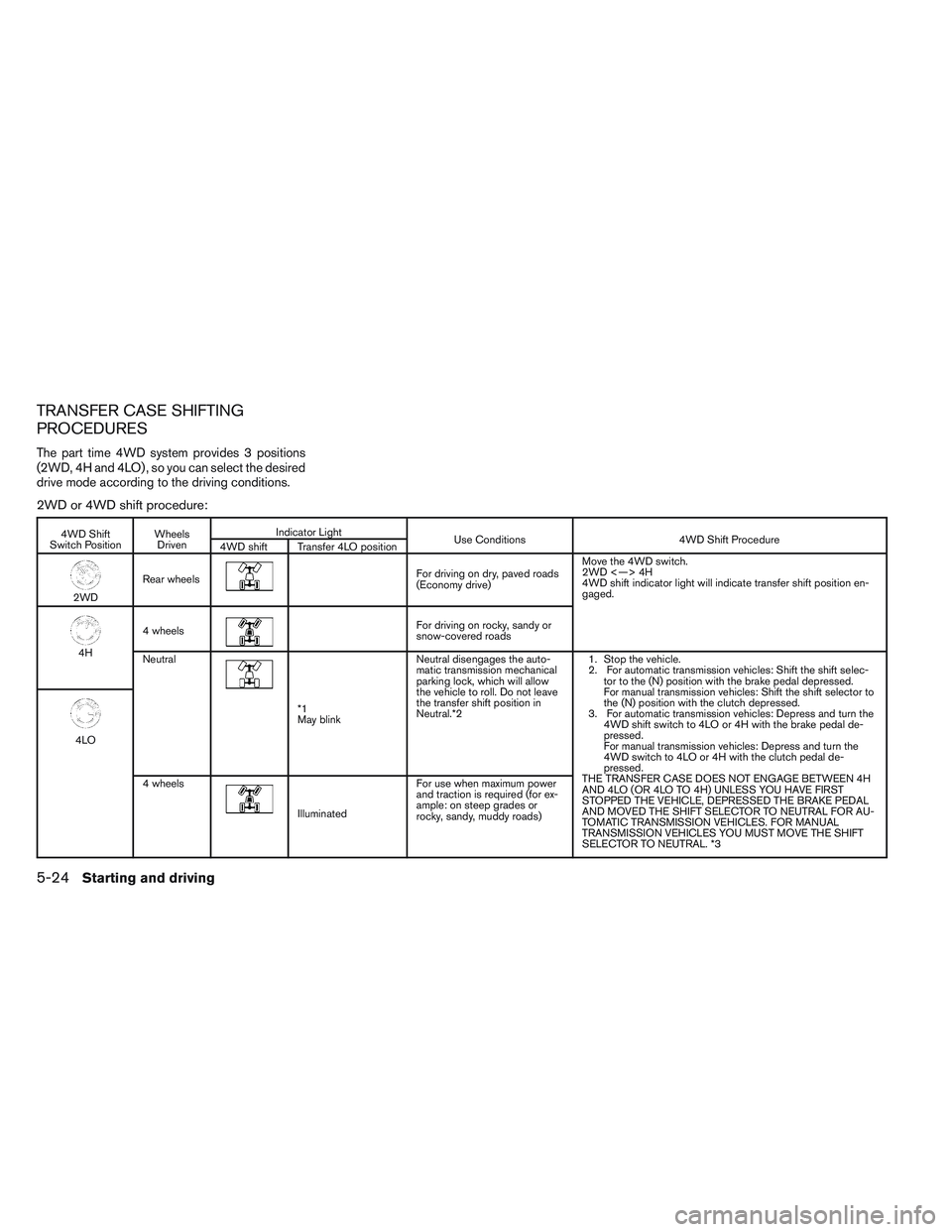
The part time 4WD system provides 3 positions
(2WD, 4H and 4LO) , so you can select the desired
drive mode according to the driving conditions.
2WD or 4WD shift procedure:
4WD Shift
Switch Position Wheels
Driven Indicator Light
Use Conditions 4WD Shift Procedure
4WD shift Transfer 4LO position
2WD Rear wheels
For driving on dry, paved roads
(Economy drive) Move the 4WD switch.
2WD <—> 4H
4WD shift indicator light will indicate transfer shift position en-
gaged.
4H
4 wheels
For driving on rocky, sandy or
snow-covered roads
Neutral
*1
May blink Neutral disengages the auto-
matic transmission mechanical
parking lock, which will allow
the vehicle to roll. Do not leave
the transfer shift position in
Neutral.*2
1. Stop the vehicle.
2. For automatic transmission vehicles: Shift the shift selec-
tor to the (N) position with the brake pedal depressed.
For manual transmission vehicles: Shift the shift selector to
the (N) position with the clutch depressed.
3. For automatic transmission vehicles: Depress and turn the 4WD shift switch to 4LO or 4H with the brake pedal de-
pressed.
For manual transmission vehicles: Depress and turn the
4WD switch to 4LO or 4H with the clutch pedal de-
pressed.
THE TRANSFER CASE DOES NOT ENGAGE BETWEEN 4H
AND 4LO (OR 4LO TO 4H) UNLESS YOU HAVE FIRST
STOPPED THE VEHICLE, DEPRESSED THE BRAKE PEDAL
AND MOVED THE SHIFT SELECTOR TO NEUTRAL FOR AU-
TOMATIC TRANSMISSION VEHICLES. FOR MANUAL
TRANSMISSION VEHICLES YOU MUST MOVE THE SHIFT
SELECTOR TO NEUTRAL. *3
4LO
4 wheels
Illuminated For use when maximum power
and traction is required (for ex-
ample: on steep grades or
rocky, sandy, muddy roads)
5-24Starting and driving
Page 255 of 384
The transfer case 4WD shift switch is used to
select either 2WD or 4WD depending on the
driving conditions. There are three types of drive
modes available, 2WD, 4H and 4LO.
The 4WD shift switch electronically controls the
transfer case operation. Rotate the switch to
move between each mode, 2WD, 4H and 4LO.
To change into or out of 4LO, the vehicle
MUST be stationary, shift the shift selector
to Neutral (N) , and for automatic transmis-
sion vehicles depress the brake pedal or
for manual transmission vehicles depress
the clutch pedal. The switch must be de-
pressed and turned when changing into or
out of 4LO.
WARNING
●When parking, apply the parking brake
before stopping the engine and make
sure that the 4WD shift indicator light is
on and the ATP warning light goes off.
Otherwise, the vehicle could unexpect-
edly move even if the automatic trans-
mission is in the P position. ●
The 4LO indicator light must stop blink-
ing and remain illuminated or turn off
before shifting the transmission into
gear. If the shift selector is shifted from
the (N) position to any other gear when
the 4LO indicator light is blinking, the
vehicle may move unexpectedly.
CAUTION
●Never shift the 4WD shift switch be-
tween 4LO and 4H while driving.
● The 4H position provides greater trac-
tion. Avoid excessive speed, as it will
cause increased fuel consumption and
higher oil temperatures, and could
damage drivetrain components.
Speeds over 62 MPH (100 km/h) in 4H is
not recommended
● The 4LO position provides maximum
power and traction. Avoid raising ve-
hicle speed excessively, as the maxi-
mum speed is approximately 31 MPH
(50 km/h) .
● When driving straight, shift the 4WD
shift switch to the 2WD or 4H position.
Do not move the 4WD shift switch when
making a turn or reversing. ●
Do not shift the 4WD shift switch (be-
tween 2WD and 4H) while driving on
steep downhill grades. Use the engine
brake and low automatic transmission
gears (D1 or D2) or manual transmis-
sion (1st gear or 2nd gear) for engine
braking.
● Do not operate the 4WD shift switch
(between 2WD and 4H) with the rear
wheels spinning.
● Do not drive on dry hard surface roads
in the 4H or 4LO position. Driving on dry
hard surfaces in 4H or 4LO may cause
unnecessary noise and tire wear.
NISSAN recommends driving in the
2WD position under these conditions.
● The 4WD transfer case may not be
shifted between 4H and 4LO at low am-
bient temperatures and the transfer
4LO position indicator light may blink
even when the 4WD shift switch is
shifted. After driving for a while you can
change the 4WD transfer case between
4H and 4LO.
When driving on rough roads, ● Set the 4WD shift switch to 4H or 4LO.
● Drive carefully according to the road surface
conditions.
5-26Starting and driving
Page 261 of 384
The power assisted steering uses a hydraulic
pump, driven by the engine, to assist steering.
If the engine stops or the drive belt breaks, you
will still have control of the vehicle. However,
much greater steering effort is needed, especially
in sharp turns and at low speeds.
WARNING
If the engine is not running or is turned off
while driving, the power assist for the
steering will not work. Steering will be
harder to operate.The brake system has two separate hydraulic
circuits. If one circuit malfunctions, you will still
have braking at 2 wheels.
BRAKE PRECAUTIONS
Vacuum assisted brakes
The brake booster aids braking by using engine
vacuum. If the engine stops, you can stop the
vehicle by depressing the brake pedal. However,
greater foot pressure on the brake pedal will be
required to stop the vehicle and stopping dis-
tance will be longer.
Using the brakes
Avoid resting your foot on the brake pedal while
driving. This will overheat the brakes, wear out the
brake pads faster, and reduce gas mileage.
To help reduce brake wear and to prevent the
brakes from overheating, reduce speed and
downshift to a lower gear before going down a
slope or long grade. Overheated brakes may
reduce braking performance and could result in
loss of vehicle control.
WARNING
●
While driving on a slippery surface, be
careful when braking, accelerating or
downshifting. Abrupt braking or accel-
erating could cause the wheels to skid
and result in an accident.
● If the engine is not running or is turned
off while driving, the power assist for
the brakes will not work. Braking will be
harder.
Wet brakes
When the vehicle is washed or driven through
water, the brakes may get wet. As a result, your
braking distance will be longer and the vehicle
may pull to one side during braking.
To dry the brakes, drive the vehicle at a safe
speed while lightly pressing the brake pedal to
heat up the brakes. Do this until the brakes return
to normal. Avoid driving the vehicle at high
speeds until the brakes function correctly.
Parking brake break-in
Break-in the parking brake shoes whenever the
stopping effect of the parking brake is weakened
or whenever the parking brake shoes and/or
drum/rotors are replaced, in order to assure the
best brake performance.
POWER STEERING BRAKE SYSTEM
5-32Starting and driving
Page 263 of 384
When the ABS senses that 1 or more wheels are
close to locking up, the actuator rapidly applies
and releases hydraulic pressure. This action is
similar to pumping the brakes very quickly. You
may feel a pulsation in the brake pedal and hear a
noise from under the hood or feel a vibration from
the actuator when it is operating. This is normal
and indicates that the ABS is operating properly.
However, the pulsation may indicate that road
conditions are hazardous and extra care is re-
quired while driving.●
ABLS system uses automatic braking to
transfer power from a slipping drive wheel to
the wheel on the same axle with more trac-
tion. The ABLS system applies braking to
the slipping wheel, which helps redirect
power to the other wheel.
● On 4WD models the ABLS system operates
in both 4H and 4LO modes. If 4WD mode is
engaged, the ABLS system operates for
both drive axles. On 2WD vehicles, the
ABLS system operates on the drive axle
only.
● The ABLS system is always ON. In some
conditions, the system may automatically
turn the ABLS system off. If the system is
automatically turned off, normal brake func-
tion will continue. ABLS will function even
when the VDC system is turned OFF.
● The ABLS does not operate if both wheels
on a drive axle are slipping.WARNING
●The ABLS system helps provide in-
creased traction, but will not prevent
accidents due to abrupt steering opera-
tion or by careless driving or dangerous
driving practices. Reduce vehicle speed
and be especially careful when driving
and cornering on slippery surfaces. Al-
ways drive carefully.
●
Do not modify the vehicle’s suspension.
If suspension parts such as shock ab-
sorbers, struts, springs, stabilizer bars,
bushings and wheels are not NISSAN ap-
proved for your vehicle or are extremely
deteriorated, the ABLS system may not
operate properly. This could adversely af-
fect vehicle handling performance, and
the slip indicator light may illuminate.
● If brake related parts such as brake
pads, rotors and calipers are not
NISSAN recommended or are extremely
deteriorated, the ABLS system may not
operate properly and the slip indicator
light may illuminate.
● If wheels or tires other than the NISSAN
recommended ones are used, the ABLS
system may not operate properly and
the slip indicator light may illuminate.
ACTIVE BRAKE LIMITED SLIP (ABLS)
SYSTEM
5-34Starting and driving
Page 264 of 384
The Vehicle Dynamic Control (VDC) system uses
various sensors to monitor driver inputs and ve-
hicle motion. Under certain driving conditions,
the VDC System helps to perform the following
functions:● Controls brake pressure to reduce wheel
slip on one slipping drive wheel so power is
transferred to a non slipping drive wheel on
the same axle.
● Controls brake pressure and engine output
to reduce drive wheel slip based on vehicle
speed (traction control function) .
● If the 4WD transfer case is shifted into 4LO
the
indicator light will come on and
the VDC system will be turned off. See “Us-
ing four wheel drive (4WD)” earlier in this
section.
● Controls brake pressure at individual wheels
and engine output to help the driver maintain
control of the vehicle in the following condi-
tions:
– understeer (vehicle tends to not follow the steered path despite increased steer-
ing input)
– oversteer (vehicle tends to spin due to certain road or driving conditions) The VDC system can help the driver to maintain
control of the vehicle, but it can not prevent loss
of vehicle control in all driving situations.
When the VDC system operates, the
indi-
cator in the instrument panel flashes so note the
following:
● The road may be slippery or the system may
determine some action is required to help
keep the vehicle on the steered path.
● You may feel a pulsation in the brake pedal
and hear a noise or vibration from under the
hood. This is normal and indicates that the
VDC system is working properly.
● Adjust your speed and driving to the road
conditions.
See “Slip indicator light” and ”Vehicle Dynamic
Control (VDC) OFF indicator light” in the ”Instru-
ments and controls” section.
If a malfunction occurs in the system, the
andindicator lights come on in the instru-
ment panel. The VDC system automatically turns
off when these indicator lights are on.
The VDC OFF switch is used to turn off the VDC
system. The
indicator illuminates to indi-
cate the VDC system is off. When the VDC switch is used to turn off the
system, the VDC system still operates to prevent
one drive wheel from slipping by transferring
power to a non slipping drive wheel. The
indicator flashes if this occurs. All other VDC
functions are off and the
indicator will not
flash.
The VDC system is automatically reset to on
when the ignition switch is placed in the off
position then back to the on position.
The computer has a built in diagnostic feature
that tests the system each time you start the
engine and move the vehicle forward or in reverse
at a slow speed. When the self-test occurs, you
may hear a clunk noise and/or feel a pulsation in
the brake pedal. This is normal and is not an
indication of a malfunction.
WARNING
● The VDC system is designed to help the
driver maintain stability but does not
prevent accidents due to abrupt steer-
ing operation at high speeds or by care-
less or dangerous driving techniques.
Reduce vehicle speed and be especially
careful when driving and cornering on
slippery surfaces and always drive
carefully.
VEHICLE DYNAMIC CONTROL (VDC)
SYSTEM
Starting and driving5-35
Page 281 of 384
CAUTION
●Do not push start this vehicle. The
three-way catalyst may be damaged.
● Automatic transmission models cannot
be push-started or tow-started. At-
tempting to do so may cause transmis-
sion damage.
● For manual transmission models, never
try to start the vehicle by towing it.
When the engine starts, the forward
surge could cause the vehicle to collide
with the tow vehicle.
WARNING
●Do not continue to drive if your vehicle
overheats. Doing so could cause engine
damage or a vehicle fire.
● To avoid the danger of being scalded,
never remove the radiator cap while the
engine is still hot. When the radiator
cap is removed, pressurized hot water
will spurt out, possibly causing serious
injury.
● Do not open the hood if steam is com-
ing out.
If your vehicle is overheating (indicated by an
extremely high temperature gauge reading) , or if
you feel a lack of engine power, detect abnormal
noise, etc. take the following steps. 1. Move the vehicle safely off the road, apply the parking brake and move the shift selector
to N (Neutral) (manual transmission) or to P
(Park) (automatic transmission) .
Do not stop the engine.
2. Turn off the air conditioner (if so equipped) . Open all the windows, move the heater or air
conditioner temperature control to maximum
hot and fan control to high speed. 3. Get out of the vehicle. Look and listen for
steam or coolant escaping from the radiator
before opening the hood. (If steam or cool-
ant is escaping, turn off the engine.) Do not
open the hood further until no steam or
coolant can be seen.
4. Open the engine hood.
WARNING
If steam or water is coming from the en-
gine, stand clear to prevent getting
burned.
5. Visually check drive belts for damage or looseness. Also check if the cooling fan is
running. The radiator hoses and radiator
should not leak water. If coolant is leaking,
the water pump belt is missing or loose, or
the cooling fan does not run, stop the en-
gine.
WARNING
Be careful not to allow your hands, hair,
jewelry or clothing to come into contact
with, or get caught in, engine belts or the
engine cooling fan. The engine cooling
fan can start at any time.
PUSH STARTING IF YOUR VEHICLE OVERHEATS
6-12In case of emergency
Page 282 of 384
6. After the engine cools down, check the cool-ant level in the engine coolant reservoir tank
with the engine running. Add coolant to the
engine coolant reservoir tank if necessary.
Have your vehicle repaired at a NISSAN
dealer. When towing your vehicle, all State (Provincial in
Canada) and local regulations for towing must be
followed. Incorrect towing equipment could dam-
age your vehicle. Towing instructions are avail-
able from a NISSAN dealer. Local service opera-
tors are generally familiar with the applicable laws
and procedures for towing. To assure proper
towing and to prevent accidental damage to your
vehicle, NISSAN recommends having a service
operator tow your vehicle. It is advisable to have
the service operator carefully read the following
precautions:
WARNING
●
Never ride in a vehicle that is being
towed.
● Never get under your vehicle after it has
been lifted by a tow truck.
CAUTION
●When towing, make sure that the trans-
mission, axles, steering system and
powertrain are in working condition. If
any of these conditions apply, dollies or
a flatbed tow truck must be used.
● Always attach safety chains before
towing. For information about towing your vehicle behind
a recreational vehicle (RV) , refer to “Flat towing”
in the “Technical and consumer information” sec-
tion of this manual.
TOWING YOUR VEHICLE
In case of emergency6-13
Page 292 of 384
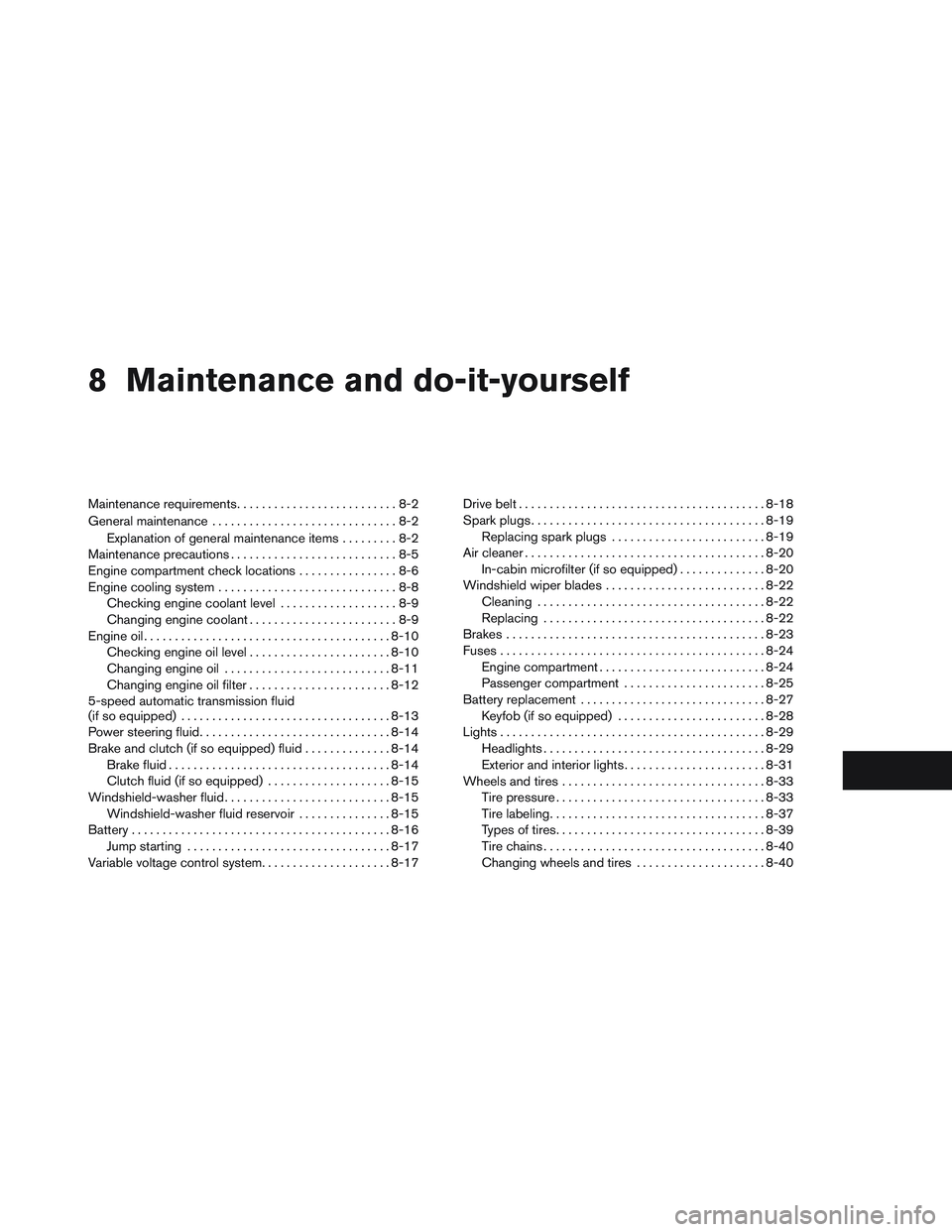
8 Maintenance and do-it-yourself
Maintenance requirements..........................8-2
General maintenance ..............................8-2
Explanation of general maintenance items .........8-2
Maintenance precautions ...........................8-5
Engine compartment check locations ................8-6
Engine cooling system .............................8-8
Checking engine coolant level ...................8-9
Changing engine coolant ........................8-9
Engine oil ........................................ 8-10
Checking engine oil level .......................8-10
Changing engine oil ........................... 8-11
Changing engine oil filter .......................8-12
5-speed automatic transmission fluid
(if so equipped) .................................. 8-13
Power steering fluid ............................... 8-14
Brake and clutch (if so equipped) fluid ..............8-14
Brake fluid .................................... 8-14
Clutch fluid (if so equipped) ....................8-15
Windshield-washer fluid ........................... 8-15
Windshield-washer fluid reservoir ...............8-15
Battery .......................................... 8-16
Jump starting ................................. 8-17
Variable voltage control system .....................8-17Drive belt
........................................ 8-18
Spark plugs ...................................... 8-19
Replacing spark plugs ......................... 8-19
Air cleaner ....................................... 8-20
In-cabin microfilter (if so equipped) ..............8-20
Windshield wiper blades .......................... 8-22
Cleaning ..................................... 8-22
Replacing .................................... 8-22
Brakes .......................................... 8-23
Fuses ........................................... 8-24
Engine compartment ........................... 8-24
Passenger compartment .......................8-25
Battery replacement .............................. 8-27
Keyfob (if so equipped) ........................ 8-28
Lights ........................................... 8-29
Headlights .................................... 8-29
Exterior and
interior lights....................... 8-31
Wheels and tires ................................. 8-33
Tire pressure . . . ............................... 8-33
Tire labeling ................................... 8-37
Types of tires .................................. 8-39
Tire chains .................................... 8-40
Changing wheels and tires .....................8-40
Page 295 of 384
Seat beltsCheck that all parts of the seat belt
system (for example, buckles, anchors, adjusters
and retractors) operate properly and smoothly,
and are installed securely. Check the belt web-
bing for cuts, fraying, wear or damage.
Steering wheel Check for changes in the steer-
ing system, such as excessive freeplay, hard
steering or strange noises.
Warning lights and chimes Make sure all
warning lights and chimes are operating properly.
Windshield wiper and washer* Check that
the wipers and washer operate properly and that
the wipers do not streak.
Windshield defroster Check that the air
comes out of the defroster outlets properly and in
sufficient quantity when operating the heater or
air conditioner.
Under the hood and vehicle
The maintenance items listed here should be
checked periodically (for example, each time you
check the engine oil or refuel) .
Battery* Check the fluid level in each cell. It
should be between the MAX and MIN lines. Ve-
hicles operated in high temperatures or under
severe conditions require frequent checks of the
battery fluid level. Brake and clutch fluid levels*
Make sure that
the brake and clutch fluid level is between the
MIN and MAX lines on the reservoir.
Engine coolant level* Check the coolant level
when the engine is cold.
Engine drive belts* Make sure the drive belts
are not frayed, worn, cracked or oily.
Engine oil level* Check the level after parking
the vehicle on a level surface with the engine off.
Wait more than 10 minutes for the oil to drain
back into the oil pan.
Exhaust system Make sure there are no loose
supports, cracks or holes. If the sound of the
exhaust seems unusual or there is a smell of
exhaust fumes, immediately have the exhaust
system inspected by a NISSAN dealer. See the
carbon monoxide warning in the “Starting and
driving” section of this manual.
Fluid leaks Check under the vehicle for fuel, oil,
water or other fluid leaks after the vehicle has
been parked for a while. Water dripping from the
air conditioner after use is normal. If you should
notice any leaks or if gasoline fumes are evident,
check for the cause and have it corrected imme-
diately. Power steering fluid level* and lines
Check
the level when the fluid is cold, with the engine
off. Check the lines for proper attachment, leaks,
cracks, etc.
Radiator and hoses Check the front of the
radiator and clean off any dirt, insects, leaves,
etc., that may have accumulated. Make sure the
hoses have no cracks, deformation, rot or loose
connections.
Underbody The underbody is frequently ex-
posed to corrosive substances such as those
used on icy roads or to control dust. It is very
important to remove these substances from the
underbody, otherwise rust may form on the floor
pan, frame, fuel lines and exhaust system. At the
end of winter, the underbody should be thor-
oughly flushed with plain water, in those areas
where mud and dirt may have accumulated. See
the “Appearance and care” section of this
manual.
Windshield-washer fluid* Check that there is
adequate fluid in the reservoir.
8-4Maintenance and do-it-yourself