4WD NISSAN FRONTIER 2015 D23 / 3.G Owner's Manual
[x] Cancel search | Manufacturer: NISSAN, Model Year: 2015, Model line: FRONTIER, Model: NISSAN FRONTIER 2015 D23 / 3.GPages: 466, PDF Size: 4.28 MB
Page 332 of 466
●When the warning light comes on, the
2WD mode may be engaged even if the
4WD shift switch is in 4H. Be especially
careful when driving. If corresponding
parts are malfunctioning, the 4WD
mode will not be engaged even if the
4WD shift switch is shifted.
● Do not drive the vehicle in the 4H or 4LO
position on dry hard surface roads. Driv-
ing on dry, hard surfaces in 4H or 4LO
may cause unnecessary noise, tire wear
and increased fuel consumption.
If the 4WD warning light turns on when
you are driving on dry hard surface
roads:
– in the 4H position, shift the 4WD shift switch to 2WD.
– in the 4LO position for automatic transmission vehicles, stop the ve-
hicle and shift the shift lever to the N
position with the brake pedal de-
pressed and shift the 4WD shift
switch to 2WD. – in the 4LO position for manual trans-
mission vehicles, stop the vehicle
and shift the shift lever to the N po-
sition with the clutch pedal de-
pressed and shift the 4WD shift
switch to 2WD.
● If the warning light is still on after the
above operation, have your vehicle
checked by a NISSAN dealer as soon as
possible.
● The transfer case may be damaged if
you continue driving with the warning
light blinking. The E-Lock system can provide additional trac-
tion and should only be used when a vehicle has
become or is becoming stuck. This system oper-
ates by electronically “locking” the two rear drive
wheels together, allowing them to turn at the
same speed. The system is used when it is not
possible to free a stuck vehicle even when using
the 4LO position (4-wheel drive vehicles) .
When added traction is required, activate the
E-Lock system by pushing the switch ON. For
additional information, refer to “Electronic locking
rear differential (E-Lock) system switch” in the
“Instruments and Controls” section of this
manual. Once the system fully engages, the indi-
cator light in the instrument panel will remain ON.
When the system is activated, both rear wheels
will engage, providing added traction.
The rear wheels may momentarily slip or move to
engage the system, and the system will only
engage up to approximately 4 MPH (7 km/h).
Once the vehicle is free, the system should be
turned OFF and driving resumed.
The Anti-Lock Brake (ABS) system is disabled
and the ABS light illuminates when the E-Lock
system is ON. Also, the Vehicle Dynamic Control
(VDC) system is disabled and the VDC light
illuminates when the E-Lock system is ON.
ELECTRONIC LOCKING REAR
DIFFERENTIAL (E-Lock) SYSTEM (if
so equipped)
Starting and driving5-31
Page 337 of 466
When the ABS senses that one or more wheels
are close to locking up, the actuator rapidly ap-
plies and releases hydraulic pressure. This action
is similar to pumping the brakes very quickly. You
may feel a pulsation in the brake pedal and hear a
noise from under the hood or feel a vibration from
the actuator when it is operating. This is normal
and indicates that the ABS is operating properly.
However, the pulsation may indicate that road
conditions are hazardous and extra care is re-
quired while driving.●
ABLS system uses automatic braking to
transfer power from a slipping drive wheel to
the wheel on the same axle with more trac-
tion. The ABLS system applies braking to
the slipping wheel, which helps redirect
power to the other wheel.
● On 4WD models the ABLS system operates
in both 4H and 4LO modes. If 4WD mode is
engaged, the ABLS system operates for
both drive axles. On 2WD vehicles, the
ABLS system operates on the drive axle
only.
● The ABLS system is always ON. In some
conditions, the system may automatically
turn the ABLS system off. If the system is
automatically turned off, normal brake func-
tion will continue. ABLS will function even
when the VDC system is turned OFF.
● The ABLS does not operate if both wheels
on a drive axle are slipping.WARNING
● The ABLS system helps provide in-
creased traction, but will not prevent
accidents due to abrupt steering opera-
tion or by careless driving or dangerous
driving practices. Reduce vehicle speed
and be especially careful when driving
and cornering on slippery surfaces. Al-
ways drive carefully.
● Do not modify the vehicle’s suspension.
If suspension parts such as shock ab-
sorbers, struts, springs, stabilizer bars,
bushings and wheels are not NISSAN
approved for your vehicle or are ex-
tremely deteriorated, the ABLS system
may not operate properly. This could
adversely affect vehicle handling per-
formance, and the slip indicator light
may illuminate.
● If brake related parts such as brake
pads, rotors and calipers are not
NISSAN recommended or are extremely
deteriorated, the ABLS system may not
operate properly and the slip indicator
light may illuminate.
ACTIVE BRAKE LIMITED SLIP (ABLS)
SYSTEM
5-36Starting and driving
Page 338 of 466
●If wheels or tires other than the NISSAN
recommended ones are used, the ABLS
system may not operate properly and
the slip indicator light may illuminate. The Vehicle Dynamic Control (VDC) system uses
various sensors to monitor driver inputs and ve-
hicle motion. Under certain driving conditions,
the VDC System helps to perform the following
functions:
● Controls brake pressure to reduce wheel
slip on one slipping drive wheel so power is
transferred to a non slipping drive wheel on
the same axle.
● Controls brake pressure and engine output
to reduce drive wheel slip based on vehicle
speed (traction control function) .
● If the 4WD transfer case is shifted into 4LO
the
indicator light will come on and
the VDC system will be turned off. For addi-
tional information, refer to “Using four wheel
drive (4WD)” in this section.
● Controls brake pressure at individual wheels
and engine output to help the driver maintain
control of the vehicle in the following condi-
tions:
– understeer (vehicle tends to not follow the steered path despite increased steer-
ing input)
– oversteer (vehicle tends to spin due to certain road or driving conditions) The VDC system can help the driver to maintain
control of the vehicle, but it cannot prevent loss of
vehicle control in all driving situations.
When the VDC system operates, the
indi-
cator in the instrument panel flashes so note the
following:
● The road may be slippery or the system may
determine some action is required to help
keep the vehicle on the steered path.
● You may feel a pulsation in the brake pedal
and hear a noise or vibration from under the
hood. This is normal and indicates that the
VDC system is working properly.
● Adjust your speed and driving to the road
conditions.
For additional information, refer to “Slip indicator
light for models with VDC” and ”Vehicle Dynamic
Control (VDC) OFF indicator light” in the ”Instru-
ments and controls” section of this manual.
If a malfunction occurs in the system, the
indicator light will come on in the instrument
panel. The VDC system automatically turns off
when these indicator lights are off.
The VDC OFF switch is used to turn off the VDC
system. The
indicator illuminates to indi-
cate the VDC system is off.
VEHICLE DYNAMIC CONTROL (VDC)
SYSTEM
Starting and driving5-37
Page 361 of 466
●Move the transmission shift lever to
the N (Neutral) position
● Observe the following restricted tow-
ing speeds and distances for manual
transmission models only:
Speed: Below 60 MPH (97 km/h)
Distance: Less than 500 miles
(805 km)
When towing long distances or speeds in excess
of 60 mph, remove the propeller shaft before
towing to prevent damage to the transmission.
See your NISSAN dealer for more information.
Four-wheel drive models
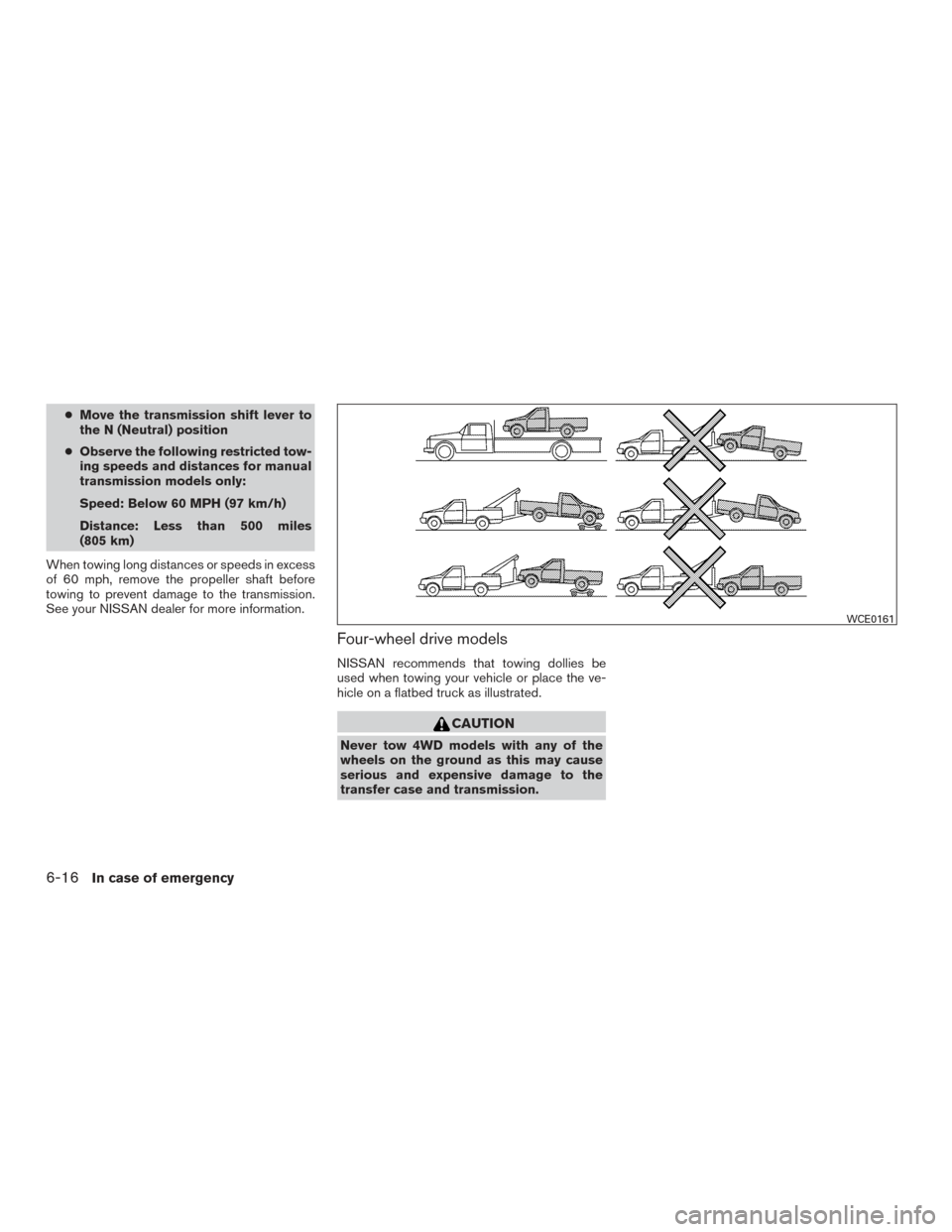
NISSAN recommends that towing dollies be
used when towing your vehicle or place the ve-
hicle on a flatbed truck as illustrated.
CAUTION
Never tow 4WD models with any of the
wheels on the ground as this may cause
serious and expensive damage to the
transfer case and transmission.
WCE0161
6-16In case of emergency
Page 445 of 466
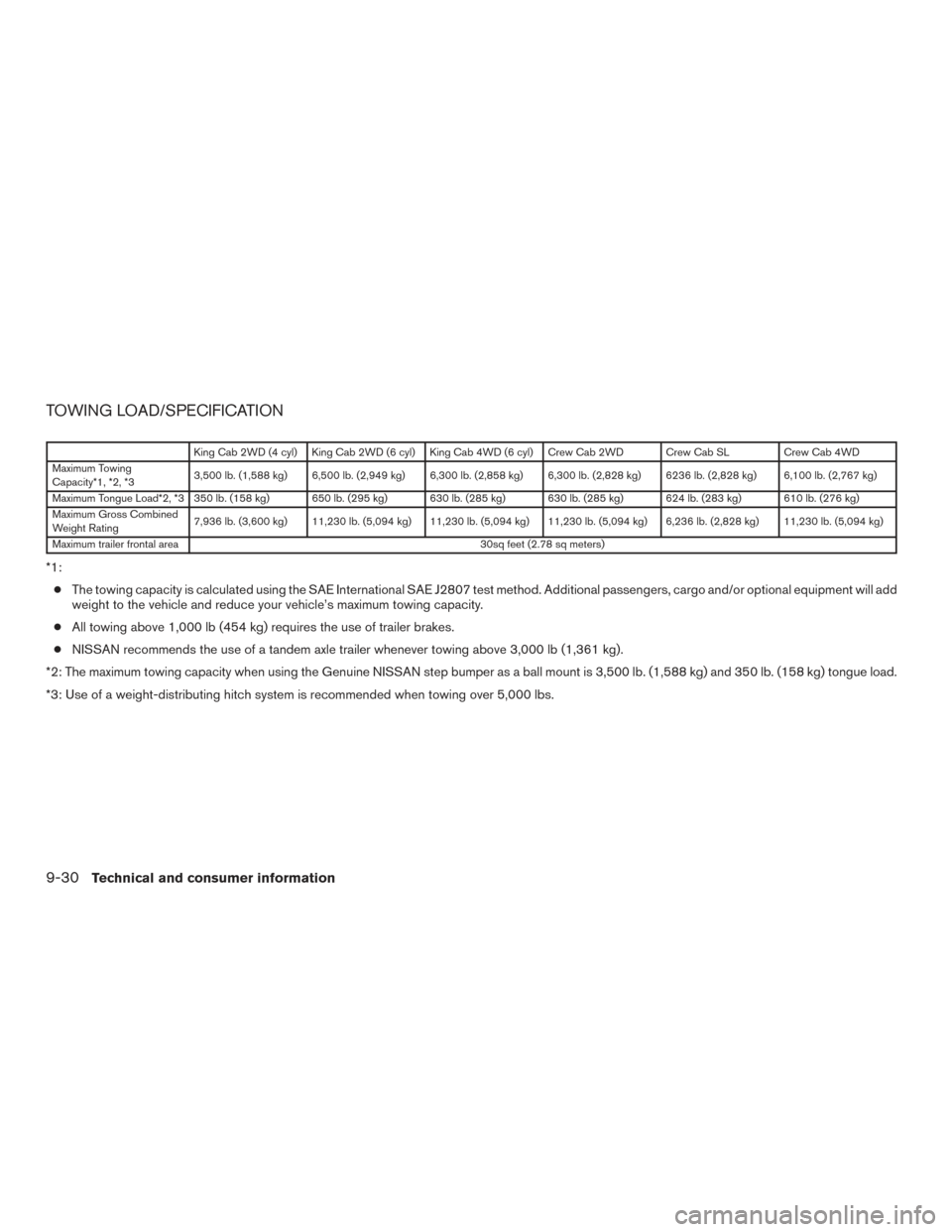
TOWING LOAD/SPECIFICATION
King Cab 2WD (4 cyl) King Cab 2WD (6 cyl) King Cab 4WD (6 cyl) Crew Cab 2WD Crew Cab SLCrew Cab 4WD
Maximum Towing
Capacity*1, *2, *3 3,500 lb. (1,588 kg) 6,500 lb. (2,949 kg) 6,300 lb. (2,858 kg) 6,300 lb. (2,828 kg) 6236 lb. (2,828 kg) 6,100 lb. (2,767 kg)
Maximum Tongue Load*2, *3 350 lb. (158 kg) 650 lb. (295 kg) 630 lb. (285 kg) 630 lb. (285 kg) 624 lb. (283 kg) 610 lb. (276 kg)
Maximum Gross Combined
Weight Rating 7,936 lb. (3,600 kg) 11,230 lb. (5,094 kg) 11,230 lb. (5,094 kg) 11,230 lb. (5,094 kg) 6,236 lb. (2,828 kg) 11,230 lb. (5,094 kg)
Maximum trailer frontal area 30sq feet (2.78 sq meters)
*1:
● The towing capacity is calculated using the SAE International SAE J2807 test method. Additional passengers, cargo and/or optional equipment will add
weight to the vehicle and reduce your vehicle’s maximum towing capacity.
● All towing above 1,000 lb (454 kg) requires the use of trailer brakes.
● NISSAN recommends the use of a tandem axle trailer whenever towing above 3,000 lb (1,361 kg).
*2: The maximum towing capacity when using the Genuine NISSAN step bumper as a ball mount is 3,500 lb. (1,588 kg) and 350 lb. (158 kg) tongue load.
*3: Use of a weight-distributing hitch system is recommended when towing over 5,000 lbs.
9-30Technical and consumer information
Page 450 of 466
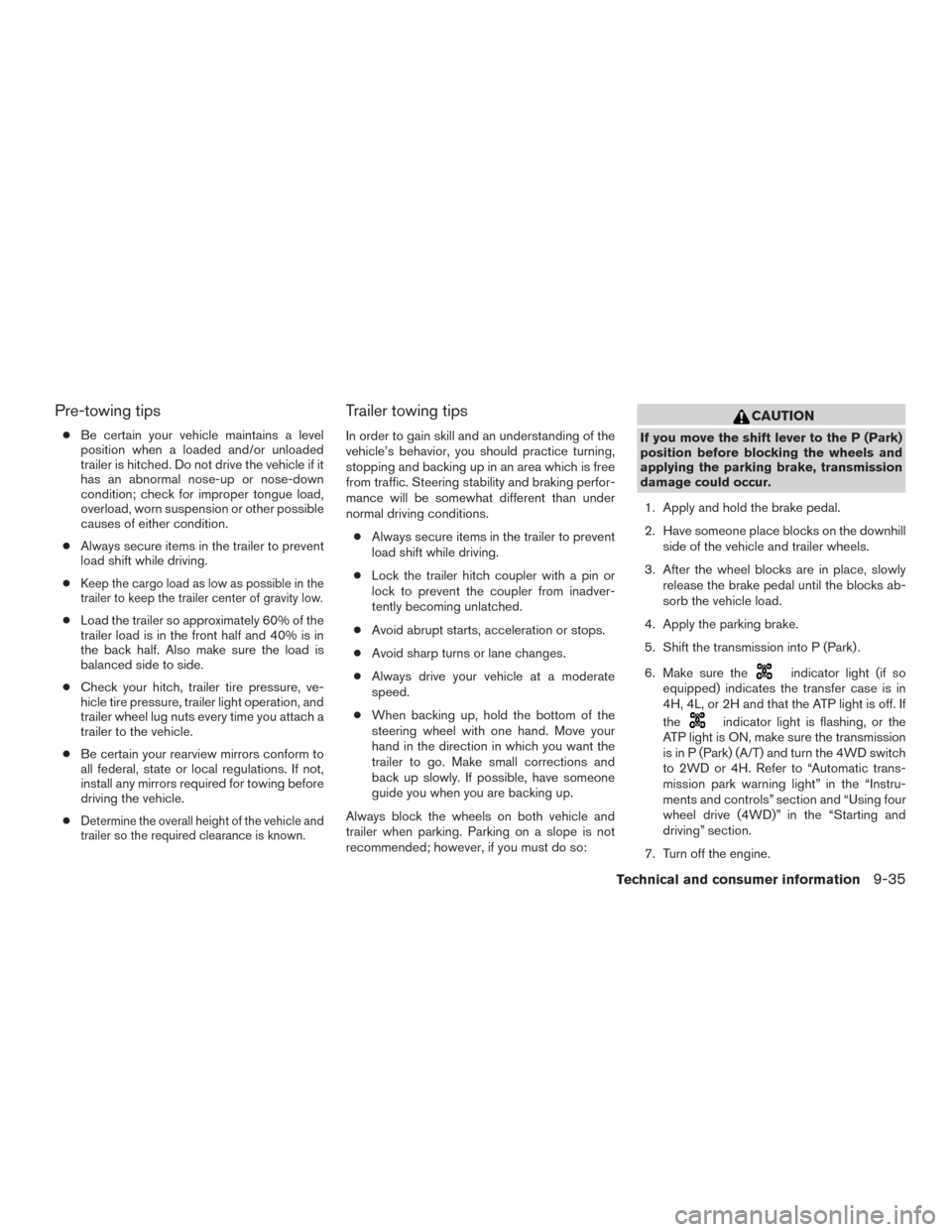
Pre-towing tips
●Be certain your vehicle maintains a level
position when a loaded and/or unloaded
trailer is hitched. Do not drive the vehicle if it
has an abnormal nose-up or nose-down
condition; check for improper tongue load,
overload, worn suspension or other possible
causes of either condition.
● Always secure items in the trailer to prevent
load shift while driving.
●
Keep the cargo load as low as possible in the
trailer to keep the trailer center of gravity low.
● Load the trailer so approximately 60% of the
trailer load is in the front half and 40% is in
the back half. Also make sure the load is
balanced side to side.
● Check your hitch, trailer tire pressure, ve-
hicle tire pressure, trailer light operation, and
trailer wheel lug nuts every time you attach a
trailer to the vehicle.
● Be certain your rearview mirrors conform to
all federal, state or local regulations. If not,
install any mirrors required for towing before
driving the vehicle.
●
Determine the overall height of the vehicle and
trailer so the required clearance is known.
Trailer towing tips
In order to gain skill and an understanding of the
vehicle’s behavior, you should practice turning,
stopping and backing up in an area which is free
from traffic. Steering stability and braking perfor-
mance will be somewhat different than under
normal driving conditions.
● Always secure items in the trailer to prevent
load shift while driving.
● Lock the trailer hitch coupler with a pin or
lock to prevent the coupler from inadver-
tently becoming unlatched.
● Avoid abrupt starts, acceleration or stops.
● Avoid sharp turns or lane changes.
● Always drive your vehicle at a moderate
speed.
● When backing up, hold the bottom of the
steering wheel with one hand. Move your
hand in the direction in which you want the
trailer to go. Make small corrections and
back up slowly. If possible, have someone
guide you when you are backing up.
Always block the wheels on both vehicle and
trailer when parking. Parking on a slope is not
recommended; however, if you must do so:
CAUTION
If you move the shift lever to the P (Park)
position before blocking the wheels and
applying the parking brake, transmission
damage could occur.
1. Apply and hold the brake pedal.
2. Have someone place blocks on the downhill side of the vehicle and trailer wheels.
3. After the wheel blocks are in place, slowly release the brake pedal until the blocks ab-
sorb the vehicle load.
4. Apply the parking brake.
5. Shift the transmission into P (Park) .
6. Make sure the
indicator light (if so
equipped) indicates the transfer case is in
4H, 4L, or 2H and that the ATP light is off. If
the
indicator light is flashing, or the
ATP light is ON, make sure the transmission
is in P (Park) (A/T) and turn the 4WD switch
to 2WD or 4H. Refer to “Automatic trans-
mission park warning light” in the “Instru-
ments and controls” section and “Using four
wheel drive (4WD)” in the “Starting and
driving” section.
7. Turn off the engine.
Technical and consumer information9-35
Page 455 of 466
You may notify NISSAN by contacting our
Consumer Affairs Department, toll-free, at
1-800-NISSAN-1.
For Canada
If you believe that your vehicle has a de-
fect which could cause a crash or could
cause injury or death, you should immedi-
ately inform Transport Canada in addition
to notifying NISSAN.
If Transport Canada receives complaints,
it may open an investigation, and if it finds
that a safety defect exists in a group of
vehicles, it may request that NISSAN con-
duct a recall campaign. However, Trans-
port Canada cannot become involved in
individual problems between you, your
dealer, or NISSAN.
You may contact Transport Canada’s De-
fect Investigations and Recalls Division
toll free at 1-800-333-0510. You may
also report safety defects online at:
https://wwwapps.tc.gc.ca/Saf-Sec-Sur/
7/PCDB-BDPP/fc-cp.aspx?lang=eng
(English speakers) orhttps://wwwapps.tc.gc.ca/Saf-Sec-Sur/
7/PCDB-BDPP/fc-cp.aspx?lang=fra
(French speakers)
Additional information concerning motor
vehicle safety may be obtained from Trans-
port Canada’s Road Safety Information
Centre at 1-800-333-0371 or online at
www.tc.gc.ca/roadsafety (English speak-
ers) or www.tc.gc.ca/securiteroutiere
(French speakers) .
To notify NISSAN of any safety concerns
please contact our Consumer Information
Centre toll free at 1-800-387-0122.
WARNING
A vehicle equipped with Four-Wheel Drive
(4WD) should never be tested using a two
wheel dynamometer (such as the dyna-
mometers used by some states for emis-
sions testing) , or similar equipment. Make
sure you inform the test facility personnel
that your vehicle is equipped with 4WD
before it is placed on a dynamometer.
Using the wrong test equipment may re-
sult in transmission damage or unex-
pected vehicle movement which could re-
sult in serious vehicle damage or personal
injury.
Due to legal requirements in some states and
Canadian Provinces, your vehicle may be re-
quired to be in what is called the “ready condi-
tion” for an Inspection/Maintenance (I/M) test of
the emission control system.
The vehicle is set to the “ready condition” when it
is driven through certain driving patterns. Usually,
the ready condition can be obtained by ordinary
usage of the vehicle.
READINESS FOR INSPECTION/
MAINTENANCE (I/M) TEST
9-40Technical and consumer information
Page 458 of 466
10 Index
4WDwarninglight...............2-17A
Active brake limited slip (ABLS) system . . .5-36
Air bag (See supplemental restraint
system) .....................1-70
Air bag system Front (See supplemental front impact air bag
system) ...................1-77
Airbagwarninglabels.............1-84
Airbagwarninglight...........1-85,2-20
Air bag warning light, supplemental . .1-85, 2-20
Air cleaner housing filter ............8-21
Air conditioner Air conditioner operation ..........4-24
Air conditioner service ...........4-34
Air conditioner specification label .....9-14
Air conditioner system refrigerant and
oil recommendations .............9-8
Heater and air conditioner
controls............4-15,4-21,4-32
Servicing air conditioner ..........4-34
Airflowcharts..............4-18,4-25
Alarm system (See vehicle security system). .2-24
Anchor point locations .............1-31
Antenna .....................4-71
Anti-lock brake warning light ..........2-15
Anti-lock Braking System (ABS) ........5-35
Apps .......................4-71
Audible reminders ...............2-24
Audio system ..................4-34 AMradioreception.............4-35
Bluetooth®audio..............4-67
Compact disc (CD) player . .4-44, 4-49, 4-56
FM-AM radio with compact disc (CD)
player ....................4-42
FM/AM/SAT radio with compact disc (CD)
player.................4-46,4-51
FMradioreception.............4-34
iPod® Player
.............4-61,4-63
iPod® player operation .......4-61,4-63
Radio ....................4-34
Steering wheel audio control switch . . .4-69
USB interface ............4-57,4-59
USB (Universal Serial Bus) Connection
Port..................4-57,4-59
Autolight switch .................2-29
Automatic Automatic power window switch .....2-50
Automatic transmission position indicator
light .....................2-20
Driving with automatic transmission ....5-13
Automatic anti-glare inside mirror .......3-15
Automatic door locks ..............3-5
AUXjack.................4-45,4-57
B
Backbutton....................4-7
Battery ..................5-41,8-17
Chargewarninglight............2-16
Battery replacement Keyfob ...................8-30 Before starting the engine
...........5-12
Belt (See drive belt) ..............8-20
Block heater Engine ....................5-42
Bluetooth® audio ................4-67
Bluetooth® hands-free phone
system...............4-73,4-87,4-97
Boosterseats..................1-65
Brake Anti-lock Braking System (ABS) ......5-35
Brake fluid ..................8-15
Brakelight(Seestoplight).........8-33
Brake system ................5-34
Brakewarninglight.............2-16
Brakewearindicators........2-24,8-25
Parking brake operation ..........5-20
Self-adjusting brakes ............8-25
Brake fluid ....................8-15
Brakes ......................8-25
Brake system ..................5-34
Break-inschedule ...............5-22
Brightness/contrast button ...........4-9
Brightness control Instrument panel ..............2-31
Bulb check/instrument panel ..........2-15
Bulbreplacement................8-33
C
Capacities and recommended fuel/lubricants..9-2
Cargolightswitch ...............2-33
Cargo (See vehicle loading information) . . .9-15
Page 464 of 466
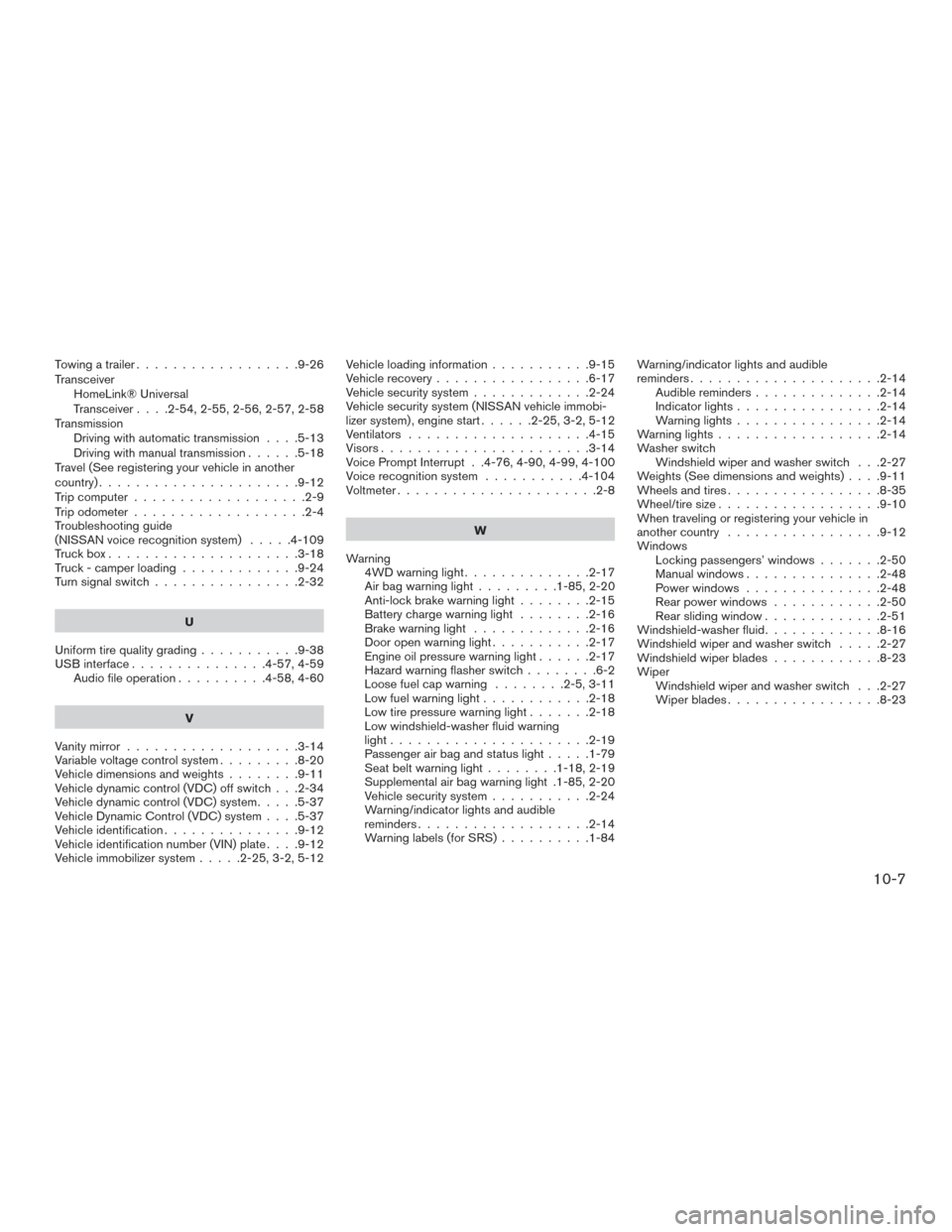
Towing a trailer..................9-26
Transceiver HomeLink® Universal
Transceiver....2-54,2-55,2-56,2-57,2-58
Transmission Driving with automatic transmission ....5-13
Driving with manual transmission ......5-18
Travel (See registering your vehicle in another
country) ......................9-12
Trip computer ...................2-9
Trip odometer ...................2-4
Troubleshooting guide
(NISSAN voice recognition system) .....4-109
Truckbox.....................3-18
Truck - camper loading .............9-24
Turn signal switch ................2-32
U
Uniform tire quality grading ...........9-38
USB interface ...............4-57,4-59
Audio file operation ..........4-58,4-60
V
Vanity mirror ...................3-14
Variable voltage control system .........8-20
Vehicledimensionsandweights........9-11
Vehicle dynamic control (VDC) off switch . . .2-34
Vehicle dynamic control (VDC) system .....5-37
Vehicle Dynamic Control (VDC) system ....5-37
Vehicle identification ...............9-12
Vehicle identification number (VIN) plate ....9-12
Vehicle immobilizer system .....2-25,3-2,5-12 Vehicle loading information
...........9-15
Vehicle recovery .................6-17
Vehicle security system .............2-24
Vehicle security system (NISSAN vehicle immobi-
lizer system) , engine start ......2-25,3-2,5-12
Ventilators ....................4-15
Visors.......................3-14
Voice Prompt Interrupt . .4-76, 4-90, 4-99, 4-100
Voice recognition system ...........4-104
Voltmeter......................2-8
W
Warning 4WD warning light ..............2-17
Airbagwarninglight.........1-85,2-20
Anti-lock brake warning light ........2-15
Battery charge warning light ........2-16
Brake warning light .............2-16
Door open warning light ...........2-17
Engine oil pressure warning light ......2-17
Hazard warning flasher switch ........6-2
Loose fuel cap warning ........2-5,3-11
Lowfuelwarninglight............2-18
Low tire pressure warning light .......2-18
Low windshield-washer fluid warning
light......................2-19
Passenger air bag and status light .....1-79
Seatbeltwarninglight........1-18,2-19
Supplemental air bag warning light .1-85, 2-20
Vehicle security system ...........2-24
Warning/indicator lights and audible
reminders...................2-14
Warning labels (for SRS) ..........1-84Warning/indicator lights and audible
reminders.....................2-14
Audiblereminders..............2-14
Indicatorlights................2-14
Warning lights ................2-14
Warning lights ..................2-14
Washer switch Windshield wiper and washer switch . . .2-27
Weights (See dimensions and weights) ....9-11
Wheels and tires .................8-35
Wheel/tire size ..................9-10
When traveling or registering your vehicle in
another country .................9-12
Windows Locking passengers’ windows .......2-50
Manual windows ...............
2-48
Power windows ...............2-48
Rear power windows ............2-50
Rear sliding window .............2-51
Windshield-washerfluid.............8-16
Windshieldwiperandwasherswitch .....2-27
Windshieldwiperblades............8-23
Wiper Windshield wiper and washer switch . . .2-27
Wiperblades.................8-23
10-7