brake NISSAN FRONTIER 2017 D23 / 3.G Owners Manual
[x] Cancel search | Manufacturer: NISSAN, Model Year: 2017, Model line: FRONTIER, Model: NISSAN FRONTIER 2017 D23 / 3.GPages: 478, PDF Size: 4.22 MB
Page 17 of 478
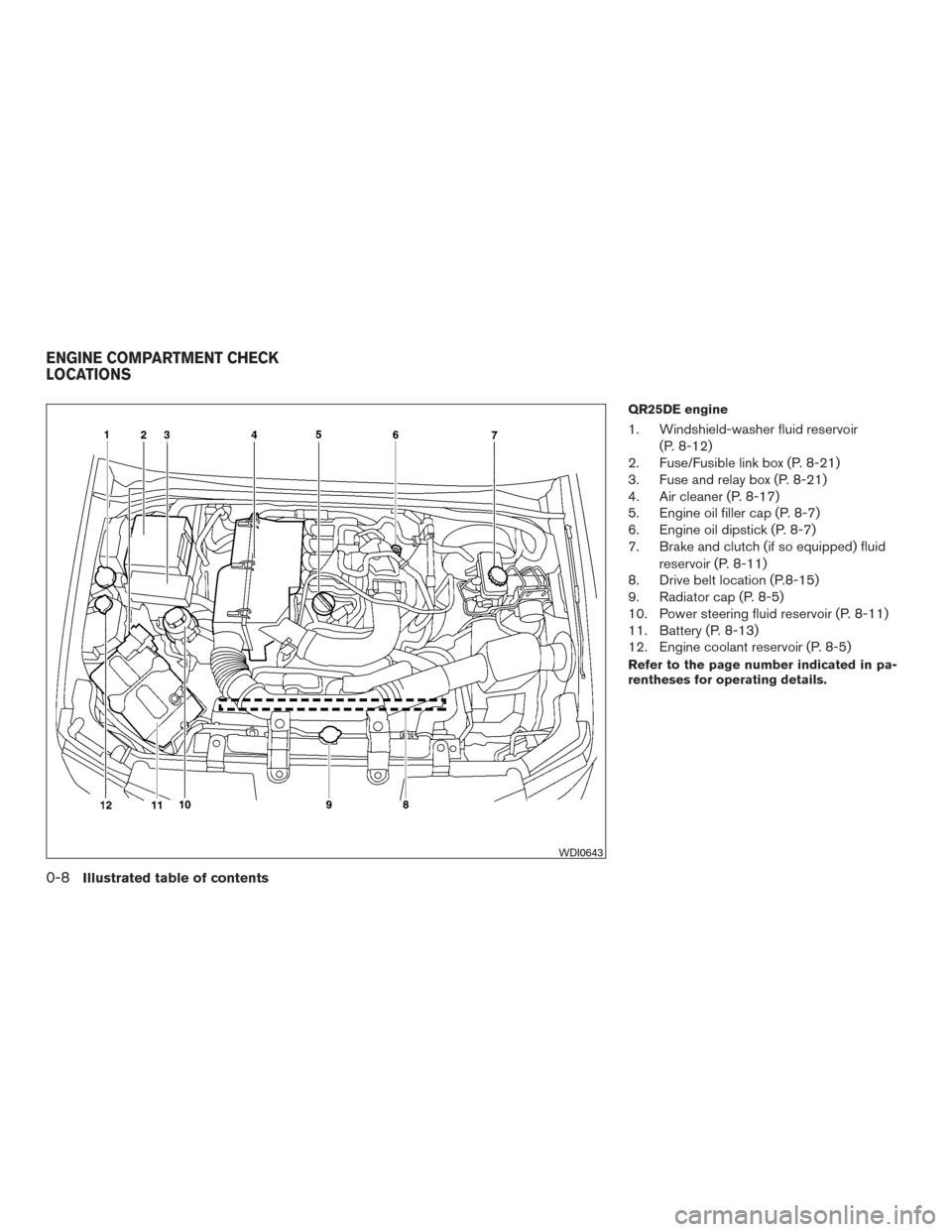
QR25DE engine
1. Windshield-washer fluid reservoir(P. 8-12)
2. Fuse/Fusible link box (P. 8-21)
3. Fuse and relay box (P. 8-21)
4. Air cleaner (P. 8-17)
5. Engine oil filler cap (P. 8-7)
6. Engine oil dipstick (P. 8-7)
7. Brake and clutch (if so equipped) fluid
reservoir (P. 8-11)
8. Drive belt location (P.8-15)
9. Radiator cap (P. 8-5)
10. Power steering fluid reservoir (P. 8-11)
11. Battery (P. 8-13)
12. Engine coolant reservoir (P. 8-5)
Refer to the page number indicated in pa-
rentheses for operating details.
WDI0643
ENGINE COMPARTMENT CHECK
LOCATIONS
0-8Illustrated table of contents
Page 18 of 478
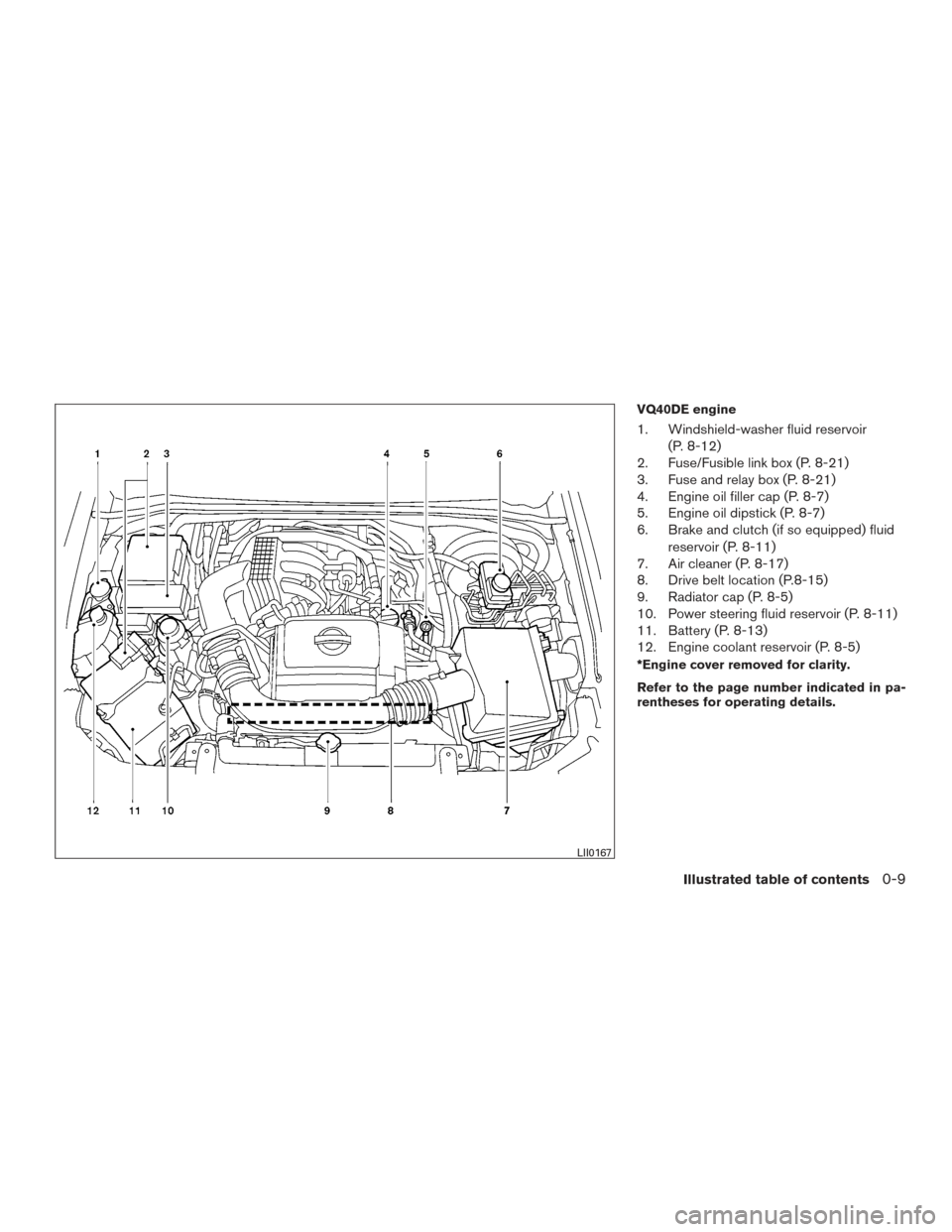
VQ40DE engine
1. Windshield-washer fluid reservoir(P. 8-12)
2. Fuse/Fusible link box (P. 8-21)
3. Fuse and relay box (P. 8-21)
4. Engine oil filler cap (P. 8-7)
5. Engine oil dipstick (P. 8-7)
6. Brake and clutch (if so equipped) fluid
reservoir (P. 8-11)
7. Air cleaner (P. 8-17)
8. Drive belt location (P.8-15)
9. Radiator cap (P. 8-5)
10. Power steering fluid reservoir (P. 8-11)
11. Battery (P. 8-13)
12. Engine coolant reservoir (P. 8-5)
*Engine cover removed for clarity.
Refer to the page number indicated in pa-
rentheses for operating details.
LII0167
Illustrated table of contents0-9
Page 19 of 478
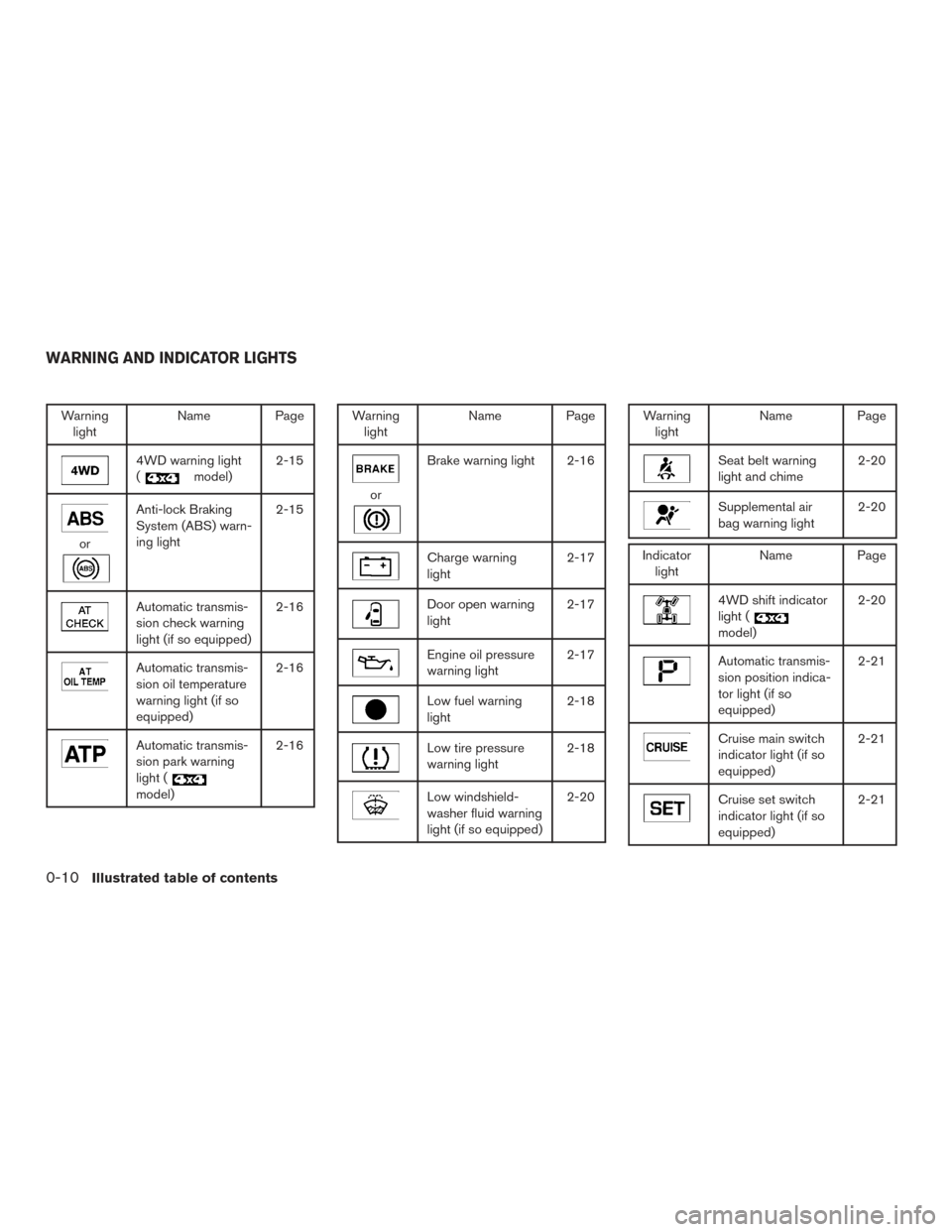
Warninglight Name Page
4WD warning light
(
model)2-15
or
Anti-lock Braking
System (ABS) warn-
ing light 2-15
Automatic transmis-
sion check warning
light (if so equipped)2-16
Automatic transmis-
sion oil temperature
warning light (if so
equipped)2-16
Automatic transmis-
sion park warning
light (
model)2-16
Warning
light Name Page
or
Brake warning light 2-16
Charge warning
light 2-17
Door open warning
light2-17
Engine oil pressure
warning light2-17
Low fuel warning
light2-18
Low tire pressure
warning light2-18
Low windshield-
washer fluid warning
light (if so equipped)2-20
Warning
light Name Page
Seat belt warning
light and chime 2-20
Supplemental air
bag warning light2-20
Indicator
light Name Page
4WD shift indicator
light (
model) 2-20
Automatic transmis-
sion position indica-
tor light (if so
equipped)2-21
Cruise main switch
indicator light (if so
equipped)
2-21
Cruise set switch
indicator light (if so
equipped)2-21
WARNING AND INDICATOR LIGHTS
0-10Illustrated table of contents
Page 24 of 478
CAUTION
When adjusting the seat positions, be
sure not to contact any moving parts to
avoid possible injuries and/or damage.
FRONT MANUAL SEAT
ADJUSTMENT (if so equipped)
Your vehicle seats can be adjusted manually. For
additional information about adjusting the seats,
refer to the steps outlined in this section.
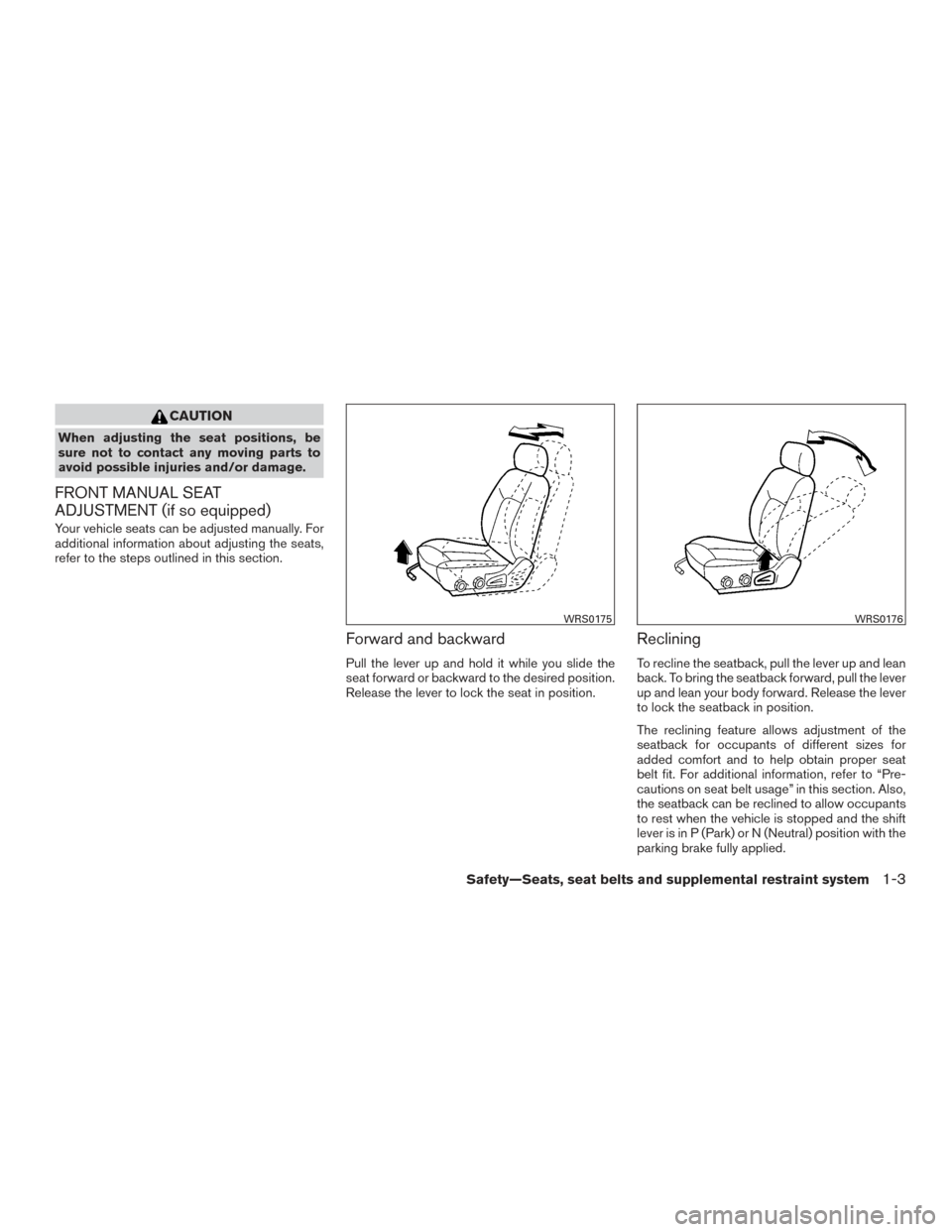
Forward and backward
Pull the lever up and hold it while you slide the
seat forward or backward to the desired position.
Release the lever to lock the seat in position.
Reclining
To recline the seatback, pull the lever up and lean
back. To bring the seatback forward, pull the lever
up and lean your body forward. Release the lever
to lock the seatback in position.
The reclining feature allows adjustment of the
seatback for occupants of different sizes for
added comfort and to help obtain proper seat
belt fit. For additional information, refer to “Pre-
cautions on seat belt usage” in this section. Also,
the seatback can be reclined to allow occupants
to rest when the vehicle is stopped and the shift
lever is in P (Park) or N (Neutral) position with the
parking brake fully applied.
WRS0175WRS0176
Safety—Seats, seat belts and supplemental restraint system1-3
Page 26 of 478
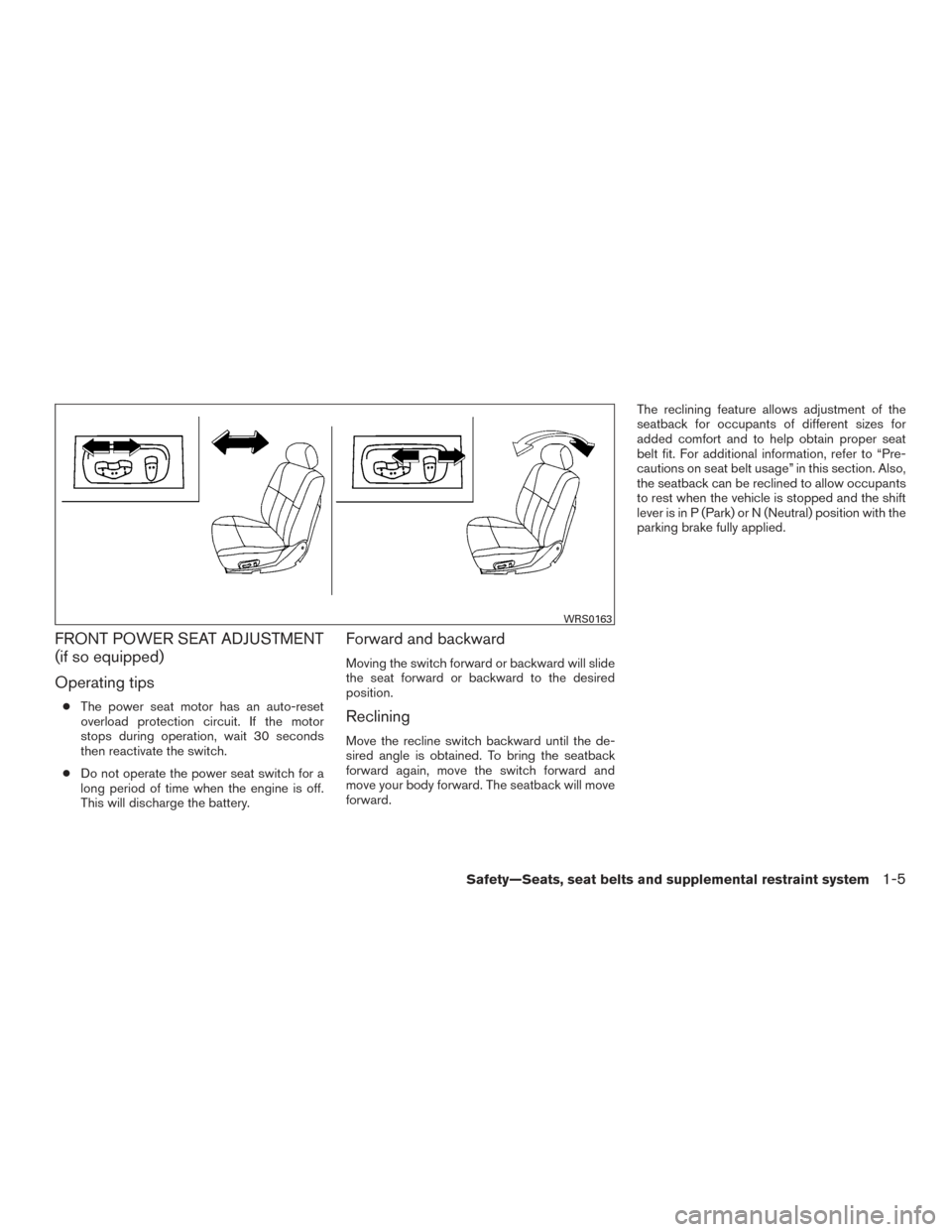
FRONT POWER SEAT ADJUSTMENT
(if so equipped)
Operating tips
●The power seat motor has an auto-reset
overload protection circuit. If the motor
stops during operation, wait 30 seconds
then reactivate the switch.
● Do not operate the power seat switch for a
long period of time when the engine is off.
This will discharge the battery.
Forward and backward
Moving the switch forward or backward will slide
the seat forward or backward to the desired
position.
Reclining
Move the recline switch backward until the de-
sired angle is obtained. To bring the seatback
forward again, move the switch forward and
move your body forward. The seatback will move
forward. The reclining feature allows adjustment of the
seatback for occupants of different sizes for
added comfort and to help obtain proper seat
belt fit. For additional information, refer to “Pre-
cautions on seat belt usage” in this section. Also,
the seatback can be reclined to allow occupants
to rest when the vehicle is stopped and the shift
lever is in P (Park) or N (Neutral) position with the
parking brake fully applied.
WRS0163
Safety—Seats, seat belts and supplemental restraint system1-5
Page 123 of 478
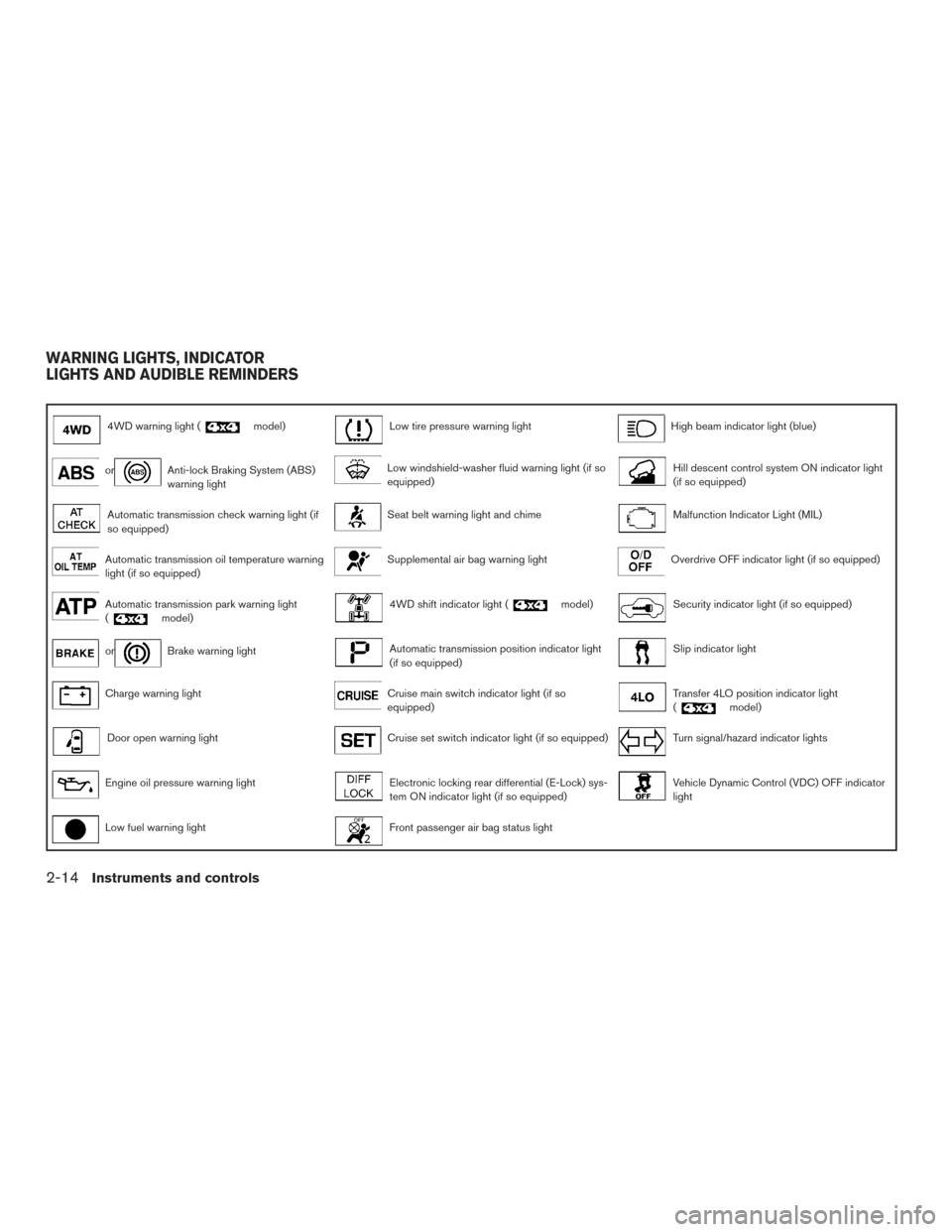
4WD warning light (model)Low tire pressure warning lightHigh beam indicator light (blue)
orAnti-lock Braking System (ABS)
warning lightLow windshield-washer fluid warning light (if so
equipped)Hill descent control system ON indicator light
(if so equipped)
Automatic transmission check warning light (if
so equipped)Seat belt warning light and chimeMalfunction Indicator Light (MIL)
Automatic transmission oil temperature warning
light (if so equipped)Supplemental air bag warning lightOverdrive OFF indicator light (if so equipped)
Automatic transmission park warning light
(model)4WD shift indicator light (model)Security indicator light (if so equipped)
orBrake warning lightAutomatic transmission position indicator light
(if so equipped)Slip indicator light
Charge warning lightCruise main switch indicator light (if so
equipped)Transfer 4LO position indicator light
(model)
Door open warning lightCruise set switch indicator light (if so equipped)Turn signal/hazard indicator lights
Engine oil pressure warning lightElectronic locking rear differential (E-Lock) sys-
tem ON indicator light (if so equipped)Vehicle Dynamic Control (VDC) OFF indicator
light
Low fuel warning lightFront passenger air bag status light
WARNING LIGHTS, INDICATOR
LIGHTS AND AUDIBLE REMINDERS
2-14Instruments and controls
Page 124 of 478
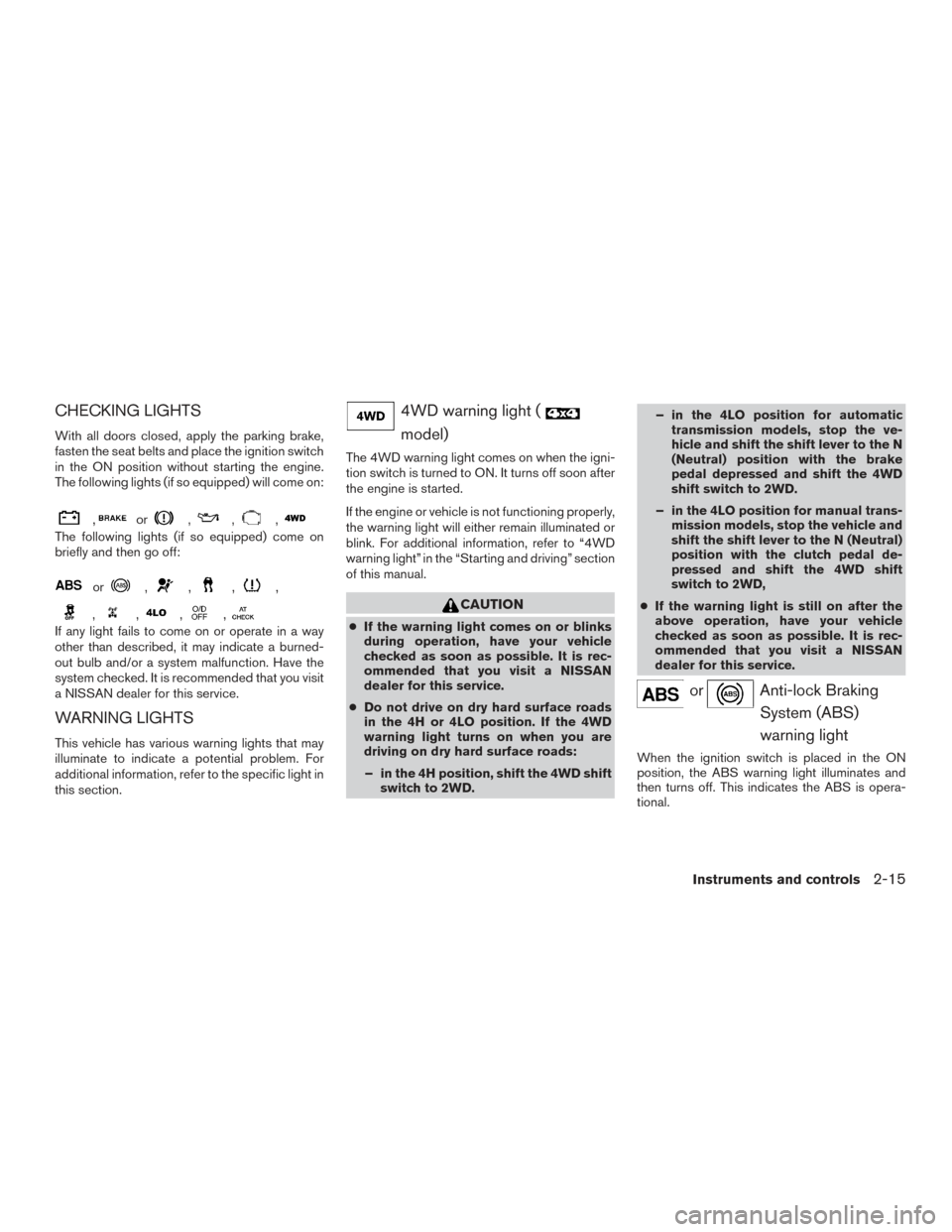
CHECKING LIGHTS
With all doors closed, apply the parking brake,
fasten the seat belts and place the ignition switch
in the ON position without starting the engine.
The following lights (if so equipped) will come on:
,or,,,
The following lights (if so equipped) come on
briefly and then go off:
or,,,,
,,,,
If any light fails to come on or operate in a way
other than described, it may indicate a burned-
out bulb and/or a system malfunction. Have the
system checked. It is recommended that you visit
a NISSAN dealer for this service.
WARNING LIGHTS
This vehicle has various warning lights that may
illuminate to indicate a potential problem. For
additional information, refer to the specific light in
this section.
4WD warning light (
model)
The 4WD warning light comes on when the igni-
tion switch is turned to ON. It turns off soon after
the engine is started.
If the engine or vehicle is not functioning properly,
the warning light will either remain illuminated or
blink. For additional information, refer to “4WD
warning light” in the “Starting and driving” section
of this manual.
CAUTION
●If the warning light comes on or blinks
during operation, have your vehicle
checked as soon as possible. It is rec-
ommended that you visit a NISSAN
dealer for this service.
● Do not drive on dry hard surface roads
in the 4H or 4LO position. If the 4WD
warning light turns on when you are
driving on dry hard surface roads:
– in the 4H position, shift the 4WD shift switch to 2WD. – in the 4LO position for automatic
transmission models, stop the ve-
hicle and shift the shift lever to the N
(Neutral) position with the brake
pedal depressed and shift the 4WD
shift switch to 2WD.
– in the 4LO position for manual trans- mission models, stop the vehicle and
shift the shift lever to the N (Neutral)
position with the clutch pedal de-
pressed and shift the 4WD shift
switch to 2WD,
● If the warning light is still on after the
above operation, have your vehicle
checked as soon as possible. It is rec-
ommended that you visit a NISSAN
dealer for this service.
orAnti-lock Braking
System (ABS)
warning light
When the ignition switch is placed in the ON
position, the ABS warning light illuminates and
then turns off. This indicates the ABS is opera-
tional.
Instruments and controls2-15
Page 125 of 478
If the ABS warning light illuminates while the
engine is running or while driving, it may indicate
the ABS is not functioning properly. Have the
system checked. It is recommended that you visit
a NISSAN dealer for this service.
If an ABS malfunction occurs, the anti-lock func-
tion is turned off. The brake system then operates
normally but without anti-lock assistance. For
additional information, refer to “Brake system” in
the “Starting and driving” section of this manual.
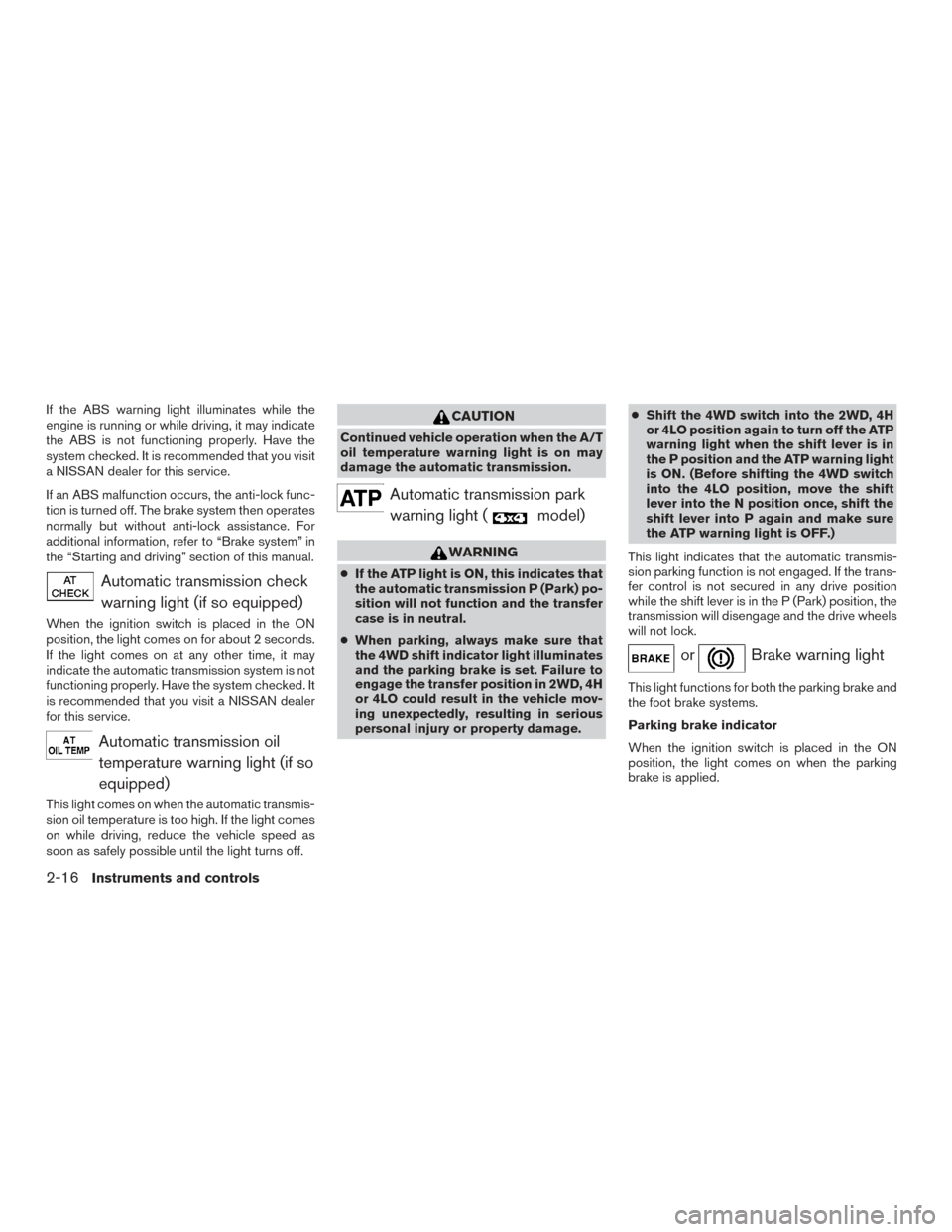
Automatic transmission checkwarning light (if so equipped)
When the ignition switch is placed in the ON
position, the light comes on for about 2 seconds.
If the light comes on at any other time, it may
indicate the automatic transmission system is not
functioning properly. Have the system checked. It
is recommended that you visit a NISSAN dealer
for this service.
Automatic transmission oiltemperature warning light (if so
equipped)
This light comes on when the automatic transmis-
sion oil temperature is too high. If the light comes
on while driving, reduce the vehicle speed as
soon as safely possible until the light turns off.
CAUTION
Continued vehicle operation when the A/T
oil temperature warning light is on may
damage the automatic transmission.
Automatic transmission parkwarning light (
model)
WARNING
● If the ATP light is ON, this indicates that
the automatic transmission P (Park) po-
sition will not function and the transfer
case is in neutral.
● When parking, always make sure that
the 4WD shift indicator light illuminates
and the parking brake is set. Failure to
engage the transfer position in 2WD, 4H
or 4LO could result in the vehicle mov-
ing unexpectedly, resulting in serious
personal injury or property damage. ●
Shift the 4WD switch into the 2WD, 4H
or 4LO position again to turn off the ATP
warning light when the shift lever is in
the P position and the ATP warning light
is ON. (Before shifting the 4WD switch
into the 4LO position, move the shift
lever into the N position once, shift the
shift lever into P again and make sure
the ATP warning light is OFF.)
This light indicates that the automatic transmis-
sion parking function is not engaged. If the trans-
fer control is not secured in any drive position
while the shift lever is in the P (Park) position, the
transmission will disengage and the drive wheels
will not lock.
orBrake warning light
This light functions for both the parking brake and
the foot brake systems.
Parking brake indicator
When the ignition switch is placed in the ON
position, the light comes on when the parking
brake is applied.
2-16Instruments and controls
Page 126 of 478
Low brake fluid warning light
When the ignition switch is placed in the ON
position, the light warns of a low brake fluid level.
If the light comes on while the engine is running,
with the parking brake not applied, stop the ve-
hicle and perform the following:1. Check the brake fluid level. Add brake fluid as necessary. For additional information, re-
fer to “Brake fluid” in the “Do-it-yourself”
section of this manual.
2. If the brake fluid level is correct, have the warning system checked. It is recommended
that you visit a NISSAN dealer for this ser-
vice.
WARNING
●Your brake system may not be working
properly if the warning light is on. Driv-
ing could be dangerous. If you judge it
to be safe, drive carefully to the nearest
service station for repairs. Otherwise,
have your vehicle towed because driv-
ing it could be dangerous.
● Pressing the brake pedal with the en-
gine stopped and/or a low brake fluid
level may increase your stopping dis-
tance and braking will require greater
pedal effort as well as pedal travel. ●
If the brake fluid level is below the
MINIMUM or MIN mark on the brake
fluid reservoir, do not drive until the
brake system has been checked. It is
recommended that you visit a NISSAN
dealer for this service.
Anti-lock Braking System (ABS) warning
indicator
When the parking brake is released and the
brake fluid level is sufficient, if both the brake
warning light and the ABS warning light illumi-
nate, it may indicate the ABS is not functioning
properly. Have the brake system checked and, if
necessary, repaired. It is recommended that you
visit a NISSAN dealer for this service. Avoid
high-speed driving and abrupt braking. For addi-
tional information, refer to “Anti-lock Braking Sys-
tem (ABS) warning light” in this section.
Charge warning light
If this light comes on while the engine is running,
it may indicate the charging system is not func-
tioning properly. Turn the engine off and check
the generator belt. If the belt is loose, broken,
missing, or if the light remains on, have the sys-
tem checked. It is recommended that you visit a
NISSAN dealer for this service.
CAUTION
● Do not ground electrical accessories di-
rectly to the battery terminal. Doing so
will bypass the variable voltage control
system and the vehicle battery may not
charge completely. For additional infor-
mation, refer to “Variable voltage con-
trol system” in the “Do-it-yourself” sec-
tion of this manual.
● Do not continue driving if the generator
belt is loose, broken or missing.
Door open warning light
This light comes on when any of the doors are not
closed securely while the ignition switch is in the
ON position.
Engine oil pressure warning
light
This light warns of low engine oil pressure. If the
light flickers or comes on during normal driving,
pull off the road in a safe area, stop the engine
immediately and call a NISSAN dealer or other
authorized repair shop.
Instruments and controls2-17
Page 132 of 478
Slip indicator light
This indicator will blink when the VDC system is
operating, thus alerting the driver to the fact that
the road surface is slippery and the vehicle is
nearing its traction limits.
You may feel or hear the system working; this is
normal.
The light will blink for a few seconds after the
VDC system stops limiting wheel spin.
The
indicator light also comes on when
you place the ignition switch in the ON position.
The light will turn off after approximately 2 sec-
onds if the system is operational. If the light does
not come on have the system checked. It is
recommended that you visit a NISSAN dealer for
this service.
Transfer 4LO position indicator
light (
model)
This light comes on when the 4WD shift switch is
set in the 4LO position with the ignition switch in
the ON position.
The transfer case may be damaged if you shift the
switch while driving. Make sure the transfer 4LO position indicator
light turns on when you shift the 4WD shift switch
to 4LO.
The indicator light may blink while shifting
from one drive mode to the other.
The 4LO indicator light must stop blinking and
remain illuminated or turn off before shifting the
transmission into gear. If the shift lever is shifted
from the N (Neutral) position to any other gear
when the 4LO indicator light is blinking, the ve-
hicle may move unexpectedly.
When you shift between 4H and 4LO, follow the
instructions below:
● For automatic transmission models, stop the
vehicle and shift the shift lever to the N
(Neutral) position with the brake pedal de-
pressed, then depress and turn the 4WD
shift switch to 4LO or 4H.
● For manual transmission models, stop the
vehicle and shift the shift lever to the N
(Neutral) position with the clutch pedal de-
pressed, then depress and turn the 4WD
shift switch to 4LO or 4H.
You cannot move the transfer 4WD shift switch
between 4H and 4LO unless you stop the vehicle
and shift the shift lever to the N position with the
brake pedal (A/T models) or clutch pedal (M/T
models) depressed.
Turn signal/hazard indicator lights
The appropriate light flashes when the turn signal
switch is activated.
Both lights flash when the hazard switch is turned
on.
Vehicle Dynamic Control(VDC) OFF indicator light
This indicator light comes on when the VDC OFF
switch is pushed to OFF, the transfer case is in
the 4LO position (
model) , or when the
VDC system is not functioning properly. This
indicates the VDC system is not operating.
Push the VDC OFF switch again or restart the
engine and the system will operate normally. For
additional information, refer to “Vehicle Dynamic
Control (VDC) system” in the “Starting and driv-
ing” section of this manual.
The VDC light also comes on when you turn the
ignition key to the ON position. The light will turn
off after about 2 seconds if the system is opera-
tional. If the light stays on or comes on along with
the SLIP (
) indicator light while you are
driving, have the VDC system checked. It is rec-
ommended that you visit a NISSAN dealer for this
service.
Instruments and controls2-23