USB NISSAN FRONTIER 2018 Owner´s Manual
[x] Cancel search | Manufacturer: NISSAN, Model Year: 2018, Model line: FRONTIER, Model: NISSAN FRONTIER 2018Pages: 502, PDF Size: 4.85 MB
Page 274 of 502
USB∙ Tilt up/down for less than 1.5 seconds to increase or decrease the track number.
∙ Tilt up/down for more than 1.5 seconds to increase or decrease the folder num-
ber.
Bluetooth® Audio ∙ Tilt up/down for less than 1.5 seconds to skip ahead or back to the next song.
∙ Tilt up/down for more than 1.5 seconds to reverse or fast forward the current
song.
ANTENNA
The antenna cannot be shortened, but can
be removed. When you need to remove the
antenna, turn the antenna rod counter-
clockwise.
To install the antenna rod, turn the antenna
rod clockwise and hand tighten.
CAUTION
∙ Always properly tighten the antennarod during installation or the antenna
rod may break during vehicle
operation.
∙ Be sure that the antenna is removed before the vehicle enters an auto-
matic car wash. This vehicle is equipped with Smartphone
Integration technology. This allows many
compatible Smartphone applications to
be displayed and easily controlled through
the vehicle’s touch-screen.
NOTE:
A compatible smartphone and registra-
tion is required to use mobile applica-
tions or to access connected features of
certain vehicle applications.
REGISTERING WITH
NISSANCONNECT® MOBILE APPS
To use the Smartphone Integration feature,
it is necessary for the user to register. In
order to register, visit the NissanConnect®
Mobile Apps website,
www.nissanusa.com/connect/ or
www.nissan.ca/en/connect or
www.nissan.ca/fr/connect and sign up or
create an account through the prompts on
the NissanConnect® Mobile Apps. Once
registered, download the NissanConnect®
Mobile Apps from your compatible phone’s
application download source and then log
into the application. If you already have an
account created through the App, please
log in.
NISSANCONNECT® MOBILE APPS
(if so equipped)
Monitor, climate, audio, phone and voice recognition systems4-73
Page 275 of 502
CONNECT PHONE
To use this feature, a compatible smart-
phone must be connected via Bluetooth®
or USB to the vehicle. For additional infor-
mation, refer to “Bluetooth® Hands-Free
Phone System with Navigation System” in
this section.
NOTE:
Apple iPhones® REQUIRE the phone to be
plugged in via USB for NissanConnect®
Mobile Apps to function.
For Android phones, NissanConnect®
Mobile Apps REQUIRES the phone to be
paired via Bluetooth®.
APPLICATION DOWNLOAD
Once connected, the NissanConnect® App
will search your phone to determine which
compatible applications are currently in-
stalled. The user will then choose which
apps they want to bring into their vehicle
from the list of apps within the “Manage My
Apps” section of the NissanConnect® App
on their smartphone. The vehicle will then
download the in-vehicle interface for each
of these compatible applications. Once
downloaded, the user can access their se-
lected smartphone applications through
the vehicle touch-screen.For additional information, refer to
www.nissanusa.com/connect or
www.nissan.ca/en/connect or
www.nissan.ca/fr/connect regarding
application availability.
Apple Siri® Eyes Free personal assistant
can be accessed from the vehicle. Siri Eyes
Free can be accessed in Siri Eyes Free
mode to reduce user distraction. In this
mode, Siri Eyes Free is available for interac-
tion by voice control. Af ter connecting a
compatible Apple device by using
Bluetooth®, Siri Eyes Free can be activated
from the
TALK switch on the steering
wheel.
Siri® is a trademark of Apple Inc., registered
in the U.S. and other countries.
∙ Some Siri Eyes Free functions, such as displaying pictures or opening apps,
may not be available while driving.
∙ For getting best results, always update your device to the latest sof tware ver-
sion.
∙ Keep the interior of the vehicle as quiet as possible. Close the windows to elimi-
nate the surrounding noises (traffic
noises, vibration sounds, etc.), which
may prevent the system from recogniz-
ing the voice commands correctly.
∙ For functions that can be used in Siri Eyes Free, please refer to the Apple
website.
SIRI® EYES FREE
4-74Monitor, climate, audio, phone and voice recognition systems
Page 277 of 502
Example 1 – Playing music1. Push or push and hold the
TALK
switch.
2. Say “Play (artist name, song name, etc.)”.
3. Your vehicle will automatically change to Bluetooth® Audio or iPod® mode*
when the music starts playing. Mode
selection is determined by the phone.
* If the iPhone® is also connected with the
USB cable.
If the audio track does not start playing
automatically af ter Siri Eyes Free ends, try
changing the track or audio source to re-
sume playback.
NOTE:
For best results, use the native music
app. Performance of music control func-
tion while using Podcasts, Audiobook or
other 3rd party music apps may vary and
is controlled by the iPhone®. Example2–Repl
ying to text messages
1. If a compatible iPhone® is connected and “Show Notifications” of the iPhone®
settings is enabled, the vehicle will dis-
play a notification for new incoming
text messages.
2. Af ter reading the message, push or push and hold the
TALK switch to
reply using Siri Eyes Free.
3. Af ter a beep sounds, say “Text mes- sage” or a similar command to reply
using Siri Eyes Free.
CHANGING SIRI® EYES FREE
SETTINGS (models without
navigation system)
Settings for Siri® Eyes Free can be found in
the Bluetooth settings menu. For addi-
tional information, refer to “Bluetooth® set-
tings” in this section.
1. Press the ENTER/SETTING button.
2.
Use the TUNE/FOLDER or TUNE/SCROLL
knob to select “Bluetooth” and then press
the ENTER/SETTING button.
3.Use the TUNE/FOLDER or TUNE/SCROLL
knob to select “Siri” and then press the
ENTER/SETTING button.
4. Select “Short Press” or “Long Press” us- ing the TUNE/SCROLL knob and then
press the ENTER/SETTING button.
CHANGING SIRI® EYES FREE
SETTINGS (models with
navigation system)
Settings for Siri® Eyes Free can be found in
the Bluetooth® settings menu. For addi-
tional information, refer to “Bluetooth® set-
tings” in this section.
1. Press the [
] button.
2. Touch the “Settings” key.
3. Touch the “Phone & Bluetooth” key.
4. Touch the “Phone settings” key.
5. Select “Short Press” or “Long Press” to set the activation.
4-76Monitor, climate, audio, phone and voice recognition systems
Page 278 of 502
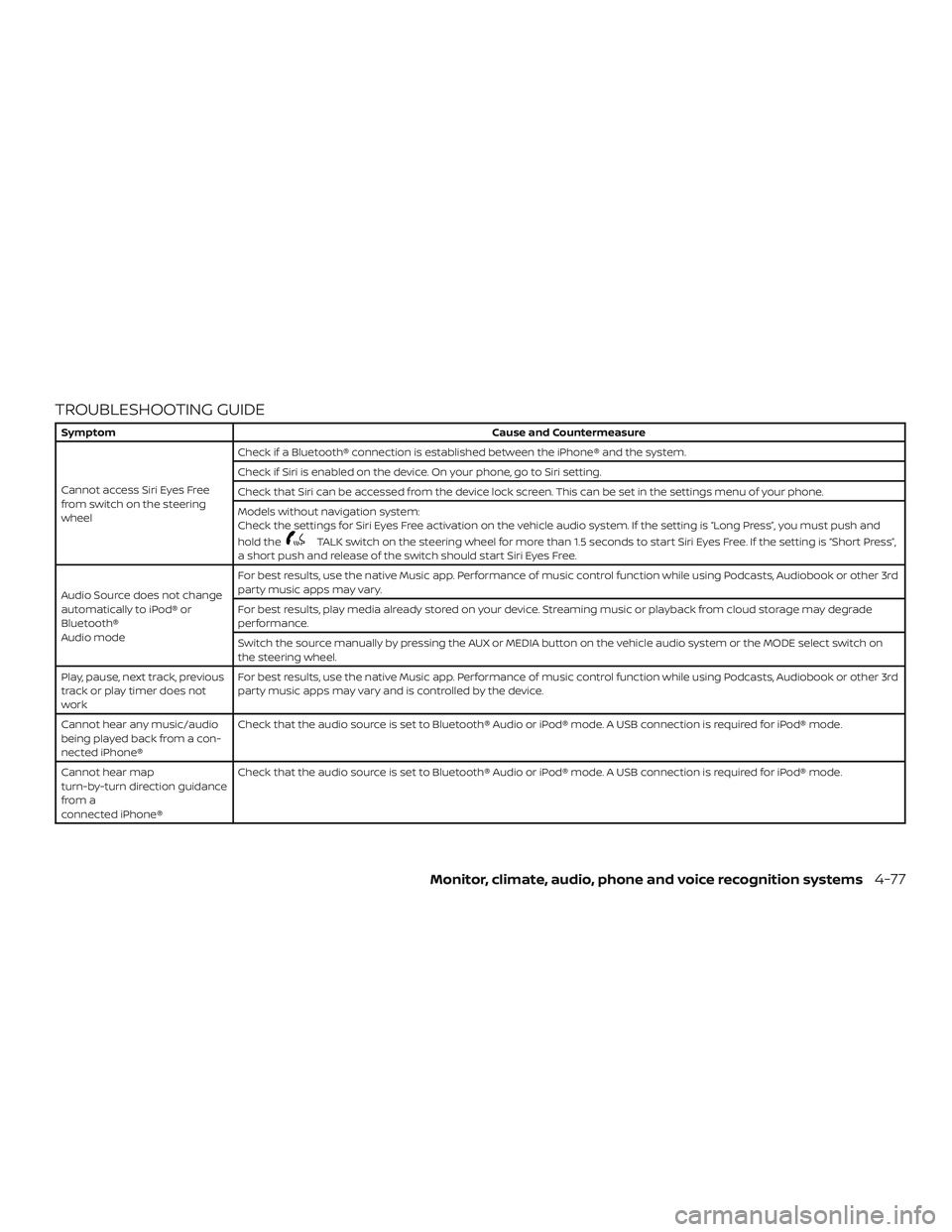
TROUBLESHOOTING GUIDE
SymptomCause and Countermeasure
Cannot access Siri Eyes Free
from switch on the steering
wheel Check if a Bluetooth® connection is established between the iPhone® and the system.
Check if Siri is enabled on the device. On your phone, go to Siri setting.
Check that Siri can be accessed from the device lock screen. This can be set in the settings menu of your phone.
Models without navigation system:
Check the settings for Siri Eyes Free activation on the vehicle audio system. If the setting is “Long Press”, you must push and
hold the
TALK switch on the steering wheel for more than 1.5 seconds to start Siri Eyes Free. If the setting is “Short Press”,
a short push and release of the switch should start Siri Eyes Free.
Audio Source does not change
automatically to iPod® or
Bluetooth®
Audio mode For best results, use the native Music app. Performance of music control function while using Podcasts, Audiobook or other 3rd
party music apps may vary.
For best results, play media already stored on your device. Streaming music or playback from cloud storage may degrade
performance.
Switch the source manually by pressing the AUX or MEDIA button on the vehicle audio system or the MODE select switch on
the steering wheel.
Play, pause, next track, previous
track or play timer does not
work For best results, use the native Music app. Performance of music control function while using Podcasts, Audiobook or other 3rd
party music apps may vary and is controlled by the device.
Cannot hear any music/audio
being played back from a con-
nected iPhone® Check that the audio source is set to Bluetooth® Audio or iPod® mode. A USB connection is required for iPod® mode.
Cannot hear map
turn-by-turn direction guidance
from a
connected iPhone® Check that the audio source is set to Bluetooth® Audio or iPod® mode. A USB connection is required for iPod® mode.
Monitor, climate, audio, phone and voice recognition systems4-77
Page 494 of 502
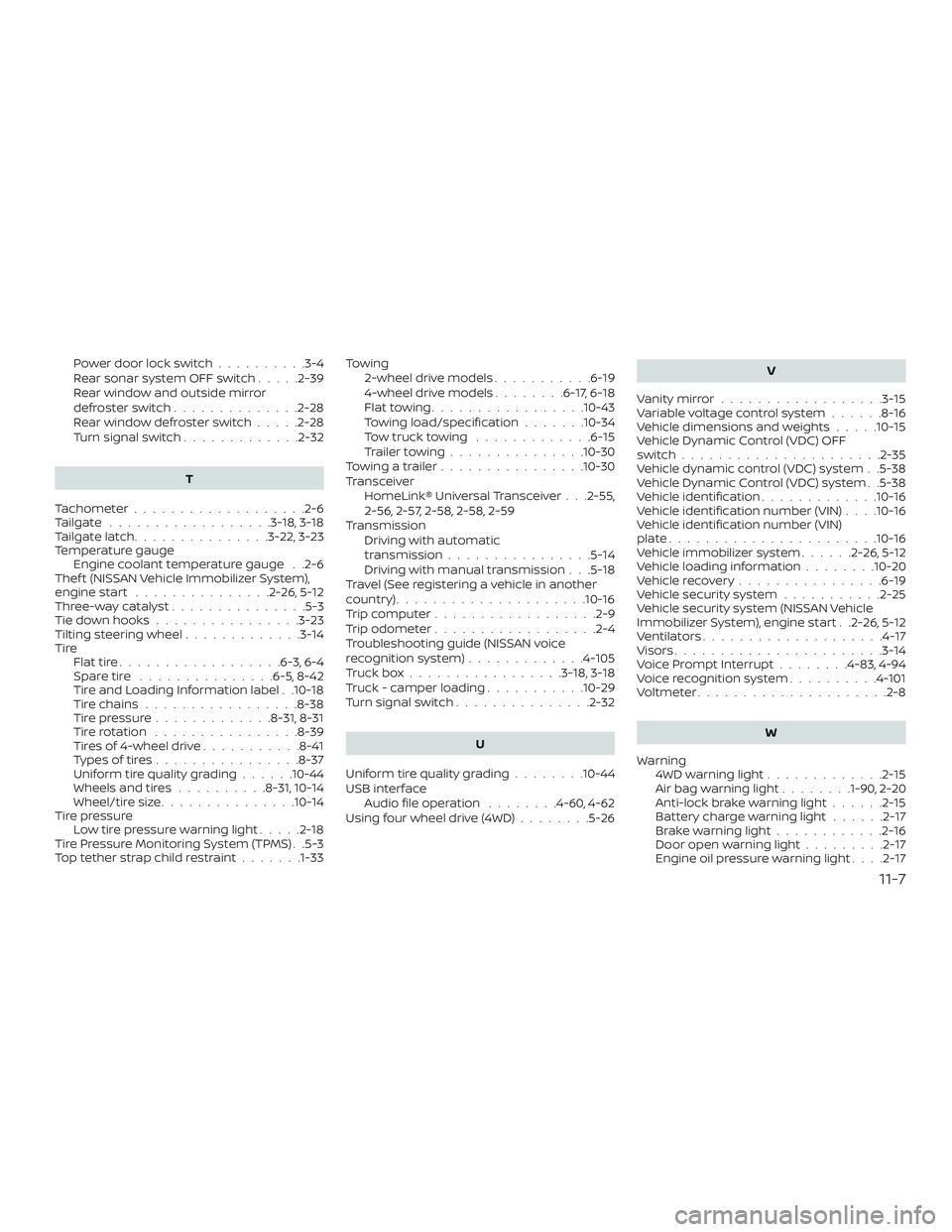
Power door lock switch..........3-4
Rear sonar system OFF switch .....2-39
Rear window and outside mirror
defrosterswitch..............2-28
Rearwindowdefrosterswitch.....2-28
Turn signal switch .............2-32
T
Tachometer ...................2-6
Tailgate ..................3-18, 3-18
Tailgatelatch...............3-22,3-23
Temperature gauge Engine coolant temperature gauge . .2-6
Thef t (NISSAN Vehicle Immobilizer System),
engine start ...............2-26,5-12
Three-waycatalyst...............5-3
Tie down hooks ................3-23
Tilting steering wheel .............3-14
Tire Flattire..................6-3,6-4
Spare tire ...............6-5,8-42
Tire and Loading Information label . .10-18
Tire chains .................8-38
Tire pressure .............8-31,8-31
Tirerotation ................8-39
Tires of 4-wheel drive ...........8-41
Types of tires ................8-37
Uniform tire quality grading ......10-44
Wheels and tires ..........8-31,10-14
Wheel/tire size ...............10-14
Tire pressure Low tire pressure warning light .....2-18
Tire Pressure Monitoring System (TPMS) . .5-3
Toptetherstrapchildrestraint.......1-33 Towing
2-wheel drive models ...........6-19
4-wheel drive models ........6-17,6-18
Flattowing.................10-43
Towing load/specification .......10-34
Towtrucktowing .............6-15
Trailertowing...............10-30
Towingatrailer................10-30
Transceiver HomeLink® Universal Transceiver . . .2-55,
2-56, 2-57, 2-58, 2-58, 2-59
Transmission Driving with automatic
transmission ................5-14
Driving with manual transmission . . .5-18
Travel (See registering a vehicle in another
country) .....................10-16
Trip computer ..................2-9
Trip odometer ..................2-4
Troubleshooting guide (NISSAN voice
recognition system) .............4-105
Truckbox.................3-18,3-18
Truck - camper loading ...........10-29
Turn signal switch ...............2-32
U
Uniform tire quality grading ........10-44
USB interface Audio file operation ........4-60,4-62
Using four wheel drive (4WD) ........5-26 V
Vanitymirror..................3-15
Variablevoltagecontrolsystem......8-16
Vehicle dimensions and weights .....10-15
Vehicle Dynamic Control (VDC) OFF
switch......................2-35
Vehicle dynamic control (VDC) system . .5-38
Vehicle Dynamic Control (VDC) system . .5-38
Vehicle identification .............10-16
Vehicle identification number (VIN) . . . .10-16
Vehicle identification number (VIN)
plate.......................10-16
Vehicle immobilizer system ......2-26,5-12
Vehicle loading information ........10-20
Vehiclerecovery................6-19
Vehicle security system ...........2-25
Vehicle security system (NISSAN Vehicle
Immobilizer System), engine start . .2-26, 5-12
Ventilators ....................4-17
Visors.......................3-14
Voice Prompt Interrupt ........4-83,4-94
Voice recognition system ..........4-101
Voltmeter.................... .2-8
W
Warning 4WDwarninglight.............2-15
A
irbagwarninglight........1-90, 2-20
Anti-lock brake warning light ......2-15
Battery charge warning light ......2-17
Brakewarninglight............2-16
Door open warning light .........2-17
Engine oil pressure warning light . . . .2-17
11-7