cruise control NISSAN FRONTIER 2018 Owner´s Manual
[x] Cancel search | Manufacturer: NISSAN, Model Year: 2018, Model line: FRONTIER, Model: NISSAN FRONTIER 2018Pages: 502, PDF Size: 4.85 MB
Page 19 of 502
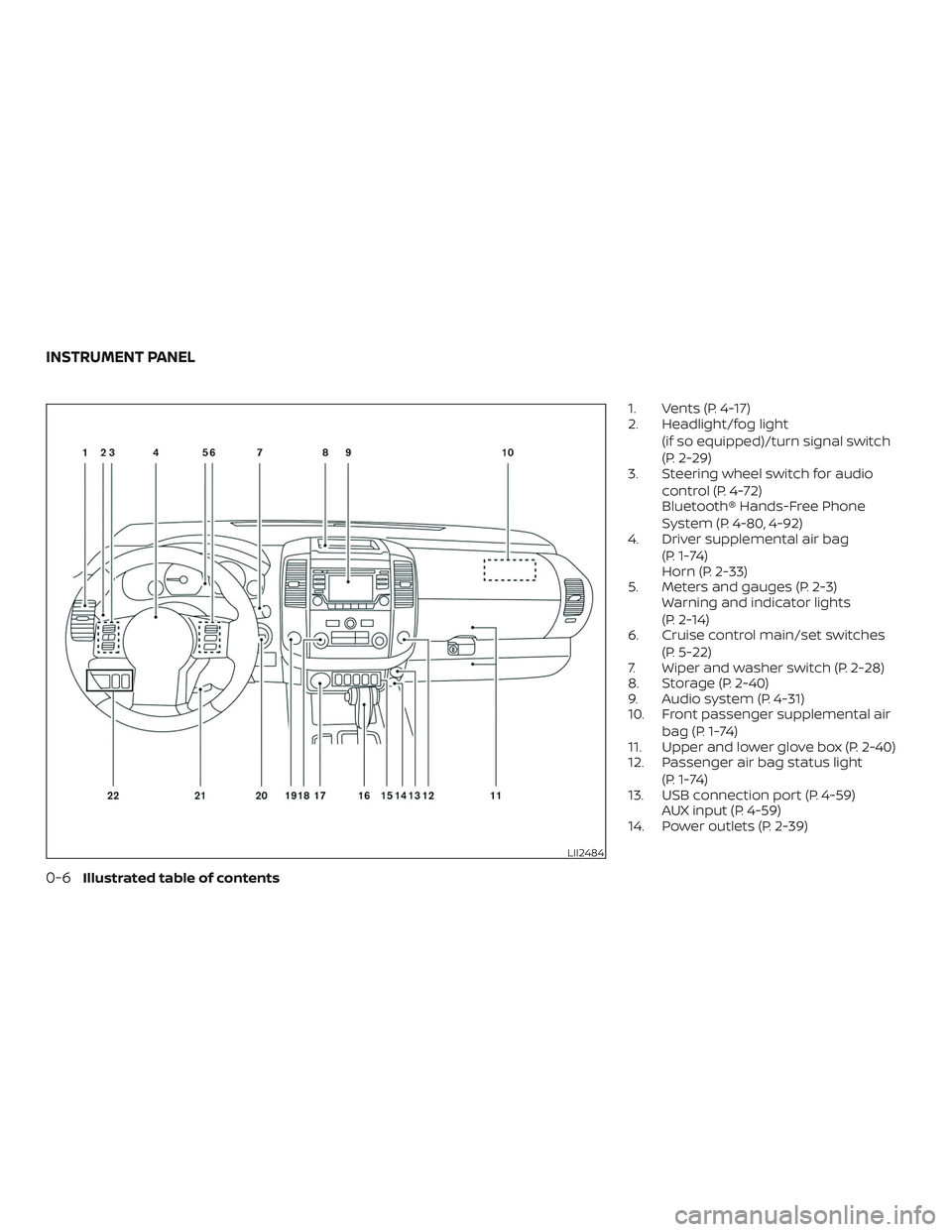
1. Vents (P. 4-17)
2. Headlight/fog light(if so equipped)/turn signal switch
(P. 2-29)
3. Steering wheel switch for audio
control (P. 4-72)
Bluetooth® Hands-Free Phone
System (P. 4-80, 4-92)
4. Driver supplemental air bag
(P. 1-74)
Horn (P. 2-33)
5. Meters and gauges (P. 2-3) Warning and indicator lights
(P. 2-14)
6. Cruise control main/set switches
(P. 5-22)
7. Wiper and washer switch (P. 2-28)
8. Storage (P. 2-40)
9. Audio system (P. 4-31)
10. Front passenger supplemental air
bag (P. 1-74)
11. Upper and lower glove box (P. 2-40)
12. Passenger air bag status light
(P. 1-74)
13. USB connection port (P. 4-59) AUX input (P. 4-59)
14. Power outlets (P. 2-39)
LII2484
INSTRUMENT PANEL
0-6Illustrated table of contents
Page 119 of 502
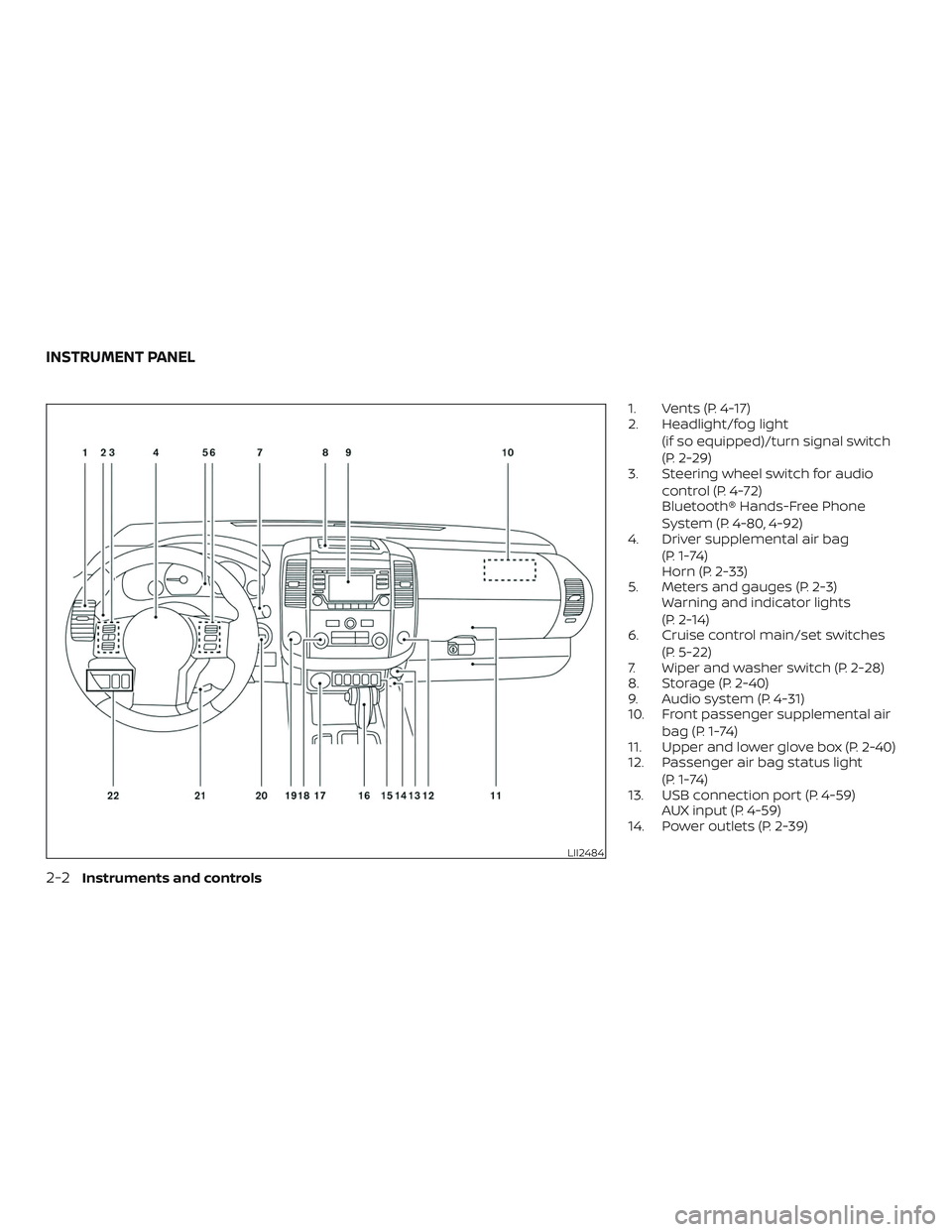
1. Vents (P. 4-17)
2. Headlight/fog light(if so equipped)/turn signal switch
(P. 2-29)
3. Steering wheel switch for audio
control (P. 4-72)
Bluetooth® Hands-Free Phone
System (P. 4-80, 4-92)
4. Driver supplemental air bag
(P. 1-74)
Horn (P. 2-33)
5. Meters and gauges (P. 2-3) Warning and indicator lights
(P. 2-14)
6. Cruise control main/set switches
(P. 5-22)
7. Wiper and washer switch (P. 2-28)
8. Storage (P. 2-40)
9. Audio system (P. 4-31)
10. Front passenger supplemental air
bag (P. 1-74)
11. Upper and lower glove box (P. 2-40)
12. Passenger air bag status light
(P. 1-74)
13. USB connection port (P. 4-59) AUX input (P. 4-59)
14. Power outlets (P. 2-39)
LII2484
INSTRUMENT PANEL
2-2Instruments and controls
Page 131 of 502
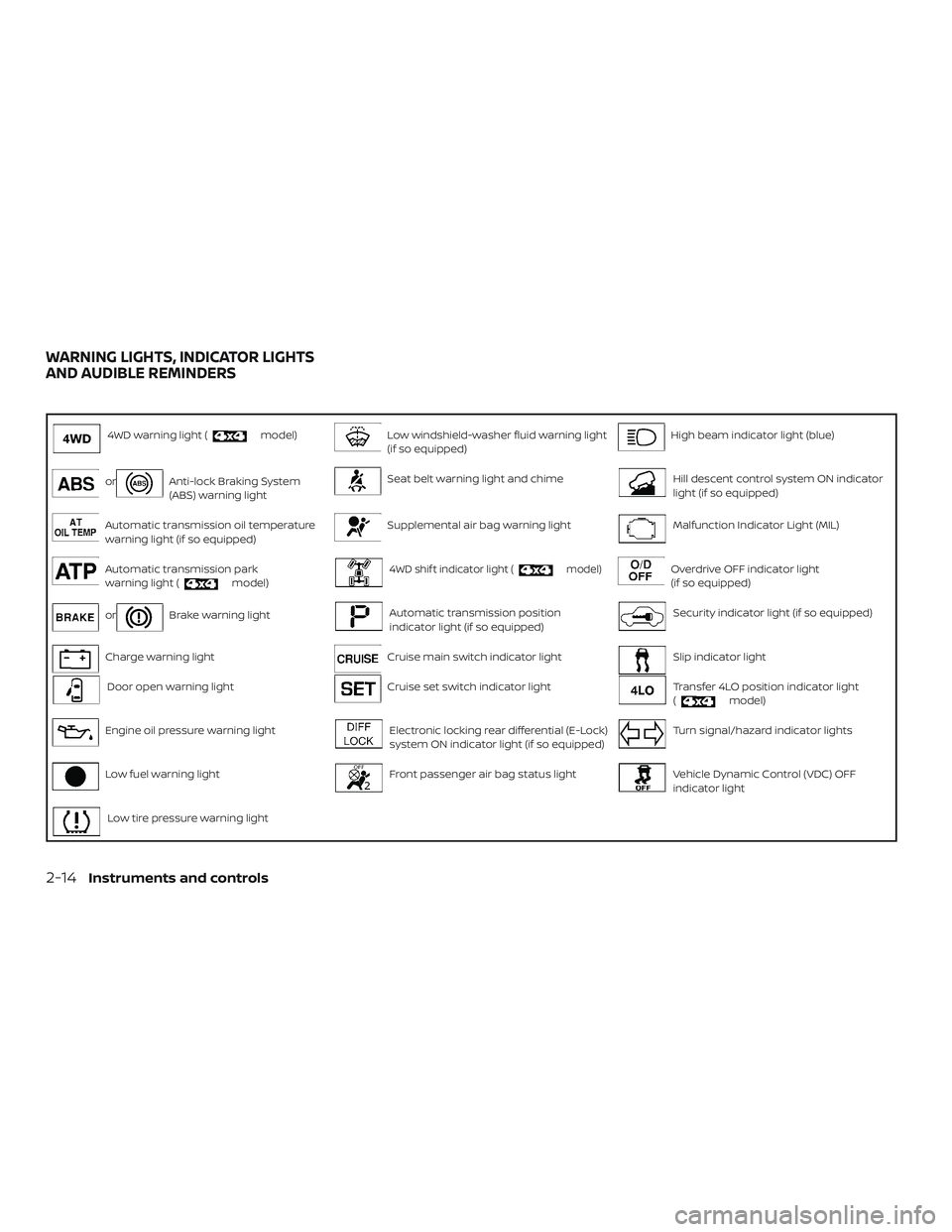
4WD warning light (model)Low windshield-washer fluid warning light
(if so equipped)High beam indicator light (blue)
orAnti-lock Braking System
(ABS) warning lightSeat belt warning light and chimeHill descent control system ON indicator
light (if so equipped)
Automatic transmission oil temperature
warning light (if so equipped)Supplemental air bag warning lightMalfunction Indicator Light (MIL)
Automatic transmission park
warning light (model)4WD shif t indicator light (model)Overdrive OFF indicator light
(if so equipped)
orBrake warning lightAutomatic transmission position
indicator light (if so equipped)Security indicator light (if so equipped)
Charge warning lightCruise main switch indicator lightSlip indicator light
Door open warning lightCruise set switch indicator lightTransfer 4LO position indicator light
(model)
Engine oil pressure warning lightElectronic locking rear differential (E-Lock)
system ON indicator light (if so equipped)Turn signal/hazard indicator lights
Low fuel warning lightFront passenger air bag status lightVehicle Dynamic Control (VDC) OFF
indicator light
Low tire pressure warning light
WARNING LIGHTS, INDICATOR LIGHTS
AND AUDIBLE REMINDERS
2-14Instruments and controls
Page 138 of 502
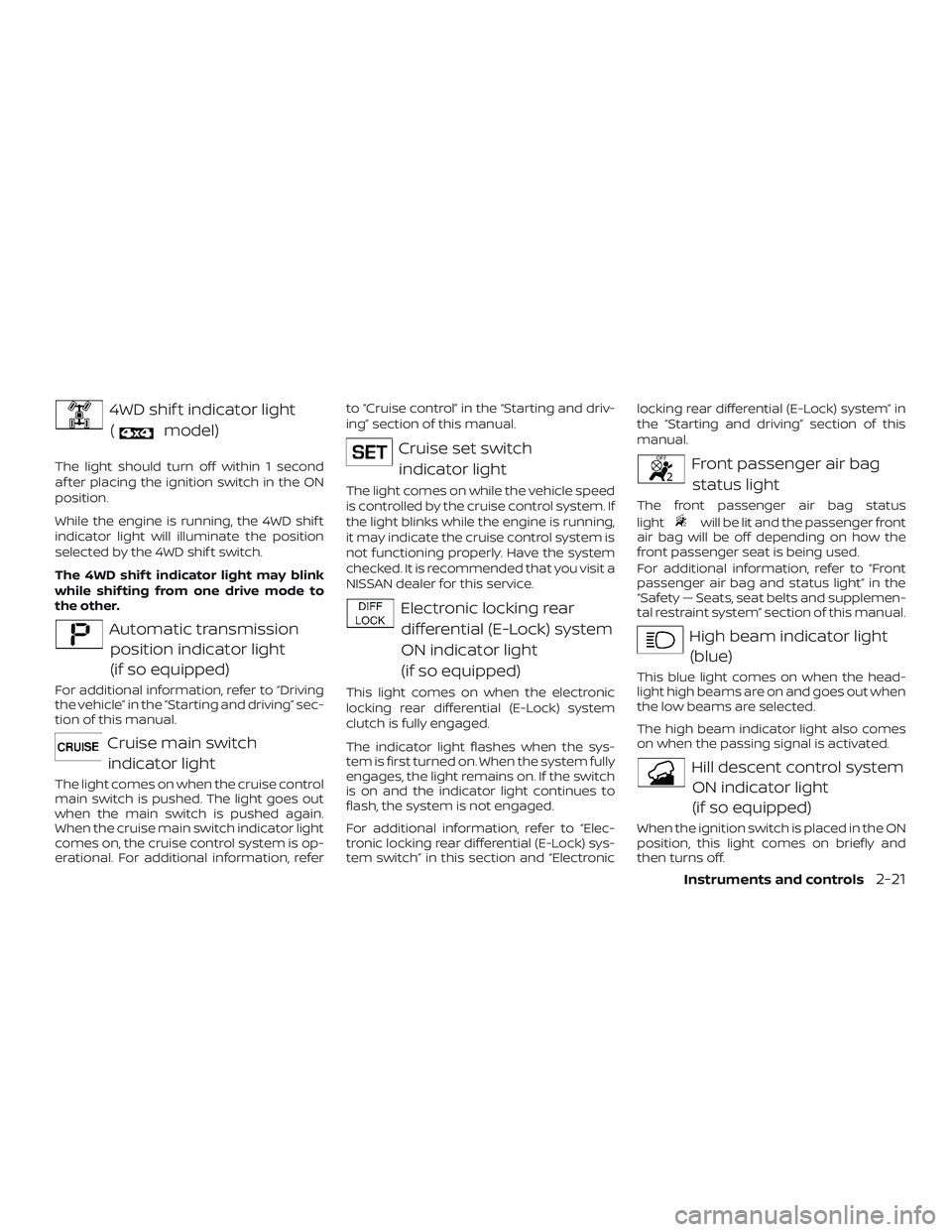
4WD shif t indicator light(
model)
The light should turn off within 1 second
af ter placing the ignition switch in the ON
position.
While the engine is running, the 4WD shif t
indicator light will illuminate the position
selected by the 4WD shif t switch.
The 4WD shif t indicator light may blink
while shif ting from one drive mode to
the other.
Automatic transmissionposition indicator light
(if so equipped)
For additional information, refer to “Driving
the vehicle” in the “Starting and driving” sec-
tion of this manual.
Cruise main switchindicator light
The light comes on when the cruise control
main switch is pushed. The light goes out
when the main switch is pushed again.
When the cruise main switch indicator light
comes on, the cruise control system is op-
erational. For additional information, refer to “Cruise control” in the “Starting and driv-
ing” section of this manual.
Cruise set switch
indicator light
The light comes on while the vehicle speed
is controlled by the cruise control system. If
the light blinks while the engine is running,
it may indicate the cruise control system is
not functioning properly. Have the system
checked. It is recommended that you visit a
NISSAN dealer for this service.
Electronic locking reardifferential (E-Lock) system
ON indicator light
(if so equipped)
This light comes on when the electronic
locking rear differential (E-Lock) system
clutch is fully engaged.
The indicator light flashes when the sys-
tem is first turned on. When the system fully
engages, the light remains on. If the switch
is on and the indicator light continues to
flash, the system is not engaged.
For additional information, refer to “Elec-
tronic locking rear differential (E-Lock) sys-
tem switch” in this section and “Electronic locking rear differential (E-Lock) system” in
the “Starting and driving” section of this
manual.
Front passenger air bag
status light
The front passenger air bag status
light
will be lit and the passenger front
air bag will be off depending on how the
front passenger seat is being used.
For additional information, refer to “Front
passenger air bag and status light” in the
“Safety — Seats, seat belts and supplemen-
tal restraint system” section of this manual.
High beam indicator light
(blue)
This blue light comes on when the head-
light high beams are on and goes out when
the low beams are selected.
The high beam indicator light also comes
on when the passing signal is activated.
Hill descent control systemON indicator light
(if so equipped)
When the ignition switch is placed in the ON
position, this light comes on briefly and
then turns off.
Instruments and controls2-21
Page 307 of 502
5 Starting and driving
Precautions when starting and driving..........5-2
Exhaust gas (carbon monoxide) ..............5-2
Three-way catalyst ...........................5-3
Tire Pressure Monitoring System
(TPMS)........................................5-3
On-pavement and off-road driving
precautions ..................................5-6
Avoiding collision and rollover ................5-6
Off-roadrecovery ............................5-7
Rapid air pressure loss .......................5-7
Drinking alcohol/drugs and driving ...........5-8
Driving safety precautions ....................5-8
Ignition switch .................................. 5-10
Automatic transmission
(if so equipped) ............................... 5-11
Manual transmission (M/T)
(if so equipped) .............................. 5-12
Key positions ................................ 5-12
NISSAN Vehicle Immobilizer System
(if so equipped) .............................. 5-12
Before starting the engine ......................5-13
Starting the engine ............................. 5-13
Driving the vehicle .............................. 5-14Automatic transmission (A/T)
(if so equipped)
.............................. 5-14
Manual transmission (if so equipped) ........5-18
Parking brake .................................. 5-21
Cruise control .................................. 5-22
Precautions on cruise control ................5-22
Cruise control operations ....................5-22
Break-in schedule .............................. 5-24
Fuel efficient driving tips ........................5-24
Increasing fuel economy .......................5-25
Using 4–wheel drive (4WD)
(if so equipped) ................................. 5-26
Transfer case shif ting procedures ...........5-26
Electronic locking rear differential (E-Lock)
system (if so equipped) ......................... 5-33
Parking/parking on hills ........................5-34
Power steering ................................. 5-35
Brake system ................................... 5-35
Brake precautions ........................... 5-35
Anti-lock Braking System (ABS) ..............5-36
Active Brake Limited Slip (ABLS) system .........5-37
Vehicle Dynamic Control (VDC) system .........5-38
Brake force distribution ......................5-40
Page 329 of 502
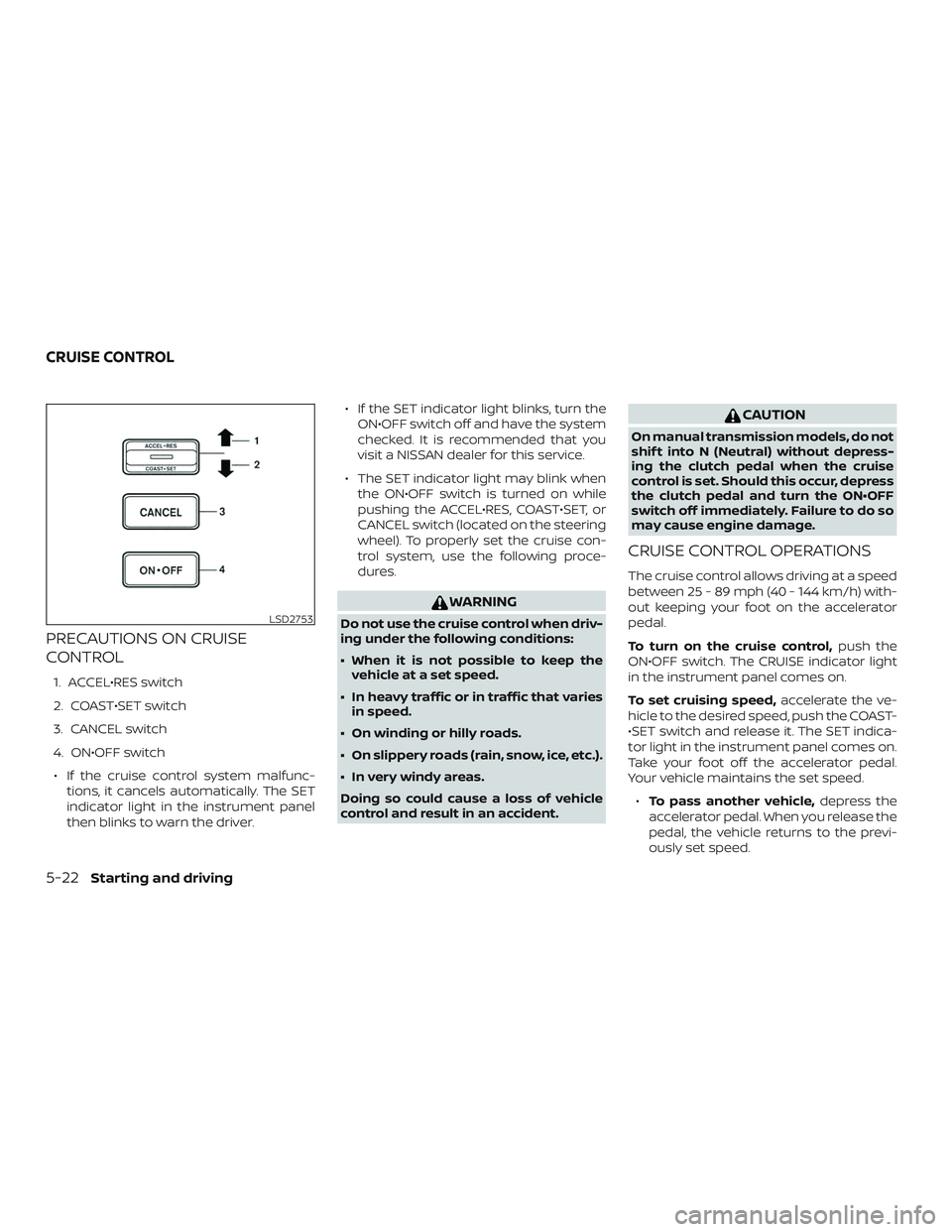
PRECAUTIONS ON CRUISE
CONTROL
1. ACCEL•RES switch
2. COAST•SET switch
3. CANCEL switch
4. ON•OFF switch∙ If the cruise control system malfunc- tions, it cancels automatically. The SET
indicator light in the instrument panel
then blinks to warn the driver. ∙ If the SET indicator light blinks, turn the
ON•OFF switch off and have the system
checked. It is recommended that you
visit a NISSAN dealer for this service.
∙ The SET indicator light may blink when the ON•OFF switch is turned on while
pushing the ACCEL•RES, COAST•SET, or
CANCEL switch (located on the steering
wheel). To properly set the cruise con-
trol system, use the following proce-
dures.
WARNING
Do not use the cruise control when driv-
ing under the following conditions:
∙ When it is not possible to keep thevehicle at a set speed.
∙ In heavy traffic or in traffic that varies in speed.
∙ On winding or hilly roads.
∙ On slippery roads (rain, snow, ice, etc.).
∙ In very windy areas.
Doing so could cause a loss of vehicle
control and result in an accident.
CAUTION
On manual transmission models, do not
shif t into N (Neutral) without depress-
ing the clutch pedal when the cruise
control is set. Should this occur, depress
the clutch pedal and turn the ON•OFF
switch off immediately. Failure to do so
may cause engine damage.
CRUISE CONTROL OPERATIONS
The cruise control allows driving at a speed
between 25 - 89 mph (40 - 144 km/h) with-
out keeping your foot on the accelerator
pedal.
To turn on the cruise control, push the
ON•OFF switch. The CRUISE indicator light
in the instrument panel comes on.
To set cruising speed, accelerate the ve-
hicle to the desired speed, push the COAST-
•SET switch and release it. The SET indica-
tor light in the instrument panel comes on.
Take your foot off the accelerator pedal.
Your vehicle maintains the set speed.
∙ To pass another vehicle, depress the
accelerator pedal. When you release the
pedal, the vehicle returns to the previ-
ously set speed.
LSD2753
CRUISE CONTROL
5-22Starting and driving
Page 330 of 502
∙ The vehicle may not maintain the setspeed when going up or down steep
hills. If this happens, drive without the
cruise control.
To cancel the preset speed, use one of the
following three methods:
∙ Push the CANCEL switch; the SET indi- cator light in the instrument panel goes
out.
∙ Tap the brake pedal; the SET indicator light goes out.
∙ Turn the ON•OFF switch off. Both the CRUISE indicator light and SET indicator
light in the instrument panel go out.
The cruise control is automatically can-
celed and the SET light in the instrument
panel goes out if: ∙ You depress the brake or clutch pedal (if so equipped) while pushing the ACCEL-
•RES or COAST•SET switch. The preset
speed is deleted from memory.
∙ The vehicle slows down more than 8 mph (13 km/h) below the set speed.
∙ You depress the clutch pedal (manual transmission), or move the shif t lever to
N (Neutral) (automatic transmission). To reset at a faster cruising speed,
use
one of the following three methods:
∙ Depress the accelerator pedal. When the vehicle attains the desired speed,
push and release the COAST•SET
switch.
∙ Push and hold the ACCEL•RES switch. When the vehicle attains the speed you
desire, release the switch.
∙ Push and release the ACCEL•RES switch. Each time you do this, the set speed
increases by about 1 mph (1.6 km/h).
To reset at a slower cruising speed, use
one of the following three methods:
∙ Lightly tap the brake pedal. When the vehicle attains the desired speed, push
the COAST•SET switch and release it.
∙ Push and hold the COAST•SET switch. Release the switch when the vehicle
slows to the desired speed.
∙ Push and release the COAST•SET switch. Each time you do this, the set
speed decreases by about 1 mph
(1.6 km/h). To resume the preset speed,
push and
release the ACCEL•RES switch. The vehicle
returns to the last set cruising speed when
the vehicle speed is over 25 mph (40 km/h).
Starting and driving5-23
Page 332 of 502
5.Use Cruise Control
∙ Using cruise control during highway driving helps maintain a steady
speed.
∙ Cruise control is particularly effective in providing fuel savings when driving
on flat terrains.
6. Plan for the Shortest Route
∙ Utilize a map or navigation system to determine the best route to save
time.
7. Avoid Idling
∙ Shutting off your engine when safe for stops exceeding 30–60 seconds
saves fuel and reduces emissions.
8. Buy an Automated Pass for Toll
Roads
∙ Automated passes permit drivers to use special lanes to maintain cruis-
ing speed through the toll and avoid
stopping and starting. 9.
Winter Warm Up
∙ Limit idling time to minimize impact to fuel economy.
∙ Vehicles typically need no more than 30 seconds of idling at start-up to
effectively circulate the engine oil be-
fore driving.
∙ Your vehicle will reach its ideal oper- ating temperature more quickly
while driving versus idling.
10. Keeping your Vehicle Cool
∙ Park your vehicle in a covered parking area or in the shade whenever pos-
sible.
∙ When entering a hot vehicle, opening the windows will help to reduce the
inside temperature faster, resulting in
reduced demand on your A/C sys-
tem. ∙ Keep your engine tuned up.
∙ Follow the recommended scheduled
maintenance.
∙ Keep the tires inflated to the correct pressure. Low tire pressure increases
tire wear and lowers fuel economy.
∙ Keep the wheels in correct alignment. Improper alignment increases tire wear
and lowers fuel economy.
∙ For vehicles equipped with
, use
4H or 4L position only when necessary.
4-wheel drive operation lowers fuel
economy.
∙ Use the recommended viscosity engine oil. For additional information, refer to
“Engine oil and oil filter recommenda-
tions” in the “Technical and consumer
information” section of this manual.
INCREASING FUEL ECONOMY
Starting and driving5-25
Page 352 of 502
∙ Do not use the cruise control on slip-pery roads.
∙ Snow can trap dangerous exhaust gases under your vehicle. Keep snow
clear of the exhaust pipe and from
around your vehicle.
ENGINE BLOCK HEATER (if so
equipped)
Engine block heaters are used to assist
with cold temperature starting.
The engine block heater should be used
when the outside temperature is 20°F (-7°C)
or lower.
WARNING
∙ Do not use your engine block heaterwith an ungrounded electrical system
or a 2-pronged adapter. You can be
seriously injured by an electrical
shock if you use an ungrounded
connection.
∙ Disconnect and properly store the en- gine block heater cord before starting
the engine. Damage to the cord could
result in an electrical shock and can
cause serious injury. ∙ Use a heavy-duty 3-wire, 3-pronged
extension cord rated for at least 10 A.
Plug the extension cord into a Ground
Fault Interrupt (GFI) protected,
grounded 110-VAC outlet. Failure to
use the proper extension cord or a
grounded outlet can result in a fire or
electrical shock and cause serious
personal injury.
To use the engine block heater: 1. Turn the engine off.
2. Open the hood and unwrap the engine block heater cord.
3. Plug the engine block heater cord into a grounded 3-wire, 3-pronged exten-
sion cord.
4. Plug the extension cord into a Ground Fault Interrupt (GFI) protected,
grounded 110-volt AC (VAC) outlet.
5. The engine block heater must be plugged in for at least 2–4 hours, de-
pending on outside temperatures, to
properly warm the engine coolant. Use
an appropriate timer to turn the engine
block heater on. 6. Before starting the engine, unplug and
properly store the cord to keep it away
from moving parts.
Starting and driving5-45
Page 481 of 502
∙ When making a turn, your trailer wheelswill be closer to the inside of the turn
than your vehicle wheels. To compen-
sate for this, make a larger than normal
turning radius during the turn.
∙ Crosswinds and rough roads will ad- versely affect vehicle/trailer handling,
possibly causing vehicle sway. When
being passed by larger vehicles, be pre-
pared for possible changes in cross-
winds that could affect vehicle han-
dling.
Do the following if the trailer begins to
sway: 1. Take your foot off the accelerator pedal to allow the vehicle to coast and steer
as straight ahead as the road condi-
tions allow. This combination will help
stabilize the vehicle
– Do not correct trailer sway by steer- ing or applying the brakes.
2. When the trailer sway stops, gently ap- ply the brakes and pull to the side of the
road in a safe area. 3. Try to rearrange the trailer load so it is
balanced as described in this section.
∙ Be careful when passing other vehicles. Passing while towing a trailer requires
considerably more distance than nor-
mal passing. Remember, the length of
the trailer must also pass the other ve-
hicle before you can safely change
lanes.
∙ Downshif t the transmission to a lower gear for engine braking when driving
down steep or long hills. This will help
slow the vehicle without applying the
brakes.
∙ Avoid holding the brake pedal down too long or too frequently. This could cause
the brakes to overheat, resulting in re-
duced braking efficiency.
∙ Increase your following distance to al- low for greater stopping distances
while towing a trailer. Anticipate stops
and brake gradually.
∙ NISSAN recommends that the cruise control not be used while towing a
trailer. ∙ Some states or provinces have specific
regulations and speed limits for ve-
hicles that are towing trailers. Obey the
local speed limits.
∙ Check your hitch, trailer wiring harness connections, and trailer wheel lug nuts
af ter 50 miles (80 km) of travel and at
every break.
∙ When launching a boat, don’t allow the water level to go over the exhaust tail
pipe or rear bumper.
∙ Make sure you disconnect the trailer lights before backing the trailer into the
water or the trailer lights may burn out.
When towing a trailer, final drive gear oil
should be replaced and transmission
oil/fluid should be changed more fre-
quently. For additional information, refer
to the “Do-it-yourself ” section in this
manual.
10-42Technical and consumer information