CD player NISSAN FRONTIER 2019 Owner´s Manual
[x] Cancel search | Manufacturer: NISSAN, Model Year: 2019, Model line: FRONTIER, Model: NISSAN FRONTIER 2019Pages: 516, PDF Size: 5.04 MB
Page 261 of 516
Press theseeking button while an
audio file on the USB device is playing to
advance one track. Press the
seeking
button several times to skip forward sev-
eral tracks. If the last track in a folder on the
USB device is skipped, the first track of the
next folder is played.
Random and repeat play mode
While files on a USB device are playing, the
play pattern can be altered so that songs
are repeated or played randomly.
Random
Touch the “Random” key to apply a random
play pattern to the USB device. When the
Random mode is active, the text “Random”
on the key will illuminate and the text “Ran-
dom Folder” appears. By touching the “Ran-
dom” key once more, the text “Random All”
appears. To cancel Random mode, touch
the “Random” key until no text is illumi-
nated. Repeat
Touch the “Repeat” key to apply a repeat
play pattern to the USB device. When the
Repeat mode is active, the text on the “Re-
peat” key will illuminate and the text “Re-
peat Track” appears. By touching the “Re-
peat” key once more, the text “Repeat
Folder” appears. To cancel Repeat mode,
touch the “Repeat” key until no text is illumi-
nated.
iPod®* PLAYER OPERATION
WITHOUT NAVIGATION SYSTEM (if
so equipped)
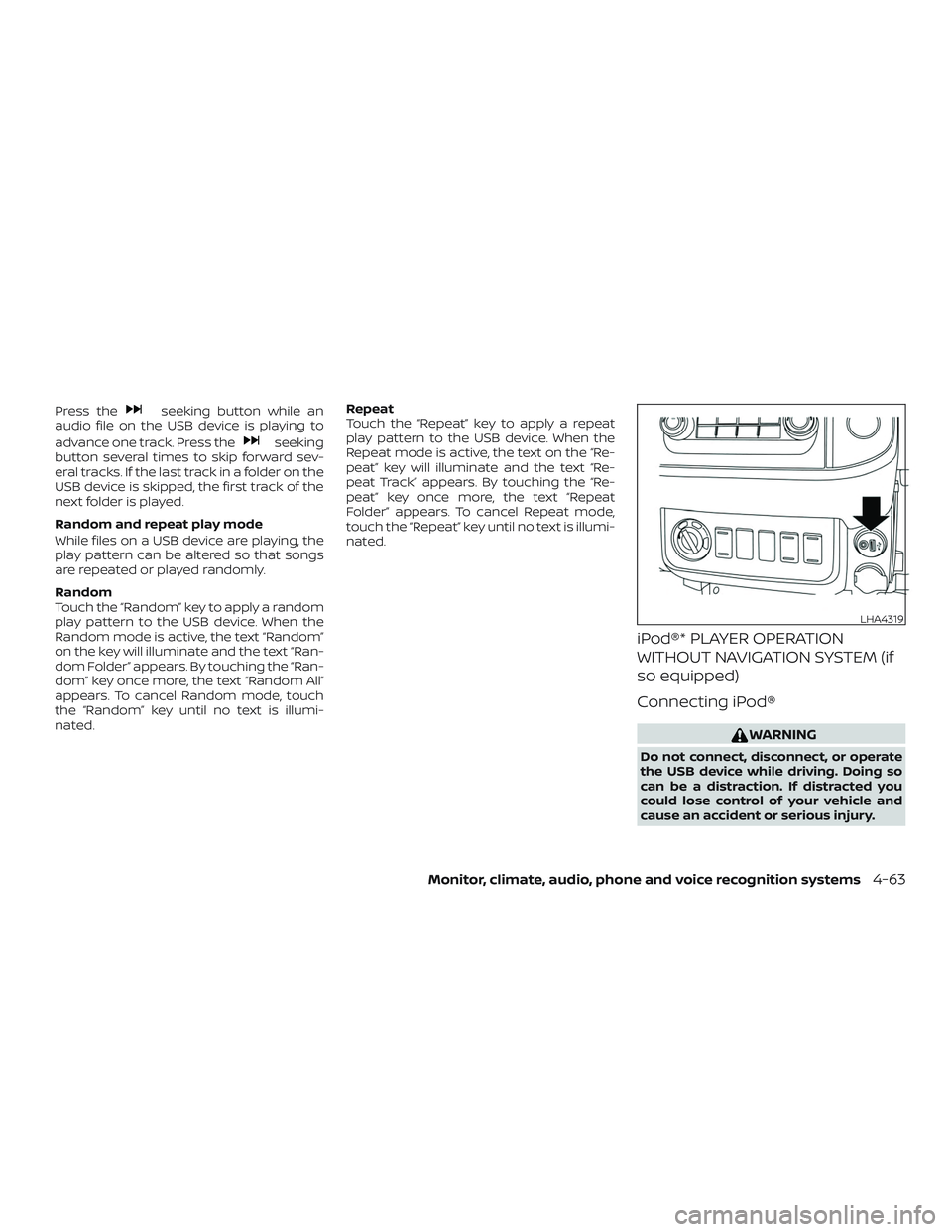
Connecting iPod®
WARNING
Do not connect, disconnect, or operate
the USB device while driving. Doing so
can be a distraction. If distracted you
could lose control of your vehicle and
cause an accident or serious injury.
LHA4319
Monitor, climate, audio, phone and voice recognition systems4-63
Page 263 of 516
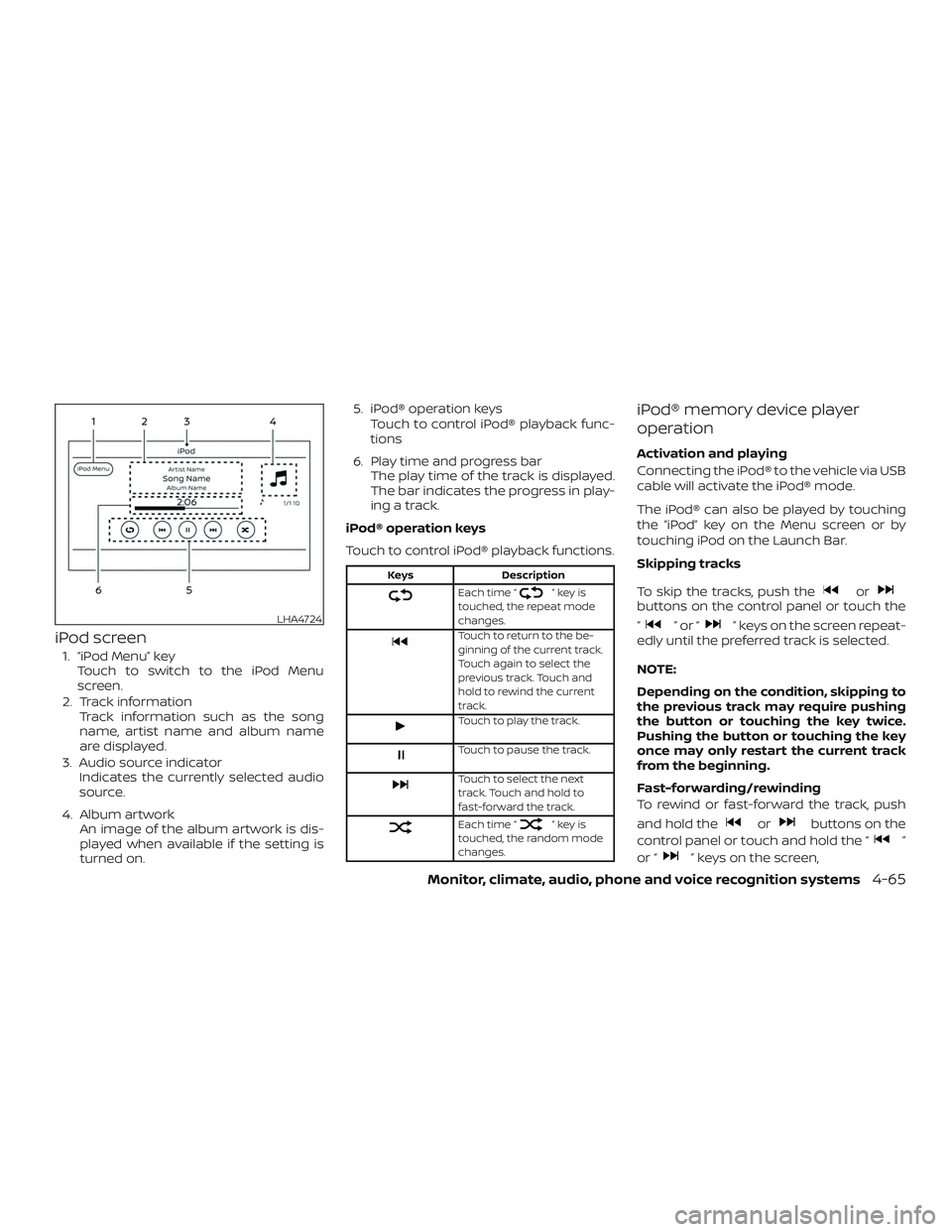
iPod screen
1. “iPod Menu” keyTouch to switch to the iPod Menu
screen.
2. Track information Track information such as the song
name, artist name and album name
are displayed.
3. Audio source indicator Indicates the currently selected audio
source.
4. Album artwork An image of the album artwork is dis-
played when available if the setting is
turned on. 5. iPod® operation keys
Touch to control iPod® playback func-
tions
6. Play time and progress bar The play time of the track is displayed.
The bar indicates the progress in play-
ing a track.
iPod® operation keys
Touch to control iPod® playback functions.
Keys Description
Each time “”keyis
touched, the repeat mode
changes.
Touch to return to the be-
ginning of the current track.
Touch again to select the
previous track. Touch and
hold to rewind the current
track.
Touch to play the track.
Touch to pause the track.
Touch to select the next
track. Touch and hold to
fast-forward the track.
Each time “”keyis
touched, the random mode
changes.
iPod® memory device player
operation
Activation and playing
Connecting the iPod® to the vehicle via USB
cable will activate the iPod® mode.
The iPod® can also be played by touching
the “iPod” key on the Menu screen or by
touching iPod on the Launch Bar.
Skipping tracks
To skip the tracks, push the
orbuttons on the control panel or touch the
“
”or“” keys on the screen repeat-
edly until the preferred track is selected.
NOTE:
Depending on the condition, skipping to
the previous track may require pushing
the button or touching the key twice.
Pushing the button or touching the key
once may only restart the current track
from the beginning.
Fast-forwarding/rewinding
To rewind or fast-forward the track, push
and hold the
orbuttons on the
control panel or touch and hold the “
”
or “
” keys on the screen,
LHA4724
Monitor, climate, audio, phone and voice recognition systems4-65
Page 264 of 516
Changing play mode
Repeat mode
Touch the “
” key on the iPod® screen
to change the repeat mode. The following
modes are available.
No text displayed: Repeat off
All: Repeat all
One: Repeat track
Random mode
Touch the “
” key on the screen to
change the random mode as follows.
No text displayed: Random off
Songs: Random play
iPod® Menu
Touch the “iPod Menu” key on the iPod®
screen to display the iPod® Menu screen.
“Now Playing” key Touch to display the USB
screen.
“Folder List” key
(if so equipped) Touch to display the folder
list. Touch an item on the list
to select the folder. The sub-
folder or track list will be
displayed. Select a sub-folder
or track from the list.
“Album Artwork”
key Touch to run on/off the al-
bum artwork display on the
USB screen.
“Playlists” key Touch to display the list ac- cording to the selected item.
“Artists” key
“Albums” key
“Songs” key
“Podcasts” key
“Genres” key
“Composers” key
“Audiobooks” key
“iTunes Radio”
key
iPod®* PLAYER OPERATION WITH
NAVIGATION SYSTEM (if so
equipped)
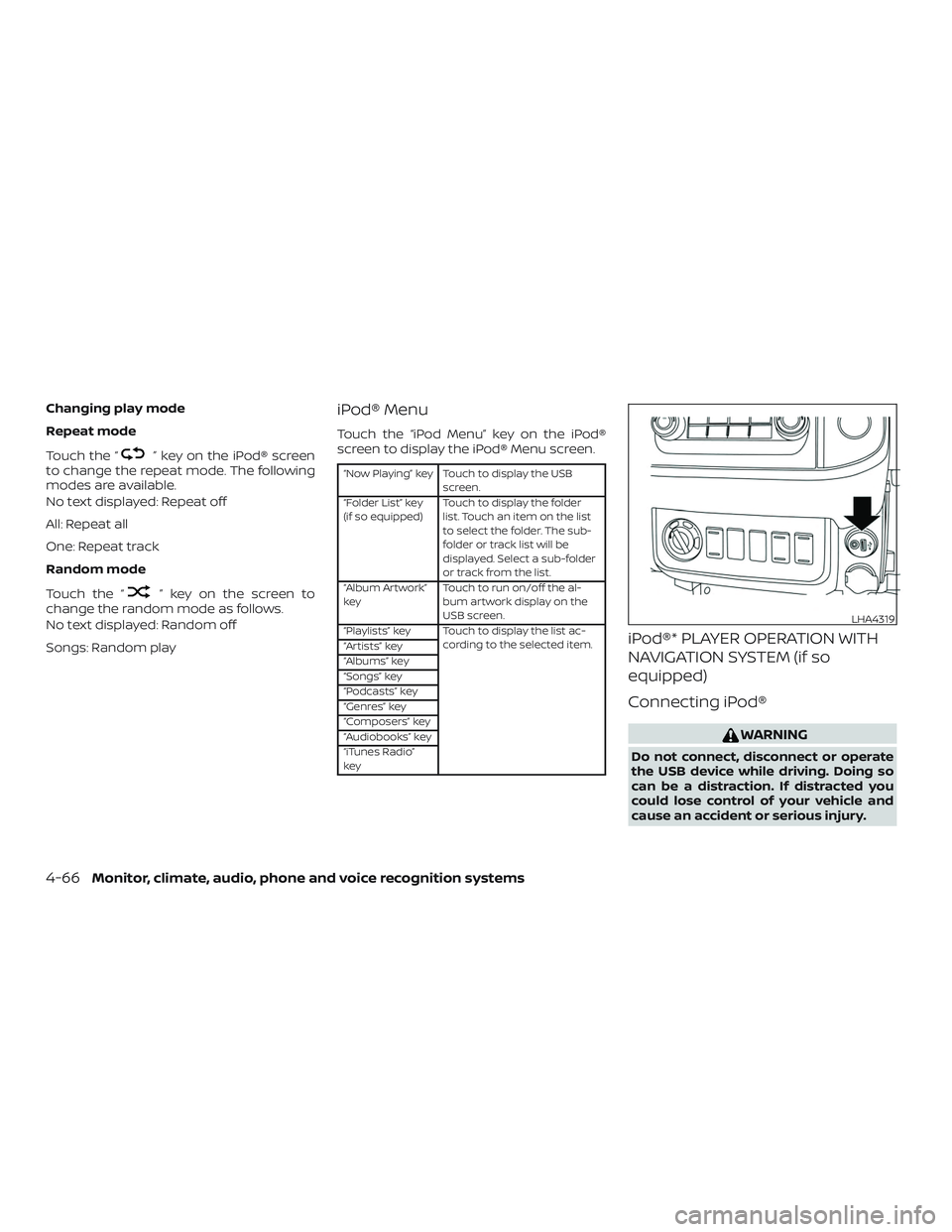
Connecting iPod®
WARNING
Do not connect, disconnect or operate
the USB device while driving. Doing so
can be a distraction. If distracted you
could lose control of your vehicle and
cause an accident or serious injury.
LHA4319
4-66Monitor, climate, audio, phone and voice recognition systems
Page 330 of 516
∙ If the engine is very hard to start inextremely cold weather or when re-
starting, depress the accelerator
pedal a little (approximately 1/3 to the
floor) and hold it and then crank the
engine. Release the key and the ac-
celerator pedal when the engine
starts.
∙ If the engine is very hard to start be- cause it is flooded, depress the accel-
erator pedal all the way to the floor
and hold it. Crank the engine for
5-6 seconds. Af ter cranking the en-
gine, release the accelerator pedal.
Crank the engine with your foot off
the accelerator pedal by placing the
ignition in the START position. Re-
lease the key when the engine starts.
If the engine starts, but fails to run,
repeat the above procedure.
CAUTION
Do not operate the starter for more
than 15 seconds at a time. If the engine
does not start, turn the key off and wait
10 seconds before cranking again, oth-
erwise the starter could be damaged. 4. Allow the engine to idle for at least
30 seconds af ter starting. Do not race
the engine while warming it up. Drive at
a moderate speed for a short distance
first, especially in cold weather.
NOTE:
Care should be taken to avoid situations
that can lead to potential battery dis-
charge and potential no-start conditions
such as: 1. Installation or extended use of elec-
tronic accessories that consume bat-
tery power when the engine is not
running (phone chargers, GPS, DVD
players, etc.).
2. The vehicle is not driven regularly
and/or only driven short distances.
In these cases, the battery may need to
be charged to maintain battery health.
AUTOMATIC TRANSMISSION (A/T)
(if so equipped)
WARNING
∙ Do not depress the accelerator pedal while shif ting from P (Park) or N (Neu-
tral) to R (Reverse), D (Drive), 3, 2 or 1.
Always depress the brake pedal until
shif ting is completed. Failure to do so
could cause you to lose control and
have an accident.
∙ Cold engine idle speed is high, so use caution when shif ting into a forward
or reverse gear before the engine has
warmed up.
∙ Never shif t to either the P (Park) or R (Reverse) position while the vehicle is
moving forward and P (Park) or D
(Drive) position while the vehicle is re-
versing. This could cause an accident
or damage the transmission.
∙ Do not downshif t abruptly on slippery roads. This may cause a loss of
control.
DRIVING THE VEHICLE
5-14Starting and driving
Page 406 of 516
∙ Keep the battery surface clean and dry.Clean the battery with a solution of bak-
ing soda and water.
∙ Make certain the terminal connections are clean and securely tightened.
∙ If the vehicle is not to be used for 30 days or longer, disconnect the nega-
tive (-) battery terminal cable to prevent
discharge.
NOTE:
Care should be taken to avoid situations
that can lead to potential battery dis-
charge and potential no-start conditions
such as: 1. Installation or extended use of elec-
tronic accessories that consume bat-
tery power when the engine is not
running (Phone chargers, GPS, DVD
players, etc.)
2. Vehicle is not driven regularly and/or
only driven short distances.
In these cases, the battery may need to
be charged to maintain battery health.WARNING
∙ Do not expose the battery to flames, an electrical spark or a cigarette. Hy-
drogen gas generated by the battery
is explosive. Explosive gases can
cause blindness or injury. Do not allow
battery fluid to contact your skin,
eyes, fabrics or painted surfaces. Sul-
furic acid can cause blindness or in-
jury. Af ter touching a battery or bat-
tery cap, do not touch or rub your
eyes. Thoroughly wash your hands. If
the acid contacts your eyes, skin or
clothing, immediately flush with wa-
ter for at least 15 minutes and seek
medical attention.
∙ When working on or near a battery, always wear suitable eye protection
and remove all jewelry.
∙ Battery posts, terminals and related accessories contain lead and lead
compounds. Wash hands af ter
handling.
∙ Keep battery out of the reach of children.
∙ Do not tip the battery. NOTE:
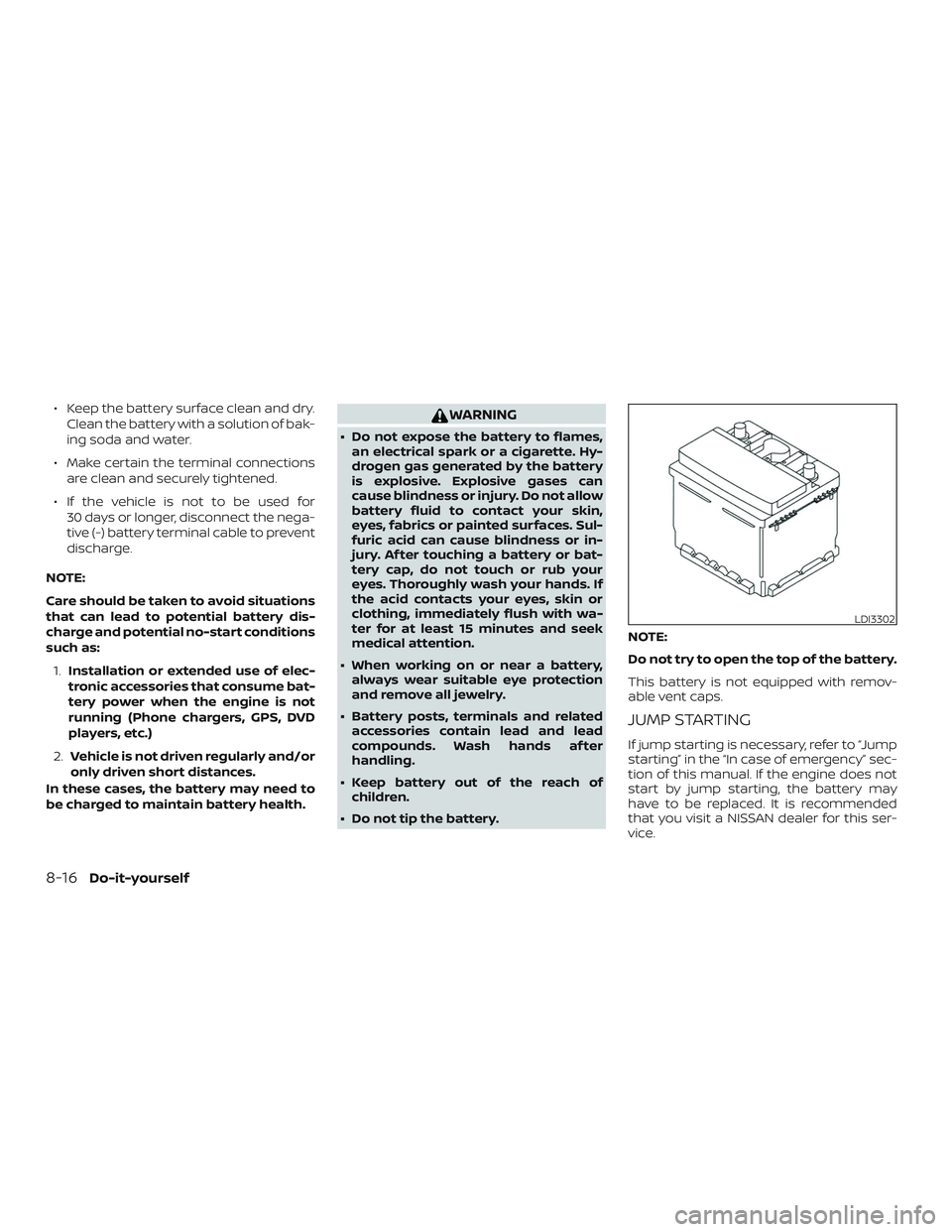
Do not try to open the top of the battery.
This battery is not equipped with remov-
able vent caps.
JUMP STARTING
If jump starting is necessary, refer to “Jump
starting” in the “In case of emergency” sec-
tion of this manual. If the engine does not
start by jump starting, the battery may
have to be replaced. It is recommended
that you visit a NISSAN dealer for this ser-
vice.
LDI3302
8-16Do-it-yourself
Page 440 of 516
Seats:Check seat position controls such
as seat adjusters, seatback recliner, etc., to
ensure they operate smoothly and all
latches lock securely in every position.
Check that the head restraints/headrests
move up and down smoothly and the locks
(if so equipped) hold securely in all latched
positions.
Seat belts: Check that all parts of the seat
belt system (for example, buckles, anchors,
adjusters and retractors) operate properly
and smoothly, and are installed securely.
Check the belt webbing for cuts, fraying,
wear or damage.
Steering wheel: Check for changes in the
steering system, such as excessive free
play, hard steering or strange noises.
Warning lights and chimes: Make sure all
warning lights and chimes are operating
properly.
Windshield defroster: Check that the air
comes out of the defroster outlets properly
and in sufficient quantity when operating
the heater or air conditioner.
Windshield wiper and washer*: Check
that the wipers and washer operate prop-
erly and that the wipers do not streak.Under the hood and vehicle
The maintenance items listed here should
be checked periodically (for example, each
time you check the engine oil or refuel).
Battery (for maintenance free batter-
ies)*: This vehicle is equipped with a sealed
maintenance free battery. It is recom-
mended that you visit a NISSAN dealer for
service.
NOTE:
Care should be taken to avoid situations
that can lead to potential battery dis-
charge and potential no-start conditions
such as:
1. Installation or extended use of elec-
tronic accessories that consume bat-
tery power when the engine is not
running (Phone chargers, GPS, DVD
players, etc.).
2. Vehicle is not driven regularly and/or
only driven short distances.
In these cases, the battery may need to
be charged to maintain battery health. Brake and clutch (if so equipped) fluid
level*:
Make sure that the fluid level is be-
tween the MAX and MIN lines on the reser-
voir.
Engine coolant level*: Check the coolant
level when the engine is cold.
Engine drive belts*: Make sure the drive
belts are not frayed, worn, cracked or oily.
Engine oil level*: Check the level af ter
parking the vehicle on a level spot and
turning off the engine. Wait more than
15 minutes for the oil to drain back into the
oil pan.
Exhaust system: Make sure there are no
loose supports, cracks or holes. If the
sound of the exhaust seems unusual or
there is a smell of exhaust fumes, immedi-
ately have the exhaust system inspected. It
is recommended that you visit a NISSAN
dealer for this service. For additional infor-
mation, refer to “Exhaust gas (carbon mon-
oxide)” in the “Starting and driving” section
of this manual.
Fluid leaks: Check under the vehicle for
fuel, oil, water or other fluid leaks af ter the
vehicle has been parked for a while. Water
dripping from the air conditioner af ter use
is normal. If you should notice any leaks or if
9-4Maintenance and schedules
Page 501 of 516
11 Index
4WDwarninglight ..............2-15
5-Speed automatic transmission fluid
(ATF).......................8-12A
Active Brake Limited Slip (ABLS)
system .....................5-37
Air bag (See supplemental restraint
system) .................... .1-73
Air bag system Front (See supplemental front impact
airbagsystem)..............1-81
Air bag warning labels ............1-89
Airbagwarninglight .........1-90, 2-20
Air bag warning light,
supplemental ..............1-90, 2-20
Air cleaner housing filter ..........8-19
Air conditioner Air conditioner operation .....4-27,4-35
Air conditioner service ..........4-37
Air conditioner specification label . .10-18
Air conditioner system refrigerant
and oil recommendations .......10-12
Air conditioner system refrigerant
recommendations ...........10-12
Heater and air conditioner
controls...............4-23,4-35
Servicing air conditioner ........4-37
Air flow charts .................4-28
Alarm system
(See vehicle security system) .......2-24Anchor point locations
............1-33
Antenna ....................4-75
Antifreeze ...................5-43
Anti-lock brake warning light ........2-15
Anti-lock Braking System (ABS) ......5-36
Apps .......................4-76
Audible reminders ..............2-24
Audiosystem.................4-37 AM/FMradio................4-48
AMradioreception............4-38
Auxiliary (AUX) devices operation . . .4-50
Bluetooth® audio ..........4-70,4-72
Compact disc (CD) player .......4-56
FM/AM/SAT radio with compact disc (CD)
player.................4-46,4-51
FMradioreception............4-38
iPod®Player.............4-63,4-66
iPod® player operation ......4-63,4-66
Radio ....................4-37
Steering wheel audio control
switch....................4-74
Autolightswitch ...............2-30
Automatic Automatic power window switch . . .2-51
Automatic transmission position
indicatorlight...............2-20
Driving with automatic
transmission ................5-14
Automatic anti-glare inside mirror ....3-16
Automatic door locks .............3-6
AUXjack....................4-58 B
Back button ..................4-13
Battery..................5-43,8-15 Charge warning light ...........2-17
Battery replacement ............8-26
Keyfob................8-26,8-27
Before starting the engine .........5-13
Belt(Seedrivebelt)..............8-17
Bluetooth® audio ............4-70,4-72
Bluetooth® hands-free phone
system ....................4-102
Bluetooth® connections ........4-99
Connecting procedure .....4-89,4-105
Phone indicators .............4-87
Text messaging ..........4-95,4-107
Voice commands ............4-90
Bluetooth® Hands-Free Phone System
without Navigation System ........4-84
Bluetooth® streaming audio with
NavigationSystem..............4-72
Booster seats .................1-68
Brake Anti-lock Br
aking System (ABS) ....5-36
Brakefluid.................8-13
Brakelight(Seestoplight).......8-30
Brakesystem...............5-35
Brakewarninglight............2-16
Brakewearindicators ......2-24,8-22
Parking brake operation .........5-21
Self-adjustingbrakes..........8-22
Brakefluid...................8-13
Page 502 of 516
Brakes......................8-22
Brake system..................5-35
Break-in schedule ...............5-24
Brightness/contrast button ......4-9,4-15
Brightness control Instrument panel .............2-32
Bulb check/instrument panel ........2-15
Bulb replacement ...............8-30
C
Capacities and recommended fuel/
lubricants....................10-2
Cargolampswitch..............2-33
Cargo
(See vehicle loading information) .....10-19
Car phone or CB radio ............4-83
CDcareandcleaning.............4-74
CD player (See audio system) ........4-56
Childrestraints........1-25, 1-26, 1-28, 1-30 LATCH (Lower Anchors and Tethers for
CHildren)System..............1-30
Precautions on child
restraints.........1-28, 1-40, 1-56, 1-68
Top tether strap anchor point
locations...................1-33
Child restraint with top tether strap . . . .1-33
Child safety rear door lock ..........3-6
Chimes, audible reminders .........2-24
Cleaningexteriorandinterior......7-2,7-4
Clock set/adjustment ..........4-7,4-13
Clock setting (models with Navigation
System) .....................4-13
Clutch Clutchfluid.................8-14 Clutch interlock (clutch start) switch . . .2-38
C.M.V.S.S. certification label
.........10-16
Cold weather driving .............5-43
Compact disc (CD) player ..........4-56
Compass .....................2-11
Compass and outside temperature
display......................2-10
Compass display ................2-11
Connect phone ................4-76
Console box ..................2-45
Control panel buttons ..........4-4,4-10
Back button .................4-13
Brightness/contrast button ....4-9,4-15
Enterbutton..............4-4,4-10
Settingbutton.............4-7,4-13
Withnavigationsystem.......4-10,4-11
Controls Audio controls (steering wheel) .....4-74
Heater and air conditioner
controls................4-23,4-35
Coolant Capacities and recommended
fuel/lubricants...............10-2
Changing engine coolant .........8-6
Checking engine coolant level ......8-6
Engine coolant temperature gauge . .2-6
Corrosionprotection..............7-8
Cruisecontrol .................5-22
Cupholders ..................2-46
Curtain side-impact and rollover air
bag........................1-87
D
Daytime Running Lights (DRL) system . . .2-31 Defroster switch
Rear window and outside mirror
defrosterswitch..............2-28
Rearwindowdefrosterswitch.....2-28
Dimensions and weights ..........10-14
Dimmer switch for instrument panel . . .2-32
Display controls
(see control panel buttons) .......4-4,4-10
Door locks ....................3-3
Door open warning light ...........2-17
Drivebelt.....................8-17
Driving Coldweatherdriving...........5-43
Driving with automatic
transmission ................5-14
Driving with manual transmission . . .5-19
Precautions when starting and
driving .....................5-2
Driving the vehicle ...............5-14
E
Economy - fuel .................5-25
Electronic locking rear differential (E-Lock)
system......................5-33
Electronic locking rear differential (E-Lock)
systemswitch.................2-37
Emission control information label ....10-17
Emission control system warranty . . . .10-44
Engine Before starting the engine ........5-13
Capacities and recommended
fuel/lubricants...............10-2
Changing engine
coolant.........8-6
Changing engine oil ............8-8
11-2
Page 504 of 516
I
Ignition switch .................5-11
Immobilizer system ...........2-26,5-12
Important vehicle information label . . .10-16
In-cabinmicrofilter..............8-20
Increasing fuel economy ...........5-25
Indicator lights and audible reminders
(See warning/indicator lights and audible
reminders) ...................2-20
Inside automatic anti-glare mirror .....3-16
Instrument brightness control .......2-32
Instrument panel .............0-6,2-2
Instrument panel dimmer switch .....2-32
Interiorlight...................2-54
iPod®Player...............4-63,4-66
ISOFIX child restraints .............1-30
J
Jumpseat.....................1-7
Jumpstarting..............6-12,8-16
K
Key.........................3-2
Key fob battery replacement .....8-26,8-27
Keyless entry system
(See remote keyless entry system) .....3-7
Keys NISSAN Vehicle Immobilizer System
keys......................3-2 L
Labels Air conditioner specification label . . .10-18
C.M.V.S.S. certification label .......10-16
Emission control information label . .10-17
Engine serial number ..........10-15
F.M.V.S.S. certification label .......10-16
Tire and Loading Information label . .10-17
Vehicle identification number (VIN) . .10-15
Vehicle identification number (VIN)
plate.....................10-15
Warning labels (for SRS) .........1-89
LATCH (Lower Anchors and Tethers for
CHildren)System................1-30
Launch bar menu ................4-9
License plate Installing the license plate .......10-18
Light Airbagwarninglight........1-90, 2-20
Brakelight(Seestoplight)........8-30
Bulb check/instrument panel ......2-15
Bulb replacement .............8-30
Charge warning light ...........2-17
ExteriorandInteriorlights........8-30
Foglights..................8-29
Foglightswitch..............2-32
Headlight and turn signal switch ....2-29
Headlightcontrolswitch.........2-29
Headlights.................8-28
Interiorlight.................2-54
Lightbulbs.................8-28
Low tire pressure warning light .....2-18
Low windshield-washer fluid warning
light......................2-19 Passenger air bag and status light. . .1-83
Security indicator light
..........2-22
Warning/indicator lights and audible
reminders ..................2-20
Lights......................8-28 Maplights..................2-55
Lock Child safety rear door lock ........3-6
Door locks ..................3-3
Power door locks ..............3-4
Loose fuel cap warning .........2-5,3-11
Lowfuelwarninglight ........... .2-18
Low tire pressure warning light .......2-18
Low windshield-washer fluid warning
light........................2-19
Luggage rack (see roof rack) ........2-48
Luggage
(See vehicle loading information) .....10-19
M
Maintenance General maintenance ...........9-2
Insidethevehicle..............9-3
Maintenance precautions .........8-2
Outsidethevehicle.............9-2
Seat belt maintenance ..........1-25
Under the
hood and vehicle .......9-4
Maintenance log ................9-13
Maintenance requirements ..........9-2
Maintenance schedules ............9-7
Maintenance under severe operation
conditions....................9-12
Malfunctionindicatorlight..........2-21
Manual front seat adjustment ........1-3
11-4
Page 505 of 516
Manual windows...............2-49
Maplights....................2-55
Map pocket ...................2-40
Meters and gauges ...............2-3
Instrument brightness control .....2-32
Mirror Automatic anti-glare inside mirror . . .3-16
Outsidemirrors...............3-17
Rearview...................3-16
Vanitymirror................3-15
Mirrors......................3-16
Mobile apps ...................4-76
Moonroof ..................2-52,7-5
N
NissanConnect® ................4-76
NISSAN Vehicle Immobilizer
System ..................2-26,5-12
NISSAN voice recognition system .....4-112
O
Octane rating
(Seefueloctanerating).........10-6,10-9
Odometer ....................2-4
Oil Capacities and recommended
fuel/lubricants...............10-2
Changing engine oil ............8-8
Changing engine oil filter .........8-8
Checking engine oil level .........8-7
Engine oil ...................8-7 Engine oil and oil filter
recommendation
.............10-11
Engine oil viscosity ............10-11
One shot call .................4-105
Outsidemirrors.................3-17
Overdriveswitch................5-18
Overhead sunglasses holder ........2-45
Overheat Ifyourvehicleoverheats.........6-14
Owner's manual order form ........10-47
Owner's manual/service manual order
information..................10-47
P
Parking Parking brake operation .........5-21
Parking/parkingonhills.........5-34
Phone, Bluetooth® hands-free
system .....................4-102
Power Front seat adjustment ...........1-5
Power door locks ..............3-4
Poweroutlet................2-39
Powersteeringfluid............8-12
Power steering system ..........5-35
Powerwindows..............2-49
Rearpowerwindows...........2-51
Poweroutlet..................2-39
Powersteering.................5-35
Powersteeringfluid..............8-12
Precautions Maintenance precautions .........8-2
On-pavement and off-road driving
precautions .................5-6 Precautions on booster
seats............1-28, 1-40, 1-56, 1-68
Precautions on child
restraints.........1-28, 1-40, 1-56, 1-68
Precautionsonseatbeltusage.....1-15
Precautions on supplemental restraint
system
....................1-73
Precautions when starting and
driving .....................5-2
Programmable features .........4-7,4-13
Push starting ..................6-14
R
Radio Car phone or CB radio ..........4-83
FM/AM/SAT radio with compact disc (CD)
player.................4-46,4-51
Steering wheel audio control
switch....................4-74
Readiness for inspection maintenance (I/M)
test.......................10-45
Rearpowerwindows............ .2-51
Rearseat.....................1-6
Rearslidingwindow..............2-52
Rear sonar system OFF switch .......2-38
Rear Sonar System (RSS) ...........5-42
Rearviewmirror ................3-16
RearViewMonitor...............4-16
Rear window and outside mirror defroster
switch......................2-28
Rearwindowdefrosterswitch.......2-28
Recommended Fluids ............
1
0-2
Recorders EventData.................10-46
11-5