warning light NISSAN FRONTIER 2020 Owner´s Manual
[x] Cancel search | Manufacturer: NISSAN, Model Year: 2020, Model line: FRONTIER, Model: NISSAN FRONTIER 2020Pages: 492, PDF Size: 3.05 MB
Page 422 of 492
brake needs adjustment, it is recom-
mended that you visit a NISSAN dealer for
this service.
Seats:
Check seat position controls such as
seat adjusters, seatback recliner, etc., to en-
sure they operate smoothly and all latches
lock securely in every position. Check that the
head restraints/headrests move up and
down smoothly and the locks (if so equipped)
hold securely in all latched positions.
Seat belts: Check that all parts of the seat
belt system (for example, buckles, anchors,
adjusters and retractors) operate properly
and smoothly, and are installed securely.
Check the belt webbing for cuts, fraying,
wear or damage.
Steering wheel: Check for changes in the
steering system, such as excessive free
play, hard steering or strange noises.
Warning lights and chimes: Make sure all
warning lights and chimes are operating
properly.
Windshield defroster: Check that the air
comes out of the defroster outlets properly
and in sufficient quantity when operating
the heater or air conditioner.
Windshield wiper and washer*: Check
that the wipers and washer operate prop-
erly and that the wipers do not streak.
Under the hood and vehicle
The maintenance items listed here should
be checked periodically (for example, each
time you check the engine oil or refuel).
Battery (for maintenance free batter-
ies)*: This vehicle is equipped with a sealed
maintenance free battery. It is recom-
mended that you visit a NISSAN dealer for
service.
NOTE:
Care should be taken to avoid situations
that can lead to potential battery dis-
charge and potential no-start conditions
such as:
1. Installation or extended use of elec-
tronic accessories that consume bat-
tery power when the engine is not run-
ning (Phone chargers, GPS, DVD
players, etc.).
2. Vehicle is not driven regularly and/or
only driven short distances.
In these cases, the battery may need to
be charged to maintain battery health.
Brake fluid level*: Make sure that the fluid
level is between the MAX and MIN lines on
the reservoir. Engine coolant level*:
Check the coolant
level when the engine is cold.
Engine drive belts*: Make sure the drive
belts are not frayed, worn, cracked or oily.
Engine oil level*: Check the level af ter
parking the vehicle on a level spot and
turning off the engine. Wait more than 15
minutes for the oil to drain back into the oil
pan.
Exhaust system: Make sure there are no
loose supports, cracks or holes. If the
sound of the exhaust seems unusual or
there is a smell of exhaust fumes, immedi-
ately have the exhaust system inspected. It
is recommended that you visit a NISSAN
dealer for this service. For additional infor-
mation, refer to “Exhaust gas (carbon mon-
oxide)” in the “Starting and driving” section
of this manual.
Fluid leaks: Check under the vehicle for
fuel, oil, water or other fluid leaks af ter the
vehicle has been parked for a while. Water
dripping from the air conditioner af ter use
is normal. If you should notice any leaks or if
fuel fumes are evident, check for the cause
and have it corrected immediately.
9-4Maintenance and schedules
Page 448 of 492
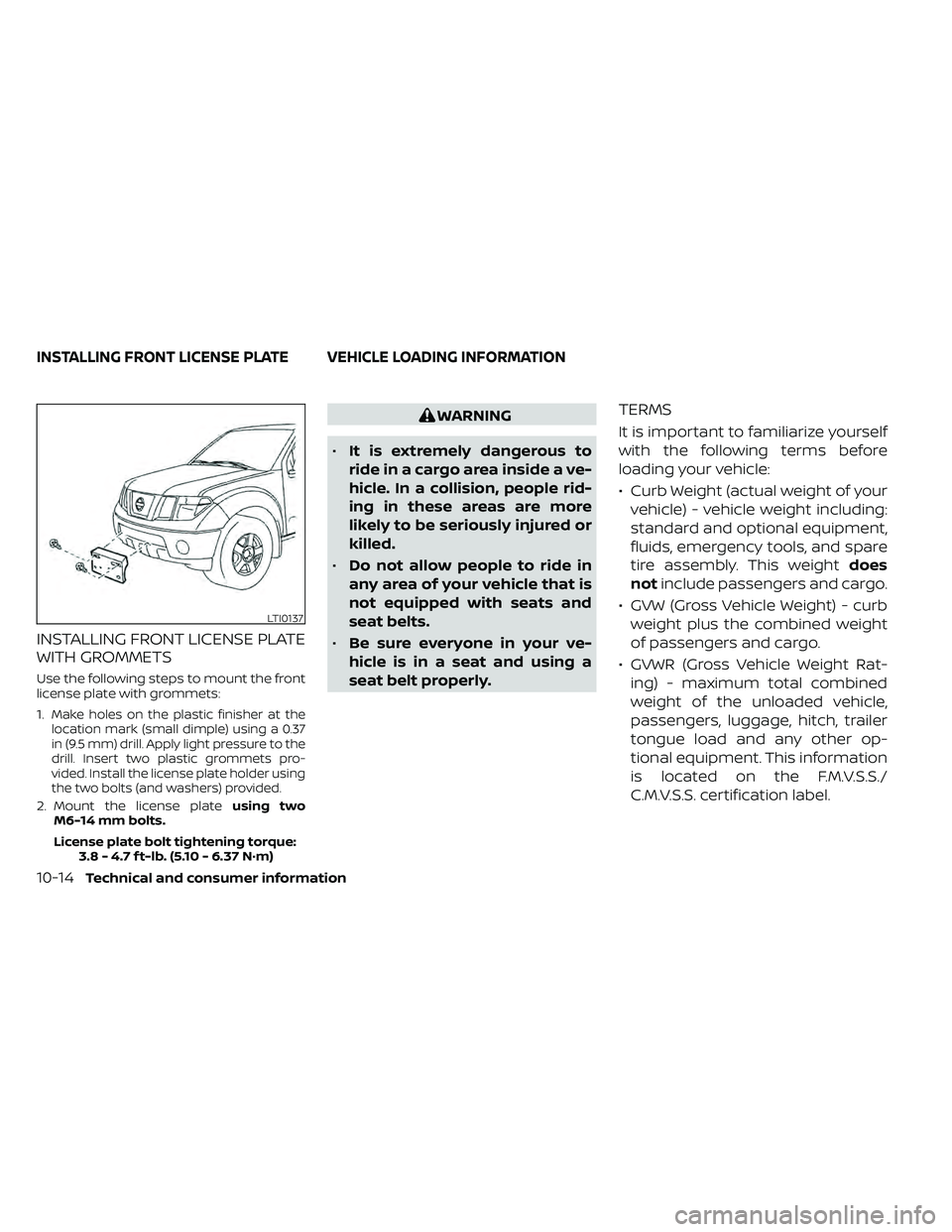
INSTALLING FRONT LICENSE PLATE
WITH GROMMETS
Use the following steps to mount the front
license plate with grommets:
1.
Make holes on the plastic finisher at the
location mark (small dimple) using a 0.37
in (9.5 mm) drill. Apply light pressure to the
drill. Insert two plastic grommets pro-
vided. Install the license plate holder using
the two bolts (and washers) provided.
2. Mount the license plate using two
M6-14 mm bolts.
License plate bolt tightening torque: 3.8 - 4.7 f t-lb. (5.10 - 6.37 N·m)
WARNING
• It is extremely dangerous to
ride in a cargo area inside a ve-
hicle. In a collision, people rid-
ing in these areas are more
likely to be seriously injured or
killed.
• Do not allow people to ride in
any area of your vehicle that is
not equipped with seats and
seat belts.
• Be sure everyone in your ve-
hicle is in a seat and using a
seat belt properly.TERMS
It is important to familiarize yourself
with the following terms before
loading your vehicle:
• Curb Weight (actual weight of your vehicle) - vehicle weight including:
standard and optional equipment,
fluids, emergency tools, and spare
tire assembly. This weight does
not include passengers and cargo.
• GVW (Gross Vehicle Weight) - curb weight plus the combined weight
of passengers and cargo.
• GVWR (Gross Vehicle Weight Rat- ing) - maximum total combined
weight of the unloaded vehicle,
passengers, luggage, hitch, trailer
tongue load and any other op-
tional equipment. This information
is located on the F.M.V.S.S./
C.M.V.S.S. certification label.
LTI0137
INSTALLING FRONT LICENSE PLATE VEHICLE LOADING INFORMATION
10-14Technical and consumer information
Page 467 of 492
Safety chains
Always use suitable safety chains between
your vehicle and the trailer. The safety chains
should be crossed and should be attached
to the hitch, not to the vehicle bumper or
axle. The safety chains can be attached to
the bumper if the hitch ball is mounted to the
bumper. Be sure to leave enough slack in the
chains to permit turning corners.
Trailer lights
CAUTION
When splicing into the vehicle electrical
system, a commercially available
power-type module/converter must
be used to provide power for all trailer
lighting. This unit uses the vehicle bat-
tery as a direct power source for all
trailer lights while using the vehicle tail
light, stop light and turn signal circuits
as a signal source. The module/
converter must draw no more than 15
milliamps from the stop and tail lamp
circuits. Using a module/converter that
exceeds these power requirements
may damage the vehicle's electrical
system. See a reputable trailer dealer
to obtain the proper equipment and to
have it installed. Trailer lights should comply with federal
and/or local regulations. For assistance in
hooking up trailer lights, it is recommended
that you visit a NISSAN dealer or reputable
trailer dealer. Vehicles equipped with the
optional trailer tow package are equipped
with a 7-pin trailer harness connector. A flat
4–pin harness is available from your dealer
for vehicles without a tow package. If your
trailer is equipped with a flat 4-pin connec-
tor, an adapter will be needed to connect
the trailer lights to the vehicle. Adapters are
available at auto parts stores and hitch re-
tailers.
Trailer brakes
If your trailer is equipped with a braking
system, make sure it conforms to federal
and/or local regulations and that it is prop-
erly installed.
Vehicles equipped with a 7–pin trailer har-
ness connector are pre-wired for a trailer
brake controller. It is recommended that
you visit a NISSAN dealer for a trailer brake
adapter harness.
WARNING
Never connect a trailer brake system
directly to the vehicle brake system. When towing a trailer load of 3,500 lbs.
(1587 kg) or more, trailers with a brake
system MUST be used.
However, most
states require a separate braking system
on trailers with a loaded weight above a
specific amount. Make sure the trailer
meets the local regulations and the regu-
lations where you plan to tow.
Several types of braking systems are available.
Surge Brakes -The surge brake actuator is
mounted on the trailer tongue with a hy-
draulic line running to each trailer wheel.
Surge brakes are activated by the trailer
pushing against the hitch ball when the
tow vehicle is braking. Hydraulic surge
brakes are common on rental trailers and
some boat trailers. In this type of system,
there is no hydraulic or electric connection
for brake operation between the tow ve-
hicle and the trailer.
Electric Trailer Brakes -Electric braking
systems are activated by an electronic sig-
nal sent from a trailer brake controller (spe-
cial brake-sensing module). If electric trailer
brakes are used, refer to “Electric trailer
brake controller" in this section.
Have a professional supplier of towing
equipment make sure the trailer brakes are
properly installed and demonstrate proper
brake function testing.
Technical and consumer information10-33
Page 469 of 492
4. Apply the parking brake.
5. Shif t the transmission into P (Park).
6. Make sure the
indicator light (if so
equipped) indicates the transfer case is
in 4H, 4L, or 2H and that the ATP light is
off. If the
indicator light is flashing,
or the ATP light is ON, make sure the
transmission is in P (Park) (A/T) and turn
the 4WD switch to 2WD or 4H. For addi-
tional information, refer to “Automatic
transmission park warning light” in the
“Instruments and controls” section and
“Using 4-wheel drive (4WD)” in the “Start-
ing and driving” section of this manual.
7. Turn off the engine.
To drive away:
1. Start the vehicle.
2. Apply and hold the brake pedal.
3. Shif t the transmission into gear.
4. Release the parking brake.
5. Drive slowly until the vehicle and trailer are clear from the blocks.
6. Apply and hold the brake pedal. 7. Have someone retrieve and store the
blocks.
• While going downhill, the weight of the trailer pushing on the tow vehicle may
decrease overall stability. Therefore, to
maintain adequate control, reduce your
speed and shif t to a lower gear. Avoid
long or repeated use of the brakes when
descending a hill, as this reduces their
effectiveness and could cause overheat-
ing. Shif ting to a lower gear instead pro-
vides “engine braking” and reduces the
need to brake as frequently.
• If the engine coolant temperature rises to a high temperature, refer to “If your ve-
hicle overheats” in the “In case of emer-
gency” section of this manual.
• Trailer towing requires more fuel than normal circumstances.
• Avoid towing a trailer for your vehicle's first 500 miles (805 km).
•
For the first 500 miles (805 km) that you do
tow, do not drive over 50 mph (80 km/h).
• Have your vehicle serviced more of ten than at intervals specified. For additional
information, refer to “Maintenance
Schedules” in the “Maintenance and
schedules” section of this manual. • When making a turn, your trailer wheels
will be closer to the inside of the turn than
your vehicle wheels. To compensate for
this, make a larger than normal turning
radius during the turn.
• Crosswinds and rough roads will ad- versely affect vehicle/trailer handling,
possibly causing vehicle sway. When be-
ing passed by larger vehicles, be pre-
pared for possible changes in crosswinds
that could affect vehicle handling.
Do the following if the trailer begins to
sway:
1. Take your foot off the accelerator pedal to allow the vehicle to coast and steer as
straight ahead as the road conditions
allow. This combination will help stabilize
the vehicle
– Do not correct trailer sway by steering or applying the brakes.
2. When the trailer sway stops, gently apply the brakes and pull to the side of the
road in a safe area.
Technical and consumer information10-35
Page 474 of 492
WARNING
A vehicle equipped with Four-Wheel
Drive (4WD) should never be tested us-
ing a two wheel dynamometer (such as
the dynamometers used by some
states for emissions testing), or similar
equipment. Make sure you inform the
test facility personnel that your vehicle
is equipped with 4WD before it is placed
on a dynamometer. Using the wrong
test equipment may result in transmis-
sion damage or unexpected vehicle
movement which could result in seri-
ous vehicle damage or personal injury.
Due to legal requirements in some states
and Canadian Provinces, your vehicle may
be required to be in what is called the
“ready condition” for an Inspection/
Maintenance (I/M) test of the emission
control system.
The vehicle is set to the “ready condition”
when it is driven through certain driving
patterns. Usually, the ready condition can
be obtained by ordinary usage of the ve-
hicle. If a powertrain system component is re-
paired or the battery is disconnected, the
vehicle may be reset to a “not ready ” condi-
tion. Before taking the I/M test, check the
vehicle's inspection/maintenance test
readiness condition. Place the ignition
switch in the ON position without starting
the engine. If the Malfunction Indicator
Light (MIL) comes on steady for 20 seconds
and then blinks for 10 seconds, the I/M test
condition is “not ready”. If the MIL does not
blink af ter 20 seconds, the I/M test condi-
tion is “ready ”. It is recommended that you
visit a NISSAN dealer to set the “ready con-
dition” or to prepare the vehicle for testing.
This vehicle is equipped with an Event Data
Recorder (EDR). The main purpose of an
EDR is to record, in certain crash or near
crash-like situations, such as an air bag
deployment or hitting a road obstacle, data
that will assist in understanding how a ve-
hicle's systems performed. The EDR is de-
signed to record data related to vehicle dy-
namics and safety systems for a short
period of time, typically 30 seconds or less.
The EDR in this vehicle is designed to re-
cord such data as:
• How various systems in your vehicle were
operating;
• Whether or not the driver and passenger safety belts were buckled/fastened;
• How far (if at all) the driver was depress- ing the accelerator and/or brake pedal;
and,
• How fast the vehicle was traveling.
• Sounds are not recorded.
READINESS FOR INSPECTION/
MAINTENANCE (I/M) TEST EVENT DATA RECORDERS (EDR)
10-40Technical and consumer information
Page 477 of 492
11 Index
4WD warning light..............2-15
A
Active Brake Limited Slip (ABLS)
system.....................5-34Air bag (See supplemental restraint
system).....................1-70Air bag system
Front (See supplemental front impact
air bag system)
..............1-77Air bag warning labels............1-85Air bag warning light.........1-85, 2-20Air bag warning light,
supplemental.............1-85, 2-20Air cleaner housing filter..........8-17Air conditionerAir conditioner operation. . . .4-26, 4-34Air conditioner service..........4-36Air conditioner specification label. .10-13Air conditioner system refrigerant
recommendations............10-8Air conditioner system refrigerant
and oil recommendations.......10-8Heater and air conditioner
controls.................. .4-34Servicing air conditioner........4-36Air flow charts.................4-27Alarm system
(See vehicle security system).......2-25
Anchor point locations...........1-33Antenna....................4-72Anti-lock brake warning light.......2-15Anti-lock Braking System (ABS)......5-33Antifreeze...................5-40Apps......................4-72Audio system.................4-36AM radio reception............4-37AM/FM radio................4-46Auxiliary (AUX) devices operation. . .4-47Bluetooth® audio.............4-66Bluetooth® streaming audio......4-69Compact disc (CD) player........4-54FM radio reception............4-36FM/AM/SAT radio with compact disc (CD)
player................4-44, 4-49iPod® Player............4-60, 4-63iPod® player operation......4-60, 4-63Radio................... .4-36Steering wheel audio control
switch....................4-71USB Connections.............4-56Autolight switch................2-31Automatic
Automatic power window switch. . .2-51Automatic transmission position
indicator light...............2-21Driving with automatic
transmission................5-14Automatic anti-glare inside mirror. . . .3-18Automatic door locks.............3-7
AUX jack................... .4-55
B
Back button..................4-13Battery.................5-40, 8-13Charge warning light...........2-17Battery replacement............8-24Key fob...................8-24NISSAN Intelligent Key®.........8-24Before starting the engine.........5-13Belt (See drive belt)..............8-15Bluetooth® audio...........4-66, 4-69Bluetooth® hands-free phone
system.................... .4-96Bluetooth® connections........4-93Connecting procedure......4-84, 4-99Phone indicators.............4-83Text messaging.........4-89, 4-100Voice commands............4-85Bluetooth® Hands-Free Phone System
without Navigation System........4-79Booster seats.................1-65Brake
Anti-lock Braking System (ABS). . . .5-33Brake fluid..................8-11Brake light (See stop light).......8-28Brake system...............5-32Brake warning light............2-16Brake wear indicators......2-24,8-20
Page 478 of 492
Parking brake operation.........5-19Self-adjusting brakes...........8-20Brake fluid....................8-11Brake system.................5-32Brakes......................8-20Break-in schedule...............5-21Brightness control
Instrument panel.............2-33Brightness/contrast button......4-9, 4-15Bulb check/instrument panel........2-15Bulb replacement...............8-28
C
C.M.V.S.S. certification label.........10-12Capacities and recommended
fuel/lubricants................ .10-2Car phone or CB radio............4-79Cargo
(See vehicle loading information).....10-14Cargo lamp switch..............2-34CD care and cleaning.............4-70CD player (See audio system).......4-54Child restraint with top tether strap. . . .1-32Child restraints.......1-25,1-26,1-28, 1-30Precautions on child
restraints.........1-39, 1-42, 1-54, 1-65Top tether strap anchor point
locations.................. .1-33Child safety rear door lock..........3-7Cleaning exterior and interior......7-2,7-4Clock set/adjustment..........4-7,4-13
Clock setting
(models with Navigation System).....4-13Cold weather driving.............5-40Compact disc (CD) player..........4-54Compass....................2-11Compass and outside temperature
display......................2-10Compass display...............2-10Connect phone................4-72Console box..................2-45Control panel buttons.........4-5, 4-10Back button.................4-13Brightness/contrast button. . . .4-9, 4-15Enter button..............4-5, 4-10Setting button...............4-13With navigation system.......4-10,4-11Controls
Audio controls (steering wheel).....4-71Heater and air conditioner controls. .4-34Heater and air conditioner controls
(manual)...................4-22CoolantCapacities and recommended
fuel/lubricants
...............10-2Changing engine coolant.........8-5Checking engine coolant level......8-5Engine coolant temperature gauge. . .2-7Corrosion protection..............7-7Cruise control.................5-19Cup holders................. .2-46Curtain side-impact and rollover
air bag..................... .1-82
D
Daytime Running Lights (DRL) system. .2-32Defroster switch
Rear window and outside mirror
defroster switch
..............2-29Rear window defroster switch.....2-29Dimensions and weights..........10-10Dimmer switch for instrument panel. . .2-33Display controls (see control panel
buttons)................. .4-5, 4-10Door locks................... .3-4Door open warning light...........2-17Drive belt....................8-15Driving
Cold weather driving...........5-40Driving with automatic
transmission................5-14Precautions when starting and
driving.....................5-2Driving the vehicle...............5-14
E
Economy - fuel.................5-23Electronic locking rear differential (E-Lock)
system.....................5-29Electronic locking rear differential (E-Lock)
system switch................ .2-37Emergency engine shutoff.......5-12,6-3Emission control information label. . . .10-12Emission control system warranty. . . .10-38
11-2
Page 479 of 492
EngineBefore starting the engine........5-13Capacities and recommended
fuel/lubricants...............10-2Changing engine coolant.........8-5Changing engine oil............8-6Changing engine oil filter.........8-6Checking engine coolant level......8-5Checking engine oil level.........8-6Engine coolant temperature gauge. . .2-7Engine cooling system...........8-4Engine oil.................. .8-6Engine oil and oil filter
recommendation.............10-7Engine oil pressure warning light. . . .2-17Engine oil viscosity.............10-7Engine serial number...........10-11Engine specifications...........10-9Engine Block Heater.............5-41Engine coolant temperature gauge. . . .2-7Enter button...............4-5, 4-10Event Data recorders............10-40Exhaust gas (Carbon monoxide)......5-2Explanation of maintenance items.....9-2Explanation of scheduled maintenance
items...................... .9-5Extended storage switch..........8-23Eyeglass case.................2-45
F
First aid kit....................6-2
Flashers
(See hazard warning flasher switch). . . .6-2Flat tire.................. .6-3, 6-4Floor mat positioning aid...........7-6Fluid
Brake fluid..................8-11Capacities and recommended
fuel/lubricants...............10-2Engine coolant................8-4Engine oil.................. .8-6Power steering fluid............8-10Windshield-washer fluid.........8-12Fog light switch................2-33Front air bag system
(See supplemental restraint system). . .1-77Front power seat adjustment........1-5Front seats....................1-2Front-door pocket..............2-40Fuel
Capacities and recommended
fuel/lubricants
...............10-2Fuel economy................5-23Fuel gauge................. .2-8Fuel octane rating.............10-6Fuel recommendation..........10-4Fuel-filler cap................3-13Fuel-filler lid.................3-13Loose fuel cap warning..........2-6Fuel efficient driving tips...........5-21Fuel gauge................... .2-8Fuel-filler door.................3-13Fuses......................8-20Fusible links..................8-22
G
Garage door opener, HomeLink® Universal
Transceiver............2-56, 2-58, 2-59Gas cap.....................3-13Gauge
Engine coolant temperature gauge. . .2-7Fuel gauge................. .2-8Odometer.................. .2-5Speedometer................2-5Tachometer..................2-7Trip computer................2-9Trip odometer................2-5General maintenance.............9-2Glove box................... .2-44
H
Hands-free phone system, Bluetooth®. .4-96Hazard warning flasher switch........6-2Head restraints.................1-10Headlight and turn signal switch.....2-30Headlight control switch...........2-30Headlights...................8-26Heated seat switches............2-35Heater
Heater and air conditioner controls. .4-34Heater operation..........4-25, 4-35Hill descent control switch.........2-36Hill descent control system.........5-37Hill start assist system............5-38HomeLink® Universal
Transceiver............2-56, 2-58, 2-59
11-3
Page 480 of 492
Hood release..................3-13Horn.......................2-34
I
Ignition switch
Push-button ignition switch.......5-10Immobilizer system..........2-27,5-13In-cabin microfilter..............8-17Increasing fuel economy..........5-23IndicatorNISSAN Intelligent Key® battery
discharge indicator
............5-12Indicator lights and audible reminders
(See warning/indicator lights and audible
reminders)
...................2-21Inside automatic anti-glare mirror.....3-18Instrument brightness control.......2-33Instrument panel.............0-6, 2-2Instrument panel dimmer switch.....2-33Intelligent Key systemMechanical key................3-3Remote keyless entry operation.....3-9Troubleshooting guide..........3-12Warning signals...............3-12Interior light................. .2-54iPod® Player...............4-60, 4-63
J
Jump seat.....................1-7Jump starting..............6-11,8-14
K
Key.........................3-2Key fob battery replacement........8-24Keyless entry
With Intelligent Key system
(See Intelligent Key system)
........3-9KeysNISSAN Intelligent Key®........3-2,3-8NISSAN Vehicle Immobilizer System
keys..................... .3-4
L
Labels
Air conditioner specification label. . .10-13C.M.V.S.S. certification label.......10-12Emission control information label. .10-12Engine serial number...........10-11Tire and Loading Information label. .10-13Vehicle identification number (VIN). .10-11Vehicle identification number (VIN)
plate.................... .10-11Warning labels (for SRS)..........1-85Launch bar menu...............4-9License plate
Installing the license plate........10-14LightAir bag warning light........1-85, 2-20Brake light (See stop light)........8-28Bulb check/instrument panel......2-15Bulb replacement.............8-28
Charge warning light...........2-17Exterior and Interior lights........8-28Fog light switch..............2-33Fog lights..................8-27Headlight and turn signal switch. . . .2-30Headlight control switch.........2-30Headlights..................8-26Interior light................ .2-54Light bulbs.................8-26Low tire pressure warning light.....2-18Low windshield-washer fluid
warning light................2-19Passenger air bag and status light. . .1-79Security indicator light..........2-23Warning/indicator lights and audible
reminders..................2-21Lights......................8-26Map lights................. .2-55Lock
Child safety rear door lock.........3-7Door locks................. .3-4Power door locks...........3-5, 3-6Loose fuel cap warning............2-6Low fuel warning light............2-18Low tire pressure warning light.......2-18Low windshield-washer fluid
warning light..................2-19Luggage (See vehicle loading
information)..................10-14Luggage rack (see roof rack)........2-48
11-4
Page 482 of 492
R
RadioCar phone or CB radio..........4-79FM/AM/SAT radio with compact disc (CD)
player................ .4-44, 4-49Steering wheel audio control switch. .4-71Readiness for inspection maintenance (I/M)
test...................... .10-40Rear power windows.............2-51Rear seat.....................1-6Rear sliding window.............2-52Rear Sonar System (RSS)..........5-39Rear sonar system OFF switch.......2-38Rear window and outside mirror
defroster switch................2-29Rear window defroster switch.......2-29Rearview mirror................3-17RearView Monitor...............4-16Recommended Fluids............10-2Recorders
Event Data................ .10-40Refrigerant recommendation.......10-8Registering a vehicle in another
country.................... .10-11Reporting safety defects (US only). . . .10-39Roof rack....................2-48
S
Safety
Child safety rear door lock.........3-7Child seat belts. .1-28, 1-39, 1-42, 1-54, 1-65
Reporting safety defects (US only). .10-39SeatJump seat...................1-7Seat adjustmentFront manual seat adjustment......1-3Front power seat adjustment.......1-5Seat beltChild safety.................1-25Infants and small children........1-26Injured person................1-18Larger children...............1-26Precautions on seat belt usage.....1-15Pregnant women..............1-18Seat belt extenders............1-24Seat belt maintenance..........1-24Seat belts................1-15,7-6Shoulder belt height adjustment. . . .1-24Three-point type with retractor.....1-19Seat belt extenders..............1-24Seat belt warning light.........1-18,2-20Seatback pockets...............2-41SeatsAdjustment..................1-2Front seats..................1-2Manual front seat adjustment......1-3Rear seat.................. .1-6Security indicator light............2-23Security system
(NISSAN Vehicle Immobilizer System),
engine start
...............2-27,5-13Security systems
Vehicle security system.........2-25Self-adjusting brakes.............8-20Service manual order form.........10-41
Servicing air conditioner...........4-36Setting button.................4-13Shif tingAutomatic transmission.........5-15Shoulder belt height adjustment......1-24Side air bag system (See supplemental
side air bag, curtain and rollover air bag
systems)
................... .1-82Siri® Eyes-Free..............4-73,4-76Smartphone connectivity..........4-72Sonar
Rear system................5-39Spark plug replacement...........8-16Spark plugs...................8-16Specifications................ .10-9Speedometer................. .2-5Speedometer and odometer........2-4SRS warning label...............1-85Stability control................5-35Standard maintenance.........9-7,9-8Starting
Before starting the engine........5-13Jump starting.............6-11,8-14Precautions when starting and
driving.....................5-2Push starting................6-13Starting the engine
(gasoline engine only)............5-13SteeringPower steering fluid............8-10Power steering system..........5-32Tilting steering wheel...........3-16Steering wheel.................3-16Steering wheel audio control switch. . . .4-71
11-6