child lock NISSAN FRONTIER 2020 Owner´s Manual
[x] Cancel search | Manufacturer: NISSAN, Model Year: 2020, Model line: FRONTIER, Model: NISSAN FRONTIER 2020Pages: 492, PDF Size: 3.05 MB
Page 76 of 492
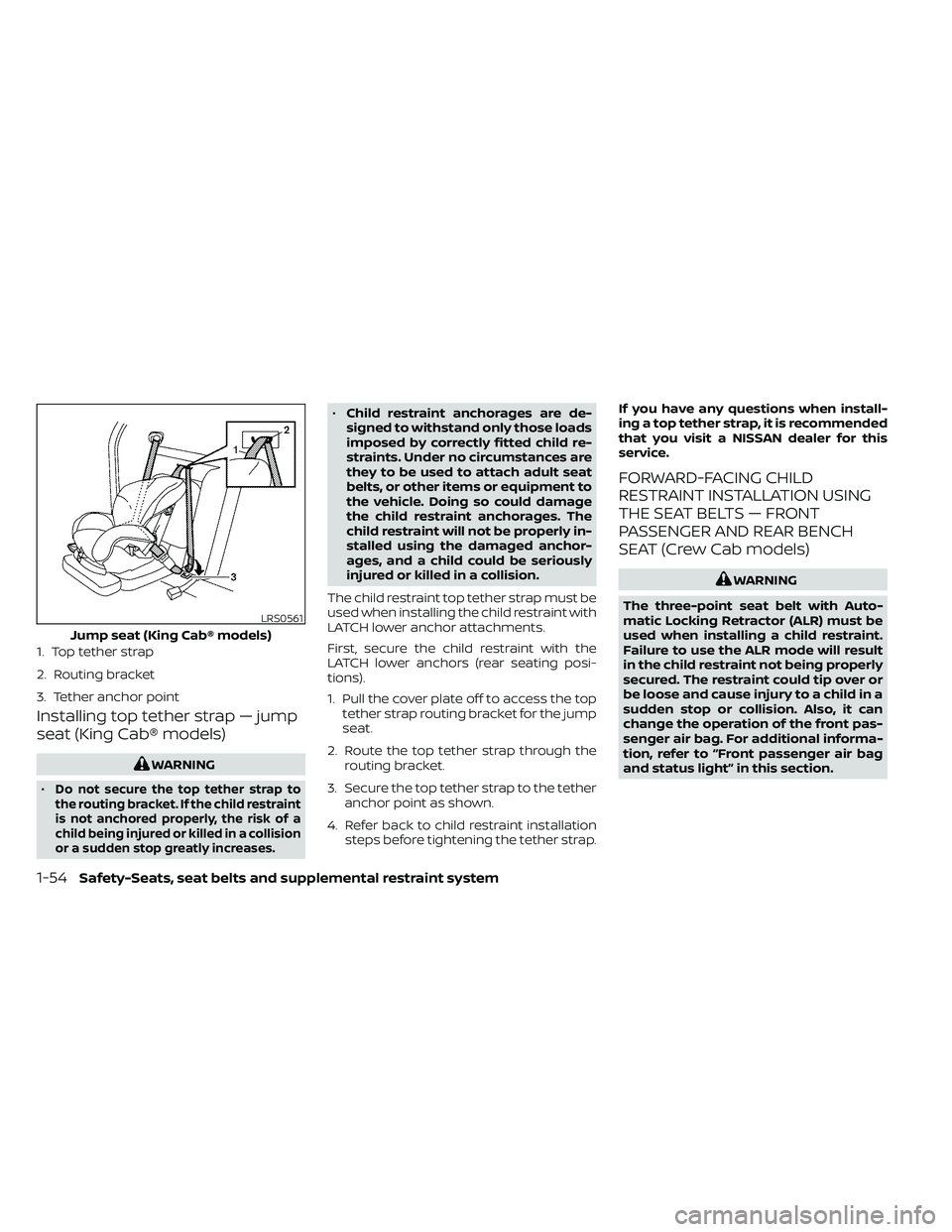
Installing top tether strap — jump
seat (King Cab® models)
WARNING
•
Do not secure the top tether strap to
the routing bracket. If the child restraint
is not anchored properly, the risk of a
child being injured or killed in a collision
or a sudden stop greatly increases.
• Child restraint anchorages are de-
signed to withstand only those loads
imposed by correctly fitted child re-
straints. Under no circumstances are
they to be used to attach adult seat
belts, or other items or equipment to
the vehicle. Doing so could damage
the child restraint anchorages. The
child restraint will not be properly in-
stalled using the damaged anchor-
ages, and a child could be seriously
injured or killed in a collision.
The child restraint top tether strap must be
used when installing the child restraint with
LATCH lower anchor attachments.
First, secure the child restraint with the
LATCH lower anchors (rear seating posi-
tions).
1. Pull the cover plate off to access the top tether strap routing bracket for the jump
seat.
2. Route the top tether strap through the routing bracket.
3. Secure the top tether strap to the tether anchor point as shown.
4. Refer back to child restraint installation steps before tightening the tether strap. If you have any questions when install-
ing a top tether strap, it is recommended
that you visit a NISSAN dealer for this
service.
FORWARD-FACING CHILD
RESTRAINT INSTALLATION USING
THE SEAT BELTS — FRONT
PASSENGER AND REAR BENCH
SEAT (Crew Cab models)
WARNING
The three-point seat belt with Auto-
matic Locking Retractor (ALR) must be
used when installing a child restraint.
Failure to use the ALR mode will result
in the child restraint not being properly
secured. The restraint could tip over or
be loose and cause injury to a child in a
sudden stop or collision. Also, it can
change the operation of the front pas-
senger air bag. For additional informa-
tion, refer to “Front passenger air bag
and status light” in this section.
LRS0561
Jump seat (King Cab® models)
1. Top tether strap
2. Routing bracket
3. Tether anchor point
1-54Safety-Seats, seat belts and supplemental restraint system
Page 79 of 492
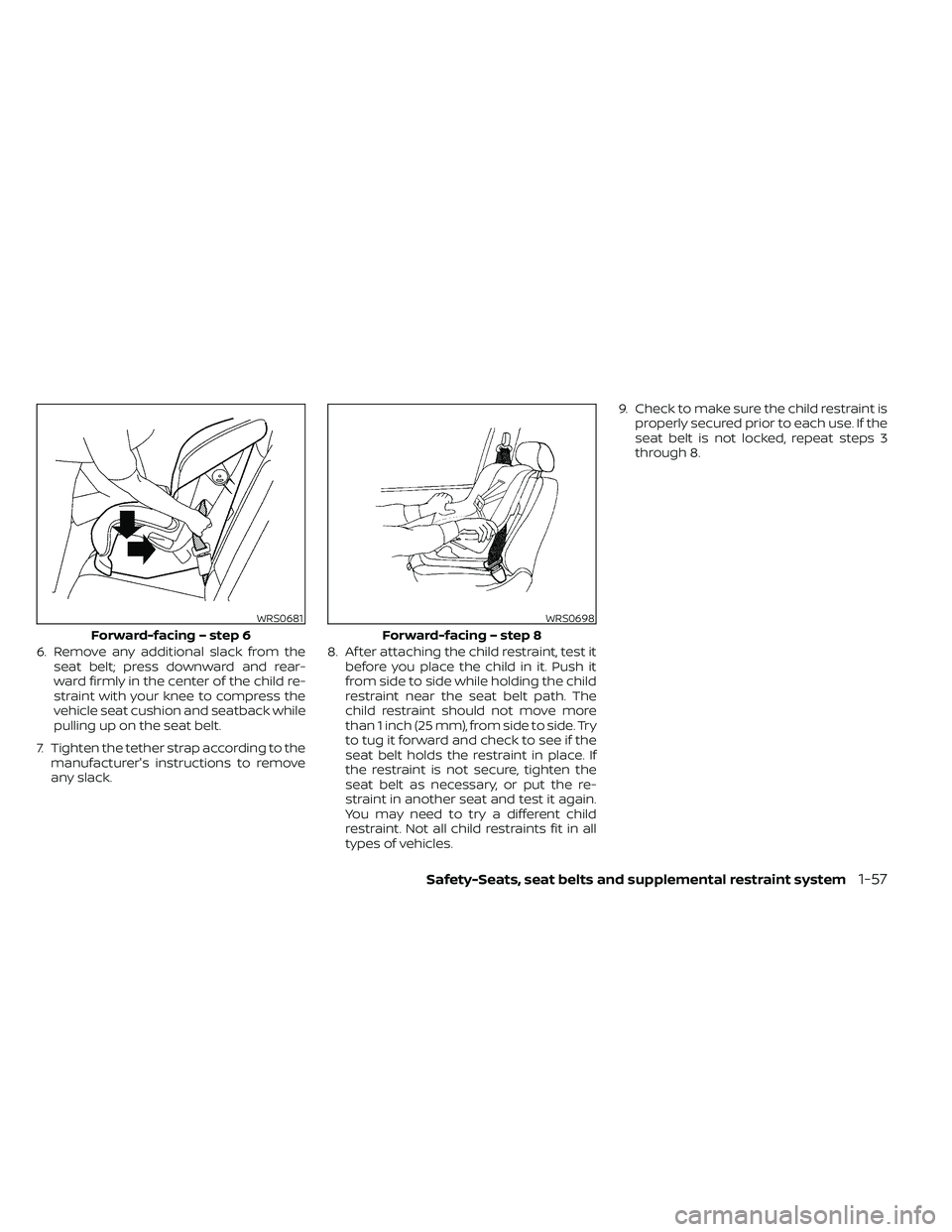
6. Remove any additional slack from theseat belt; press downward and rear-
ward firmly in the center of the child re-
straint with your knee to compress the
vehicle seat cushion and seatback while
pulling up on the seat belt.
7. Tighten the tether strap according to the manufacturer's instructions to remove
any slack. 8. Af ter attaching the child restraint, test it
before you place the child in it. Push it
from side to side while holding the child
restraint near the seat belt path. The
child restraint should not move more
than 1 inch (25 mm), from side to side. Try
to tug it forward and check to see if the
seat belt holds the restraint in place. If
the restraint is not secure, tighten the
seat belt as necessary, or put the re-
straint in another seat and test it again.
You may need to try a different child
restraint. Not all child restraints fit in all
types of vehicles. 9. Check to make sure the child restraint is
properly secured prior to each use. If the
seat belt is not locked, repeat steps 3
through 8.
WRS0681
Forward-facing – step 6
WRS0698
Forward-facing – step 8
Safety-Seats, seat belts and supplemental restraint system1-57
Page 81 of 492
a secure place. Be sure to reinstall the
head restraint/headrest when the child
restraint is removed.For additional in-
formation, refer to “Head restraints/
headrests” in this section.
2. Position the top tether strap as shown.
3. Secure the tether strap to the tether an- chor point as shown.
4. Return the seatback to the locked position.
5. Refer back to child restraint installation steps before tightening the tether strap.
If you have any questions when install-
ing a top tether strap, it is recommended
that you visit a NISSAN dealer for this
service.
FORWARD-FACING CHILD
RESTRAINT INSTALLATION USING
THE SEAT BELTS — FRONT
PASSENGER AND JUMP SEATS
(King Cab® models)
WARNING
• The three-point seat belt with Auto-
matic Locking Retractor (ALR) must
be used when installing a child re-
straint. Failure to use the ALR mode
will result in the child restraint not
being properly secured. The restraint
could tip over or be loose and cause injury to a child in a sudden stop or
collision. Also, it can change the op-
eration of the front passenger air
bag. For additional information, refer
to “Front passenger air bag and sta-
tus light” in this section.
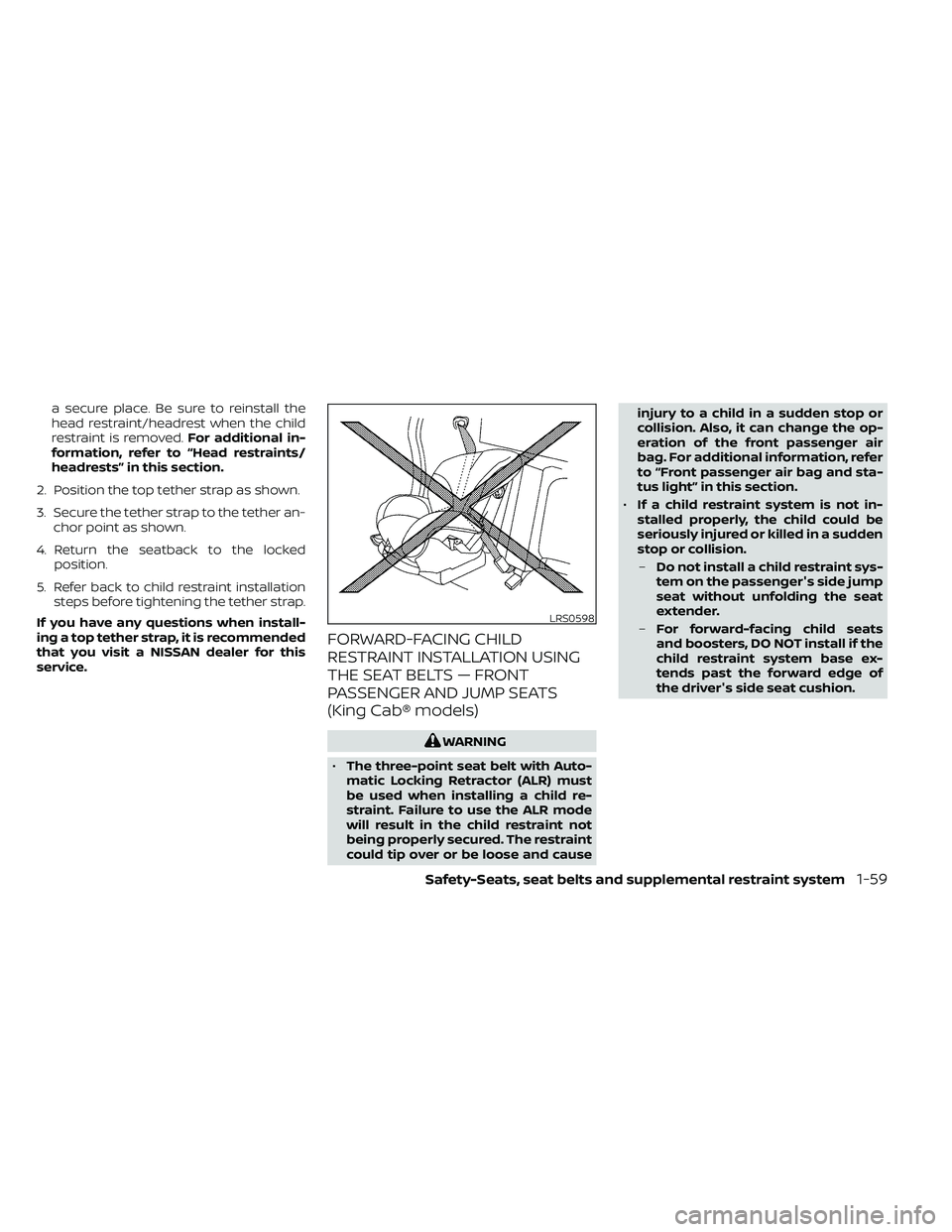
• If a child restraint system is not in-
stalled properly, the child could be
seriously injured or killed in a sudden
stop or collision.
– Do not install a child restraint sys-
tem on the passenger's side jump
seat without unfolding the seat
extender.
– For forward-facing child seats
and boosters, DO NOT install if the
child restraint system base ex-
tends past the forward edge of
the driver's side seat cushion.
LRS0598
Safety-Seats, seat belts and supplemental restraint system1-59
Page 85 of 492
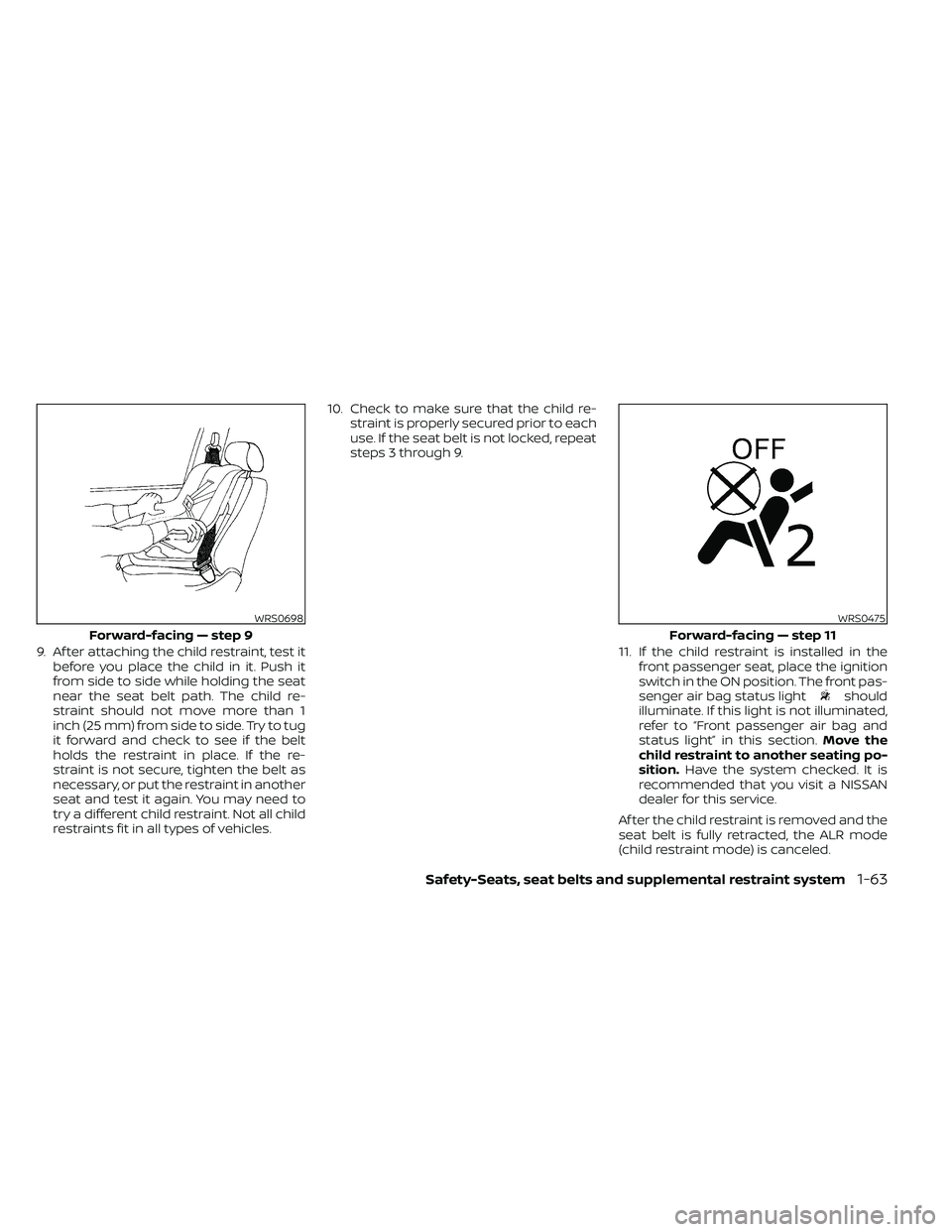
9. Af ter attaching the child restraint, test itbefore you place the child in it. Push it
from side to side while holding the seat
near the seat belt path. The child re-
straint should not move more than 1
inch (25 mm) from side to side. Try to tug
it forward and check to see if the belt
holds the restraint in place. If the re-
straint is not secure, tighten the belt as
necessary, or put the restraint in another
seat and test it again. You may need to
try a different child restraint. Not all child
restraints fit in all types of vehicles. 10. Check to make sure that the child re-
straint is properly secured prior to each
use. If the seat belt is not locked, repeat
steps 3 through 9.
11. If the child restraint is installed in thefront passenger seat, place the ignition
switch in the ON position. The front pas-
senger air bag status light
should
illuminate. If this light is not illuminated,
refer to “Front passenger air bag and
status light” in this section. Move the
child restraint to another seating po-
sition. Have the system checked. It is
recommended that you visit a NISSAN
dealer for this service.
Af ter the child restraint is removed and the
seat belt is fully retracted, the ALR mode
(child restraint mode) is canceled.
WRS0698
Forward-facing — step 9
WRS0475
Forward-facing — step 11
Safety-Seats, seat belts and supplemental restraint system1-63
Page 89 of 492
Booster seat installation — front
passenger seat (all models) and
rear seat (Crew Cab models)
WARNING
To avoid injury to child, do not use the
lap/shoulder belt in the Automatic
Locking Retractor (ALR) mode when us-
ing a booster seat with the seat belts.
For additional information, refer to all Warn-
ings and Cautions in the “Child safety”,
“Child restraints” and “Booster seats” sec-
tions of this manual before installing a child
restraint.
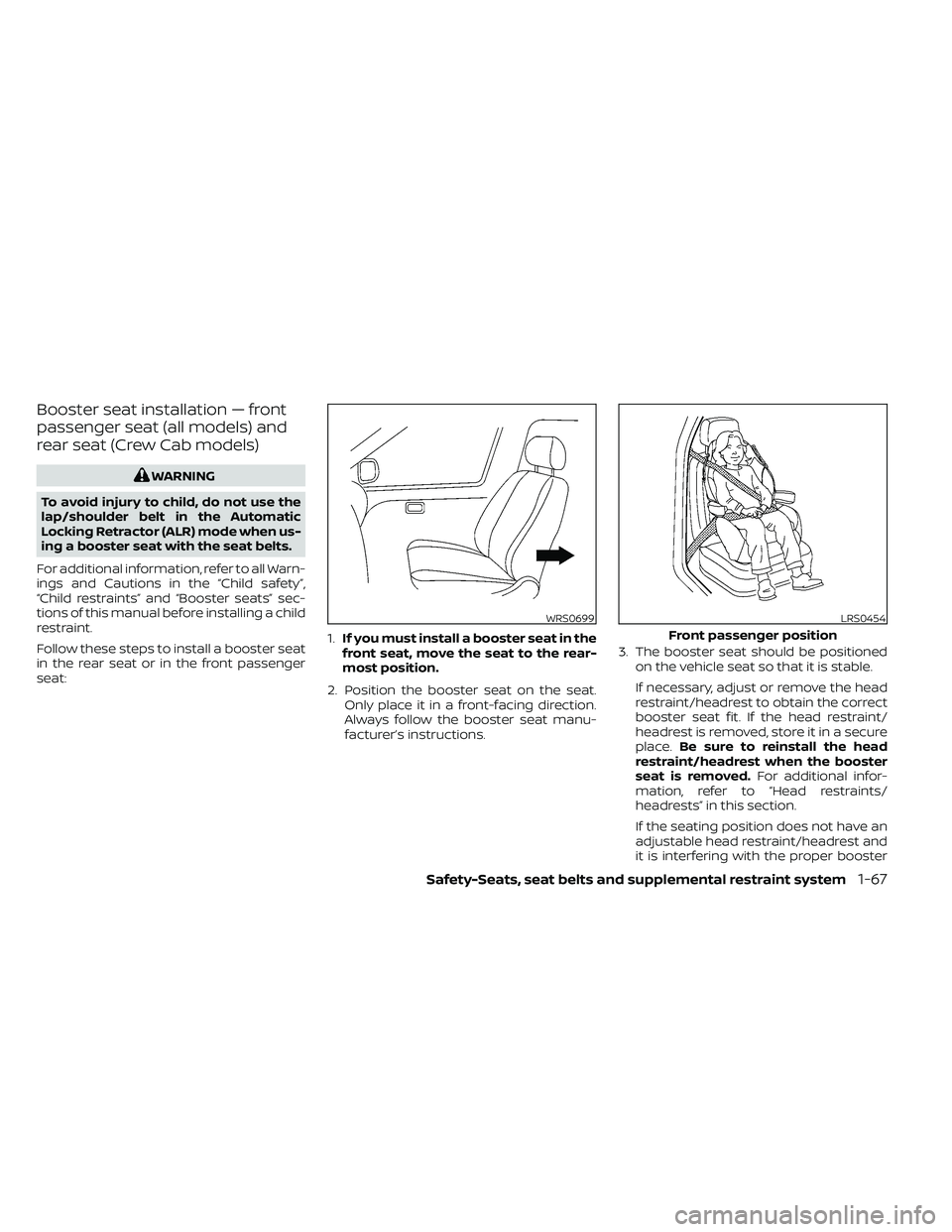
Follow these steps to install a booster seat
in the rear seat or in the front passenger
seat: 1.
If you must install a booster seat in the
front seat, move the seat to the rear-
most position.
2. Position the booster seat on the seat. Only place it in a front-facing direction.
Always follow the booster seat manu-
facturer’s instructions. 3. The booster seat should be positioned
on the vehicle seat so that it is stable.
If necessary, adjust or remove the head
restraint/headrest to obtain the correct
booster seat fit. If the head restraint/
headrest is removed, store it in a secure
place. Be sure to reinstall the head
restraint/headrest when the booster
seat is removed. For additional infor-
mation, refer to “Head restraints/
headrests” in this section.
If the seating position does not have an
adjustable head restraint/headrest and
it is interfering with the proper booster
WRS0699LRS0454
Front passenger position
Safety-Seats, seat belts and supplemental restraint system1-67
Page 90 of 492
seat fit, try another seating position or a
different booster seat.
4. Position the lap portion of the seat belt low and snug on the child’s hips. Be sure
to follow the booster seat manufactur-
er’s instructions for adjusting the seat
belt routing.
5. Pull the shoulder belt portion of the seat belt toward the retractor to take up ex-
tra slack. Be sure the shoulder belt is
positioned across the top, middle por-
tion of the child’s shoulder. Be sure to
follow the booster seat manufacturer’s
instructions for adjusting the seat belt
routing.
6. Follow the warnings, cautions and in- structions for properly fastening a seat
belt shown in “Three-point type seat belt
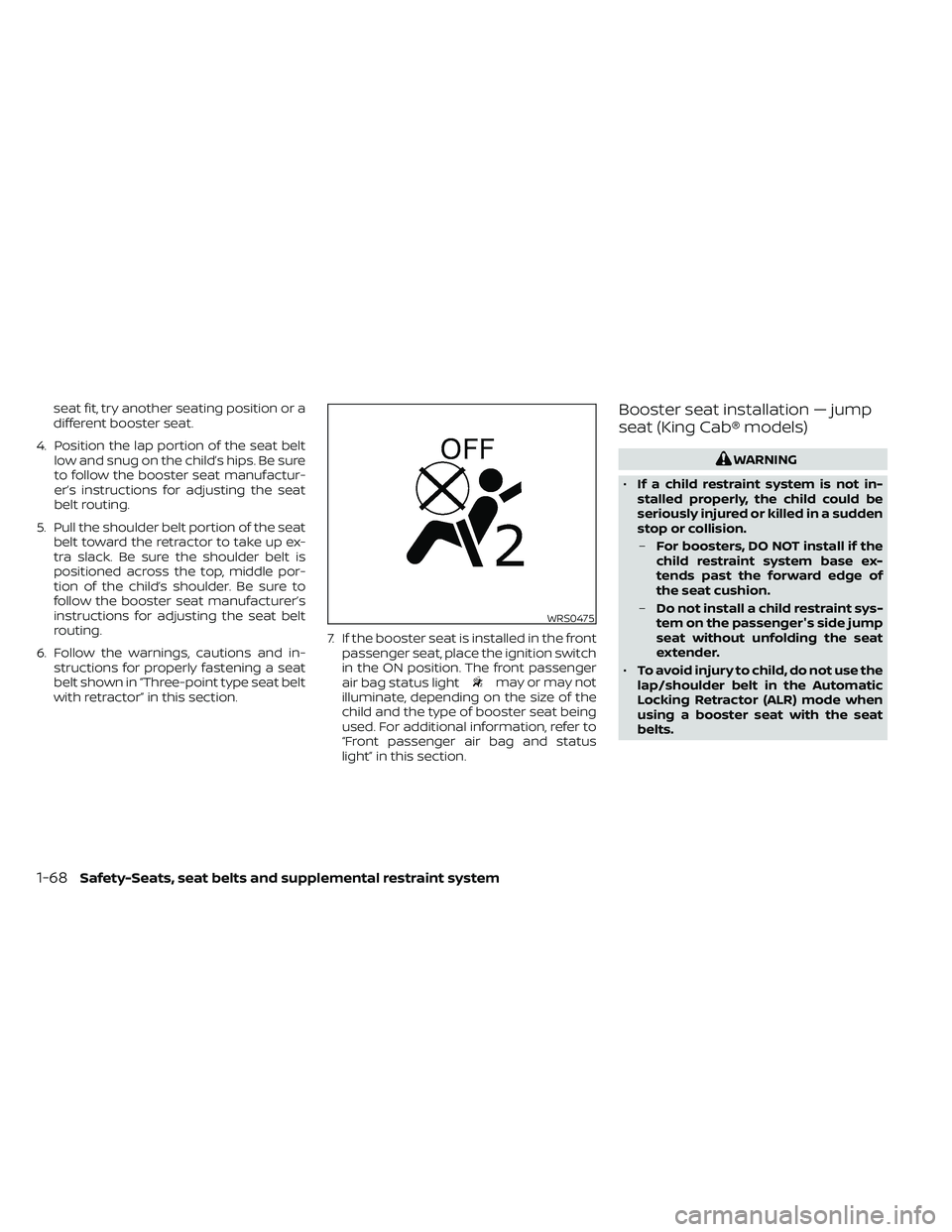
with retractor” in this section. 7. If the booster seat is installed in the front
passenger seat, place the ignition switch
in the ON position. The front passenger
air bag status light
may or may not
illuminate, depending on the size of the
child and the type of booster seat being
used. For additional information, refer to
“Front passenger air bag and status
light” in this section.
Booster seat installation — jump
seat (King Cab® models)
WARNING
• If a child restraint system is not in-
stalled properly, the child could be
seriously injured or killed in a sudden
stop or collision.
– For boosters, DO NOT install if the
child restraint system base ex-
tends past the forward edge of
the seat cushion.
– Do not install a child restraint sys-
tem on the passenger's side jump
seat without unfolding the seat
extender.
• To avoid injury to child, do not use the
lap/shoulder belt in the Automatic
Locking Retractor (ALR) mode when
using a booster seat with the seat
belts.
WRS0475
1-68Safety-Seats, seat belts and supplemental restraint system
Page 102 of 492
Front passenger air bag
The front passenger air bag is designed to
automatically turn OFF when the vehicle is
operated under some conditions as de-
scribed below in accordance with U.S. regu-
lations. If the front passenger air bag is OFF
it will not inflate in a crash. The driver air bag
and other air bags in your vehicle are not
part of this system.
The purpose of the regulation is to help
reduce the risk of injury or death from an
inflating air bag to certain front passenger
seat occupants, such as children, by requir-
ing the air bag to be automatically turned
OFF. Certain sensors are used to meet the
requirements.
One sensor used is the occupant classifi-
cation sensor (pressure sensor). It is in the
bottom of the front passenger seat cush-
ion and is designed to detect an occupant
and objects on the seat by weight. It works
together with seat belt sensors described
in this section. For example, if a child is in
the front passenger seat, the NISSAN Ad-
vanced Air Bag System is designed to turn
the front passenger air bag OFF in accor-
dance with the regulations. Also, if a child
restraint of the type specified in the regula-
tions is on the seat, its weight and the
child’s weight can be detected and causethe air bag to turn OFF. Occupant classifi-
cation sensor operation can vary depend-
ing on the front passenger seat belt sen-
sors.
The front passenger seat belt sensors are
designed to detect if the seat belt is buck-
led and the amount of tension on the seat
belt, such as when it is in the Automatic
Locking Retractor (ALR) mode (child re-
straint mode). Based on the weight on the
seat detected by the occupant classifica-
tion sensor and the belt tension detected
on the seat belt, the NISSAN Advanced Air
Bag System determines whether the front
passenger air bag should be automatically
turned OFF as required by the regulations.
Front passenger seat adult occupants who
are properly seated and using the seat belt
as outlined in this manual should not
cause the front passenger air bag to be
automatically turned OFF. For small adults
it may be turned OFF, however, if the occu-
pant does not sit in the seat properly (for
example, by not sitting upright, by sitting on
an edge of the seat, or by otherwise being
out of position), this could cause the sensor
to turn the air bag OFF. In addition, if the
occupant improperly uses the seat belt in
the ALR mode, this could cause the air bag
to be turned OFF. Always be sure to be
seated and wearing the seat belt properly
for the most effective protection by the
seat belt and supplemental air bag.
NISSAN recommends that pre-teens and
children be properly restrained in a rear
seat. NISSAN also recommends that ap-
propriate child restraints and booster
seats be properly installed in a rear seat. If
this is not possible, the occupant classifica-
tion sensor and seat belt sensors are de-
signed to operate as described above to
turn the front passenger air bag OFF for
specified child restraints as required by the
regulations. Failing to properly secure child
restraints and to use the ALR mode may
allow the restraint to tip or move in a colli-
sion or sudden stop. This can also result in
the passenger air bag inflating in a crash
instead of being OFF. For additional infor-
mation, refer to “Child restraints” in this sec-
tion.
If the front passenger seat is not occupied,
the front passenger air bag is designed not
to inflate in a crash. However, heavy objects
placed on the seat could result in air bag
inflation, because of the object’s weight de-
tected by the occupant classification sen-
sor. Other conditions could also result in air
bag inflation, such as if a child is standing
on the seat, or if two children are on the
1-80Safety-Seats, seat belts and supplemental restraint system
Page 160 of 492
POWER WINDOWS (if so equipped)
WARNING
• Make sure that all passengers have
their hands, etc., inside the vehicle
while it is in motion and before clos-
ing the windows. Use the window
lock switch to prevent unexpected
use of the power windows.
• To help avoid risk of injury or death
through unintended operation of the
vehicle and/or its systems, including
entrapment in windows or inadver-
tent door lock activation, do not
leave children, people who require
the assistance of others or pets unat-
tended in your vehicle. Additionally,
the temperature inside a closed ve-
hicle on a warm day can quickly be-
come high enough to cause a signifi-
cant risk of injury or death to people
and pets.
The power windows operate when the ig-
nition switch is placed in the ON position or
for a period of time af ter the ignition switch
is placed in the ACC or OFF position. If the
driver's or passenger's door is opened dur-
ing this period of time, the power to the
windows is canceled.
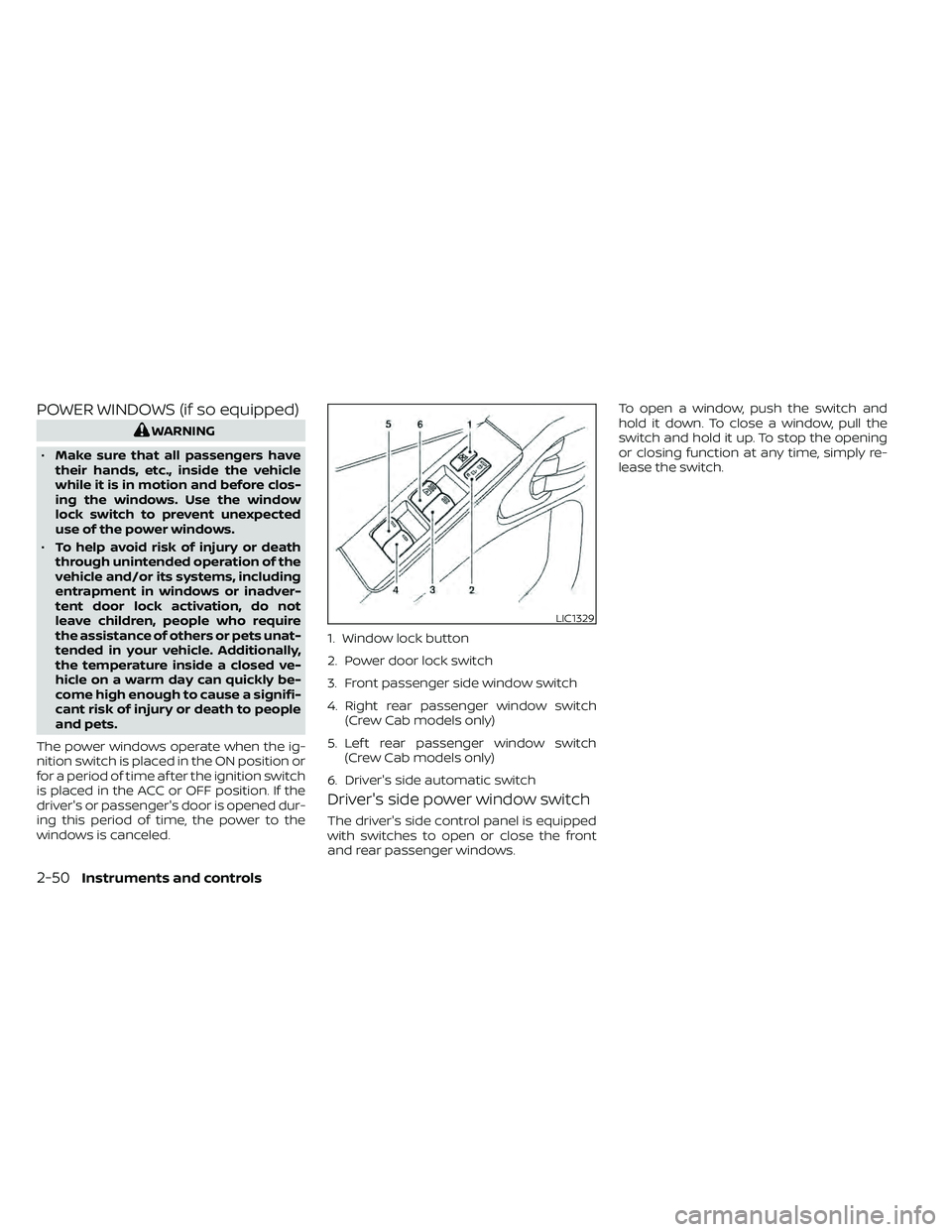
Driver's side power window switch
The driver's side control panel is equipped
with switches to open or close the front
and rear passenger windows. To open a window, push the switch and
hold it down. To close a window, pull the
switch and hold it up. To stop the opening
or closing function at any time, simply re-
lease the switch.
LIC1329
1. Window lock button
2. Power door lock switch
3. Front passenger side window switch
4. Right rear passenger window switch
(Crew Cab models only)
5. Lef t rear passenger window switch (Crew Cab models only)
6. Driver's side automatic switch
2-50Instruments and controls
Page 171 of 492
3 Pre-driving checks and adjustments
Keys.............................................3-2NISSAN Intelligent Key® .......................3-2
NISSAN Vehicle Immobilizer System
keys..........................................3-4
Doors ...........................................3-4
Locking with key .............................3-5
Locking with inside lock knob ................3-5
Locking with power door lock switch .........3-6
Rear doors (King Cab® models) ...............3-6
Automatic door locks ........................ 3-7
Child safety rear door lock
(if so equipped) ............................... 3-7
NISSAN Intelligent Key® ..........................3-8
How to use the remote keyless entry
function ......................................3-9
Warning signals .............................. 3-11
Troubleshooting guide ......................3-12Hood
........................................... 3-13
Fuel-filler door .................................. 3-13
Fuel-filler cap ................................ 3-13
Steering wheel ................................. 3-16
Tilt operation ................................ 3-16
Sun visors ...................................... 3-16
Vanity mirrors (if so equipped) ...............3-17
Mirrors ......................................... 3-17
Manual anti-glare rearview mirror
(if so equipped) .............................. 3-17
Automatic anti-glare rearview mirror ........3-18
Outside mirrors ............................. 3-19
Truck box ...................................... 3-20
Tailgate ..................................... 3-20
Bed extender (if so equipped) ...............3-24
Tie down hooks (if so equipped) .............3-25
Page 174 of 492
NISSAN VEHICLE IMMOBILIZER
SYSTEM KEYS
You can only drive your vehicle using the
Intelligent Keys which are registered to the
NISSAN Vehicle Immobilizer System com-
ponents in your vehicle.
The mechanical key can be used for all the
locks.
Never leave the keys in the vehicle.
Additional or replacement keys:
If you still have a key, the key number is not
necessary when you need extra NISSAN Ve-
hicle Immobilizer System keys. Your existing
key can be duplicated without knowing the
key number. As many as four NISSAN Vehicle
Immobilizer System keys can be used with
one vehicle. You should bring all NISSAN Ve-
hicle Immobilizer System keys that you have
to the NISSAN dealer for registration. This is
because the registration process will erase
the memory of all key codes previously reg-
istered into the NISSAN Vehicle Immobilizer
System. Af ter the registration process, these
components will only recognize keys coded
into the NISSAN Vehicle Immobilizer System
during registration. Any key that is not given
to the dealer at the time of registration will
no longer be able to start your vehicle.
CAUTION
Do not allow the immobilizer system
key, which contains an electrical tran-
sponder, to come into contact with wa-
ter or salt water. This could affect sys-
tem function. When the doors are locked using one of the
following methods, the doors cannot be
opened using the inside or outside door
handles. The doors must be unlocked to
open the doors.
WARNING
• Always have the doors locked while
driving. Along with the use of seat
belts, this provides greater safety in
the event of an accident by helping to
prevent persons from being thrown
from the vehicle. This also helps keep
children and others from uninten-
tionally opening the doors, and will
help keep out intruders.
• Before opening any door, always look
for and avoid oncoming traffic.
•
To help avoid risk of injury or death
through unintended operation of the
vehicle and/or its systems, including
entrapment in windows or inadver-
tent door lock activation, do not leave
children, people who require the assis-
tance of others or pets unattended in
your vehicle. Additionally, the tem-
perature inside a closed vehicle on a
warm day can quickly become high
enough to cause a significant risk of
injury or death to people and pets.
DOORS
3-4Pre-driving checks and adjustments