lock NISSAN FRONTIER 2020 Owner´s Manual
[x] Cancel search | Manufacturer: NISSAN, Model Year: 2020, Model line: FRONTIER, Model: NISSAN FRONTIER 2020Pages: 492, PDF Size: 3.05 MB
Page 318 of 492
•Always use tires of the same type,
size, brand, construction (bias, bias-
belted, or radial), and tread pattern
on all four wheels. Install tire chains
on the rear wheels when driving on
slippery roads and drive carefully.
• Be sure to check the brakes immedi-
ately af ter driving in mud or water.
For additional information, refer to
“Wet brakes” in this section.
• Avoid parking your vehicle on steep
hills. If you get out of the vehicle and
it rolls forward, backward or side-
ways, you could be injured.
• Whenever you drive off-road through
sand, mud or water as deep as the
wheel hub, more frequent mainte-
nance may be required. For addi-
tional information, refer to “Mainte-
nance under severe operating
conditions” in the “Maintenance and
schedules” section of this manual.
WARNING
Do not operate the push-button igni-
tion switch while driving the vehicle ex-
cept in an emergency. (The engine will
stop when the ignition switch is pushed
three consecutive times in quick suc-
cession or the ignition switch is pushed
and held for more than 2 seconds.) If
the engine stops while the vehicle is
being driven, this could lead to a crash
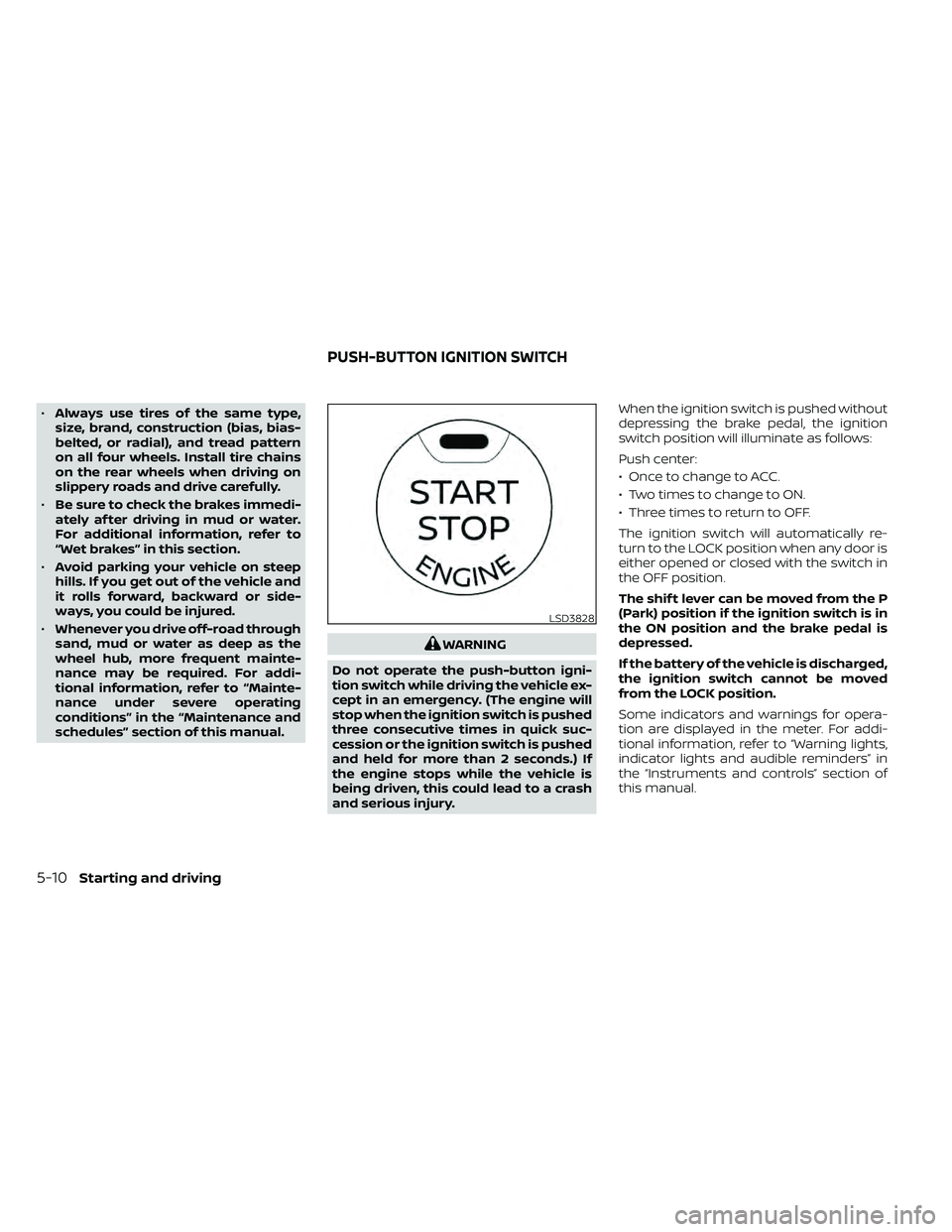
and serious injury. When the ignition switch is pushed without
depressing the brake pedal, the ignition
switch position will illuminate as follows:
Push center:
• Once to change to ACC.
• Two times to change to ON.
• Three times to return to OFF.
The ignition switch will automatically re-
turn to the LOCK position when any door is
either opened or closed with the switch in
the OFF position.
The shif t lever can be moved from the P
(Park) position if the ignition switch is in
the ON position and the brake pedal is
depressed.
If the battery of the vehicle is discharged,
the ignition switch cannot be moved
from the LOCK position.
Some indicators and warnings for opera-
tion are displayed in the meter. For addi-
tional information, refer to “Warning lights,
indicator lights and audible reminders” in
the “Instruments and controls” section of
this manual.
LSD3828
PUSH-BUTTON IGNITION SWITCH
5-10Starting and driving
Page 319 of 492
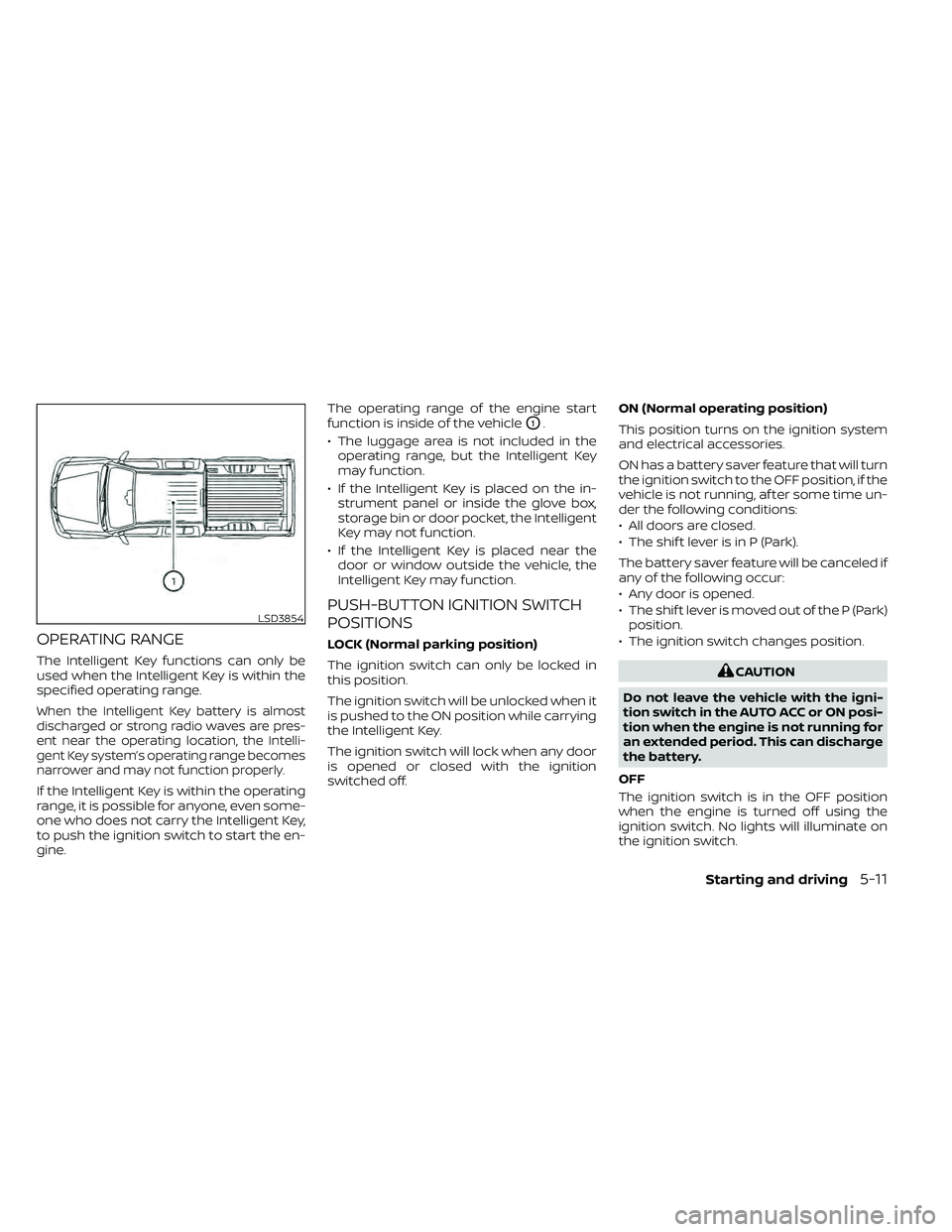
OPERATING RANGE
The Intelligent Key functions can only be
used when the Intelligent Key is within the
specified operating range.
When the Intelligent Key battery is almost
discharged or strong radio waves are pres-
ent near the operating location, the Intelli-
gent Key system’s operating range becomes
narrower and may not function properly.
If the Intelligent Key is within the operating
range, it is possible for anyone, even some-
one who does not carry the Intelligent Key,
to push the ignition switch to start the en-
gine.The operating range of the engine start
function is inside of the vehicle
O1.
• The luggage area is not included in the operating range, but the Intelligent Key
may function.
• If the Intelligent Key is placed on the in- strument panel or inside the glove box,
storage bin or door pocket, the Intelligent
Key may not function.
• If the Intelligent Key is placed near the door or window outside the vehicle, the
Intelligent Key may function.
PUSH-BUTTON IGNITION SWITCH
POSITIONS
LOCK (Normal parking position)
The ignition switch can only be locked in
this position.
The ignition switch will be unlocked when it
is pushed to the ON position while carrying
the Intelligent Key.
The ignition switch will lock when any door
is opened or closed with the ignition
switched off. ON (Normal operating position)
This position turns on the ignition system
and electrical accessories.
ON has a battery saver feature that will turn
the ignition switch to the OFF position, if the
vehicle is not running, af ter some time un-
der the following conditions:
• All doors are closed.
• The shif t lever is in P (Park).
The battery saver feature will be canceled if
any of the following occur:
• Any door is opened.
• The shif t lever is moved out of the P (Park)
position.
• The ignition switch changes position.
CAUTION
Do not leave the vehicle with the igni-
tion switch in the AUTO ACC or ON posi-
tion when the engine is not running for
an extended period. This can discharge
the battery.
OFF
The ignition switch is in the OFF position
when the engine is turned off using the
ignition switch. No lights will illuminate on
the ignition switch.
LSD3854
Starting and driving5-11
Page 320 of 492
AUTO ACC:
With the vehicle in the P (Park) position, the
Intelligent Key with you, and the ignition
switch placed from the ON to the OFF po-
sition, the radio can still be used for a period
of time, or until the driver’s door is opened.
Af ter a period of time, functions such as
radio, navigation, and Bluetooth® Hands-
Free Phone System may be restarted by
pressing the “ON-OFF button/VOLUME
control knob” or the key fob unlock button.
For additional information, refer to “Monitor,
climate, audio, phone and voice recogni-
tion systems” in this manual.
EMERGENCY ENGINE SHUT OFF
To shut off the engine in an emergency
situation while driving, perform the follow-
ing procedure:
• Rapidly push the ignition switch threeconsecutive times in less than 1.5 sec-
onds, or
• Push and hold the ignition switch for more than 2 seconds.
NISSAN INTELLIGENT KEY®
BATTERY DISCHARGE
If the battery of the NISSAN Intelligent Key®
is discharged or environmental conditions
interfere with the Intelligent Key operation,
start the engine according to the following
procedure:
1. Place the shif t lever in the P (Park) position.
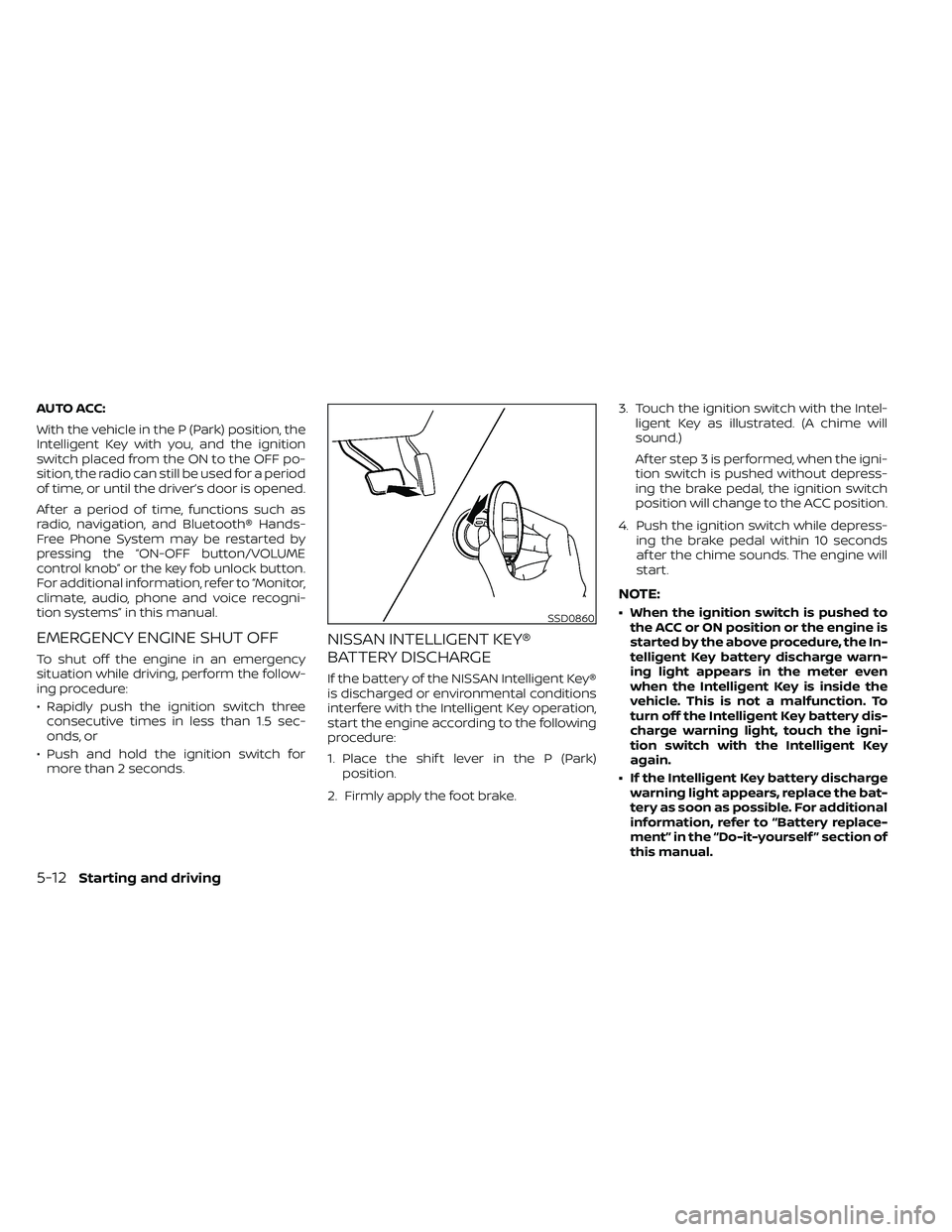
2. Firmly apply the foot brake. 3. Touch the ignition switch with the Intel-
ligent Key as illustrated. (A chime will
sound.)
Af ter step 3 is performed, when the igni-
tion switch is pushed without depress-
ing the brake pedal, the ignition switch
position will change to the ACC position.
4. Push the ignition switch while depress- ing the brake pedal within 10 seconds
af ter the chime sounds. The engine will
start.
NOTE:
• When the ignition switch is pushed tothe ACC or ON position or the engine is
started by the above procedure, the In-
telligent Key battery discharge warn-
ing light appears in the meter even
when the Intelligent Key is inside the
vehicle. This is not a malfunction. To
turn off the Intelligent Key battery dis-
charge warning light, touch the igni-
tion switch with the Intelligent Key
again.
• If the Intelligent Key battery discharge warning light appears, replace the bat-
tery as soon as possible. For additional
information, refer to “Battery replace-
ment” in the “Do-it-yourself ” section of
this manual.SSD0860
5-12Starting and driving
Page 321 of 492
NISSAN VEHICLE IMMOBILIZER
SYSTEM
The NISSAN Vehicle Immobilizer System
will not allow the engine to start without
the use of the registered key.
If the engine fails to start using a registered
key (for example, when interference is
caused by another registered key, an auto-
mated toll road device or automatic pay-
ment device on the key ring), restart the
engine using the following procedures:
1. Leave the ignition switch in the ON posi-tion for approximately 5 seconds.
2. Place the ignition switch in the OFF or LOCK position, and wait approximately
10 seconds.
3. Repeat steps 1 and 2.
4. Restart the engine while holding the de- vice (which may have caused the inter-
ference) separate from the registered
key.
If the no start condition re-occurs, NISSAN
recommends placing the registered key on
a separate key ring to avoid interference
from other devices. • Make sure the area around the vehicle is
clear.
• Check fluid levels such as engine oil, cool- ant, brake, and windshield-washer fluid
as frequently as possible, or at least
whenever you refuel.
• Check that all windows and lights are clean.
• Visually inspect tires for their appearance and condition. Also check tires for proper
inflation.
• Check that all doors are closed.
• Position seat and adjust head restraints/ headrests.
• Adjust inside and outside mirrors.
• Fasten the seat belt and ask all passen- gers to do likewise.
• Check the operation of warning lights when the ignition switch is placed in the
ON position. For additional information,
refer to “Warning lights, indicator lights
and audible reminders” in the “Instru-
ments and controls” section of this
manual. 1. Apply the parking brake.
2. Move the shif t lever to P (Park) or N (Neu-
tral). P (Park) is recommended.
The starter is designed not to operate
unless the shif t lever is in either P
(Park) or N (Neutral).
3. Push the ignition switch to the ON posi- tion. Depress the brake pedal and push
the ignition switch to start the engine.
To start the engine immediately, push
and release the ignition switch while de-
pressing the brake pedal with the igni-
tion switch in any position.
• If the engine is very hard to start in extremely cold weather or when re-
starting, depress the accelerator
pedal a little (approximately 1/3 to the
floor) and while holding, crank the en-
gine. Release the accelerator pedal
when the engine starts.
• If the engine is very hard to start be- cause it is flooded, depress the accel-
erator pedal all the way to the floor
and hold it. Push the ignition switch to
the ON position to start cranking the
engine. Af ter 5 or 6 seconds, stop
cranking by pushing the ignition
switch to the LOCK position. Af ter
BEFORE STARTING THE ENGINE STARTING THE ENGINE
Starting and driving5-13
Page 323 of 492
CAUTION
• To avoid possible damage to your ve-
hicle, when stopping the vehicle on
an uphill grade, do not hold the ve-
hicle by depressing the accelerator
pedal. The foot brake should be used
for this purpose.
The A/T in your vehicle is electronically con-
trolled to produce maximum power and
smooth operation.
The recommended operating procedures
for this transmission are shown on the fol-
lowing pages. Follow these procedures for
maximum vehicle performance and driv-
ing enjoyment.
Starting the vehicle
1. Af ter starting the engine, fully depress the foot brake pedal before moving the
shif t lever out of the P (Park) position.
2. Keep the foot brake pedal depressed and move the shif t lever into a driving
gear.
3. Release the foot brake, then gradually start the vehicle in motion. The automatic transmission is designed
so the foot brake pedal MUST be de-
pressed before shif ting from P (Park) to
any drive position while the ignition
switch is in the ON position.
The shif t lever cannot be moved out of
the P (Park) position and into any of the
other gear positions if the ignition
switch is placed in the LOCK or OFF posi-
tion.
The shif t lever may not be moved out of
the P (Park) position and into any of the
other gear positions if the ignition
switch is placed in the ON position, but
the engine is not running and the out-
side temperature is extremely low.
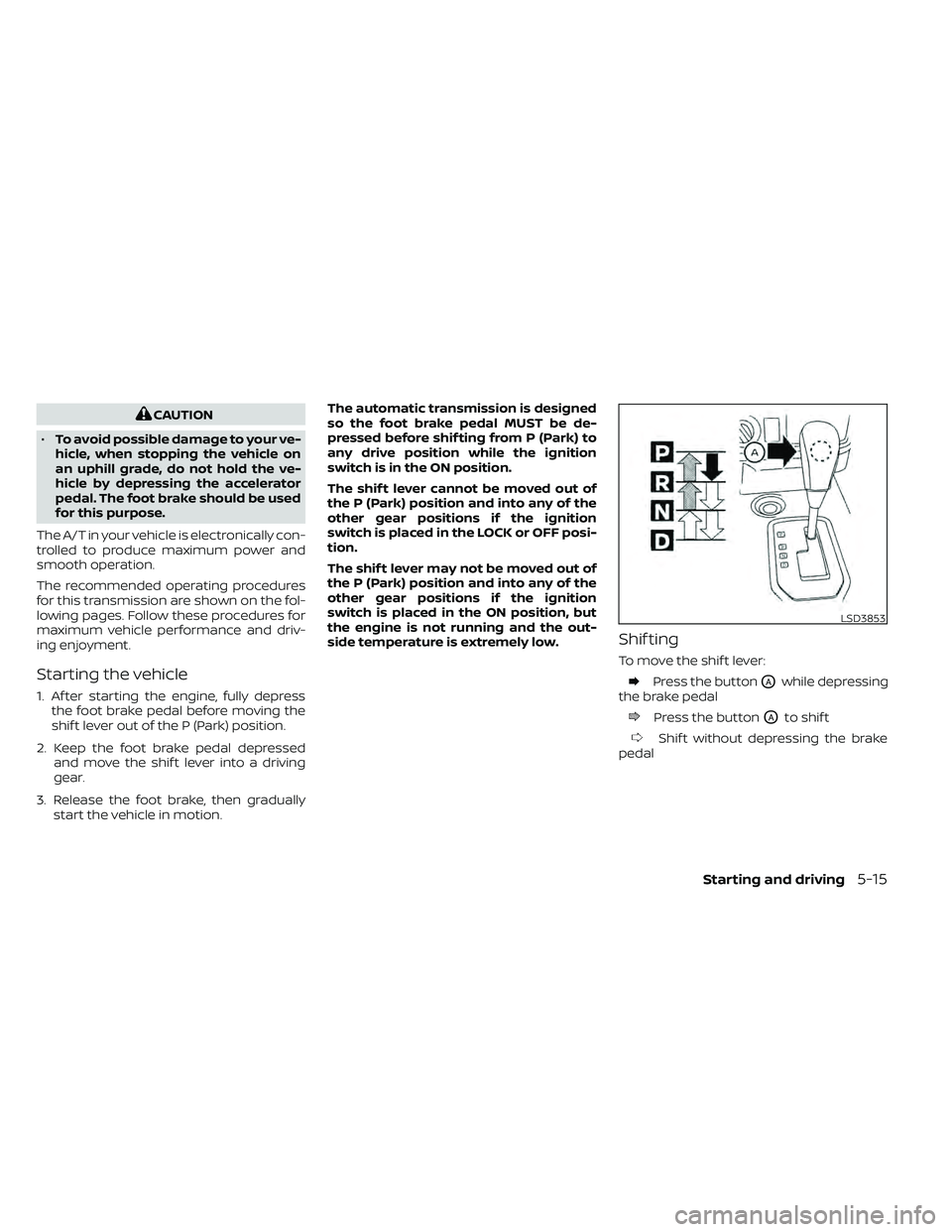
Shif ting
To move the shif t lever:
Press the buttonOAwhile depressing
the brake pedal
Press the buttonOAto shif t
Shif t without depressing the brake
pedal
LSD3853
Starting and driving5-15
Page 324 of 492
Shif ting
Af ter starting the engine, fully depress the
brake pedal and move the shif t lever out of
the P (Park) position.
WARNING
Apply the parking brake if the shif t le-
ver is in any position while the engine is
not running. Failure to do so could
cause the vehicle to move unexpect-
edly or roll away and result in serious
personal injury or property damage.
If the ignition switch is placed in the OFF
position for any reason while the vehicle is
in N (Neutral), or any D (Drive) position, the
ignition switch cannot be placed in the
LOCK position. Move the shif t lever to the P
(Park) position, then the ignition switch can
be placed in the LOCK position.
P (Park)
CAUTION
To prevent transmission damage, use
the P (Park) position only when the ve-
hicle is completely stopped.
Use the P (Park) shif t lever position when
the vehicle is parked or when starting the
engine. Make sure the vehicle is completely
stopped.
The brake pedal should be depressed to
move the shif t lever from N (Neutral) or
any drive position to P (Park).
The P (Park) position is automatically en-
gaged if you switch off the ignition.
Apply the parking brake. When parking on a
hill, apply the parking brake first, then move
the shif t lever into the P (Park) position.
R (Reverse)
CAUTION
To prevent transmission damage, use
the R (Reverse) position only when the
vehicle is completely stopped.
Use the R (Reverse) position to back up. Make
sure the vehicle is completely stopped be-
fore selecting the R (Reverse) position. The
brake pedal must be depressed to move
the shif t lever from P (Park), N (Neutral) or
any drive position to R (Reverse).
N (Neutral)
Neither forward nor reverse gear is engaged.
The engine can be started in this position.
You may shif t to N (Neutral) and restart a
stalled engine while the vehicle is moving.
D (Drive)
Use this position for all normal forward
driving.
5-16Starting and driving
Page 332 of 492
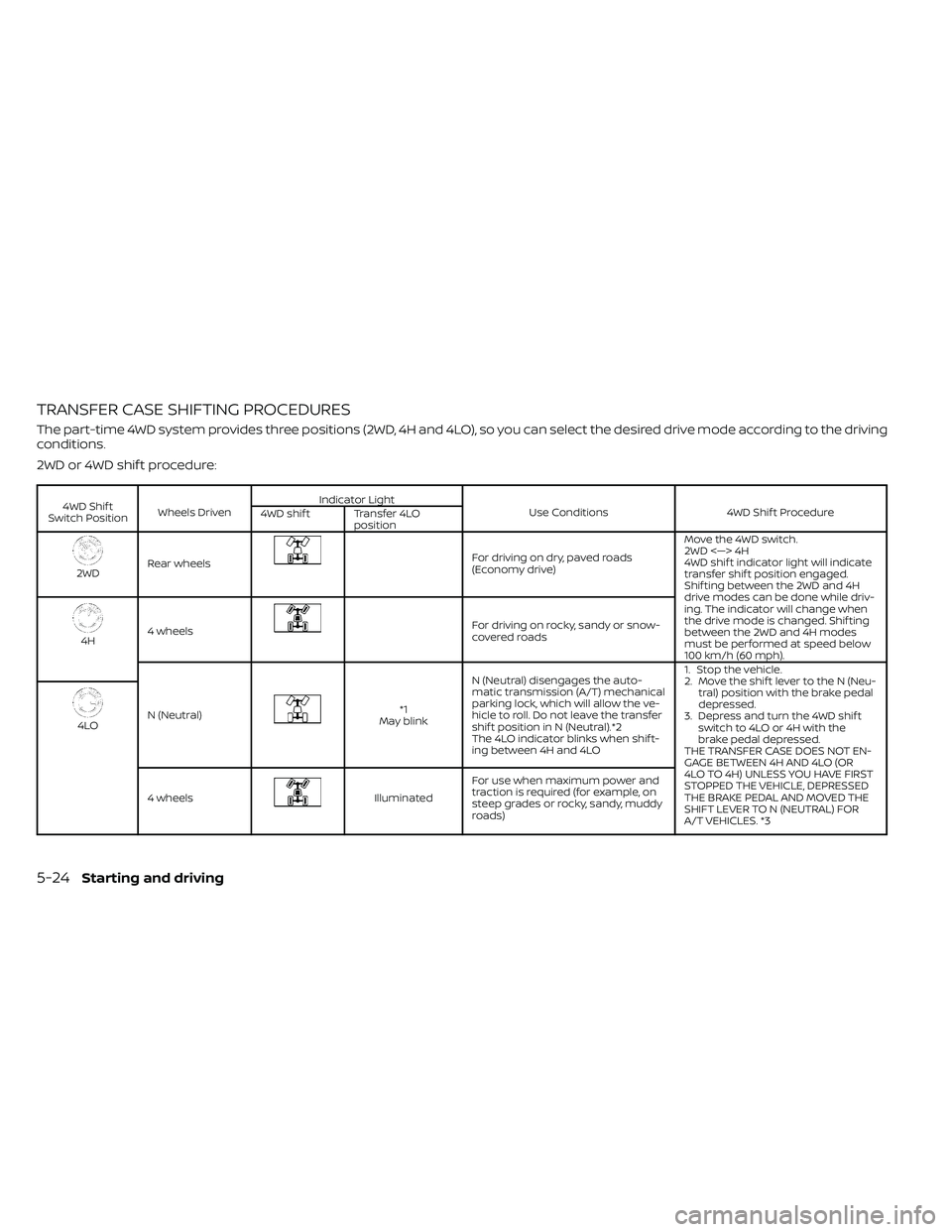
TRANSFER CASE SHIFTING PROCEDURES
The part-time 4WD system provides three positions (2WD, 4H and 4LO), so you can select the desired drive mode according to the driving
conditions.
2WD or 4WD shif t procedure:
4WD Shif t
Switch Position Wheels Driven Indicator Light
Use Conditions 4WD Shif t Procedure
4WD shif t Transfer 4LO
position
2WDRear wheels
For driving on dry, paved roads
(Economy drive) Move the 4WD switch.
2WD <—> 4H
4WD shif t indicator light will indicate
transfer shif t position engaged.
Shif ting between the 2WD and 4H
drive modes can be done while driv-
ing. The indicator will change when
the drive mode is changed. Shif ting
between the 2WD and 4H modes
must be performed at speed below
100 km/h (60 mph).
4H
4 wheels
For driving on rocky, sandy or snow-
covered roads
N (Neutral)
*1
May blink N (Neutral) disengages the auto-
matic transmission (A/T) mechanical
parking lock, which will allow the ve-
hicle to roll. Do not leave the transfer
shif t position in N (Neutral).*2
The 4LO indicator blinks when shif t-
ing between 4H and 4LO 1. Stop the vehicle.
2. Move the shif t lever to the N (Neu-
tral) position with the brake pedal
depressed.
3. Depress and turn the 4WD shif t switch to 4LO or 4H with the
brake pedal depressed.
THE TRANSFER CASE DOES NOT EN-
GAGE BETWEEN 4H AND 4LO (OR
4LO TO 4H) UNLESS YOU HAVE FIRST
STOPPED THE VEHICLE, DEPRESSED
THE BRAKE PEDAL AND MOVED THE
SHIFT LEVER TO N (NEUTRAL) FOR
A/T VEHICLES. *3
4LO
4 wheels
Illuminated For use when maximum power and
traction is required (for example, on
steep grades or rocky, sandy, muddy
roads)
5-24Starting and driving
Page 335 of 492
When driving on rough roads:
• Set the 4WD shif t switch to 4H or 4LO.
• Drive carefully according to the road sur-face conditions.
When the vehicle is stuck:
• Set the 4WD shif t switch to 4H or 4LO.
• Use the Electronic Locking Rear Differen- tial (E-Lock) system (if so equipped). Turn
the switch ON while the vehicle is station-
ary and apply the throttle to try to free the
vehicle.
• If it is difficult to free the vehicle, rock the vehicle back and forth between R (Re-
verse) and D (Drive) gears.
• If the vehicle is stuck deep in mud, place stones or wooden blocks under the tires.
Then try the recovery procedures above.
Tire chains may be effective.
CAUTION
• Do not spin the tires excessively. Tires
will sink deep into the mud, making it
difficult to free the vehicle.
• Avoid shif ting gears with the engine
running at high speeds as this may
cause malfunction.
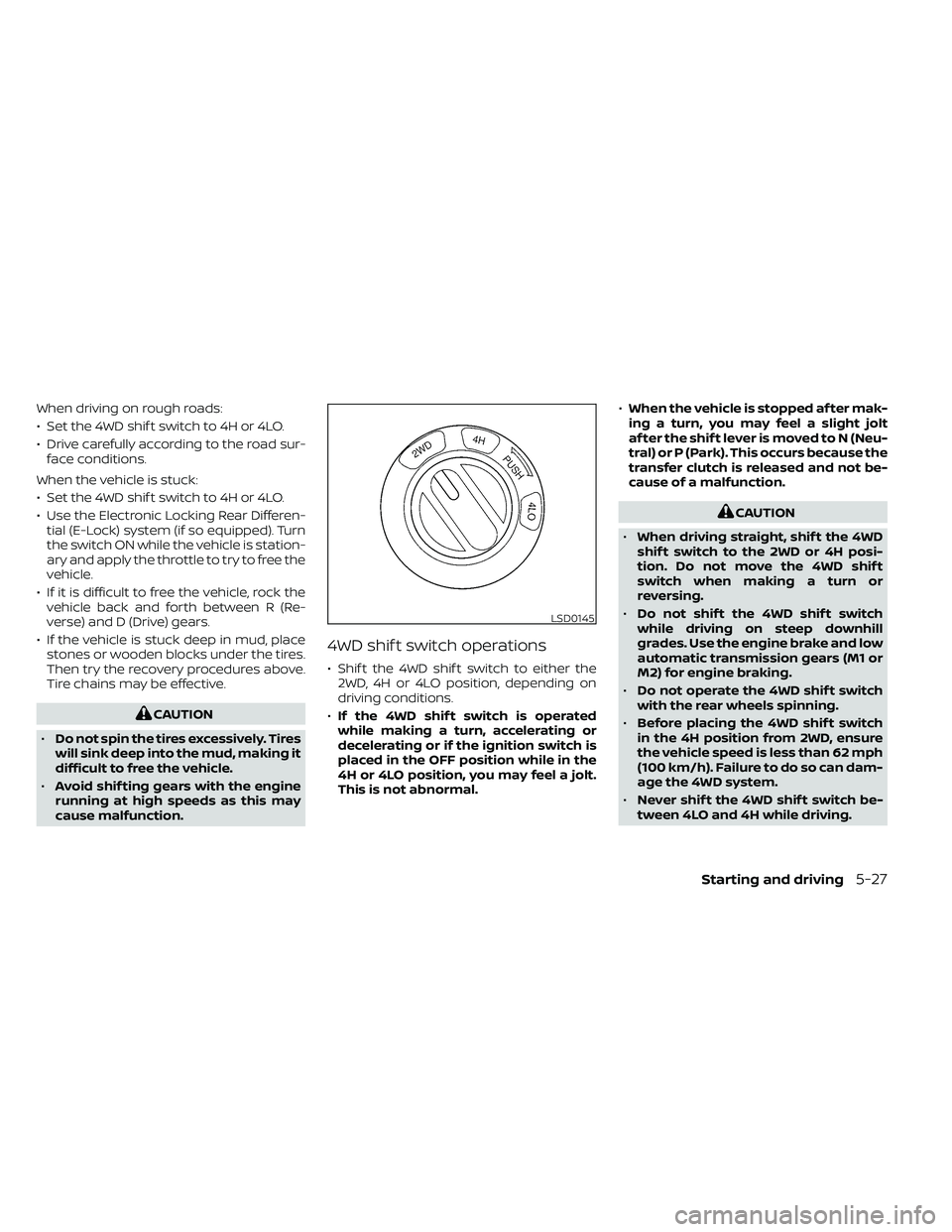
4WD shif t switch operations
• Shif t the 4WD shif t switch to either the 2WD, 4H or 4LO position, depending on
driving conditions.
• If the 4WD shif t switch is operated
while making a turn, accelerating or
decelerating or if the ignition switch is
placed in the OFF position while in the
4H or 4LO position, you may feel a jolt.
This is not abnormal. •
When the vehicle is stopped af ter mak-
ing a turn, you may feel a slight jolt
af ter the shif t lever is moved to N (Neu-
tral) or P (Park). This occurs because the
transfer clutch is released and not be-
cause of a malfunction.
CAUTION
• When driving straight, shif t the 4WD
shif t switch to the 2WD or 4H posi-
tion. Do not move the 4WD shif t
switch when making a turn or
reversing.
• Do not shif t the 4WD shif t switch
while driving on steep downhill
grades. Use the engine brake and low
automatic transmission gears (M1 or
M2) for engine braking.
• Do not operate the 4WD shif t switch
with the rear wheels spinning.
• Before placing the 4WD shif t switch
in the 4H position from 2WD, ensure
the vehicle speed is less than 62 mph
(100 km/h). Failure to do so can dam-
age the 4WD system.
• Never shif t the 4WD shif t switch be-
tween 4LO and 4H while driving.
LSD0145
Starting and driving5-27
Page 337 of 492
If the 4WD warning light comes on, the 4WD
shif t indicator light goes out.
A large difference between the diameters
of front and rear wheels will make the
warning light blink slowly (about once per 1
second). Change the 4WD shif t switch into
2WD and do not drive fast.
CAUTION
• If the warning light comes on or
blinks slowly during operation, have
your vehicle checked as soon as pos-
sible. It is recommended that you
visit a NISSAN dealer for this service.
• Shif ting between 4H and 4LO is not
recommended when the 4WD warn-
ing light turns on.
• When the warning light comes on,
the 2WD mode may be engaged even
if the 4WD shif t switch is in 4H. Be
especially careful when driving. If
corresponding parts are malfunc-
tioning, the 4WD mode will not be en-
gaged even if the 4WD shif t switch is
shif ted. •
Do not drive the vehicle in the 4H or
4LO position on dry hard surface
roads. Driving on dry, hard surfaces in
4H or 4LO may cause unnecessary
noise, tire wear and increased fuel
consumption.
If the 4WD warning light turns on
when you are driving on dry hard sur-
face roads:
– In the 4H position, shif t the 4WD
shif t switch to 2WD.
– In the 4LO position for automatic
transmission vehicles, stop the
vehicle and shif t the shif t lever to
the N (Neutral) position with the
brake pedal depressed and shif t
the 4WD shif t switch to 2WD.
• If the warning light is still on af ter the
above operation, have your vehicle
checked as soon as possible. It is rec-
ommended that you visit a NISSAN
dealer for this service.
• The transfer case may be damaged if
you continue driving with the warn-
ing light blinking. The E-Lock system can provide additional
traction and should only be used when a
vehicle has become or is becoming stuck.
This system operates by electronically
“locking” the two rear drive wheels to-
gether, allowing them to turn at the same
speed. The system is used when it is not
possible to free a stuck vehicle even when
using the 4LO position (4-Wheel Drive ve-
hicles).
When added traction is required, activate
the E-Lock system by pushing the switch
ON. For additional information, refer to
“Electronic locking rear differential (E-Lock)
system switch” in the “Instruments and
controls” section of this manual. Once the
system fully engages, the indicator light in
the instrument panel will remain on. When
the system is activated, both rear wheels
will engage, providing added traction.
The rear wheels may momentarily slip or
move to engage the system, and the sys-
tem will only engage up to approximately 4
mph (7 km/h). Once the vehicle is free, the
system should be turned off and driving
resumed.
ELECTRONIC LOCKING REAR
DIFFERENTIAL (E-Lock) SYSTEM (if
so equipped)
Starting and driving5-29
Page 338 of 492
The Anti-Lock Braking (ABS) system is dis-
abled and the ABS light illuminates when
the E-Lock system is on. Also, the Vehicle
Dynamic Control (VDC) system is disabled
and the
indicator light illuminates
when the E-Lock system is on.
WARNING
• Never leave the E-Lock system on
when driving on paved or hard-
surfaced roads. Turning the vehicle
may result in the rear wheels slipping
and result in an accident and per-
sonal injury. Af ter using the E-Lock
system to free the vehicle, turn the
system off.
• Use the E-Lock system only when
freeing a stuck vehicle. Try the 4LO
position before using the E-Lock sys-
tem. Never use the E-Lock system on
a slippery road surface such as snow
or ice surface. Using the E-Lock sys-
tem when driving in these road con-
ditions may cause unexpected
movement of the vehicle during en-
gine braking, accelerating or turning,
which may result in an accident and
serious personal injury.
CAUTION
• Af ter using the E-Lock system, turn
the switch OFF to prevent possible
damage to driveline components
from extended use.
• Do not drive the vehicle at speeds
faster than 12 mph (20 km/h) when
the system is engaged. Doing so
could damage drivetrain
components.
• Do not turn on the E-Lock system
while the tires are spinning. Doing so
could damage drivetrain
components.
5-30Starting and driving