fuel NISSAN FRONTIER 2021 Owners Manual
[x] Cancel search | Manufacturer: NISSAN, Model Year: 2021, Model line: FRONTIER, Model: NISSAN FRONTIER 2021Pages: 492, PDF Size: 2.86 MB
Page 14 of 492
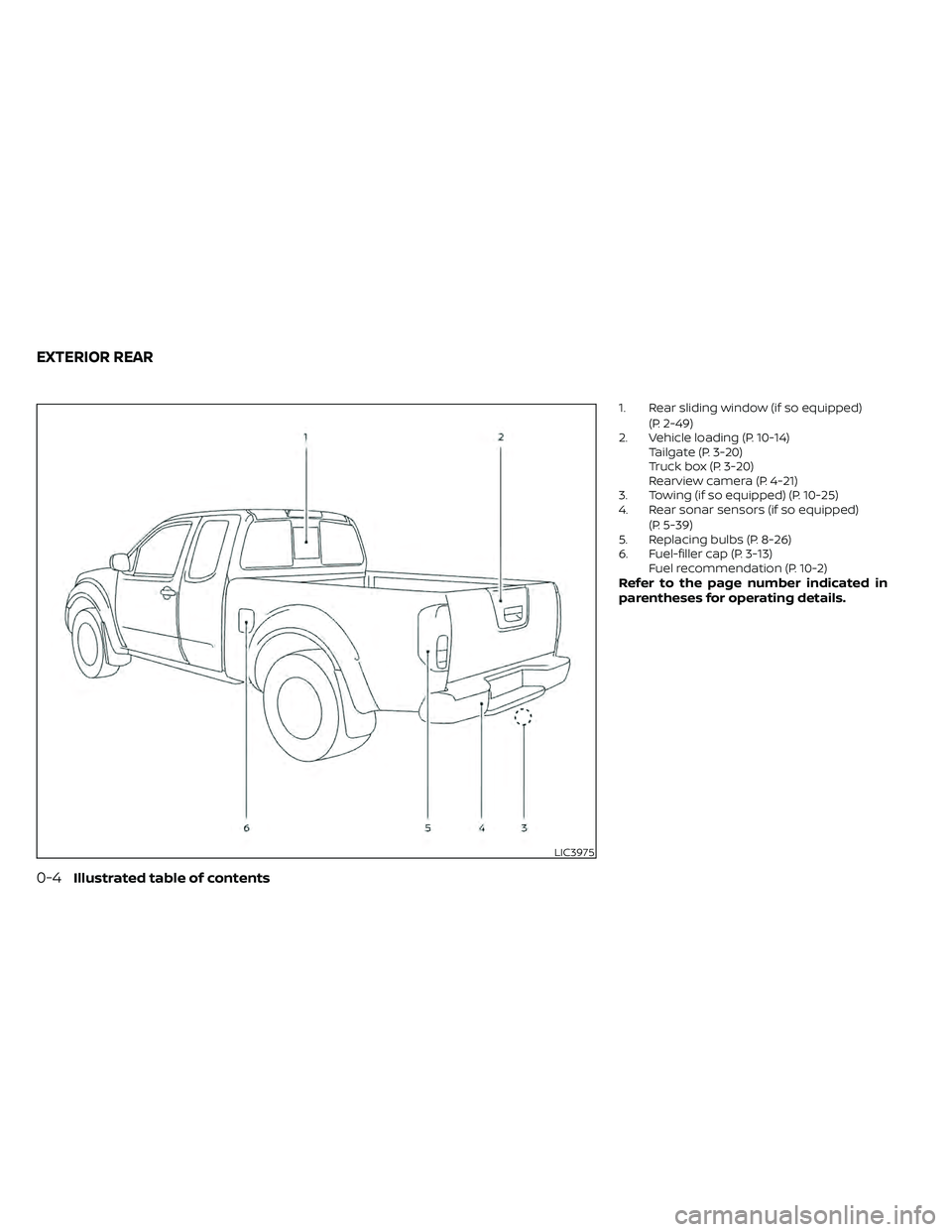
1. Rear sliding window (if so equipped)(P. 2-49)
2. Vehicle loading (P. 10-14) Tailgate (P. 3-20)
Truck box (P. 3-20)
Rearview camera (P. 4-21)
3. Towing (if so equipped) (P. 10-25)
4. Rear sonar sensors (if so equipped)
(P. 5-39)
5. Replacing bulbs (P. 8-26)
6. Fuel-filler cap (P. 3-13) Fuel recommendation (P. 10-2)
Refer to the page number indicated in
parentheses for operating details.
Page 19 of 492
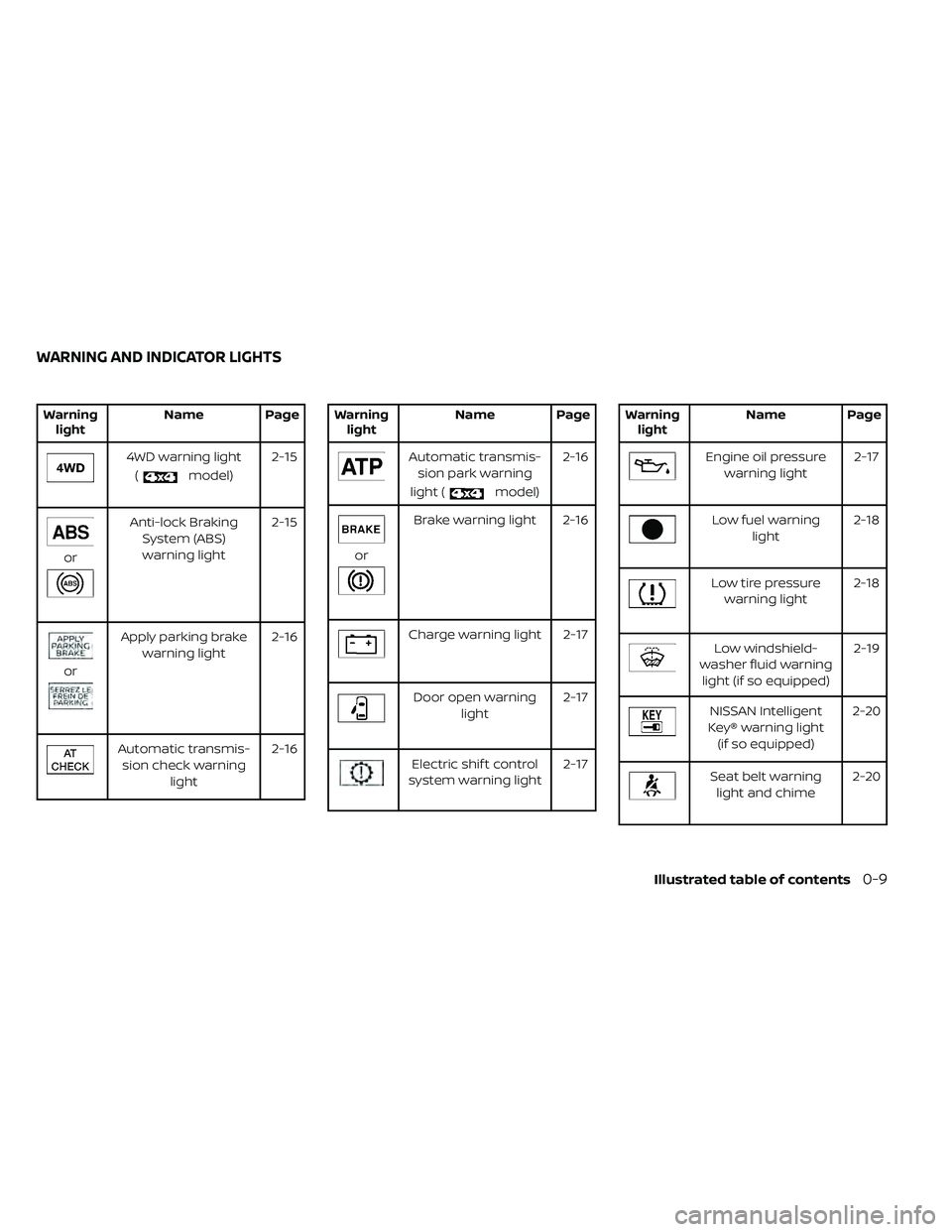
WarninglightName Page
model) 2-15
or
Anti-lock Braking
System (ABS)warning light 2-15
or
Apply parking brake
warning light 2-16
Automatic transmis-
sion check warning light 2-16
model)2-16
or
Brake warning light 2-16
Charge warning light 2-17
Door open warning
light 2-17
Electric shif t control
system warning light 2-17
Low fuel warning
light 2-18
Low tire pressure
warning light 2-18
Low windshield-
washer fluid warning light (if so equipped) 2-19
NISSAN Intelligent
Key® warning light (if so equipped) 2-20
Seat belt warning
light and chime 2-20
WARNING AND INDICATOR LIGHTS
Illustrated table of contents0-9
Page 110 of 492
2 Instruments and controls
Instrument panel................................2-2
Meters and gauges .............................2-4
Speedometer and odometer .................2-4
Tachometer .................................. 2-7
Engine coolant temperature gauge .......... 2-7
Fuel gauge ...................................2-8
Distance To Empty (DTE) .....................2-8
Trip computer (if so equipped) ................2-9
Compass and outside temperature display
(if so equipped) ................................. 2-10
Outside temperature display ................2-10
Compass .................................... 2-11
Warning lights, indicator lights and audible
reminders ...................................... 2-14
Checking lights .............................. 2-15
Warning lights ............................... 2-15
Indicator lights .............................. 2-21
Audible reminders ........................... 2-24
Security systems (if so equipped) ...............2-25
Vehicle security system (if so equipped) .....2-25
NISSAN Vehicle Immobilizer System
(if so equipped) .............................. 2-27
Wiper and washer switch .......................2-28
Switch operation ............................ 2-28
Rear window or outside mirror defroster
switch (if so equipped) ......................... 2-29Headlight and turn signal switch
...............2-30
Headlight control switch ....................2-30
Daytime Running Lights (DRL) system
(if so equipped) .............................. 2-32
Instrument brightness control ..............2-33
Turn signal switch ........................... 2-33
Fog light switch (if so equipped) .............2-33
Horn ........................................... 2-34
Cargo lamp switch ............................. 2-34
Heated seat switches (if so equipped) ..........2-35
Vehicle Dynamic Control (VDC) OFF switch .....2-36
Hill descent control switch (if so equipped) .....2-36
Electronic locking rear differential (E-Lock)
system switch (if so equipped) .................2-37
Rear Sonar System (RSS) OFF switch
(if so equipped) .................................
2-38
P
ower outlets .................................. 2-39
Storage ........................................ 2-40
Front-door pockets ......................... 2-40
Rear-door pockets .......................... 2-40
Seatback pocket (if so equipped) ............2-41
Under-seat storage bins
(if so equipped) .............................. 2-42
Storagetrays................................ 2-44
Glovebox ................................... 2-44
Page 114 of 492
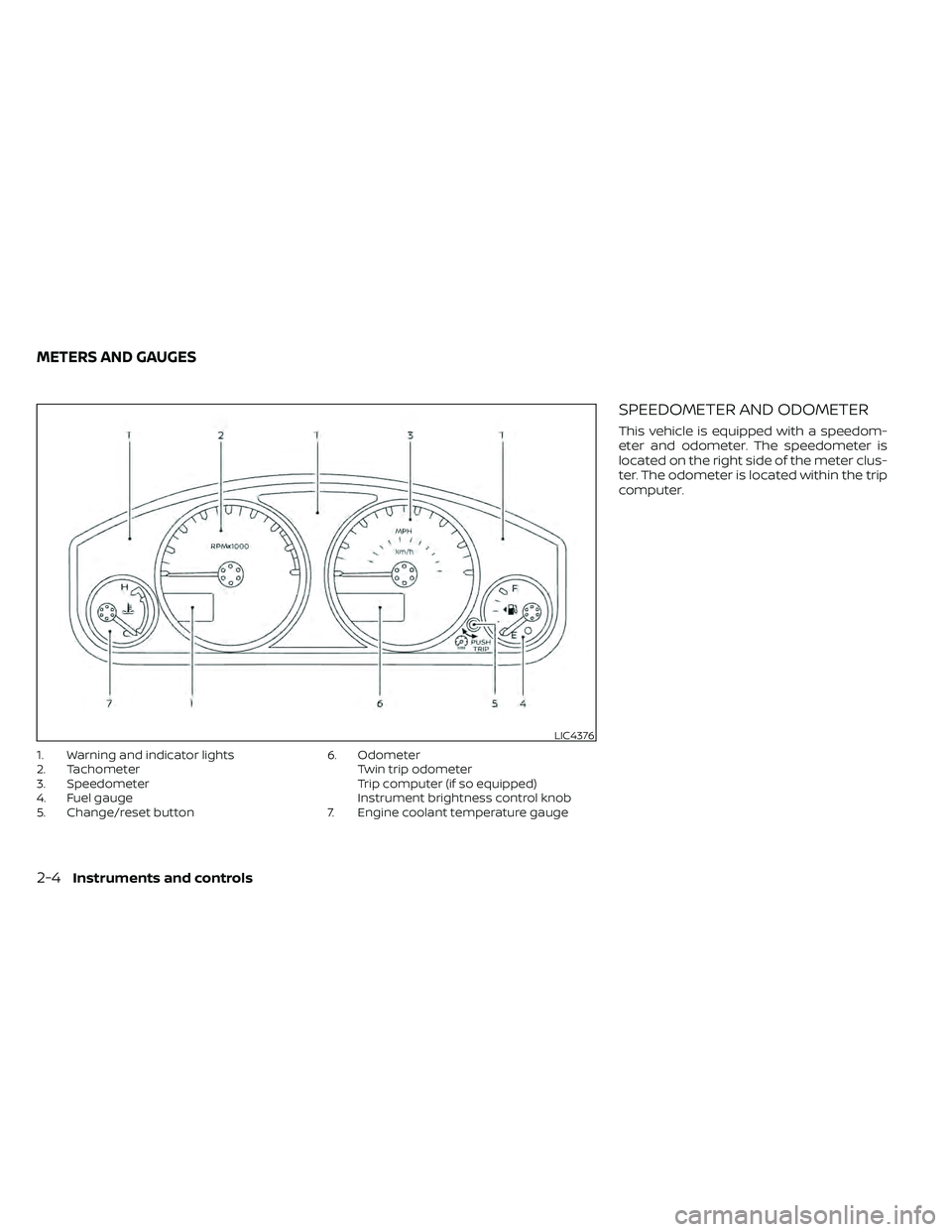
1. Warning and indicator lights
2. Tachometer
3. Speedometer
4. Fuel gauge
5. Change/reset button6. Odometer
Twin trip odometer
Trip computer (if so equipped)
Instrument brightness control knob
7. Engine coolant temperature gauge
SPEEDOMETER AND ODOMETER
This vehicle is equipped with a speedom-
eter and odometer. The speedometer is
located on the right side of the meter clus-
ter. The odometer is located within the trip
computer.
LIC4376
METERS AND GAUGES
Page 116 of 492
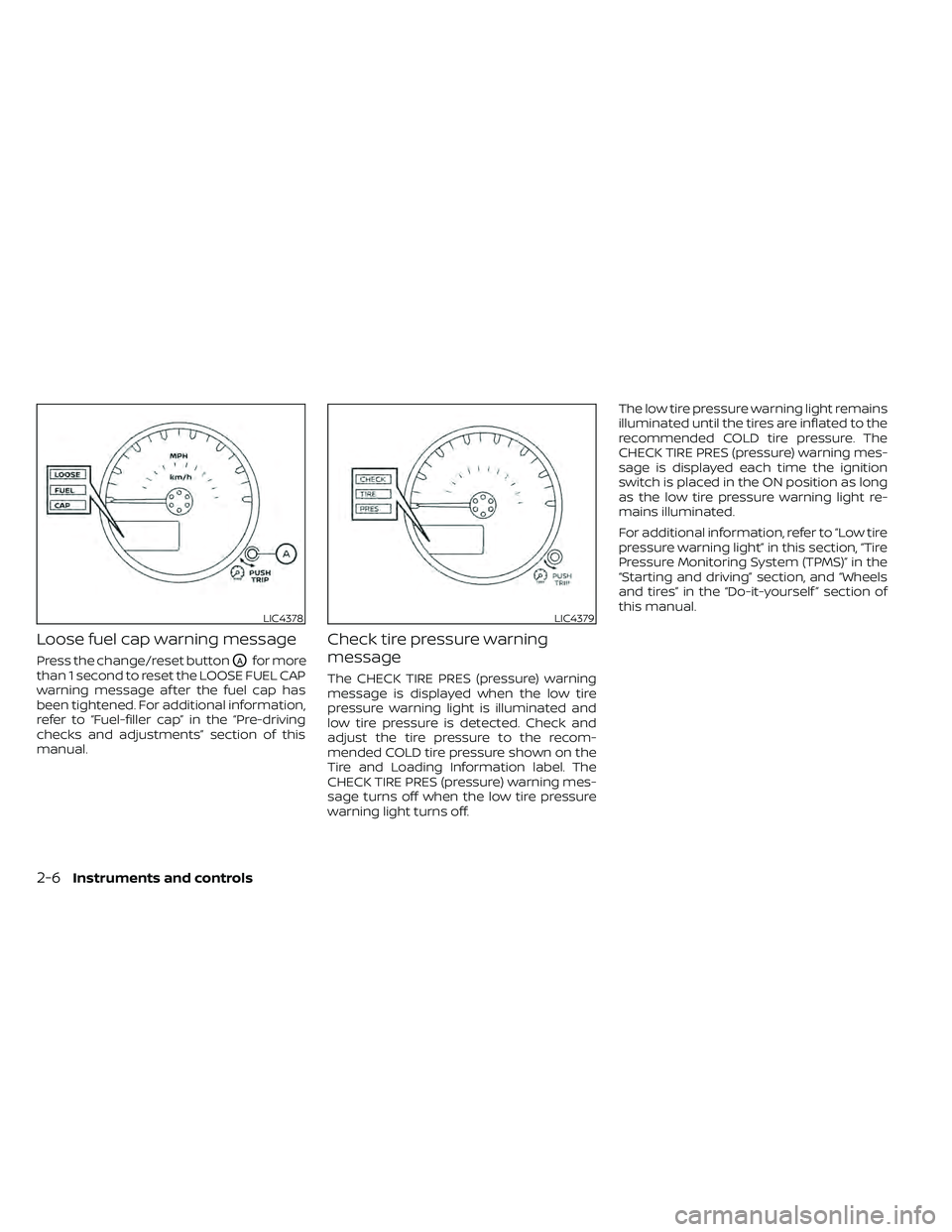
Loose fuel cap warning message
Press the change/reset buttonOAfor more
than 1 second to reset the LOOSE FUEL CAP
warning message af ter the fuel cap has
been tightened. For additional information,
refer to “Fuel-filler cap” in the “Pre-driving
checks and adjustments” section of this
manual.
Check tire pressure warning
message
The CHECK TIRE PRES (pressure) warning
message is displayed when the low tire
pressure warning light is illuminated and
low tire pressure is detected. Check and
adjust the tire pressure to the recom-
mended COLD tire pressure shown on the
Tire and Loading Information label. The
CHECK TIRE PRES (pressure) warning mes-
sage turns off when the low tire pressure
warning light turns off. The low tire pressure warning light remains
illuminated until the tires are inflated to the
recommended COLD tire pressure. The
CHECK TIRE PRES (pressure) warning mes-
sage is displayed each time the ignition
switch is placed in the ON position as long
as the low tire pressure warning light re-
mains illuminated.
For additional information, refer to “Low tire
pressure warning light” in this section, “Tire
Pressure Monitoring System (TPMS)” in the
“Starting and driving” section, and “Wheels
and tires” in the “Do-it-yourself ” section of
this manual.
LIC4378LIC4379
2-6Instruments and controls
Page 118 of 492
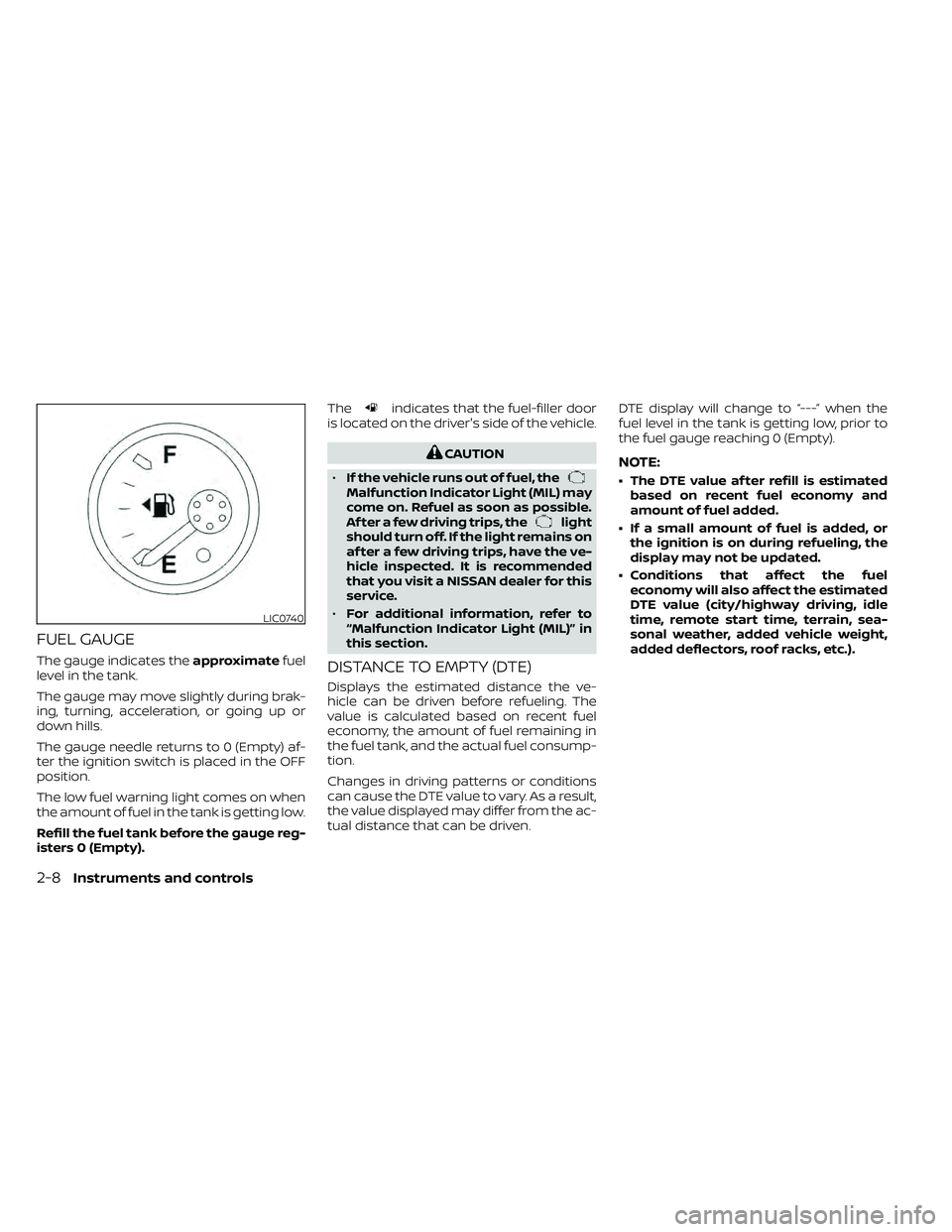
FUEL GAUGE
The gauge indicates theapproximatefuel
level in the tank.
The gauge may move slightly during brak-
ing, turning, acceleration, or going up or
down hills.
The gauge needle returns to 0 (Empty) af-
ter the ignition switch is placed in the OFF
position.
The low fuel warning light comes on when
the amount of fuel in the tank is getting low.
Refill the fuel tank before the gauge reg-
isters 0 (Empty). The
indicates that the fuel-filler door
is located on the driver's side of the vehicle.
Malfunction Indicator Light (MIL) may
come on. Refuel as soon as possible.
Af ter a few driving trips, the
light
should turn off. If the light remains on
af ter a few driving trips, have the ve-
hicle inspected. It is recommended
that you visit a NISSAN dealer for this
service.
• For additional information, refer to
“Malfunction Indicator Light (MIL)” in
this section.
DISTANCE TO EMPTY (DTE)
Displays the estimated distance the ve-
hicle can be driven before refueling. The
value is calculated based on recent fuel
economy, the amount of fuel remaining in
the fuel tank, and the actual fuel consump-
tion.
Changes in driving patterns or conditions
can cause the DTE value to vary. As a result,
the value displayed may differ from the ac-
tual distance that can be driven. DTE display will change to “---” when the
fuel level in the tank is getting low, prior to
the fuel gauge reaching 0 (Empty).
NOTE:
• The DTE value af ter refill is estimated
based on recent fuel economy and
amount of fuel added.
• If a small amount of fuel is added, or the ignition is on during refueling, the
display may not be updated.
• Conditions that affect the fuel economy will also affect the estimated
DTE value (city/highway driving, idle
time, remote start time, terrain, sea-
sonal weather, added vehicle weight,
added deflectors, roof racks, etc.).
2-8Instruments and controls
Page 119 of 492
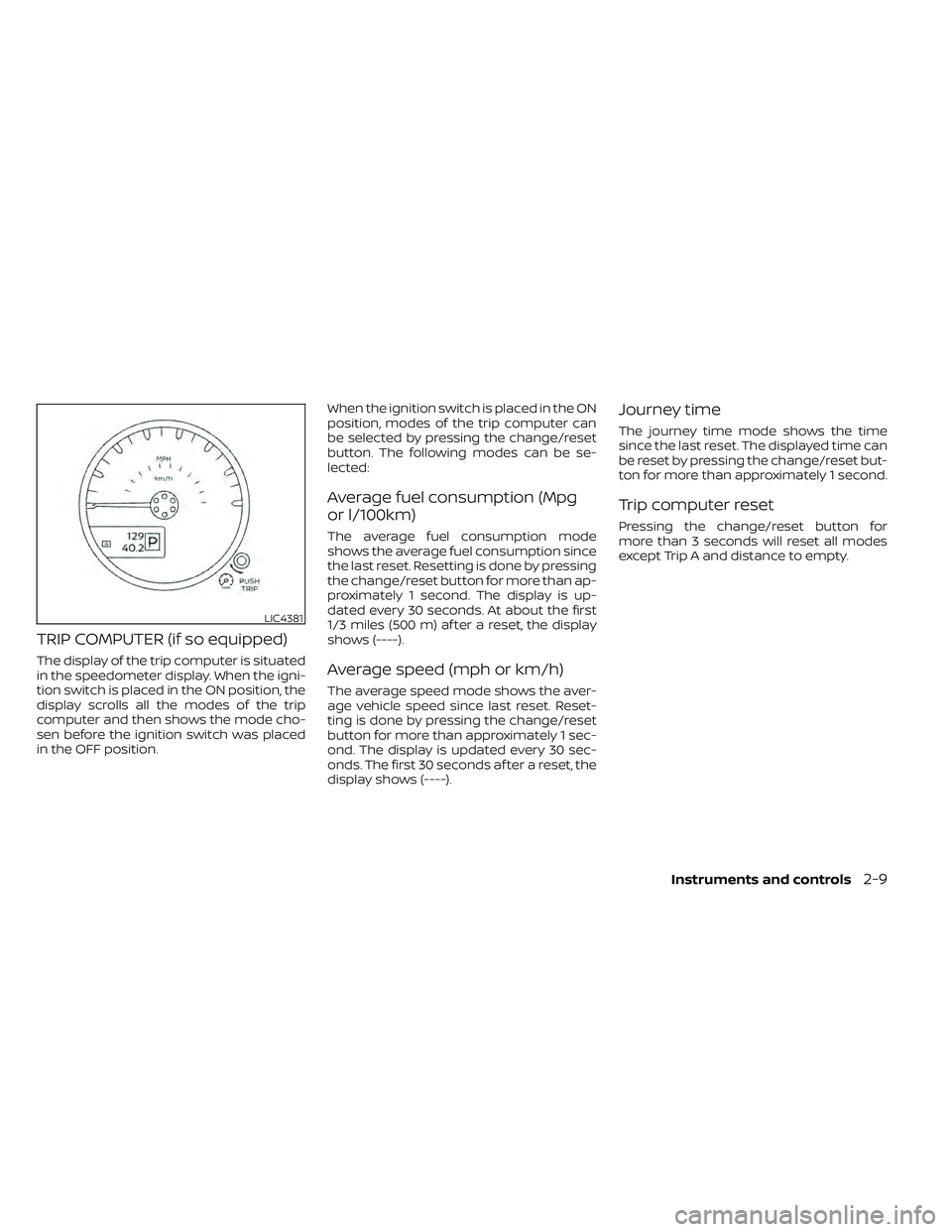
TRIP COMPUTER (if so equipped)
The display of the trip computer is situated
in the speedometer display. When the igni-
tion switch is placed in the ON position, the
display scrolls all the modes of the trip
computer and then shows the mode cho-
sen before the ignition switch was placed
in the OFF position.When the ignition switch is placed in the ON
position, modes of the trip computer can
be selected by pressing the change/reset
button. The following modes can be se-
lected:
Average fuel consumption (Mpg
or l/100km)
The average fuel consumption mode
shows the average fuel consumption since
the last reset. Resetting is done by pressing
the change/reset button for more than ap-
proximately 1 second. The display is up-
dated every 30 seconds. At about the first
1/3 miles (500 m) af ter a reset, the display
shows (----).
Average speed (mph or km/h)
The average speed mode shows the aver-
age vehicle speed since last reset. Reset-
ting is done by pressing the change/reset
button for more than approximately 1 sec-
ond. The display is updated every 30 sec-
onds. The first 30 seconds af ter a reset, the
display shows (----).
Journey time
The journey time mode shows the time
since the last reset. The displayed time can
be reset by pressing the change/reset but-
ton for more than approximately 1 second.
Trip computer reset
Pressing the change/reset button for
more than 3 seconds will reset all modes
except Trip A and distance to empty.
LIC4381
Page 124 of 492
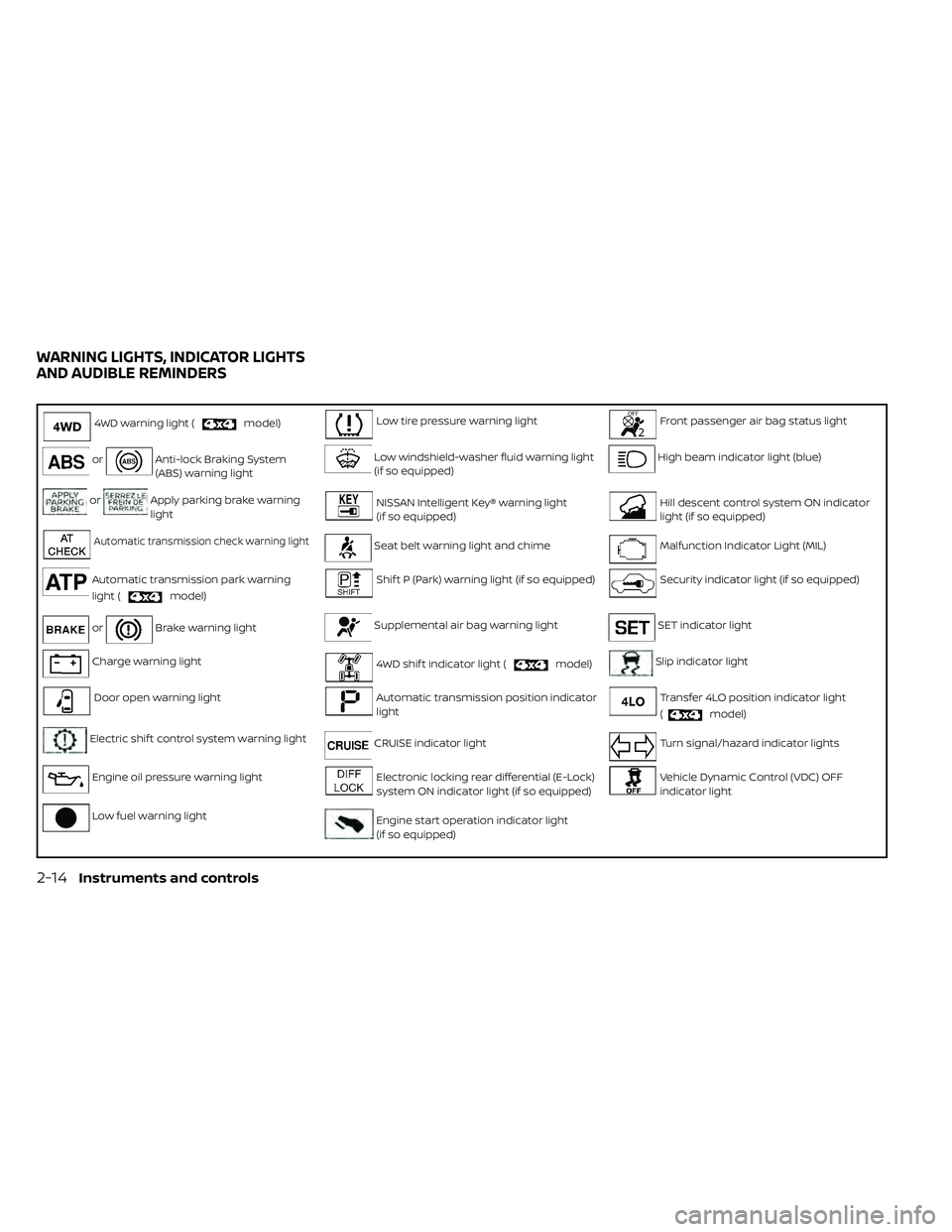
4WD warning light (model)Low tire pressure warning lightFront passenger air bag status light
orAnti-lock Braking System
(ABS) warning lightLow windshield-washer fluid warning light
(if so equipped)High beam indicator light (blue)
orApply parking brake warning
lightNISSAN Intelligent Key® warning light
(if so equipped)Hill descent control system ON indicator
light (if so equipped)
Automatic transmission check warning lightSeat belt warning light and chimeMalfunction Indicator Light (MIL)
Automatic transmission park warning
light (
model)
Shif t P (Park) warning light (if so equipped)Security indicator light (if so equipped)
orBrake warning lightSupplemental air bag warning lightSET indicator light
Charge warning light4WD shif t indicator light (model)Slip indicator light
Door open warning lightAutomatic transmission position indicator
lightTransfer 4LO position indicator light
(
model)
Electric shif t control system warning lightCRUISE indicator lightTurn signal/hazard indicator lights
Engine oil pressure warning lightElectronic locking rear differential (E-Lock)
system ON indicator light (if so equipped)Vehicle Dynamic Control (VDC) OFF
indicator light
Low fuel warning lightEngine start operation indicator light
(if so equipped)
WARNING LIGHTS, INDICATOR LIGHTS
AND AUDIBLE REMINDERS
2-14Instruments and controls
Page 132 of 492
Front passenger air bag
status light
The front passenger air bag status lightwill be lit and the passenger front air
bag will be off depending on how the front
passenger seat is being used.
For additional information, refer to “Front
passenger air bag and status light” in the
“Safety — Seats, seat belts and supplemen-
tal restraint system” section of this manual.
High beam indicator light
(blue)
This blue light comes on when the head-
light high beams are on and goes out when
the low beams are selected.
The high beam indicator light also comes
on when the passing signal is activated.
Hill descent control system
ON indicator light (if so
equipped)
When the ignition switch is placed in the ON
position, this light comes on briefly and
then turns off.
The light comes on when the hill descent
control system is activated. If the hill descent control switch is on and
the indicator light blinks, the system is not
engaged.
If the indicator light does not come on
when the hill descent switch is on, the sys-
tem may not be functioning properly. Have
the system checked. It is recommended
that you visit a NISSAN dealer for this ser-
vice.
For additional information, refer to “Hill de-
scent control switch” in this section and “Hill
descent control system” in the “Starting
and driving” section of this manual.
Malfunction Indicator Light
(MIL)
If this indicator light comes on steady or
blinks while the engine is running, it may
indicate a potential emission control mal-
function.
The MIL may also come on steady if the
fuel-filler cap is loose or missing, or if the
vehicle runs out of fuel. Check to make sure
the fuel-filler cap is installed and closed
tightly, and that the vehicle has at least 3
gal (11.4 L) of fuel in the fuel tank.
Af ter a few driving trips, the
light
should turn off if no other potential emis-
sion control system malfunction exists. If this indicator light comes on steady for 20
seconds and then blinks for 10 seconds
when the engine is not running, it indicates
that the vehicle is not ready for an emission
control system inspection/maintenance
test. For additional information, refer to
“Readiness for inspection/maintenance
(I/M) test” in the “Technical and consumer
information” section of this manual.
Operation
The MIL will come on in one of two ways:
• MIL on steady — An emission control sys-
tem malfunction has been detected.
Check the fuel-filler cap if the LOOSE FUEL
CAP warning appears in the trip com-
puter. If the fuel-filler cap is loose or miss-
ing, tighten or install the cap and con-
tinue to drive the vehicle. The
light
should turn off af ter a few driving trips. If
the
light does not turn off af ter a few
driving trips, have the vehicle inspected. It
is recommended that you visit a NISSAN
dealer for this service. You do not need to
have your vehicle towed to the dealer.
• MIL blinking — An engine misfire has been detected which may damage the emis-
sion control system. To reduce or avoid
emission control system damage:– Do not drive at speeds above 45 mph (72 km/h).
2-22Instruments and controls
Page 183 of 492
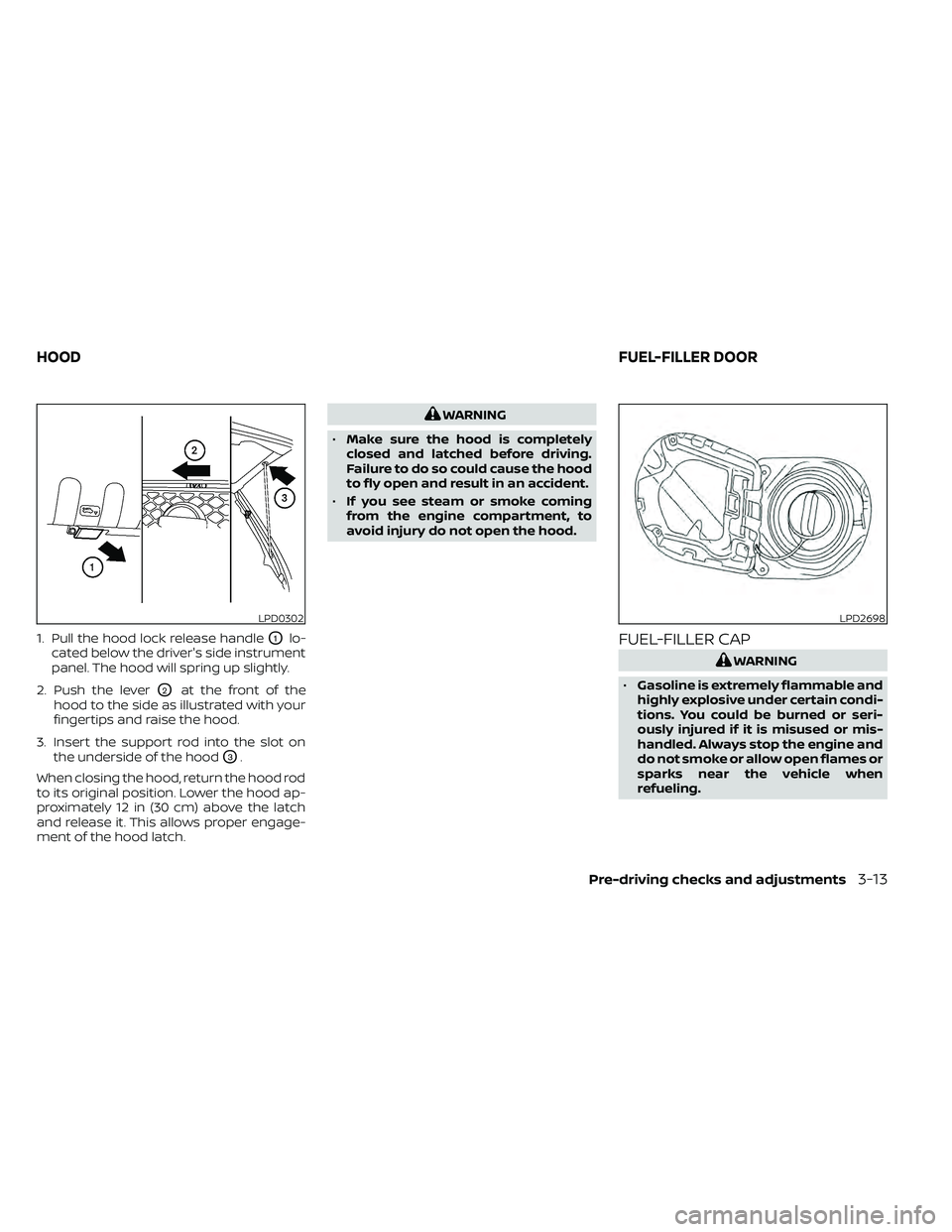
1. Pull the hood lock release handleO1lo-
cated below the driver's side instrument
panel. The hood will spring up slightly.
2. Push the lever
O2at the front of the
hood to the side as illustrated with your
fingertips and raise the hood.
3. Insert the support rod into the slot on the underside of the hood
O3.
When closing the hood, return the hood rod
to its original position. Lower the hood ap-
proximately 12 in (30 cm) above the latch
and release it. This allows proper engage-
ment of the hood latch.
LPD2698
HOOD FUEL-FILLER DOOR
Pre-driving checks and adjustments3-13