tailgate NISSAN FRONTIER 2021 Owners Manual
[x] Cancel search | Manufacturer: NISSAN, Model Year: 2021, Model line: FRONTIER, Model: NISSAN FRONTIER 2021Pages: 492, PDF Size: 2.86 MB
Page 14 of 492
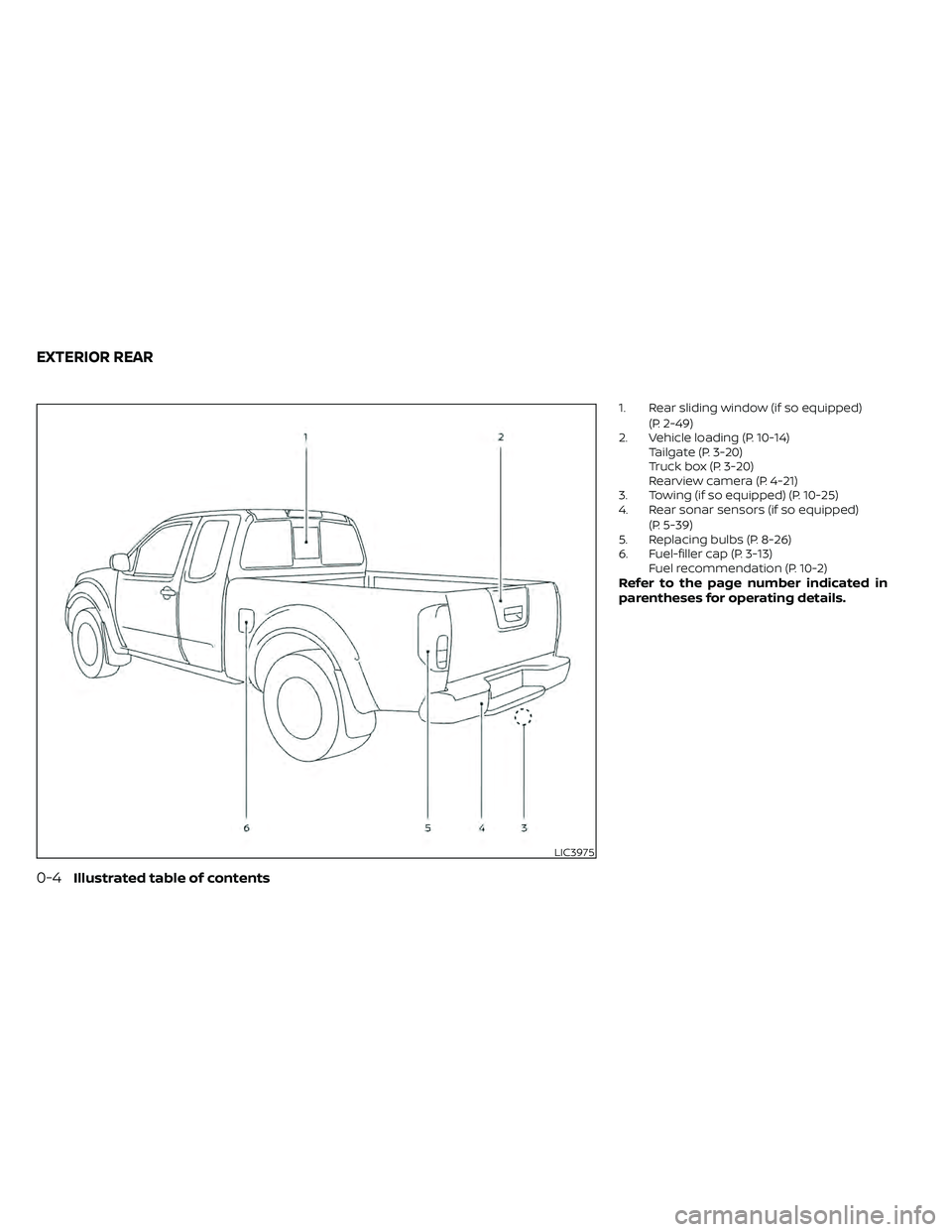
1. Rear sliding window (if so equipped)(P. 2-49)
2. Vehicle loading (P. 10-14) Tailgate (P. 3-20)
Truck box (P. 3-20)
Rearview camera (P. 4-21)
3. Towing (if so equipped) (P. 10-25)
4. Rear sonar sensors (if so equipped)
(P. 5-39)
5. Replacing bulbs (P. 8-26)
6. Fuel-filler cap (P. 3-13) Fuel recommendation (P. 10-2)
Refer to the page number indicated in
parentheses for operating details.
Page 173 of 492
If an Intelligent Key is lost or stolen, NISSAN
recommends erasing the ID code of that
Intelligent Key from the vehicle. This may
prevent the unauthorized use of the Intelli-
gent Key to operate the vehicle. For infor-
mation regarding the erasing procedure, it
is recommended that you visit a NISSAN
dealer.
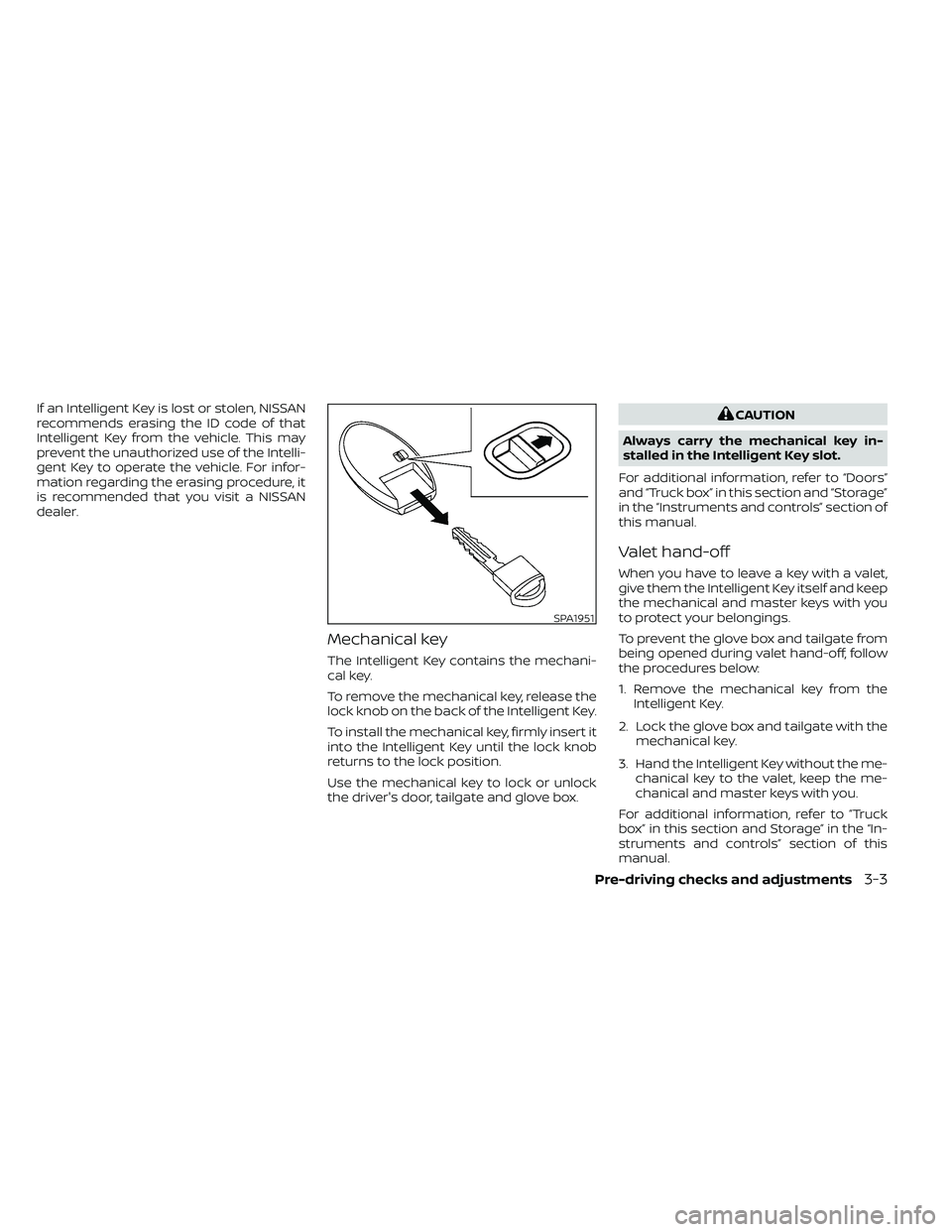
Mechanical key
The Intelligent Key contains the mechani-
cal key.
To remove the mechanical key, release the
lock knob on the back of the Intelligent Key.
To install the mechanical key, firmly insert it
into the Intelligent Key until the lock knob
returns to the lock position.
Use the mechanical key to lock or unlock
the driver's door, tailgate and glove box.
SPA1951
Page 190 of 492
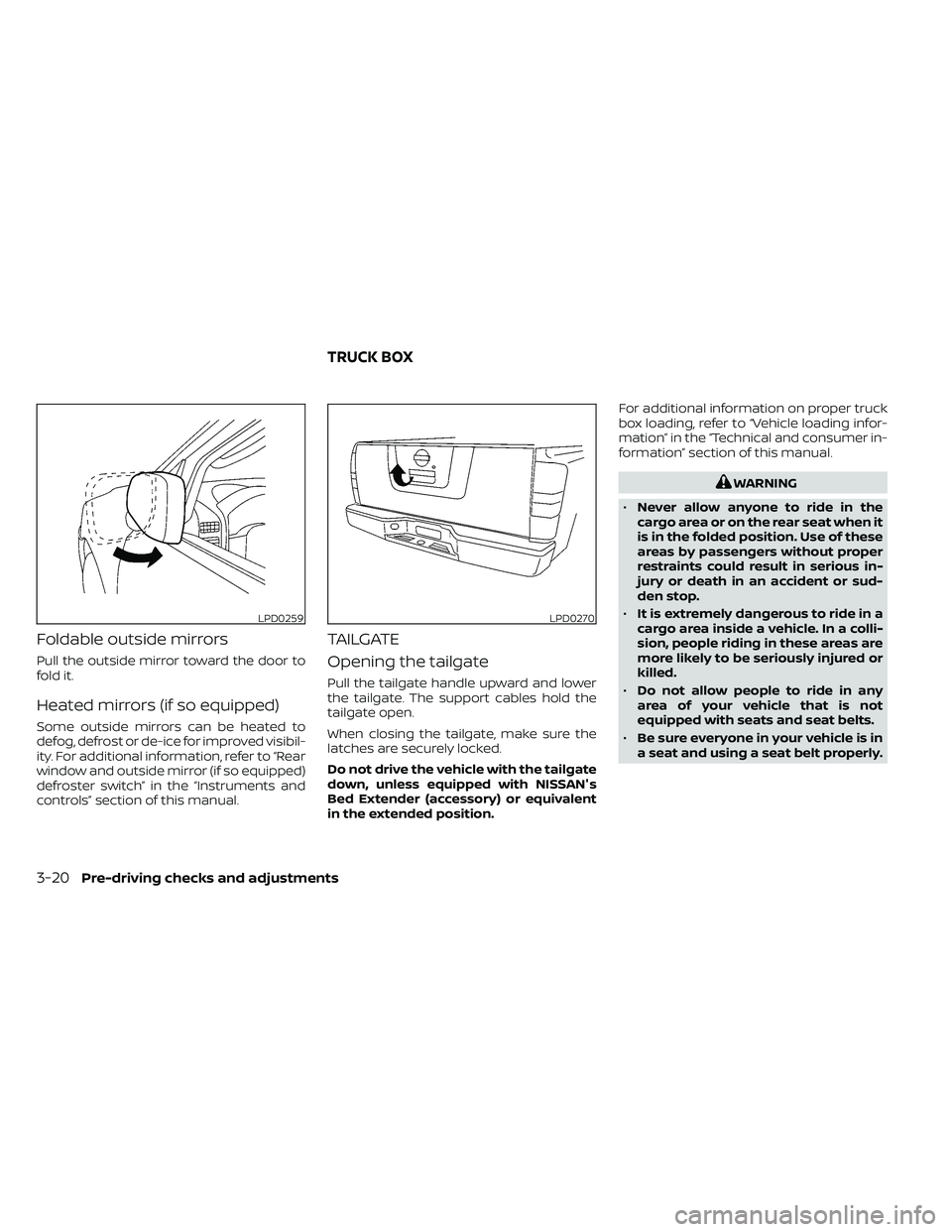
Foldable outside mirrors
Pull the outside mirror toward the door to
fold it.
Heated mirrors (if so equipped)
Some outside mirrors can be heated to
defog, defrost or de-ice for improved visibil-
ity. For additional information, refer to “Rear
window and outside mirror (if so equipped)
defroster switch” in the “Instruments and
controls” section of this manual.
TAILGATE
Opening the tailgate
Pull the tailgate handle upward and lower
the tailgate. The support cables hold the
tailgate open.
When closing the tailgate, make sure the
latches are securely locked.
Do not drive the vehicle with the tailgate
down, unless equipped with NISSAN's
Bed Extender (accessory) or equivalent
in the extended position.For additional information on proper truck
box loading, refer to “Vehicle loading infor-
mation” in the “Technical and consumer in-
formation” section of this manual.
LPD0270
TRUCK BOX
Page 191 of 492
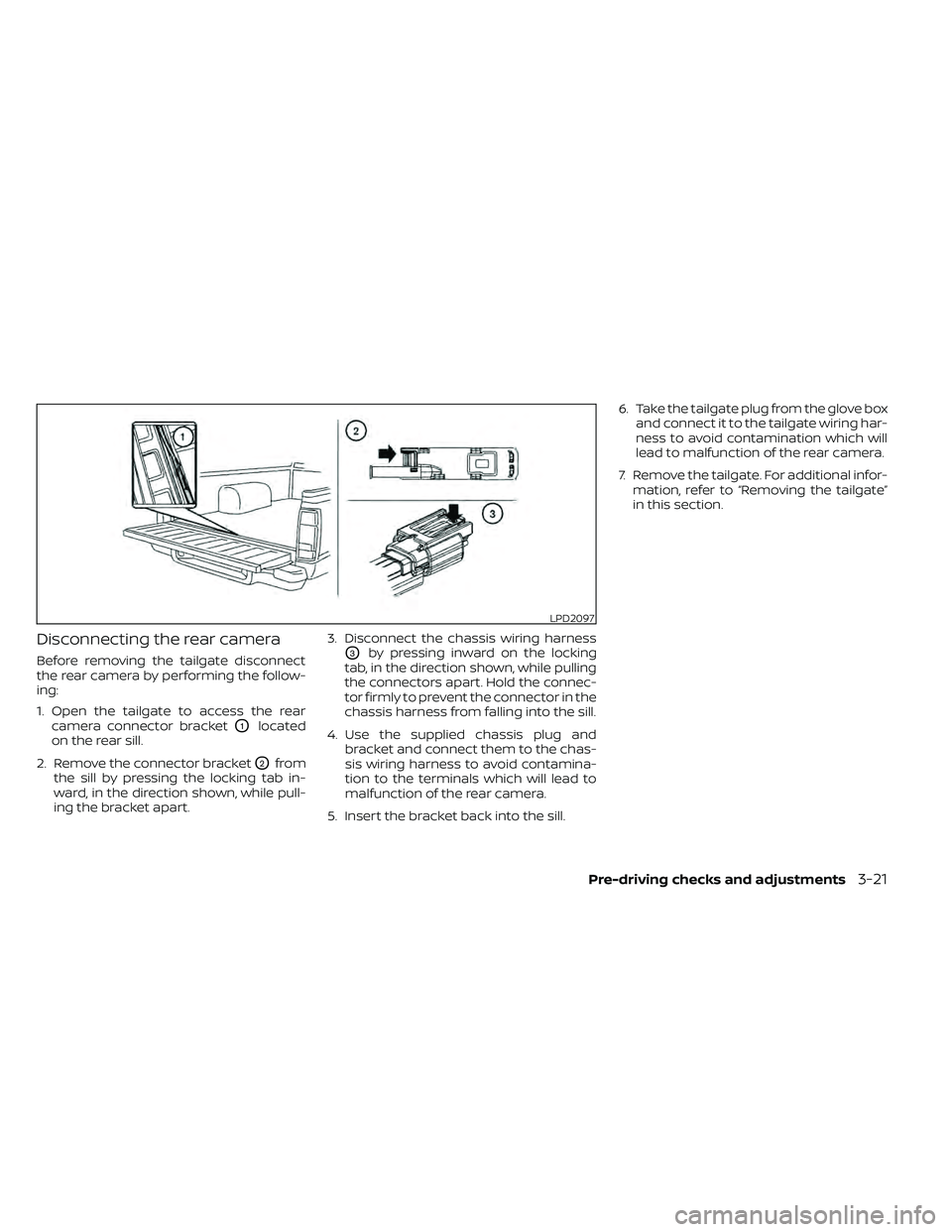
Disconnecting the rear camera
Before removing the tailgate disconnect
the rear camera by performing the follow-
ing:
1. Open the tailgate to access the rearcamera connector bracket
O1located
on the rear sill.
2. Remove the connector bracket
O2from
the sill by pressing the locking tab in-
ward, in the direction shown, while pull-
ing the bracket apart. 3. Disconnect the chassis wiring harness
O3by pressing inward on the locking
tab, in the direction shown, while pulling
the connectors apart. Hold the connec-
tor firmly to prevent the connector in the
chassis harness from falling into the sill.
4. Use the supplied chassis plug and bracket and connect them to the chas-
sis wiring harness to avoid contamina-
tion to the terminals which will lead to
malfunction of the rear camera.
5. Insert the bracket back into the sill. 6. Take the tailgate plug from the glove box
and connect it to the tailgate wiring har-
ness to avoid contamination which will
lead to malfunction of the rear camera.
7. Remove the tailgate. For additional infor- mation, refer to “Removing the tailgate”
in this section.
LPD2097
Page 192 of 492
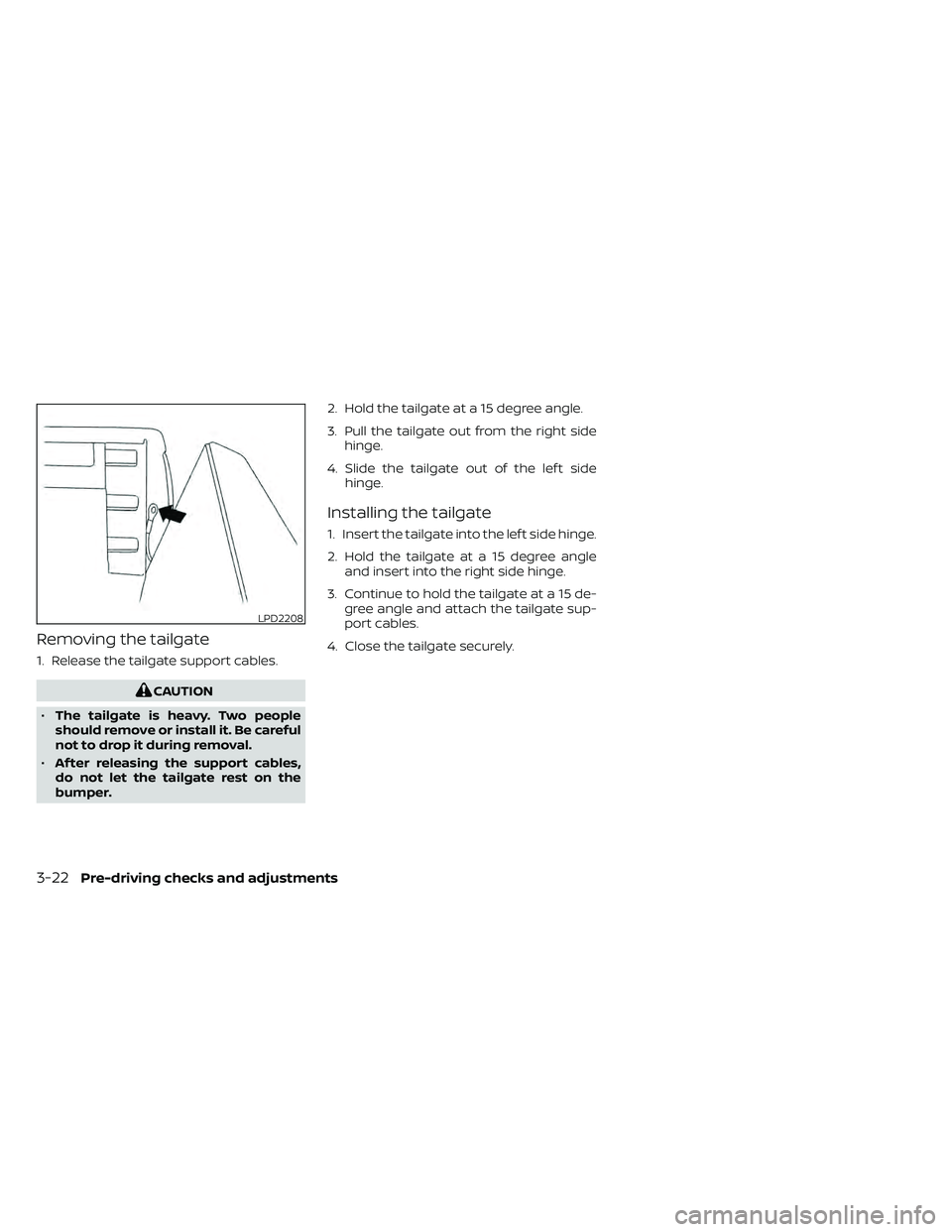
Removing the tailgate
1. Release the tailgate support cables.
LPD2208
3-22Pre-driving checks and adjustments
Page 193 of 492
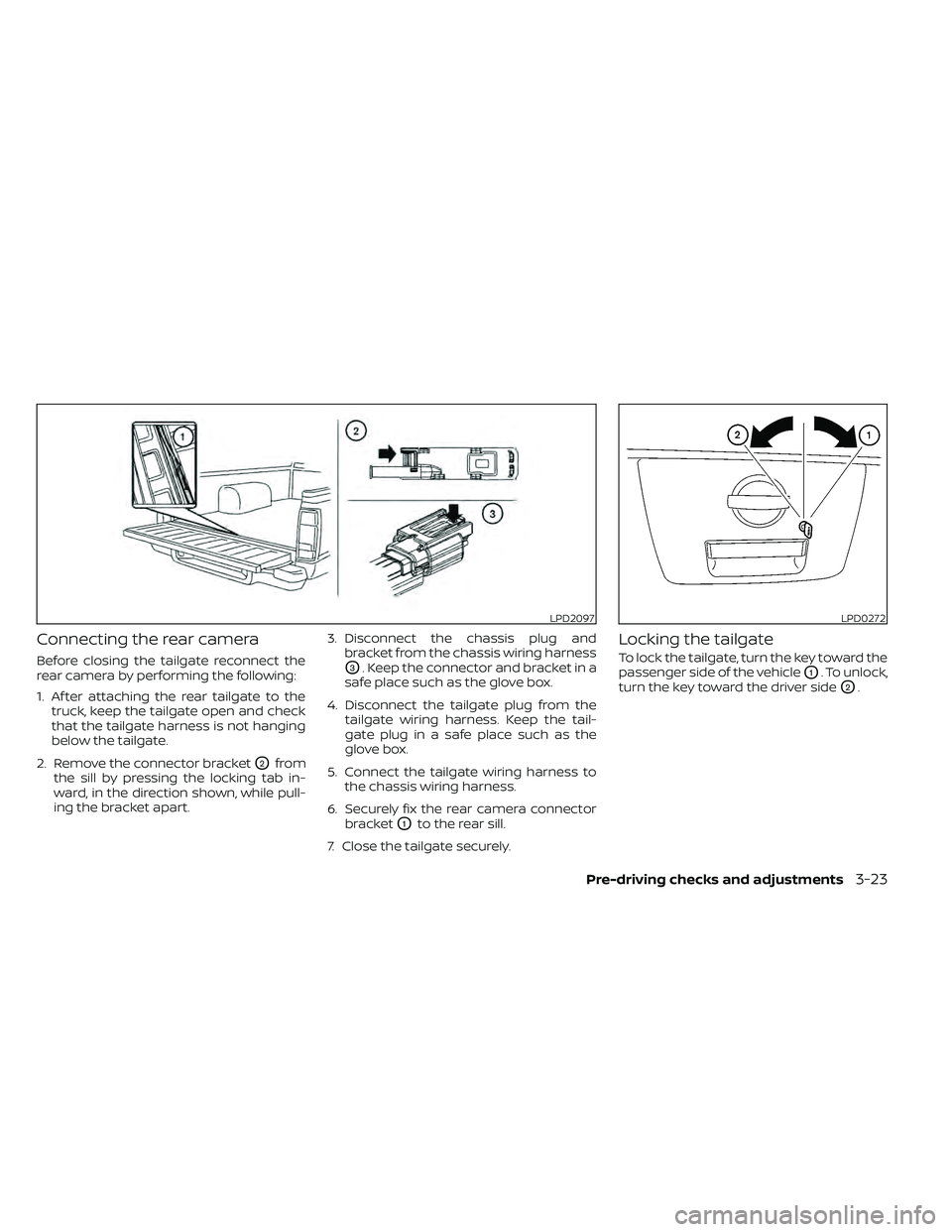
Connecting the rear camera
Before closing the tailgate reconnect the
rear camera by performing the following:
1. Af ter attaching the rear tailgate to thetruck, keep the tailgate open and check
that the tailgate harness is not hanging
below the tailgate.
2. Remove the connector bracket
O2from
the sill by pressing the locking tab in-
ward, in the direction shown, while pull-
ing the bracket apart. 3. Disconnect the chassis plug and
bracket from the chassis wiring harness
O3. Keep the connector and bracket in a
safe place such as the glove box.
4. Disconnect the tailgate plug from the tailgate wiring harness. Keep the tail-
gate plug in a safe place such as the
glove box.
5. Connect the tailgate wiring harness to the chassis wiring harness.
6. Securely fix the rear camera connector bracket
O1to the rear sill.
7. Close the tailgate securely.
Locking the tailgate
To lock the tailgate, turn the key toward the
passenger side of the vehicle
O1. To unlock,
turn the key toward the driver side
O2.
LPD2097LPD0272
Page 195 of 492
NOTE:
Use care when rotating extender, buck-
les may come in contact with the truck
bed railing.
Removing and installing the bed
extender
To remove or install the bed extender per-
form the following:
1. Open the tailgate.
2. Rotate the bed extender into a verticalposition and lif t straight up (to remove)
or lower straight down (to install).
To store the bed extender in the front of the
truck when not in use perform the follow-
ing:
1. Position the sliding brackets past the center of the wheel well.
2. Re-install the extender into the brackets (see above).
3. Rotate the extender to the inward position.
4. Push the brackets forward until the ex- tender comes in contact with the front
wall of the truck box.
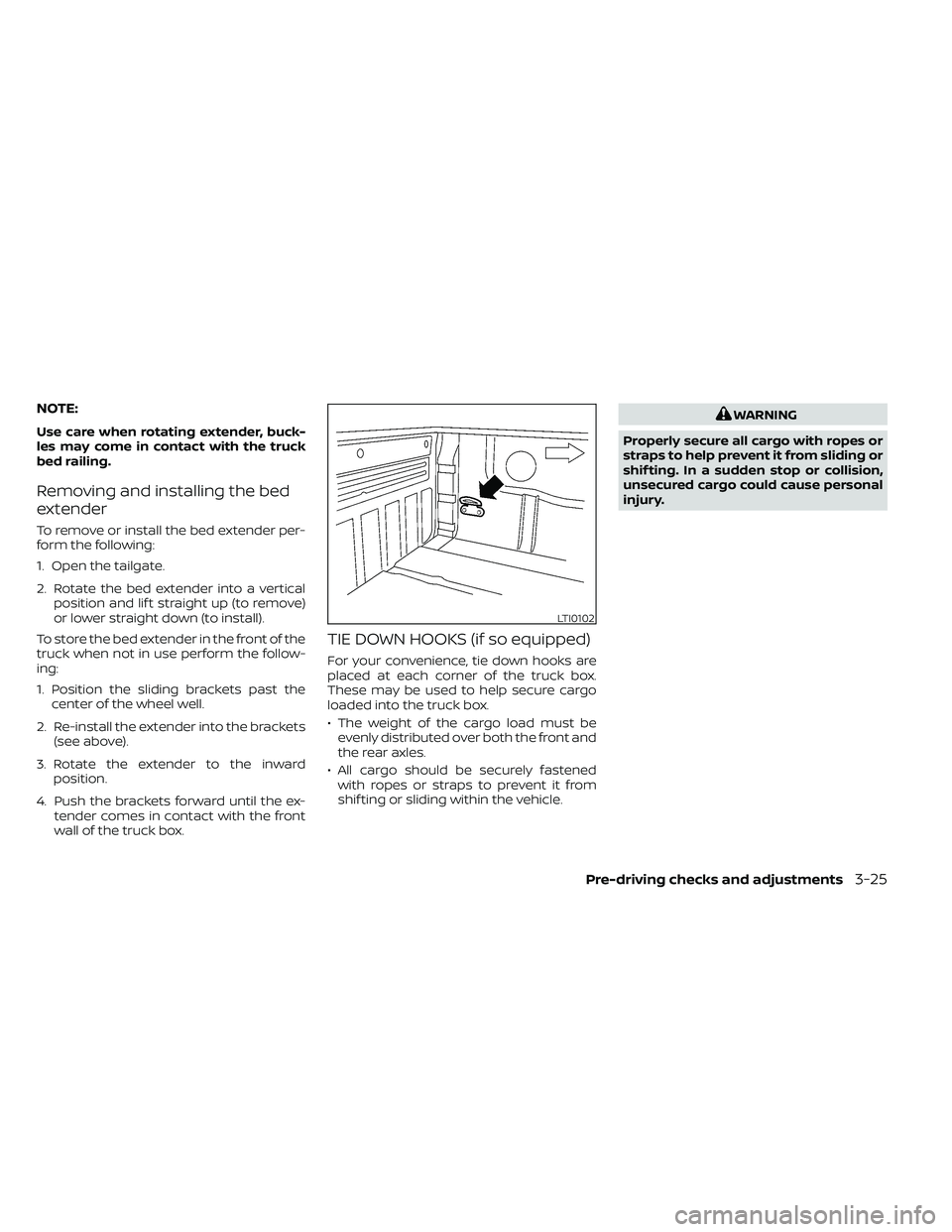
TIE DOWN HOOKS (if so equipped)
For your convenience, tie down hooks are
placed at each corner of the truck box.
These may be used to help secure cargo
loaded into the truck box.
• The weight of the cargo load must beevenly distributed over both the front and
the rear axles.
• All cargo should be securely fastened with ropes or straps to prevent it from
shif ting or sliding within the vehicle.
Page 213 of 492
•The distance guide line and the ve-
hicle width line should be used as a
reference only when the vehicle is on
a level paved surface. The distance
viewed on the monitor is for refer-
ence only and may be different than
the actual distance between the ve-
hicle and displayed objects.
CAUTION
Do not scratch the camera lens when
cleaning dirt or snow from the front of
the camera.
The RearView Monitor system automati-
cally shows a rear view of the vehicle when
the shif t lever is shif ted into the R (Reverse)
position. Press the CAMERA button (if so
equipped) while in the R (Reverse) position
to cycle through guideline options. The ra-
dio can still be heard while the RearView
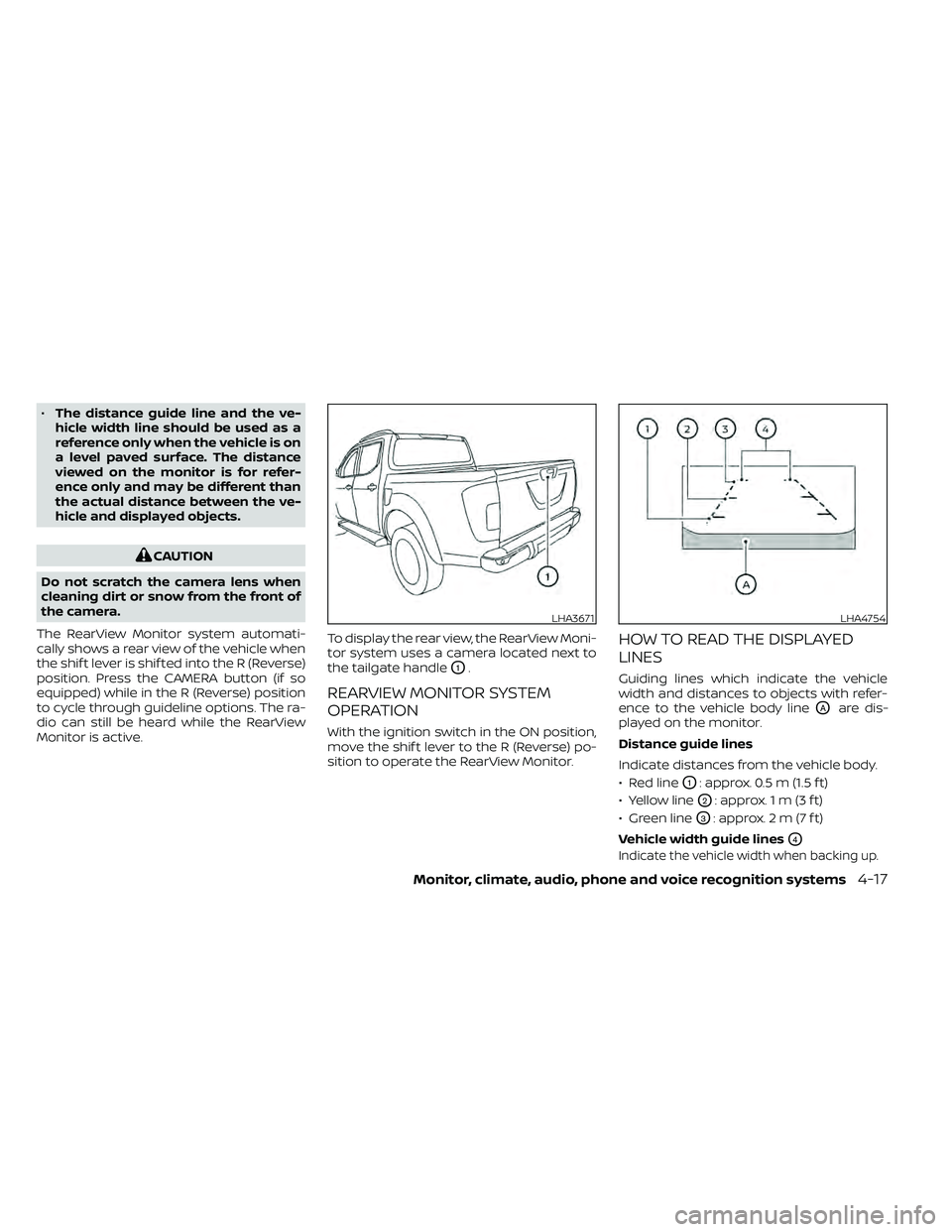
Monitor is active. To display the rear view, the RearView Moni-
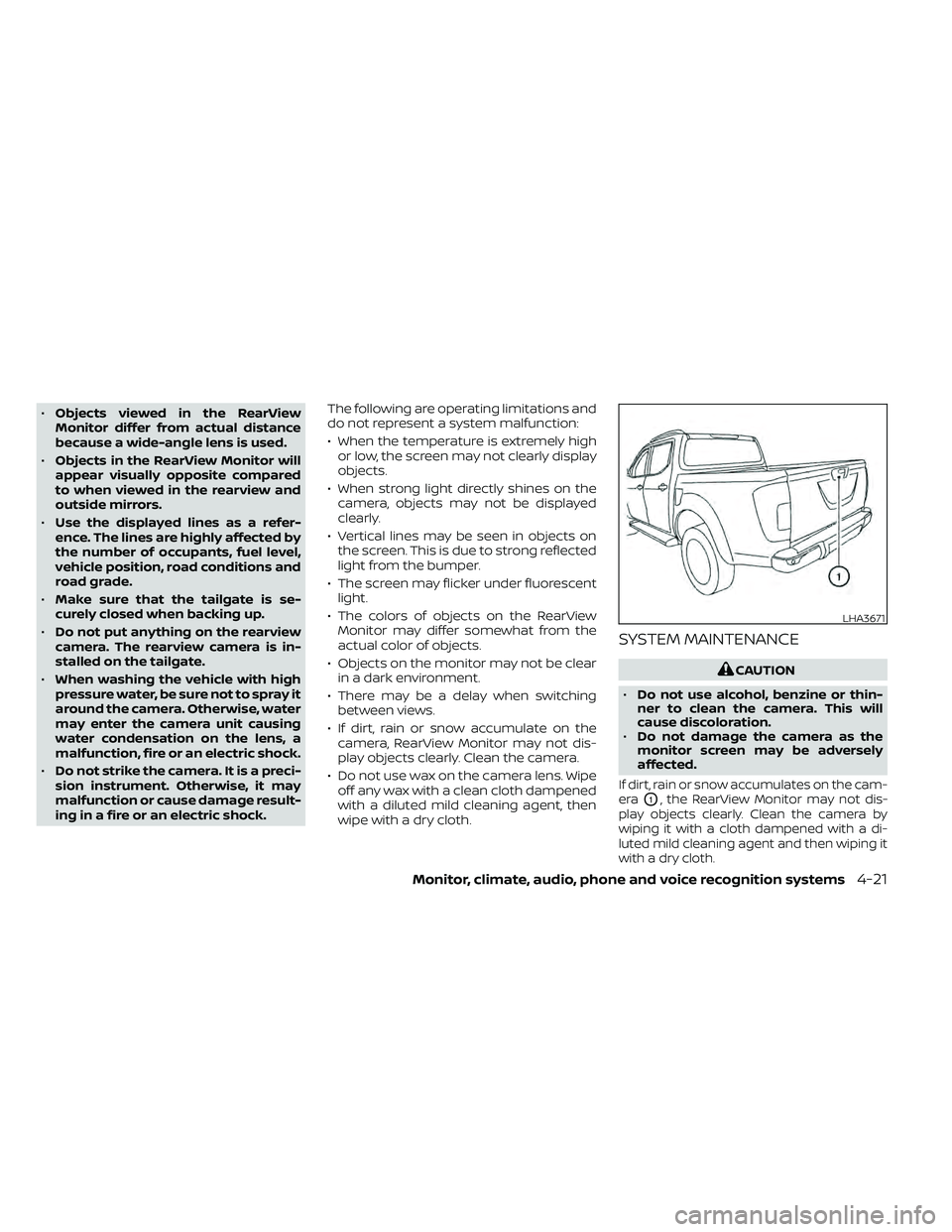
tor system uses a camera located next to
the tailgate handle
O1.
REARVIEW MONITOR SYSTEM
OPERATION
With the ignition switch in the ON position,
move the shif t lever to the R (Reverse) po-
sition to operate the RearView Monitor.
HOW TO READ THE DISPLAYED
LINES
Guiding lines which indicate the vehicle
width and distances to objects with refer-
ence to the vehicle body line
OAare dis-
played on the monitor.
Distance guide lines
Indicate distances from the vehicle body.
• Red line
O1: approx. 0.5 m (1.5 f t)
• Yellow line
O2: approx. 1 m (3 f t)
• Green line
O3: approx. 2 m (7 f t)
Vehicle width guide lines
O4
Indicate the vehicle width when backing up.
LHA3671LHA4754
Page 217 of 492
•Objects viewed in the RearView
Monitor differ from actual distance
because a wide-angle lens is used.
• Objects in the RearView Monitor will
appear visually opposite compared
to when viewed in the rearview and
outside mirrors.
• Use the displayed lines as a refer-
ence. The lines are highly affected by
the number of occupants, fuel level,
vehicle position, road conditions and
road grade.
• Make sure that the tailgate is se-
curely closed when backing up.
• Do not put anything on the rearview
camera. The rearview camera is in-
stalled on the tailgate.
• When washing the vehicle with high
pressure water, be sure not to spray it
around the camera. Otherwise, water
may enter the camera unit causing
water condensation on the lens, a
malfunction, fire or an electric shock.
• Do not strike the camera. It is a preci-
sion instrument. Otherwise, it may
malfunction or cause damage result-
ing in a fire or an electric shock. The following are operating limitations and
do not represent a system malfunction:
• When the temperature is extremely high
or low, the screen may not clearly display
objects.
• When strong light directly shines on the camera, objects may not be displayed
clearly.
• Vertical lines may be seen in objects on the screen. This is due to strong reflected
light from the bumper.
• The screen may flicker under fluorescent light.
• The colors of objects on the RearView Monitor may differ somewhat from the
actual color of objects.
• Objects on the monitor may not be clear in a dark environment.
• There may be a delay when switching between views.
• If dirt, rain or snow accumulate on the camera, RearView Monitor may not dis-
play objects clearly. Clean the camera.
• Do not use wax on the camera lens. Wipe off any wax with a clean cloth dampened
with a diluted mild cleaning agent, then
wipe with a dry cloth.
SYSTEM MAINTENANCE
LHA3671
Page 483 of 492
Stop light....................8-28Storage.....................2-40Storage tray..................2-44Sun visors....................3-16Sunglasses case...............2-45Sunglasses holder..............2-45Sunroof..................2-52, 7-5Supplemental air bag warning
labels...................... .1-85Supplemental air bag warning
light....................1-85, 2-20Supplemental front impact air bag
system......................1-77Supplemental restraint system
Information and warning labels.....1-85Precautions on supplemental restraint
system....................1-70Supplemental restraint system
(Supplemental air bag system).......1-70SwitchAutolight switch..............2-31Automatic power window switch. . . .2-51Electronic locking rear differential (E-Lock)
system switch...............2-37Fog light switch..............2-33Hazard warning flasher switch......6-2Headlight and turn signal switch. . . .2-30Headlight control switch.........2-30Hill descent control switch........2-36Instrument brightness control.....2-33Power door lock switch........3-5, 3-6Rear sonar system OFF switch.....2-38Rear window and outside mirror
defroster switch..............2-29
Rear window defroster switch.....2-29Turn signal switch.............2-33
T
Tachometer...................2-7Tailgate.....................3-20Tailgate latch..............3-24,3-25Temperature gaugeEngine coolant temperature gauge. . .2-7Thef t (NISSAN Vehicle Immobilizer System),
engine start...............2-27,5-13Three-way catalyst...............5-3Tie down hooks................3-25Tilting steering wheel.............3-16TireFlat tire................. .6-3, 6-4Spare tire.............6-5, 6-6, 8-41Tire and Loading Information
label.................... .10-13Tire chains..................8-37Tire pressure................8-30Tire rotation.................8-38Tires of 4-wheel drive...........8-40Types of tires................8-36Uniform tire quality grading......10-37Wheel/tire size...............10-10Wheels and tires..........8-30, 10-10Tire pressure
Low tire pressure warning light.....2-18Tire Pressure Monitoring System
(TPMS)...................... .5-3Top tether strap child restraint.......1-32
Towing
2-wheel drive models...........6-16Flat towing.............10-36, 10-37Tow truck towing..............6-14Towing load/specification.......10-28Trailer towing...............10-25Towing a trailer................10-25TransceiverHomeLink® Universal
Transceiver
..........2-56, 2-58, 2-59TransmissionDriving with automatic
transmission
................5-14Travel (See registering a vehicle in
another country)...............10-11Trip computer................. .2-9Trip odometer..................2-5Troubleshooting guide
(NISSAN voice recognition system). . . .4-110Truck - camper loading...........10-23Truck box....................3-20Turn signal switch...............2-33
U
Under seat storage bin...........2-42Uniform tire quality grading........10-37USB (Universal Serial Bus) Connection Port
(models with Navigation System).....4-58USB (Universal Serial Bus) Connection Port
(models without Navigation System). . .4-55USB interface
Audio file operation............4-59
11-7