P switch NISSAN FRONTIER 2022 Owner´s Manual
[x] Cancel search | Manufacturer: NISSAN, Model Year: 2022, Model line: FRONTIER, Model: NISSAN FRONTIER 2022Pages: 556, PDF Size: 6.11 MB
Page 344 of 556
CONVENTIONAL (fixed speed)
CRUISE CONTROL MODE
This mode allows driving at a speed be-
tween 25 to 90 mph (40 to 144 km/h) with-
out keeping your foot on the accelerator
pedal.
WARNING
• In the conventional (fixed speed)
cruise control mode, a warning
chime does not sound to warn you if
you are too close to the vehicle
ahead, as neither the presence of the
vehicle ahead nor the vehicle-to-
vehicle distance is detected.
• Pay special attention to the distance
between your vehicle and the vehicle
ahead of you or a collision could
occur.
• Always confirm the setting in the ICC
system display.
• Do not use the conventional (fixed
speed) cruise control mode when
driving under the following condi-
tions:
– When it is not possible to keep the
vehicle at a set speed –
In heavy traffic or in traffic that
varies in speed
– On winding or hilly roads
– On slippery roads (rain, snow, ice,
etc.)
– In very windy areas
• Doing so could cause a loss of vehicle
control and result in an accident.
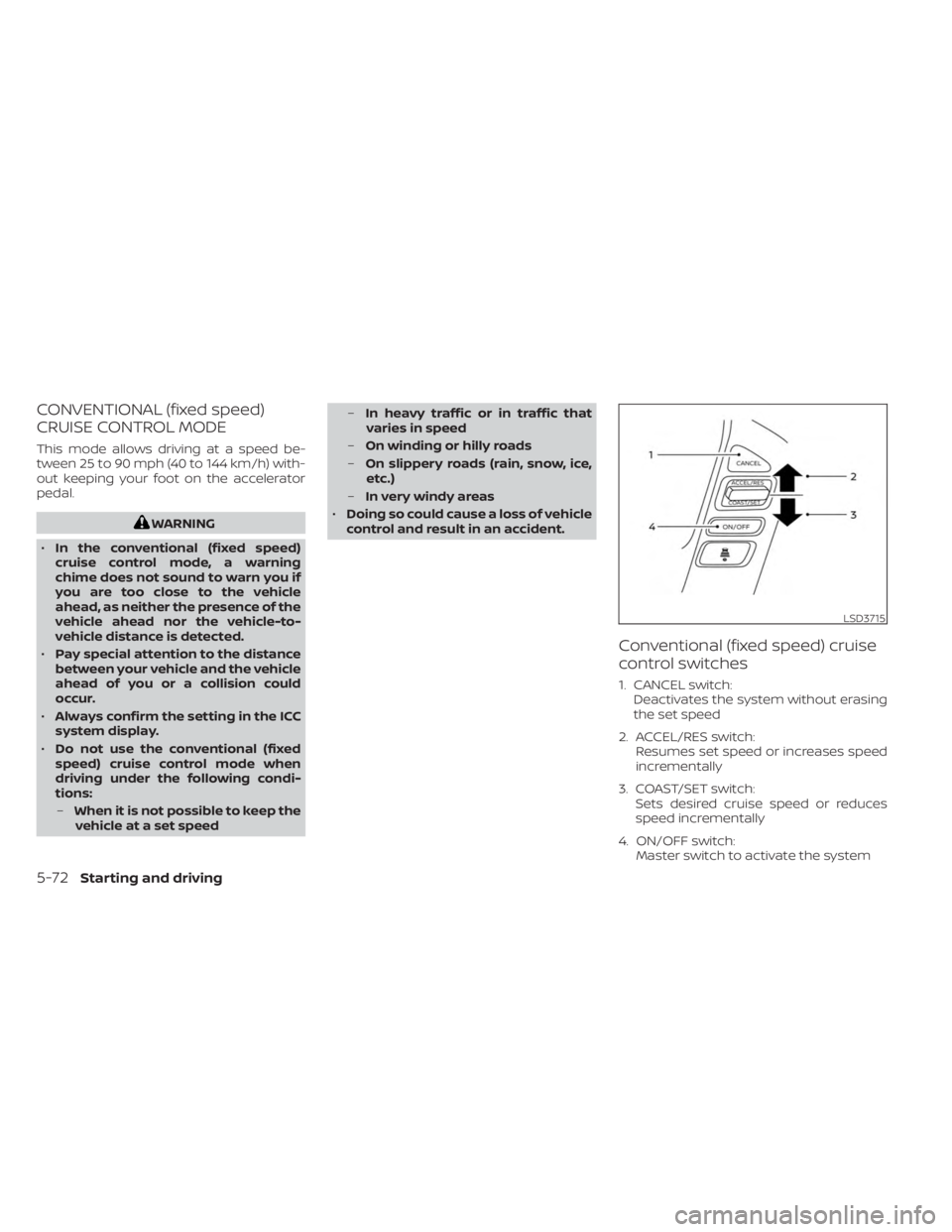
Conventional (fixed speed) cruise
control switches
1. CANCEL switch: Deactivates the system without erasing
the set speed
2. ACCEL/RES switch: Resumes set speed or increases speed
incrementally
3. COAST/SET switch: Sets desired cruise speed or reduces
speed incrementally
4. ON/OFF switch: Master switch to activate the system
LSD3715
5-72Starting and driving
Page 345 of 556
Conventional (fixed speed) cruise
control mode display and
indicators
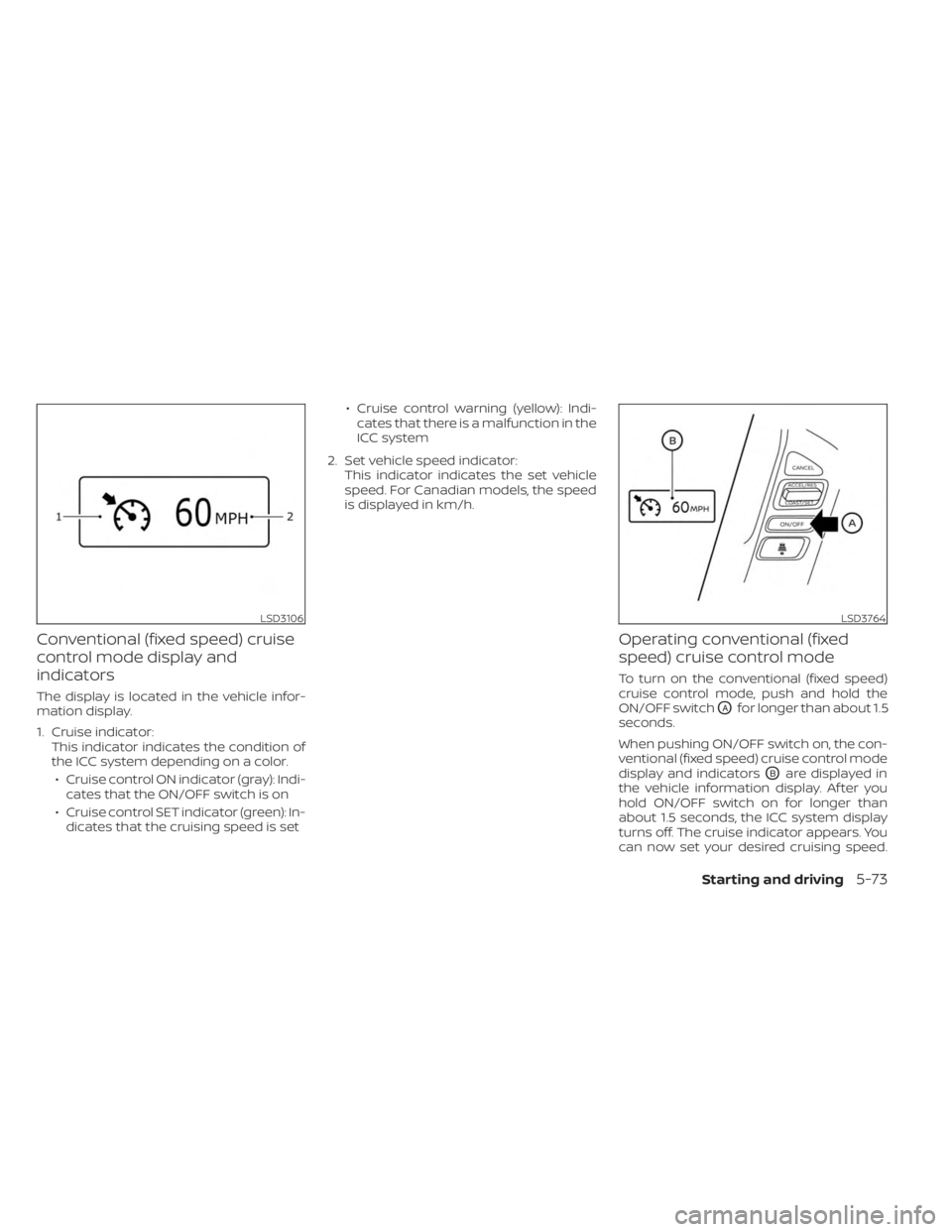
The display is located in the vehicle infor-
mation display.
1. Cruise indicator:This indicator indicates the condition of
the ICC system depending on a color.
• Cruise control ON indicator (gray): Indi- cates that the ON/OFF switch is on
• Cruise control SET indicator (green): In- dicates that the cruising speed is set • Cruise control warning (yellow): Indi-
cates that there is a malfunction in the
ICC system
2. Set vehicle speed indicator: This indicator indicates the set vehicle
speed. For Canadian models, the speed
is displayed in km/h.
Operating conventional (fixed
speed) cruise control mode
To turn on the conventional (fixed speed)
cruise control mode, push and hold the
ON/OFF switch
OAfor longer than about 1.5
seconds.
When pushing ON/OFF switch on, the con-
ventional (fixed speed) cruise control mode
display and indicators
OBare displayed in
the vehicle information display. Af ter you
hold ON/OFF switch on for longer than
about 1.5 seconds, the ICC system display
turns off. The cruise indicator appears. You
can now set your desired cruising speed.
LSD3106LSD3764
Starting and driving5-73
Page 346 of 556
Pushing the ON/OFF switch again will turn
the system completely off. When the igni-
tion switch is placed in the OFF position, the
system is also automatically turned off.
To use the ICC system again, quickly push
and release the ON/OFF switch (vehicle-to
vehicle distance control mode) or push and
hold it (conventional cruise control mode)
again to turn it on.
CAUTION
To avoid accidentally engaging cruise
control, make sure to turn the ON/OFF
switch off when not using the ICC
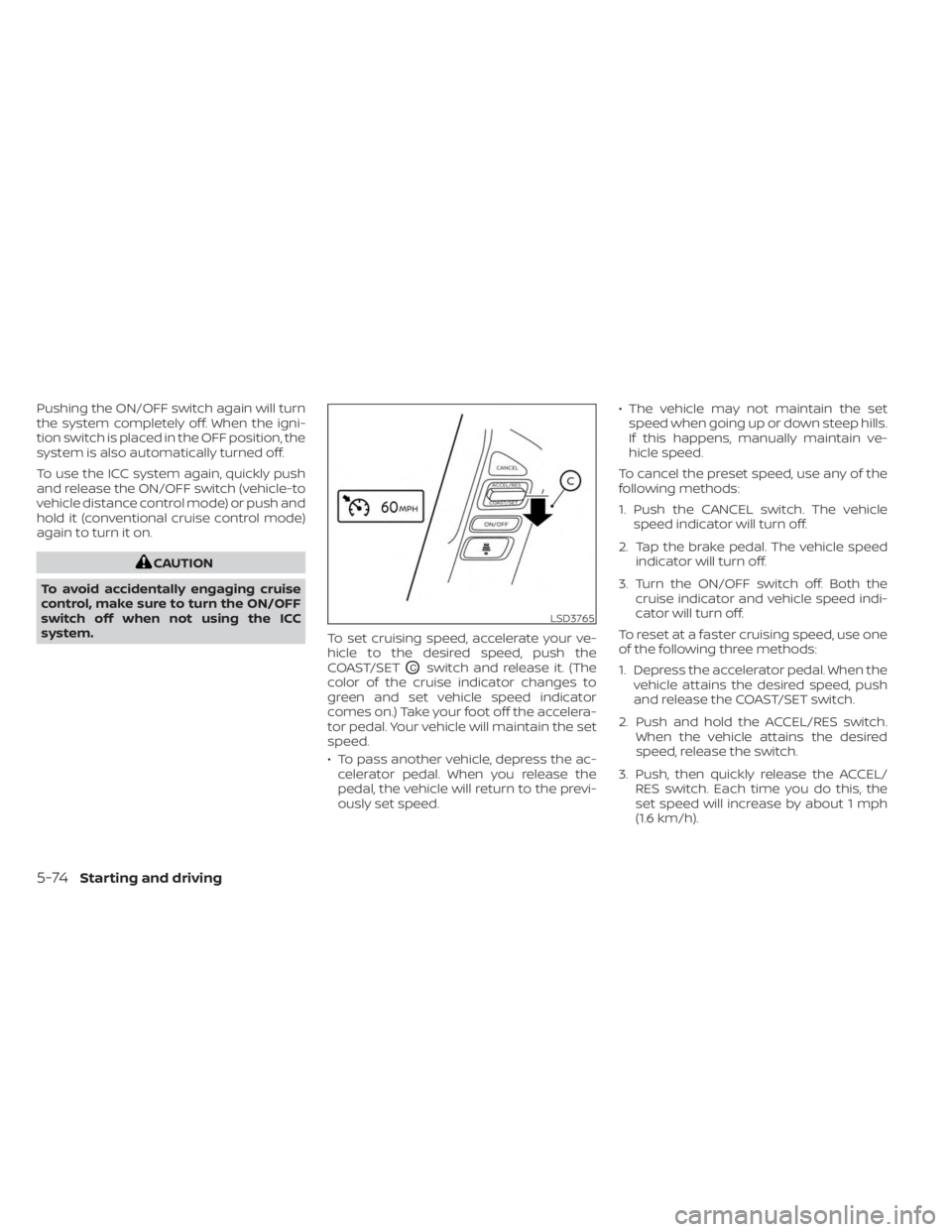
system. To set cruising speed, accelerate your ve-
hicle to the desired speed, push the
COAST/SET
OCswitch and release it. (The
color of the cruise indicator changes to
green and set vehicle speed indicator
comes on.) Take your foot off the accelera-
tor pedal. Your vehicle will maintain the set
speed.
• To pass another vehicle, depress the ac- celerator pedal. When you release the
pedal, the vehicle will return to the previ-
ously set speed. • The vehicle may not maintain the set
speed when going up or down steep hills.
If this happens, manually maintain ve-
hicle speed.
To cancel the preset speed, use any of the
following methods:
1. Push the CANCEL switch. The vehicle speed indicator will turn off.
2. Tap the brake pedal. The vehicle speed indicator will turn off.
3. Turn the ON/OFF switch off. Both the cruise indicator and vehicle speed indi-
cator will turn off.
To reset at a faster cruising speed, use one
of the following three methods:
1. Depress the accelerator pedal. When the vehicle attains the desired speed, push
and release the COAST/SET switch.
2. Push and hold the ACCEL/RES switch. When the vehicle attains the desired
speed, release the switch.
3. Push, then quickly release the ACCEL/ RES switch. Each time you do this, the
set speed will increase by about 1 mph
(1.6 km/h).
LSD3765
5-74Starting and driving
Page 347 of 556
To reset at a slower cruising speed, use one
of the following three methods:
1. Lightly tap the brake pedal. When thevehicle attains the desired speed, push
the COAST/SET switch and release it.
2. Push and hold the COAST/SET switch. Release the switch when the vehicle
slows down to the desired speed.
3. Push, then quickly release the COAST/ SET switch. Each time you do this, the set
speed will decrease by about 1 mph (1.6
km/h).
To resume the preset speed, push and re-
lease the ACCEL/RES switch. The vehicle
will resume the last set cruising speed
when the vehicle speed is over 25 mph (40
km/h).
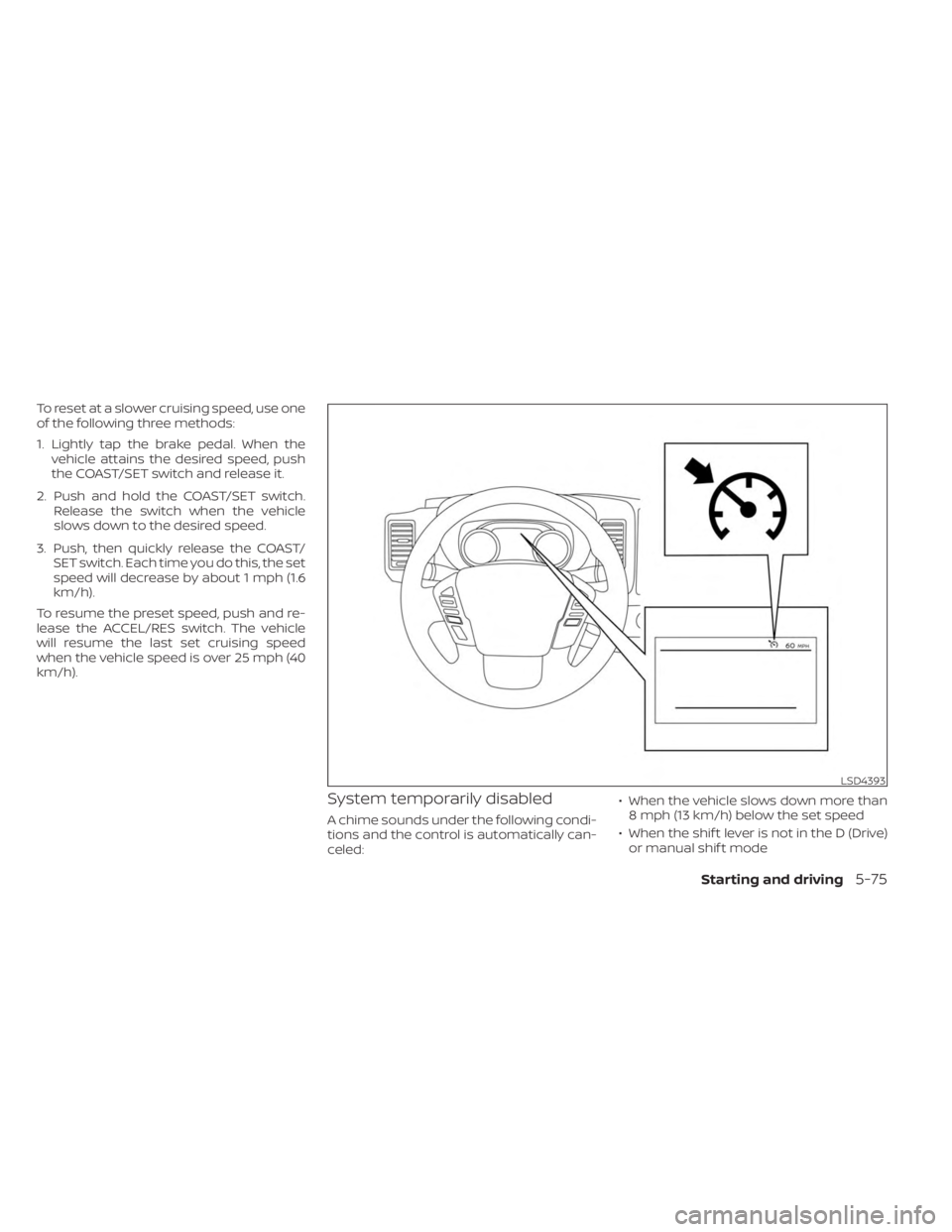
System temporarily disabled
A chime sounds under the following condi-
tions and the control is automatically can-
celed: • When the vehicle slows down more than
8 mph (13 km/h) below the set speed
• When the shif t lever is not in the D (Drive) or manual shif t mode
LSD4393
Starting and driving5-75
Page 350 of 556
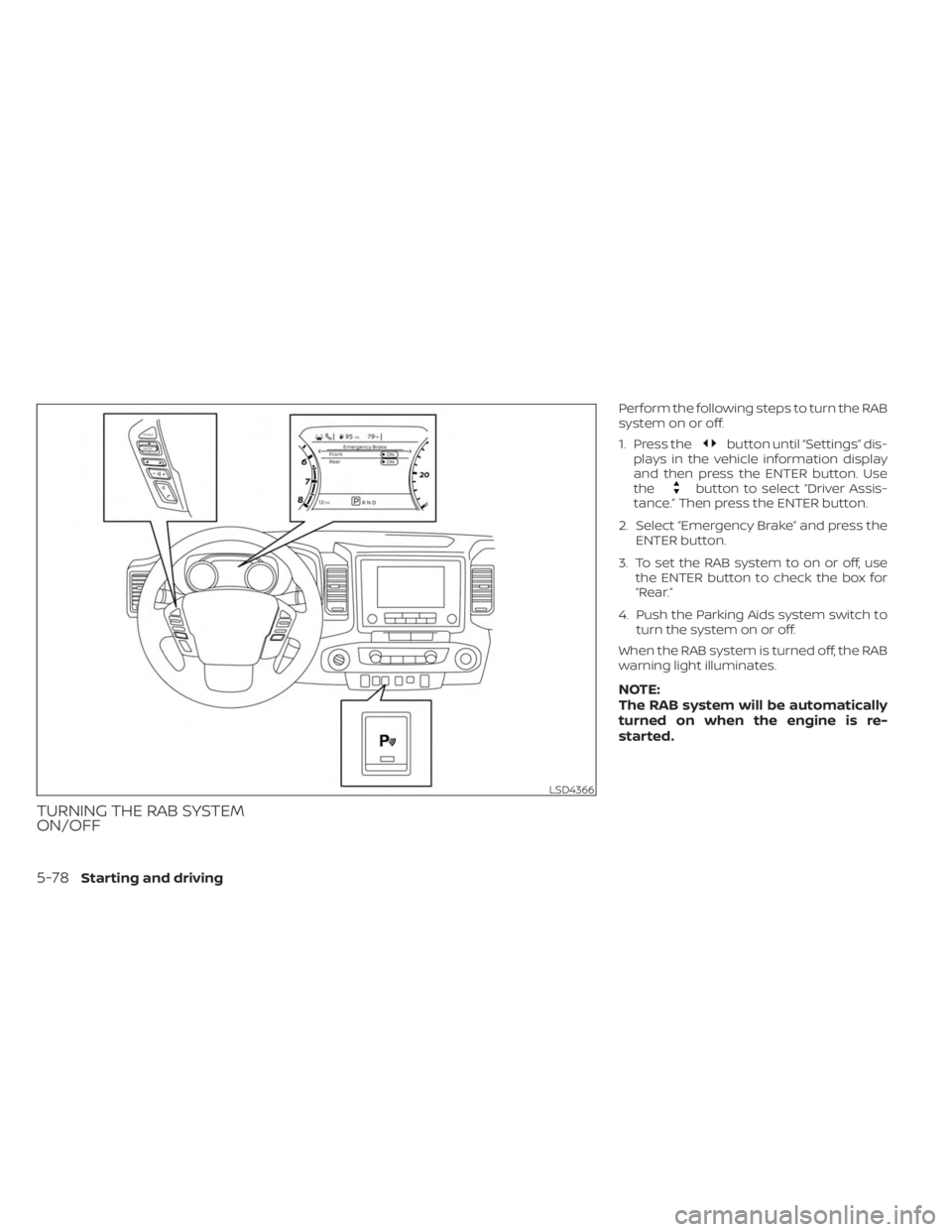
TURNING THE RAB SYSTEM
ON/OFF
Perform the following steps to turn the RAB
system on or off.
1. Press the
button until “Settings” dis-
plays in the vehicle information display
and then press the ENTER button. Use
the
button to select “Driver Assis-
tance.” Then press the ENTER button.
2. Select “Emergency Brake” and press the ENTER button.
3. To set the RAB system to on or off, use the ENTER button to check the box for
“Rear.”
4. Push the Parking Aids system switch to turn the system on or off.
When the RAB system is turned off, the RAB
warning light illuminates.
NOTE:
The RAB system will be automatically
turned on when the engine is re-
started.
LSD4366
5-78Starting and driving
Page 377 of 556
The I–DA system helps alert the driver if the
system detects a lack of attention or driv-
ing fatigue.
The system monitors driving style and
steering behavior over a period of time,
and it detects changes from the normal
pattern. If the system detects that driver
attention is decreasing over a period of
time, the system uses audible and visual
warnings to suggest that the driver take a
break.
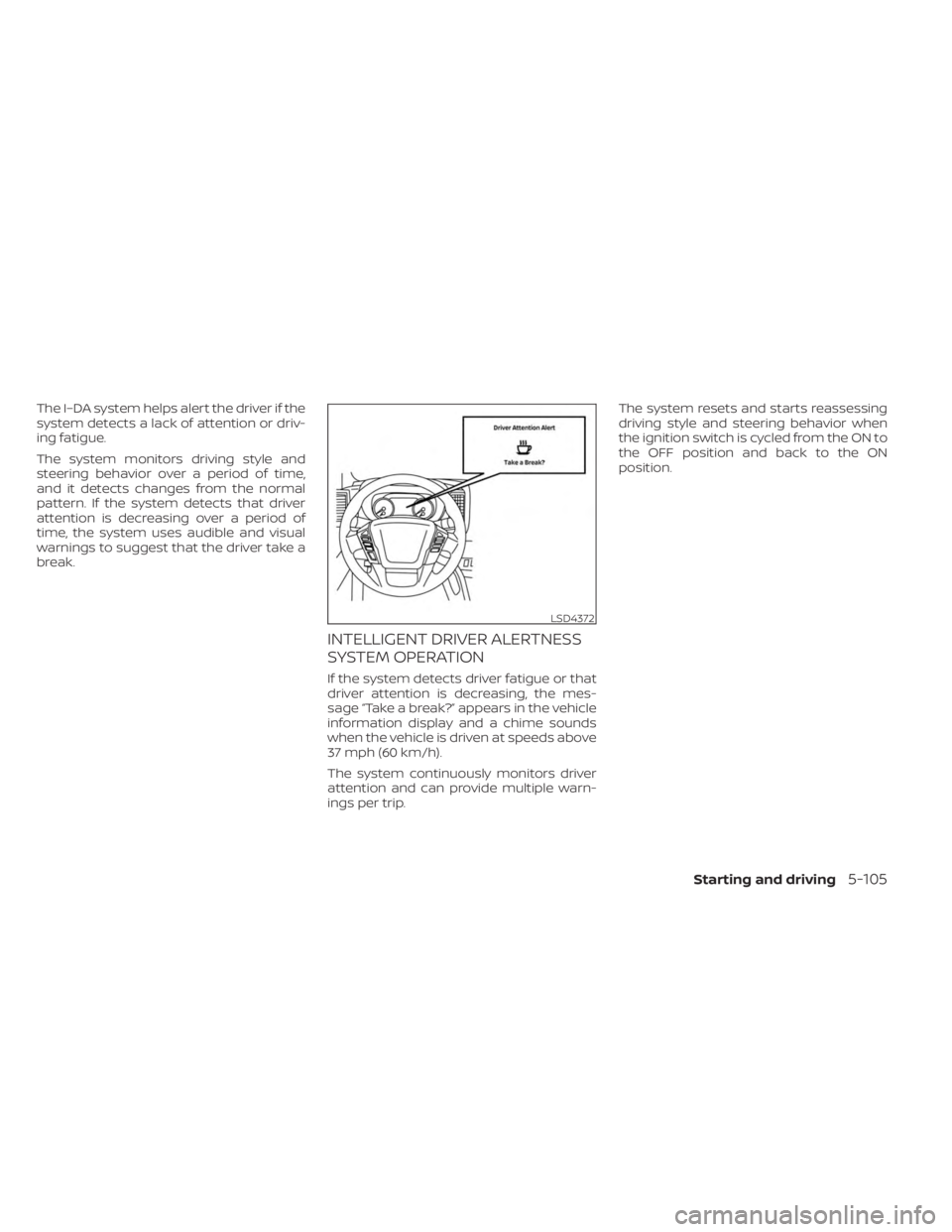
INTELLIGENT DRIVER ALERTNESS
SYSTEM OPERATION
If the system detects driver fatigue or that
driver attention is decreasing, the mes-
sage “Take a break?” appears in the vehicle
information display and a chime sounds
when the vehicle is driven at speeds above
37 mph (60 km/h).
The system continuously monitors driver
attention and can provide multiple warn-
ings per trip.The system resets and starts reassessing
driving style and steering behavior when
the ignition switch is cycled from the ON to
the OFF position and back to the ON
position.
LSD4372
Starting and driving5-105
Page 381 of 556
• Keep your engine tuned up.
• Follow the recommended scheduledmaintenance.
• Keep the tires inflated to the correct pres- sure. Low tire pressure increases tire
wear and lowers fuel economy.
• Keep the wheels in correct alignment. Im- proper alignment increases tire wear and
lowers fuel economy.
• For vehicles equipped with
, use 4H
or 4L position only when necessary.
4-Wheel Drive operation lowers fuel
economy.
• Use the recommended viscosity engine oil. For additional information, see “Engine
oil and oil filter recommendations”
(P. 10-7).
WARNING
• For 4WD equipped vehicles, do not
attempt to raise two wheels off the
ground and shif t the transmission to
any drive or reverse position with the
engine running. Doing so may result
in drivetrain damage or unexpected
vehicle movement which could result
in serious vehicle damage or per-
sonal injury.
• Do not attempt to test a 4WD
equipped vehicle on a 2-wheel dyna-
mometer (such as the dynamom-
eters used by some states for emis-
sions testing), or similar equipment
even if the other two wheels are
raised off the ground. Make sure you
inform test facility personnel that
your vehicle is equipped with 4WD
before it is placed on a dynamom-
eter. Using the wrong test equipment
may result in drivetrain damage or
unexpected vehicle movement
which could result in serious vehicle
damage or personal injury.CAUTION
• Do not drive the vehicle in the 4H or
4LO position on dry hard surface
roads. Driving on dry, hard surfaces in
4H or 4LO may cause unnecessary
noise, tire wear and increased fuel
consumption.
If the 4WD vehicle information dis-
play warning message turns on
when you are driving on dry hard sur-
face roads:
– In the 4H position, shif t the 4WD
shif t switch to 2WD.
– In the 4LO position, stop the ve-
hicle, move the shif t lever to the N
(Neutral) position with the brake
pedal depressed, and shif t the
4WD shif t switch to 2WD.
• If the vehicle information display
warning message is still on af ter the
above operation, have your vehicle
checked as soon as possible. It is rec-
ommended that you visit a NISSAN
dealer for this service.
INCREASING FUEL ECONOMYUSING 4–WHEEL DRIVE (4WD)
(if so equipped)
Starting and driving5-109
Page 382 of 556
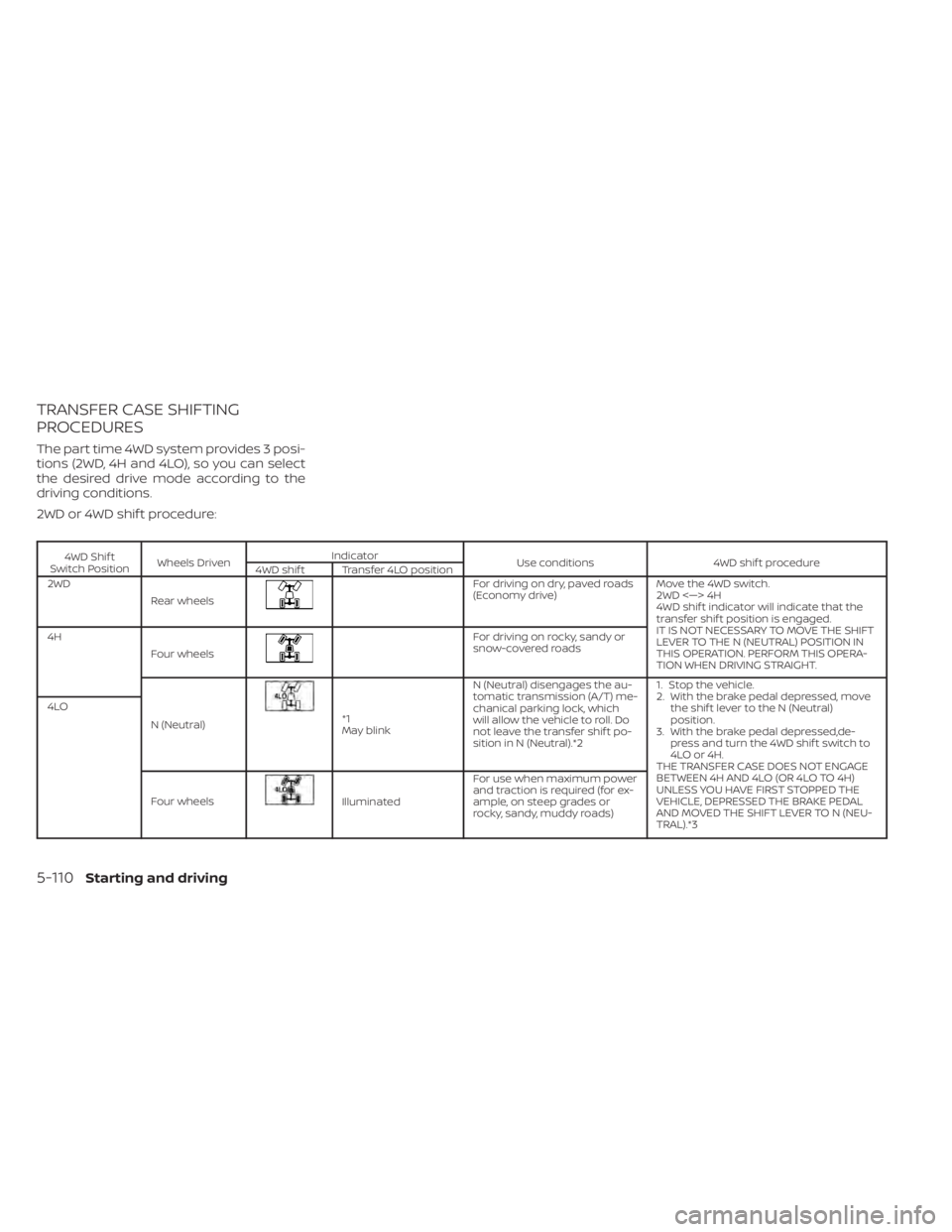
TRANSFER CASE SHIFTING
PROCEDURES
The part time 4WD system provides 3 posi-
tions (2WD, 4H and 4LO), so you can select
the desired drive mode according to the
driving conditions.
2WD or 4WD shif t procedure:
4WD Shif t
Switch Position Wheels Driven Indicator
Use conditions 4WD shif t procedure
4WD shif t Transfer 4LO position
2WD
Rear wheels
For driving on dry, paved roads
(Economy drive) Move the 4WD switch.
2WD <—> 4H
4WD shif t indicator will indicate that the
transfer shif t position is engaged.
IT IS NOT NECESSARY TO MOVE THE SHIFT
LEVER TO THE N (NEUTRAL) POSITION IN
THIS OPERATION. PERFORM THIS OPERA-
TION WHEN DRIVING STRAIGHT.
4H
Four wheels
For driving on rocky, sandy or
snow-covered roads
N (Neutral)
*1
May blink N (Neutral) disengages the au-
tomatic transmission (A/T) me-
chanical parking lock, which
will allow the vehicle to roll. Do
not leave the transfer shif t po-
sition in N (Neutral).*2 1. Stop the vehicle.
2. With the brake pedal depressed, move
the shif t lever to the N (Neutral)
position.
3. With the brake pedal depressed,de- press and turn the 4WD shif t switch to
4LO or 4H.
THE TRANSFER CASE DOES NOT ENGAGE
BETWEEN 4H AND 4LO (OR 4LO TO 4H)
UNLESS YOU HAVE FIRST STOPPED THE
VEHICLE, DEPRESSED THE BRAKE PEDAL
AND MOVED THE SHIFT LEVER TO N (NEU-
TRAL).*3
4LO
Four wheels
Illuminated For use when maximum power
and traction is required (for ex-
ample, on steep grades or
rocky, sandy, muddy roads)
5-110Starting and driving
Page 383 of 556
*1: Before moving the shif t lever from N
(Neutral), wait until the 4LO indicator stays
on steady. This indicates that the 4WD shif t
procedure is completed and the transfer
gear is correctly set in the 4LO position. If
the vehicle is shif ted into gear before the
indicator is on steady, the transfer gear
may grind, not engage correctly or stay in
the N (Neutral) position.
- If the 4WD vehicle information display
warning message illuminates, perform the
following procedure to return the transfer
case to correct operating condition.
1. Turn off the engine by placing the ignition
switch in the OFF position.
2. Start the engine.
- Check that the 4WD vehicle information
display warning message turns off. If the
warning message in the vehicle informa-
tion display stays on, have the system
checked. It is recommended that you visit a
NISSAN dealer for this service.
3. Apply the parking brake, depress the
brake pedal and move the shif t lever to the
N (Neutral) position.
4. With the brake pedal depressed, move
the 4WD shif t switch to the desired mode.- Be sure to wait until the transfer gear
change completes before shif ting the shif t
lever from the N (Neutral) position.
*2: While changing in and out of 4LO, the
ignition switch must be in the ON position
and the vehicle's engine must be running
for a shif t to take place and for the 4WD
shif t and 4LO position indicators to be op-
erable. Otherwise, the shif t will not take
place and no indicators will be on or
flashing.
*3: Make sure the transfer 4LO position in-
dicator turns on when you shif t the 4WD
shif t switch to 4LO. The
indicator light
will also turn on when 4LO is selected. For
additional information, see “Vehicle Dy-
namic Control (VDC) system” (P. 5-121).
When the 4LO position is selected, the VDC
system is disabled and the VDC off indica-
tor light illuminates, see “Vehicle Dynamic
Control (VDC) OFF indicator light”(P. 2-18).
The transfer case 4WD shif t switch is used
to select either 2WD or 4WD depending on
the driving conditions. There are three
types of drive modes available, 2WD, 4H and
4LO. The 4WD shif t switch electronically controls
the transfer case operation. Rotate the
switch to move between each mode, 2WD,
4H and 4LO.
To change into or out of 4LO, the vehicle
MUST be stationary, move the shif t lever
to N (Neutral), and depress the brake
pedal. The switch must be pushed and
turned to select 4LO.
WARNING
• When parking, apply the parking
brake before stopping the engine
and make sure that the 4WD shif t in-
dicator is on and the Automatic
Transmission Park (ATP) warning
light goes off. Otherwise, the vehicle
could unexpectedly move even if the
A/T is in the P (Park) position.
• The 4LO indicator must stop blinking
and remain illuminated or turn off
before shif ting the transmission into
gear. If the shif t lever is shif ted from
the N (Neutral) position to any other
gear when the 4LO indicator is blink-
ing, the vehicle may move
unexpectedly.
Starting and driving5-111
Page 384 of 556
CAUTION
• Never shif t the 4WD shif t switch be-
tween 4LO and 4H while driving.
• The 4H position provides greater
traction. Avoid excessive speed, as it
will cause increased fuel consump-
tion and higher oil temperatures, and
could damage drivetrain compo-
nents. Speeds over 100 km/h (62
mph) in 4H is not recommended.
• The 4LO position provides maximum
power and traction. Avoid raising ve-
hicle speed excessively, as the maxi-
mum speed is approximately 31 mph
(50 km/h).
• When driving straight, shif t the 4WD
shif t switch to the 2WD or 4H posi-
tion. Do not move the 4WD shif t
switch when making a turn or
reversing.
• Do not shif t the 4WD shif t switch (be-
tween 2WD and 4H) while driving on
steep downhill grades. Use the en-
gine brake and low A/T gears (M1 or
M2) for engine braking.
• Do not operate the 4WD shif t switch
(between 2WD and 4H) with the rear
wheels spinning. •
Do not drive on dry hard surface
roads in the 4H or 4LO position. Driv-
ing on dry hard surfaces in 4H or 4LO
may cause unnecessary noise and
tire wear. NISSAN recommends driv-
ing in the 2WD position under these
conditions.
• The 4WD transfer case may not be
shif ted between 4H and 4LO at low
ambient temperatures and the
transfer 4LO position indicator may
blink even when the 4WD shif t switch
is shif ted. Af ter driving for a while
you can change the 4WD transfer
case between 4H and 4LO.
When driving on rough roads:
• Set the 4WD shif t switch to 4H or 4LO.
• Drive carefully according to the road sur- face conditions.
When the vehicle is stuck:
• Set the 4WD shif t switch to 4H or 4LO.
• Place stones or wooden blocks under the tires to free the vehicle.
• Use the Electronic locking rear differential (E-Lock) system (if so equipped). For addi-
tional information, see “Electronic locking
rear differential (E-Lock) system” (P. 5-116). • If it is difficult to free the vehicle, rock the
vehicle back and forth between reverse
and drive gears.
• If the vehicle is stuck deep in mud, place stones or wooden blocks under the tires.
Then try the recovery procedures above.
Tire chains may be effective.
CAUTION
• Do not spin the tires excessively. Tires
will sink deep into the mud, making it
difficult to free the vehicle.
• Avoid shif ting gears with the engine
running at high speeds as this may
cause malfunction.
5-112Starting and driving