rear view mirror NISSAN FRONTIER 2022 Owner´s Manual
[x] Cancel search | Manufacturer: NISSAN, Model Year: 2022, Model line: FRONTIER, Model: NISSAN FRONTIER 2022Pages: 556, PDF Size: 6.11 MB
Page 252 of 556
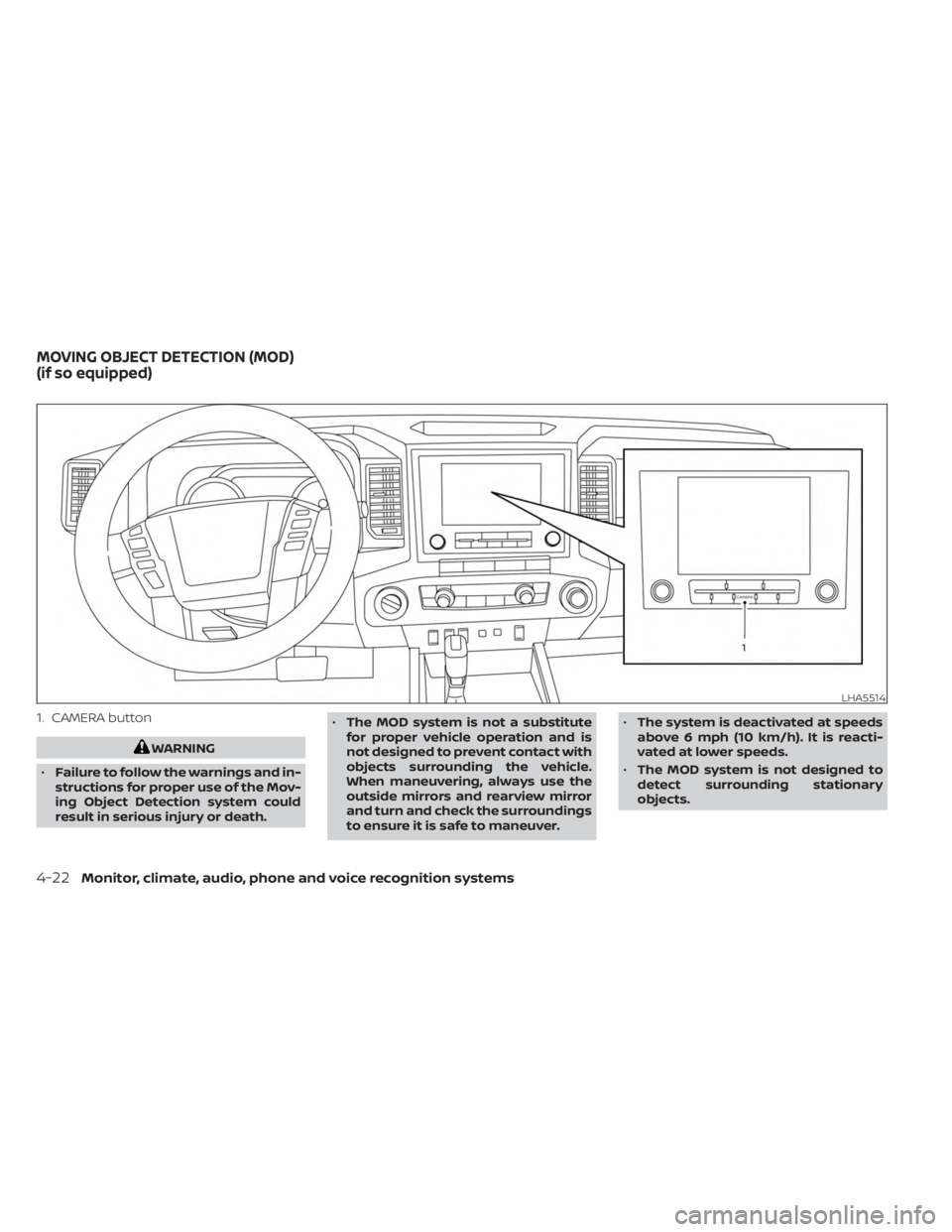
1. CAMERA button
WARNING
• Failure to follow the warnings and in-
structions for proper use of the Mov-
ing Object Detection system could
result in serious injury or death. •
The MOD system is not a substitute
for proper vehicle operation and is
not designed to prevent contact with
objects surrounding the vehicle.
When maneuvering, always use the
outside mirrors and rearview mirror
and turn and check the surroundings
to ensure it is safe to maneuver. •
The system is deactivated at speeds
above 6 mph (10 km/h). It is reacti-
vated at lower speeds.
• The MOD system is not designed to
detect surrounding stationary
objects.
LHA5514
MOVING OBJECT DETECTION (MOD)
(if so equipped)
4-22Monitor, climate, audio, phone and voice recognition systems
Page 253 of 556
The MOD system can inform the driver of
moving objects near the vehicle when
backing out of garages, maneuvering in
parking lots and in other such instances.
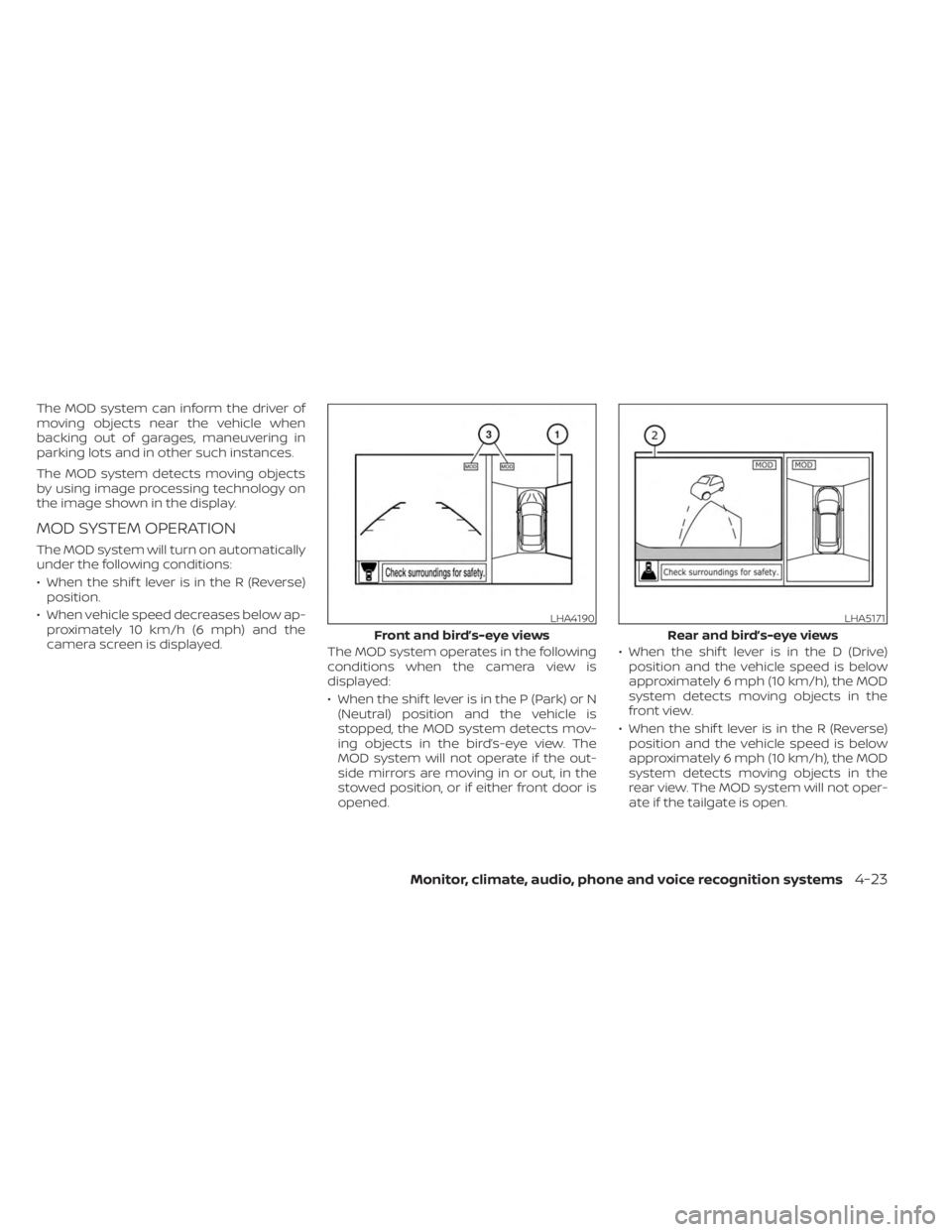
The MOD system detects moving objects
by using image processing technology on
the image shown in the display.
MOD SYSTEM OPERATION
The MOD system will turn on automatically
under the following conditions:
• When the shif t lever is in the R (Reverse)position.
• When vehicle speed decreases below ap- proximately 10 km/h (6 mph) and the
camera screen is displayed. The MOD system operates in the following
conditions when the camera view is
displayed:
• When the shif t lever is in the P (Park) or N
(Neutral) position and the vehicle is
stopped, the MOD system detects mov-
ing objects in the bird’s-eye view. The
MOD system will not operate if the out-
side mirrors are moving in or out, in the
stowed position, or if either front door is
opened. • When the shif t lever is in the D (Drive)
position and the vehicle speed is below
approximately 6 mph (10 km/h), the MOD
system detects moving objects in the
front view.
• When the shif t lever is in the R (Reverse) position and the vehicle speed is below
approximately 6 mph (10 km/h), the MOD
system detects moving objects in the
rear view. The MOD system will not oper-
ate if the tailgate is open.
LHA4190
Front and bird’s-eye views
LHA5171
Rear and bird’s-eye views
Monitor, climate, audio, phone and voice recognition systems4-23
Page 255 of 556
•Excessive noise (for example, audio
system volume or open vehicle win-
dow) will interfere with the chime
sound, and it may not be heard.
• The MOD system performance will be
limited according to environmental
conditions and surrounding objects
such as:
– When there is low contrast be-
tween background and the mov-
ing objects.
– When there is a blinking source of
light.
– When strong light such as another
vehicle’s headlight or sunlight is
present.
– When camera orientation is not in
its usual position, such as when a
mirror is folded.
– When there is dirt, water drops or
snow on the camera lens.
– When the position of the moving
objects in the display is not
changed.
• The MOD system might detect flow-
ing water droplets on the camera
lens, white smoke from the muffler,
moving shadows, etc. •
The MOD system may not function
properly depending on the speed, di-
rection, distance or shape of the
moving objects.
• If your vehicle sustains damage to
the parts where the camera is in-
stalled, leaving it misaligned or bent,
the sensing zone may be altered and
the MOD system may not detect ob-
jects properly.
• When the temperature is extremely
high or low, the screen may not dis-
play objects clearly. This is not a
malfunction.
NOTE:
The blue MOD icon will change to or-
ange if one of the following has oc-
curred:
• When the system is malfunctioning.
• When the component temperature reaches a high level (icon will blink).
• When the Rear View camera has de- tected a blockage (icon will blink).
If the icon light continues to illuminate
orange, have the MOD system checked. It
is recommended that you visit a NISSAN
dealer for this service.
SYSTEM MAINTENANCE
CAUTION
• Do not use alcohol, benzine or thin-
ner to clean the camera. This will
cause discoloration.
• Do not damage the camera as the
monitor screen may be adversely
affected.
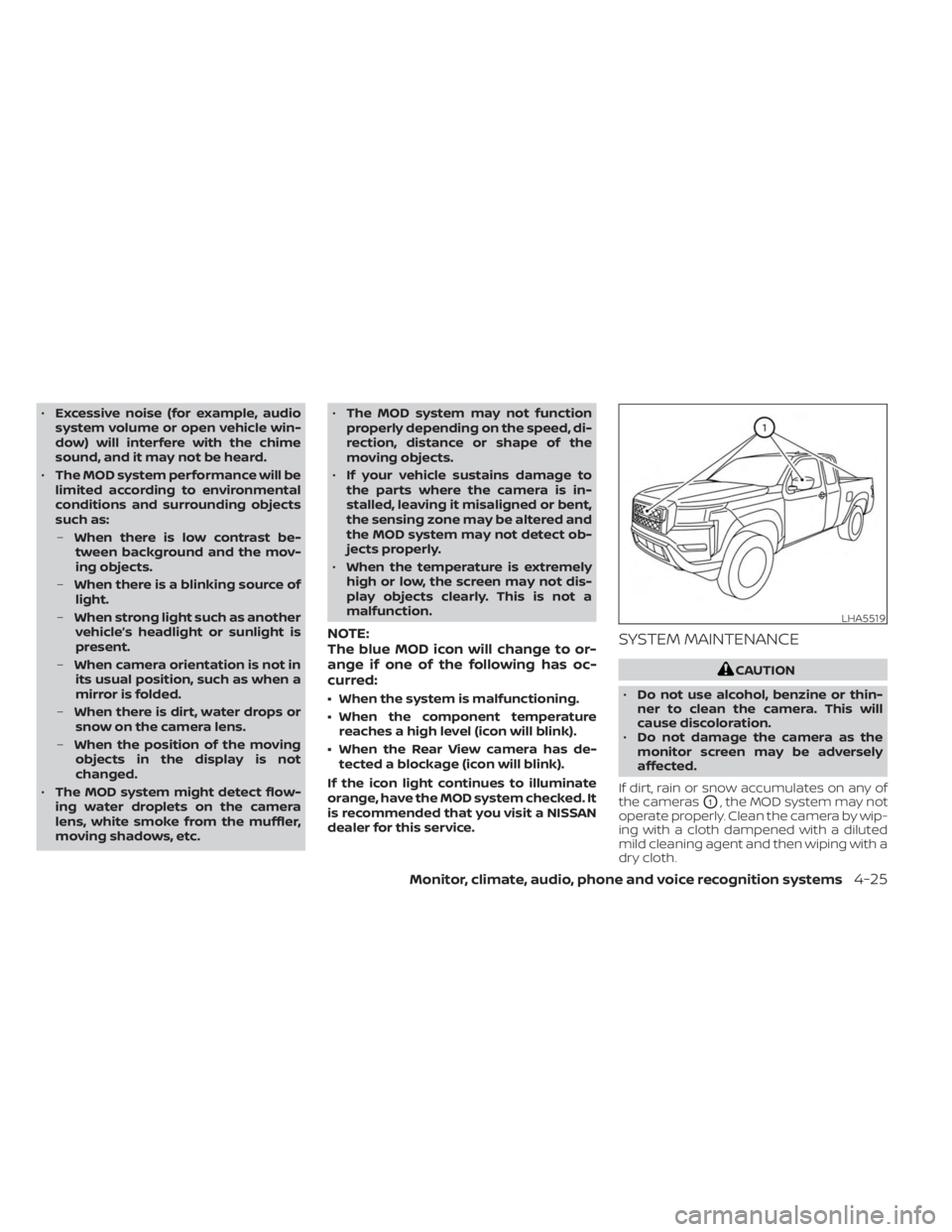
If dirt, rain or snow accumulates on any of
the cameras
O1, the MOD system may not
operate properly. Clean the camera by wip-
ing with a cloth dampened with a diluted
mild cleaning agent and then wiping with a
dry cloth.
LHA5519
Monitor, climate, audio, phone and voice recognition systems4-25
Page 296 of 556
To engage:Firmly depress the parking
brake.
To release:
1. Firmly apply the foot brake.
2. Move the shif t lever to the P (Park) position.
3. Firmly depress the parking brake pedal and it will release.
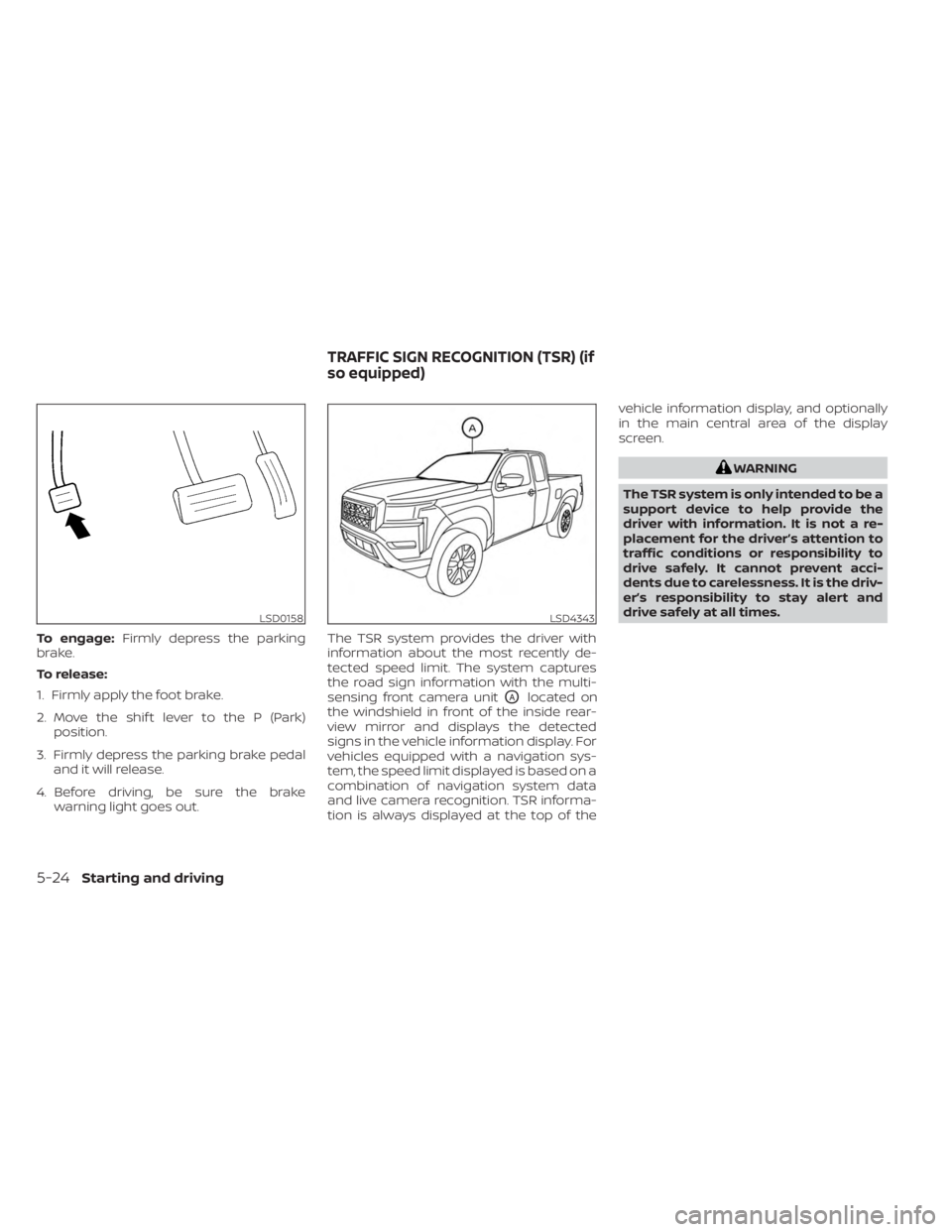
4. Before driving, be sure the brake warning light goes out. The TSR system provides the driver with
information about the most recently de-
tected speed limit. The system captures
the road sign information with the multi-
sensing front camera unit
OAlocated on
the windshield in front of the inside rear-
view mirror and displays the detected
signs in the vehicle information display. For
vehicles equipped with a navigation sys-
tem, the speed limit displayed is based on a
combination of navigation system data
and live camera recognition. TSR informa-
tion is always displayed at the top of the vehicle information display, and optionally
in the main central area of the display
screen.
WARNING
The TSR system is only intended to be a
support device to help provide the
driver with information. It is not a re-
placement for the driver’s attention to
traffic conditions or responsibility to
drive safely. It cannot prevent acci-
dents due to carelessness. It is the driv-
er’s responsibility to stay alert and
drive safely at all times.
LSD0158LSD4343
TRAFFIC SIGN RECOGNITION (TSR) (if
so equipped)
5-24Starting and driving
Page 534 of 556
When towing a trailer load of 3,500 lbs.
(1587 kg) or more, trailers with a brake
system MUST be used.However, most
states require a separate braking system
on trailers with a loaded weight above a
specific amount. Make sure the trailer
meets the local regulations and the regu-
lations where you plan to tow.
Several types of braking systems are
available.
Surge Brakes -The surge brake actuator is
mounted on the trailer tongue with a hy-
draulic line running to each trailer wheel.
Surge brakes are activated by the trailer
pushing against the hitch ball when the
tow vehicle is braking. Hydraulic surge
brakes are common on rental trailers and
some boat trailers. In this type of system,
there is no hydraulic or electric connection
for brake operation between the tow ve-
hicle and the trailer.
Electric Trailer Brakes -Electric braking
systems are activated by an electronic sig-
nal sent from a trailer brake controller (spe-
cial brake-sensing module). If electric trailer
brakes are used, see “Electric trailer brake
controller" (P. 10-36).. Have a professional supplier of towing
equipment make sure the trailer brakes are
properly installed and demonstrate proper
brake function testing.
Electric trailer brake controller
Trailers equipped with electric brakes may
require the installation of an af termarket
trailer brake controller.
A Genuine NISSAN jumper harness is avail-
able that is specifically designed to be used
when installing an af termarket brake
controller.
Install the af termarket electric trailer brake
controller according to the manufacturer's
instructions.
Pre-towing tips
• Be certain your vehicle maintains a level
position when a loaded and/or unloaded
trailer is hitched. Do not drive the vehicle if
it has an abnormal nose-up or nose-
down condition; check for improper
tongue load, overload, worn suspension
or other possible causes of either
condition.
• Always secure items in the trailer to pre- vent load shif t while driving. • Keep the cargo load as low as possible in
the trailer to keep the trailer center of
gravity low.
• Load the trailer so approximately 60% of the trailer load is in the front half and 40%
is in the back half. Also make sure the load
is balanced side to side.
• Check your hitch, trailer tire pressure, ve- hicle tire pressure, trailer light operation,
and trailer wheel lug nuts every time you
attach a trailer to the vehicle.
• Be certain your rearview mirrors conform to all federal, state or local regulations. If
not, install any mirrors required for towing
before driving the vehicle.
• Determine the overall height of the ve- hicle and trailer so the required clearance
is known.Trailer towing tips
In order to gain skill and an understanding
of the vehicle's behavior, you should prac-
tice turning, stopping and backing up in an
area which is free from traffic. Steering sta-
bility and braking performance will be
somewhat different than under normal
driving conditions.
• Always secure items in the trailer to pre-vent load shif t while driving.
10-36Technical and consumer information
Page 546 of 556
J
Jump seat.....................1-7Jump starting..............6-11,8-15
K
Key.........................3-2Key fob battery replacement........8-23Keyless entryWith Intelligent Key system
(See Intelligent Key system)
.......3-13KeysNISSAN Intelligent Key®........3-2,3-8NISSAN Vehicle Immobilizer System
keys..................... .3-4
L
Labels
Air conditioner specification label. . .10-14C.M.V.S.S. certification label.......10-13Emission control information label. .10-13Engine serial number..........10-12Tire and Loading Information label. .10-14Vehicle identification number (VIN). .10-12Vehicle identification number (VIN)
plate.................... .10-12Warning labels (for SRS)..........1-88Ladder rack..................2-69Lane Departure Warning (LDW).......5-27
Light
Air bag warning light........1-88, 2-14Brake light (See stop light)........8-27Bulb check/instrument panel......2-11Bulb replacement.............8-27Charge warning light...........2-13Exterior and Interior lights........8-27Fog light switch..............2-45Fog lights..................8-26Headlight and turn signal switch. . . .2-38Headlight control switch.........2-38Headlights..................8-25Interior light.................2-74Light bulbs.................8-25Low tire pressure warning light.....2-15Low windshield-washer fluid warning
light......................2-29Passenger air bag and status light. . .1-80Security indicator light..........2-14Warning/indicator lights and audible
reminders..................2-11Lights......................8-25Map lights..................2-75LockChild safety rear door lock.........3-7Door locks................. .3-4Power door locks..............3-6Loose fuel cap warning...........2-28Low fuel warning light......2-13,2-18,2-29Low tire pressure warning light.......2-15Low windshield-washer fluid warning
light.......................2-29Luggage (See vehicle loading
information)..................10-16
M
Maintenance
General maintenance...........9-2Inside the vehicle..............9-3Maintenance precautions.........8-2Outside the vehicle.............9-2Seat belt maintenance..........1-25Under the hood and vehicle.......9-4Maintenance requirements..........9-2Maintenance schedules............9-7Malfunction indicator light..........2-17Manual front seat adjustment........1-3Manual windows...............2-69Map lights....................2-75Map pocket.................. .2-62Meters and gauges............2-4, 2-8Instrument brightness control.....2-44Mirror
Automatic anti-glare inside mirror. . .3-25Outside mirrors..............3-26Rearview...................3-25Vanity mirror................3-24Mirrors......................3-25Moonroof.................2-72,7-5Moving Object Detection (MOD)......4-22
N
NISSAN Intelligent Key®..........3-2,3-8NISSAN Vehicle Immobilizer
System................. .2-36, 5-16NissanConnect® Owner's Manual......4-2
11-4
Page 547 of 556
O
Octane rating (See fuel octane rating). .10-6Odometer....................2-5Oil
Capacities and recommended
fuel/lubricants
...............10-2Changing engine oil............8-6Changing engine oil filter.........8-6Checking engine oil level.........8-6Engine oil.................. .8-6Engine oil and oil filter
recommendation.............10-7Engine oil viscosity.............10-7Outside mirror defroster switch......2-38Outside mirrors................3-26Overhead sunglasses holder........2-67Overheat
If your vehicle overheats.........6-13Owner's manual order form........10-44Owner's manual/service manual order
information................. .10-44
P
Parking
Parking brake operation.........5-23Parking/parking on hills.........5-117Parking brake.................5-23PowerFront seat adjustment...........1-5Power door locks..............3-6Power outlet.............2-55, 2-56
Power steering fluid............8-11Power steering system.........5-118Power windows..............2-69Rear power windows...........2-71Power inverter switch............2-51Power outlet..............2-55, 2-56Power steering................5-118Power steering fluid..............8-11PrecautionsMaintenance precautions.........8-2On-pavement and off-road driving
precautions................. .5-9Precautions on booster
seats...........1-40, 1-43, 1-55, 1-66Precautions on child
restraints.........1-40, 1-43, 1-55, 1-66Precautions on seat belt usage.....1-15Precautions on supplemental restraint
system....................1-71Precautions when starting and
driving..................5-4, 5-11Push starting..................6-13
R
Radio
Car phone or CB radio..........4-41Readiness for inspection maintenance (I/M)
test...................... .10-42Rear Automatic Braking (RAB). . . .2-18, 5-76Rear Cross Traffic Alert (RCTA).......5-43Rear Door Alert.........2-29,2-30, 2-54Rear power windows.............2-71
Rear seat.................... .1-6Rear sliding window..............2-72Rear Sonar System (RSS)..........5-124Rear sonar system OFF switch.......2-52Rearview mirror................3-25RearView Monitor................4-3Recommended Fluids............10-2Recorders
Event Data................ .10-43Refrigerant recommendation.......10-8Registering a vehicle in another
country.................... .10-12Remote Engine Start.............3-18Reporting safety defects (US only). . . .10-41
S
Safety
Child safety rear door lock.........3-7Child seat belts. .1-28, 1-40, 1-43, 1-55, 1-66Reporting safety defects (US only). . .10-41SeatJump seat...................1-7Seat adjustmentFront manual seat adjustment......1-3Front power seat adjustment.......1-5Seat beltChild safety.................1-25Infants and small children........1-26Injured person................1-18Larger children...............1-27Precautions on seat belt usage.....1-15Pregnant women..............1-18
11-5