window NISSAN FRONTIER 2022 Owner´s Manual
[x] Cancel search | Manufacturer: NISSAN, Model Year: 2022, Model line: FRONTIER, Model: NISSAN FRONTIER 2022Pages: 556, PDF Size: 6.11 MB
Page 173 of 556
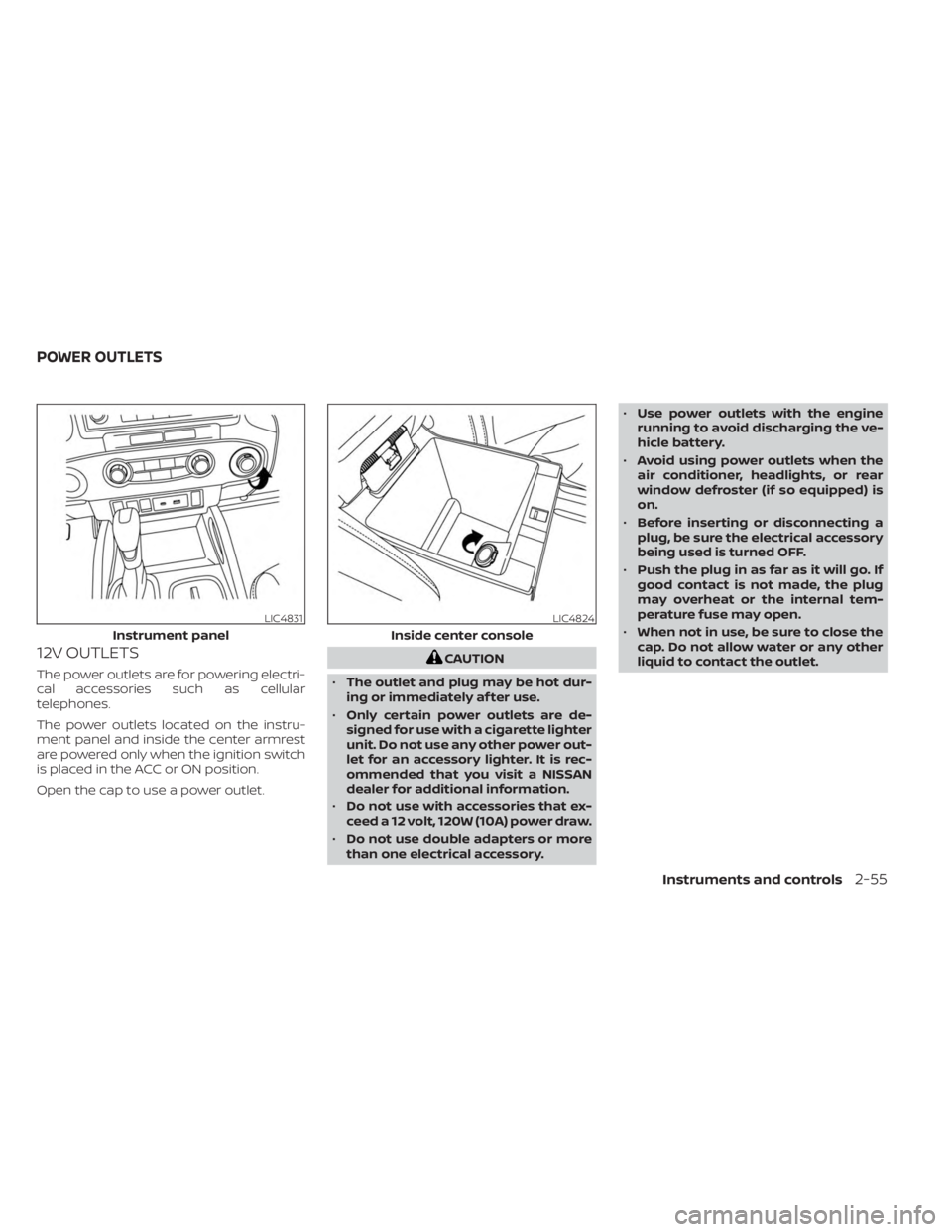
12V OUTLETS
The power outlets are for powering electri-
cal accessories such as cellular
telephones.
The power outlets located on the instru-
ment panel and inside the center armrest
are powered only when the ignition switch
is placed in the ACC or ON position.
Open the cap to use a power outlet.
CAUTION
• The outlet and plug may be hot dur-
ing or immediately af ter use.
• Only certain power outlets are de-
signed for use with a cigarette lighter
unit. Do not use any other power out-
let for an accessory lighter. It is rec-
ommended that you visit a NISSAN
dealer for additional information.
• Do not use with accessories that ex-
ceed a 12 volt, 120W (10A) power draw.
• Do not use double adapters or more
than one electrical accessory. •
Use power outlets with the engine
running to avoid discharging the ve-
hicle battery.
• Avoid using power outlets when the
air conditioner, headlights, or rear
window defroster (if so equipped) is
on.
• Before inserting or disconnecting a
plug, be sure the electrical accessory
being used is turned OFF.
• Push the plug in as far as it will go. If
good contact is not made, the plug
may overheat or the internal tem-
perature fuse may open.
• When not in use, be sure to close the
cap. Do not allow water or any other
liquid to contact the outlet.
LIC4831
Instrument panel
LIC4824
Inside center console
POWER OUTLETS
Instruments and controls2-55
Page 176 of 556
Do not use the outlet located in the truck
box with accessories that exceed 120 volt.
Do not use double adapters or more than
one electrical accessory.
CAUTION
• Operation of the 120 volt system with
the ignition in the ON position and
the engine not running (idle) will
drain the battery charge. This could
lead to a dead battery or no start
condition.
• The outlet and plug may be hot dur-
ing or immediately af ter use.
• Use power outlets with the engine
running to avoid discharging the ve-
hicle battery.
• Do not use double adaptors or more
than one electrical accessory.
• Avoid using power outlets when the
air conditioner, headlights or rear
window defroster is on.
• Before inserting or disconnecting a
plug, be sure the electrical accessory
being used is turned OFF. •
Push the plug in as far as it will go. If
good contact is not made, the plug
may overheat or the internal tem-
perature fuse may open.
• When not in use, be sure to close the
cap. Do not allow water or any other
liquid to contact the outlet.
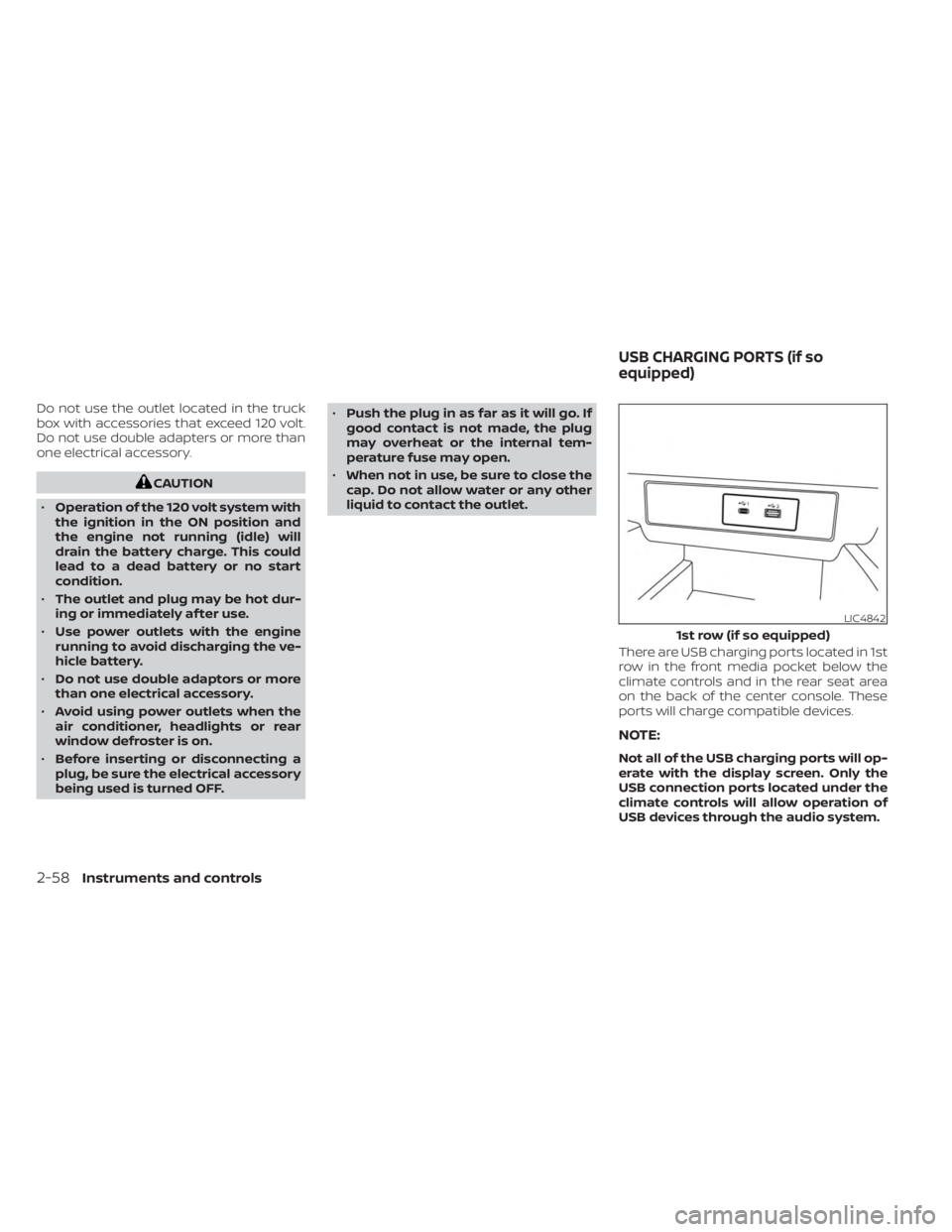
There are USB charging ports located in 1st
row in the front media pocket below the
climate controls and in the rear seat area
on the back of the center console. These
ports will charge compatible devices.
NOTE:
Not all of the USB charging ports will op-
erate with the display screen. Only the
USB connection ports located under the
climate controls will allow operation of
USB devices through the audio system.
LIC4842
1st row (if so equipped)
USB CHARGING PORTS (if so
equipped)
2-58Instruments and controls
Page 187 of 556
WARNING
• Do not exceed maximum ladder rack
load capacity.
• Exceeding the ladder rack capacity
can change the vehicle’s center of
gravity and adversely affect the han-
dling and stability of the vehicle re-
sulting in an accident causing death
or serious injury.
• When loading the ladder rack, evenly
distribute the load as well as main-
tain a low center of gravity.
• Do not use your rack off road, unless
otherwise noted as an “off road
rated” product.
• Do not allow the ladder rack or load
to obstruct the vehicle’s exterior
lighting.
• Be careful that your vehicle does not
exceed the Gross Vehicle Weight Rat-
ing (GVWR) or its Gross Axle Weight
Rating (GAWR front & rear).
• Properly secure all cargo with ropes
or straps to help it prevent from slid-
ing or shif ting. •
Take extra caution when the vehicle
has load on the Ladder rack as this
raises the center of gravity of the ve-
hicle and may cause the vehicle to
roll over when there is a loss of ve-
hicle control.
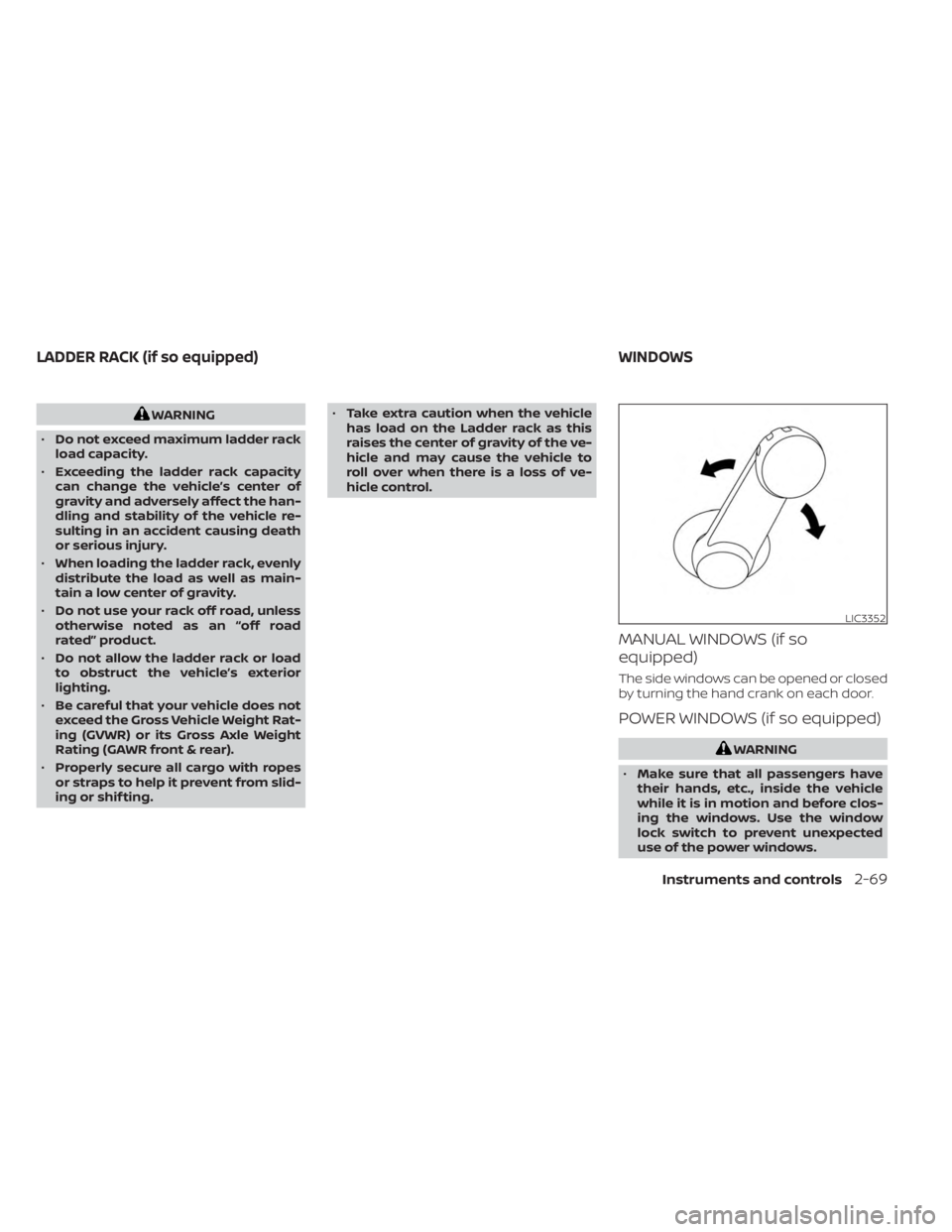
MANUAL WINDOWS (if so
equipped)
The side windows can be opened or closed
by turning the hand crank on each door.
POWER WINDOWS (if so equipped)
WARNING
• Make sure that all passengers have
their hands, etc., inside the vehicle
while it is in motion and before clos-
ing the windows. Use the window
lock switch to prevent unexpected
use of the power windows.
LIC3352
LADDER RACK (if so equipped) WINDOWS
Instruments and controls2-69
Page 188 of 556
•To help avoid risk of injury or death
through unintended operation of the
vehicle and/or its systems, including
entrapment in windows or inadver-
tent door lock activation, do not
leave children, people who require
the assistance of others or pets unat-
tended in your vehicle. Additionally,
the temperature inside a closed ve-
hicle on a warm day can quickly be-
come high enough to cause a signifi-
cant risk of injury or death to people
and pets.
The power windows operate when the ig-
nition switch is placed in the ON position or
for a period of time af ter the ignition switch
is placed in the ACC or OFF position. If the
driver's or passenger's door is opened dur-
ing this period of time, the power to the
windows is canceled.
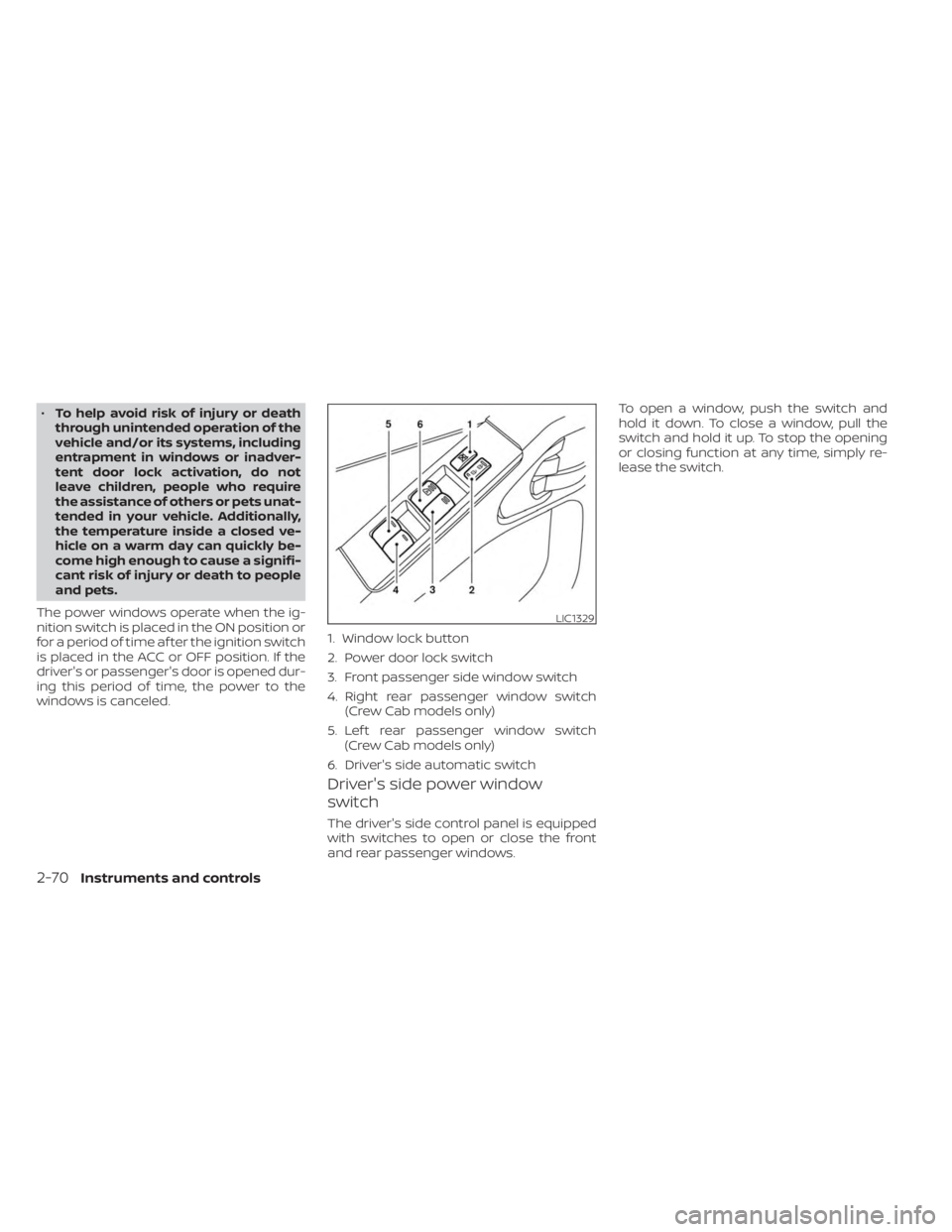
Driver's side power window
switch
The driver's side control panel is equipped
with switches to open or close the front
and rear passenger windows. To open a window, push the switch and
hold it down. To close a window, pull the
switch and hold it up. To stop the opening
or closing function at any time, simply re-
lease the switch.
LIC1329
1. Window lock button
2. Power door lock switch
3. Front passenger side window switch
4. Right rear passenger window switch
(Crew Cab models only)
5. Lef t rear passenger window switch (Crew Cab models only)
6. Driver's side automatic switch
2-70Instruments and controls
Page 189 of 556
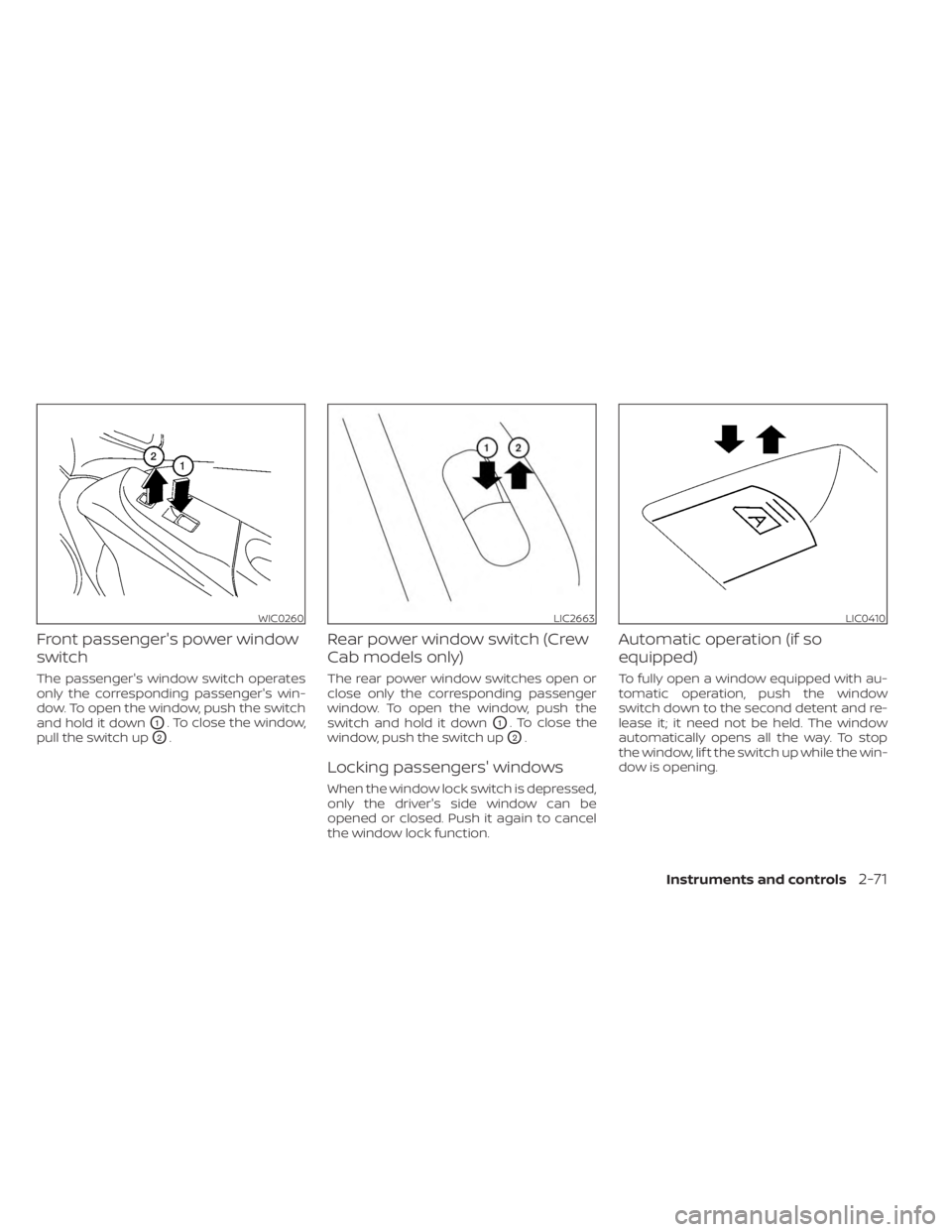
Front passenger's power window
switch
The passenger's window switch operates
only the corresponding passenger's win-
dow. To open the window, push the switch
and hold it down
O1. To close the window,
pull the switch up
O2.
Rear power window switch (Crew
Cab models only)
The rear power window switches open or
close only the corresponding passenger
window. To open the window, push the
switch and hold it down
O1. To close the
window, push the switch up
O2.
Locking passengers' windows
When the window lock switch is depressed,
only the driver's side window can be
opened or closed. Push it again to cancel
the window lock function.
Automatic operation (if so
equipped)
To fully open a window equipped with au-
tomatic operation, push the window
switch down to the second detent and re-
lease it; it need not be held. The window
automatically opens all the way. To stop
the window, lif t the switch up while the win-
dow is opening.
WIC0260LIC2663LIC0410
Instruments and controls2-71
Page 190 of 556
REAR SLIDING WINDOW (if so
equipped)
WARNING
• You must ensure all occupants and
objects are free of the rear window
area prior to and during operation.
Failure to do so may result in injury
and/or damage to the rear window
system.
• The rear window is not designed to
carry long items through it. •
Do not place objects through the
opened rear window. Do not use the
rear window as a cargo area pass-
through. This may result in damage
to the rear window system or per-
sonal injury.
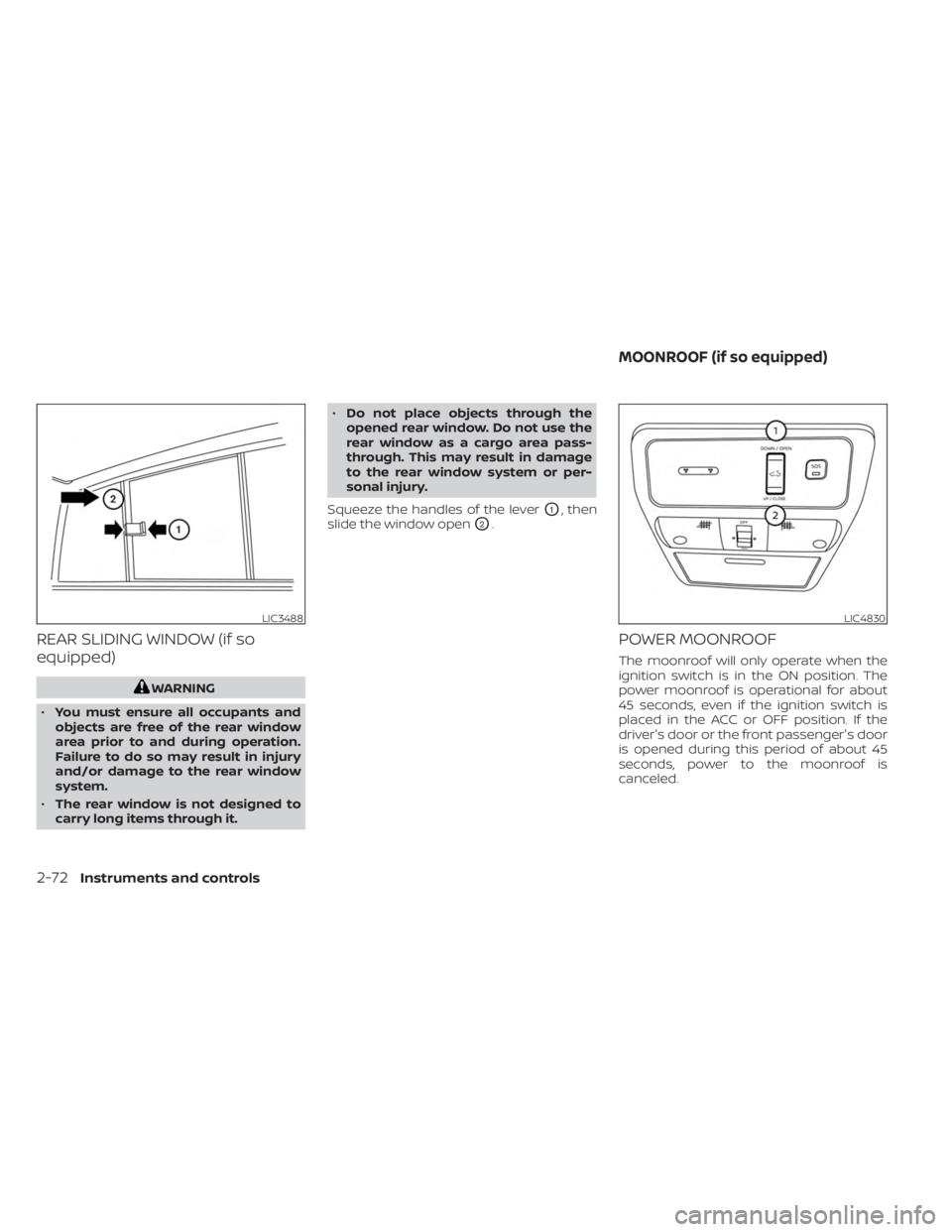
Squeeze the handles of the lever
O1, then
slide the window open
O2.
POWER MOONROOF
The moonroof will only operate when the
ignition switch is in the ON position. The
power moonroof is operational for about
45 seconds, even if the ignition switch is
placed in the ACC or OFF position. If the
driver's door or the front passenger's door
is opened during this period of about 45
seconds, power to the moonroof is
canceled.
LIC3488LIC4830
MOONROOF (if so equipped)
2-72Instruments and controls
Page 203 of 556
•To help avoid risk of injury or death
through unintended operation of the
vehicle and/or its systems, including
entrapment in windows or inadver-
tent door lock activation, do not
leave children, people who require
the assistance of others or pets unat-
tended in your vehicle. Additionally,
the temperature inside a closed ve-
hicle on a warm day can quickly be-
come high enough to cause a signifi-
cant risk of injury or death to people
and pets.
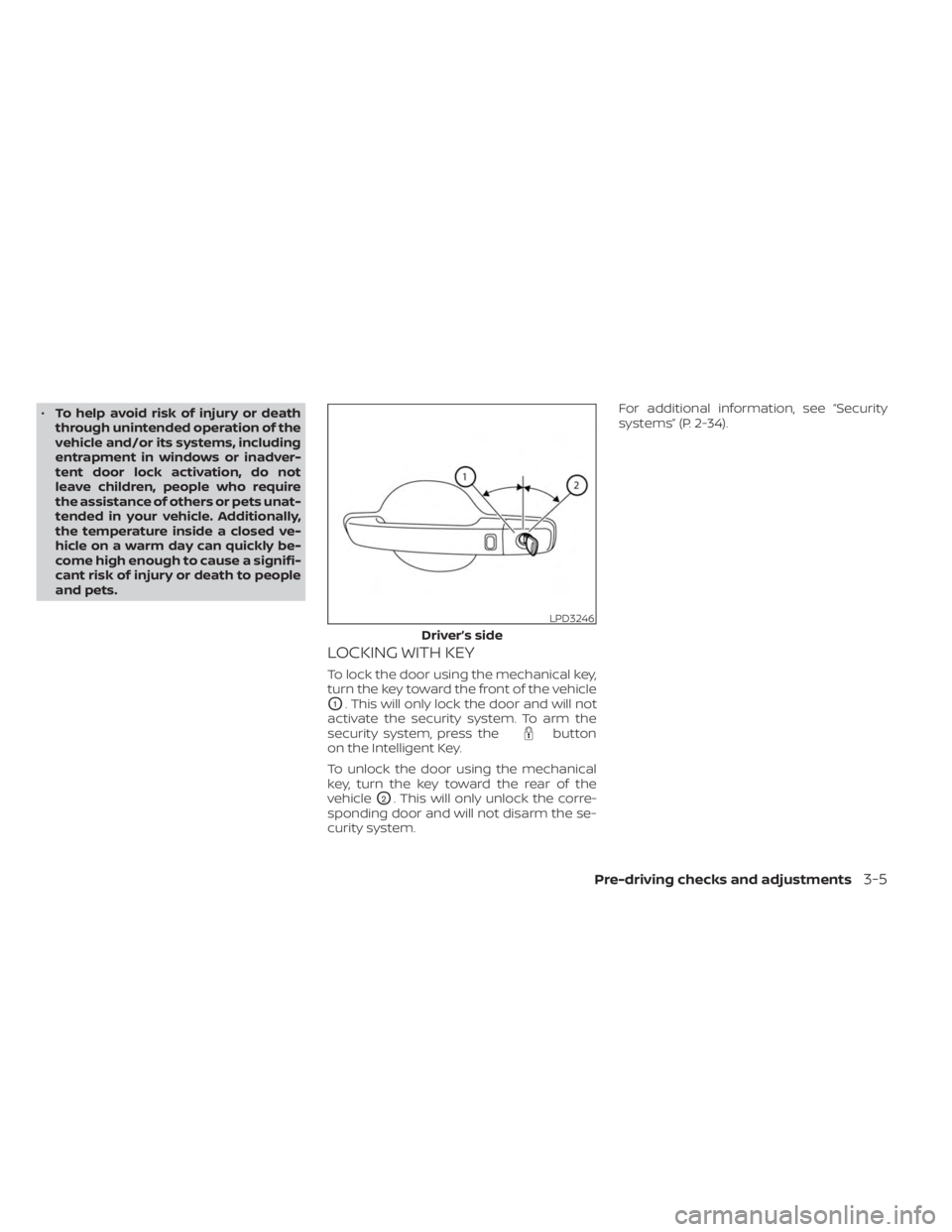
LOCKING WITH KEY
To lock the door using the mechanical key,
turn the key toward the front of the vehicle
O1. This will only lock the door and will not
activate the security system. To arm the
security system, press the
button
on the Intelligent Key.
To unlock the door using the mechanical
key, turn the key toward the rear of the
vehicle
O2. This will only unlock the corre-
sponding door and will not disarm the se-
curity system. For additional information, see “Security
systems” (P. 2-34).
LPD3246
Driver’s side
Pre-driving checks and adjustments3-5
Page 216 of 556
Thebutton will be on the NISSAN
Intelligent Key® if the vehicle has Remote
Engine Start. This feature allows the engine
to start from outside the vehicle.
The following features may be affected
when the Remote Engine Start feature is
used:
• Vehicles with a manual climate control system will default to the last used heat-
ing or cooling mode. • Vehicles with an automatic climate con-
trol system will default to either a heating
or cooling mode depending on outside
and cabin temperatures. For additional
information, see “Remote Engine Start
with Intelligent Climate Control” (P. 4-37).
Laws in some local communities may re-
strict or prohibit the use of Remote Engine
Start, or the amount of time a parked ve-
hicle engine may idle. For example, some
laws require a person using Remote Engine
Start to have the vehicle in view or may
restrict idling time except in freezing tem-
peratures. Check local regulations for any
requirements.
Other conditions may affect the function of
the Remote Engine Start feature. For addi-
tional information, see “Conditions the Re-
mote Engine Start will not work” (P. 3-20).
Other conditions can affect the perfor-
mance of the Intelligent Key transmitter.
For additional information, see “NISSAN In-
telligent Key® system” (P. 3-8).
REMOTE ENGINE START
OPERATING RANGE
WARNING
• To help avoid risk of injury or death
through unintended operation of the
vehicle and/or its systems, including
entrapment in windows or inadver-
tent door lock activation, do not
leave children, people who require
the assistance of others or pets unat-
tended in your vehicle. Additionally,
the temperature inside a closed ve-
hicle on a warm day can quickly be-
come high enough to cause a signifi-
cant risk of injury or death to people
and pets.
• Do not use Remote Engine Start in
closed spaces such as a garage. Do
not breathe exhaust gases; they con-
tain colorless and odorless carbon
monoxide. Carbon monoxide is dan-
gerous. It can cause unconscious-
ness or death.
LPD2995
REMOTE ENGINE START (if so
equipped)
3-18Pre-driving checks and adjustments
Page 233 of 556
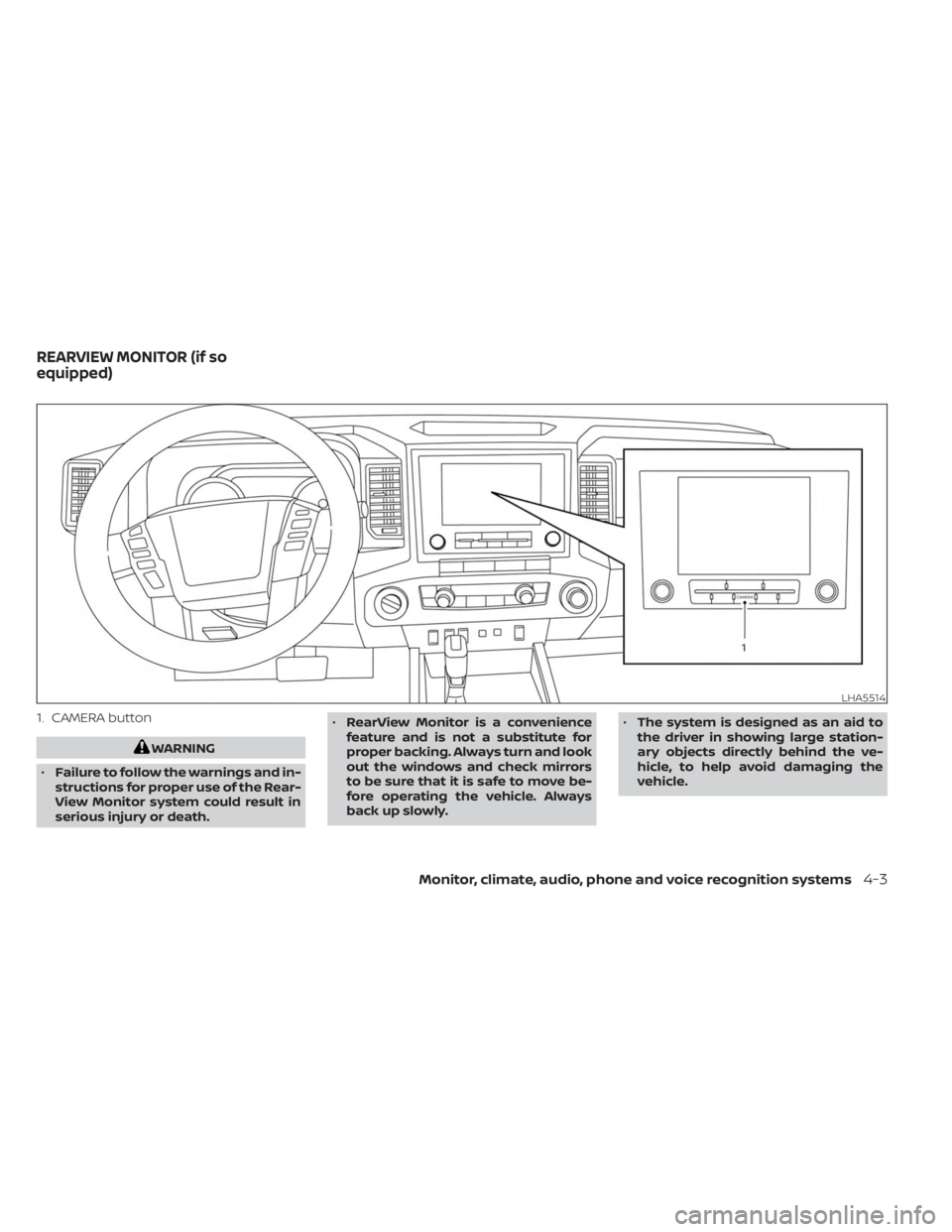
1. CAMERA button
WARNING
• Failure to follow the warnings and in-
structions for proper use of the Rear-
View Monitor system could result in
serious injury or death. •
RearView Monitor is a convenience
feature and is not a substitute for
proper backing. Always turn and look
out the windows and check mirrors
to be sure that it is safe to move be-
fore operating the vehicle. Always
back up slowly. •
The system is designed as an aid to
the driver in showing large station-
ary objects directly behind the ve-
hicle, to help avoid damaging the
vehicle.
LHA5514
REARVIEW MONITOR (if so
equipped)
Monitor, climate, audio, phone and voice recognition systems4-3
Page 258 of 556
Temperature control dial
The temperature control dial allows you to
adjust the temperature of the outlet air. To
lower the temperature, turn the dial to the
lef t. To increase the temperature, turn the
dial to the right.
Air recirculation button
ON position (Indicator light on)
Interior air is recirculated inside the vehicle.
Press the
button to the ON position
when:
• driving on a dusty road.
• to prevent traffic fumes from entering passenger compartment.
• for maximum cooling when using the air conditioner.
OFF position (Indicator light off )
If outside air is desired in off mode, press
the recirculation button until the indicator
turns off.
If fogging occurs, press the
front
windshield defrost button.
A/C (air conditioner) button
Start the engine, turn thefan speed
control dial to the desired position and
press the
button to turn on the air
conditioner. To turn off the air conditioner,
press the
button again.
The air conditioner cooling function op-
erates only when the engine is running.
HEATER OPERATION
Heating
This mode is used to direct heated air to
the foot outlets. Some air also flows from
the defrost outlets.
1. Press the
button to the OFF posi-
tion for normal heating. The indicator
light on the
button will go off.
2. Press the
air flow control button.
3. Turn the
fan speed control dial to
the desired position.
4. Turn the temperature control dial to the desired position between the middle
and the hot position.
Ventilation
This mode directs outside air to the side
and center vents.
1. Press the
button to the off position.
The indicator light on thebutton
willgooff.
2. Press the
air flow control button.
3. Turn the
fan speed control dial to
the desired position.
4. Turn the temperature control dial to the desired position.
Defrosting or defogging
This mode directs the air to the defrost
outlets to defrost/defog the windows.
1. Press the
defrost/defog button.
2. Turn the
fan speed control dial to
the desired position.
3. Turn the temperature control dial to the desired position between the middle
and the hot position.
• To quickly remove ice or fog from the win- dows, turn the
fan speed control dial
to the highest setting and the tempera-
ture control to the full HOT position.
4-28Monitor, climate, audio, phone and voice recognition systems