mirror NISSAN FRONTIER 2022 Owner´s Manual
[x] Cancel search | Manufacturer: NISSAN, Model Year: 2022, Model line: FRONTIER, Model: NISSAN FRONTIER 2022Pages: 556, PDF Size: 6.11 MB
Page 303 of 556
![NISSAN FRONTIER 2022 Owner´s Manual SYSTEM TEMPORARILY DISABLED
If the vehicle is parked in direct sunlight
under high temperature conditions (over
approximately 104°F [40°C]) and then
started, the LDW system may be deacti-
vated auto](/img/5/40335/w960_40335-302.png "NISSAN FRONTIER 2022 Owner´s Manual SYSTEM TEMPORARILY DISABLED
If the vehicle is parked in direct sunlight
under high temperature conditions (over
approximately 104°F [40°C]) and then
started, the LDW system may be deacti-
vated auto")
SYSTEM TEMPORARILY DISABLED
If the vehicle is parked in direct sunlight
under high temperature conditions (over
approximately 104°F [40°C]) and then
started, the LDW system may be deacti-
vated automatically and the following
message will appear in the vehicle infor-
mation display: “Not Available High Camera
Temp.”
When the interior temperature is reduced,
the LDW system will resume operating
automatically.
The LDW system is not designed to warn
under the following conditions:
• When you operate the lane change signaland change traveling lanes in the direc-
tion of the signal. (The LDW system will
become operable again approximately 2
seconds af ter the lane change signal is
turned off.)
• When the vehicle speed lowers to less than approximately 37 mph (60 km/h).
Af ter the above conditions have finished
and the necessary operating conditions
are satisfied, the LDW functions will resume.
SYSTEM MALFUNCTION
If the LDW system malfunctions, it will can-
cel automatically and “Malfunction” will ap-
pear in the vehicle information display. If “
Malfunction” appears in the vehicle infor-
mation display, pull off the road to a safe
location and stop the vehicle. Place the
shif t lever in the P (Park) position and the
ignition switch in the OFF position and re-
start the engine/motor. If “Malfunction”
continues to appear in the vehicle informa-
tion display, have the system checked. It is
recommended that you visit a NISSAN
dealer for this service.
SYSTEM MAINTENANCE
The lane camera unitO1for the LDW sys-
tem is located above the inside mirror. To
keep the proper operation of the LDW sys-
tem and prevent a system malfunction, be
sure to observe the following:
• Always keep the windshield clean.
• Do not attach a sticker (including trans- parent material) or install an accessory
near the camera unit.
LSD4346
Starting and driving5-31
Page 304 of 556
• Do not place reflective materials, such aswhite paper or a mirror, on the instru-
ment panel. The reflection of sunlight
may adversely affect the camera unit’s
capability of detecting the lane markers.
• Do not strike or damage the areas around the camera unit. Do not touch the
camera lens or remove the screw located
on the camera unit. If the camera unit is
damaged due to an accident, it is recom-
mended that you visit a NISSAN dealer.WARNING
Failure to follow the warnings and in-
structions for proper use of the BSW
system could result in serious injury or
death.
• The BSW system is not a replacement
for proper driving procedures and is
not designed to prevent contact with
vehicles or objects. When changing
lanes, always use the side and rear
mirrors and turn and look in the di-
rection your vehicle will move to en-
sure it is safe to change lanes. Never
rely solely on the BSW system.
• Do not use the BSW system when
towing a trailer. The system may not
function properly.
The BSW system helps alert the driver of
other vehicles in adjacent lanes when
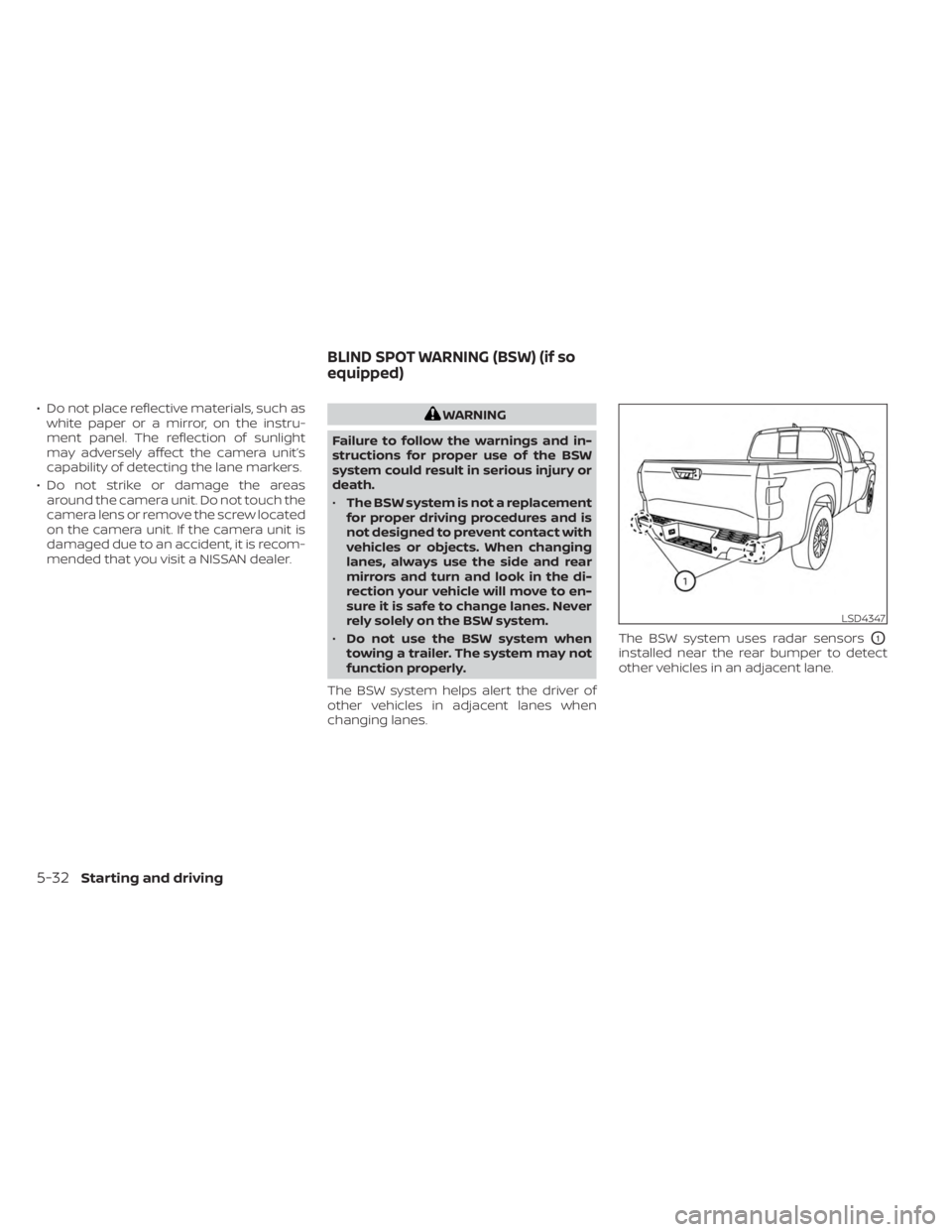
changing lanes. The BSW system uses radar sensors
O1
installed near the rear bumper to detect
other vehicles in an adjacent lane.
LSD4347
BLIND SPOT WARNING (BSW) (if so
equipped)
5-32Starting and driving
Page 305 of 556
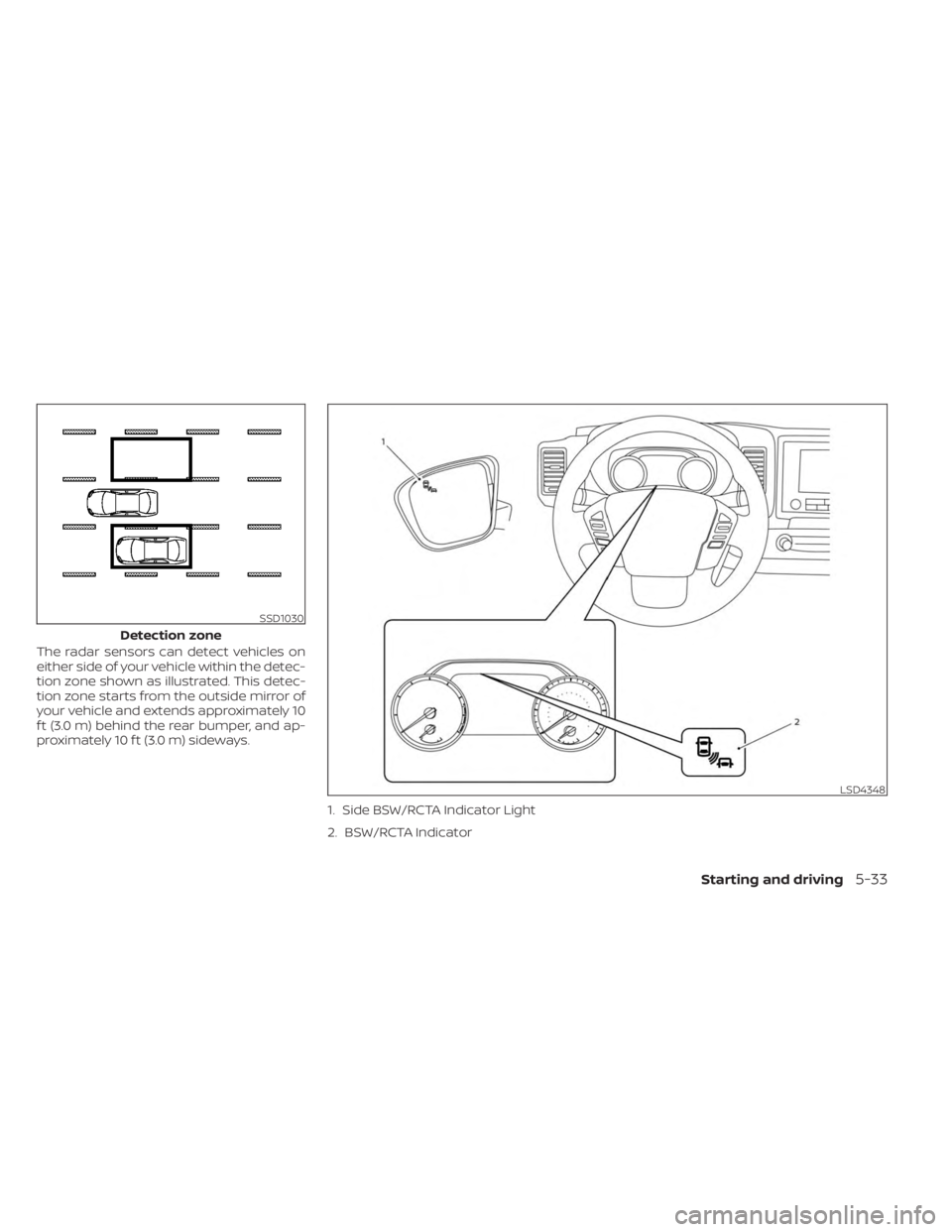
The radar sensors can detect vehicles on
either side of your vehicle within the detec-
tion zone shown as illustrated. This detec-
tion zone starts from the outside mirror of
your vehicle and extends approximately 10
f t (3.0 m) behind the rear bumper, and ap-
proximately 10 f t (3.0 m) sideways.1. Side BSW/RCTA Indicator Light
2. BSW/RCTA Indicator
SSD1030
Detection zone
LSD4348
Starting and driving5-33
Page 315 of 556
WARNING
Failure to follow the warnings and in-
structions for proper use of the RCTA
system could result in serious injury or
death.
• The RCTA system is not a replace-
ment for proper driving procedures
and is not designed to prevent con-
tact with vehicles or objects. When
backing out of a parking space, al-
ways use the side and rear mirrors
and turn and look in the direction
your vehicle will move. Never rely
solely on the RCTA system.
The RCTA system will assist you when
backing out from a parking space. When
the vehicle is in reverse, the system is de-
signed to detect other vehicles approach-
ing from the right or lef t of the vehicle. If the
system detects cross traffic, it will alert you.
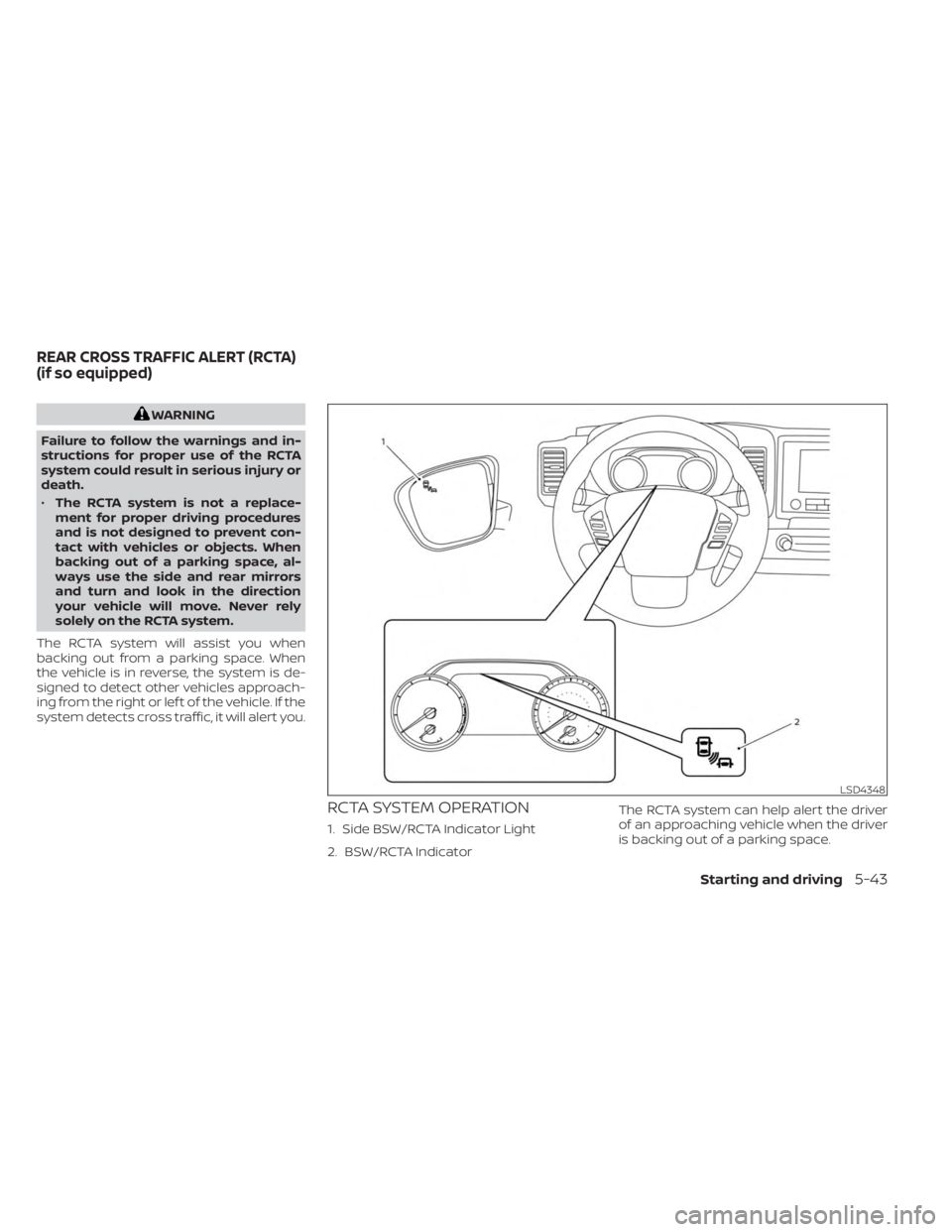
RCTA SYSTEM OPERATION
1. Side BSW/RCTA Indicator Light
2. BSW/RCTA Indicator The RCTA system can help alert the driver
of an approaching vehicle when the driver
is backing out of a parking space.
LSD4348
REAR CROSS TRAFFIC ALERT (RCTA)
(if so equipped)
Starting and driving5-43
Page 348 of 556
• When the parking brake is applied
• When the VDC operates (including thetraction control system)
• When a wheel slips
When the system is not operating properly,
the chime sounds and the color of the
cruise indicator will change to orange.
Action to take
If the color of the cruise indicator changes
to orange, stop the vehicle in a safe place
and place the shif t lever in the P (Park) po-
sition. Turn the engine off, restart the en-
gine, resume driving, and then perform the
setting again.
If it is not possible to set or the indicator
stays on, it may indicate that the system
is malfunctioning. Although the vehicle
is still drivable under normal conditions,
have the vehicle checked. It is recom-
mended that you visit a NISSAN dealer
for this service.WARNING
Failure to follow the warnings and in-
structions for proper use of the RAB
system could result in serious injury or
death.
• The RAB system is a supplemental
aid to the driver. It is not a replace-
ment for proper driving procedures.
Always use the side and rear mirrors
and turn and look in the direction you
will move before and while backing
up. Never rely solely on the RAB sys-
tem. It is the driver’s responsibility to
stay alert, drive safely, and be in con-
trol of the vehicle at all times.
• There is a limitation to the RAB sys-
tem capability. The RAB system is not
effective in all situations.
• Inclement weather or ultrasonic
sources such as an automatic car
wash, a truck’s compressed-air
brakes or a pneumatic drill may af-
fect the function of the system; this
may include reduced performance or
a false activation.
The RAB system can assist the driver when
the vehicle is backing up and approaching
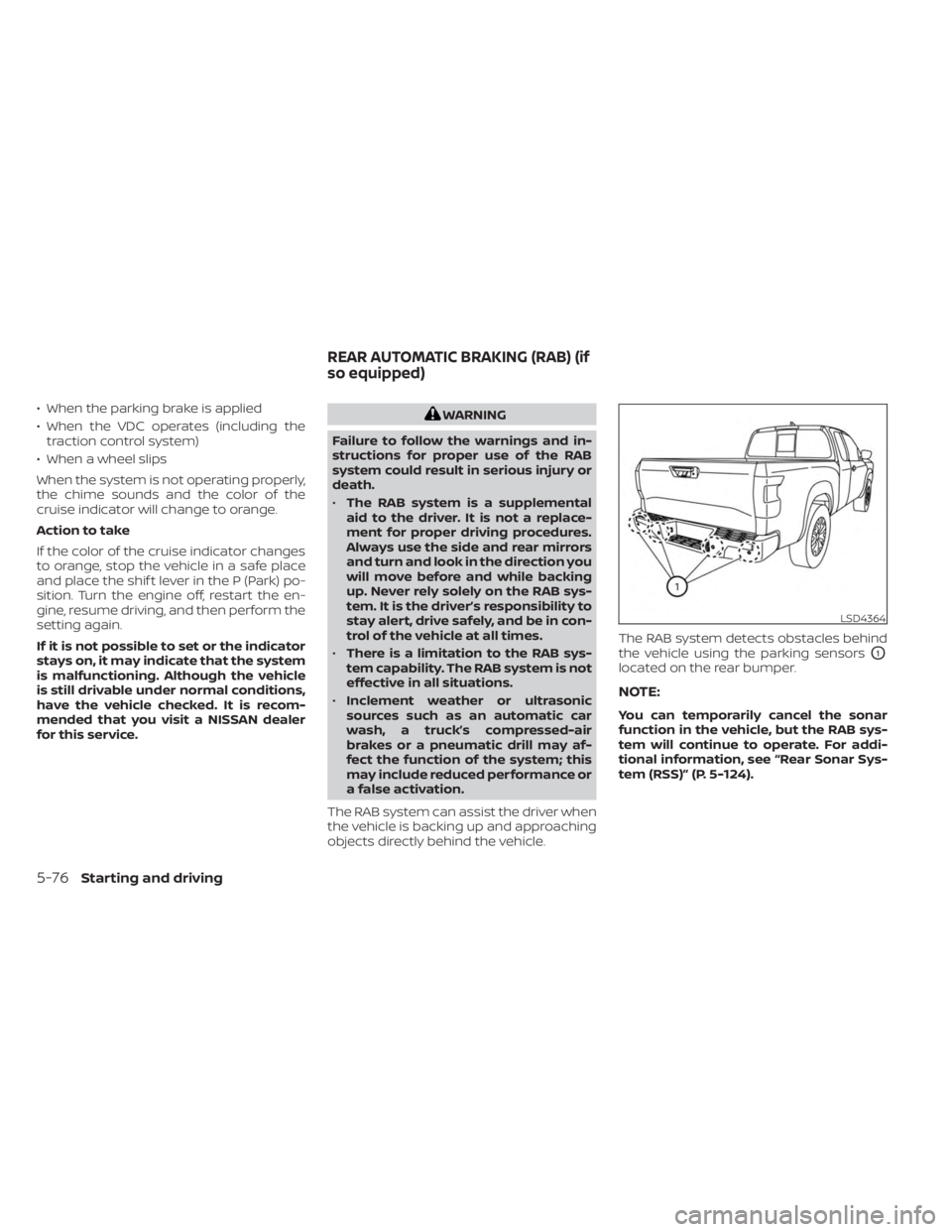
objects directly behind the vehicle. The RAB system detects obstacles behind
the vehicle using the parking sensors
O1
located on the rear bumper.
NOTE:
You can temporarily cancel the sonar
function in the vehicle, but the RAB sys-
tem will continue to operate. For addi-
tional information, see “Rear Sonar Sys-
tem (RSS)” (P. 5-124).
LSD4364
REAR AUTOMATIC BRAKING (RAB) (if
so equipped)
5-76Starting and driving
Page 363 of 556
• Do not cover or attach stickers, or installany accessory near the sensors. This
could block sensor signals and/or cause
failure or malfunction.
• Do not attach metallic objects near the radar sensor (brush guard, etc.). This
could cause failure or malfunction.
• Do not place reflective materials, such as white paper or a mirror, on the instru-
ment panel. The reflection of sunlight
may adversely affect the camera unit's
detection capability.
• Do not alter, remove or paint the front bumper. Before customizing or restoring
the front bumper, it is recommended that
you visit a NISSAN dealer.
Radio frequency statement
FCC Notice
USA
FCC ID: OAYARS4B
This device complies with Part 15 of the
FCC Rules with Industry Canada Licence-
exempt RSS standard(s).
Operation is subject to the following two
conditions:
1. This device may not cause harmful in-
terference, and 2.
This device must accept any interfer-
ence received, including interference
that may cause undesired operation.
Radiofrequency radiation exposure
Information:
This equipment complies with FCC and IC
radiation exposure limits set forth for an
uncontrolled environment.
This equipment should be installed and
operated with minimum distance of 30
cm between the radiator and your body.
This transmitter must not be co-located
or operating in conjunction with any
other antenna or transmitter.
FCC Notice
Changes or modifications not expressly
approved by the party responsible for
compliance could void the user’s author-
ity to operate the equipment.
CANADA
IC: 4135A-ARS4B
This device complies with Part 15 of the
FCC Rules and Industry Canada licence-
exempt RSS standard(s). Operation is subject to the following two
conditions:
1.
This device may not cause
interference,
2. This device must accept any interfer-
ence, including interference that may
cause undesired operation.
Le présent appareil est conforme aux
CNR d’Industrie Canada applicables aux
appareils radio exempts de licence.
L’exploitation est autorisée aux deux
conditions suivantes:
1. l’appareil ne doit pas produire de
brouillage, et
2.
l’utillisateur de l’appareil doit accepter
tout brouillage radioélectrique subi,
même si le brouillage est susceptible
d’en compromettre le fonctionnement.
Radiofrequency radiation exposure
Information:
This equipment complies with FCC and IC
radiation exposure limits set forth for an
uncontrolled environment.
Starting and driving5-91
Page 457 of 556
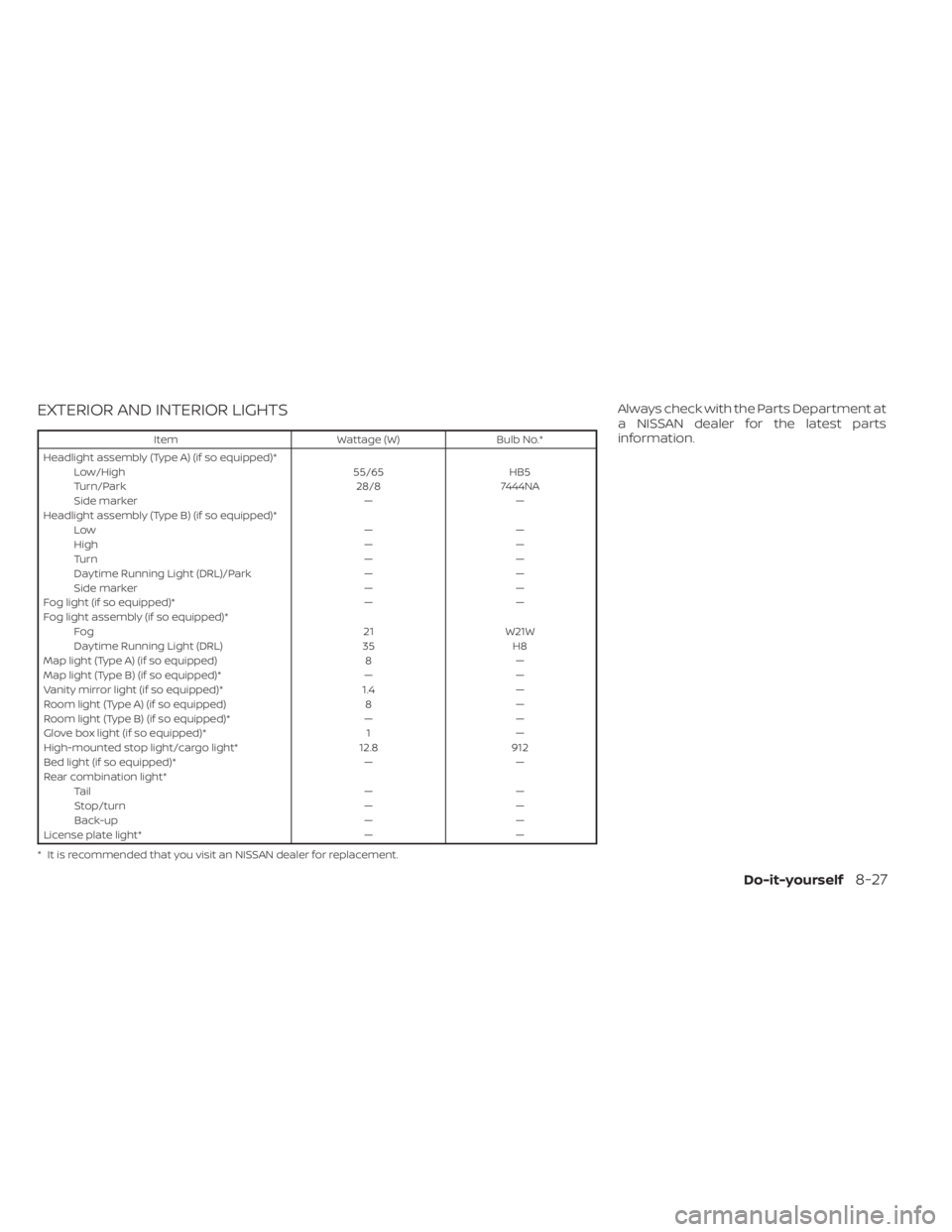
EXTERIOR AND INTERIOR LIGHTS
ItemWattage (W)Bulb No.*
Headlight assembly (Type A) (if so equipped)* Low/High 55/65HB5
Turn/Park 28/87444NA
Side marker ——
Headlight assembly (Type B) (if so equipped)* Low ——
High ——
Tu r n ——
Daytime Running Light (DRL)/Park ——
Side marker ——
Fog light (if so equipped)* ——
Fog light assembly (if so equipped)* Fog 21W21W
Daytime Running Light (DRL) 35H8
Map light (Type A) (if so equipped) 8—
Map light (Type B) (if so equipped)* ——
Vanity mirror light (if so equipped)* 1.4—
Room light (Type A) (if so equipped) 8—
Room light (Type B) (if so equipped)* ——
Glove box light (if so equipped)* 1—
High-mounted stop light/cargo light* 12.8912
Bed light (if so equipped)* ——
Rear combination light* Ta i l ——
Stop/turn ——
Back-up ——
License plate light* ——
* It is recommended that you visit an NISSAN dealer for replacement.
Always check with the Parts Department at
a NISSAN dealer for the latest parts
information.
Do-it-yourself8-27
Page 509 of 556
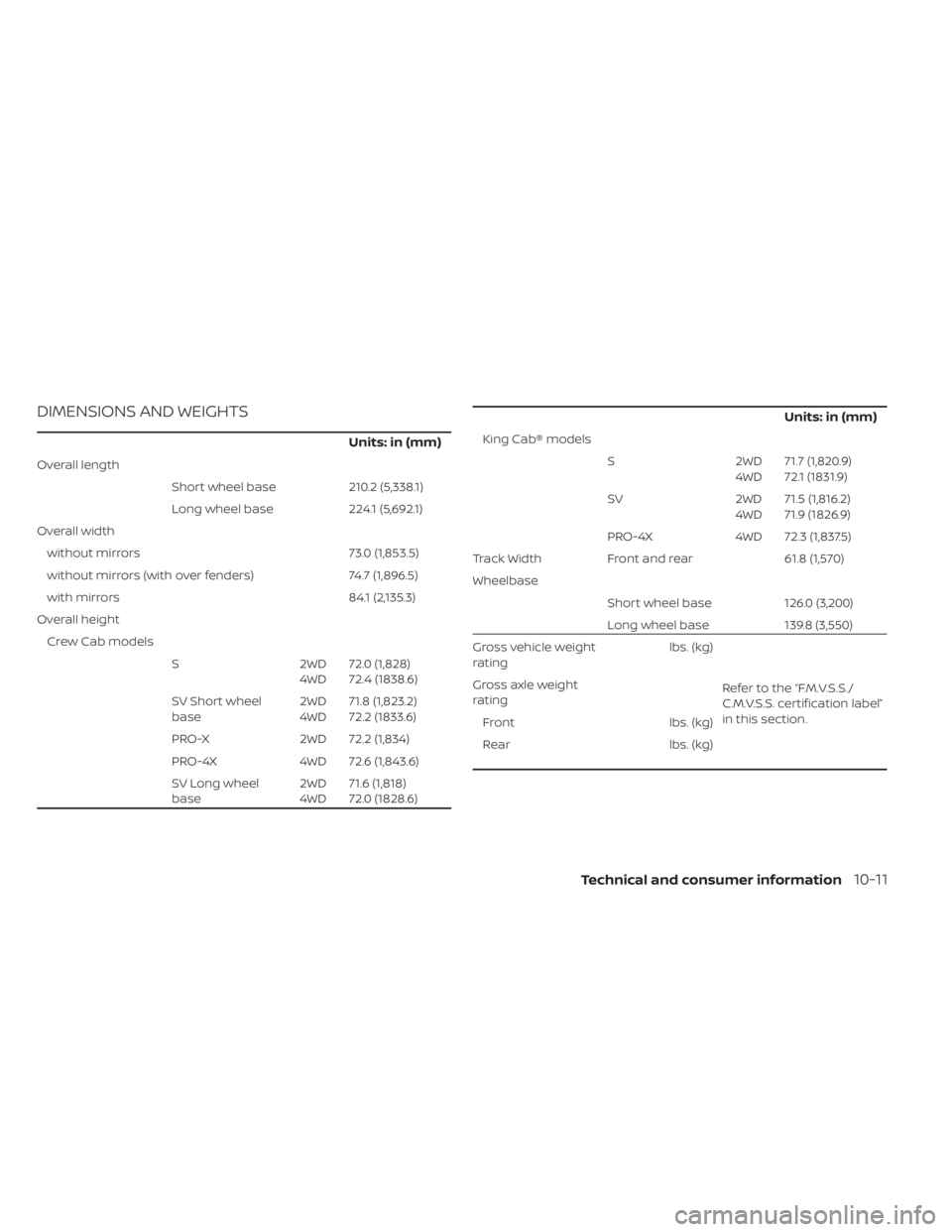
DIMENSIONS AND WEIGHTS
Units: in (mm)
Overall lengthShort wheel base 210.2 (5,338.1)
Long wheel base 224.1 (5,692.1)
Overall width without mirrors 73.0 (1,853.5)
without mirrors (with over fenders) 74.7 (1,896.5)
with mirrors 84.1 (2,135.3)
Overall height Crew Cab models S 2WD
4WD 72.0 (1,828)
72.4 (1838.6)
SV Short wheel
base 2WD
4WD 71.8 (1,823.2)
72.2 (1833.6)
PRO-X 2WD 72.2 (1,834)
PRO-4X 4WD 72.6 (1,843.6)
SV Long wheel
base 2WD
4WD 71.6 (1,818)
72.0 (1828.6)
Units: in (mm)
King Cab® models
S 2WD 4WD71.7 (1,820.9)
72.1 (1831.9)
SV 2WD 4WD71.5 (1,816.2)
71.9 (1826.9)
PRO-4X 4WD 72.3 (1,837.5)
Track Width Front and rear 61.8 (1,570)
Wheelbase Short wheel base 126.0 (3,200)
Long wheel base 139.8 (3,550)
Gross vehicle weight
rating lbs. (kg)
Refer to the “F.M.V.S.S./
C.M.V.S.S. certification label”
in this section.
Gross axle weight
rating
Front lbs. (kg)
Rear lbs. (kg)
Technical and consumer information10-11
Page 534 of 556
When towing a trailer load of 3,500 lbs.
(1587 kg) or more, trailers with a brake
system MUST be used.However, most
states require a separate braking system
on trailers with a loaded weight above a
specific amount. Make sure the trailer
meets the local regulations and the regu-
lations where you plan to tow.
Several types of braking systems are
available.
Surge Brakes -The surge brake actuator is
mounted on the trailer tongue with a hy-
draulic line running to each trailer wheel.
Surge brakes are activated by the trailer
pushing against the hitch ball when the
tow vehicle is braking. Hydraulic surge
brakes are common on rental trailers and
some boat trailers. In this type of system,
there is no hydraulic or electric connection
for brake operation between the tow ve-
hicle and the trailer.
Electric Trailer Brakes -Electric braking
systems are activated by an electronic sig-
nal sent from a trailer brake controller (spe-
cial brake-sensing module). If electric trailer
brakes are used, see “Electric trailer brake
controller" (P. 10-36).. Have a professional supplier of towing
equipment make sure the trailer brakes are
properly installed and demonstrate proper
brake function testing.
Electric trailer brake controller
Trailers equipped with electric brakes may
require the installation of an af termarket
trailer brake controller.
A Genuine NISSAN jumper harness is avail-
able that is specifically designed to be used
when installing an af termarket brake
controller.
Install the af termarket electric trailer brake
controller according to the manufacturer's
instructions.
Pre-towing tips
• Be certain your vehicle maintains a level
position when a loaded and/or unloaded
trailer is hitched. Do not drive the vehicle if
it has an abnormal nose-up or nose-
down condition; check for improper
tongue load, overload, worn suspension
or other possible causes of either
condition.
• Always secure items in the trailer to pre- vent load shif t while driving. • Keep the cargo load as low as possible in
the trailer to keep the trailer center of
gravity low.
• Load the trailer so approximately 60% of the trailer load is in the front half and 40%
is in the back half. Also make sure the load
is balanced side to side.
• Check your hitch, trailer tire pressure, ve- hicle tire pressure, trailer light operation,
and trailer wheel lug nuts every time you
attach a trailer to the vehicle.
• Be certain your rearview mirrors conform to all federal, state or local regulations. If
not, install any mirrors required for towing
before driving the vehicle.
• Determine the overall height of the ve- hicle and trailer so the required clearance
is known.Trailer towing tips
In order to gain skill and an understanding
of the vehicle's behavior, you should prac-
tice turning, stopping and backing up in an
area which is free from traffic. Steering sta-
bility and braking performance will be
somewhat different than under normal
driving conditions.
• Always secure items in the trailer to pre-vent load shif t while driving.
10-36Technical and consumer information
Page 543 of 556
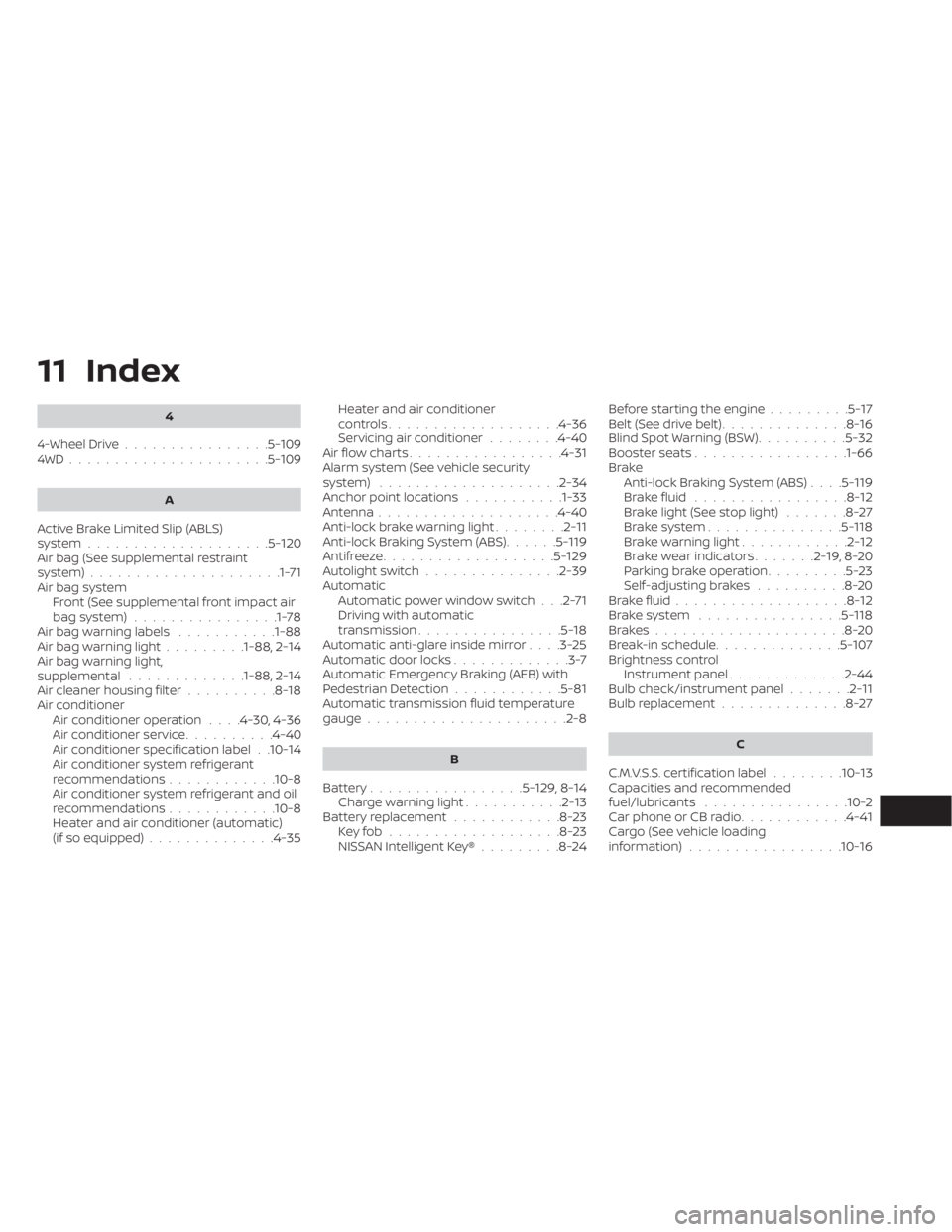
11 Index
4
4-Wheel Drive................5-1094WD......................5-109
A
Active Brake Limited Slip (ABLS)
system....................5-120Air bag (See supplemental restraint
system).....................1-71Air bag systemFront (See supplemental front impact air
bag system)
................1-78Air bag warning labels...........1-88Air bag warning light.........1-88, 2-14Air bag warning light,
supplemental.............1-88, 2-14Air cleaner housing filter..........8-18Air conditionerAir conditioner operation. . . .4-30, 4-36Air conditioner service..........4-40Air conditioner specification label. .10-14Air conditioner system refrigerant
recommendations............10-8Air conditioner system refrigerant and oil
recommendations............10-8Heater and air conditioner (automatic)
(if so equipped)..............4-35
Heater and air conditioner
controls.................. .4-36Servicing air conditioner........4-40Air flow charts.................4-31Alarm system (See vehicle security
system)................... .2-34Anchor point locations...........1-33Antenna....................4-40Anti-lock brake warning light........2-11Anti-lock Braking System (ABS)......5-119Antifreeze...................5-129Autolight switch...............2-39Automatic
Automatic power window switch. . .2-71Driving with automatic
transmission................5-18Automatic anti-glare inside mirror. . . .3-25Automatic door locks.............3-7Automatic Emergency Braking (AEB) with
Pedestrian Detection............5-81Automatic transmission fluid temperature
gauge..................... .2-8
B
Battery.................5-129, 8-14Charge warning light...........2-13Battery replacement............8-23Key fob...................8-23NISSAN Intelligent Key®.........8-24
Before starting the engine.........5-17Belt (See drive belt)..............8-16Blind Spot Warning (BSW)..........5-32Booster seats.................1-66Brake
Anti-lock Braking System (ABS). . . .5-119Brake fluid.................8-12Brake light (See stop light).......8-27Brake system...............5-118Brake warning light............2-12Brake wear indicators.......2-19,8-20Parking brake operation.........5-23Self-adjusting brakes..........8-20Brake fluid...................8-12Brake system................5-118Brakes.....................8-20Break-in schedule..............5-107Brightness controlInstrument panel.............2-44Bulb check/instrument panel.......2-11Bulb replacement..............8-27
C
C.M.V.S.S. certification label........10-13Capacities and recommended
fuel/lubricants................10-2Car phone or CB radio............4-41Cargo (See vehicle loading
information)................ .10-16