ad blue NISSAN FRONTIER 2022 Owner´s Manual
[x] Cancel search | Manufacturer: NISSAN, Model Year: 2022, Model line: FRONTIER, Model: NISSAN FRONTIER 2022Pages: 556, PDF Size: 6.11 MB
Page 22 of 556
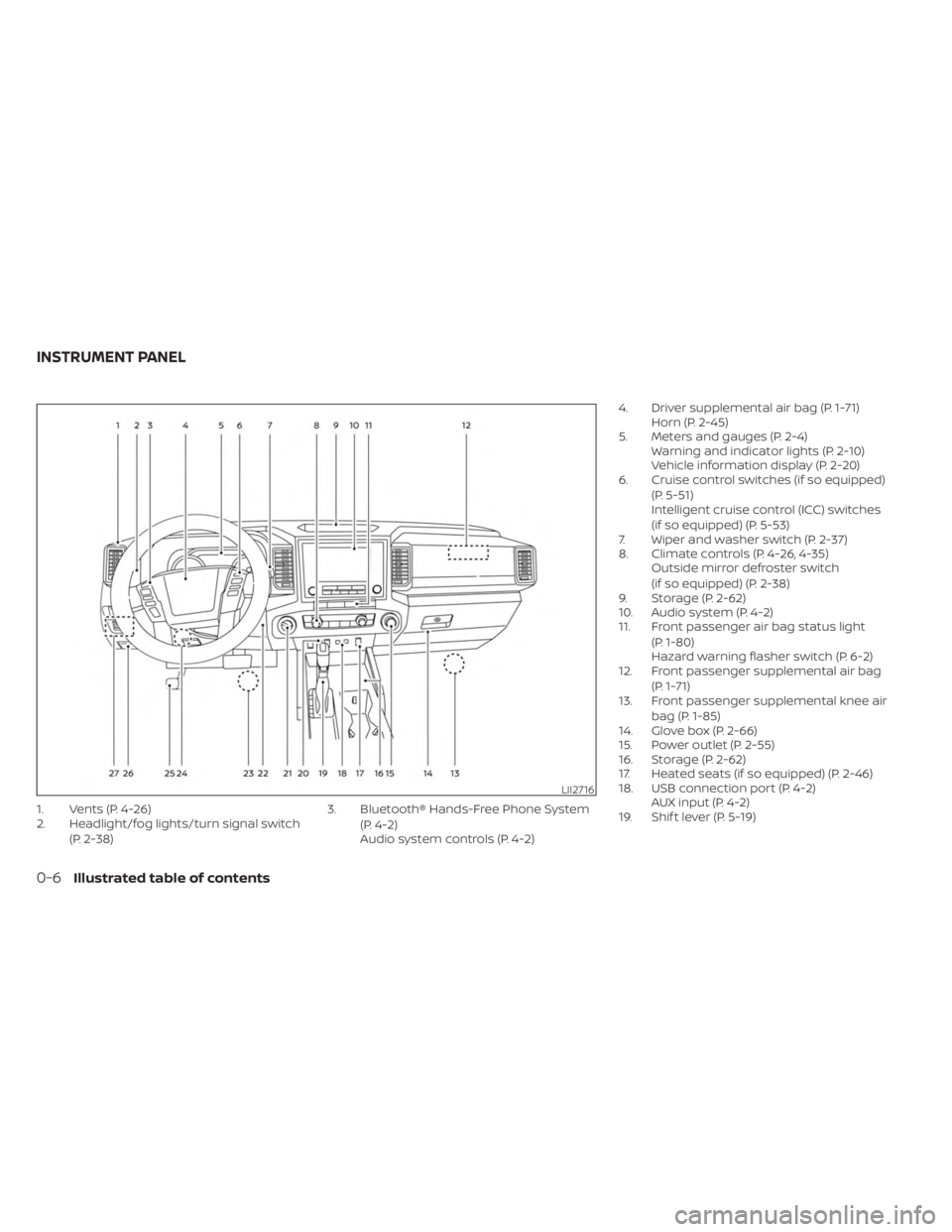
1. Vents (P. 4-26)
2. Headlight/fog lights/turn signal switch(P. 2-38) 3. Bluetooth® Hands-Free Phone System
(P. 4-2)
Audio system controls (P. 4-2) 4. Driver supplemental air bag (P. 1-71)
Horn (P. 2-45)
5. Meters and gauges (P. 2-4) Warning and indicator lights (P. 2-10)
Vehicle information display (P. 2-20)
6. Cruise control switches (if so equipped)
(P. 5-51)
Intelligent cruise control (ICC) switches
(if so equipped) (P. 5-53)
7. Wiper and washer switch (P. 2-37)
8. Climate controls (P. 4-26, 4-35) Outside mirror defroster switch
(if so equipped) (P. 2-38)
9. Storage (P. 2-62)
10. Audio system (P. 4-2)
11. Front passenger air bag status light
(P. 1-80)
Hazard warning flasher switch (P. 6-2)
12. Front passenger supplemental air bag
(P. 1-71)
13. Front passenger supplemental knee air
bag (P. 1-85)
14. Glove box (P. 2-66)
15. Power outlet (P. 2-55)
16. Storage (P. 2-62)
17. Heated seats (if so equipped) (P. 2-46)
18. USB connection port (P. 4-2) AUX input (P. 4-2)
19. Shif t lever (P. 5-19)
LII2716
INSTRUMENT PANEL
0-6Illustrated table of contents
Page 26 of 556
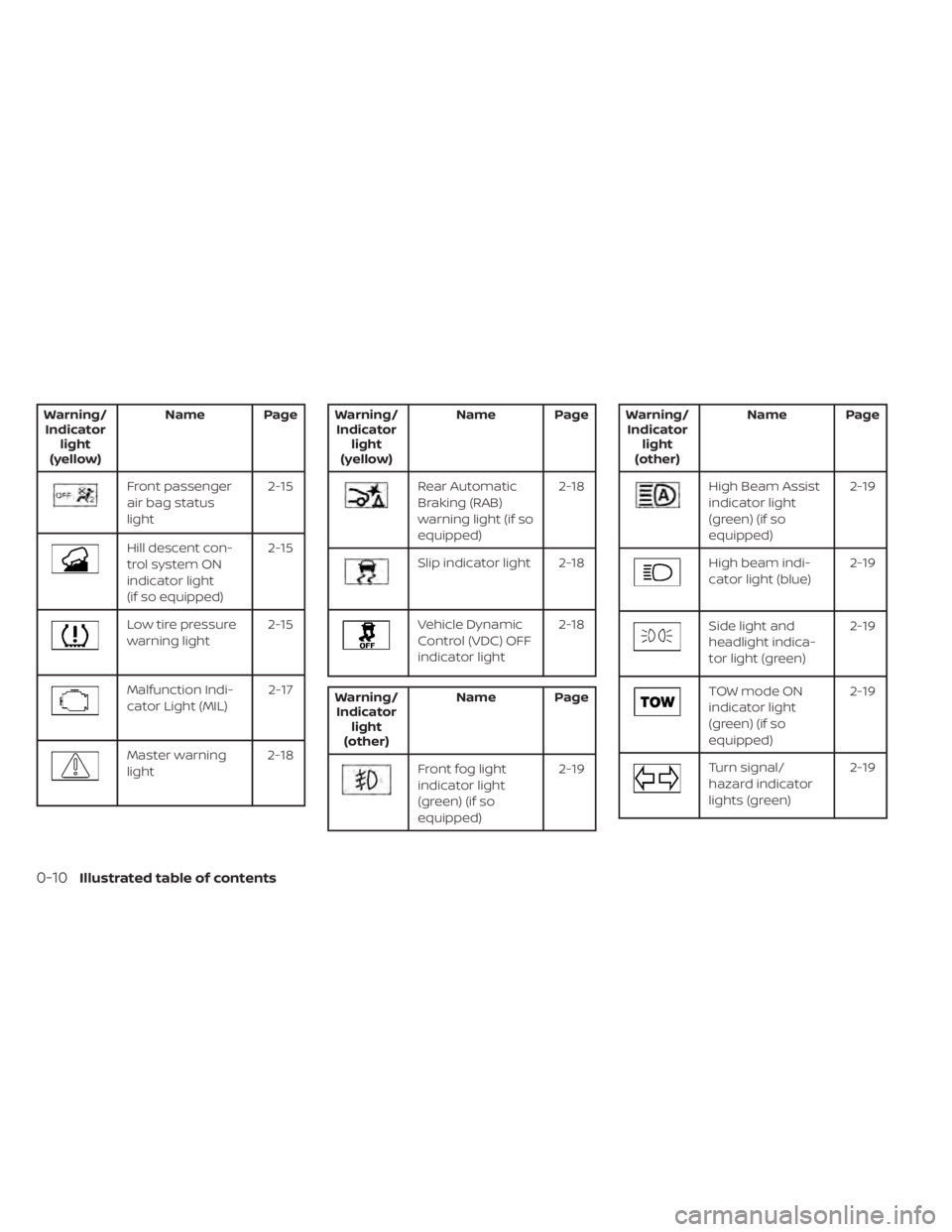
Warning/Indicator light
(yellow) Name Page
Front passenger
air bag status
light
2-15
Hill descent con-
trol system ON
indicator light
(if so equipped)2-15
Low tire pressure
warning light
2-15
Malfunction Indi-
cator Light (MIL) 2-17
Master warning
light2-18
Warning/
Indicator light
(yellow) Name Page
Rear Automatic
Braking (RAB)
warning light (if so
equipped) 2-18
Slip indicator light 2-18
Vehicle Dynamic
Control (VDC) OFF
indicator light
2-18
Warning/
Indicator light
(other) Name Page
Front fog light
indicator light
(green) (if so
equipped) 2-19
Warning/
Indicator light
(other) Name Page
High Beam Assist
indicator light
(green) (if so
equipped) 2-19
High beam indi-
cator light (blue)
2-19
Side light and
headlight indica-
tor light (green)2-19
TOW mode ON
indicator light
(green) (if so
equipped)2-19
Turn signal/
hazard indicator
lights (green)
2-19
0-10Illustrated table of contents
Page 120 of 556
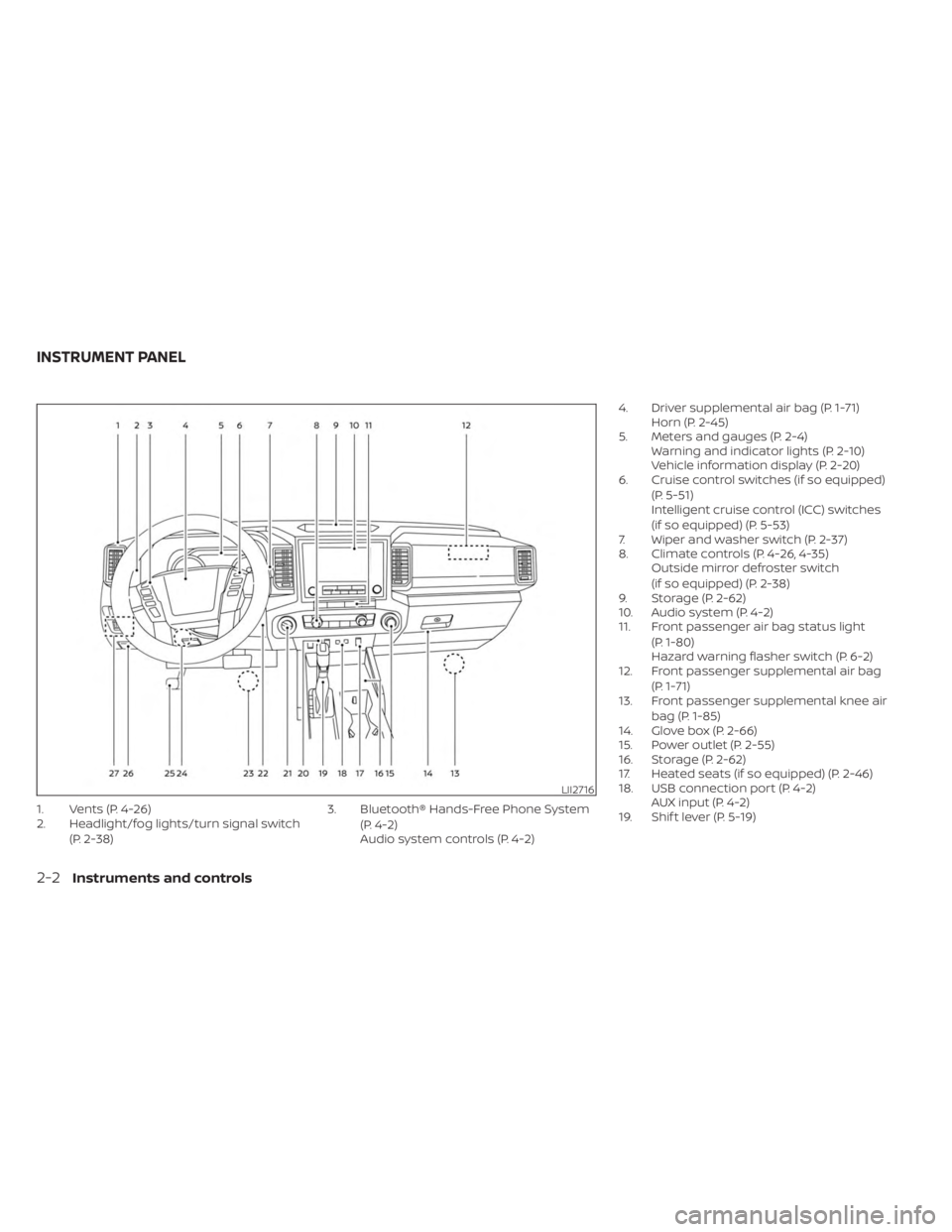
1. Vents (P. 4-26)
2. Headlight/fog lights/turn signal switch(P. 2-38) 3. Bluetooth® Hands-Free Phone System
(P. 4-2)
Audio system controls (P. 4-2) 4. Driver supplemental air bag (P. 1-71)
Horn (P. 2-45)
5. Meters and gauges (P. 2-4) Warning and indicator lights (P. 2-10)
Vehicle information display (P. 2-20)
6. Cruise control switches (if so equipped)
(P. 5-51)
Intelligent cruise control (ICC) switches
(if so equipped) (P. 5-53)
7. Wiper and washer switch (P. 2-37)
8. Climate controls (P. 4-26, 4-35) Outside mirror defroster switch
(if so equipped) (P. 2-38)
9. Storage (P. 2-62)
10. Audio system (P. 4-2)
11. Front passenger air bag status light
(P. 1-80)
Hazard warning flasher switch (P. 6-2)
12. Front passenger supplemental air bag
(P. 1-71)
13. Front passenger supplemental knee air
bag (P. 1-85)
14. Glove box (P. 2-66)
15. Power outlet (P. 2-55)
16. Storage (P. 2-62)
17. Heated seats (if so equipped) (P. 2-46)
18. USB connection port (P. 4-2) AUX input (P. 4-2)
19. Shif t lever (P. 5-19)
LII2716
INSTRUMENT PANEL
2-2Instruments and controls
Page 128 of 556
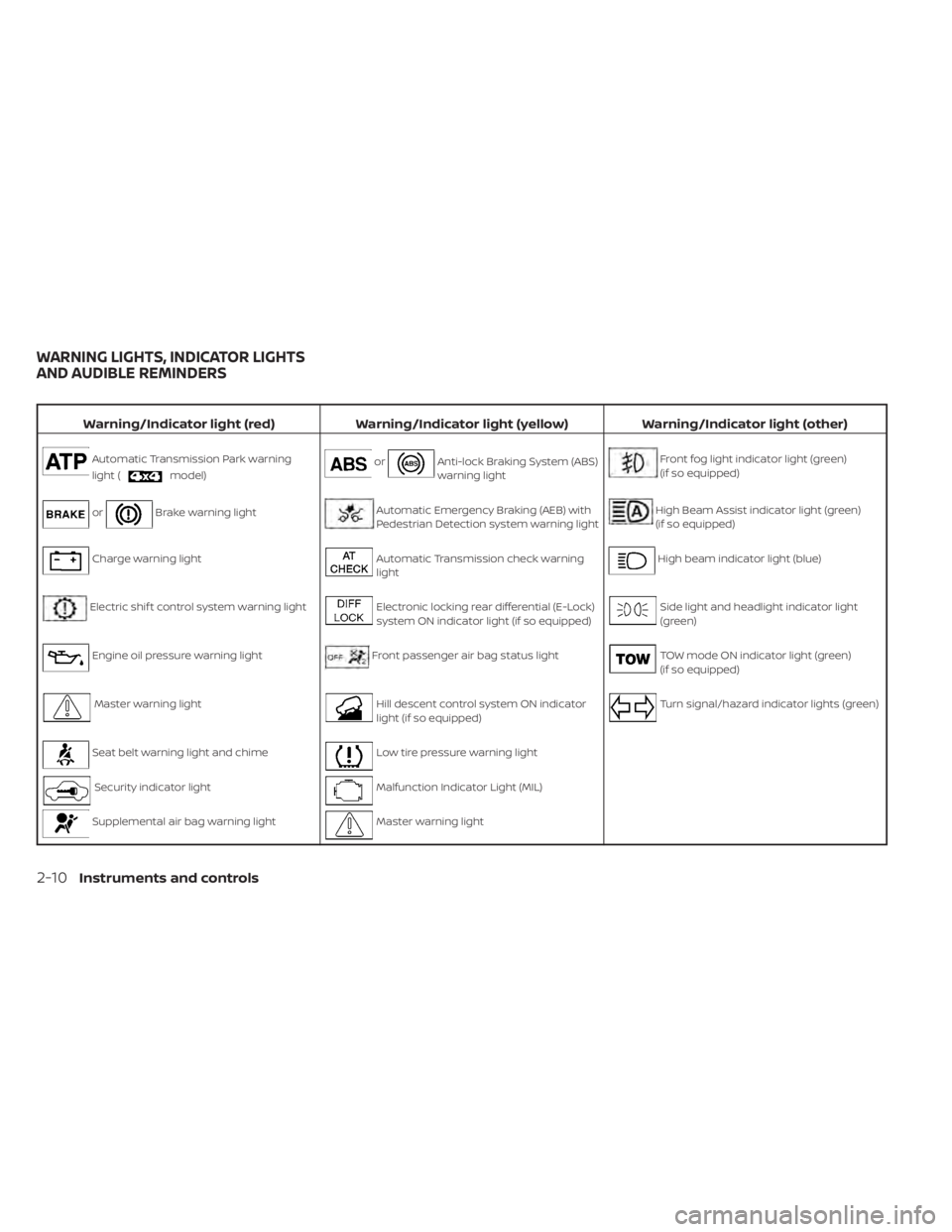
Warning/Indicator light (red)Warning/Indicator light (yellow) Warning/Indicator light (other)
Automatic Transmission Park warning
light (
model)orAnti-lock Braking System (ABS)
warning lightFront fog light indicator light (green)
(if so equipped)
orBrake warning lightAutomatic Emergency Braking (AEB) with
Pedestrian Detection system warning lightHigh Beam Assist indicator light (green)
(if so equipped)
Charge warning lightAutomatic Transmission check warning
lightHigh beam indicator light (blue)
Electric shif t control system warning lightElectronic locking rear differential (E-Lock)
system ON indicator light (if so equipped)Side light and headlight indicator light
(green)
Engine oil pressure warning lightFront passenger air bag status lightTOW mode ON indicator light (green)
(if so equipped)
Master warning lightHill descent control system ON indicator
light (if so equipped)Turn signal/hazard indicator lights (green)
Seat belt warning light and chimeLow tire pressure warning light
Security indicator lightMalfunction Indicator Light (MIL)
Supplemental air bag warning lightMaster warning light
WARNING LIGHTS, INDICATOR LIGHTS
AND AUDIBLE REMINDERS
2-10Instruments and controls
Page 137 of 556
Push the VDC OFF switch again or restart the
engine and the system will operate normally.
For additional information, see “Vehicle Dy-
namic Control (VDC) system” (P. 5-121).
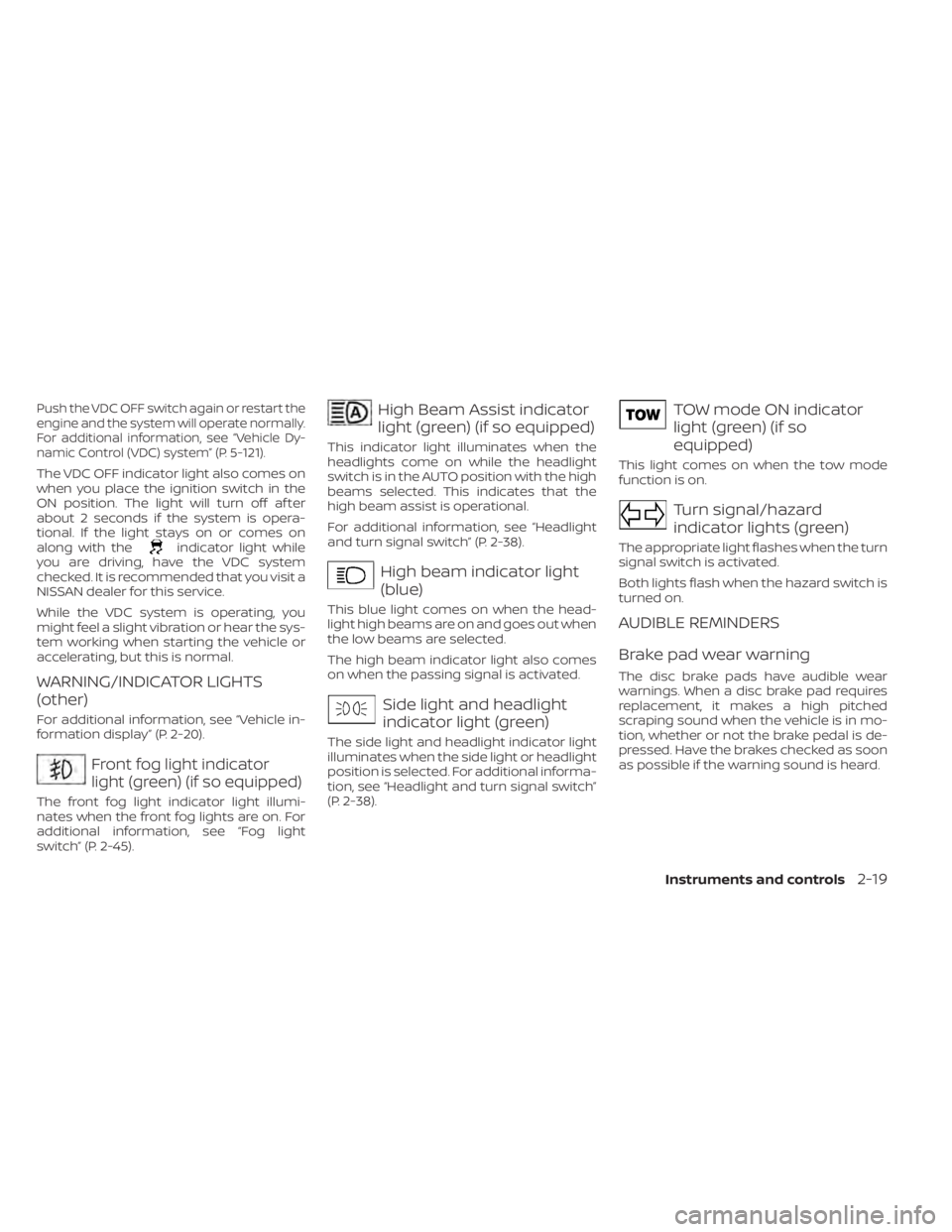
The VDC OFF indicator light also comes on
when you place the ignition switch in the
ON position. The light will turn off af ter
about 2 seconds if the system is opera-
tional. If the light stays on or comes on
along with the
indicator light while
you are driving, have the VDC system
checked. It is recommended that you visit a
NISSAN dealer for this service.
While the VDC system is operating, you
might feel a slight vibration or hear the sys-
tem working when starting the vehicle or
accelerating, but this is normal.
WARNING/INDICATOR LIGHTS
(other)
For additional information, see “Vehicle in-
formation display” (P. 2-20).
Front fog light indicator
light (green) (if so equipped)
The front fog light indicator light illumi-
nates when the front fog lights are on. For
additional information, see “Fog light
switch” (P. 2-45).
High Beam Assist indicator
light (green) (if so equipped)
This indicator light illuminates when the
headlights come on while the headlight
switch is in the AUTO position with the high
beams selected. This indicates that the
high beam assist is operational.
For additional information, see “Headlight
and turn signal switch” (P. 2-38).
High beam indicator light
(blue)
This blue light comes on when the head-
light high beams are on and goes out when
the low beams are selected.
The high beam indicator light also comes
on when the passing signal is activated.
Side light and headlight
indicator light (green)
The side light and headlight indicator light
illuminates when the side light or headlight
position is selected. For additional informa-
tion, see “Headlight and turn signal switch”
(P. 2-38).
TOW mode ON indicator
light (green) (if so
equipped)
This light comes on when the tow mode
function is on.
Turn signal/hazard
indicator lights (green)
The appropriate light flashes when the turn
signal switch is activated.
Both lights flash when the hazard switch is
turned on.
AUDIBLE REMINDERS
Brake pad wear warning
The disc brake pads have audible wear
warnings. When a disc brake pad requires
replacement, it makes a high pitched
scraping sound when the vehicle is in mo-
tion, whether or not the brake pedal is de-
pressed. Have the brakes checked as soon
as possible if the warning sound is heard.
Instruments and controls2-19
Page 232 of 556
Refer to the digital NissanConnect® Own-
er’s manual using the QR code on this
page, or your printed NissanConnect®
Owner’s manual (if so equipped). This
manual includes the following information:
• NissanConnect® Services Powered BySiriusXM®
• Navigation system (if so equipped)
• Audio system
• Apple CarPlay®
• Android Auto
TM
• Bluetooth® Hands-Free Phone system
• Viewing information
• Other settings • Voice recognition
• General system information
LHA5513
NISSANCONNECT® OWNER’S
MANUAL
4-2Monitor, climate, audio, phone and voice recognition systems
Page 254 of 556
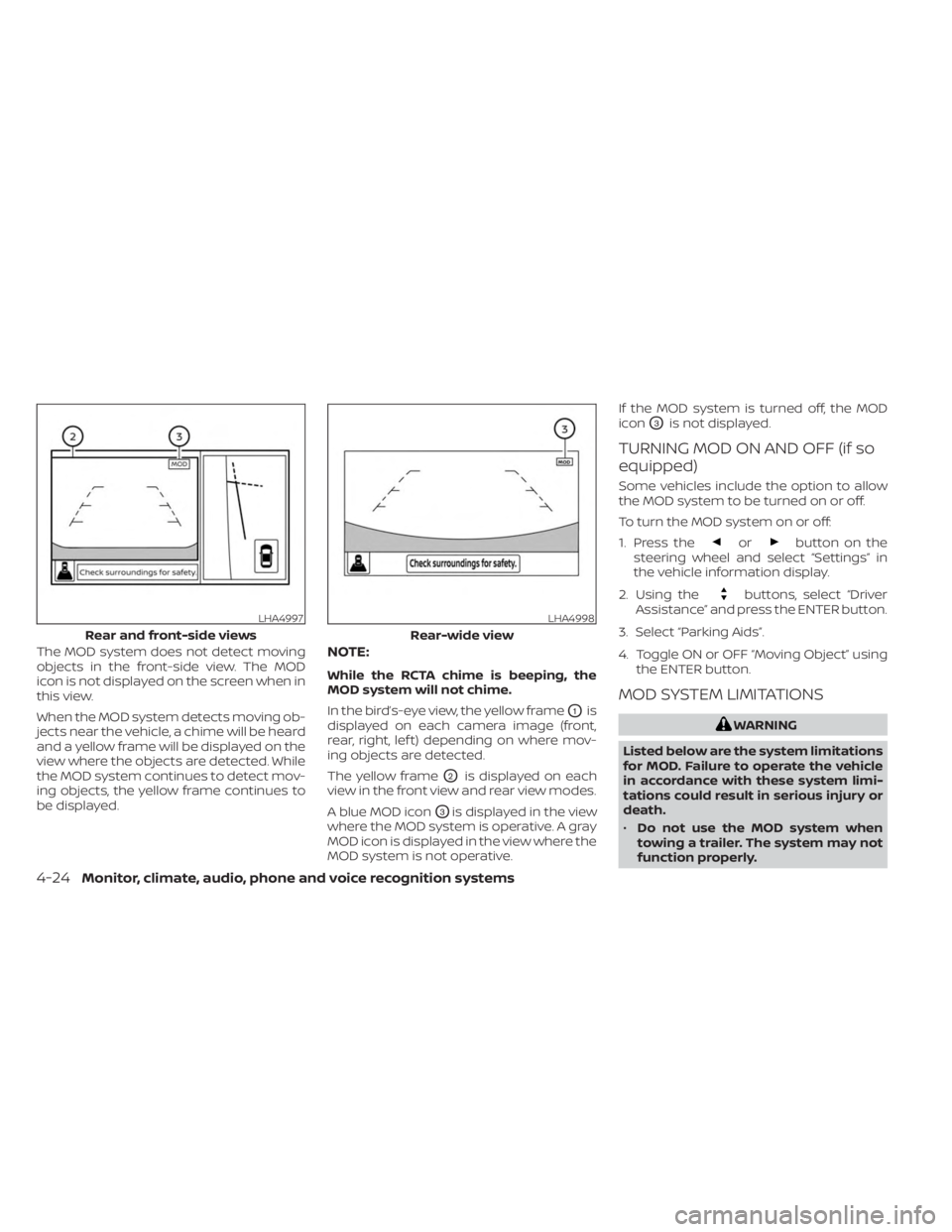
The MOD system does not detect moving
objects in the front-side view. The MOD
icon is not displayed on the screen when in
this view.
When the MOD system detects moving ob-
jects near the vehicle, a chime will be heard
and a yellow frame will be displayed on the
view where the objects are detected. While
the MOD system continues to detect mov-
ing objects, the yellow frame continues to
be displayed.NOTE:
While the RCTA chime is beeping, the
MOD system will not chime.
In the bird’s-eye view, the yellow frame
O1is
displayed on each camera image (front,
rear, right, lef t) depending on where mov-
ing objects are detected.
The yellow frame
O2is displayed on each
view in the front view and rear view modes.
A blue MOD icon
O3is displayed in the view
where the MOD system is operative. A gray
MOD icon is displayed in the view where the
MOD system is not operative. If the MOD system is turned off, the MOD
icon
O3is not displayed.
TURNING MOD ON AND OFF (if so
equipped)
Some vehicles include the option to allow
the MOD system to be turned on or off.
To turn the MOD system on or off:
1. Press the
orbutton on the
steering wheel and select “Settings” in
the vehicle information display.
2. Using the
buttons, select “Driver
Assistance” and press the ENTER button.
3. Select “Parking Aids”.
4. Toggle ON or OFF “Moving Object” using the ENTER button.
MOD SYSTEM LIMITATIONS
WARNING
Listed below are the system limitations
for MOD. Failure to operate the vehicle
in accordance with these system limi-
tations could result in serious injury or
death.
• Do not use the MOD system when
towing a trailer. The system may not
function properly.
LHA4997
Rear and front-side views
LHA4998
Rear-wide view
4-24Monitor, climate, audio, phone and voice recognition systems
Page 255 of 556
•Excessive noise (for example, audio
system volume or open vehicle win-
dow) will interfere with the chime
sound, and it may not be heard.
• The MOD system performance will be
limited according to environmental
conditions and surrounding objects
such as:
– When there is low contrast be-
tween background and the mov-
ing objects.
– When there is a blinking source of
light.
– When strong light such as another
vehicle’s headlight or sunlight is
present.
– When camera orientation is not in
its usual position, such as when a
mirror is folded.
– When there is dirt, water drops or
snow on the camera lens.
– When the position of the moving
objects in the display is not
changed.
• The MOD system might detect flow-
ing water droplets on the camera
lens, white smoke from the muffler,
moving shadows, etc. •
The MOD system may not function
properly depending on the speed, di-
rection, distance or shape of the
moving objects.
• If your vehicle sustains damage to
the parts where the camera is in-
stalled, leaving it misaligned or bent,
the sensing zone may be altered and
the MOD system may not detect ob-
jects properly.
• When the temperature is extremely
high or low, the screen may not dis-
play objects clearly. This is not a
malfunction.
NOTE:
The blue MOD icon will change to or-
ange if one of the following has oc-
curred:
• When the system is malfunctioning.
• When the component temperature reaches a high level (icon will blink).
• When the Rear View camera has de- tected a blockage (icon will blink).
If the icon light continues to illuminate
orange, have the MOD system checked. It
is recommended that you visit a NISSAN
dealer for this service.
SYSTEM MAINTENANCE
CAUTION
• Do not use alcohol, benzine or thin-
ner to clean the camera. This will
cause discoloration.
• Do not damage the camera as the
monitor screen may be adversely
affected.
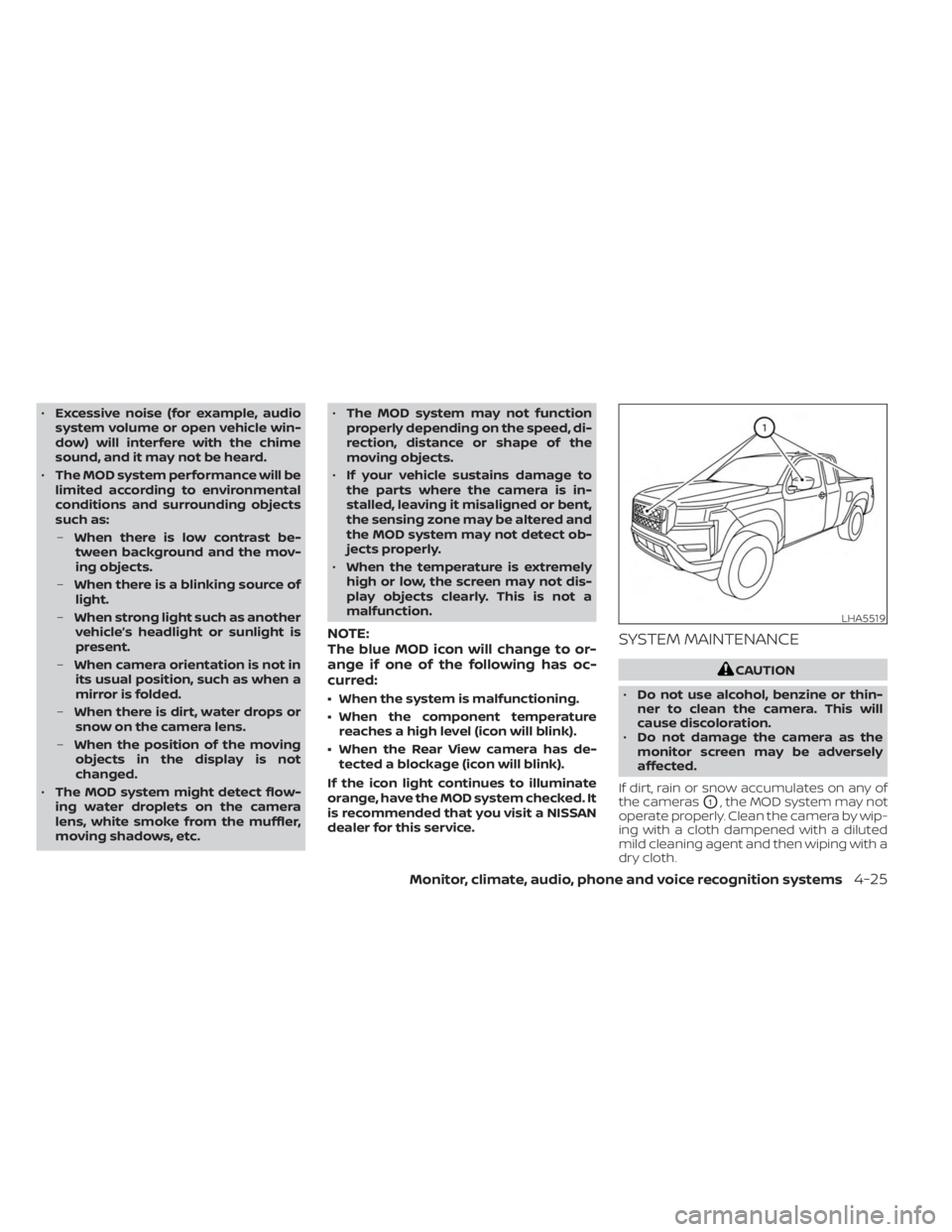
If dirt, rain or snow accumulates on any of
the cameras
O1, the MOD system may not
operate properly. Clean the camera by wip-
ing with a cloth dampened with a diluted
mild cleaning agent and then wiping with a
dry cloth.
LHA5519
Monitor, climate, audio, phone and voice recognition systems4-25
Page 434 of 556
The engine cooling system is filled at the
factory with a pre-diluted mixture of 50%
Genuine NISSAN Long Life Antifreeze/
Coolant (blue) and 50% water to provide
year-round antifreeze and coolant protec-
tion. The antifreeze solution contains rust
and corrosion inhibitors. Additional engine
cooling system additives are not
necessary.
WARNING
• Never remove the radiator or coolant
reservoir cap when the engine is hot.
Wait until the engine and radiator
cool down. Serious burns could be
caused by high pressure fluid escap-
ing from the radiator. For additional
information on precautions, see “If
your vehicle overheats” (P. 6-13).
• The radiator and coolant reservoir
are equipped with a pressure type ra-
diator cap. To prevent engine dam-
age, use only a Genuine NISSAN ra-
diator cap.
CAUTION
• Never use any cooling system addi-
tives such as radiator sealer. Addi-
tives may clog the cooling system
and cause damage to the engine,
transmission and/or cooling system.
• When adding or replacing coolant, be
sure to use only Genuine NISSAN
Long Life Antifreeze/Coolant (blue)
or equivalent. Genuine NISSAN Long
Life Antifreeze/Coolant (blue) is pre-
diluted to provide antifreeze protec-
tion to -34° F (-37° C). If additional
freeze protection is needed due to
weather where you operate your ve-
hicle, add Genuine NISSAN Long Life
Antifreeze/Coolant (blue) concen-
trate following the directions on the
container. If an equivalent coolant
other than Genuine NISSAN Long Life
Antifreeze/Coolant (blue) is used, fol-
low the coolant manufacturer’s in-
structions to maintain minimum an-
tifreeze protection to -34° F (-37° C).
The use of other types of coolant so-
lutions other than Genuine NISSAN
Long Life Antifreeze/Coolant (blue)
or equivalent may damage the en-
gine cooling system. •
The life expectancy of the factory-fill
coolant is 105,000 miles (168,000 km)
or 7 years. Mixing any other type of
coolant other than Genuine NISSAN
Long Life Antifreeze/Coolant (blue)
(or equivalent coolant), including
Genuine NISSAN Long Life
Antifreeze/Coolant (green), or the
use of non-distilled water may re-
duce the life expectancy of the
factory-fill coolant. For additional in-
formation, see the "Maintenance and
schedules" section of this manual.
ENGINE COOLING SYSTEM
8-4Do-it-yourself
Page 435 of 556
CHECKING ENGINE COOLANT
LEVEL
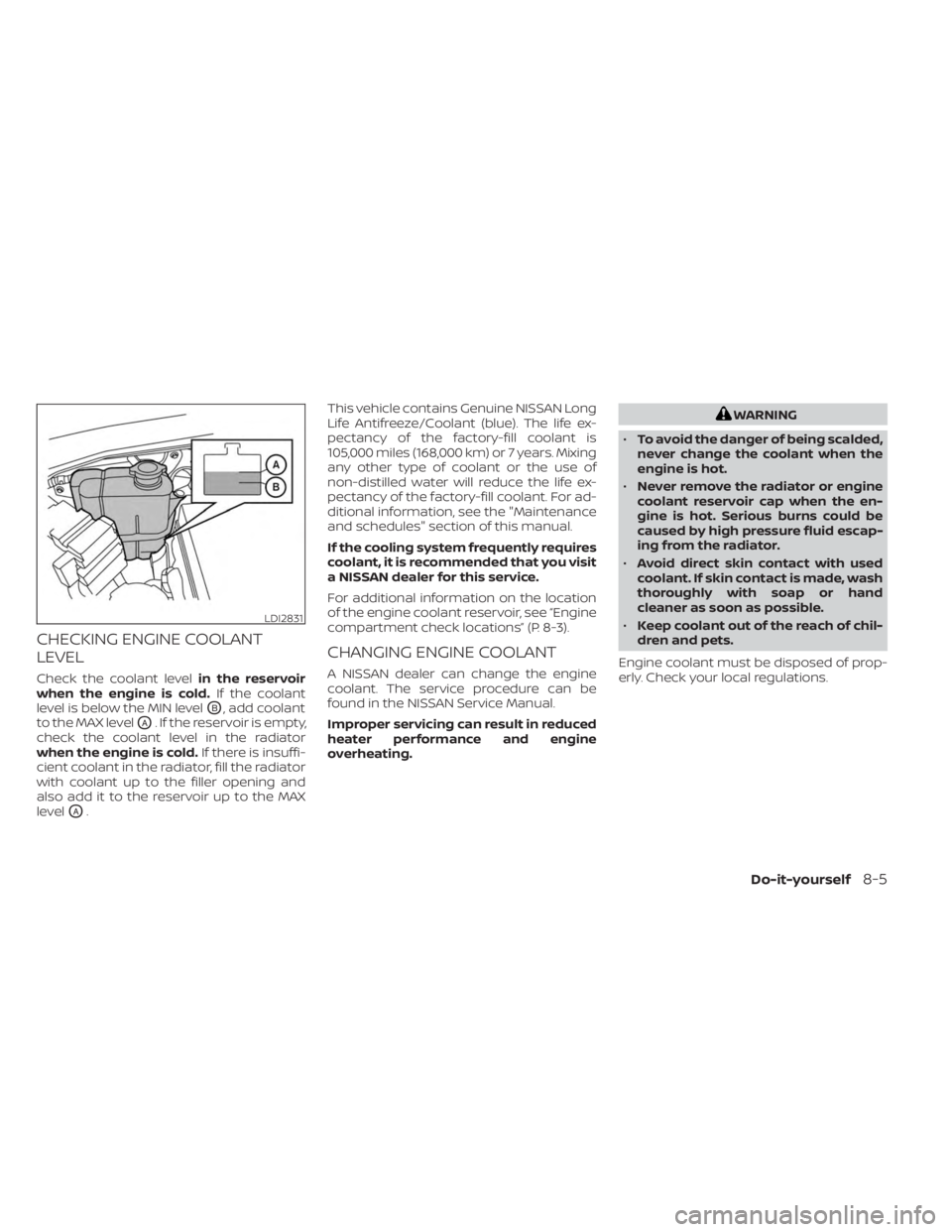
Check the coolant levelin the reservoir
when the engine is cold. If the coolant
level is below the MIN level
OB, add coolant
to the MAX level
OA. If the reservoir is empty,
check the coolant level in the radiator
when the engine is cold. If there is insuffi-
cient coolant in the radiator, fill the radiator
with coolant up to the filler opening and
also add it to the reservoir up to the MAX
level
OA. This vehicle contains Genuine NISSAN Long
Life Antifreeze/Coolant (blue). The life ex-
pectancy of the factory-fill coolant is
105,000 miles (168,000 km) or 7 years. Mixing
any other type of coolant or the use of
non-distilled water will reduce the life ex-
pectancy of the factory-fill coolant. For ad-
ditional information, see the "Maintenance
and schedules" section of this manual.
If the cooling system frequently requires
coolant, it is recommended that you visit
a NISSAN dealer for this service.
For additional information on the location
of the engine coolant reservoir, see “Engine
compartment check locations” (P. 8-3).
CHANGING ENGINE COOLANT
A NISSAN dealer can change the engine
coolant. The service procedure can be
found in the NISSAN Service Manual.
Improper servicing can result in reduced
heater performance and engine
overheating.
WARNING
• To avoid the danger of being scalded,
never change the coolant when the
engine is hot.
• Never remove the radiator or engine
coolant reservoir cap when the en-
gine is hot. Serious burns could be
caused by high pressure fluid escap-
ing from the radiator.
• Avoid direct skin contact with used
coolant. If skin contact is made, wash
thoroughly with soap or hand
cleaner as soon as possible.
• Keep coolant out of the reach of chil-
dren and pets.
Engine coolant must be disposed of prop-
erly. Check your local regulations.
LDI2831
Do-it-yourself8-5