display NISSAN FRONTIER 2022 Owner´s Manual
[x] Cancel search | Manufacturer: NISSAN, Model Year: 2022, Model line: FRONTIER, Model: NISSAN FRONTIER 2022Pages: 556, PDF Size: 6.11 MB
Page 22 of 556
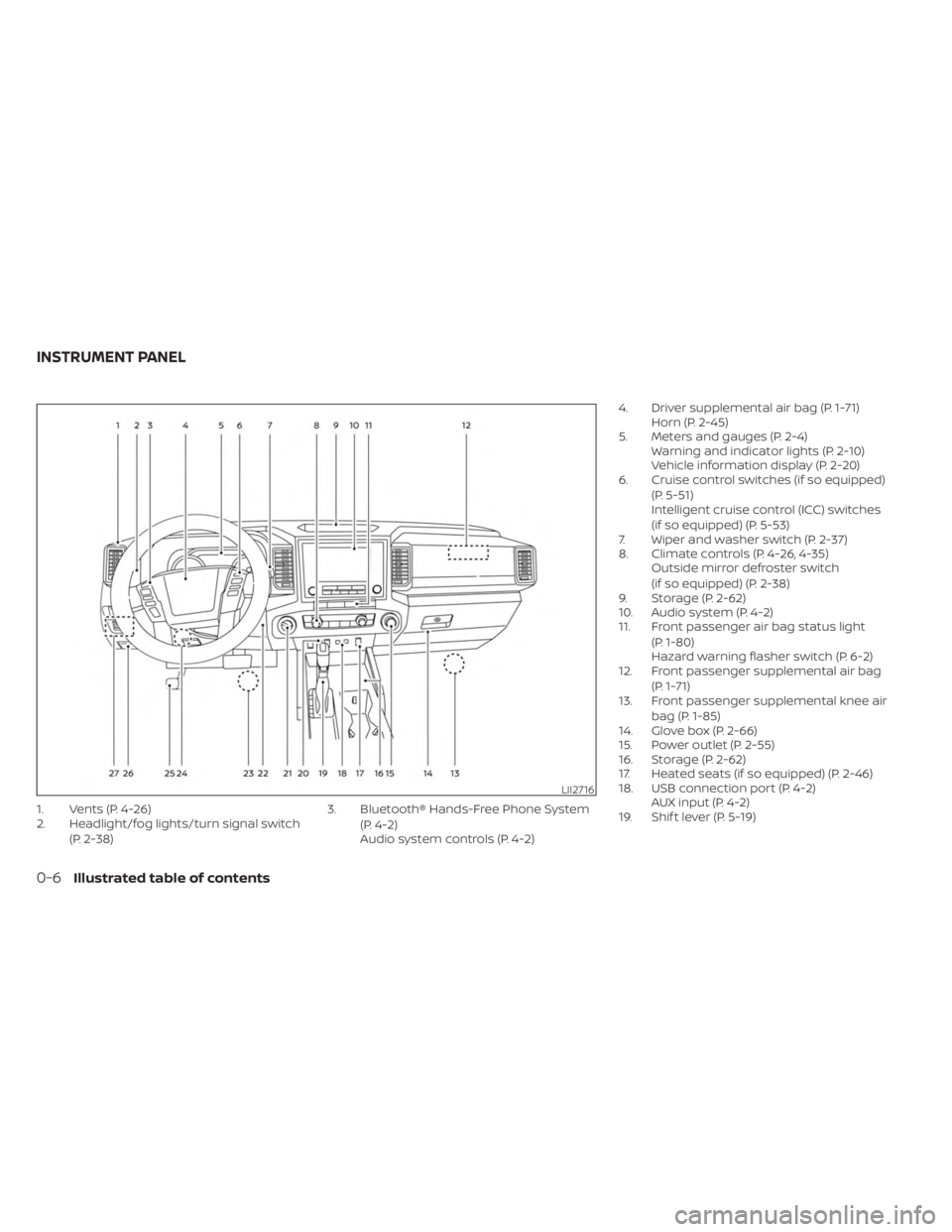
1. Vents (P. 4-26)
2. Headlight/fog lights/turn signal switch(P. 2-38) 3. Bluetooth® Hands-Free Phone System
(P. 4-2)
Audio system controls (P. 4-2) 4. Driver supplemental air bag (P. 1-71)
Horn (P. 2-45)
5. Meters and gauges (P. 2-4) Warning and indicator lights (P. 2-10)
Vehicle information display (P. 2-20)
6. Cruise control switches (if so equipped)
(P. 5-51)
Intelligent cruise control (ICC) switches
(if so equipped) (P. 5-53)
7. Wiper and washer switch (P. 2-37)
8. Climate controls (P. 4-26, 4-35) Outside mirror defroster switch
(if so equipped) (P. 2-38)
9. Storage (P. 2-62)
10. Audio system (P. 4-2)
11. Front passenger air bag status light
(P. 1-80)
Hazard warning flasher switch (P. 6-2)
12. Front passenger supplemental air bag
(P. 1-71)
13. Front passenger supplemental knee air
bag (P. 1-85)
14. Glove box (P. 2-66)
15. Power outlet (P. 2-55)
16. Storage (P. 2-62)
17. Heated seats (if so equipped) (P. 2-46)
18. USB connection port (P. 4-2) AUX input (P. 4-2)
19. Shif t lever (P. 5-19)
LII2716
INSTRUMENT PANEL
0-6Illustrated table of contents
Page 116 of 556
SUPPLEMENTAL AIR BAG WARNING
LABELS
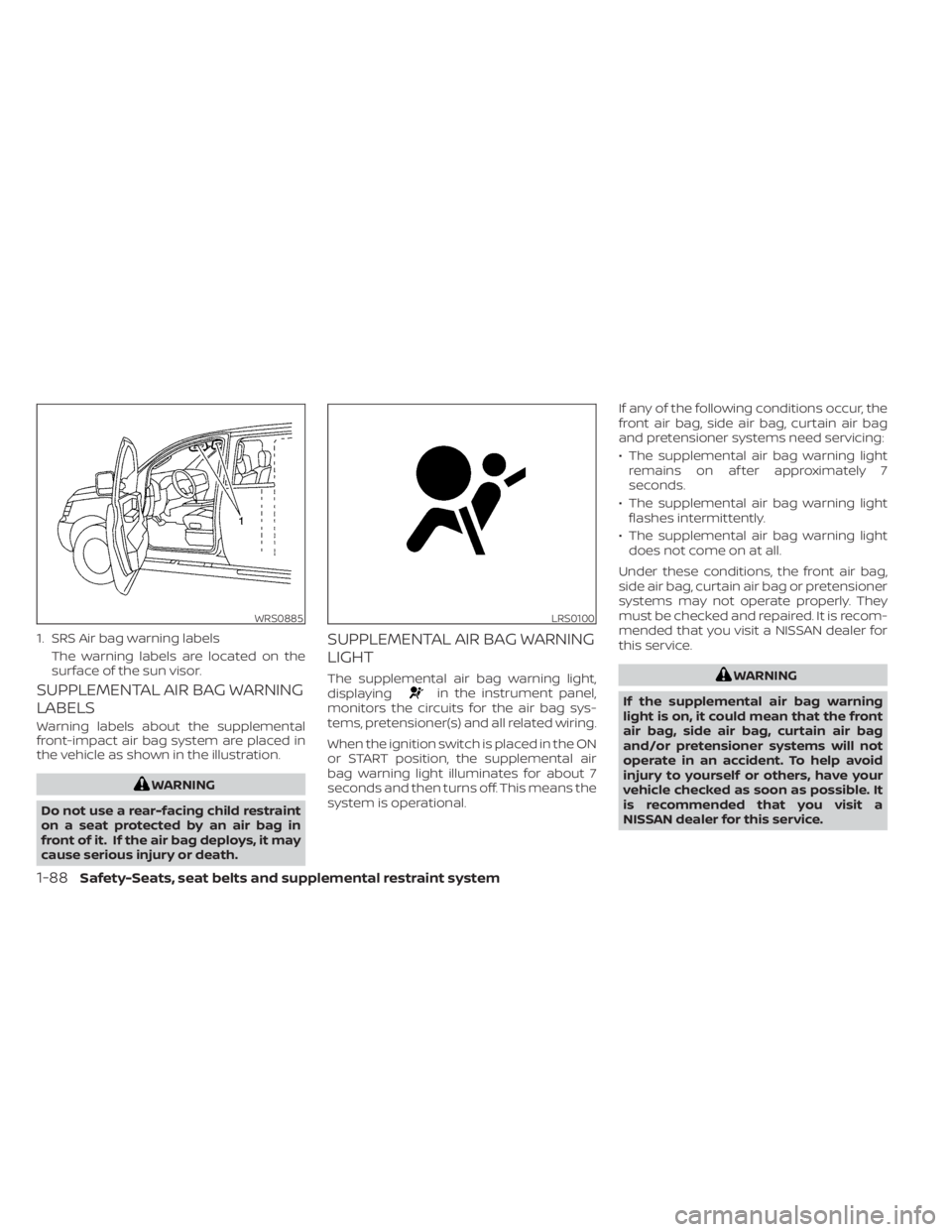
Warning labels about the supplemental
front-impact air bag system are placed in
the vehicle as shown in the illustration.
WARNING
Do not use a rear-facing child restraint
on a seat protected by an air bag in
front of it. If the air bag deploys, it may
cause serious injury or death.
SUPPLEMENTAL AIR BAG WARNING
LIGHT
The supplemental air bag warning light,
displayingin the instrument panel,
monitors the circuits for the air bag sys-
tems, pretensioner(s) and all related wiring.
When the ignition switch is placed in the ON
or START position, the supplemental air
bag warning light illuminates for about 7
seconds and then turns off. This means the
system is operational. If any of the following conditions occur, the
front air bag, side air bag, curtain air bag
and pretensioner systems need servicing:
• The supplemental air bag warning light
remains on af ter approximately 7
seconds.
• The supplemental air bag warning light flashes intermittently.
• The supplemental air bag warning light does not come on at all.
Under these conditions, the front air bag,
side air bag, curtain air bag or pretensioner
systems may not operate properly. They
must be checked and repaired. It is recom-
mended that you visit a NISSAN dealer for
this service.
WARNING
If the supplemental air bag warning
light is on, it could mean that the front
air bag, side air bag, curtain air bag
and/or pretensioner systems will not
operate in an accident. To help avoid
injury to yourself or others, have your
vehicle checked as soon as possible. It
is recommended that you visit a
NISSAN dealer for this service.
WRS0885
1. SRS Air bag warning labels The warning labels are located on the
surface of the sun visor.
LRS0100
1-88Safety-Seats, seat belts and supplemental restraint system
Page 118 of 556
2 Instruments and controls
Instrument panel................................2-2
Meters and gauges .............................2-4
Speedometer and odometer .................2-4
Tachometer ..................................2-6
Engine coolant temperature gauge ..........2-6
Fuel gauge ................................... 2-7
Distance To Empty (DTE) ..................... 2-7
Auxiliary gauges (if so equipped) .............2-8
Off-road and 4–Wheel Drive (4WD)
monitor (if so equipped) ......................2-9
Warning lights, indicator lights and audible
reminders ...................................... 2-10
Checking lights ............................... 2-11
Warning/Indicator lights (red) ................2-11
Warning/Indicator lights (yellow) ............2-14
Warning/Indicator lights (other) .............2-19
Audible reminders ........................... 2-19
Vehicle information display .....................2-20
How to use the vehicle information
display ...................................... 2-21
Startup display .............................. 2-21
Settings ..................................... 2-21
Vehicle information display warnings
and indicators ............................... 2-28
Security systems ............................... 2-34
Vehicle security system (if so equipped) .....2-34 NISSAN Vehicle Immobilizer System
.........2-36
Wiper and washer switch .......................2-37
Switch operation ............................ 2-37
Outside mirror defroster switch
(if so equipped) ................................. 2-38
Headlight and turn signal switch ...............2-38
Headlight control switch ....................2-38
Daytime Running Lights (DRL) system
(Type A) (if so equipped) .....................2-43
LED Daytime Running Lights (DRL)
system (Type B) (if so equipped) .............2-43
Instrument brightness control ..............2-44
Turn signal switch ........................... 2-44
Fog light switch (if so equipped) .............2-45
Horn ........................................... 2-45
Cargo lamp switch ............................. 2-46
Heated seat switches (if so equipped) ..........2-46
Heated steering wheel switch (if so equipped) . . 2-47
W
arning systems switch (if so equipped) .......2-48
Vehicle Dynamic Control (VDC) OFF switch .....2-48
Hill descent control switch (if so equipped) .....2-49
Electronic locking rear differential (E-Lock)
system switch (if so equipped) .................2-50
Power inverter switch (if so equipped) ..........2-51
Parking Aids system switch (if so equipped) ....2-52
Page 120 of 556
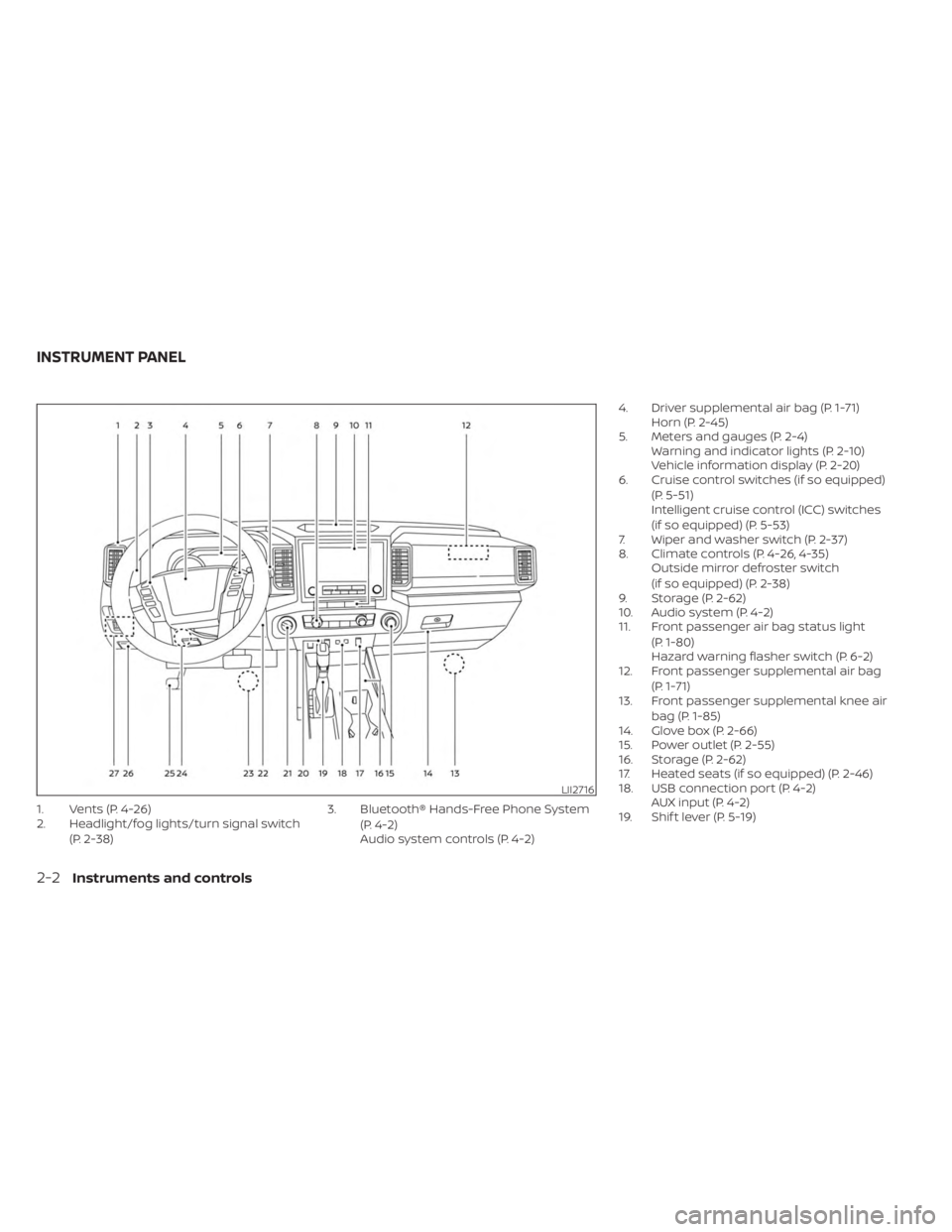
1. Vents (P. 4-26)
2. Headlight/fog lights/turn signal switch(P. 2-38) 3. Bluetooth® Hands-Free Phone System
(P. 4-2)
Audio system controls (P. 4-2) 4. Driver supplemental air bag (P. 1-71)
Horn (P. 2-45)
5. Meters and gauges (P. 2-4) Warning and indicator lights (P. 2-10)
Vehicle information display (P. 2-20)
6. Cruise control switches (if so equipped)
(P. 5-51)
Intelligent cruise control (ICC) switches
(if so equipped) (P. 5-53)
7. Wiper and washer switch (P. 2-37)
8. Climate controls (P. 4-26, 4-35) Outside mirror defroster switch
(if so equipped) (P. 2-38)
9. Storage (P. 2-62)
10. Audio system (P. 4-2)
11. Front passenger air bag status light
(P. 1-80)
Hazard warning flasher switch (P. 6-2)
12. Front passenger supplemental air bag
(P. 1-71)
13. Front passenger supplemental knee air
bag (P. 1-85)
14. Glove box (P. 2-66)
15. Power outlet (P. 2-55)
16. Storage (P. 2-62)
17. Heated seats (if so equipped) (P. 2-46)
18. USB connection port (P. 4-2) AUX input (P. 4-2)
19. Shif t lever (P. 5-19)
LII2716
INSTRUMENT PANEL
2-2Instruments and controls
Page 122 of 556
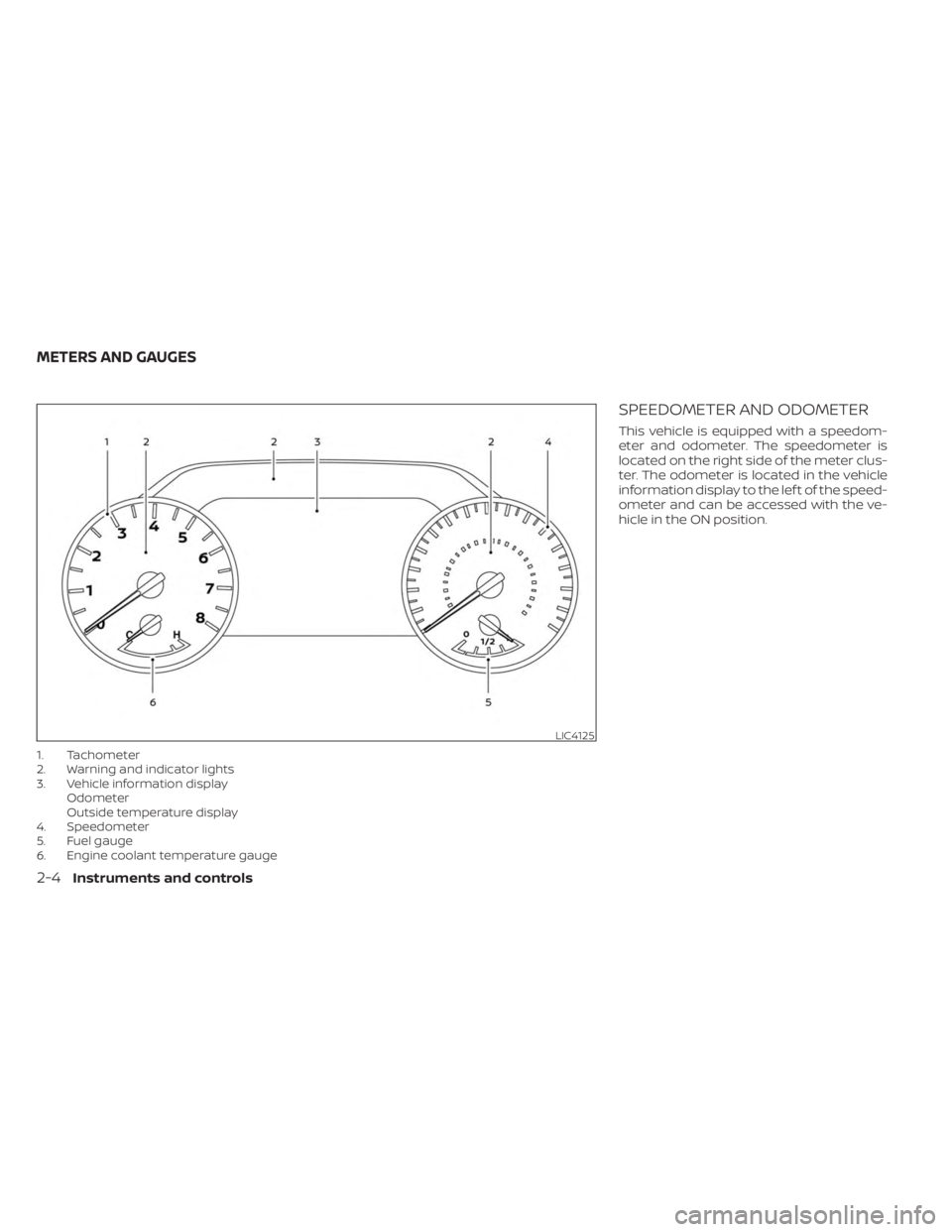
1. Tachometer
2. Warning and indicator lights
3. Vehicle information displayOdometer
Outside temperature display
4. Speedometer
5. Fuel gauge
6. Engine coolant temperature gauge
SPEEDOMETER AND ODOMETER
This vehicle is equipped with a speedom-
eter and odometer. The speedometer is
located on the right side of the meter clus-
ter. The odometer is located in the vehicle
information display to the lef t of the speed-
ometer and can be accessed with the ve-
hicle in the ON position.
LIC4125
METERS AND GAUGES
2-4Instruments and controls
Page 123 of 556
Speedometer
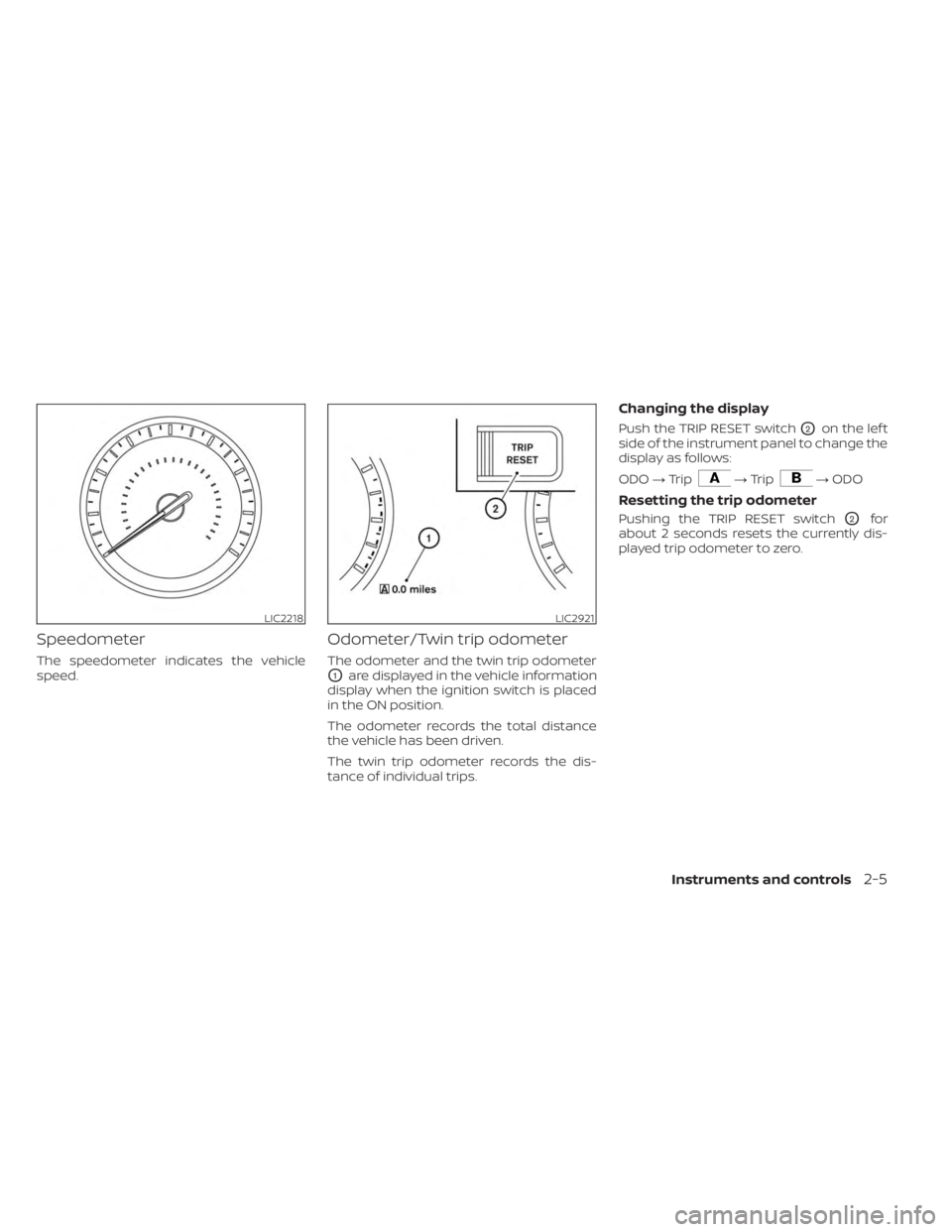
The speedometer indicates the vehicle
speed.
Odometer/Twin trip odometer
The odometer and the twin trip odometer
O1are displayed in the vehicle information
display when the ignition switch is placed
in the ON position.
The odometer records the total distance
the vehicle has been driven.
The twin trip odometer records the dis-
tance of individual trips.
Changing the display
Push the TRIP RESET switchO2on the lef t
side of the instrument panel to change the
display as follows:
ODO →Trip
→Trip→ ODO
Resetting the trip odometer
Pushing the TRIP RESET switchO2for
about 2 seconds resets the currently dis-
played trip odometer to zero.
LIC2218LIC2921
Instruments and controls2-5
Page 125 of 556
FUEL GAUGE
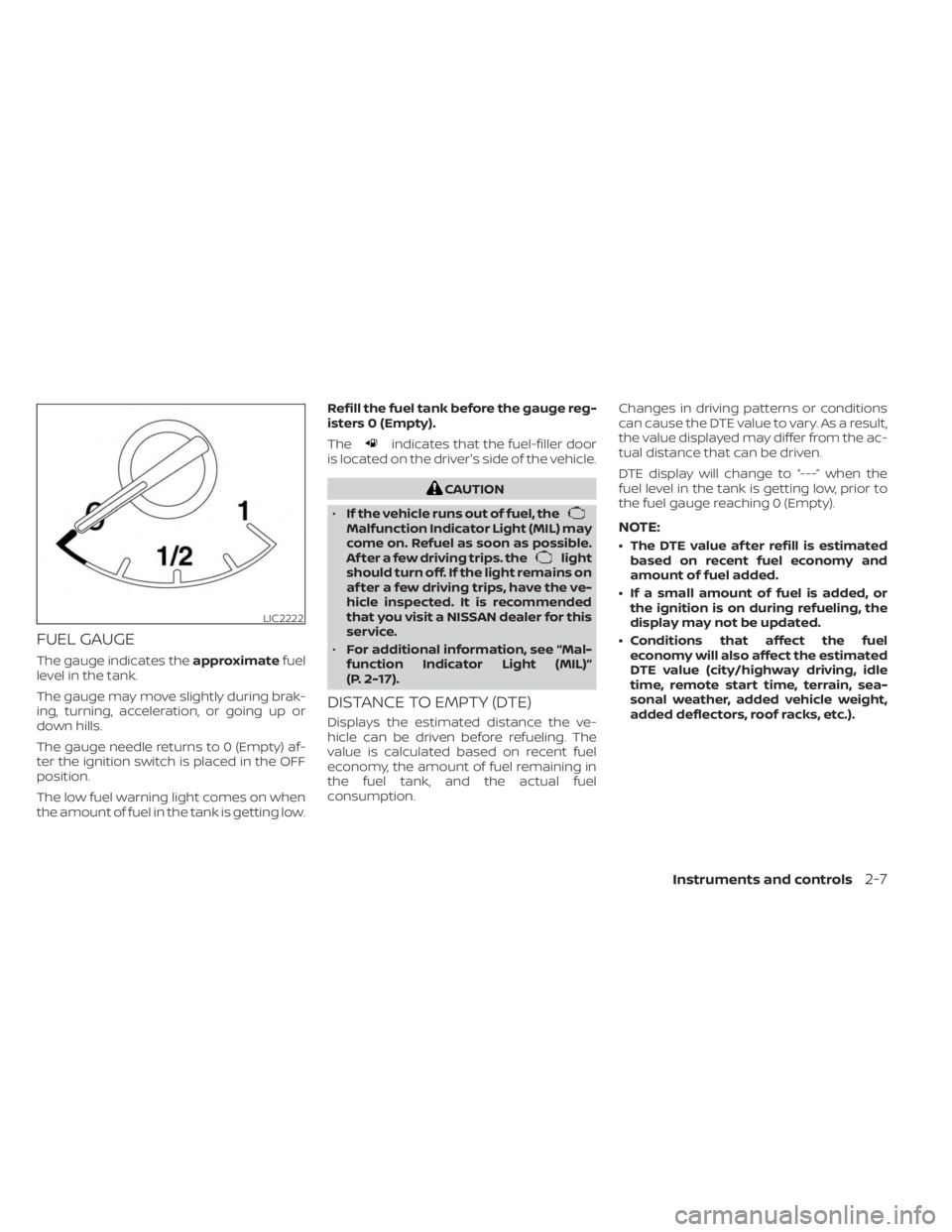
The gauge indicates theapproximatefuel
level in the tank.
The gauge may move slightly during brak-
ing, turning, acceleration, or going up or
down hills.
The gauge needle returns to 0 (Empty) af-
ter the ignition switch is placed in the OFF
position.
The low fuel warning light comes on when
the amount of fuel in the tank is getting low. Refill the fuel tank before the gauge reg-
isters 0 (Empty).
The
indicates that the fuel-filler door
is located on the driver's side of the vehicle.
CAUTION
• If the vehicle runs out of fuel, the
Malfunction Indicator Light (MIL) may
come on. Refuel as soon as possible.
Af ter a few driving trips. the
light
should turn off. If the light remains on
af ter a few driving trips, have the ve-
hicle inspected. It is recommended
that you visit a NISSAN dealer for this
service.
• For additional information, see “Mal-
function Indicator Light (MIL)”
(P. 2-17).
DISTANCE TO EMPTY (DTE)
Displays the estimated distance the ve-
hicle can be driven before refueling. The
value is calculated based on recent fuel
economy, the amount of fuel remaining in
the fuel tank, and the actual fuel
consumption. Changes in driving patterns or conditions
can cause the DTE value to vary. As a result,
the value displayed may differ from the ac-
tual distance that can be driven.
DTE display will change to “---” when the
fuel level in the tank is getting low, prior to
the fuel gauge reaching 0 (Empty).
NOTE:
• The DTE value af ter refill is estimated
based on recent fuel economy and
amount of fuel added.
• If a small amount of fuel is added, or the ignition is on during refueling, the
display may not be updated.
• Conditions that affect the fuel economy will also affect the estimated
DTE value (city/highway driving, idle
time, remote start time, terrain, sea-
sonal weather, added vehicle weight,
added deflectors, roof racks, etc.).
LIC2222
Instruments and controls2-7
Page 127 of 556
OFF-ROAD AND 4–WHEEL DRIVE
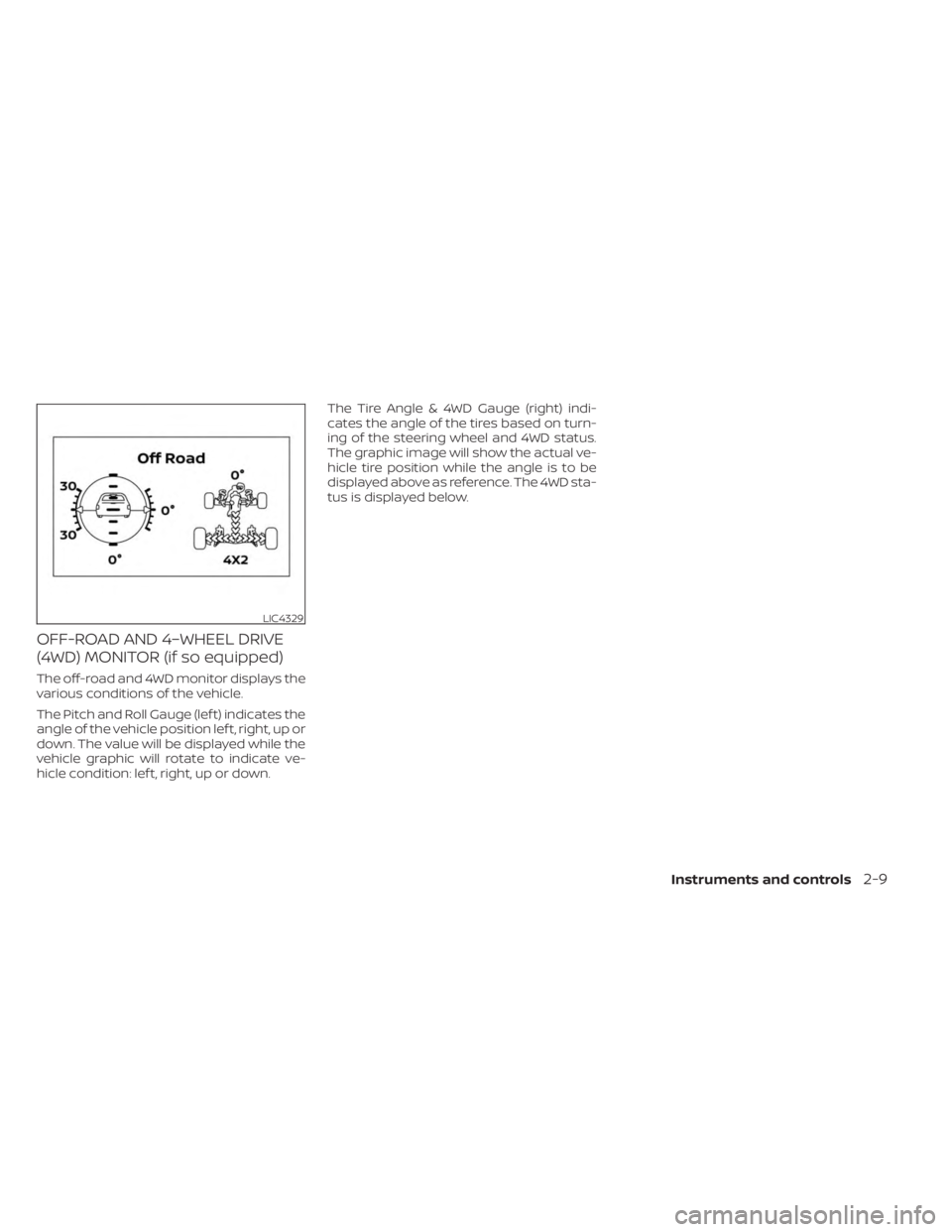
(4WD) MONITOR (if so equipped)
The off-road and 4WD monitor displays the
various conditions of the vehicle.
The Pitch and Roll Gauge (lef t) indicates the
angle of the vehicle position lef t, right, up or
down. The value will be displayed while the
vehicle graphic will rotate to indicate ve-
hicle condition: lef t, right, up or down.The Tire Angle & 4WD Gauge (right) indi-
cates the angle of the tires based on turn-
ing of the steering wheel and 4WD status.
The graphic image will show the actual ve-
hicle tire position while the angle is to be
displayed above as reference. The 4WD sta-
tus is displayed below.
LIC4329
Instruments and controls2-9
Page 129 of 556
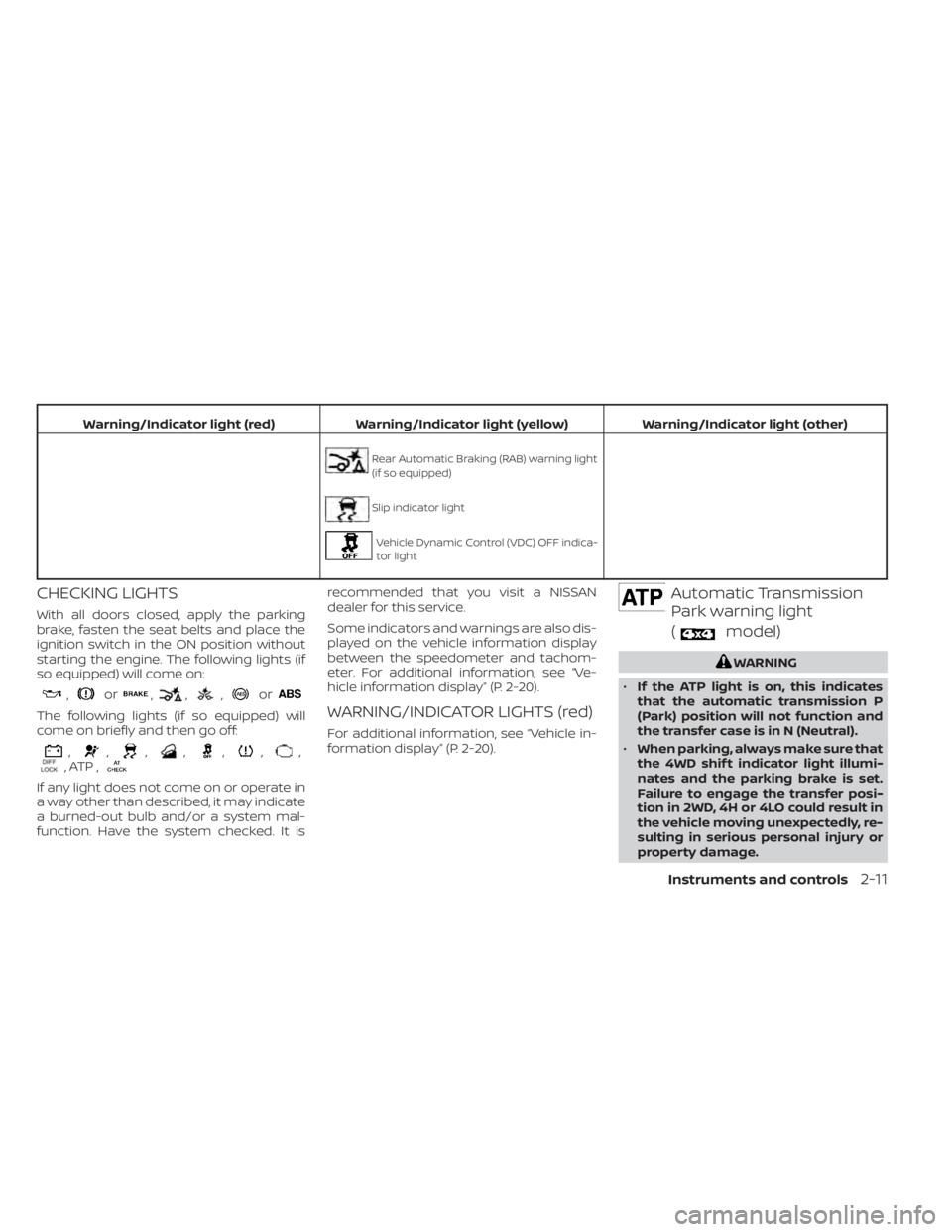
Warning/Indicator light (red)Warning/Indicator light (yellow) Warning/Indicator light (other)
Rear Automatic Braking (RAB) warning light
(if so equipped)
Slip indicator light
Vehicle Dynamic Control (VDC) OFF indica-
tor light
CHECKING LIGHTS
With all doors closed, apply the parking
brake, fasten the seat belts and place the
ignition switch in the ON position without
starting the engine. The following lights (if
so equipped) will come on:
,or,,,or
The following lights (if so equipped) will
come on briefly and then go off:
,,,,,,,, ATP ,
If any light does not come on or operate in
a way other than described, it may indicate
a burned-out bulb and/or a system mal-
function. Have the system checked. It is recommended that you visit a NISSAN
dealer for this service.
Some indicators and warnings are also dis-
played on the vehicle information display
between the speedometer and tachom-
eter. For additional information, see “Ve-
hicle information display” (P. 2-20).
WARNING/INDICATOR LIGHTS (red)
For additional information, see “Vehicle in-
formation display” (P. 2-20).
Automatic Transmission
Park warning light
(
model)
WARNING
• If the ATP light is on, this indicates
that the automatic transmission P
(Park) position will not function and
the transfer case is in N (Neutral).
• When parking, always make sure that
the 4WD shif t indicator light illumi-
nates and the parking brake is set.
Failure to engage the transfer posi-
tion in 2WD, 4H or 4LO could result in
the vehicle moving unexpectedly, re-
sulting in serious personal injury or
property damage.
Instruments and controls2-11
Page 131 of 556
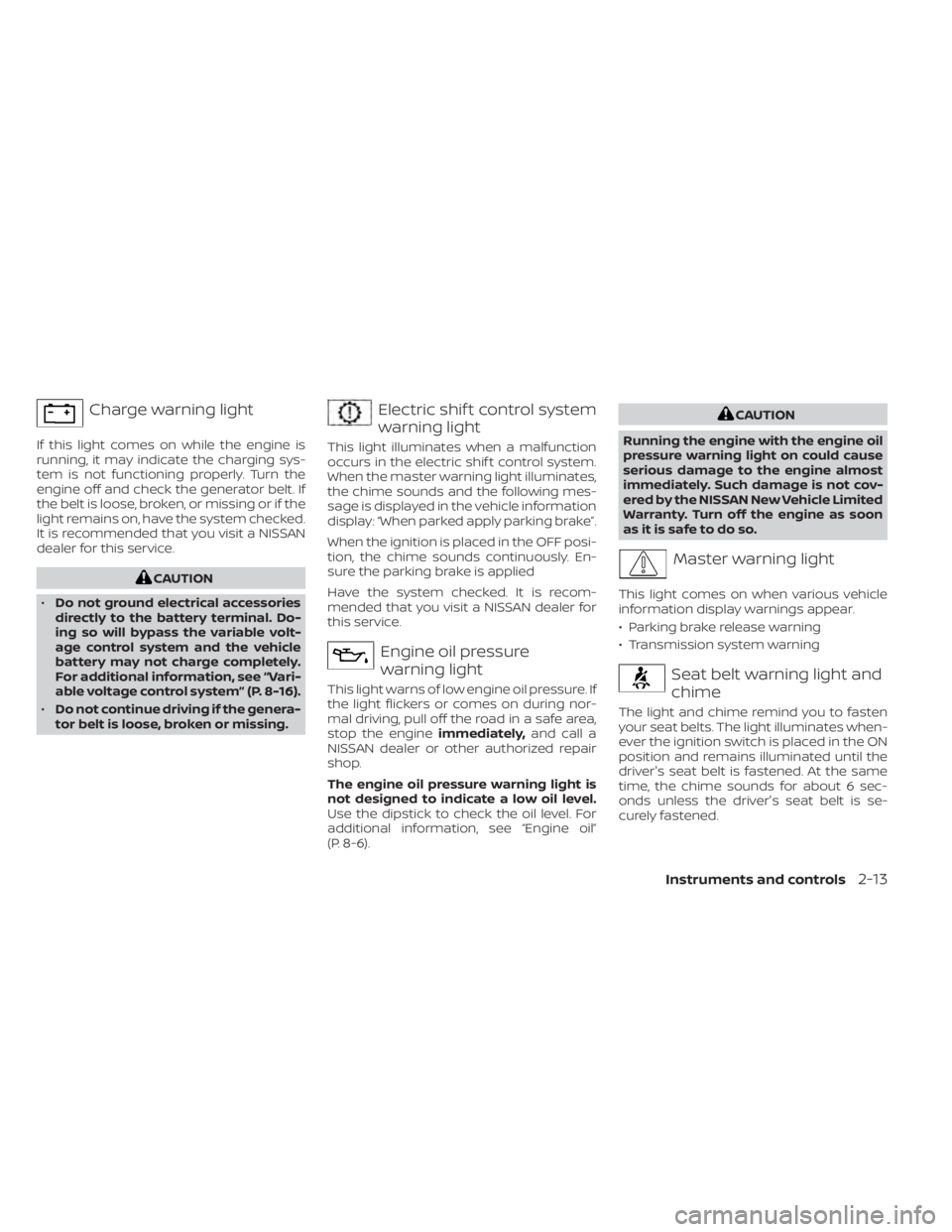
Charge warning light
If this light comes on while the engine is
running, it may indicate the charging sys-
tem is not functioning properly. Turn the
engine off and check the generator belt. If
the belt is loose, broken, or missing or if the
light remains on, have the system checked.
It is recommended that you visit a NISSAN
dealer for this service.
CAUTION
• Do not ground electrical accessories
directly to the battery terminal. Do-
ing so will bypass the variable volt-
age control system and the vehicle
battery may not charge completely.
For additional information, see “Vari-
able voltage control system” (P. 8-16).
• Do not continue driving if the genera-
tor belt is loose, broken or missing.
Electric shif t control system
warning light
This light illuminates when a malfunction
occurs in the electric shif t control system.
When the master warning light illuminates,
the chime sounds and the following mes-
sage is displayed in the vehicle information
display: “When parked apply parking brake”.
When the ignition is placed in the OFF posi-
tion, the chime sounds continuously. En-
sure the parking brake is applied
Have the system checked. It is recom-
mended that you visit a NISSAN dealer for
this service.
Engine oil pressure
warning light
This light warns of low engine oil pressure. If
the light flickers or comes on during nor-
mal driving, pull off the road in a safe area,
stop the engine immediately,and call a
NISSAN dealer or other authorized repair
shop.
The engine oil pressure warning light is
not designed to indicate a low oil level.
Use the dipstick to check the oil level. For
additional information, see “Engine oil”
(P. 8-6).
CAUTION
Running the engine with the engine oil
pressure warning light on could cause
serious damage to the engine almost
immediately. Such damage is not cov-
ered by the NISSAN New Vehicle Limited
Warranty. Turn off the engine as soon
as it is safe to do so.
Master warning light
This light comes on when various vehicle
information display warnings appear.
• Parking brake release warning
• Transmission system warning
Seat belt warning light and
chime
The light and chime remind you to fasten
your seat belts. The light illuminates when-
ever the ignition switch is placed in the ON
position and remains illuminated until the
driver's seat belt is fastened. At the same
time, the chime sounds for about 6 sec-
onds unless the driver's seat belt is se-
curely fastened.
Instruments and controls2-13