glove box NISSAN FRONTIER 2022 Owner´s Manual
[x] Cancel search | Manufacturer: NISSAN, Model Year: 2022, Model line: FRONTIER, Model: NISSAN FRONTIER 2022Pages: 556, PDF Size: 6.11 MB
Page 21 of 556
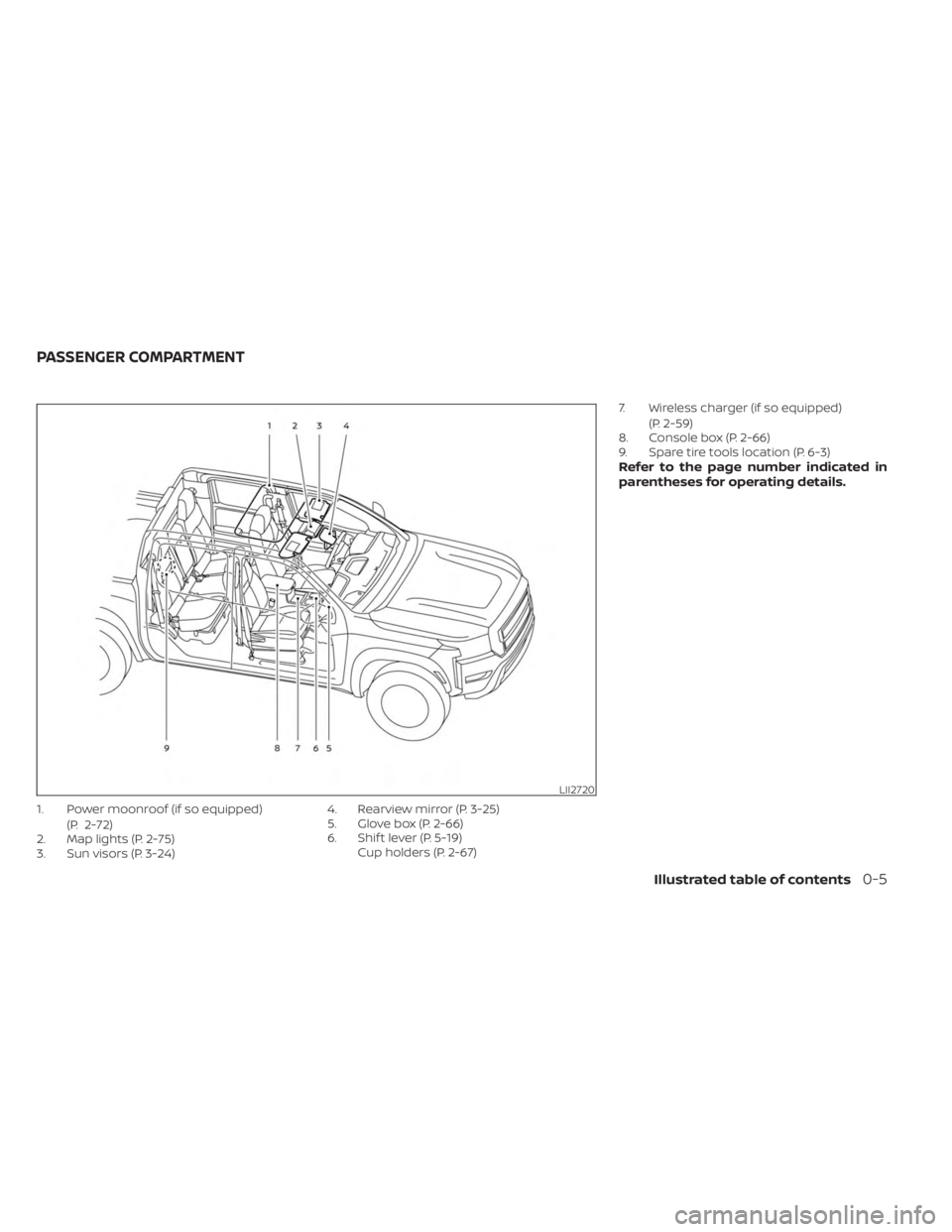
1. Power moonroof (if so equipped)(P. 2-72)
2. Map lights (P. 2-75)
3. Sun visors (P. 3-24) 4. Rearview mirror (P. 3-25)
5. Glove box (P. 2-66)
6. Shif t lever (P. 5-19)
Cup holders (P. 2-67) 7. Wireless charger (if so equipped)
(P. 2-59)
8. Console box (P. 2-66)
9. Spare tire tools location (P. 6-3)
Refer to the page number indicated in
parentheses for operating details.
LII2720
PASSENGER COMPARTMENT
Illustrated table of contents0-5
Page 22 of 556
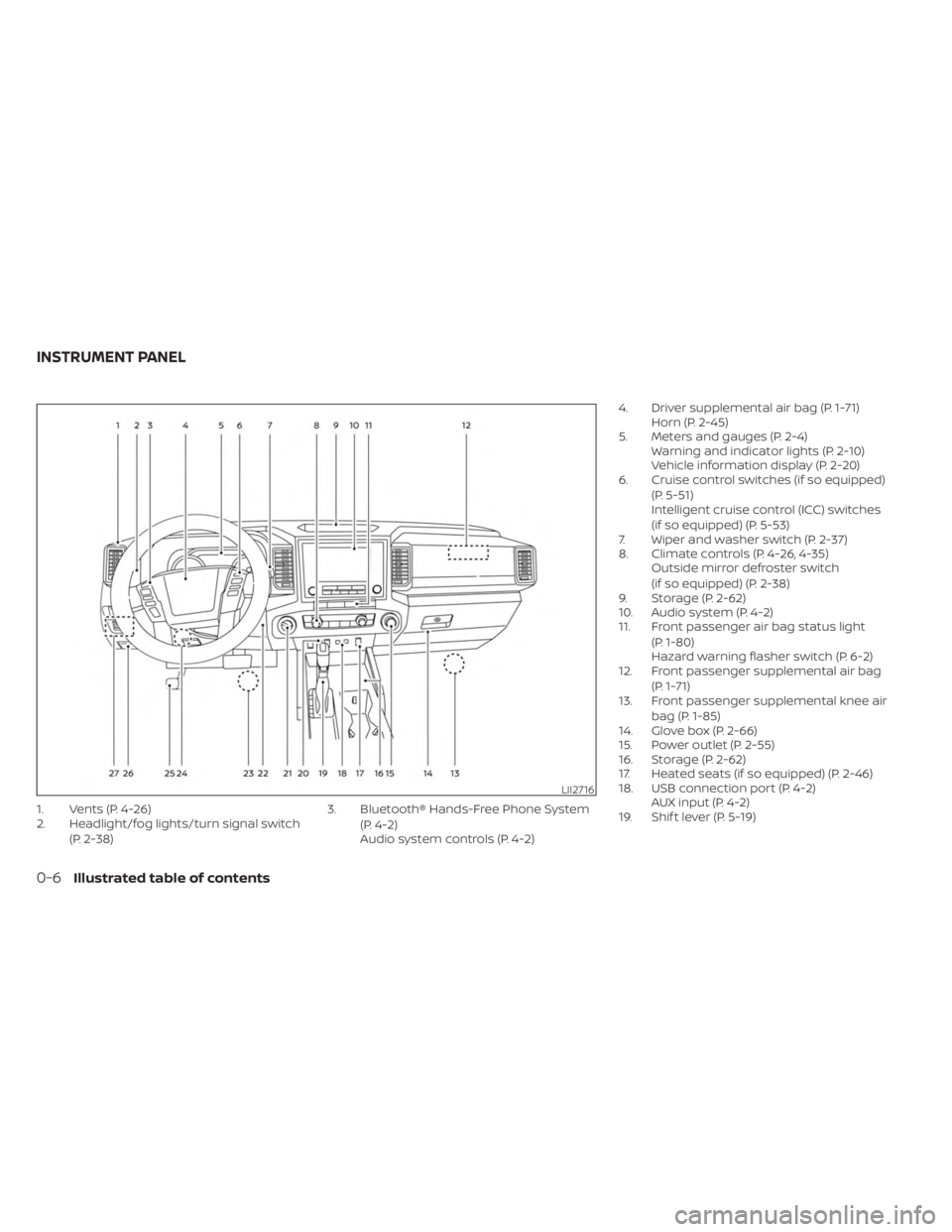
1. Vents (P. 4-26)
2. Headlight/fog lights/turn signal switch(P. 2-38) 3. Bluetooth® Hands-Free Phone System
(P. 4-2)
Audio system controls (P. 4-2) 4. Driver supplemental air bag (P. 1-71)
Horn (P. 2-45)
5. Meters and gauges (P. 2-4) Warning and indicator lights (P. 2-10)
Vehicle information display (P. 2-20)
6. Cruise control switches (if so equipped)
(P. 5-51)
Intelligent cruise control (ICC) switches
(if so equipped) (P. 5-53)
7. Wiper and washer switch (P. 2-37)
8. Climate controls (P. 4-26, 4-35) Outside mirror defroster switch
(if so equipped) (P. 2-38)
9. Storage (P. 2-62)
10. Audio system (P. 4-2)
11. Front passenger air bag status light
(P. 1-80)
Hazard warning flasher switch (P. 6-2)
12. Front passenger supplemental air bag
(P. 1-71)
13. Front passenger supplemental knee air
bag (P. 1-85)
14. Glove box (P. 2-66)
15. Power outlet (P. 2-55)
16. Storage (P. 2-62)
17. Heated seats (if so equipped) (P. 2-46)
18. USB connection port (P. 4-2) AUX input (P. 4-2)
19. Shif t lever (P. 5-19)
LII2716
INSTRUMENT PANEL
0-6Illustrated table of contents
Page 107 of 556

under U.S. regulations. It is also permitted in
Canada.However, all of the information,
cautions and warnings in this manual
still apply and must be followed.
The driver supplemental front-impact air
bag is located in the center of the steering
wheel. The front passenger supplemental
front-impact air bag is mounted in the
dashboard above the glove box. The front
air bags are designed to inflate in higher
severity frontal collisions, although they
may inflate if the forces in another type of
collision are similar to those of a higher
severity frontal impact. They may not in-
flate in certain frontal collisions. Vehicle
damage (or lack of it) is not always an indi-
cation of proper front air bag system
operation.
The NISSAN Advanced Air Bag System
monitors information from the crash zone
sensor and the Air bag Control Unit (ACU).
Inflator operation is based on the severity
of a collision and seat belt usage for the
driver. For the front passenger, the occu-
pant classification sensor is also moni-
tored. Based on the information from the
sensor, only one front air bag may inflate in
a crash, depending on the crash severity.
Additionally, the front passenger air bag
may be automatically turned OFF under some conditions, depending on the weight
detected on the front passenger seat and
how the seat belt is used. If the front pas-
senger air bag is OFF, the front passenger
air bag status light will be illuminated (if the
seat is unoccupied, the light will not be illu-
minated, but the air bag will be off ). For
additional information, see “Front passen-
ger air bag and status light” (P. 1-80). One
front air bag inflating does not indicate im-
proper performance of the system.
If you have any questions about your air
bag system, it is recommended that you
visit a NISSAN dealer to obtain information
about the system. If you are considering
modification of your vehicle due to a dis-
ability, you may also contact NISSAN. Con-
tact information is contained in the front of
this Owner's Manual.
When a front air bag inflates, a fairly loud
noise may be heard, followed by the re-
lease of smoke. This smoke is not harmful
and does not indicate a fire. Care should be
taken to not inhale it, as it may cause irrita-
tion and choking. Those with a history of a
breathing condition should get fresh air
promptly.
Front air bags, along with the use of seat
belts, help to cushion the impact force on
the face and chest of the front occupants.They can help save lives and reduce seri-
ous injuries. However, an inflating front air
bag may cause facial abrasions or other
injuries. Front air bags do not provide re-
straint to the lower body.
Even with NISSAN Advanced Air Bags, seat
belts should be correctly worn and the
driver and front passenger seated upright
as far as practical away from the steering
wheel or instrument panel. The front air
bags inflate quickly in order to help protect
the front occupants. Because of this, the
force of the front air bag inflating can in-
crease the risk of injury if the occupant is
too close to, or is against, the front air bag
module during inflation.
The front air bags deflate quickly af ter a
collision.
The front air bags operate only when the
ignition switch is in the ON or START
position.
Af ter placing the ignition switch in the
ON position, the supplemental air bag
warning light illuminates. The supple-
mental air bag warning light will turn off
af ter about 7 seconds if the system is
operational.
Safety-Seats, seat belts and supplemental restraint system1-79
Page 119 of 556
Tow mode switch (if so equipped)..............2-53
Emergency call (SOS) button (if so equipped) . . . 2-53
Rear Door Alert ................................. 2-54
Power outlets .................................. 2-55
12v Outlets .................................. 2-55
120v outlets (if so equipped) .................2-56
USB charging ports (if so equipped) ............2-58
Wireless charger (if so equipped) ...............2-59
Wireless charger indicator ...................2-60
Wireless charger operation ..................2-60
Extended storage switch .......................2-61
Storage ........................................ 2-62
Front-door pockets ......................... 2-62
Rear-door pockets .......................... 2-62
Seatback pocket (if so equipped) ............2-63
Under-seat storage bins ....................2-64
Storagetrays................................ 2-65
Glovebox ................................... 2-66
Console box ................................. 2-66
Overhead sunglasses storage
(if so equipped) .............................. 2-67
Cup holders ................................. 2-67Ladder rack (if so equipped)
....................2-69
Windows ....................................... 2-69
Manual windows (if so equipped) ............2-69
Power windows (if so equipped) .............2-69
Rear sliding window (if so equipped) .........2-72
Moonroof (if so equipped) ......................2-72
Power moonroof ............................ 2-72
Interior lights ...................................2-74
Map lights ................................... 2-75
Cargo light .................................. 2-75
HomeLink® Universal Transceiver
(if so equipped) ................................. 2-76
Programming HomeLink® ...................2-77
Programming HomeLink® for Canadian
customers and gate openers ...............2-78
Operating the HomeLink® Universal
Transceiver .................................. 2-79
Programming trouble-diagnosis ............
2-79
Cle
aring the programmed information ......2-79
Reprogramming a single HomeLink®
button ...................................... 2-80
If your vehicle is stolen ......................2-80
Page 120 of 556
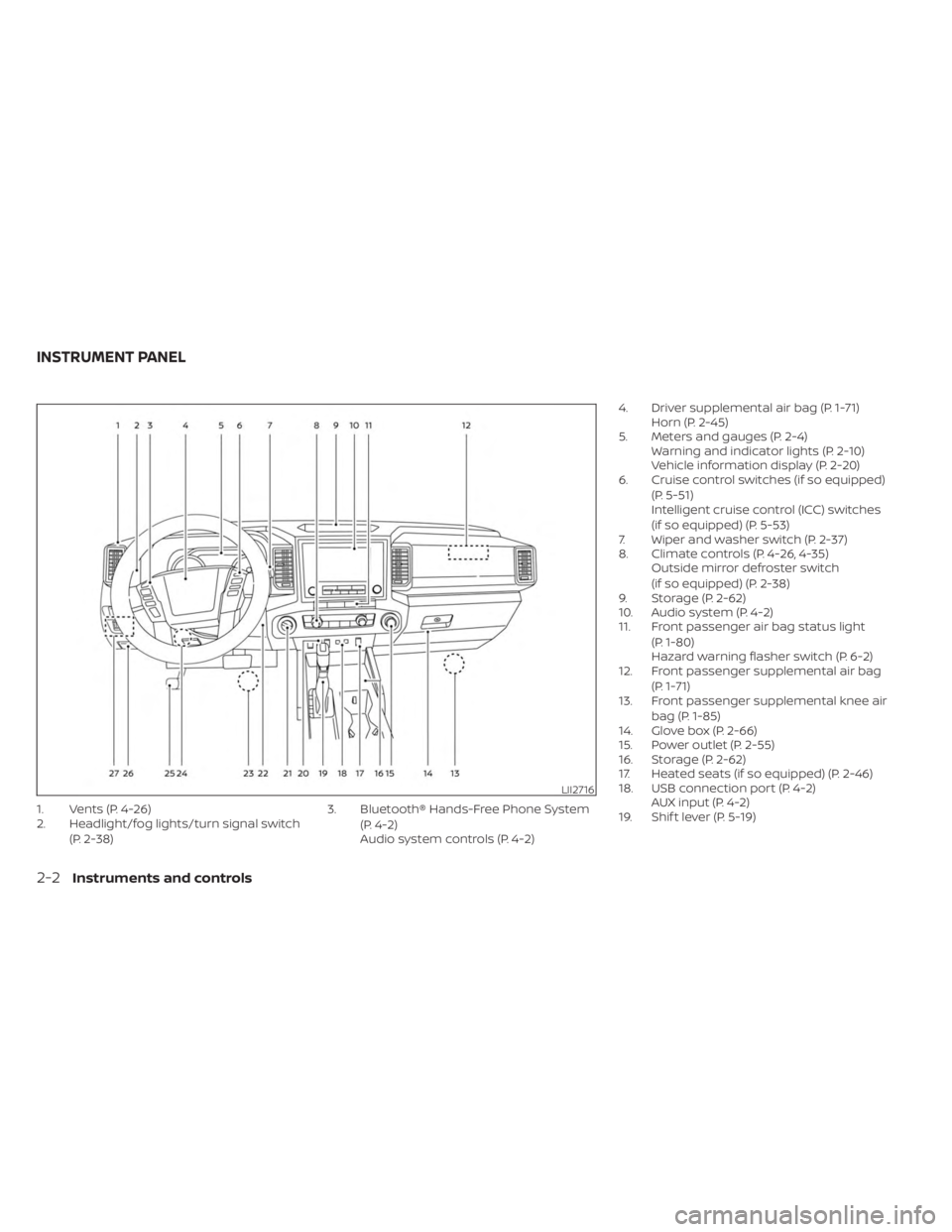
1. Vents (P. 4-26)
2. Headlight/fog lights/turn signal switch(P. 2-38) 3. Bluetooth® Hands-Free Phone System
(P. 4-2)
Audio system controls (P. 4-2) 4. Driver supplemental air bag (P. 1-71)
Horn (P. 2-45)
5. Meters and gauges (P. 2-4) Warning and indicator lights (P. 2-10)
Vehicle information display (P. 2-20)
6. Cruise control switches (if so equipped)
(P. 5-51)
Intelligent cruise control (ICC) switches
(if so equipped) (P. 5-53)
7. Wiper and washer switch (P. 2-37)
8. Climate controls (P. 4-26, 4-35) Outside mirror defroster switch
(if so equipped) (P. 2-38)
9. Storage (P. 2-62)
10. Audio system (P. 4-2)
11. Front passenger air bag status light
(P. 1-80)
Hazard warning flasher switch (P. 6-2)
12. Front passenger supplemental air bag
(P. 1-71)
13. Front passenger supplemental knee air
bag (P. 1-85)
14. Glove box (P. 2-66)
15. Power outlet (P. 2-55)
16. Storage (P. 2-62)
17. Heated seats (if so equipped) (P. 2-46)
18. USB connection port (P. 4-2) AUX input (P. 4-2)
19. Shif t lever (P. 5-19)
LII2716
INSTRUMENT PANEL
2-2Instruments and controls
Page 179 of 556
ISED Compliance Statement
This device complies with RSS-Gen of IC
Rules
Operation is subject to the following two
conditions:
(1) This device may not cause harmful
interference, and
(2) This device must accept any interfer-
ence received, including interference
that may cause undesired operation.
Changes or modifications made to this
device, not expressly approved by LG Ve-
hicle Components Company, will void the
user’s authority to operate the
equipment.
ISED RF Radiation Exposure Statement:
This equipment complies with ISED RF
Radiation exposure limits set forth for an
uncontrolled environment. This device
and its antenna must not be co-located
or operating in conjunction with any
other antenna or transmitter. This
equipment should be installed to oper-
ate with a minimum distance of 15 cm
between the radiator and the end-user’s
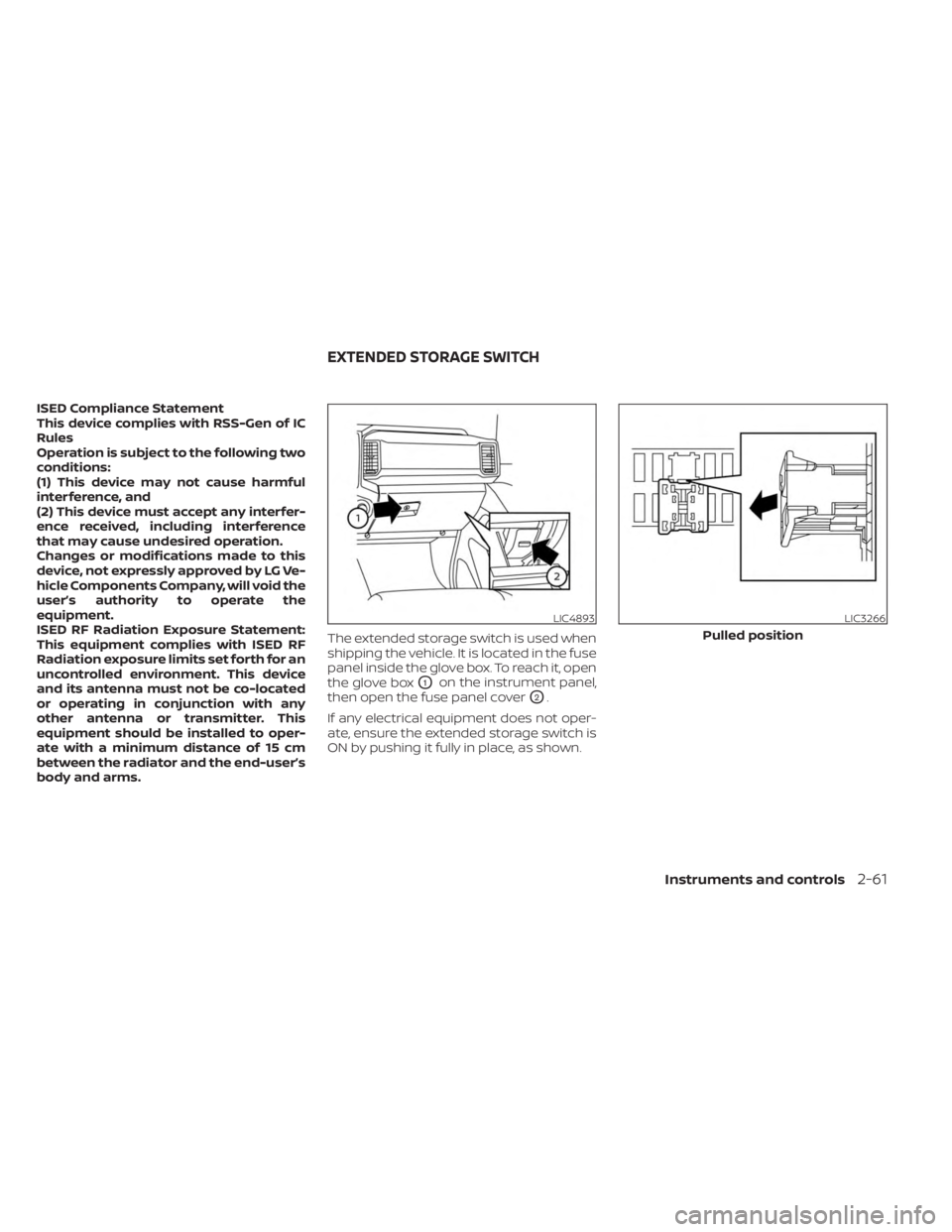
body and arms.The extended storage switch is used when
shipping the vehicle. It is located in the fuse
panel inside the glove box. To reach it, open
the glove box
O1on the instrument panel,
then open the fuse panel cover
O2.
If any electrical equipment does not oper-
ate, ensure the extended storage switch is
ON by pushing it fully in place, as shown.
LIC4893LIC3266
Pulled position
EXTENDED STORAGE SWITCH
Instruments and controls2-61
Page 184 of 556
WARNING
Do not place sharp objects in the trays
to help prevent injury in an accident or
sudden stop.
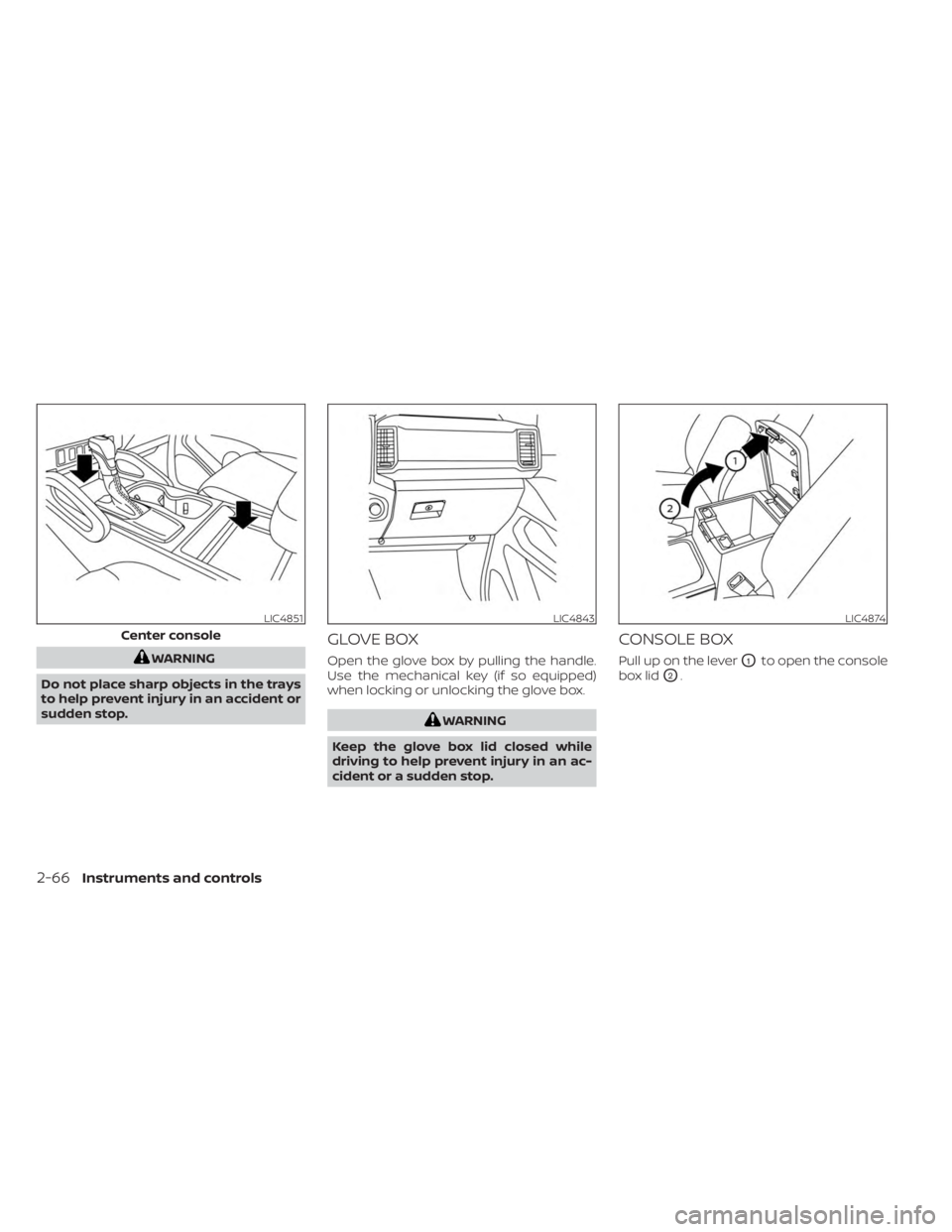
GLOVE BOX
Open the glove box by pulling the handle.
Use the mechanical key (if so equipped)
when locking or unlocking the glove box.
WARNING
Keep the glove box lid closed while
driving to help prevent injury in an ac-
cident or a sudden stop.
CONSOLE BOX
Pull up on the leverO1to open the console
box lid
O2.
LIC4851
Center console
LIC4843LIC4874
2-66Instruments and controls
Page 201 of 556
•Do not strike the Intelligent Key
sharply against another object.
• Do not change or modif y the Intelli-
gent Key.
• Wetting may damage the Intelligent
Key. If the Intelligent Key gets wet,
immediately wipe until it is com-
pletely dry.
• Do not place the Intelligent Key for an
extended period in an area where
temperatures exceed 140°F (60°C).
• Do not attach the Intelligent Key with
a key holder that contains a magnet.
• Do not place the Intelligent Key near
equipment that produces a magnetic
field, such as a TV, audio equipment
and personal computers.
If an Intelligent Key is lost or stolen,
NISSAN recommends erasing the ID
code of that Intelligent Key from the
vehicle. This may prevent the unau-
thorized use of the Intelligent Key to
operate the vehicle. For information re-
garding the erasing procedure, it is rec-
ommended that you visit a NISSAN
dealer.
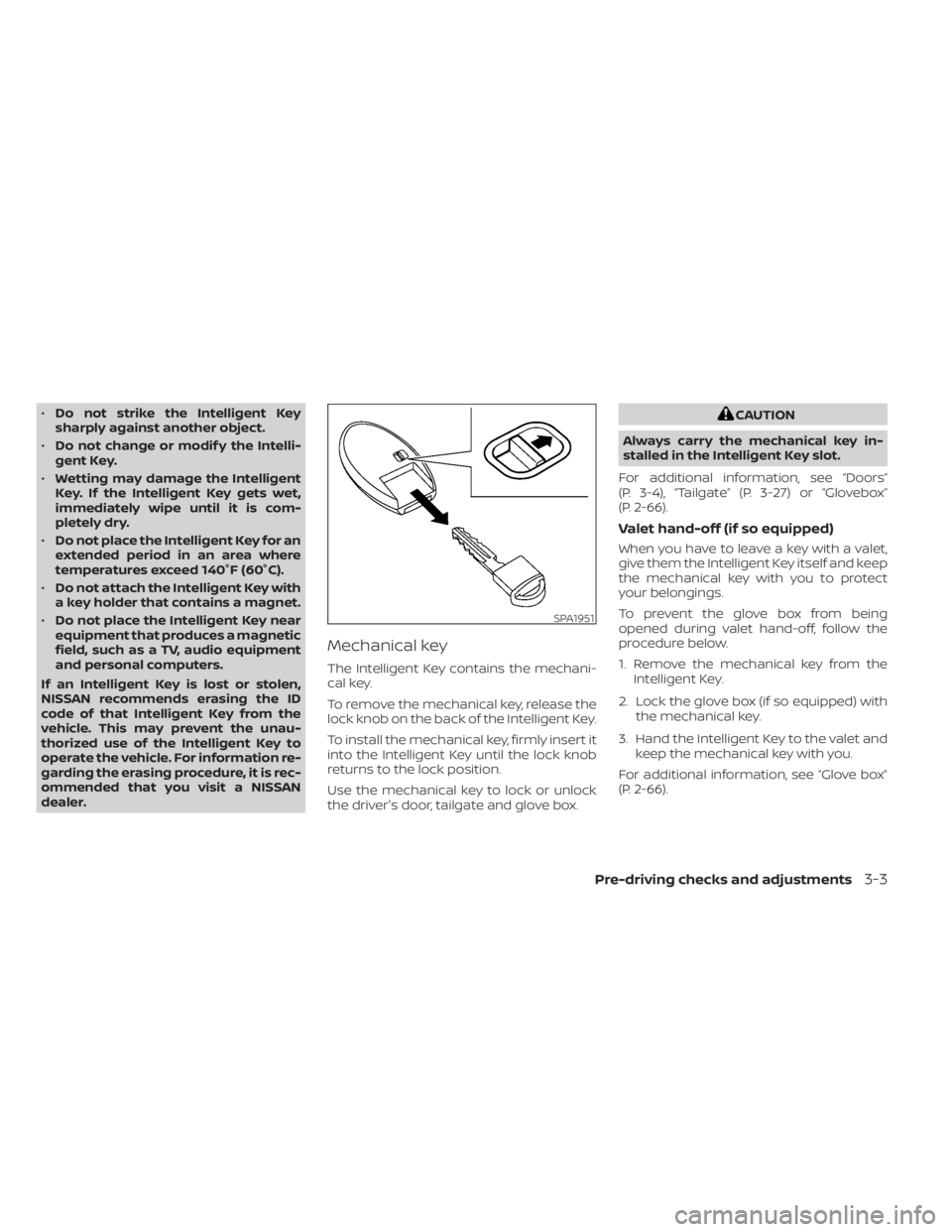
Mechanical key
The Intelligent Key contains the mechani-
cal key.
To remove the mechanical key, release the
lock knob on the back of the Intelligent Key.
To install the mechanical key, firmly insert it
into the Intelligent Key until the lock knob
returns to the lock position.
Use the mechanical key to lock or unlock
the driver's door, tailgate and glove box.
CAUTION
Always carry the mechanical key in-
stalled in the Intelligent Key slot.
For additional information, see “Doors”
(P. 3-4), “Tailgate” (P. 3-27) or “Glovebox”
(P. 2-66).
Valet hand-off (if so equipped)
When you have to leave a key with a valet,
give them the Intelligent Key itself and keep
the mechanical key with you to protect
your belongings.
To prevent the glove box from being
opened during valet hand-off, follow the
procedure below.
1. Remove the mechanical key from the Intelligent Key.
2. Lock the glove box (if so equipped) with the mechanical key.
3. Hand the Intelligent Key to the valet and keep the mechanical key with you.
For additional information, see “Glove box”
(P. 2-66).
SPA1951
Pre-driving checks and adjustments3-3
Page 209 of 556
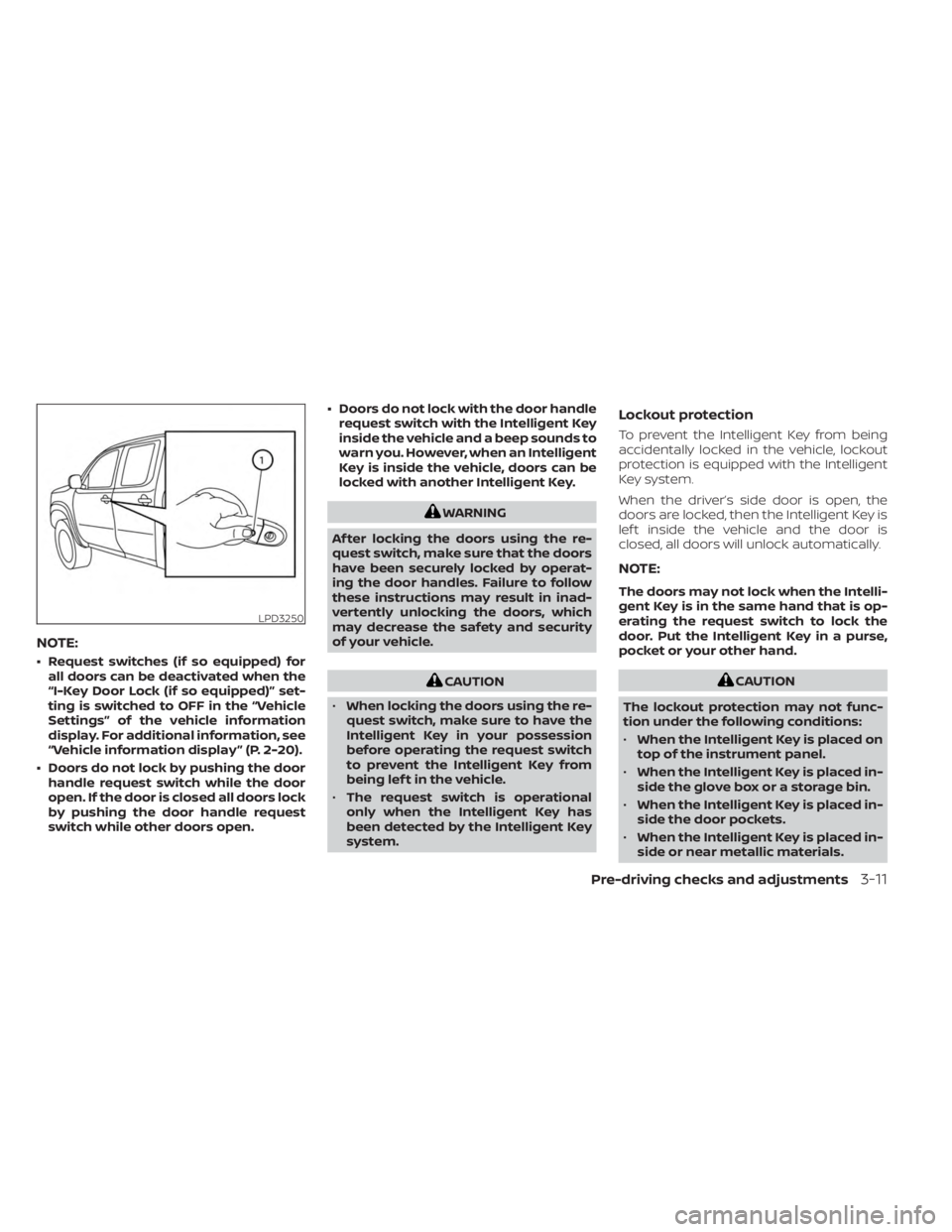
NOTE:
• Request switches (if so equipped) forall doors can be deactivated when the
“I-Key Door Lock (if so equipped)” set-
ting is switched to OFF in the “Vehicle
Settings” of the vehicle information
display. For additional information, see
“Vehicle information display ” (P. 2-20).
• Doors do not lock by pushing the door handle request switch while the door
open. If the door is closed all doors lock
by pushing the door handle request
switch while other doors open. • Doors do not lock with the door handle
request switch with the Intelligent Key
inside the vehicle and a beep sounds to
warn you. However, when an Intelligent
Key is inside the vehicle, doors can be
locked with another Intelligent Key.
WARNING
Af ter locking the doors using the re-
quest switch, make sure that the doors
have been securely locked by operat-
ing the door handles. Failure to follow
these instructions may result in inad-
vertently unlocking the doors, which
may decrease the safety and security
of your vehicle.
CAUTION
• When locking the doors using the re-
quest switch, make sure to have the
Intelligent Key in your possession
before operating the request switch
to prevent the Intelligent Key from
being lef t in the vehicle.
• The request switch is operational
only when the Intelligent Key has
been detected by the Intelligent Key
system.
Lockout protection
To prevent the Intelligent Key from being
accidentally locked in the vehicle, lockout
protection is equipped with the Intelligent
Key system.
When the driver’s side door is open, the
doors are locked, then the Intelligent Key is
lef t inside the vehicle and the door is
closed, all doors will unlock automatically.
NOTE:
The doors may not lock when the Intelli-
gent Key is in the same hand that is op-
erating the request switch to lock the
door. Put the Intelligent Key in a purse,
pocket or your other hand.
CAUTION
The lockout protection may not func-
tion under the following conditions:
• When the Intelligent Key is placed on
top of the instrument panel.
• When the Intelligent Key is placed in-
side the glove box or a storage bin.
• When the Intelligent Key is placed in-
side the door pockets.
• When the Intelligent Key is placed in-
side or near metallic materials.
LPD3250
Pre-driving checks and adjustments3-11
Page 226 of 556
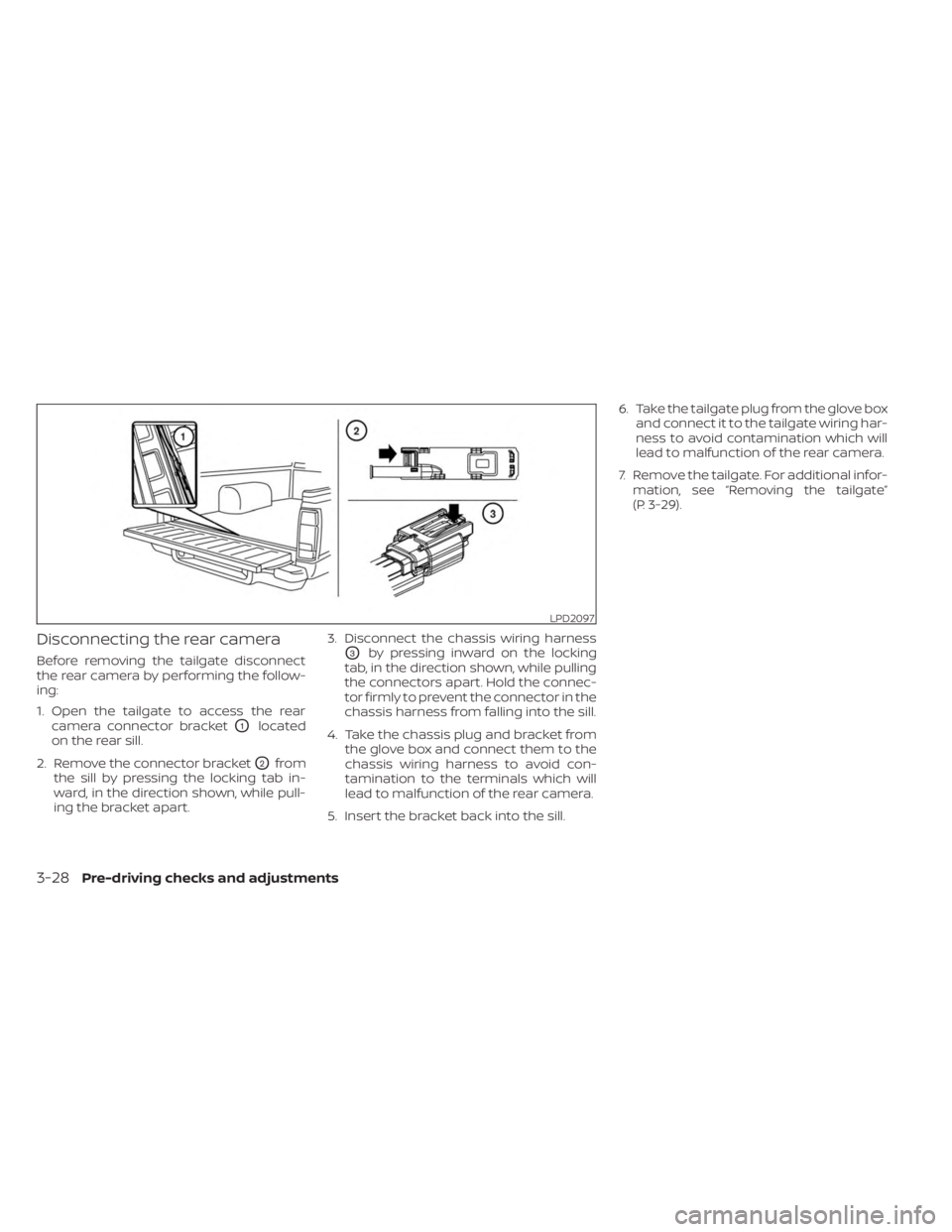
Disconnecting the rear camera
Before removing the tailgate disconnect
the rear camera by performing the follow-
ing:
1. Open the tailgate to access the rearcamera connector bracket
O1located
on the rear sill.
2. Remove the connector bracket
O2from
the sill by pressing the locking tab in-
ward, in the direction shown, while pull-
ing the bracket apart. 3. Disconnect the chassis wiring harness
O3by pressing inward on the locking
tab, in the direction shown, while pulling
the connectors apart. Hold the connec-
tor firmly to prevent the connector in the
chassis harness from falling into the sill.
4. Take the chassis plug and bracket from the glove box and connect them to the
chassis wiring harness to avoid con-
tamination to the terminals which will
lead to malfunction of the rear camera.
5. Insert the bracket back into the sill. 6. Take the tailgate plug from the glove box
and connect it to the tailgate wiring har-
ness to avoid contamination which will
lead to malfunction of the rear camera.
7. Remove the tailgate. For additional infor- mation, see “Removing the tailgate”
(P. 3-29).
LPD2097
3-28Pre-driving checks and adjustments