buttons NISSAN FRONTIER 2023 User Guide
[x] Cancel search | Manufacturer: NISSAN, Model Year: 2023, Model line: FRONTIER, Model: NISSAN FRONTIER 2023Pages: 572, PDF Size: 6.58 MB
Page 264 of 572
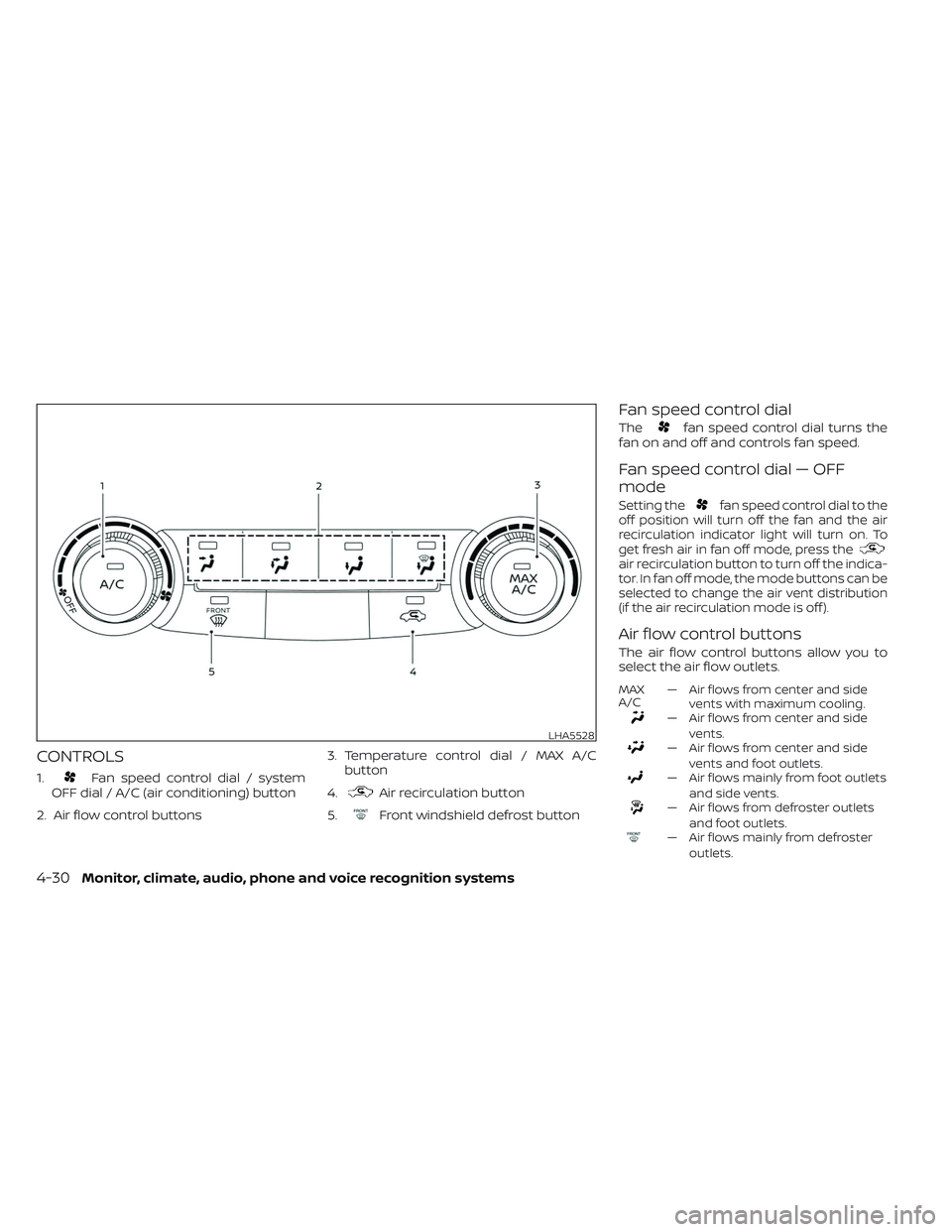
CONTROLS
1.Fan speed control dial / system
OFF dial / A/C (air conditioning) button
2. Air flow control buttons 3. Temperature control dial / MAX A/C
button
4.Air recirculation button
5.
Front windshield defrost button
Fan speed control dial
Thefan speed control dial turns the
fan on and off and controls fan speed.
Fan speed control dial — OFF
mode
Setting thefan speed control dial to the
off position will turn off the fan and the air
recirculation indicator light will turn on. To
get fresh air in fan off mode, press the
air recirculation button to turn off the indica-
tor. In fan off mode, the mode buttons can be
selected to change the air vent distribution
(if the air recirculation mode is off ).
Air flow control buttons
The air flow control buttons allow you to
select the air flow outlets.
MAX
A/C — Air flows from center and side
vents with maximum cooling.
— Air flows from center and side
vents.
— Air flows from center and sidevents and foot outlets.
— Air flows mainly from foot outletsand side vents.
— Air flows from defroster outletsand foot outlets.
— Air flows mainly from defrosteroutlets.
LHA5528
4-30Monitor, climate, audio, phone and voice recognition systems
Page 272 of 572
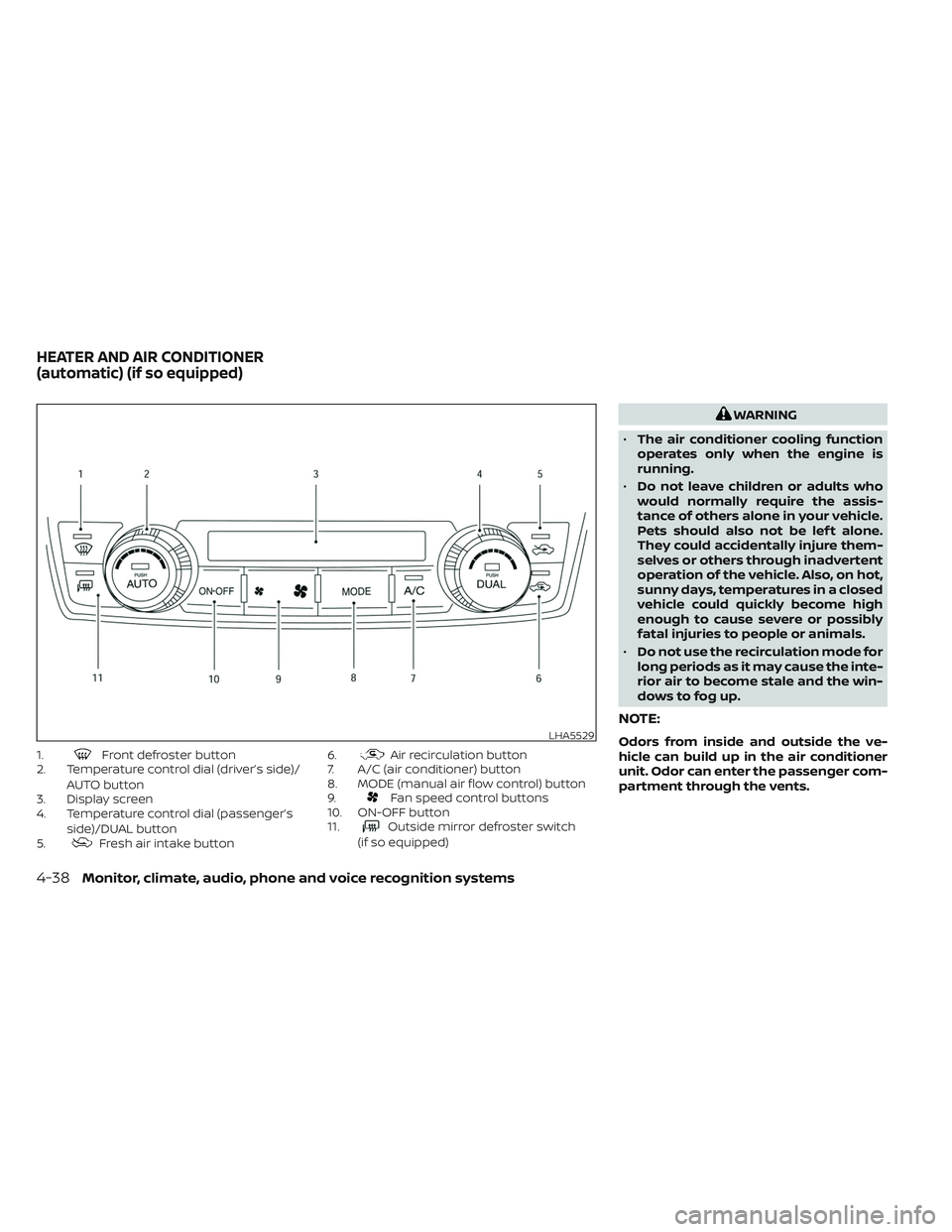
1.Front defroster button
2. Temperature control dial (driver’s side)/
AUTO button
3. Display screen
4. Temperature control dial (passenger’s
side)/DUAL button
5.
Fresh air intake button 6.
Air recirculation button
7. A/C (air conditioner) button
8. MODE (manual air flow control) button
9.
Fan speed control buttons
10. ON-OFF button
11.
Outside mirror defroster switch
(if so equipped)
WARNING
• The air conditioner cooling function
operates only when the engine is
running.
• Do not leave children or adults who
would normally require the assis-
tance of others alone in your vehicle.
Pets should also not be lef t alone.
They could accidentally injure them-
selves or others through inadvertent
operation of the vehicle. Also, on hot,
sunny days, temperatures in a closed
vehicle could quickly become high
enough to cause severe or possibly
fatal injuries to people or animals.
• Do not use the recirculation mode for
long periods as it may cause the inte-
rior air to become stale and the win-
dows to fog up.
NOTE:
Odors from inside and outside the ve-
hicle can build up in the air conditioner
unit. Odor can enter the passenger com-
partment through the vents.LHA5529
HEATER AND AIR CONDITIONER
(automatic) (if so equipped)
4-38Monitor, climate, audio, phone and voice recognition systems
Page 274 of 572
2. Turn the temperature control dial to thelef t or the right to set the desired tem-
perature. Driver and passenger tem-
peratures can be set independently.
Press the DUAL button to activate dual
climate control functions. Turn the pas-
senger’s side temperature control dial
to the lef t or right to set the desired
passenger’s temperature.
• The temperature of the passenger com- partment will be maintained automati-
cally. Air flow distribution and fan speed
are also controlled automatically.
• Do not set the temperature lower than the outside air temperature. Otherwise,
the system may not work properly.
• Not recommended if windows fog up.
Dehumidified defrosting or
defogging
1. Press thedefroster control button
to turn the system on. The indicator light
in the button will illuminate.
2. The fan will automatically change to blower speed 5. Blower speed can be
changed by pressing the
fan speed
control button. Increase the fan to 6
or 7 for more aggressive defogging
performance. 3. Turn the temperature dial to the lef t or
right to set the desired temperature.
• To quickly remove ice from the outside of the windows, press the
fan speed
control button to the maximum position.
• As soon as possible af ter the windshield is clean, press the AUTO button to return
to the auto mode.
• When the
control is activated, the air
conditioner will automatically be turned
on. This dehumidifies the air which helps
defog the windshield. Under this condi-
tion, the indicator light on the A/C button
indicator will not turn on if the user had
selected A/C off prior to entering this
mode. Turning off the air condition via the
A/C button is not allowed in this mode.
If the A/C button indicator was on when
entering this mode, and the A/C button is
selected in this mode, the A/C compres-
sor will still be automatically enabled.
The air recirculation mode automatically
turns off, allowing outside air to be drawn
into the passenger compartment to
further improve the defogging perfor-
mance.
Remote Engine Start with
Intelligent Climate Control (if so
equipped)
Vehicles equipped with automatic climate
controls and Remote Engine Start function
may go into automatic heating or cooling
mode when Remote Engine Start is acti-
vated depending on outside and cabin
temperatures. During this period, the cli-
mate control display and buttons will be
inoperable until the ignition switch is
placed in the ON position. In Remote
Engine Start defrosting mode, the outside
mirror defroster (if so equipped) and
heated steering wheel (if so equipped) may
be activated automatically.
Voice Recognition logic (if so
equipped)
When the climate control system is on, the
front and rear (if so equipped) fan speeds
may be automatically lowered so that
commands are more easily recognized.
Fan speed can be adjusted using the
fan speed
decrease andin-
crease buttons, if desired.
4-40Monitor, climate, audio, phone and voice recognition systems
Page 275 of 572
MANUAL OPERATION
Fan speed control
Press thefan speed control buttons
to manually control the fan speed.
Press the AUTO button to return to auto-
matic control of the fan speed.
When adjusting the manual fan from auto
mode, the outlet direction (floor, floor/
defrost, vent, bi-level) will still automatically
change. To fix the outlet to a manual mode,
select the desired air flow location using
the MODE button.
Temperature control dial
The temperature control dial allows you to
adjust the temperature of the outlet air. To
lower the temperature, turn the dial to the
lef t. To increase the temperature, turn the
dial to the right. Temperature can be ad-
justed on the driver’s and passenger’s side.
Air recirculation
Press theair recirculation button to
recirculate interior air inside the vehicle
when:
• driving on a dusty road
• to prevent traffic fumes from entering passenger compartment. • for maximum cooling when using the air
conditioning system.
Press the AUTO button to return to auto-
matic mode.
The air recirculation button will not be acti-
vated or allowed when the air conditioner
is in
mode.
When the outside temperature exceeds
approximately 70°F (21°C), the air condition-
ing system may default to air recirculation
mode automatically to reduce overall
power consumption. To exit air recircula-
tion mode, select the fresh air intake but-
ton to enter fresh air mode.
In Floor/Defrost mode, the recirculation
button can be selected to block outside
odors. However, for maximum defogging in
this mode, it is recommended to turn recir-
culation off when possible.
Fresh air intake
Press thefresh air intake button to
draw outside air into the passenger
compartment.
Automatic intake air control
In the AUTO mode, the intake air will be
controlled automatically. When the outside
temperature exceeds approximately 70°F
(21°C), the air conditioning system may de-
fault to air recirculation mode automati-
cally to reduce overall power consumption.
To exit air recirculation mode, select the
fresh air intake button to enter fresh air
mode. The air recirculation indicator will
turn off, the fresh air indicator will turn on.
To manually control the intake air, press the
fresh air intake button. To return to the
automatic control mode if thefresh
air indicator is illuminated, press and hold
the
fresh air intake button for about 2
seconds. The fresh air indicator and air re-
circulation indicator lights will flash twice,
and then the intake air will be controlled
automatically. To return to the automatic
control mode if the
air recirculation
icon is illuminated, press and hold the
air recirculation or the AUTO button for
about 2 seconds. Theair recirculation
indicator andfresh air intake indicator
lights will flash twice and the intake air will
be controlled automatically. When OFF is
selected, the intake door is automatically
forced to recirculate. To get fresh air in OFF
Monitor, climate, audio, phone and voice recognition systems4-41
Page 276 of 572
mode, select thefresh air intake but-
ton. The MODE can be changed in OFF
mode to direct the flow of incoming air if
intake is set to
fresh.
A/C (air conditioner) button
Start the engine, turn thefan speed
control buttons to the desired position and
press the
button to turn on the air
conditioner. To turn off the air conditioner,
press the
button again. In auto
mode, the air conditioner will be on even
if the
button indicator is off at tem-
peratures approximately at or above
freezing.
The air conditioner cooling function op-
erates only when the engine is running.
Air flow control
Press the MODE button to manually control
air flow and select the air outlet.
— Air flows from center and side
vents.
— Air flows from center and sidevents and foot outlets.
— Air flows mainly from foot out-lets.
— Air flows from defroster and footoutlets.
To turn system off
Press the ON-OFF button.
Outside mirror defroster switch
(if so equipped)
For additional information, see “Outside
mirror defroster switch” (P. 2-43).
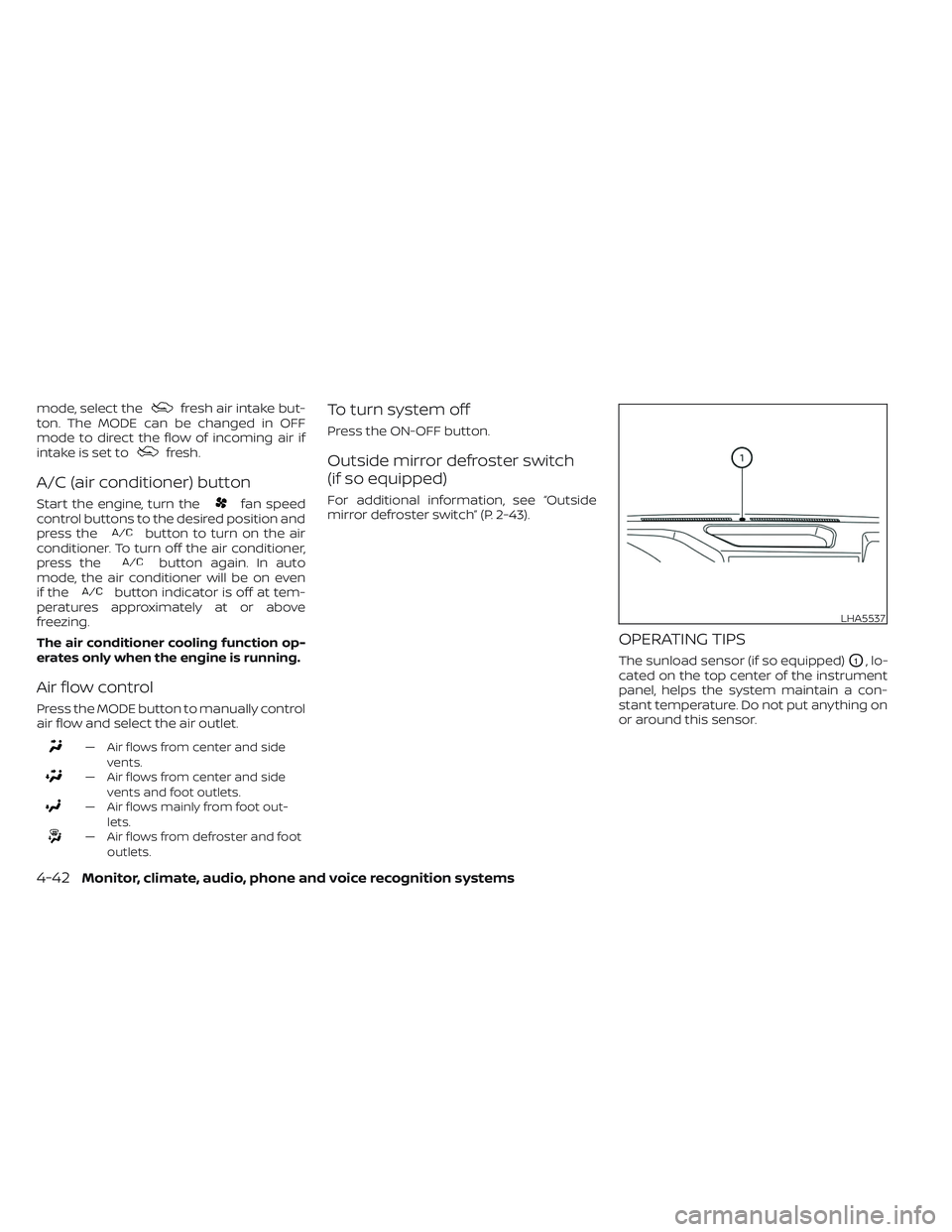
OPERATING TIPS
The sunload sensor (if so equipped)O1, lo-
cated on the top center of the instrument
panel, helps the system maintain a con-
stant temperature. Do not put anything on
or around this sensor.
LHA5537
4-42Monitor, climate, audio, phone and voice recognition systems
Page 469 of 572
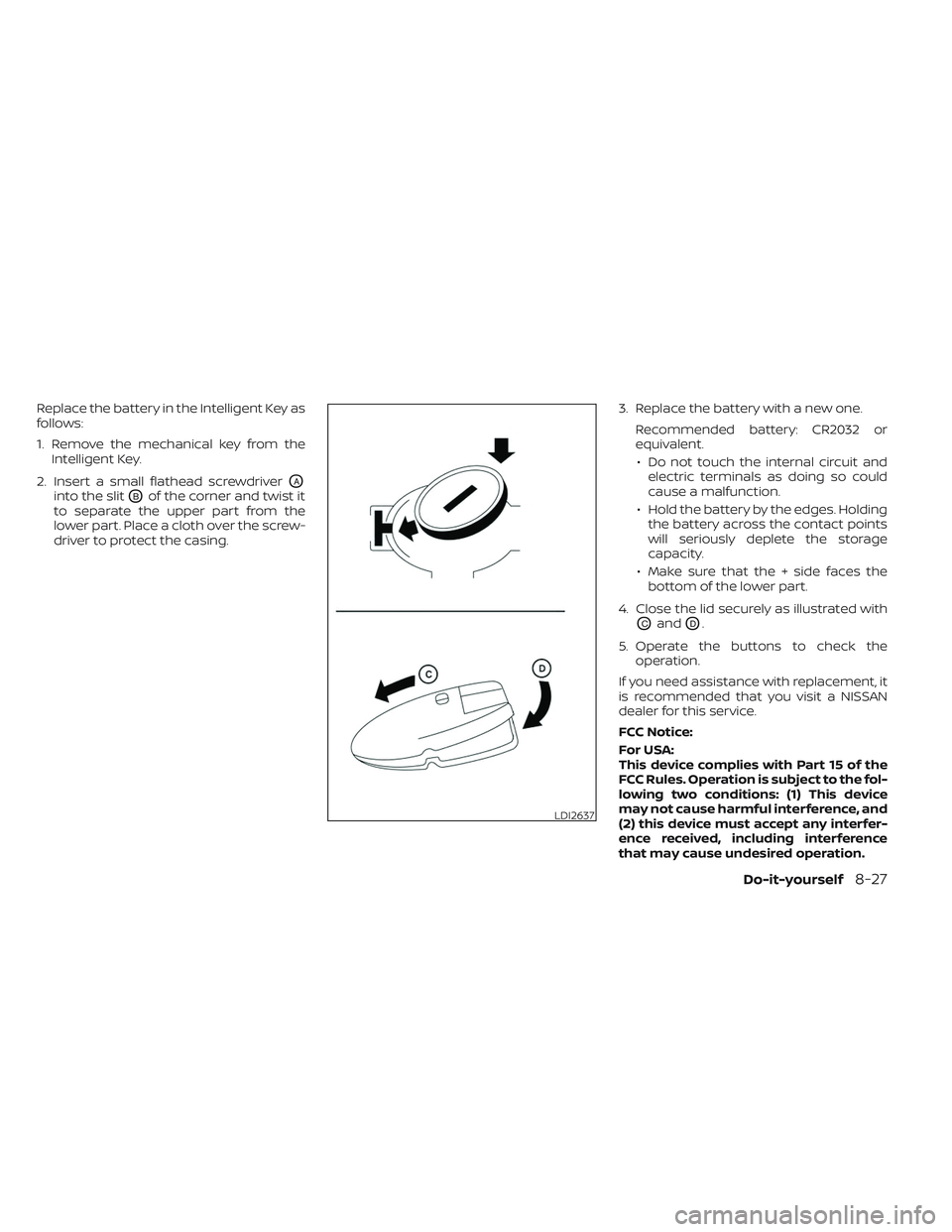
Replace the battery in the Intelligent Key as
follows:
1. Remove the mechanical key from theIntelligent Key.
2. Insert a small flathead screwdriver
OA
into the slitOBof the corner and twist it
to separate the upper part from the
lower part. Place a cloth over the screw-
driver to protect the casing. 3. Replace the battery with a new one.
Recommended battery: CR2032 or
equivalent.• Do not touch the internal circuit and electric terminals as doing so could
cause a malfunction.
• Hold the battery by the edges. Holding the battery across the contact points
will seriously deplete the storage
capacity.
• Make sure that the + side faces the bottom of the lower part.
4. Close the lid securely as illustrated with
OCandOD.
5. Operate the buttons to check the operation.
If you need assistance with replacement, it
is recommended that you visit a NISSAN
dealer for this service.
FCC Notice:
For USA:
This device complies with Part 15 of the
FCC Rules. Operation is subject to the fol-
lowing two conditions: (1) This device
may not cause harmful interference, and
(2) this device must accept any interfer-
ence received, including interference
that may cause undesired operation.
LDI2637
Do-it-yourself8-27