display NISSAN FRONTIER 2023 Service Manual
[x] Cancel search | Manufacturer: NISSAN, Model Year: 2023, Model line: FRONTIER, Model: NISSAN FRONTIER 2023Pages: 572, PDF Size: 6.58 MB
Page 219 of 572
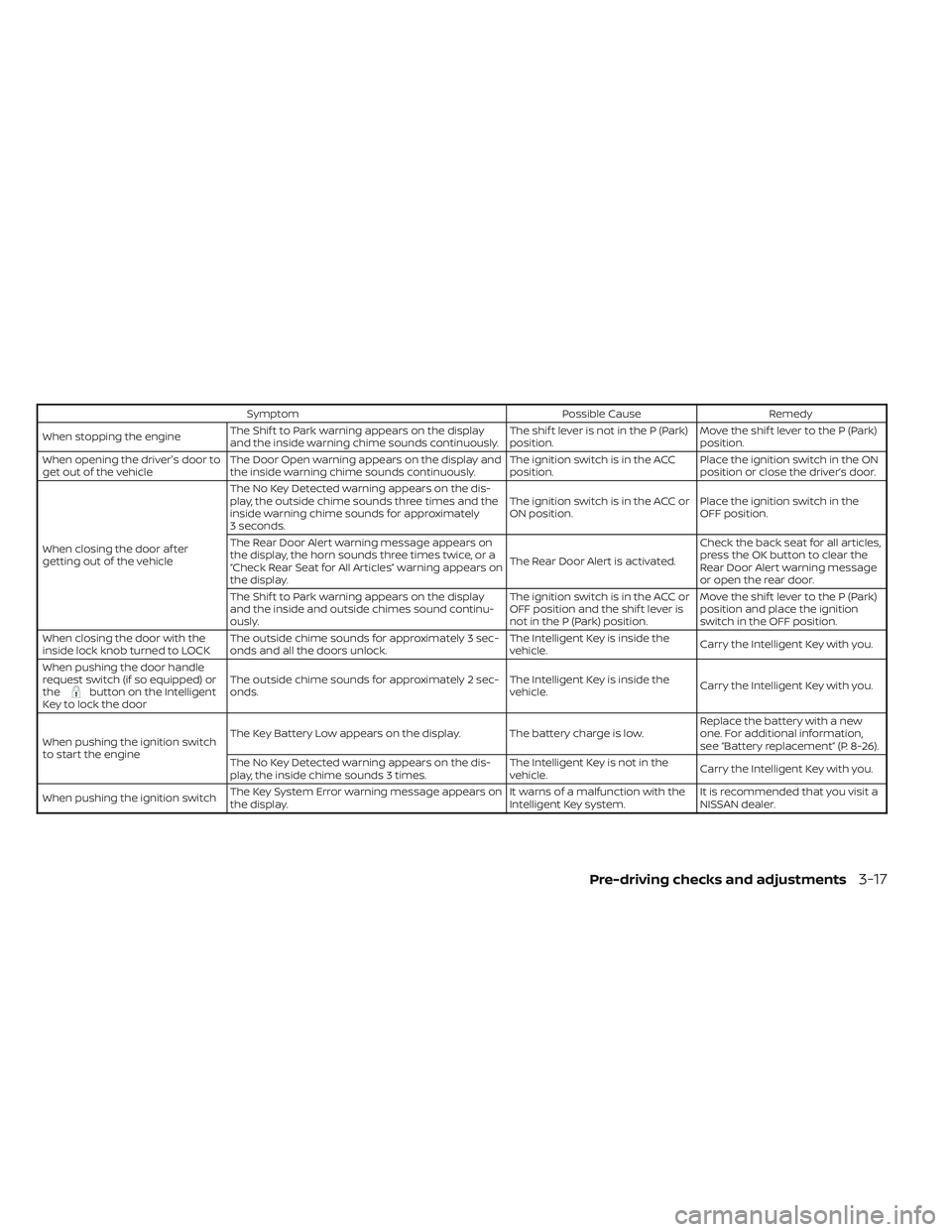
SymptomPossible CauseRemedy
When stopping the engine The Shif t to Park warning appears on the display
and the inside warning chime sounds continuously. The shif t lever is not in the P (Park)
position.Move the shif t lever to the P (Park)
position.
When opening the driver's door to
get out of the vehicle The Door Open warning appears on the display and
the inside warning chime sounds continuously. The ignition switch is in the ACC
position.Place the ignition switch in the ON
position or close the driver’s door.
When closing the door af ter
getting out of the vehicle The No Key Detected warning appears on the dis-
play, the outside chime sounds three times and the
inside warning chime sounds for approximately
3 seconds.
The ignition switch is in the ACC or
ON position.
Place the ignition switch in the
OFF position.
The Rear Door Alert warning message appears on
the display, the horn sounds three times twice, or a
“Check Rear Seat for All Articles” warning appears on
the display. The Rear Door Alert is activated.Check the back seat for all articles,
press the OK button to clear the
Rear Door Alert warning message
or open the rear door.
The Shif t to Park warning appears on the display
and the inside and outside chimes sound continu-
ously. The ignition switch is in the ACC or
OFF position and the shif t lever is
not in the P (Park) position.Move the shif t lever to the P (Park)
position and place the ignition
switch in the OFF position.
When closing the door with the
inside lock knob turned to LOCK The outside chime sounds for approximately 3 sec-
onds and all the doors unlock. The Intelligent Key is inside the
vehicle.
Carry the Intelligent Key with you.
When pushing the door handle
request switch (if so equipped) or
the
button on the Intelligent
Key to lock the door The outside chime sounds for approximately 2 sec-
onds.
The Intelligent Key is inside the
vehicle.
Carry the Intelligent Key with you.
When pushing the ignition switch
to start the engine The Key Battery Low appears on the display. The battery charge is low.
Replace the battery with a new
one. For additional information,
see “Battery replacement” (P. 8-26).
The No Key Detected warning appears on the dis-
play, the inside chime sounds 3 times. The Intelligent Key is not in the
vehicle.
Carry the Intelligent Key with you.
When pushing the ignition switch The Key System Error warning message appears on
the display. It warns of a malfunction with the
Intelligent Key system.It is recommended that you visit a
NISSAN dealer.
Pre-driving checks and adjustments3-17
Page 222 of 572
• The vehicle is shif ted out of P (Park)position.
• The alarm sounds due to illegal entry into the vehicle.
• The ignition switch is pushed without an Intelligent Key in the vehicle.
• The ignition switch is pushed with an In- telligent Key in the vehicle but the brake
pedal is not depressed.
CONDITIONS THE REMOTE ENGINE
START WILL NOT WORK
The Remote Engine Start will not operate if
any of the following conditions are present:
• The ignition switch is placed in the ONposition.
• The hood is not securely closed.
• The hazard warning lights are on.
• The engine is still running. The engine must be completely stopped. Wait at
least 6 seconds if the engine goes from
running to off. This is not applicable when
extending engine run time.
• The
button is not pressed and held
for at least 2 seconds.
• The
button is not pressed and held
within 5 seconds of pressing the lock but-
ton. • The brake is pressed.
• The doors are not closed and locked.
• The Key System Error Light remains solid
in the vehicle information display.
• The alarm sounds due to illegal entry into the vehicle.
• Two Remote Engine Starts, or a single Remote Engine Start with an extension,
have already been used.
• The vehicle is not in P (Park) position.
• There is a detected registered key already inside of the vehicle.
The Remote Engine Start Mode (if so
equipped) may display a warning or indica-
tor in the vehicle information display. For
additional information, see “Vehicle infor-
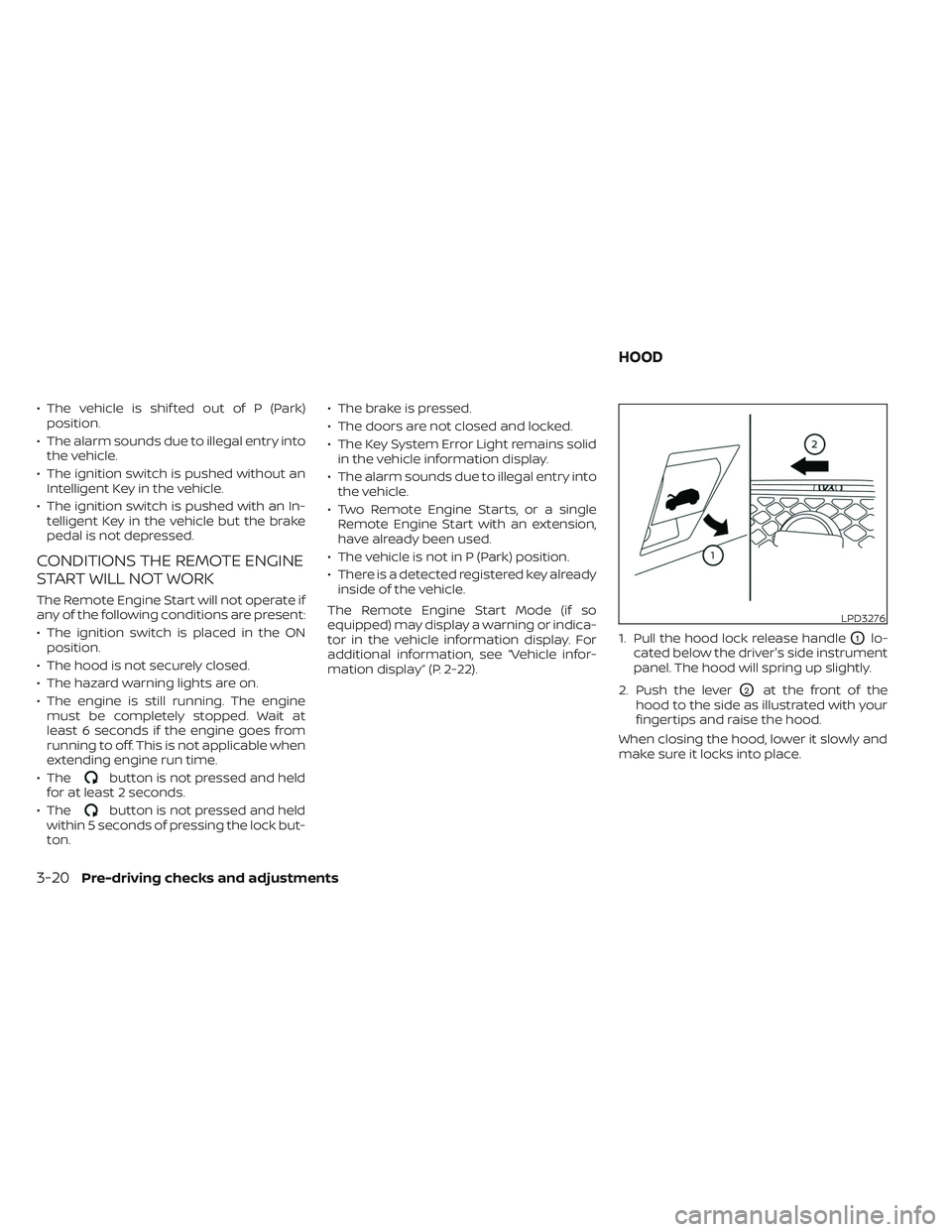
mation display” (P. 2-22). 1. Pull the hood lock release handle
O1lo-
cated below the driver's side instrument
panel. The hood will spring up slightly.
2. Push the lever
O2at the front of the
hood to the side as illustrated with your
fingertips and raise the hood.
When closing the hood, lower it slowly and
make sure it locks into place.
LPD3276
HOOD
3-20Pre-driving checks and adjustments
Page 224 of 572
–Keep the pump nozzle in contact
with the container while you are
filling it.
– Use only approved portable fuel
containers for flammable liquid.
CAUTION
• Do not use a fuel containing more
than 15% ethanol in your vehicle. For
additional information, see “Fuel rec-
ommendation” (P. 10-4).
• The LOOSE FUEL CAP warning mes-
sage will be displayed if the fuel-filler
cap is not properly tightened. It may
take a few driving trips for the mes-
sage to be displayed. Failure to
tighten the fuel-filler cap properly af-
ter the LOOSE FUEL CAP warning
message is displayed may cause the
Malfunction Indicator Light (MIL)
to illuminate. •
Failure to tighten the fuel-filler cap
properly may cause the
Mal-
function Indicator Light (MIL) to illu-
minate. If the
light illuminates
because the fuel-filler cap is loose or
missing, tighten or install the cap and
continue to drive the vehicle. The
light should turn off af ter a few
driving trips. If thelight does not
turn off af ter a few driving trips, have
the vehicle inspected. It is recom-
mended that you visit a NISSAN
dealer for this service.
•
For additional information, see “Mal-
function Indicator Light (MIL)” (P. 2-19).
• If fuel is spilled on the vehicle body,
flush it away with water to avoid
paint damage. To remove the fuel-filler cap:
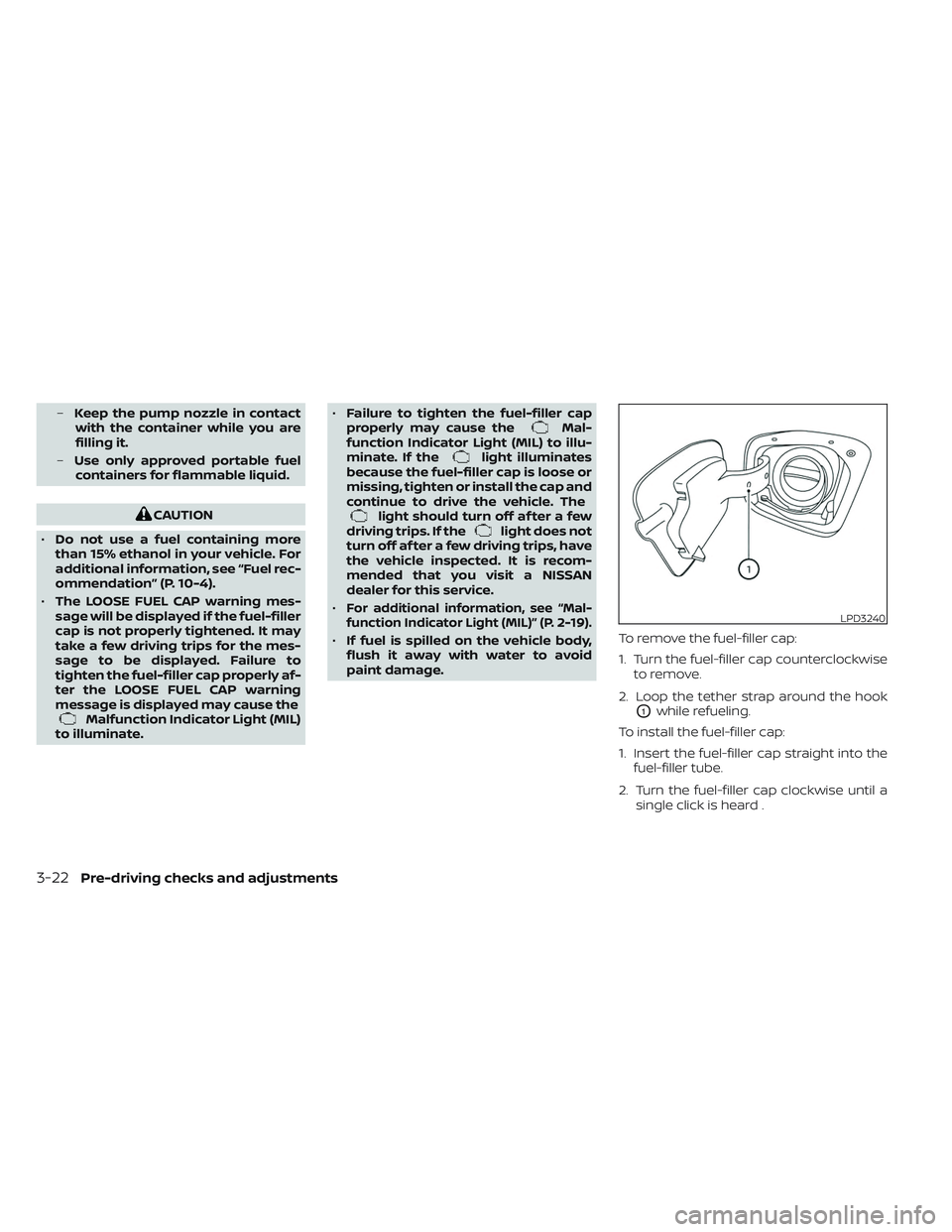
1. Turn the fuel-filler cap counterclockwise
to remove.
2. Loop the tether strap around the hook
O1while refueling.
To install the fuel-filler cap:
1. Insert the fuel-filler cap straight into the fuel-filler tube.
2. Turn the fuel-filler cap clockwise until a single click is heard .
LPD3240
3-22Pre-driving checks and adjustments
Page 225 of 572
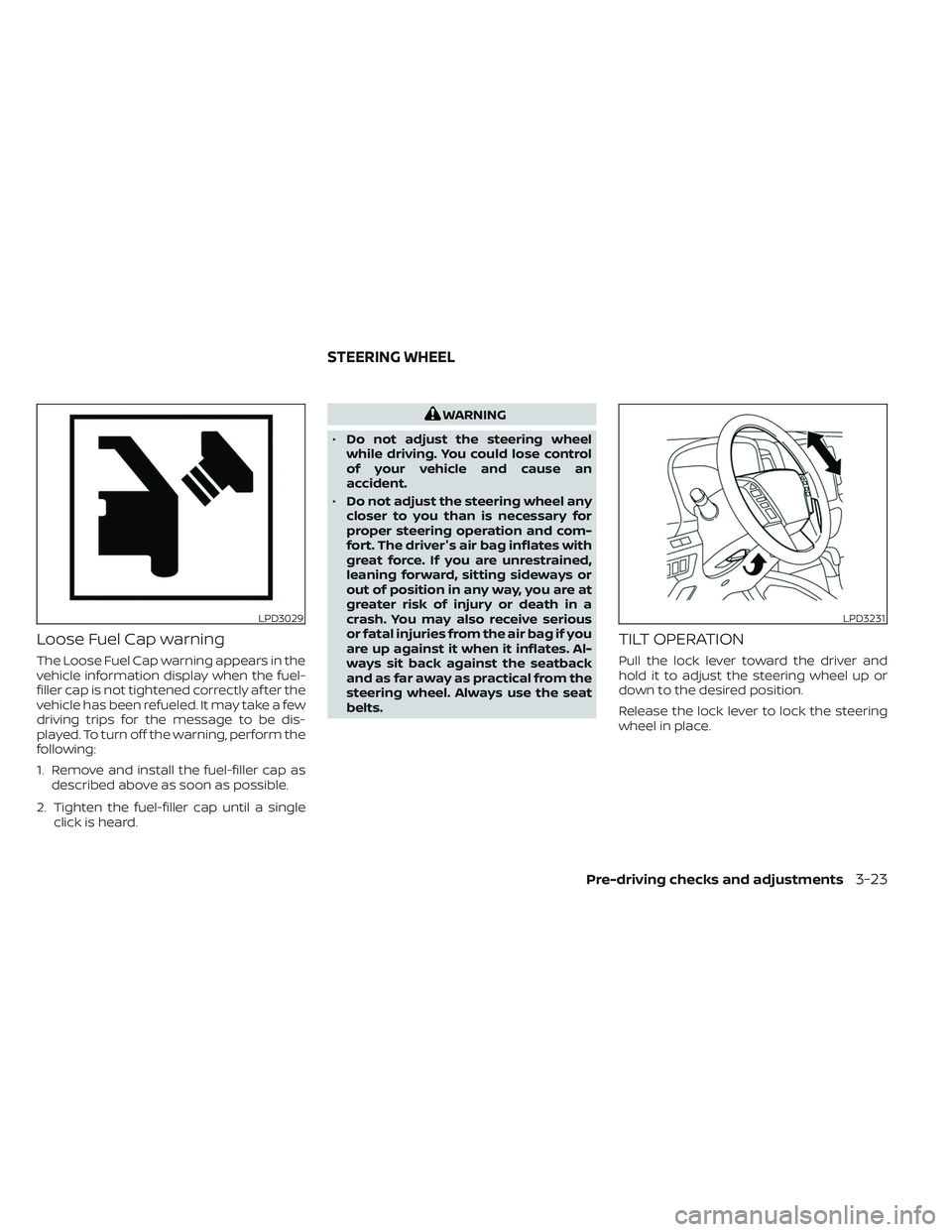
Loose Fuel Cap warning
The Loose Fuel Cap warning appears in the
vehicle information display when the fuel-
filler cap is not tightened correctly af ter the
vehicle has been refueled. It may take a few
driving trips for the message to be dis-
played. To turn off the warning, perform the
following:
1. Remove and install the fuel-filler cap asdescribed above as soon as possible.
2. Tighten the fuel-filler cap until a single click is heard.
WARNING
• Do not adjust the steering wheel
while driving. You could lose control
of your vehicle and cause an
accident.
• Do not adjust the steering wheel any
closer to you than is necessary for
proper steering operation and com-
fort. The driver's air bag inflates with
great force. If you are unrestrained,
leaning forward, sitting sideways or
out of position in any way, you are at
greater risk of injury or death in a
crash. You may also receive serious
or fatal injuries from the air bag if you
are up against it when it inflates. Al-
ways sit back against the seatback
and as far away as practical from the
steering wheel. Always use the seat
belts.
TILT OPERATION
Pull the lock lever toward the driver and
hold it to adjust the steering wheel up or
down to the desired position.
Release the lock lever to lock the steering
wheel in place.
LPD3029LPD3231
STEERING WHEEL
Pre-driving checks and adjustments3-23
Page 235 of 572
4 Monitor, climate, audio, phone and
voice recognition systems
NissanConnect® Owner’s Manual...............4-2
RearView Monitor (if so equipped) ...............4-3
RearView Monitor system operation ..........4-4
How to read the displayed lines ..............4-4
Difference between predicted and
actual distances .............................4-5
How to park with predicted course lines ....... 4-7Adjusting the screen.........................4-8
How to turn on and off predicted
course lines ..................................4-8
RearView Monitor system limitations .........4-8
System maintenance ....................... 4-10
Intelligent Around View® Monitor
(if so equipped) .................................. 4-11
Intelligent Around View® Monitor
system operation ........................... 4-12
Difference between predicted and
actual distances ............................ 4-16
How to park with predicted course lines ......4-18How to switch the display ...................4-19
Off-road mode (if so equipped) ..............4-20
Adjusting the screen ........................ 4-20
Intelligent Around View® Monitor
system limitations .......................... 4-21
System maintenance .......................4-23Moving Object Detection (MOD) (if so
equipped)
...................................... 4-24
MOD system operation ......................4-25
Turning MOD on and off (if so equipped) .....4-26
MOD system limitations .....................4-27
System maintenance .......................4-28
Vents .......................................... 4-28
Heater and air conditioner (manual)
(if so equipped) ................................. 4-29
Controls ..................................... 4-30
Heater operation ............................ 4-31
Air conditioner operation ....................4-33
Air flow charts ............................... 4-34
Heater and air conditioner (automatic)
(if so equipped) ................................. 4-38
Automatic operation ........................ 4-39
Manual operation ........................... 4-41
Operating tips ............................... 4-42
Servicing air conditioner ........................4-43
Antenna ........................................ 4-44
Roof Mounted Antenna ......................4-44
Car phone or CB radio .......................... 4-44
iPod®/iPhone® ................................. 4-45
Page 238 of 572
•The distance guide line and the ve-
hicle width line should be used as a
reference only when the vehicle is on
a level paved surface. The distance
viewed on the monitor is for refer-
ence only and may be different than
the actual distance between the ve-
hicle and displayed objects.
CAUTION
Do not scratch the camera lens when
cleaning dirt or snow from the front of
the camera.
The RearView Monitor system automati-
cally shows a rear view of the vehicle when
the shif t lever is shif ted into the R (Reverse)
position. While in R (Reverse), pressing the
CAMERA will cycle through guideline op-
tions. The radio can still be heard while the
RearView Monitor is active. To display the rear view, the RearView Moni-
tor system uses a camera located just
above the vehicle’s license plate
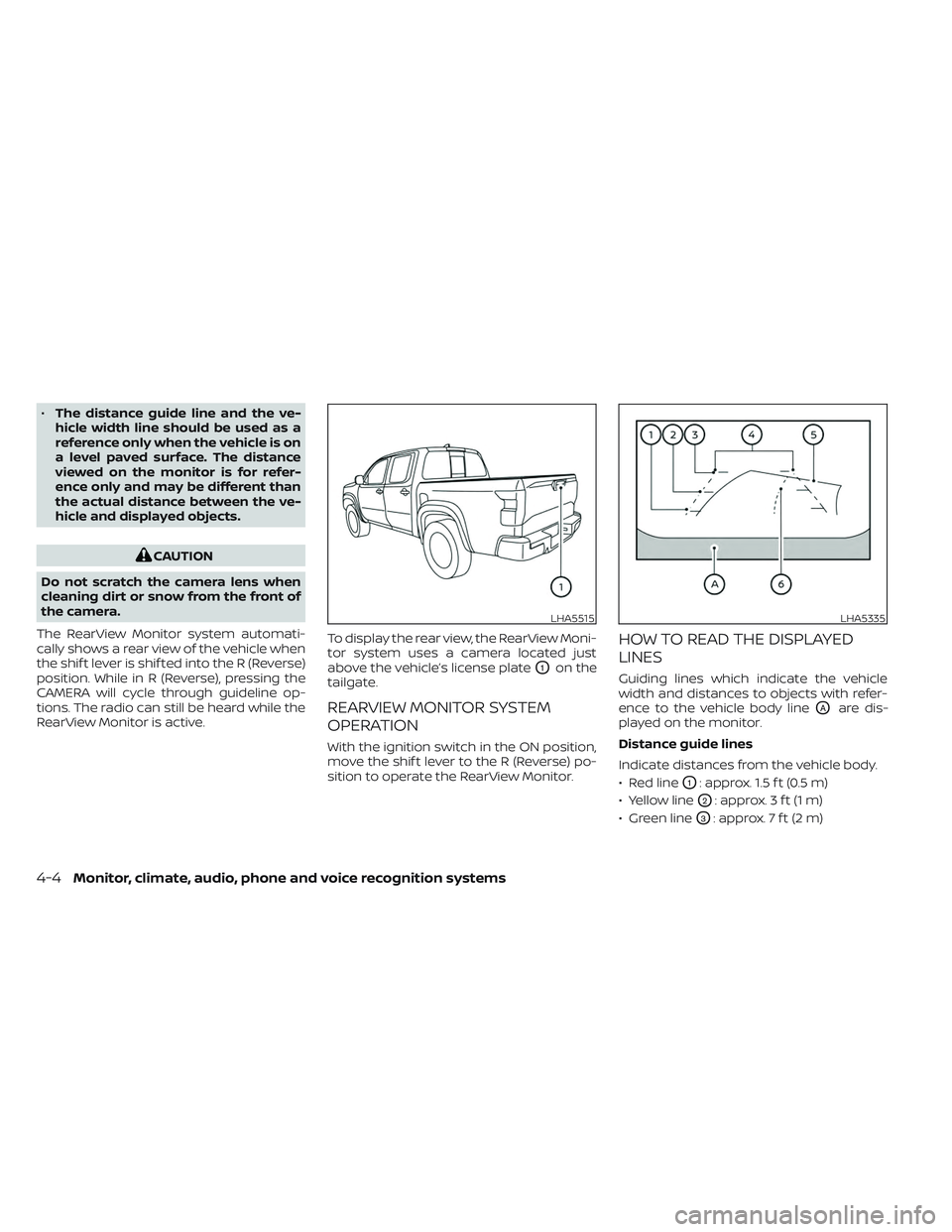
O1on the
tailgate.
REARVIEW MONITOR SYSTEM
OPERATION
With the ignition switch in the ON position,
move the shif t lever to the R (Reverse) po-
sition to operate the RearView Monitor.
HOW TO READ THE DISPLAYED
LINES
Guiding lines which indicate the vehicle
width and distances to objects with refer-
ence to the vehicle body line
OAare dis-
played on the monitor.
Distance guide lines
Indicate distances from the vehicle body.
• Red line
O1: approx. 1.5 f t (0.5 m)
• Yellow line
O2: approx. 3 f t (1 m)
• Green line
O3: approx. 7 f t (2 m)
LHA5515LHA5335
4-4Monitor, climate, audio, phone and voice recognition systems
Page 239 of 572
Vehicle width guide linesO4
Indicate the vehicle width when backing
up.
Predicted course lines
O5
Indicate the predicted course when back-
ing up. The predicted course lines will be
displayed on the monitor when the shif t
lever is in the R (Reverse) position and the
steering wheel is turned. The predicted
course lines will move depending on how
much the steering wheel is turned and will
not be displayed while the steering wheel is
in the straight-ahead position.
The vehicle width guide lines and the width
of the predicted course lines are wider than
the actual width and course.
Center guide lines
O6
Indicates the vehicle’s center.
DIFFERENCE BETWEEN PREDICTED
AND ACTUAL DISTANCES
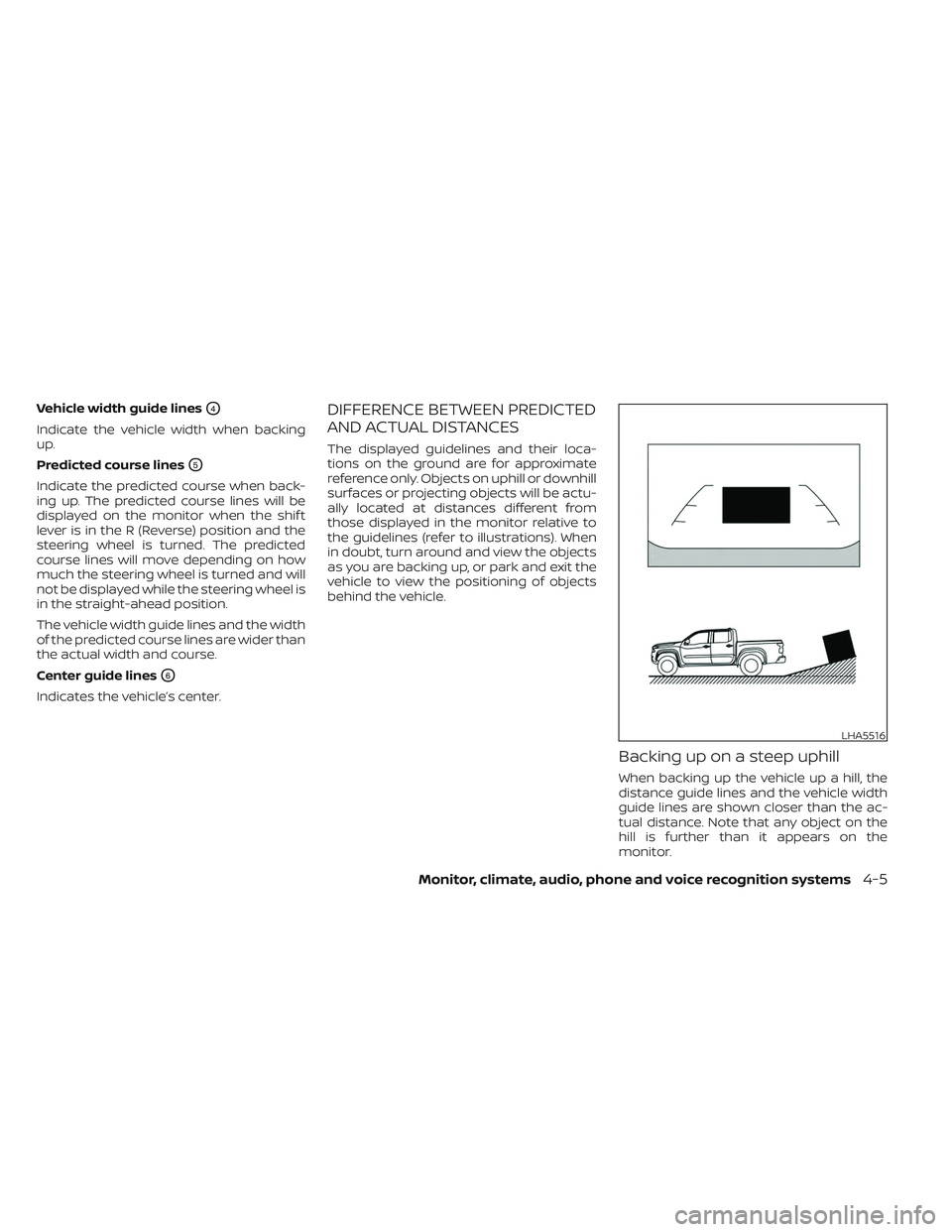
The displayed guidelines and their loca-
tions on the ground are for approximate
reference only. Objects on uphill or downhill
surfaces or projecting objects will be actu-
ally located at distances different from
those displayed in the monitor relative to
the guidelines (refer to illustrations). When
in doubt, turn around and view the objects
as you are backing up, or park and exit the
vehicle to view the positioning of objects
behind the vehicle.
Backing up on a steep uphill
When backing up the vehicle up a hill, the
distance guide lines and the vehicle width
guide lines are shown closer than the ac-
tual distance. Note that any object on the
hill is further than it appears on the
monitor.
LHA5516
Monitor, climate, audio, phone and voice recognition systems4-5
Page 240 of 572
Backing up on a steep downhill
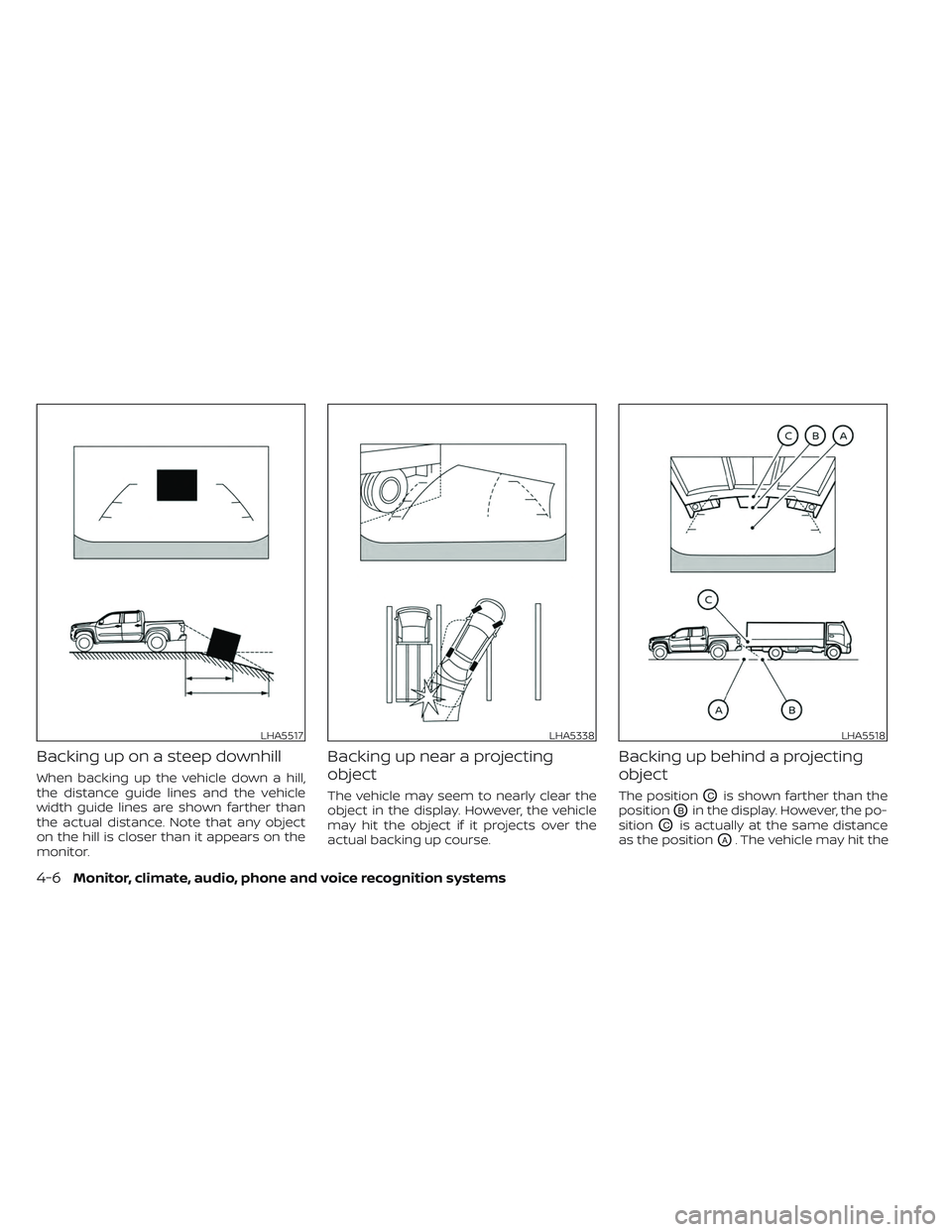
When backing up the vehicle down a hill,
the distance guide lines and the vehicle
width guide lines are shown farther than
the actual distance. Note that any object
on the hill is closer than it appears on the
monitor.
Backing up near a projecting
object
The vehicle may seem to nearly clear the
object in the display. However, the vehicle
may hit the object if it projects over the
actual backing up course.
Backing up behind a projecting
object
The positionOCis shown farther than the
position
OBin the display. However, the po-
sition
OCis actually at the same distance
as the position
OA. The vehicle may hit the
LHA5517LHA5338LHA5518
4-6Monitor, climate, audio, phone and voice recognition systems
Page 241 of 572
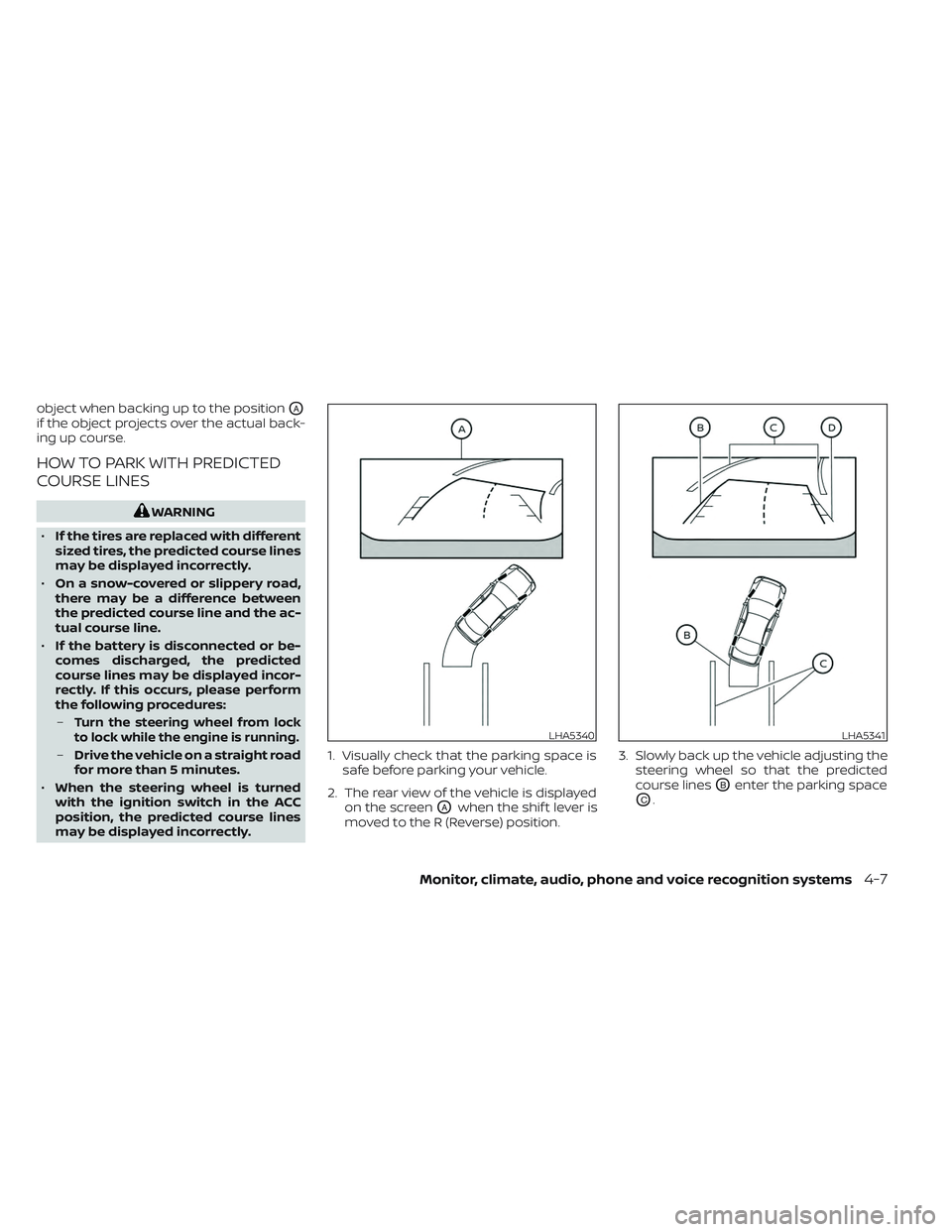
object when backing up to the positionOA
if the object projects over the actual back-
ing up course.
HOW TO PARK WITH PREDICTED
COURSE LINES
WARNING
• If the tires are replaced with different
sized tires, the predicted course lines
may be displayed incorrectly.
• On a snow-covered or slippery road,
there may be a difference between
the predicted course line and the ac-
tual course line.
• If the battery is disconnected or be-
comes discharged, the predicted
course lines may be displayed incor-
rectly. If this occurs, please perform
the following procedures:
–
Turn the steering wheel from lock
to lock while the engine is running.
– Drive the vehicle on a straight road
for more than 5 minutes.
• When the steering wheel is turned
with the ignition switch in the ACC
position, the predicted course lines
may be displayed incorrectly. 1. Visually check that the parking space is
safe before parking your vehicle.
2. The rear view of the vehicle is displayed on the screen
OAwhen the shif t lever is
moved to the R (Reverse) position. 3. Slowly back up the vehicle adjusting the
steering wheel so that the predicted
course lines
OBenter the parking space
OC.
LHA5340LHA5341
Monitor, climate, audio, phone and voice recognition systems4-7
Page 242 of 572
4. Maneuver the steering wheel to makethe vehicle width guide lines
ODparallel
to the parking space
OCwhile referring
to the predicted course lines.
5. When the vehicle is parked in the space completely, move the shif t lever to the P
(Park) position and apply the parking
brake.
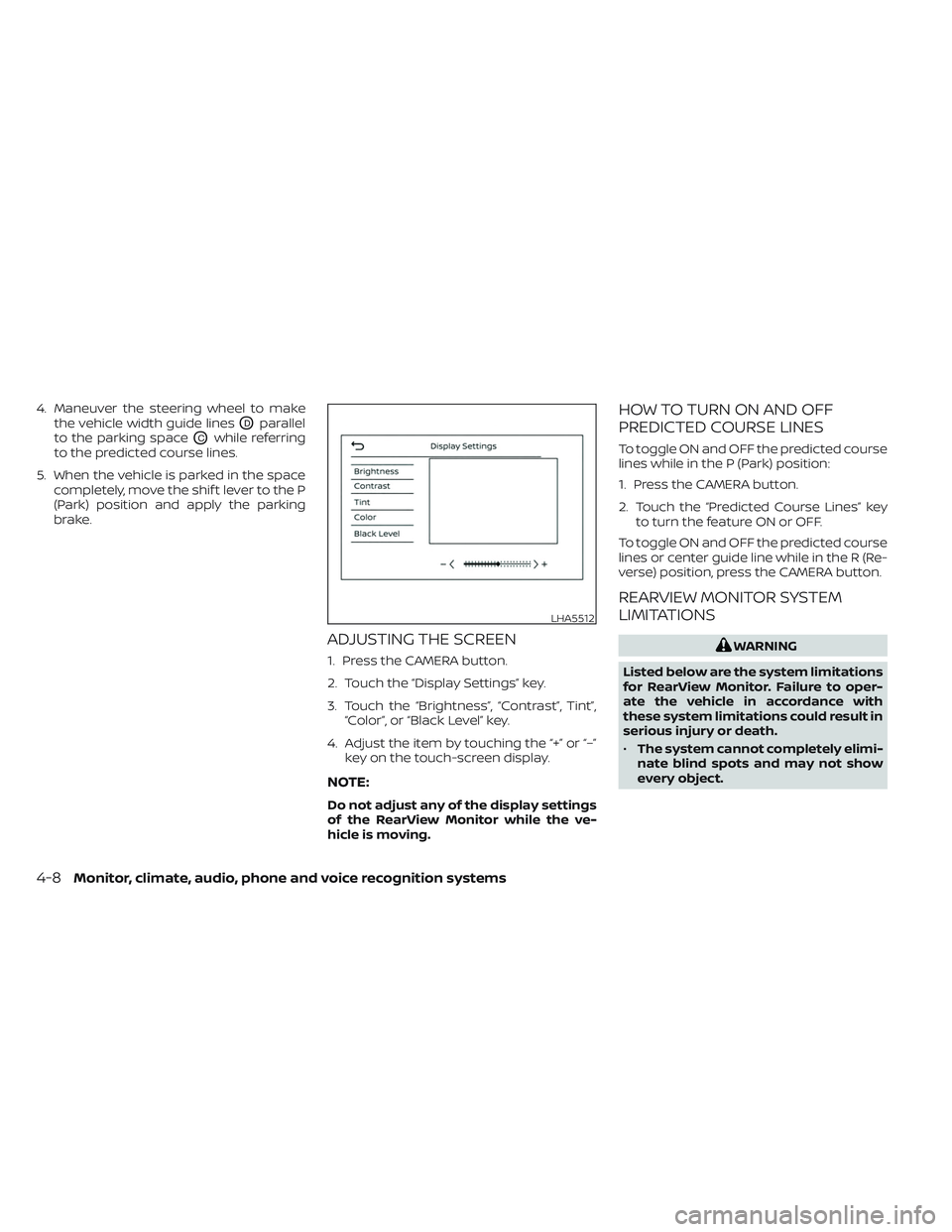
ADJUSTING THE SCREEN
1. Press the CAMERA button.
2. Touch the “Display Settings” key.
3. Touch the “Brightness”, “Contrast”, Tint”,“Color”, or “Black Level” key.
4. Adjust the item by touching the “+” or “–” key on the touch-screen display.
NOTE:
Do not adjust any of the display settings
of the RearView Monitor while the ve-
hicle is moving.
HOW TO TURN ON AND OFF
PREDICTED COURSE LINES
To toggle ON and OFF the predicted course
lines while in the P (Park) position:
1. Press the CAMERA button.
2. Touch the “Predicted Course Lines” keyto turn the feature ON or OFF.
To toggle ON and OFF the predicted course
lines or center guide line while in the R (Re-
verse) position, press the CAMERA button.
REARVIEW MONITOR SYSTEM
LIMITATIONS
WARNING
Listed below are the system limitations
for RearView Monitor. Failure to oper-
ate the vehicle in accordance with
these system limitations could result in
serious injury or death.
• The system cannot completely elimi-
nate blind spots and may not show
every object.
LHA5512
4-8Monitor, climate, audio, phone and voice recognition systems