phone NISSAN FRONTIER PRO-4X 2019 Owners Manual
[x] Cancel search | Manufacturer: NISSAN, Model Year: 2019, Model line: FRONTIER PRO-4X, Model: NISSAN FRONTIER PRO-4X 2019Pages: 516, PDF Size: 4.68 MB
Page 153 of 516
The RSS can be disabled by pushing the
OFF switch. When the system is disabled,
the indicator light on the switch will illumi-
nate.
The system will automatically reset the
next time the ignition switch is placed in
the ON position.
For additional information, refer to “Rear
Sonar System (RSS)” in the “Starting and
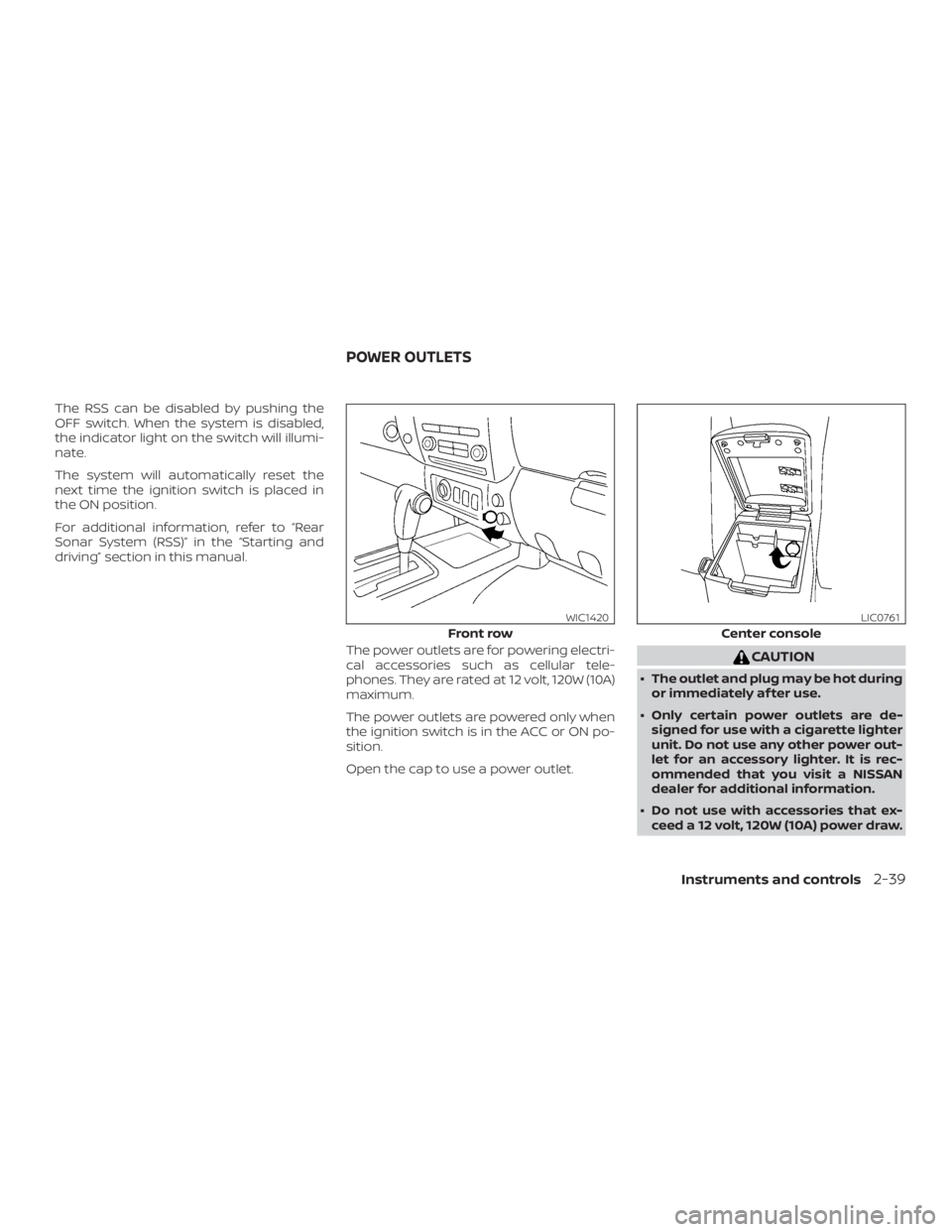
driving” section in this manual.The power outlets are for powering electri-
cal accessories such as cellular tele-
phones. They are rated at 12 volt, 120W (10A)
maximum.
The power outlets are powered only when
the ignition switch is in the ACC or ON po-
sition.
Open the cap to use a power outlet.
Page 203 of 516
Free Phone System without Navigation
System” in this section.
When you use this system, make sure the
engine is running.
If you use the system with the engine not
running for a long time, it will discharge
the battery, and the engine will not start.
Reference symbols:
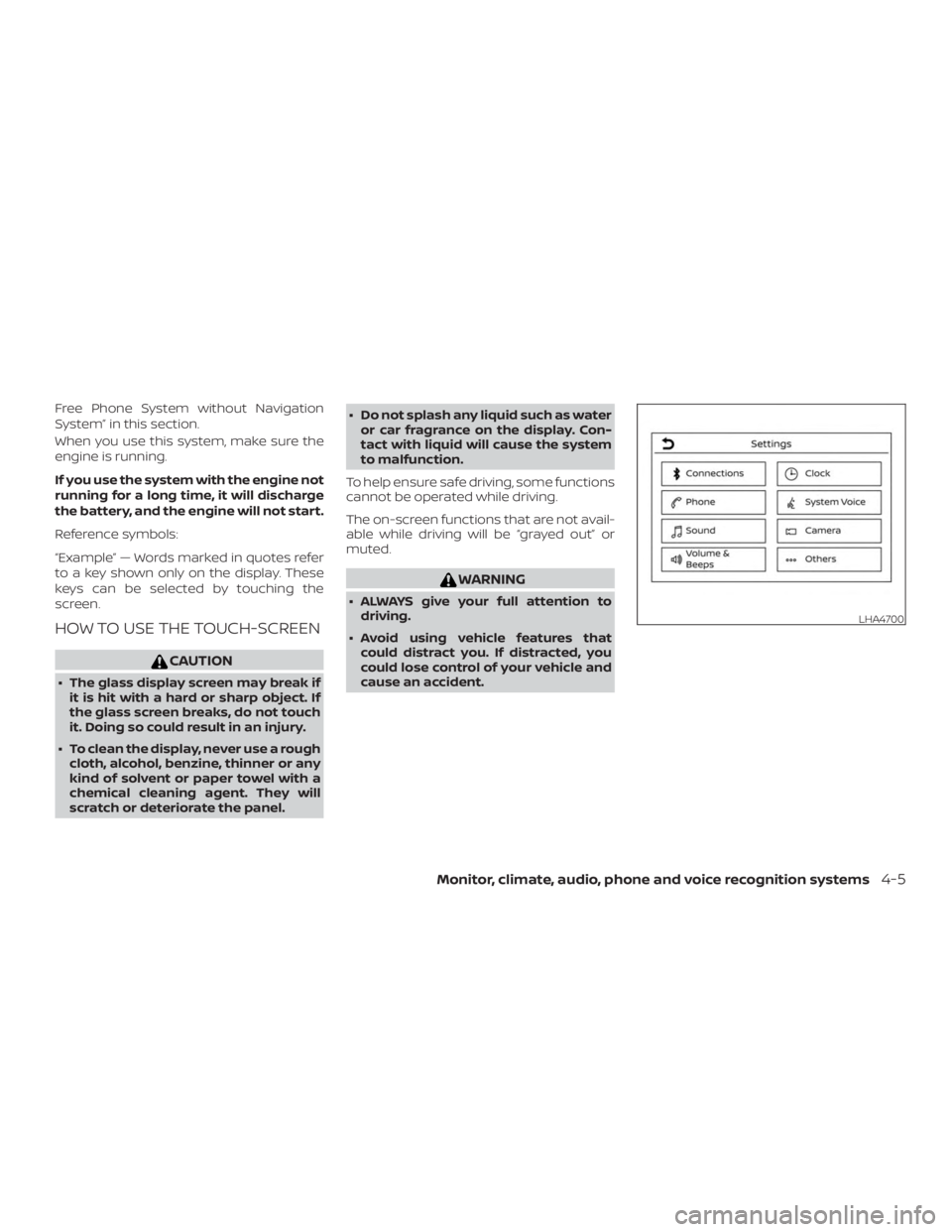
“Example” — Words marked in quotes refer
to a key shown only on the display. These
keys can be selected by touching the
screen.
HOW TO USE THE TOUCH-SCREEN
Page 262 of 516
CAUTION
∙ Do not force the USB device into theUSB port. Inserting the USB device
tilted or up-side-down into the port
may damage the port. Make sure that
the USB device is connected correctly
into the USB port.
∙ Do not grab the USB port cover (if so equipped) when pulling the USB de-
vice out of the port. This could dam-
age the port and the cover.
∙ Do not leave the USB cable in a place where it can be pulled unintentionally.
Pulling the cable may damage the
port.
For additional information, refer to your de-
vice manufacturer’s owner information re-
garding the proper use and care of the
device.
To connect an iPod® to the vehicle so that
the iPod® can be controlled with the audio
system controls and display screen, use
the USB connection port located on the
center console below the heater and air
conditioner controls. Connect the iPod®-
specific end of the cable to the iPod® and
the USB end of the cable to the USB con-
nection port on the vehicle. If your iPod® supports charging via a USB connection, its
battery will be charged while connected to
the vehicle with the ignition switch in the
ON position.
While connected to the vehicle, the iPod®
can only be operated by the vehicle audio
controls.
To disconnect the iPod® from the vehicle,
remove the USB end of the cable from the
USB connection port on the vehicle, then
remove the cable from the iPod®.
* iPod® is a trademark of Apple Inc., regis-
tered in the U.S. and other countries.
Compatibility
The following models are compatible:
∙ iPod® Classic 5th generation (firmware version 1.3.0 or later)
∙ iPod® Classic 6th generation (firmware version 2.0.1 or later)
∙ iPod® Classic 7th generation (firmware version 2.0.4 or later)
∙ iPod® Touch 2nd generation (firmware version 4.2.1 or later)*
∙ iPod® Touch 3rd generation (firmware version 5.1 or later) ∙ iPod® Touch 4th generation (firmware
version 5.1 or later)
∙ iPod® nano - 1st generation (firmware version 1.3.1 or later)
∙ iPod® nano - 2nd generation (firmware version 1.1.3 or later)
∙ iPod® nano - 3rd generation (firmware version 1.1.3 or later)
∙ iPod® nano - 4th generation (firmware version 1.0.4 or later)
∙ iPod® nano - 5th generation (firmware version 1.0.2 or later)
∙ iPod® nano - 6th generation (firmware version 1.1 or later)
∙ iPhone® 3G (firmware version 4.2.1 or later)
∙ iPhone® 3GS (firmware version 5.1 or later)
∙ iPhone® 4 (firmware version 5.1 or later)
∙ iPhone® 4S (firmware version 5.1 or later)
* Some features of this iPod® may not be
fully functional.
Make sure that your iPod® firmware is up-
dated to the version indicated above.
4-64Monitor, climate, audio, phone and voice recognition systems
Page 265 of 516
CAUTION
∙ Do not force the USB device into theUSB port. Inserting the USB device
tilted or up-side-down into the port
may damage the port. Make sure that
the USB device is connected correctly
into the USB port.
∙ Do not grab the USB port cover (if so equipped) when pulling the USB de-
vice out of the port. This could dam-
age the port and the cover.
∙ Do not leave the USB cable in a place where it can be pulled unintentionally.
Pulling the cable may damage the
port.
For additional information, refer to your de-
vice manufacturer’s owner information re-
garding the proper use and care of the
device.
To connect an iPod® to the vehicle so that
the iPod® can be controlled with the audio
system controls and display screen, use
the USB port located on the instrument
panel. Connect the iPod®-specific end of
the cable to the iPod® and the USB end of
the cable to the USB port on the vehicle. If
your iPod® supports charging via a USB
connection, its battery will be charged while connected to the vehicle with the ig-
nition switch in the ACC or ON position.
While connected to the vehicle, the iPod®
can only be operated by the vehicle audio
controls.
To disconnect the iPod® from the vehicle,
remove the USB end of the cable from the
USB port on the vehicle, then remove the
cable from the iPod®.
* iPod® is a trademark of Apple Inc., regis-
tered in the U.S. and other countries.
Compatibility
The following models are compatible:
∙ iPod® Classic 5th generation (firmware version 1.3.0 or later)
∙ iPod® Classic 6th generation (firmware version 2.0.1 or later)
∙ iPod® Classic 7th generation (firmware version 2.0.4 or later)
∙ iPod® Touch 2nd generation (firmware version 4.2.1 or later)*
∙ iPod® Touch 3rd generation (firmware version 5.1 or later)
∙ iPod® Touch 4th generation (firmware version 5.1 or later) ∙ iPod® nano - 1st generation (firmware
version 1.3.1 or later)
∙ iPod® nano - 2nd generation (firmware version 1.1.3 or later)
∙ iPod® nano - 3rd generation (firmware version 1.1.3 or later)
∙ iPod® nano - 4th generation (firmware version 1.0.4 or later)
∙ iPod® nano - 5th generation (firmware version 1.0.2 or later)
∙ iPod® nano - 6th generation (firmware version 1.1 or later)
∙ iPhone® 3G (firmware version 4.2.1 or later)
∙ iPhone® 3GS (firmware version 5.1 or later)
∙ iPhone® 4 (firmware version 5.1 or later)
∙ iPhone® 4S (firmware version 5.1 or later)
* Some features of this iPod® may not be
fully functional.
Make sure that your iPod® firmware is up-
dated to the version indicated above.
Monitor, climate, audio, phone and voice recognition systems4-67
Page 281 of 516
When installing a CB, ham radio or car
phone in your vehicle, be sure to observe
the following precautions; otherwise, the
new equipment may adversely affect the
engine control system and other electronic
parts.
Page 282 of 516
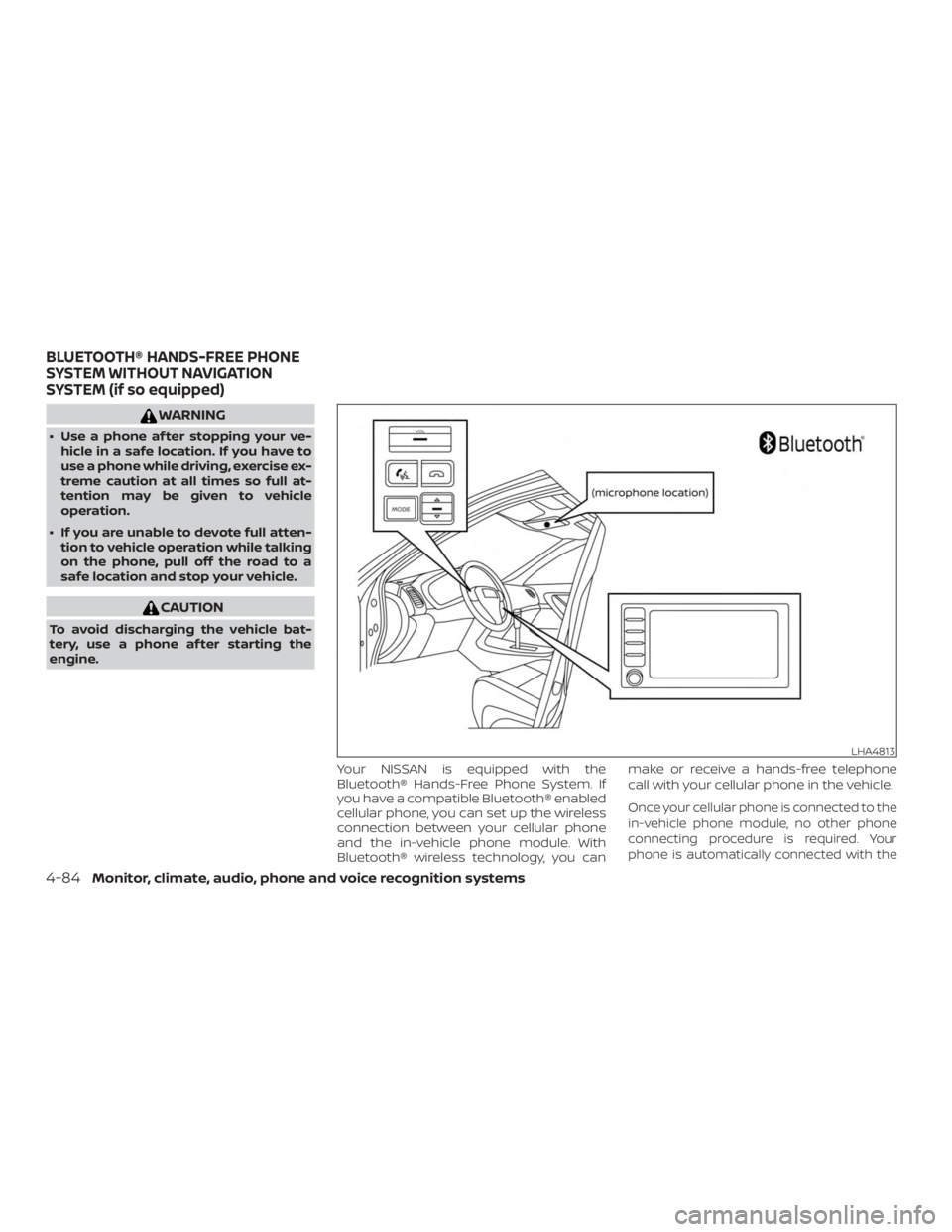
WARNING
∙ Use a phone af ter stopping your ve-hicle in a safe location. If you have to
use a phone while driving, exercise ex-
treme caution at all times so full at-
tention may be given to vehicle
operation.
∙ If you are unable to devote full atten- tion to vehicle operation while talking
on the phone, pull off the road to a
safe location and stop your vehicle.
Page 305 of 516
ENDING A CALL
To end a phone call, select the phone
Page 406 of 516
∙ Keep the battery surface clean and dry.Clean the battery with a solution of bak-
ing soda and water.
∙ Make certain the terminal connections are clean and securely tightened.
∙ If the vehicle is not to be used for 30 days or longer, disconnect the nega-
tive (-) battery terminal cable to prevent
discharge.
NOTE:
Care should be taken to avoid situations
that can lead to potential battery dis-
charge and potential no-start conditions
such as: 1. Installation or extended use of elec-
tronic accessories that consume bat-
tery power when the engine is not
running (Phone chargers, GPS, DVD
players, etc.)
2. Vehicle is not driven regularly and/or
only driven short distances.
In these cases, the battery may need to
be charged to maintain battery health.
Page 502 of 516
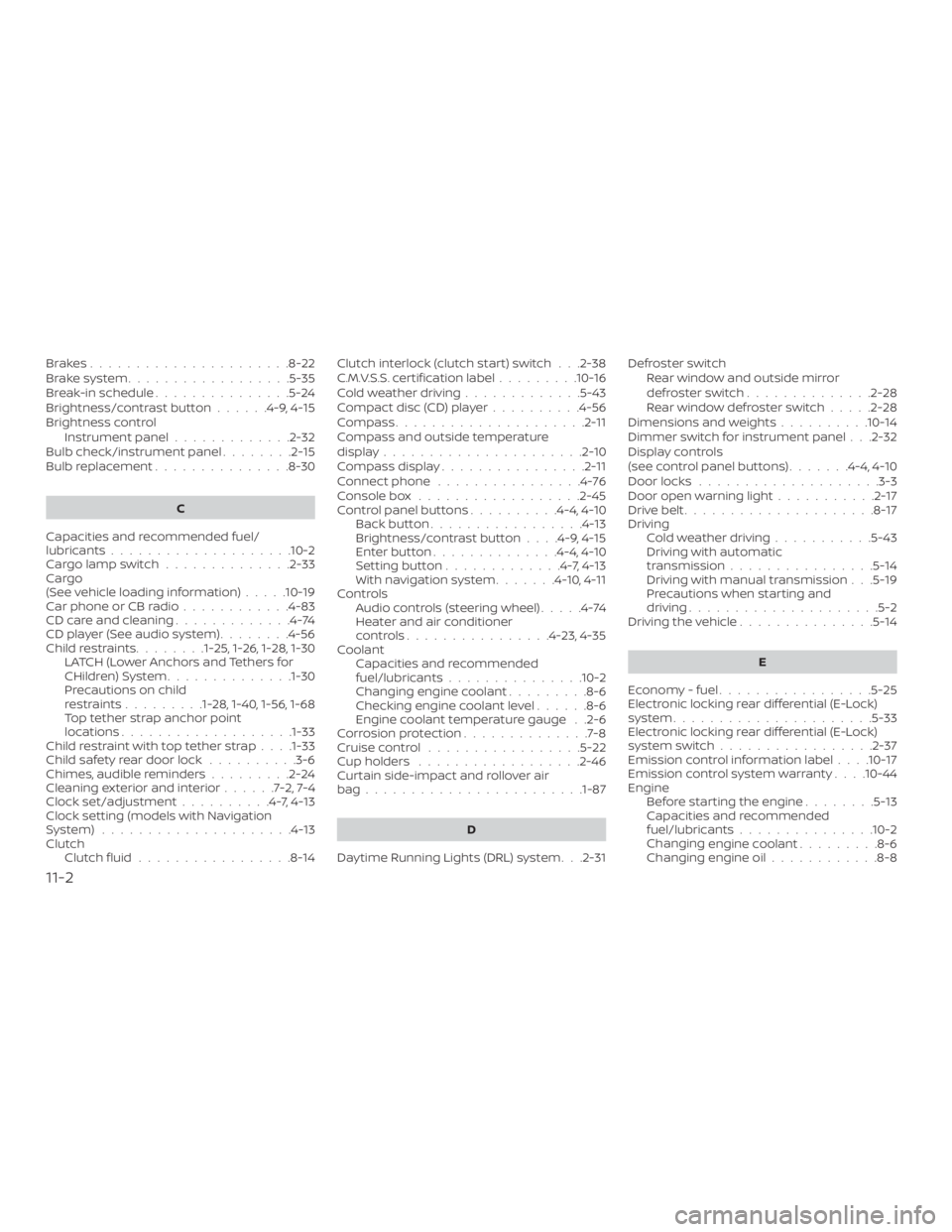
Brakes......................8-22
Brake system..................5-35
Break-in schedule ...............5-24
Brightness/contrast button ......4-9,4-15
Brightness control Instrument panel .............2-32
Bulb check/instrument panel ........2-15
Bulb replacement ...............8-30
C
Capacities and recommended fuel/
lubricants....................10-2
Cargolampswitch..............2-33
Cargo
(See vehicle loading information) .....10-19
Car phone or CB radio ............4-83
CDcareandcleaning.............4-74
CD player (See audio system) ........4-56
Childrestraints........1-25, 1-26, 1-28, 1-30 LATCH (Lower Anchors and Tethers for
CHildren)System..............1-30
Precautions on child
restraints.........1-28, 1-40, 1-56, 1-68
Top tether strap anchor point
locations...................1-33
Child restraint with top tether strap . . . .1-33
Child safety rear door lock ..........3-6
Chimes, audible reminders .........2-24
Cleaningexteriorandinterior......7-2,7-4
Clock set/adjustment ..........4-7,4-13
Clock setting (models with Navigation
System) .....................4-13
Clutch Clutchfluid.................8-14 Clutch interlock (clutch start) switch . . .2-38
C.M.V.S.S. certification label
.........10-16
Cold weather driving .............5-43
Compact disc (CD) player ..........4-56
Compass .....................2-11
Compass and outside temperature
display......................2-10
Compass display ................2-11
Connect phone ................4-76
Console box ..................2-45
Control panel buttons ..........4-4,4-10
Back button .................4-13
Brightness/contrast button ....4-9,4-15
Enterbutton..............4-4,4-10
Settingbutton.............4-7,4-13
Withnavigationsystem.......4-10,4-11
Controls Audio controls (steering wheel) .....4-74
Heater and air conditioner
controls................4-23,4-35
Coolant Capacities and recommended
fuel/lubricants...............10-2
Changing engine coolant .........8-6
Checking engine coolant level ......8-6
Engine coolant temperature gauge . .2-6
Corrosionprotection..............7-8
Cruisecontrol .................5-22
Cupholders ..................2-46
Curtain side-impact and rollover air
bag........................1-87
D
Daytime Running Lights (DRL) system . . .2-31 Defroster switch
Rear window and outside mirror
defrosterswitch..............2-28
Rearwindowdefrosterswitch.....2-28
Dimensions and weights ..........10-14
Dimmer switch for instrument panel . . .2-32
Display controls
(see control panel buttons) .......4-4,4-10
Door locks ....................3-3
Door open warning light ...........2-17
Drivebelt.....................8-17
Driving Coldweatherdriving...........5-43
Driving with automatic
transmission ................5-14
Driving with manual transmission . . .5-19
Precautions when starting and
driving .....................5-2
Driving the vehicle ...............5-14
E
Economy - fuel .................5-25
Electronic locking rear differential (E-Lock)
system......................5-33
Electronic locking rear differential (E-Lock)
systemswitch.................2-37
Emission control information label ....10-17
Emission control system warranty . . . .10-44
Engine Before starting the engine ........5-13
Capacities and recommended
fuel/lubricants...............10-2
Changing engine
coolant.........8-6
Changing engine oil ............8-8
11-2
Page 503 of 516
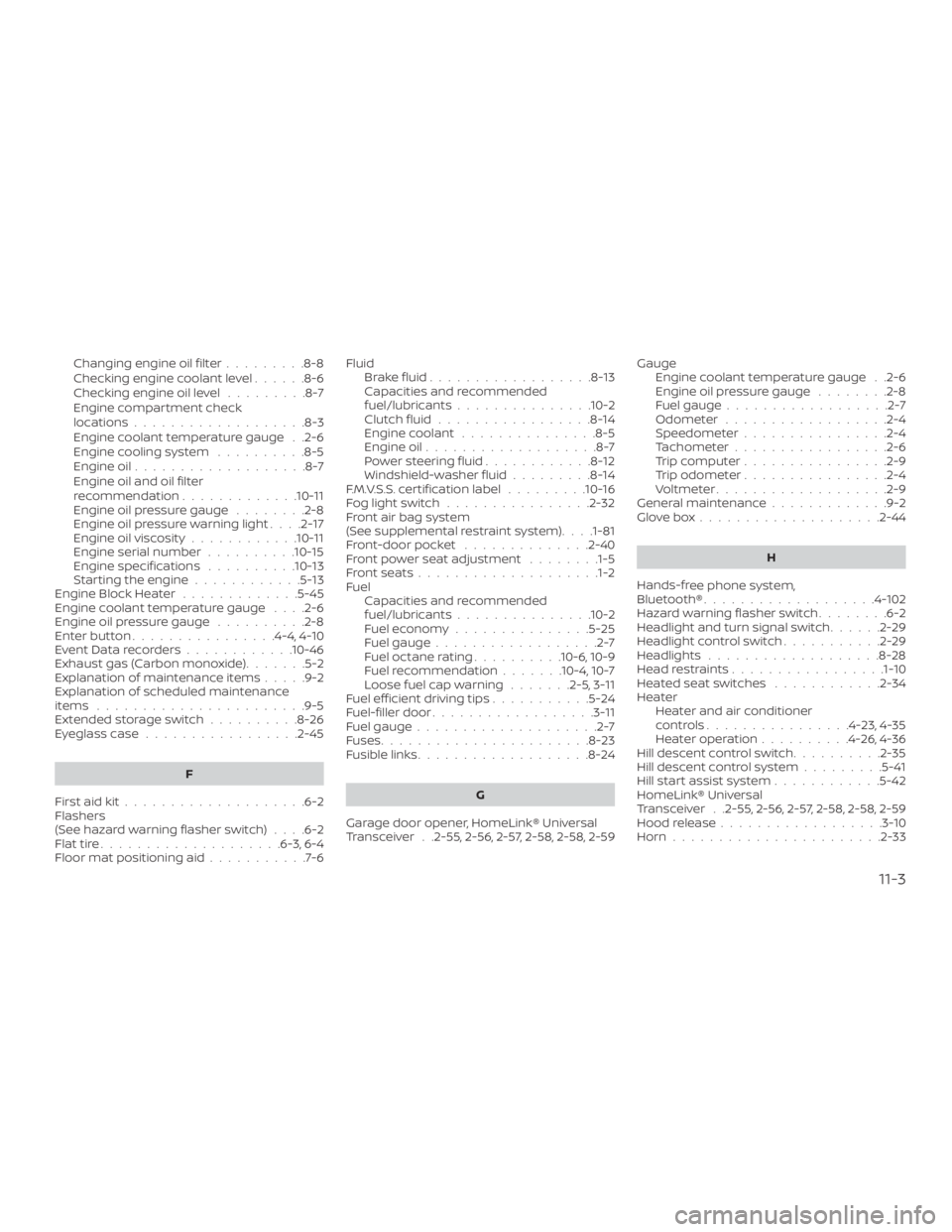
Changing engine oil filter.........8-8
Checking engine coolant level ......8-6
Checking engine oil level .........8-7
Engine compartment check
locations...................8-3
Engine coolant temperature gauge . .2-6
Engine cooling system ..........8-5
Engine oil ...................8-7
Engine oil and oil filter
recommendation .............10-11
Engine oil pressure gauge ........2-8
Engine oil pressure warning light ....2-17
Engine oil viscosity ............10-11
Engine serial number ..........10-15
Engine specifications ..........10-13
Starting the engine ............5-13
Engine Block Heater .............5-45
Engine coolant temperature gauge ....2-6
Engine oil pressure gauge ..........2-8
Enterbutton................4-4,4-10
EventDatarecorders............10-46
Exhaust gas (Carbon monoxide) .......5-2
Explanation of maintenance items .....9-2
Explanation of scheduled maintenance
items .......................9-5
Extended storage switch ..........8-26
Eyeglasscase.................2-45
F
Firstaidkit....................6-2
Flashers
(See hazard warning flasher switch) ....6-2
Flattire....................6-3,6-4
Floormatpositioningaid...........7-6 Fluid
Brakefluid..................8-13
Capacities and recommended
fuel/lubricants...............10-2
Clutchfluid.................8-14
Engine coolant ...............8-5
Engine oil ...................8-7
Powersteeringfluid............8-12
Windshield-washer fluid .........8-14
F.M.V.S.S. certification label .........10-16
Foglightswitch................2-32
Front air bag system
(See supplemental restraint system) . . . .1-81
Front-door pocket ..............2-40
Front power seat adjustment ........1-5
Frontseats....................1-2
Fuel Capacities and recommended
fuel/lubricants...............10-2
Fuel economy ...............5-25
Fuel gauge ..................2-7
Fueloctanerating..........10-6,10-9
Fuel recommendation .......10-4,10-7
Loose fuel cap warning .......2-5,3-11
Fuel efficient driving tips ...........5-24
Fuel-filler door ..................3-11
Fuel gauge ....................2-7
Fuses .......................8-23
Fusiblelinks...................8-24
G
Garage door opener, HomeLink® Universal
Transceiver . .2-55, 2-56, 2-57, 2-58, 2-58, 2-59 Gauge
Engine coolant temperature gauge . .2-6
Engine oil pressure gauge ........2-8
Fuel gauge ..................2-7
Odometer ..................2-4
Speedometer ................2-4
Tachometer .................2-6
Trip computer ................2-9
Trip odometer ................2-4
Voltmeter...................2-9
General maintenance .............9-2
Glovebox....................2-44
H
Hands-fr ee
phone system,
Bluetooth®...................4-102
Hazardwarningflasherswitch........6-2
Headlight and turn signal switch ......2-29
Headlightcontrolswitch...........2-29
Headlights...................8-28
Headrestraints.................1-10
Heated seat switches ............2-34
Heater Heater and air conditioner
controls................4-23,4-35
Heater operation ..........4-26,4-36
Hill descent control switch ..........2-35
Hill descent control system .........5-41
Hill start assist system ............5-42
HomeLink® Universal
Transceiver . .2-55, 2-56, 2-57, 2-58, 2-58, 2-59
Hood release ..................3-10
Horn.......................2-33
11-3