engine NISSAN GT-R 2011 User Guide
[x] Cancel search | Manufacturer: NISSAN, Model Year: 2011, Model line: GT-R, Model: NISSAN GT-R 2011Pages: 312, PDF Size: 13.07 MB
Page 253 of 312
Black plate (259,1)
Model "R35-N" EDITED: 2009/ 10/ 30
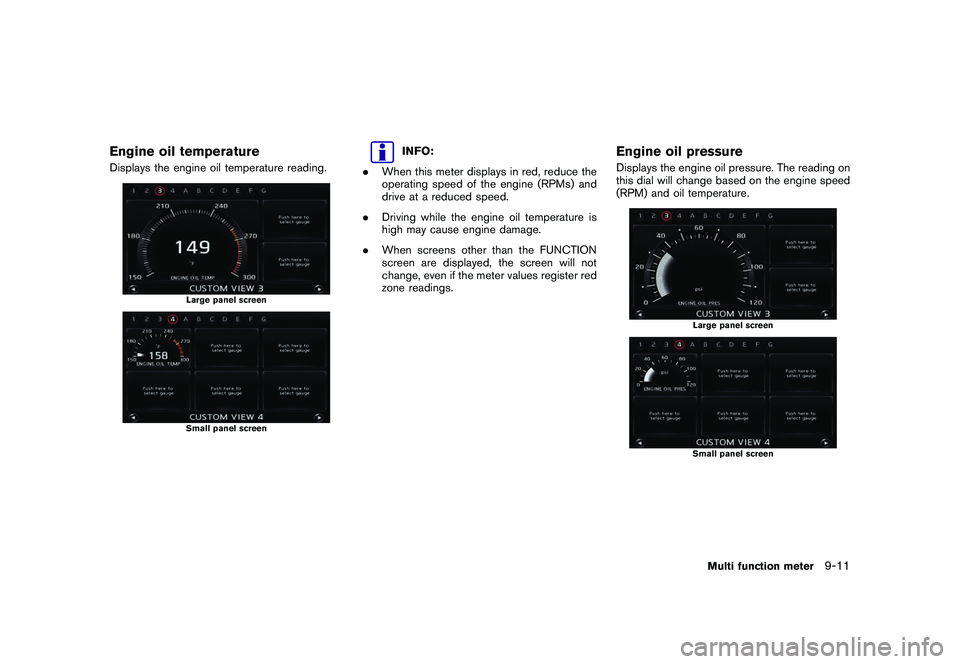
Engine oil temperatureDisplays the engine oil temperature reading.
Large panel screenSmall panel screen
INFO:
. When this meter displays in red, reduce the
operating speed of the engine (RPMs) and
drive at a reduced speed.
. Driving while the engine oil temperature is
high may cause engine damage.
. When screens other than the FUNCTION
screen are displayed, the screen will not
change, even if the meter values register red
zone readings.
Engine oil pressureDisplays the engine oil pressure. The reading on
this dial will change based on the engine speed
(RPM) and oil temperature.
Large panel screenSmall panel screen
Multi function meter
9-11
Page 254 of 312
Black plate (260,1)
Model "R35-N" EDITED: 2009/ 10/ 30
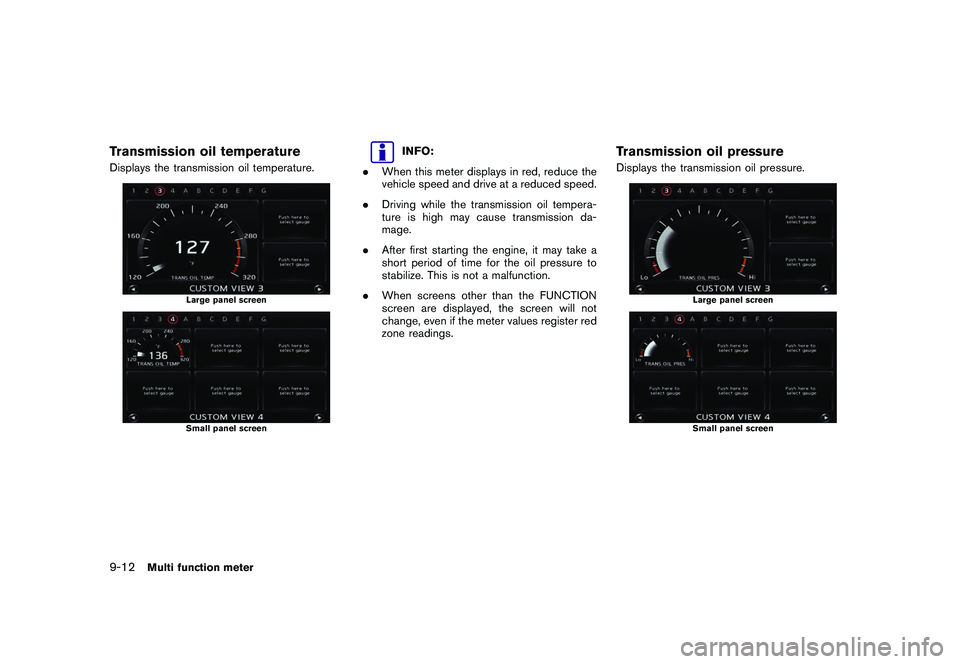
Transmission oil temperatureDisplays the transmission oil temperature.
Large panel screenSmall panel screen
INFO:
. When this meter displays in red, reduce the
vehicle speed and drive at a reduced speed.
. Driving while the transmission oil tempera-
ture is high may cause transmission da-
mage.
. After first starting the engine, it may take a
short period of time for the oil pressure to
stabilize. This is not a malfunction.
. When screens other than the FUNCTION
screen are displayed, the screen will not
change, even if the meter values register red
zone readings.
Transmission oil pressureDisplays the transmission oil pressure.
Large panel screenSmall panel screen
9-12
Multi function meter
Page 255 of 312
Black plate (261,1)
Model "R35-N" EDITED: 2009/ 10/ 30
INFO:
. The oil pressure gauge may momentarily
have a high reading, but this is a result of oil
pressure suppression and does not indicate
a malfunction.
. If the meter reads red frequently, have your
vehicle inspected at your NISSAN dealer or
GT-R certified NISSAN dealer.
. When screens other than the FUNCTION
screen are displayed, the screen will not
change, even if the meter values register red
zone readings.
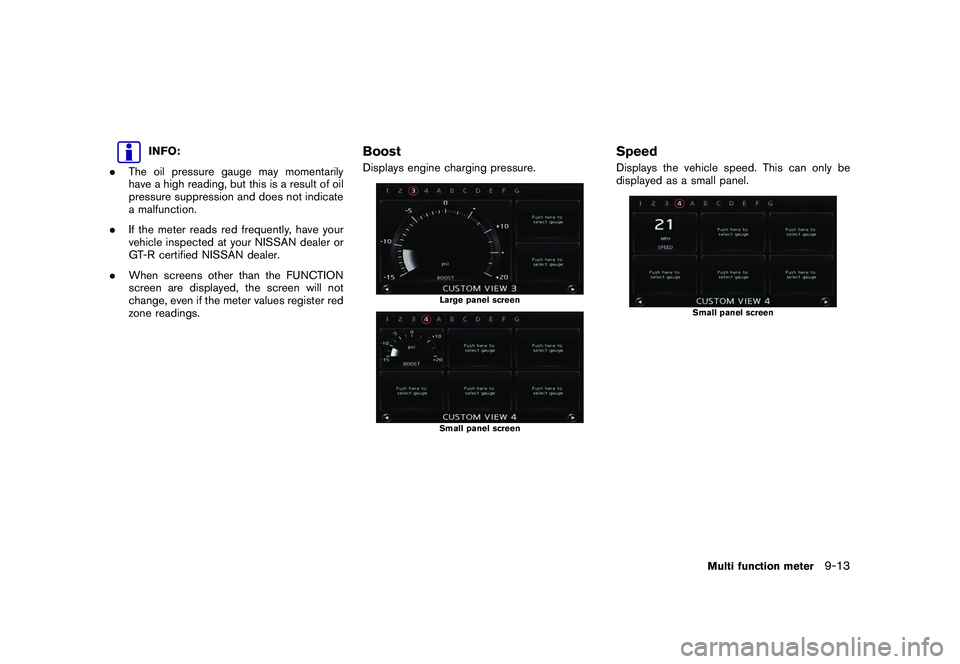
BoostDisplays engine charging pressure.
Large panel screenSmall panel screen
SpeedDisplays the vehicle speed. This can only be
displayed as a small panel.
Small panel screen
Multi function meter
9-13
Page 256 of 312
Black plate (262,1)
Model "R35-N" EDITED: 2009/ 10/ 30
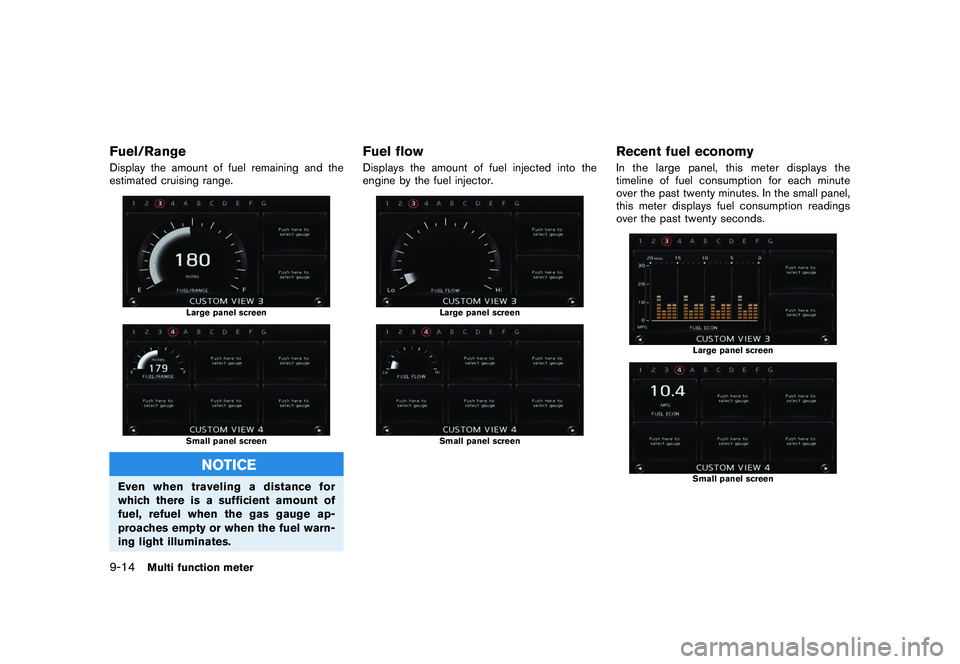
Fuel/RangeDisplay the amount of fuel remaining and the
estimated cruising range.
Large panel screenSmall panel screen
NOTICE
Even when traveling a distance for
which there is a sufficient amount of
fuel, refuel when the gas gauge ap-
proaches empty or when the fuel warn-
ing light illuminates.
Fuel flowDisplays the amount of fuel injected into the
engine by the fuel injector.
Large panel screenSmall panel screen
Recent fuel economyIn the large panel, this meter displays the
timeline of fuel consumption for each minute
over the past twenty minutes. In the small panel,
this meter displays fuel consumption readings
over the past twenty seconds.
Large panel screenSmall panel screen
9-14
Multi function meter
Page 262 of 312
Black plate (268,1)
Model "R35-N" EDITED: 2009/ 10/ 30
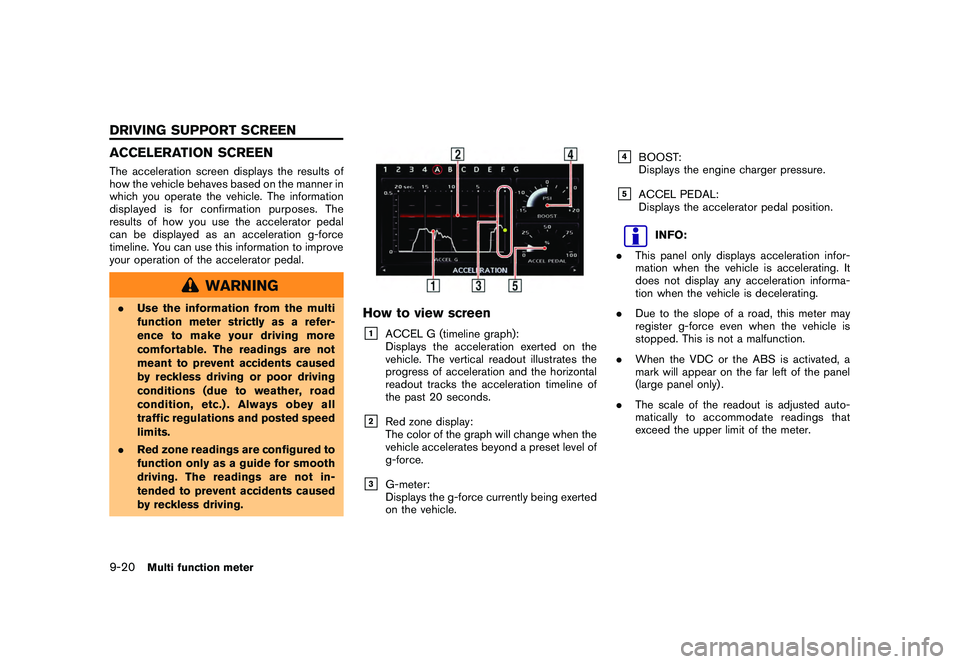
ACCELERATION SCREENThe acceleration screen displays the results of
how the vehicle behaves based on the manner in
which you operate the vehicle. The information
displayed is for confirmation purposes. The
results of how you use the accelerator pedal
can be displayed as an acceleration g-force
timeline. You can use this information to improve
your operation of the accelerator pedal.
WARNING
.Use the information from the multi
function meter strictly as a refer-
ence to make your driving more
comfortable. The readings are not
meant to prevent accidents caused
by reckless driving or poor driving
conditions (due to weather, road
condition, etc.) . Always obey all
traffic regulations and posted speed
limits.
. Red zone readings are configured to
function only as a guide for smooth
driving. The readings are not in-
tended to prevent accidents caused
by reckless driving.
How to view screen&1
ACCEL G (timeline graph):
Displays the acceleration exerted on the
vehicle. The vertical readout illustrates the
progress of acceleration and the horizontal
readout tracks the acceleration timeline of
the past 20 seconds.
&2
Red zone display:
The color of the graph will change when the
vehicle accelerates beyond a preset level of
g-force.
&3
G-meter:
Displays the g-force currently being exerted
on the vehicle.
&4
BOOST:
Displays the engine charger pressure.
&5
ACCEL PEDAL:
Displays the accelerator pedal position.
INFO:
. This panel only displays acceleration infor-
mation when the vehicle is accelerating. It
does not display any acceleration informa-
tion when the vehicle is decelerating.
. Due to the slope of a road, this meter may
register g-force even when the vehicle is
stopped. This is not a malfunction.
. When the VDC or the ABS is activated, a
mark will appear on the far left of the panel
(large panel only) .
. The scale of the readout is adjusted auto-
matically to accommodate readings that
exceed the upper limit of the meter.
9-20
Multi function meter
DRIVING SUPPORT SCREEN
Page 269 of 312
Black plate (275,1)
Model "R35-N" EDITED: 2009/ 10/ 30
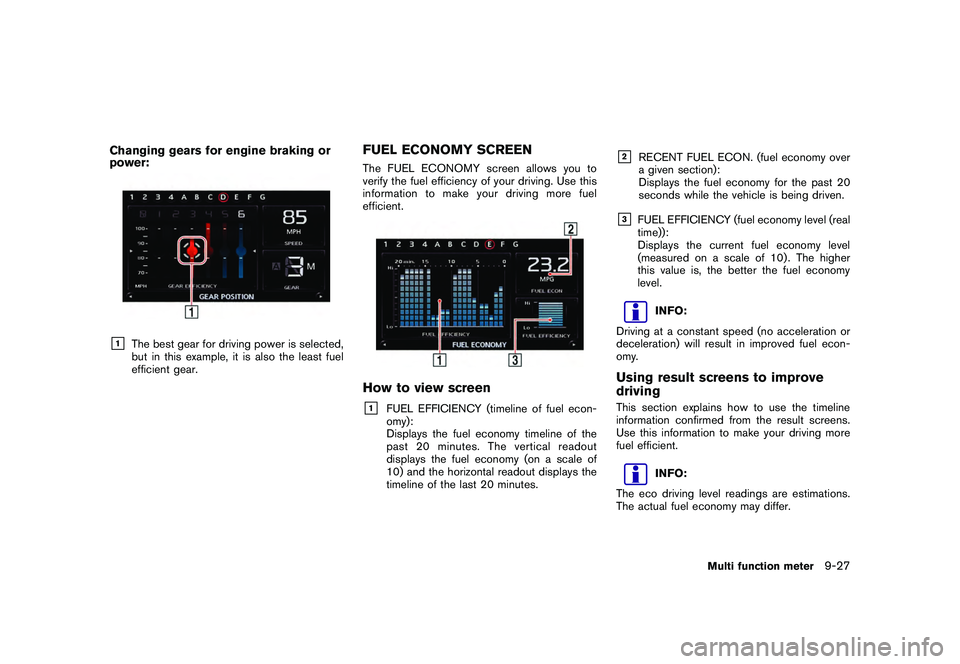
Changing gears for engine braking or
power:&1
The best gear for driving power is selected,
but in this example, it is also the least fuel
efficient gear.
FUEL ECONOMY SCREENThe FUEL ECONOMY screen allows you to
verify the fuel efficiency of your driving. Use this
information to make your driving more fuel
efficient.How to view screen&1
FUEL EFFICIENCY (timeline of fuel econ-
omy):
Displays the fuel economy timeline of the
past 20 minutes. The vertical readout
displays the fuel economy (on a scale of
10) and the horizontal readout displays the
timeline of the last 20 minutes.
&2
RECENT FUEL ECON. (fuel economy over
a given section):
Displays the fuel economy for the past 20
seconds while the vehicle is being driven.
&3
FUEL EFFICIENCY (fuel economy level (real
time)):
Displays the current fuel economy level
(measured on a scale of 10) . The higher
this value is, the better the fuel economy
level.
INFO:
Driving at a constant speed (no acceleration or
deceleration) will result in improved fuel econ-
omy.
Using result screens to improve
drivingThis section explains how to use the timeline
information confirmed from the result screens.
Use this information to make your driving more
fuel efficient.
INFO:
The eco driving level readings are estimations.
The actual fuel economy may differ.
Multi function meter
9-27
Page 276 of 312
Black plate (282,1)
Model "R35-N" EDITED: 2009/ 10/ 30
INFO:
. The STOP WATCH function can only be
used when the clock is activated.
. When the STOP WATCH function is acti-
vated, you cannot use the waypoint timer.
This is the waypoint timer after use of the
STOP WATCH function is completed.
. Even if you stop the engine, when RESUME
is set to ON, the timer will not reset and you
will be able to continue timing your travel.
. If a roadway with a long name has been
recorded as a waypoint, the city and state/
province names may not be displayed.
. If a place name that is not contained in the
map data is recorded as a waypoint, the
waypoint will be displayed by longitude and
latitude.
. Town/city/state/province names configured
in region settings will only be displayed on
the Destination screen for regions in which
the vehicle is located.
About Driver’s notes icon:
: Ordinary road
When your vehicle enters a road, the name of
the road is recorded.: Toll road
When your vehicle enters a toll road, the name
of the road is recorded.: U.S. highways
When your vehicle enters a U.S. highways, the
name of the road is recorded.: Freeway
When your vehicle enters a freeway, the name of
the freeway is recorded.: Parking
When the shift lever is put into the P position,
the vehicle’s current location is recorded.: Check point
When
location is recorded.: Start point
When
Drivers Notes function, the vehicle’s current
location is recorded.
: Destination
When
Drivers Notes function, the vehicle’s current
location is recorded.
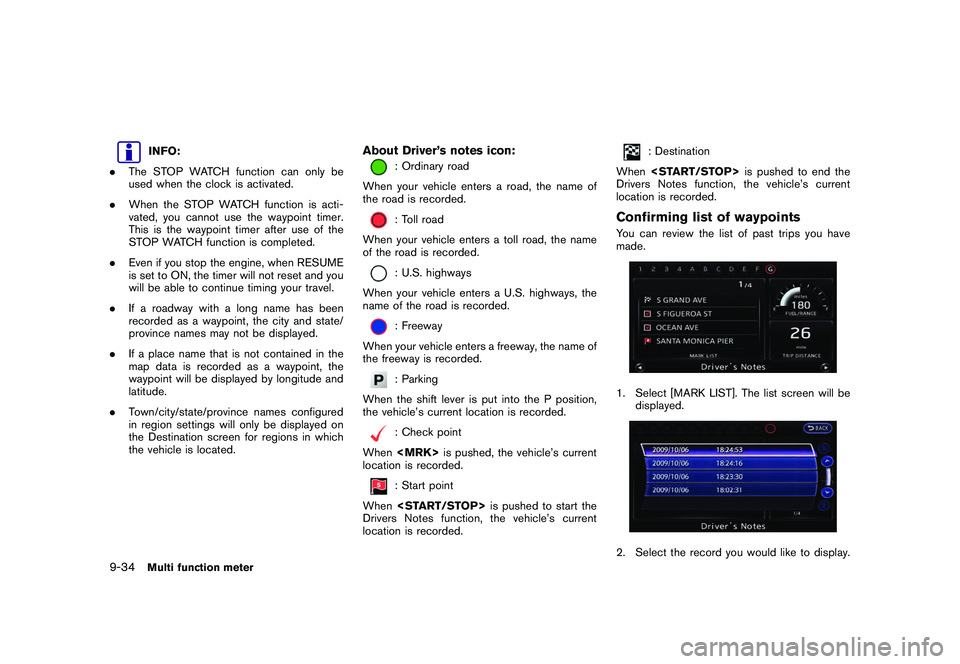
Confirming list of waypointsYou can review the list of past trips you have
made.1. Select [MARK LIST]. The list screen will be displayed.2. Select the record you would like to display.
9-34
Multi function meter
Page 283 of 312
Black plate (289,1)
Model "R35-N" EDITED: 2009/ 10/ 30
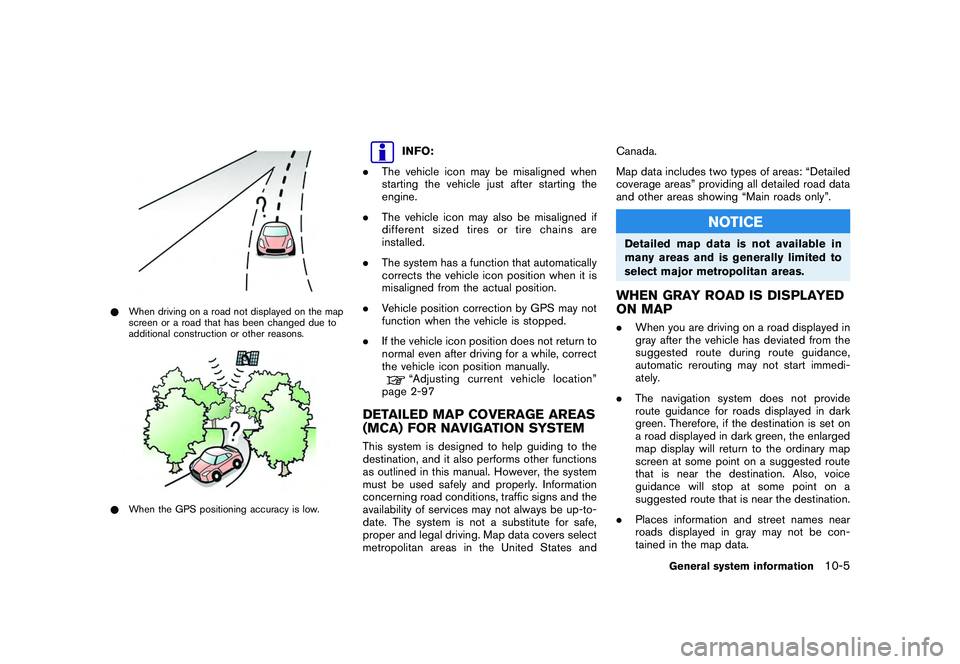
*When driving on a road not displayed on the map
screen or a road that has been changed due to
additional construction or other reasons.*When the GPS positioning accuracy is low.
INFO:
. The vehicle icon may be misaligned when
starting the vehicle just after starting the
engine.
. The vehicle icon may also be misaligned if
different sized tires or tire chains are
installed.
. The system has a function that automatically
corrects the vehicle icon position when it is
misaligned from the actual position.
. Vehicle position correction by GPS may not
function when the vehicle is stopped.
. If the vehicle icon position does not return to
normal even after driving for a while, correct
the vehicle icon position manually.“Adjusting current vehicle location”
page 2-97
DETAILED MAP COVERAGE AREAS
(MCA) FOR NAVIGATION SYSTEMThis system is designed to help guiding to the
destination, and it also performs other functions
as outlined in this manual. However, the system
must be used safely and properly. Information
concerning road conditions, traffic signs and the
availability of services may not always be up-to-
date. The system is not a substitute for safe,
proper and legal driving. Map data covers select
metropolitan areas in the United States and Canada.
Map data includes two types of areas: “Detailed
coverage areas” providing all detailed road data
and other areas showing “Main roads only”.
NOTICE
Detailed map data is not available in
many areas and is generally limited to
select major metropolitan areas.WHEN GRAY ROAD IS DISPLAYED
ON MAP.
When you are driving on a road displayed in
gray after the vehicle has deviated from the
suggested route during route guidance,
automatic rerouting may not start immedi-
ately.
. The navigation system does not provide
route guidance for roads displayed in dark
green. Therefore, if the destination is set on
a road displayed in dark green, the enlarged
map display will return to the ordinary map
screen at some point on a suggested route
that is near the destination. Also, voice
guidance will stop at some point on a
suggested route that is near the destination.
. Places information and street names near
roads displayed in gray may not be con-
tained in the map data.
General system information
10-5
Page 292 of 312
Black plate (298,1)
Model "R35-N" EDITED: 2009/ 10/ 30
ber that actual road conditions
and traffic regulations take pre-
cedence over the information
contained on the navigation sys-
tem.
— The Software may contain inac- curate or incomplete informa-
tion due to the passage of
time, changing circumstances,
and the sources of information
used. Please respect current
traffic conditions and regula-
tions at all times while driving.
— Where actual road conditions and highway regulations differ
from the information contained
on the navigation system, abide
by the highway regulations.
— Keep the amount of time spent viewing the screen while driving
to a strict minimum.
The navigation system does not provide,
nor represent in any way information on:
traffic and highway regulations; technical
aspects of the vehicle including weight,
height, width, load and speed limits; road
conditions including grade, percentage of
incline and surface conditions; obstacles
such as the height and width of bridges and tunnels; and other current driving or
road conditions. Always rely on your own
judgement when driving a car, taking into
account current driving conditions.
The marks of companies displayed by this
product to indicate business locations are the
marks of their respective owners. The use of
such marks in this product does not imply any
sponsorship, approval, or endorsement by such
companies of this product.
END-USER TERMSThe data (“Data”) is provided for your personal,
internal use only and not for resale. It is
protected by copyright, and is subject to the
following terms and conditions which are agreed
to by you, on the one hand, and HITACHI
(“HITACHI”) and its licensors (including their
licensors and suppliers) on the other hand.*C2008 NAVTEQ. All rights reserved.
The Data for areas of Canada includes informa-
tion taken with permission from Canadian
authorities, including:
*CHer Majesty the Queen
in Right of Canada,*C
Queen’s Printer for
Ontario,
*C
Canada Post Corporation, Geo-
Base
®.
NAVTEQ holds a non-exclusive license from the
United States Postal Service
®to publish and
sell ZIP+4
®information.
*CUnited States Postal Service
®2008. Prices
are not established, controlled or approved by
the United States Postal Service®. The following
trademarks and registrations are owned by the
USPS: United States Postal Service, USPS, and
ZIP+4.
Terms and conditionsPersonal Use Only. You agree to use this Data
together with Nissan Automotive Products for
the solely personal, non-commercial purposes
for which you were licensed, and not for service
bureau, timesharing or other similar purposes.
Accordingly, but subject to the restrictions set
forth in the following paragraphs, you may copy
this Data only as necessary for your personal
use to (i) view it, and (ii) save it, provided that
you do not remove any copyright notices that
appear and do not modify the Data in any way.
You agree not to otherwise reproduce, copy,
modify, decompile, disassemble or reverse
engineer any portion of this Data, and may not
transfer or distribute it in any form, for any
purpose, except to the extent permitted by
mandatory laws. Multi-disc sets may only be
transferredorsoldasacompletesetas
provided by HITACHI and not as a subset
thereof.Restrictions. Except where you have been
specifically licensed to do so by HITACHI, and
without limiting the preceding paragraph, you
may not (a) use this Data with any products,
10-14
General system information