brake NISSAN GT-R 2011 Owners Manual
[x] Cancel search | Manufacturer: NISSAN, Model Year: 2011, Model line: GT-R, Model: NISSAN GT-R 2011Pages: 312, PDF Size: 13.07 MB
Page 7 of 312
Black plate (5,1)
Model "R35-N" EDITED: 2009/ 10/ 30
This system is primarily designed to help you
reach your destination, and it also performs
other functions as outlined in this manual.
However, you, the driver, must use the system
safely and properly. Information concerning road
conditions, traffic signs and the availability of
services may not always be up-to-date. The
system is not a substitute for safe, proper and
legal driving.
Before using the navigation system, please read
the following safety information. Always use the
system as outlined in this manual.
WARNING
.When the driver wants to operate
the navigation system or use the
center dial, first park the vehicle in a
safe location and set the parking
brake. Operating the system while
driving can distract the driver and
may result in a serious accident.
. Do not rely on route guidance alone.
Always be sure that all driving
maneuvers are legal and safe in
order to avoid accidents.
. Do not disassemble or modify this
system. If you do, it may result in
accidents, fire or electrical shock.
. If you notice any foreign objects in
the system hardware, spill liquid on
the system or notice smoke or a
smell coming from it, stop using the
system immediately and contact a
GT-R certified NISSAN dealer. Ignor-
ing such conditions may lead to
accidents, fire or electrical shock.
CAUTION
.Do not use this system if you notice
any malfunctions such as a frozen
screen or the lack of sound. Con-
tinued use of the system may result
in accidents, fire or electrical shock.
. Some states/provinces may have
laws limiting the use of video
screens while driving. Use this sys-
tem only where it is legal to do so.
. Extreme temperature conditions
[below 48F( 208 C) and above
158 8F (70 8C)] could affect the per-
formance of the system.
NOTICE
Do not keep the navigation system
running with the engine stopped. Doing
so may discharge the vehicle battery.
When you use the navigation system,
always keep the engine running.
Introduction
0-3
SAFETY INFORMATION
Page 13 of 312
Black plate (11,1)
Model "R35-N" EDITED: 2009/ 10/ 30
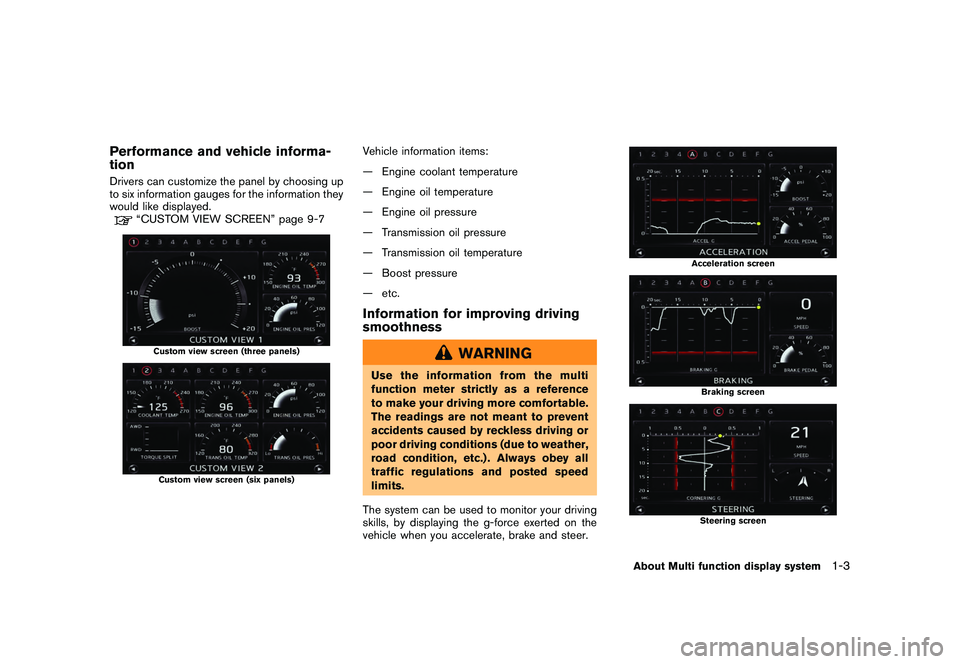
Performance and vehicle informa-
tionDrivers can customize the panel by choosing up
to six information gauges for the information they
would like displayed.
“CUSTOM VIEW SCREEN” page 9-7
Custom view screen (three panels)Custom view screen (six panels)
Vehicle information items:
— Engine coolant temperature
— Engine oil temperature
— Engine oil pressure
— Transmission oil pressure
— Transmission oil temperature
— Boost pressure
— etc.Information for improving driving
smoothness
WARNING
Use the information from the multi
function meter strictly as a reference
to make your driving more comfortable.
The readings are not meant to prevent
accidents caused by reckless driving or
poor driving conditions (due to weather,
road condition, etc.) . Always obey all
traffic regulations and posted speed
limits.
The system can be used to monitor your driving
skills, by displaying the g-force exerted on the
vehicle when you accelerate, brake and steer.
Acceleration screenBraking screenSteering screen
About Multi function display system
1-3
Page 14 of 312
Black plate (12,1)
Model "R35-N" EDITED: 2009/ 10/ 30
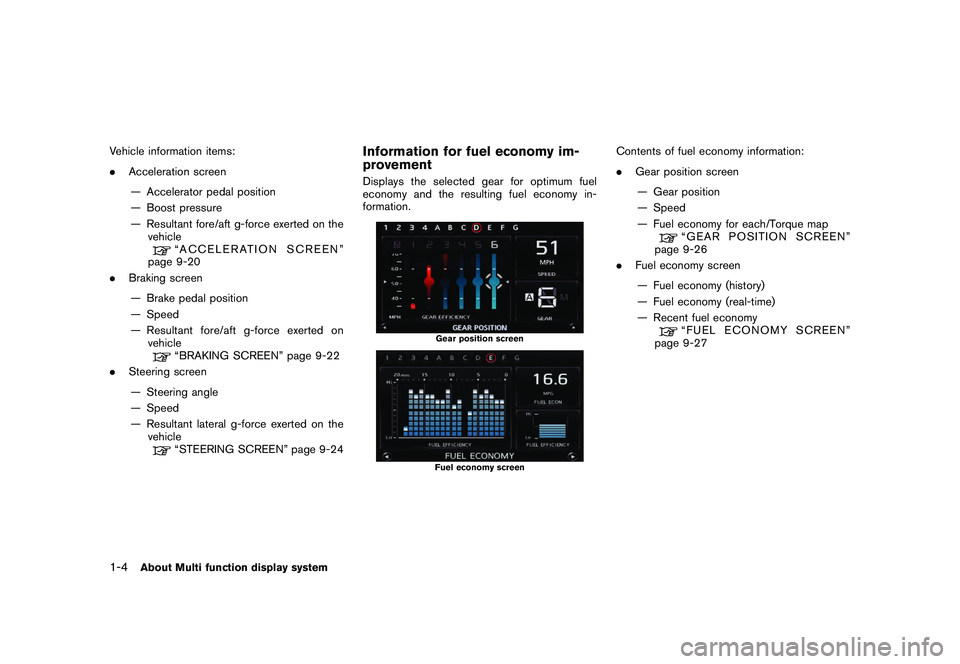
Vehicle information items:
.Acceleration screen
— Accelerator pedal position
— Boost pressure
— Resultant fore/aft g-force exerted on the vehicle
“ACCELERATION SCREEN”
page 9-20
. Braking screen
— Brake pedal position
— Speed
— Resultant fore/aft g-force exerted on vehicle“BRAKING SCREEN” page 9-22
. Steering screen
— Steering angle
— Speed
— Resultant lateral g-force exerted on the vehicle“STEERING SCREEN” page 9-24
Information for fuel economy im-
provementDisplays the selected gear for optimum fuel
economy and the resulting fuel economy in-
formation.
Gear position screenFuel economy screen
Contents of fuel economy information:
. Gear position screen
— Gear position
— Speed
— Fuel economy for each/Torque map
“GEAR POSITION SCREEN”
page 9-26
. Fuel economy screen
— Fuel economy (history)
— Fuel economy (real-time)
— Recent fuel economy“FUEL ECONOMY SCREEN”
page 9-27
1-4
About Multi function display system
Page 142 of 312
Black plate (142,1)
Model "R35-N" EDITED: 2009/ 10/ 30
DVD (DIGITAL VERSATILE DISC)
PLAYER OPERATION
PrecautionsStart the engine when using the DVD entertain-
ment system.
Movies will not be shown on the front display
while the vehicle is in any drive position to
reduce driver distraction. Audio is available
when a movie is played. To view movies in the
front display, stop the vehicle in a safe location,
move the shift lever to the P (Park) position and
apply the parking brake.
WARNING
.The driver must not attempt to
operate the DVD system or wear
the headphones while the vehicle is
in motion so that full attention may
be given to vehicle operation.
. Do not attempt to modify the system
to display a movie on the front
screen while the vehicle is being
driven. Doing so may distract the
driver and may cause a collision and
serious personal injury or death.
CAUTION
.Only operate the DVD while the
vehicle engine is running. Operating
the DVD for extended periods of
time with the engine OFF can dis-
charge the vehicle battery.
. Do not allow the system to get wet.
Excessive moisture such as spilled
liquids may cause the system to
malfunction.
. While playing VIDEO-CD media, this
DVD player does not guarantee
complete functionality of all VI-
DEO-CD formats.Display settingsTo adjust the front display mode, push
[Others] and then select [Display].
To adjust the display ON/OFF, brightness, tint,
color and contrast, select [Display Adjustment]
and then select each key.
Then you can adjust each item using the center
dial. After changes have been made push
<
> to save the setting.
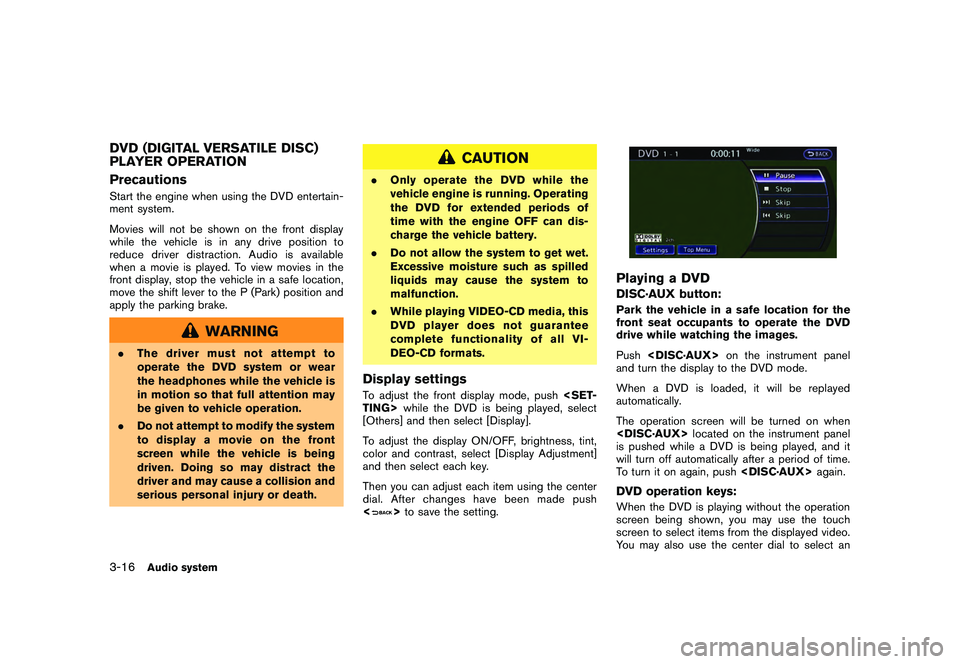
Playing a DVDDISC·AUX button:Park the vehicle in a safe location for the
front seat occupants to operate the DVD
drive while watching the images.
Push
and turn the display to the DVD mode.
When a DVD is loaded, it will be replayed
automatically.
The operation screen will be turned on when
is pushed while a DVD is being played, and it
will turn off automatically after a period of time.
To turn it on again, push
screen being shown, you may use the touch
screen to select items from the displayed video.
You may also use the center dial to select an
3-16
Audio system
Page 245 of 312
Black plate (251,1)
Model "R35-N" EDITED: 2009/ 10/ 30
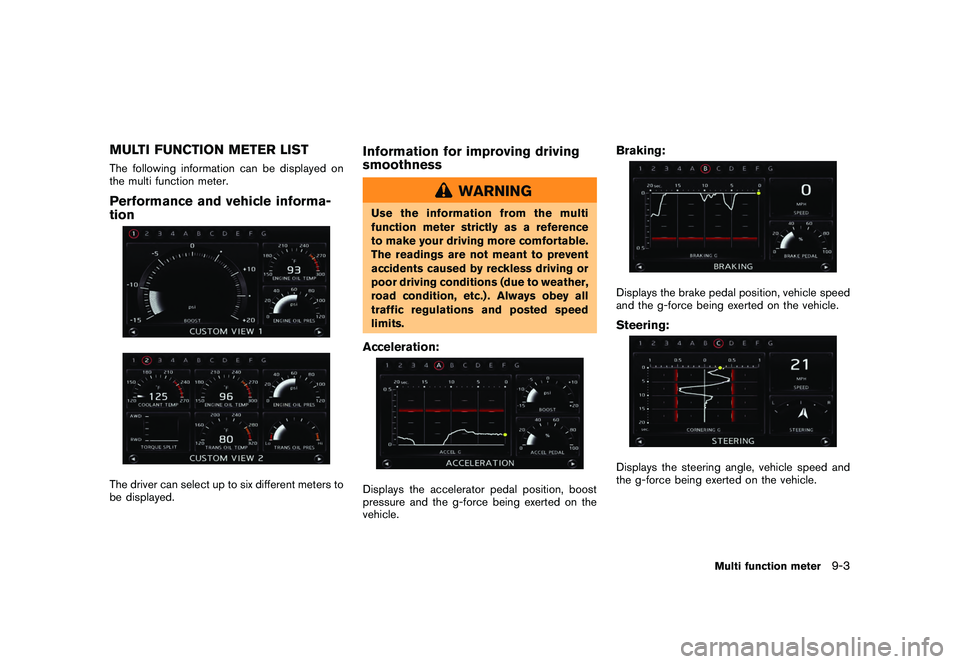
MULTI FUNCTION METER LISTThe following information can be displayed on
the multi function meter.Performance and vehicle informa-
tionThe driver can select up to six different meters to
be displayed.
Information for improving driving
smoothness
WARNING
Use the information from the multi
function meter strictly as a reference
to make your driving more comfortable.
The readings are not meant to prevent
accidents caused by reckless driving or
poor driving conditions (due to weather,
road condition, etc.) . Always obey all
traffic regulations and posted speed
limits.Acceleration:Displays the accelerator pedal position, boost
pressure and the g-force being exerted on the
vehicle.
Braking:Displays the brake pedal position, vehicle speed
and the g-force being exerted on the vehicle.Steering:Displays the steering angle, vehicle speed and
the g-force being exerted on the vehicle.
Multi function meter
9-3
Page 251 of 312
Black plate (257,1)
Model "R35-N" EDITED: 2009/ 10/ 30
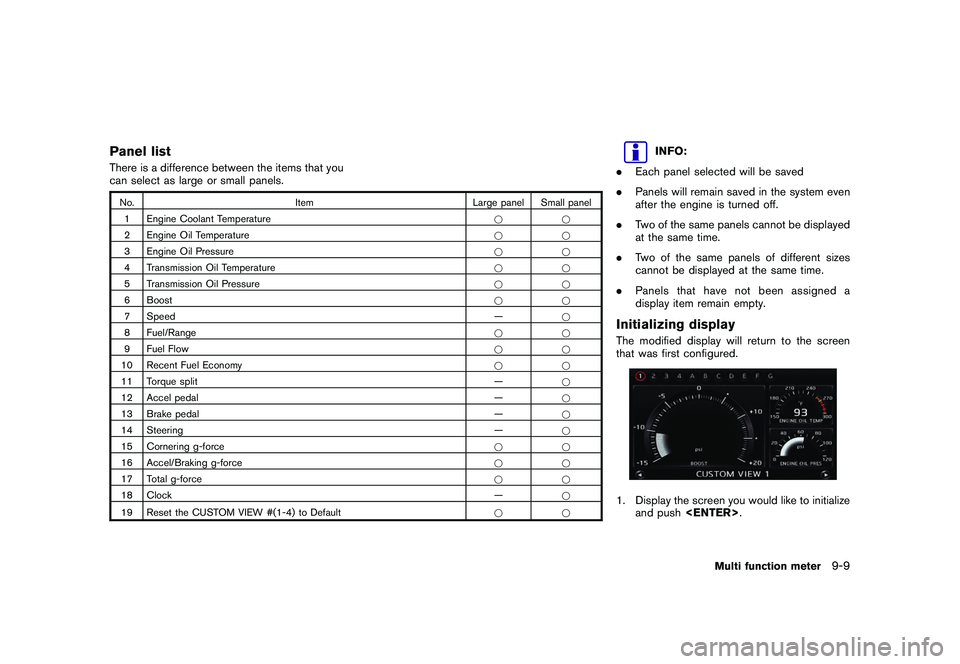
Panel listThere is a difference between the items that you
can select as large or small panels.No.Item Large panel Small panel
1 Engine Coolant Temperature **
2 Engine Oil Temperature **
3 Engine Oil Pressure **
4 Transmission Oil Temperature **
5 Transmission Oil Pressure **
6 Boost **
7 Speed —*
8 Fuel/Range **
9 Fuel Flow **
10 Recent Fuel Economy **
11 Torque split —*
12 Accel pedal —*
13 Brake pedal —*
14 Steering —*
15 Cornering g-force **
16 Accel/Braking g-force **
17 Total g-force **
18 Clock —*
19 Reset the CUSTOM VIEW #(1-4) to Default *
*
INFO:
. Each panel selected will be saved
. Panels will remain saved in the system even
after the engine is turned off.
. Two of the same panels cannot be displayed
at the same time.
. Two of the same panels of different sizes
cannot be displayed at the same time.
. Panels that have not been assigned a
display item remain empty.
Initializing displayThe modified display will return to the screen
that was first configured.1. Display the screen you would like to initialize
and push
Multi function meter
9-9
Page 258 of 312
Black plate (264,1)
Model "R35-N" EDITED: 2009/ 10/ 30
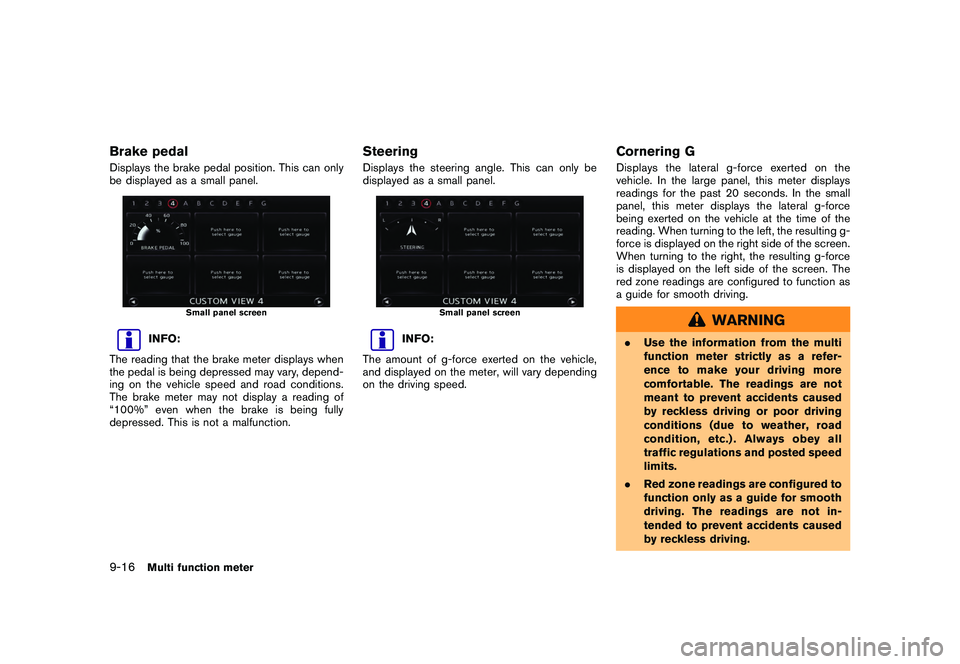
Brake pedalDisplays the brake pedal position. This can only
be displayed as a small panel.
Small panel screen
INFO:
The reading that the brake meter displays when
the pedal is being depressed may vary, depend-
ing on the vehicle speed and road conditions.
The brake meter may not display a reading of
“100%” even when the brake is being fully
depressed. This is not a malfunction.
SteeringDisplays the steering angle. This can only be
displayed as a small panel.
Small panel screen
INFO:
The amount of g-force exerted on the vehicle,
and displayed on the meter, will vary depending
on the driving speed.
Cornering GDisplays the lateral g-force exerted on the
vehicle. In the large panel, this meter displays
readings for the past 20 seconds. In the small
panel, this meter displays the lateral g-force
being exerted on the vehicle at the time of the
reading. When turning to the left, the resulting g-
force is displayed on the right side of the screen.
When turning to the right, the resulting g-force
is displayed on the left side of the screen. The
red zone readings are configured to function as
a guide for smooth driving.
WARNING
. Use the information from the multi
function meter strictly as a refer-
ence to make your driving more
comfortable. The readings are not
meant to prevent accidents caused
by reckless driving or poor driving
conditions (due to weather, road
condition, etc.) . Always obey all
traffic regulations and posted speed
limits.
. Red zone readings are configured to
function only as a guide for smooth
driving. The readings are not in-
tended to prevent accidents caused
by reckless driving.
9-16
Multi function meter
Page 264 of 312
Black plate (270,1)
Model "R35-N" EDITED: 2009/ 10/ 30
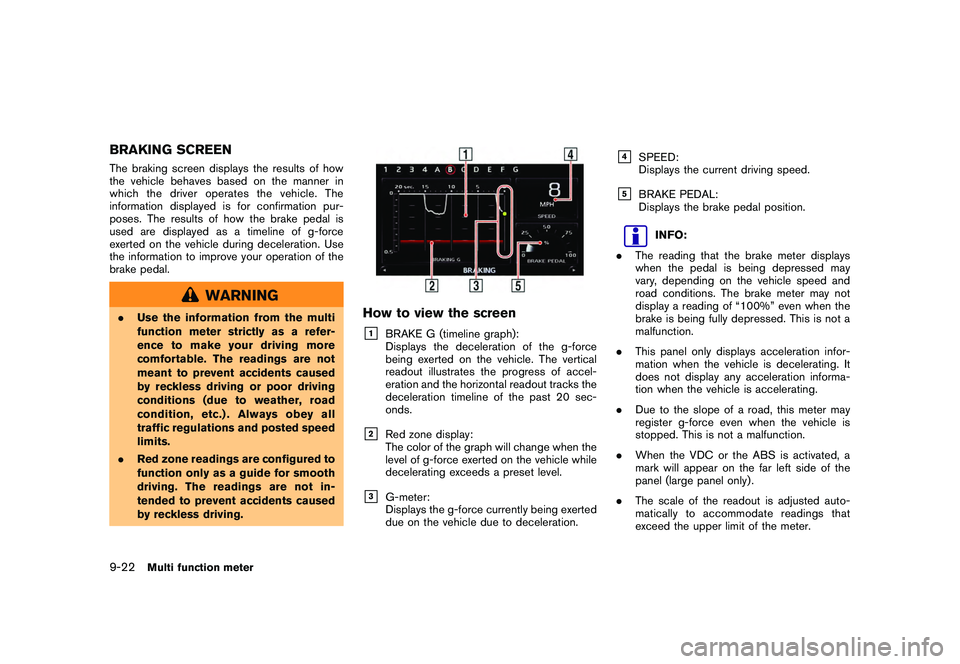
BRAKING SCREENThe braking screen displays the results of how
the vehicle behaves based on the manner in
which the driver operates the vehicle. The
information displayed is for confirmation pur-
poses. The results of how the brake pedal is
used are displayed as a timeline of g-force
exerted on the vehicle during deceleration. Use
the information to improve your operation of the
brake pedal.
WARNING
.Use the information from the multi
function meter strictly as a refer-
ence to make your driving more
comfortable. The readings are not
meant to prevent accidents caused
by reckless driving or poor driving
conditions (due to weather, road
condition, etc.) . Always obey all
traffic regulations and posted speed
limits.
. Red zone readings are configured to
function only as a guide for smooth
driving. The readings are not in-
tended to prevent accidents caused
by reckless driving.
How to view the screen&1
BRAKE G (timeline graph):
Displays the deceleration of the g-force
being exerted on the vehicle. The vertical
readout illustrates the progress of accel-
eration and the horizontal readout tracks the
deceleration timeline of the past 20 sec-
onds.
&2
Red zone display:
The color of the graph will change when the
level of g-force exerted on the vehicle while
decelerating exceeds a preset level.
&3
G-meter:
Displays the g-force currently being exerted
due on the vehicle due to deceleration.
&4
SPEED:
Displays the current driving speed.
&5
BRAKE PEDAL:
Displays the brake pedal position.
INFO:
. The reading that the brake meter displays
when the pedal is being depressed may
vary, depending on the vehicle speed and
road conditions. The brake meter may not
display a reading of “100%” even when the
brake is being fully depressed. This is not a
malfunction.
. This panel only displays acceleration infor-
mation when the vehicle is decelerating. It
does not display any acceleration informa-
tion when the vehicle is accelerating.
. Due to the slope of a road, this meter may
register g-force even when the vehicle is
stopped. This is not a malfunction.
. When the VDC or the ABS is activated, a
mark will appear on the far left side of the
panel (large panel only) .
. The scale of the readout is adjusted auto-
matically to accommodate readings that
exceed the upper limit of the meter.
9-22
Multi function meter
Page 265 of 312
Black plate (271,1)
Model "R35-N" EDITED: 2009/ 10/ 30
Using result screens to improve
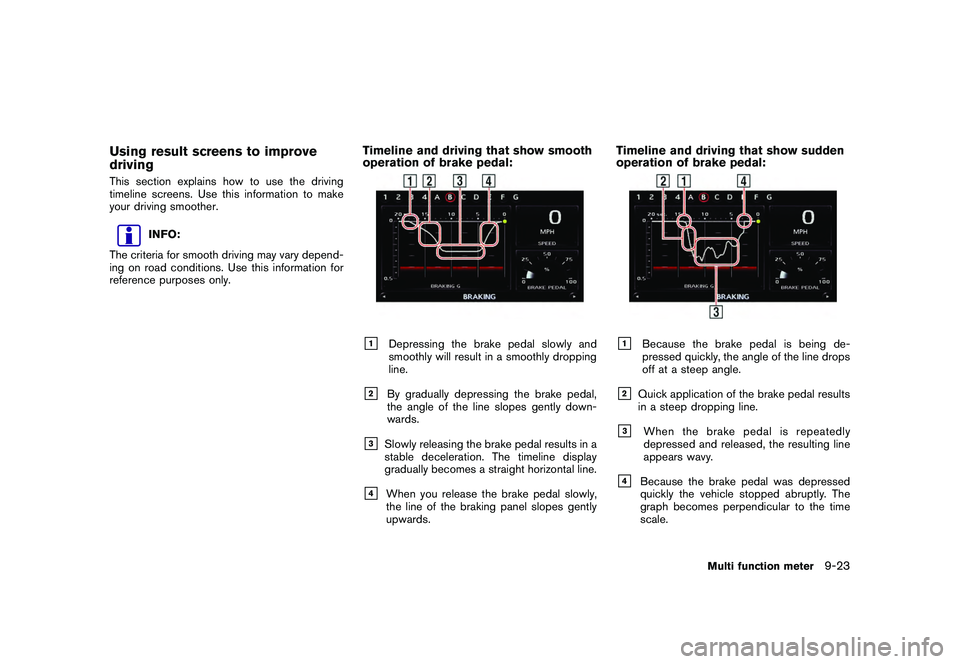
drivingThis section explains how to use the driving
timeline screens. Use this information to make
your driving smoother.
INFO:
The criteria for smooth driving may vary depend-
ing on road conditions. Use this information for
reference purposes only.
Timeline and driving that show smooth
operation of brake pedal:&1
Depressing the brake pedal slowly and
smoothly will result in a smoothly dropping
line.
&2
By gradually depressing the brake pedal,
the angle of the line slopes gently down-
wards.
&3
Slowly releasing the brake pedal results in a
stable deceleration. The timeline display
gradually becomes a straight horizontal line.
&4
When you release the brake pedal slowly,
the line of the braking panel slopes gently
upwards.
Timeline and driving that show sudden
operation of brake pedal:&1
Because the brake pedal is being de-
pressed quickly, the angle of the line drops
off at a steep angle.
&2
Quick application of the brake pedal results
in a steep dropping line.
&3
When the brake pedal is repeatedly
depressed and released, the resulting line
appears wavy.
&4
Because the brake pedal was depressed
quickly the vehicle stopped abruptly. The
graph becomes perpendicular to the time
scale.
Multi function meter
9-23
Page 291 of 312
Black plate (297,1)
Model "R35-N" EDITED: 2009/ 10/ 30
HOW TO ORDER MAP DATA UP-
DATESTo order updated map data, contact the
NISSAN NAVIGATION SYSTEM HELPDESK.
See the contact information on the inside front
cover of this manual.ABOUT MAP DATA1. This map data has been prepared byHITACHI, LTD. under licence from ZENRIN
CO., LTD. and NAVTEQ. ZENRIN CO., LTD.
has added, processed and digitized data
based on the digital road map data of
Navigation Technologies Corporation. Due
to the production timing of the map data,
some new roads may not be included in this
map data or some of the names or roads
may be different from those at the time you
use this map data.
2. Traffic control and regulation data used in this map data may be different from those at
the time you use this map data due to the
data production timing. When driving your
vehicle, follow the actual traffic control signs
and notices on the roads.
3. Reproducing or copying this map software is strictly prohibited by law.
Published by Nissan North America, Inc.*C
2006 Navigation Technologies. All rights reserved.
Certain business data provided by infoUSA, Inc.,
Omaha, NE, Copyright
*C1993-2008 NAVTEQ. All Rights Reserved.
*C2008, All Rights Reserved.
*CZENRIN CO., LTD. 2009. All rights reserved.
*CZENRIN USA, INC. 2008. All rights reserved.
*C2008 Zagat Survey, LLC.
WARNING
.
This navigation system should not
be used to replace your own judge-
ment. No itinerary suggested by this
navigation system should ever over-
ride any highway regulations, your
own judgement, or a knowledge of
safe driving practices. Do not follow
the navigation system’s suggested
itinerary if it would cause you to
perform a dangerous or illegal act,
place you in a dangerous situation,
or take you into an area you con-
sider unsafe.
. The advice provided by the naviga-
tion system is to be regarded as a
suggestion only. There may be times when the navigation system
displays the vehicle’s location in-
correctly, fails to suggest the short-
est route, or fails to direct you to the
your desired destination. In such
instances, rely on your own driving
judgement, taking into account the
driving conditions at the time.
. Do not use the navigation system to
locate emergency services. The da-
tabase does not contain a complete
listing of emergency services such
as police stations, fire halls, hospi-
tals and walk-in clinics. Please
show discretion and ask for direc-
tions in such instances.
. As the driver, you alone are respon-
sible for your driving safety.
— In order to avoid a traffic acci-
dent, do not operate the system
while driving.
— In order to avoid a traffic acci- dent, operate the system only
when the vehicle is stopped at a
safe place and the parking
brake is on.
— In order to avoid a traffic acci- dent or traffic offence, remem-
General system information
10-13
MAP DATA