Prox NISSAN GT-R 2014 R35 User Guide
[x] Cancel search | Manufacturer: NISSAN, Model Year: 2014, Model line: GT-R, Model: NISSAN GT-R 2014 R35Pages: 354, PDF Size: 5.08 MB
Page 126 of 354
.Although you can continue driving
with a punctured run-flat tire, re-
member that vehicle handling sta-
bility is reduced, which could lead to
an accident and personal injury.
Also, driving a long distance at high
speeds may damage the tires.
. Do not drive at speeds above 50
MPH (80 km/h) and do not drive
more than 50 miles (80 km) with a
punctured run-flat tire. The actual
distance the vehicle can be driven
on a flat tire depends on outside
temperature, vehicle load, road con-
ditions and other factors.
. When a wheel is replaced, the TPMS
will not function and the low tire
pressure warning light will flash for
approximately 1 minute. The light
will remain on after the 1 minute.
Contact a GT-R certified NISSAN
dealer as soon as possible for tire
replacement and/or system reset-
ting.
. Replacing tires with those not ori-
ginally specified by NISSAN could
affect the proper operation of the
TPMS.CAUTION
.The TPMS is not a substitute for the
regular tire pressure check. Be sure
to check the tire pressure regularly.
. Be sure to install the specified size
of tires on the four wheels.
NOTE:
. If the vehicle is being driven at speeds
of less than 16 MPH (25 km/h) , the
TPMS may not operate correctly.
. The tires of this vehicle are filled with
nitrogen gas. When the tire pressure is
low, fill the tires with nitrogen gas.
Contact a GT-R certified NISSAN dealer
for information on filling the tires with
nitrogen gas.
Master warning light
When the ignition switch is in the ON position,
the master warning light illuminates if any of the
warning displays appear on the vehicle informa-
tion display. (
“Warning display” page 2-
33)
Seat belt warning light and
chime
The light and chime remind you to fasten seat
belts. The light illuminates whenever the ignition
switch is pushed to the ON position, and will
remain illuminated until the driver’s seat belt is
fastened. At the same time, the chime will sound
for about 6 seconds unless the driver’s seat belt
is securely fastened.
The seat belt warning light for the front
passenger will illuminate if the seat belt is not
fastened when the front passenger’s seat is
occupied. For approximately 5 seconds after the
ignition switch is in the ON position, the system
does not activate the warning light for the front
passenger. (
“Seat belts” page 1-7)
Supplemental air bag warning
light
After pushing the ignition switch to the ON
position, the supplemental air bag warning light
will illuminate for about 7 seconds and then turn
off. This means the system is operational.
If any of the following conditions occur, the front
air bag, side air bag, curtain air bag and
pretensioner systems need servicing and your
vehicle must be taken to a GT-R certified
NISSAN dealer.
Instruments and controls2-29
Page 127 of 354
2-30Instruments and controls
.The supplemental air bag warning light
remains on after approximately 7 seconds.
. The supplemental air bag warning light
flashes intermittently.
. The supplemental air bag warning light does
not come on at all.
Unless checked and repaired, the supplemental
restraint system (air bag system) and/or the
pretensioners may not function properly.
(
“Supplemental restraint system” page 1-
34)
WARNING
If the supplemental air bag warning
light is on, it could mean that the front
air bag, side air bag, curtain air bag
and/or pretensioner systems will not
operate in an accident. To help avoid
injury to yourself or others, have your
vehicle checked by a GT-R certified
NISSAN dealer as soon as possible.
Transmission warning light
This light warns of the following malfunctions.
Transmission system malfunction:
The light blinks if a malfunction in the transmis-
sion system occurs. If the light blinks, certain
gear positions may become unusable, so that
the vehicle may become undrivable. Have the
system inspected promptly by a GT-R certified
NISSAN dealer.
Transmission oil temperature high:
The light illuminates if the transmission oil
temperature becomes unusually high. If the light
illuminates, avoid driving at high speed or at high
engine speed until the light turns off. The light
will turn off after a short period of time and the
vehicle can then be driven normally. If the light
illuminates frequently, contact a GT-R certified
NISSAN dealer.
NOTICE
If the light continues to illuminate, the
engine output may be reduced to pre-
vent transmission damage. Transmission clutch temperature high:
The light illuminates if clutch temperature
becomes unusually high. If the light illuminates,
pull off the road in a safe area and idle the
engine. When the light turns off, driving can be
resumed. If the light illuminates frequently,
contact a GT-R certified NISSAN dealer.
NOTICE
.
Continuing to drive with the light on
could cause serious damage to the
transmission.
. If the light continues to illuminate,
the vehicle cannot be driven be-
cause the engine output may be
reduced and the clutch may be
reduced to keep the clutch disen-
gaged.
R mode start function:
If the R mode start function is used 4 times
continuously, the function may be disabled and
cannot be turned on for protection. While the
function is disabled, the warning light illumi-
nates. When the warning light goes off, the
function can be used again. (
“R mode start
function” page 5-31)
Page 128 of 354
When the warning light illuminates, perform cool
down driving (driving 1.3 mile (2 km) in 5th or
6th gear at a speed of approximately 37 - 50
MPH (60 - 80 km/h) while checking the
temperature of the transmission oil until the
warning light goes off.
NOTICE
While the warning light is illuminated,
the engine output is controlled so that
it does not increase.
Vehicle Dynamic Control (VDC)
warning light
The light will blink when the VDC system or the
traction control system is operating, thus alerting
the driver that the vehicle is nearing its traction
limits. The road surface may be slippery.
If the VDC warning light illuminates when the
VDC system is turned on, this light alerts the
driver to the fact that the VDC system’s fail-safe
mode is operating, for example the VDC or hill
start assist system may not be functioning
properly. Have the system checked by a GT-R
certified NISSAN dealer. If a malfunction occurs
in the system, the VDC system function will be
canceled but the vehicle is still driveable. (
“Vehicle Dynamic Control (VDC) system”
page 5-49)
INDICATOR LIGHTS
Cruise main switch indicator
light
The light comes on when the cruise control is
pushed. The light turns off when the main switch
is pushed again. While the cruise control system
main switch indicator light is on, the cruise
control system is operational.
Cruise set switch indicator
light
The light comes on while the vehicle speed is
controlled by the cruise control system. If the
light blinks while the engine is running, it may
indicate the cruise control system is not
functioning properly. Have the system checked
by a GT-R certified NISSAN dealer.
Exterior light indicator
This indicator illuminates when the headlight
switch is turned to the AUTO,orposition and the front parking lights, instrument
panel lights, rear combination lights, license
plate lights or headlights are on. The indicator
turns off when these lights are turned off.
Front passenger air bag status
light
The front passenger air bag status light ()
will be lit and the passenger front air bag will be
OFF depending on how the front passenger
seat is being used. (
“NISSAN Advanced
Air Bag System (front seats)” page 1-40)
High beam indicator light
This light comes on when the headlight high
beam is on and goes out when the low beam is
selected.
Malfunction Indicator Light
(MIL)
If the malfunction indicator light comes on
steady or blinks while the engine is running, it
may indicate a potential emission control mal-
function.
The malfunction indicator light may also come on
steady if the fuel-filler cap is loose or missing, or
if the vehicle runs out of fuel. Check to make
sure the fuel-filler cap is installed and closed
tightly, and that the vehicle has at least 3 US
gallons (12 liters) of fuel in the fuel tank.
After a few driving trips, the
light should
turn off if no other potential emission control
system malfunction exists.
If this indicator light remains on for 20 seconds
Instruments and controls2-31
Page 137 of 354
2-40Instruments and controls
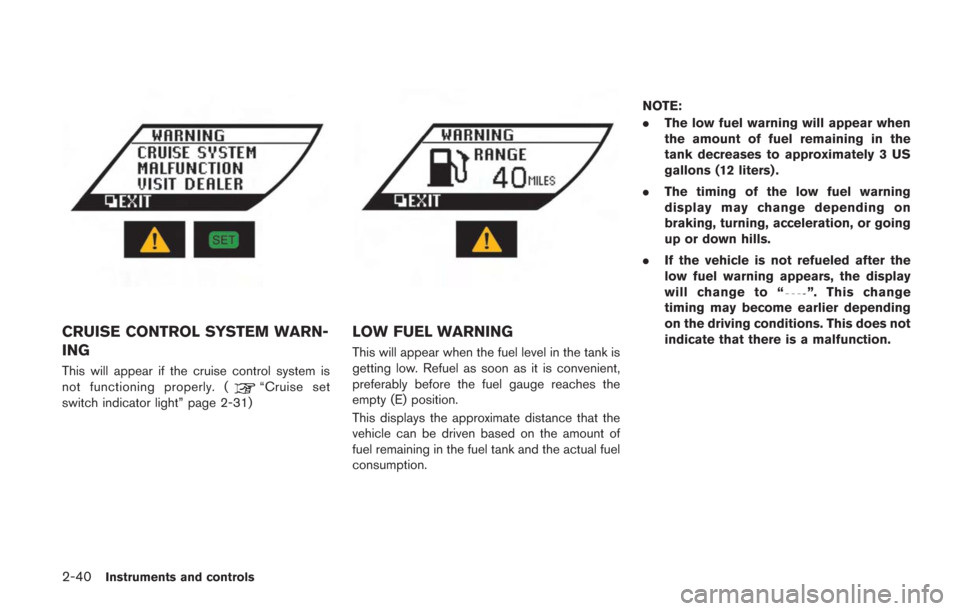
CRUISE CONTROL SYSTEM WARN-
ING
This will appear if the cruise control system is
not functioning properly. (“Cruise set
switch indicator light” page 2-31)
LOW FUEL WARNING
This will appear when the fuel level in the tank is
getting low. Refuel as soon as it is convenient,
preferably before the fuel gauge reaches the
empty (E) position.
This displays the approximate distance that the
vehicle can be driven based on the amount of
fuel remaining in the fuel tank and the actual fuel
consumption. NOTE:
.
The low fuel warning will appear when
the amount of fuel remaining in the
tank decreases to approximately 3 US
gallons (12 liters) .
. The timing of the low fuel warning
display may change depending on
braking, turning, acceleration, or going
up or down hills.
. If the vehicle is not refueled after the
low fuel warning appears, the display
will change to “
”. This change
timing may become earlier depending
on the driving conditions. This does not
indicate that there is a malfunction.
Page 143 of 354
2-46Instruments and controls
5. Confirm that the security indicator lightcomes on. The security indicator light stays
on for about 30 seconds. The vehicle
security system is now pre-armed. After
about 30 seconds the vehicle security
system automatically shifts into the armed
phase. The security light begins to flash
once every approximately 3 seconds. If,
during this 30-second pre-arm time period,
the door is unlocked, or the ignition switch is
pushed to ACC or ON, the system will not
arm.
Even when the driver and/or passengers
are in the vehicle, the system will activate
with all doors, hood, and trunk lid locked
with the ignition switch in the LOCK
position. When pushing the ignition switch
to the ACC or ON position, the system will
be released.
Vehicle security system activation
The vehicle security system will give the follow-
ing alarm:
. The headlights blink and the horn sounds
intermittently.
. The alarm automatically turns off after
approximately 1 minute. However, the alarm
reactivates if the vehicle is tampered with
again. The alarm is activated by:
.
Opening the door or the trunk lid without
using the button on the Intelligent Key, the
door handle request switch or the mechan-
ical key. (Even if the door is opened by
releasing the door inside lock knob, the
alarm will activate.)
. Opening the hood.
How to stop an activated alarm
The alarm will stop by:
.Unlocking a door by pushing the UNLOCK
button on the Intelligent Key.
. Unlocking a door by pushing the door
handle request switch.
. Pushing the ignition switch to the ACC or
ON position.
If the system does not operate as de-
scribed above, have it checked by a GT-R
certified NISSAN dealer.
NISSAN VEHICLE IMMOBILIZER
SYSTEM
The NISSAN Vehicle Immobilizer System will not
allow the engine to start without the use of the
registered Intelligent Key. Never leave these
keys in the vehicle. FCC Notice:
For USA:
This device complies with Part 15 of the
FCC Rules. Operation is subject to the
following two conditions: (1) This device
may not cause harmful interference, and
(2) this device must accept any interfer-
ence received, including interference that
may cause undesired operation.
Note: Changes or modifications not ex-
pressly approved by the party responsible
for compliance could void the user’s
authority to operate the equipment.
For Canada:
This device complies with RSS-210 of
Industry Canada. Operation is subject to
the following two conditions: (1) this
device may not cause interference, and
(2) this device must accept any interfer-
ence, including interference that may
cause undesired operation of the device.
Page 145 of 354
2-48Instruments and controls
window washer reservoir tank to
mix the washer fluid concentrate
and water.
The windshield wiper and washer operates
when the ignition switch is in the ON position.
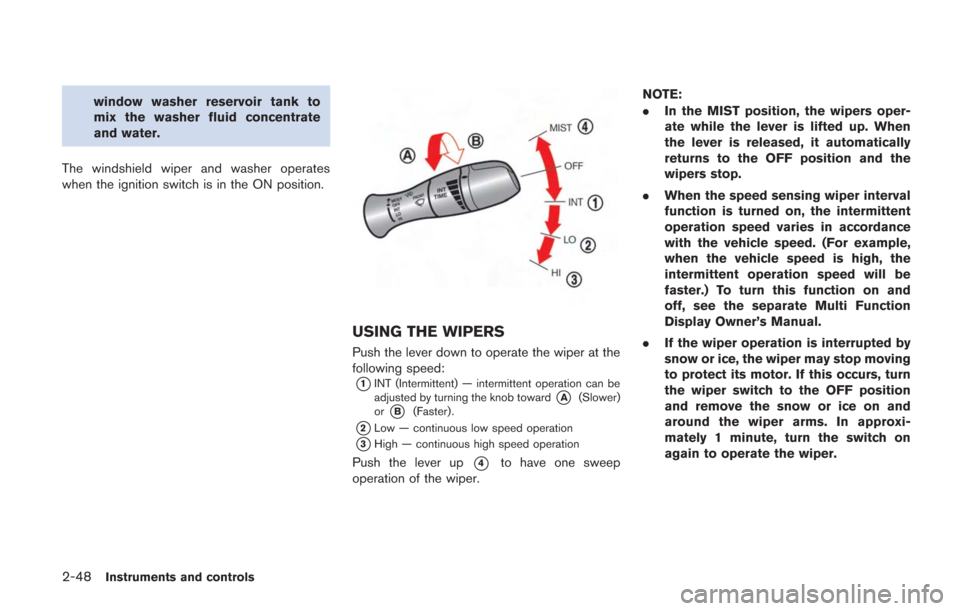
USING THE WIPERS
Push the lever down to operate the wiper at the
following speed:
*1INT (Intermittent) — intermittent operation can be
adjusted by turning the knob toward*A(Slower)
or*B(Faster).
*2Low — continuous low speed operation
*3High — continuous high speed operation
Push the lever up*4to have one sweep
operation of the wiper. NOTE:
.
In the MIST position, the wipers oper-
ate while the lever is lifted up. When
the lever is released, it automatically
returns to the OFF position and the
wipers stop.
. When the speed sensing wiper interval
function is turned on, the intermittent
operation speed varies in accordance
with the vehicle speed. (For example,
when the vehicle speed is high, the
intermittent operation speed will be
faster.) To turn this function on and
off, see the separate Multi Function
Display Owner’s Manual.
. If the wiper operation is interrupted by
snow or ice, the wiper may stop moving
to protect its motor. If this occurs, turn
the wiper switch to the OFF position
and remove the snow or ice on and
around the wiper arms. In approxi-
mately 1 minute, turn the switch on
again to operate the wiper.
Page 146 of 354
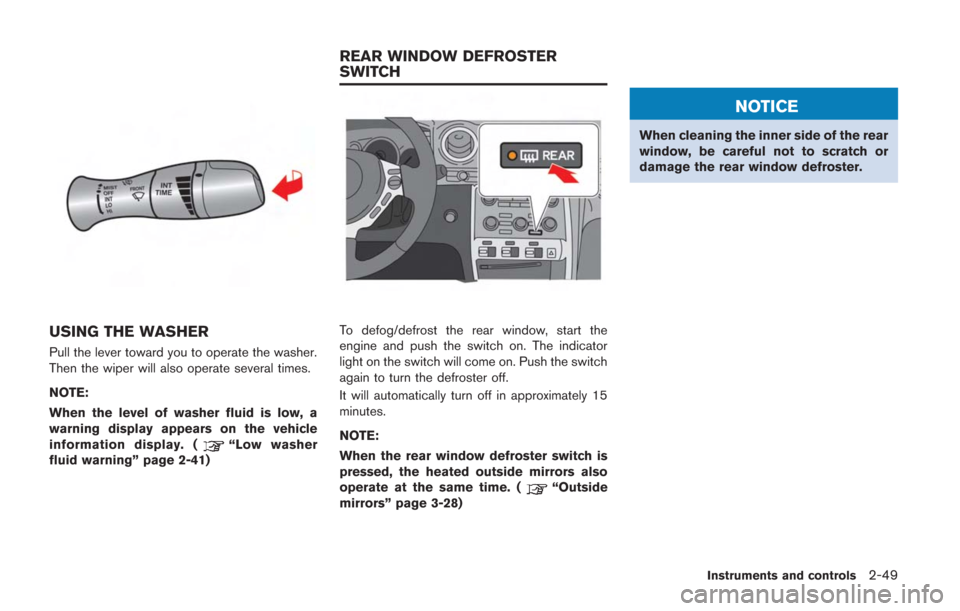
USING THE WASHER
Pull the lever toward you to operate the washer.
Then the wiper will also operate several times.
NOTE:
When the level of washer fluid is low, a
warning display appears on the vehicle
information display. (
“Low washer
fluid warning” page 2-41)
To defog/defrost the rear window, start the
engine and push the switch on. The indicator
light on the switch will come on. Push the switch
again to turn the defroster off.
It will automatically turn off in approximately 15
minutes.
NOTE:
When the rear window defroster switch is
pressed, the heated outside mirrors also
operate at the same time. (
“Outside
mirrors” page 3-28)
NOTICE
When cleaning the inner side of the rear
window, be careful not to scratch or
damage the rear window defroster.
Instruments and controls2-49
REAR WINDOW DEFROSTER
SWITCH
Page 155 of 354
2-58Instruments and controls
GLOVE BOX
WARNING
Keep glove box lid closed while driving
to help prevent injury in an accident or a
sudden stop.
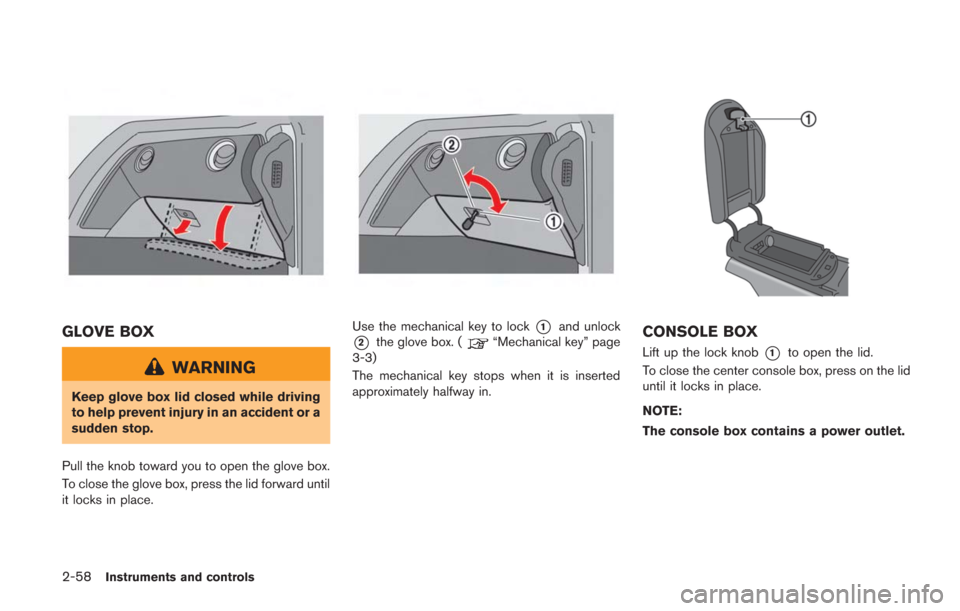
Pull the knob toward you to open the glove box.
To close the glove box, press the lid forward until
it locks in place.
Use the mechanical key to lock*1and unlock
*2the glove box. (“Mechanical key” page
3-3)
The mechanical key stops when it is inserted
approximately halfway in.CONSOLE BOX
Lift up the lock knob*1to open the lid.
To close the center console box, press on the lid
until it locks in place.
NOTE:
The console box contains a power outlet.
Page 158 of 354
activated if an impact or load similar to some-
thing being caught in the window occurs.
WARNING
There are some small distances imme-
diately before the closed position which
cannot be detected. Make sure that all
passengers have their hands, etc., in-
side the vehicle before closing the
window.
Automatic adjusting function
CAUTION
When the battery cable is removed from
the battery terminal, do not close either
of the front doors. The automatic win-
dow adjusting function will not work
and the side roof panel may be da-
maged.
The power window has an automatic adjusting
function. When the door is being opened, the
window is automatically lowered slightly to avoid
contact between the window and the side roof
panel. When the door is closed, the window is automatically raised slightly.
While the automatic adjusting function does not
work, the window will be controlled as follows:
.
When the door is opened, the window
lowers for approximately 2 seconds.
. While the door is open, the window cannot
be raised.
If the windows do not close auto-
matically
If the power window automatic function (closing
only) does not operate properly, perform the
following procedure to initialize the power
window system.
1. Push the ignition switch to the ON position.
2. Close the door.
3. Open the window completely by operating
the power window switch.
4. Pull the power window switch and hold it to close the driver side window, and then hold
the switch more than 3 seconds after the
window is closed completely.
5. Release the power window switch. Operate the window by the automatic function to
confirm the initialization is complete.
6. Perform steps 2 through 5 above for the passenger side window by operating either
driver’s or passenger’s side switch. If the power window automatic function does
not operate properly after performing the pro-
cedure above, have your vehicle checked by a
GT-R certified NISSAN dealer.
Instruments and controls2-61
Page 159 of 354
2-62Instruments and controls
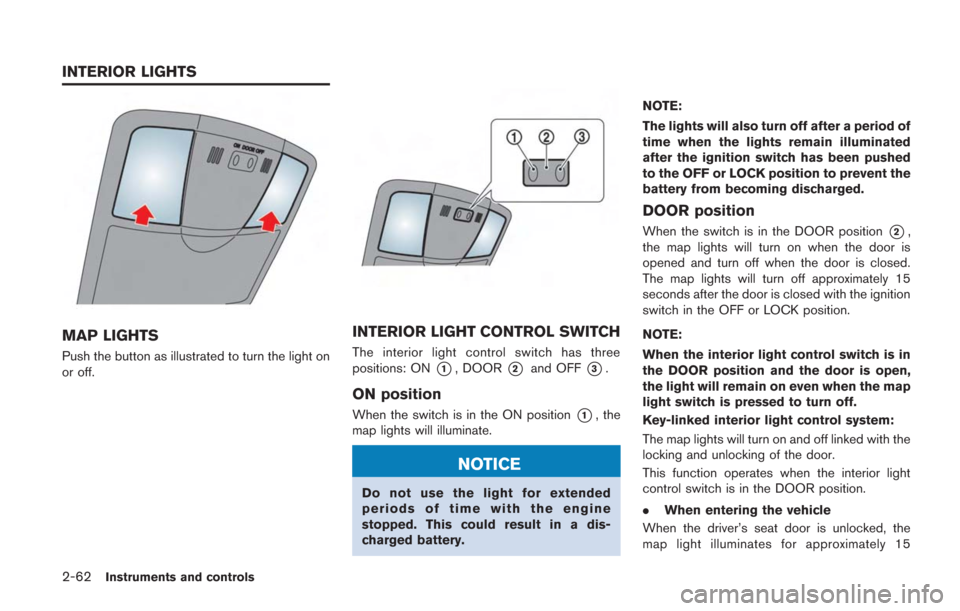
MAP LIGHTS
Push the button as illustrated to turn the light on
or off.
INTERIOR LIGHT CONTROL SWITCH
The interior light control switch has three
positions: ON
*1, DOOR*2and OFF*3.
ON position
When the switch is in the ON position*1, the
map lights will illuminate.
NOTICE
Do not use the light for extended
periods of time with the engine
stopped. This could result in a dis-
charged battery. NOTE:
The lights will also turn off after a period of
time when the lights remain illuminated
after the ignition switch has been pushed
to the OFF or LOCK position to prevent the
battery from becoming discharged.
DOOR position
When the switch is in the DOOR position*2,
the map lights will turn on when the door is
opened and turn off when the door is closed.
The map lights will turn off approximately 15
seconds after the door is closed with the ignition
switch in the OFF or LOCK position.
NOTE:
When the interior light control switch is in
the DOOR position and the door is open,
the light will remain on even when the map
light switch is pressed to turn off.
Key-linked interior light control system:
The map lights will turn on and off linked with the
locking and unlocking of the door.
This function operates when the interior light
control switch is in the DOOR position.
. When entering the vehicle
When the driver’s seat door is unlocked, the
map light illuminates for approximately 15
INTERIOR LIGHTS