USB NISSAN GT-R 2015 R35 Multi Function Display Owner's Manual
[x] Cancel search | Manufacturer: NISSAN, Model Year: 2015, Model line: GT-R, Model: NISSAN GT-R 2015 R35Pages: 298, PDF Size: 11.39 MB
Page 190 of 298
![NISSAN GT-R 2015 R35 Multi Function Display Owners Manual This allows to you adjust the speaker tone
quality and sound balance.
1. Push<SETTING>.
2. Highlight [Audio] and push <ENTER>.
3. Highlight the preferred adjustment item and push <ENTER>.
4. Use the c](/img/5/423/w960_423-189.png "NISSAN GT-R 2015 R35 Multi Function Display Owners Manual This allows to you adjust the speaker tone
quality and sound balance.
1. Push<SETTING>.
2. Highlight [Audio] and push <ENTER>.
3. Highlight the preferred adjustment item and push <ENTER>.
4. Use the c")
This allows to you adjust the speaker tone
quality and sound balance.
1. Push
2. Highlight [Audio] and push
3. Highlight the preferred adjustment item and push
4. Use the center dial to adjust the tone quality or sound balance.
5. After settings, push
6. Push
screen.
Push
Page 197 of 298
![NISSAN GT-R 2015 R35 Multi Function Display Owners Manual 7-10Other settings
UNIT SETTINGS (Tire Pressure)
1. Push<SETTING>.
2. Highlight [Others] and push <ENTER>.
3. Highlight [Language/Units] and push <ENTER>.
4. Highlight [Select Units (Tire Pressure)] a](/img/5/423/w960_423-196.png "NISSAN GT-R 2015 R35 Multi Function Display Owners Manual 7-10Other settings
UNIT SETTINGS (Tire Pressure)
1. Push<SETTING>.
2. Highlight [Others] and push <ENTER>.
3. Highlight [Language/Units] and push <ENTER>.
4. Highlight [Select Units (Tire Pressure)] a")
7-10Other settings
UNIT SETTINGS (Tire Pressure)
1. Push
2. Highlight [Others] and push
3. Highlight [Language/Units] and push
4. Highlight [Select Units (Tire Pressure)] andpush
5. Highlight the preferred unit and push
unit illuminates.
Available units
.psi
.kPa
6. Push
screen.
The image files in the USB device will be
displayed.
1. Press
2. Select [Others] and press
3. Select [Image Viewer] and press
The image of the selected file is displayed on the
right side of the screen.
When a number of folders are included in the
USB device, select a folder from the list and
push
IMAGE VIEWER
Page 198 of 298
![NISSAN GT-R 2015 R35 Multi Function Display Owners Manual FULL SCREEN DISPLAY
The full screen display will appear when select-
ing [Full Screen Display] and press<ENTER>.
To operate the Image Viewer or to change the
settings, select the desired key.
.
(Start](/img/5/423/w960_423-197.png "NISSAN GT-R 2015 R35 Multi Function Display Owners Manual FULL SCREEN DISPLAY
The full screen display will appear when select-
ing [Full Screen Display] and press<ENTER>.
To operate the Image Viewer or to change the
settings, select the desired key.
.
(Start")
FULL SCREEN DISPLAY
The full screen display will appear when select-
ing [Full Screen Display] and press
To operate the Image Viewer or to change the
settings, select the desired key.
.
(Start)
Select “
” and push
playing the slideshow.
.
(Stop)
Select “
” and push
the slideshow.
.
(Next)
Select “
” and push
display the next file.
.
(Previous)
Select “
” and push
display the previous file.
SETTING THE IMAGE VIEWER
The Image Viewer setting display will appear
when selecting [Settings] on the full screen
display and pushing
settings are available for the full screen display.
. Slideshow Speed
Choose [Slideshow Speed] and push
select the changing time from 5, 10, 30,
60 seconds or “No Auto Change”. .
Slideshow Order
Choose [Slideshow Order] and push
select “Random” or “Order List”.
Operating tips
.Only files that meet the following conditions
will be displayed.
— File format: JPEG (“.jpg” or “.jpeg”)
— File size: 2 MB or less
— Display size: 1,536 62,048 pixels or
less
. If an electronic device (such as a digital
camera) is directly connected to the vehicle
using a USB cable, no image will be
displayed on the screen.
. If the file name is too long, some file names
may not be entirely displayed.
Other settings7-11
Page 220 of 298
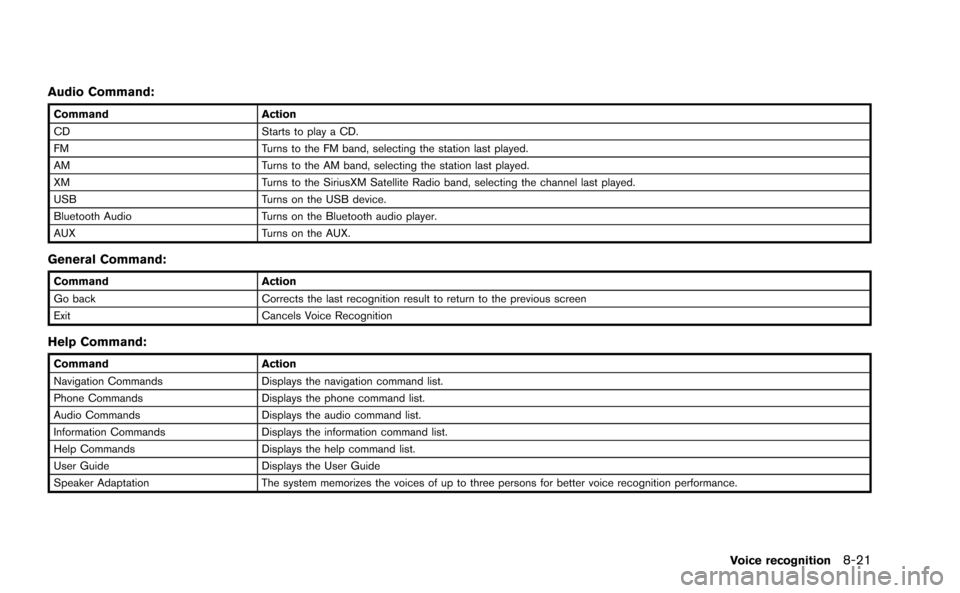
Audio Command:
CommandAction
CD Starts to play a CD.
FM Turns to the FM band, selecting the station last played.
AM Turns to the AM band, selecting the station last played.
XM Turns to the SiriusXM Satellite Radio band, selecting the channel last played.
USB Turns on the USB device.
Bluetooth Audio Turns on the Bluetooth audio player.
AUX Turns on the AUX.
General Command:
CommandAction
Go back Corrects the last recognition result to return to the previous screen
Exit Cancels Voice Recognition
Help Command:
CommandAction
Navigation Commands Displays the navigation command list.
Phone Commands Displays the phone command list.
Audio Commands Displays the audio command list.
Information Commands Displays the information command list.
Help Commands Displays the help command list.
User Guide Displays the User Guide
Speaker Adaptation The system memorizes the voices of up to three persons for better voice recognition performance.
Voice recognition8-21
Page 259 of 298
![NISSAN GT-R 2015 R35 Multi Function Display Owners Manual 10-24Multi function meter
3. Select [Stop Watch Times]. The details ofthe selected record will be displayed.
INFO:
You can use either the center dial or the touch
panel to scroll through the list.
Sav](/img/5/423/w960_423-258.png "NISSAN GT-R 2015 R35 Multi Function Display Owners Manual 10-24Multi function meter
3. Select [Stop Watch Times]. The details ofthe selected record will be displayed.
INFO:
You can use either the center dial or the touch
panel to scroll through the list.
Sav")
10-24Multi function meter
3. Select [Stop Watch Times]. The details ofthe selected record will be displayed.
INFO:
You can use either the center dial or the touch
panel to scroll through the list.
Saving to USB device
You can save the time records saved in the
system onto a USB device.
1. Insert the USB device in the media slot.
2. Select [TIME LOG]. The list screen will be displayed.
3. Select the record you would like to display.The menu screen will be displayed.
4. Select [Transfer Stop Watch data to USBMemory]. The time record is saved to the
USB device.
NOTICE
Inserting objects other than a USB
device into the USB connector can
cause damage. Do not insert anything
other than a USB device into the USB
connector.
INFO:
. Time records are saved to the USB device in
the CSV format.
. While records are being saved to the USB
device, do not change the key position or
remove the USB device.
Page 260 of 298
![NISSAN GT-R 2015 R35 Multi Function Display Owners Manual .To save all records to the USB device, select
[Transfer All Stop Watch Times to USB
Mem.].
Deleting records
Use the following procedure to delete time
records saved in the system.
1. Select [TIME LOG](/img/5/423/w960_423-259.png "NISSAN GT-R 2015 R35 Multi Function Display Owners Manual .To save all records to the USB device, select
[Transfer All Stop Watch Times to USB
Mem.].
Deleting records
Use the following procedure to delete time
records saved in the system.
1. Select [TIME LOG")
.To save all records to the USB device, select
[Transfer All Stop Watch Times to USB
Mem.].
Deleting records
Use the following procedure to delete time
records saved in the system.
1. Select [TIME LOG]. The list screen will be
displayed.
2. Select the record you would like to display.The menu screen will be displayed.
3. Select [Delete Stop Watch data]. The
message screen will be displayed.
4. Select [Yes]. The time record will be deleted.
INFO:
. You cannot recover deleted records.
. To delete all records select [Delete All Stop
Watch data].
Multi function meter10-25
Page 289 of 298
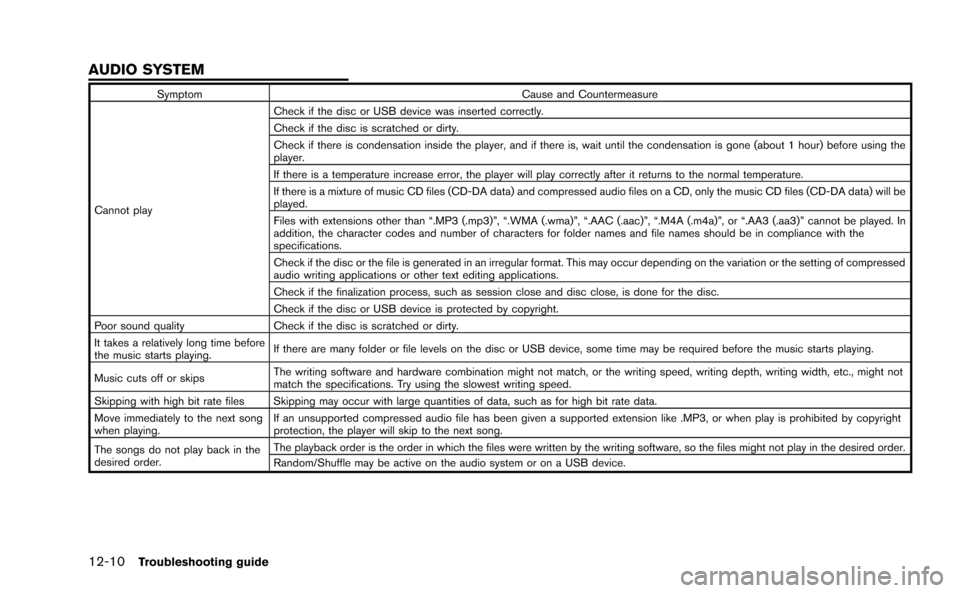
12-10Troubleshooting guide
SymptomCause and Countermeasure
Cannot play Check if the disc or USB device was inserted correctly.
Check if the disc is scratched or dirty.
Check if there is condensation inside the player, and if there is, wait until the condensation is gone (about 1 hour) before using the
player.
If there is a temperature increase error, the player will play correctly after it returns to the normal temperature.
If there is a mixture of music CD files (CD-DA data) and compressed audio files on a CD, only the music CD files (CD-DA data) will be
played.
Files with extensions other than “.MP3 (.mp3)”, “.WMA (.wma)”, “.AAC (.aac)”, “.M4A (.m4a)”, or “.AA3 (.aa3)” cannot be played. In
addition, the character codes and number of characters for folder names and file names should be in compliance with the
specifications.
Check if the disc or the file is generated in an irregular format. This may occur depending on the variation or the setting of compressed
audio writing applications or other text editing applications.
Check if the finalization process, such as session close and disc close, is done for the disc.
Check if the disc or USB device is protected by copyright.
Poor sound quality Check if the disc is scratched or dirty.
It takes a relatively long time before
the music starts playing. If there are many folder or file levels on the disc or USB device, some time may be required before the music starts playing.
Music cuts off or skips The writing software and hardware combination might not match, or the writing speed, writing depth, writing width, etc., might not
match the specifications. Try using the slowest writing speed.
Skipping with high bit rate files Skipping may occur with large quantities of data, such as for high bit rate data.
Move immediately to the next song
when playing. If an unsupported compressed audio file has been given a supported extension like .MP3, or when play is prohibited by copyright
protection, the player will skip to the next song.
The songs do not play back in the
desired order. The playback order is the order in which the files were written by the writing software, so the files might not play in the desired order.
Random/Shuffle may be active on the audio system or on a USB device.
AUDIO SYSTEM
Page 294 of 298
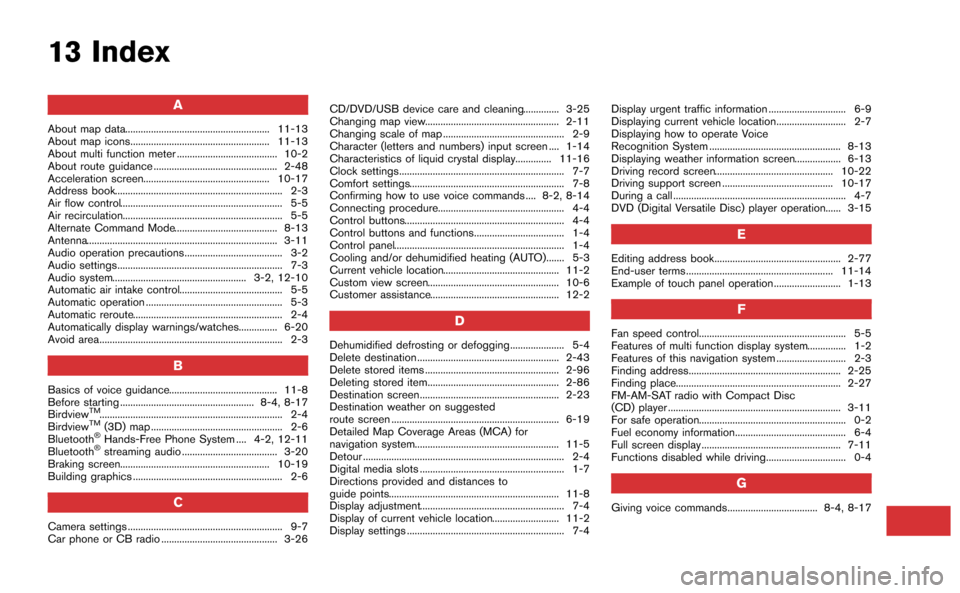
13 Index
A
About map data........................................................ 11-13
About map icons...................................................... 11-13
About multi function meter ....................................... 10-2
About route guidance ................................................ 2-48
Acceleration screen................................................. 10-17
Address book................................................................. 2-3
Air flow control............................................................... 5-5
Air recirculation.............................................................. 5-5
Alternate Command Mode........................................ 8-13
Antenna.......................................................................... 3-11
Audio operation precautions...................................... 3-2
Audio settings................................................................ 7-3
Audio system.................................................... 3-2, 12-10
Automatic air intake control........................................ 5-5
Automatic operation ..................................................... 5-3
Automatic reroute.......................................................... 2-4
Automatically display warnings/watches............... 6-20
Avoid area....................................................................... 2-3
B
Basics of voice guidance.......................................... 11-8
Before starting .................................................... 8-4, 8-17
Birdview
TM....................................................................... 2-4
BirdviewTM(3D) map ................................................... 2-6
Bluetooth®Hands-Free Phone System .... 4-2, 12-11
Bluetooth®streaming audio ..................................... 3-20
Braking screen.......................................................... 10-19
Building graphics .......................................................... 2-6
C
Camera settings ............................................................ 9-7
Car phone or CB radio ............................................. 3-26 CD/DVD/USB device care and cleaning.............. 3-25
Changing map view.................................................... 2-11
Changing scale of map ............................................... 2-9
Character (letters and numbers) input screen .... 1-14
Characteristics of liquid crystal display.............. 11-16
Clock settings................................................................ 7-7
Comfort settings............................................................ 7-8
Confirming how to use voice commands .... 8-2, 8-14
Connecting procedure................................................. 4-4
Control buttons.............................................................. 4-4
Control buttons and functions................................... 1-4
Control panel.................................................................. 1-4
Cooling and/or dehumidified heating (AUTO)....... 5-3
Current vehicle location............................................. 11-2
Custom view screen................................................... 10-6
Customer assistance.................................................. 12-2
D
Dehumidified defrosting or defogging..................... 5-4
Delete destination ....................................................... 2-43
Delete stored items .................................................... 2-96
Deleting stored item................................................... 2-86
Destination screen...................................................... 2-23
Destination weather on suggested
route screen ................................................................. 6-19
Detailed Map Coverage Areas (MCA) for
navigation system........................................................ 11-5
Detour .............................................................................. 2-4
Digital media slots ........................................................ 1-7
Directions provided and distances to
guide points.................................................................. 11-8
Display adjustment........................................................ 7-4
Display of current vehicle location.......................... 11-2
Display settings ............................................................. 7-4
Display urgent traffic information .............................. 6-9
Displaying current vehicle location........................... 2-7
Displaying how to operate Voice
Recognition System ................................................... 8-13
Displaying weather information screen.................. 6-13
Driving record screen.............................................. 10-22
Driving support screen ........................................... 10-17
During a call ................................................................... 4-7
DVD (Digital Versatile Disc) player operation...... 3-15
E
Editing address book................................................. 2-77
End-user terms ......................................................... 11-14
Example of touch panel operation.......................... 1-13
F
Fan speed control......................................................... 5-5
Features of multi function display system............... 1-2
Features of this navigation system ........................... 2-3
Finding address........................................................... 2-25
Finding place................................................................ 2-27
FM-AM-SAT radio with Compact Disc
(CD) player ................................................................... 3-11
For safe operation......................................................... 0-2
Fuel economy information........................................... 6-4
Full screen display ...................................................... 7-11
Functions disabled while driving............................... 0-4
G
Giving voice commands................................... 8-4, 8-17
Page 296 of 298

Setting previous start point ...................................... 2-35
Setting the image viewer .......................................... 7-11
Settings screen.............................................................. 7-2
Speaker adaptation..................................................... 8-22
Speed limit indication on map................................. 2-92
Standard mode.............................................................. 8-2
Start-up screen.............................................................. 1-9
Status screen................................................................. 6-2
Steering screen ........................................................ 10-20
Steering switch.............................................................. 1-8
Stopwatch screen.................................................... 10-22
Storing a location/route............................................. 2-70
Storing avoid area....................................................... 2-75
Storing location ........................................................... 2-70
Storing route ................................................................ 2-73
Storing tracked route ................................................. 2-74
System feedback announcement modes.............. 8-22
T
Tire pressure information............................................. 6-4
To turn the system OFF............................................... 5-6
Touch panel operation ............................................... 1-13
Trademarks...................................................................... 0-5
Traffic information........................................................ 12-9
Traffic information on map ........................................ 6-10
Traffic information settings........................................ 6-11
Transferring information to/from address book.... 2-89
U
Unit settings ................................................................... 7-9
Unit settings (Tire Pressure) .................................... 7-10
USB device operation................................................ 3-17
Using Voice Recognition System................... 8-4, 8-17
V
Vehicle icon .................................................................. 12-4
Vehicle information display.......................................... 6-4
Ventilators........................................................................ 5-6
Viewing available traffic information ......................... 6-7
Viewing available weather information................... 6-12
Viewing GPS current location information ........... 6-22
Viewing information about current
vehicle location .............................................................. 6-3
Viewing navigation system version information.... 6-22
Voice command examples ............................... 8-9, 8-24
Voice commands........................................................... 4-3
Voice guidance ................................................... 2-4, 12-8
Voice recognition...................................................... 12-12
Volume adjustment........................................................ 7-6
W
What is GPS (Global Positioning System)?........ 11-2
When gray road is displayed on map ................... 11-6
X
XM NavTraffic®information......................................... 2-3
13-3