air NISSAN GT-R 2015 R35 Multi Function Display Owners Manual
[x] Cancel search | Manufacturer: NISSAN, Model Year: 2015, Model line: GT-R, Model: NISSAN GT-R 2015 R35Pages: 298, PDF Size: 11.39 MB
Page 2 of 298
Introduction0
About Multi function display system1
Navigation
Audio system
Bluetooth®Hands-Free Phone System
Heater and air conditioner
Viewing technical information
Other settings
Voice recognition
Monitor system
Multi function meter
2
3
4
5
6
7
8
9
10
Table of
Contents
General system information11
Troubleshooting guide12
Index13
Page 11 of 298
1-2About Multi function display system
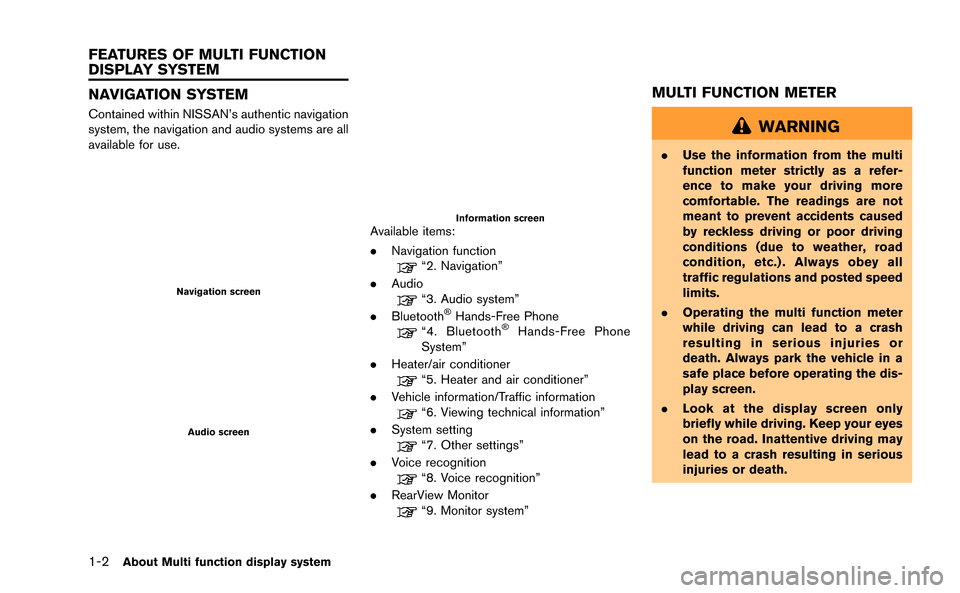
NAVIGATION SYSTEM
Contained within NISSAN’s authentic navigation
system, the navigation and audio systems are all
available for use.
Navigation screen
Audio screen
Information screenAvailable items:
.Navigation function
“2. Navigation”
. Audio
“3. Audio system”
. Bluetooth®Hands-Free Phone“4. Bluetooth®Hands-Free Phone
System”
. Heater/air conditioner
“5. Heater and air conditioner”
. Vehicle information/Traffic information
“6. Viewing technical information”
. System setting
“7. Other settings”
. Voice recognition
“8. Voice recognition”
. RearView Monitor
“9. Monitor system”
MULTI FUNCTION METER
WARNING
.Use the information from the multi
function meter strictly as a refer-
ence to make your driving more
comfortable. The readings are not
meant to prevent accidents caused
by reckless driving or poor driving
conditions (due to weather, road
condition, etc.) . Always obey all
traffic regulations and posted speed
limits.
. Operating the multi function meter
while driving can lead to a crash
resulting in serious injuries or
death. Always park the vehicle in a
safe place before operating the dis-
play screen.
. Look at the display screen only
briefly while driving. Keep your eyes
on the road. Inattentive driving may
lead to a crash resulting in serious
injuries or death.
FEATURES OF MULTI FUNCTION
DISPLAY SYSTEM
Page 13 of 298
1-4About Multi function display system
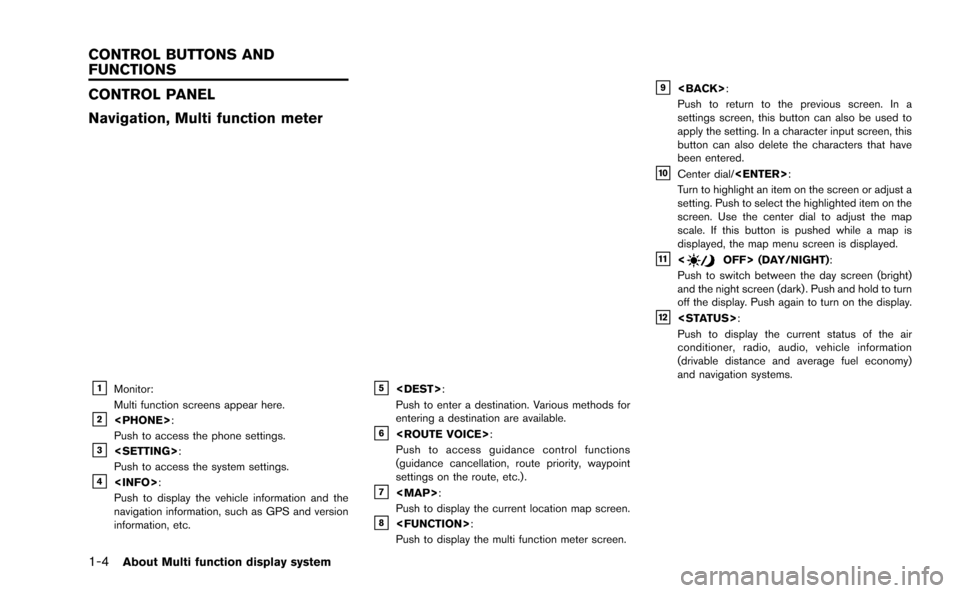
CONTROL PANEL
Navigation, Multi function meter
&1Monitor:
Multi function screens appear here.
&2
Push to access the phone settings.
&3
Push to access the system settings.
&4
Push to display the vehicle information and the
navigation information, such as GPS and version
information, etc.
&5
Push to enter a destination. Various methods for
entering a destination are available.
&6
Push to access guidance control functions
(guidance cancellation, route priority, waypoint
settings on the route, etc.) .
&7
Page 15 of 298
1-6About Multi function display system
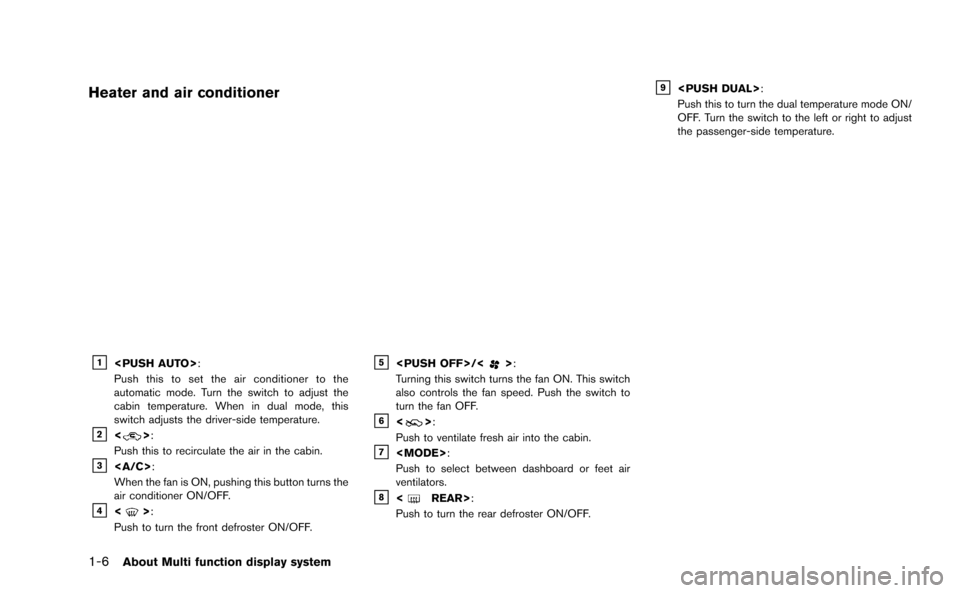
Heater and air conditioner
&1
Push this to set the air conditioner to the
automatic mode. Turn the switch to adjust the
cabin temperature. When in dual mode, this
switch adjusts the driver-side temperature.
&2<>:
Push this to recirculate the air in the cabin.
&3:
When the fan is ON, pushing this button turns the
air conditioner ON/OFF.
&4<>:
Push to turn the front defroster ON/OFF.
&5
Turning this switch turns the fan ON. This switch
also controls the fan speed. Push the switch to
turn the fan OFF.
&6<>:
Push to ventilate fresh air into the cabin.
&7
Push to select between dashboard or feet air
ventilators.
&8
Push to turn the rear defroster ON/OFF.
&9
Push this to turn the dual temperature mode ON/
OFF. Turn the switch to the left or right to adjust
the passenger-side temperature.
Page 133 of 298
3-12Audio system
Adjusting tone quality and speaker bal-
ance:
To adjust Bass, Treble, Balance and Fade, push
the Audio control knob. When the display shows
the setting you want to change (Bass, Treble,
Balance and Fade) , rotate the Audio control
knob to set the desired setting.
“Audio settings” (page 7-3)
Switching the display:
Pushing
as follows:
iPod
®/USB ?CD/DVD ?Bluetooth®stream-
ing audio ?AUX (if so equipped) ?iPod®/
USB
FM-AM-SAT radio operation
FM/AM radio band select:
Pushing
follows:
AM ?FM1 ?FM2 ?AM
SiriusXM Satellite Radio band select:
Pushing
follows:
XM1 ?XM2 ?XM3 ?XM1
When
the ignition switch is in the ACC or ON position,
the radio will come on at the channel last played.
The last channel played will also come on when
the ON·OFF button is pushed to ON.
The satellite radio is not available in Alaska,
Hawaii and Guam.
If another audio source is playing when
audio source will automatically be turned off and
the last radio channel played will come on.
When the stereo broadcast signal is weak, the
radio will automatically change from stereo to
monaural reception. TUNE (Tuning):
.
For AM and FM radio
Turn the radio TUNE knob for manual tuning.
. For SiriusXM Satellite Radio
Turn the radio TUNE knob to seek channels
from all of the categories when any category
is not selected.
SEEK tuning/CATEGORY (CAT):
. For AM and FM radio
Push <
>or <>to tune from low to
high or high to low frequencies and to stop
at the next broadcasting station.
. For SiriusXM Satellite Radio
Push <
>or <>to tune to the first
channel of the next or previous category.
During satellite radio reception, the following
notices will be displayed under certain condi-
tions.
. NO SIGNAL (No signal is received while the
SAT tuner is connected.)
. OFF AIR (Broadcasting signed off)
. CHECK ANTENNA (Antenna connection
error)
. LOADING (When the initial setting is
performed)
Page 150 of 298
.If the Bluetooth®Hands-Free Phone System
seems to be malfunctioning, please visit
www.nissanusa.com/bluetooth for trouble-
shooting help.
. Some cellular phones or other devices may
cause interference or a buzzing noise to
come from the audio system speakers.
Storing the device in a different location
may reduce or eliminate the noise.
. Refer to the cellular phone Owner’s Manual
regarding the telephone pairing procedure
specific to your phone, battery charging,
cellular phone antenna, etc.
. The antenna display on the monitor will not
coincide with the antenna display of some
cellular phones.
. Keep the interior of the vehicle as quiet as
possible to hear the caller’s voice clearly as
well as to minimize its echoes.
. If reception between callers is unclear,
adjusting the incoming or outgoing call
volume may improve the clarity.REGULATORY INFORMATION
FCC Regulatory information
.CAUTION: To maintain compliance with
FCC’s RF exposure guidelines, use only
the supplied antenna. Unauthorized antenna,
modification, or attachments could damage
the transmitter and may violate FCC regula-
tions.
. Operation is subject to the following two
conditions:
1. this device may not cause interference and
2. this device must accept any interference, including interference that may cause un-
desired operation of the device
IC Regulatory information
.Operation is subject to the following two
conditions: (1) this device may not cause
interference, and (2) this device must accept
any interference, including interference that
may cause undesired operation of the
device.
. This Class B digital apparatus meets all
requirements of the Canadian Interference-
Causing Equipment Regulations.
Bluetooth trademark
Bluetooth®is a trademark owned
by Bluetooth SIG, Inc., and
licensed to Clarion Co., Ltd.
VOICE COMMANDS
You can use voice commands to operate various
Bluetooth®Hands-Free Phone System features
using the NISSAN Voice Recognition system.
“8. Voice recognition”
Bluetooth®Hands-Free Phone System4-3
Page 151 of 298
![NISSAN GT-R 2015 R35 Multi Function Display Owners Manual 4-4Bluetooth®Hands-Free Phone System
CONTROL BUTTONS
&1PHONE button&2button
CONNECTING PROCEDURE
1. Push<PHONE> or<>, and select
[Connect Phone].
2. When a PIN code appears on the screen, operate the](/img/5/423/w960_423-150.png "NISSAN GT-R 2015 R35 Multi Function Display Owners Manual 4-4Bluetooth®Hands-Free Phone System
CONTROL BUTTONS
&1PHONE button&2button
CONNECTING PROCEDURE
1. Push<PHONE> or<>, and select
[Connect Phone].
2. When a PIN code appears on the screen, operate the")
4-4Bluetooth®Hands-Free Phone System
CONTROL BUTTONS
&1PHONE button&2button
CONNECTING PROCEDURE
1. Push
[Connect Phone].
2. When a PIN code appears on the screen, operate the compatible Bluetooth®cellular
phone to enter the PIN code.
The connecting procedure of the cellular
phone varies according to each cellular
phone. See the cellular phone Owner’s
Manual for the details. You can also visit
www.nissanusa.com/bluetooth or call NISSAN Consumer Affairs Department for
instructions on pairing NISSAN recom-
mended cellular phones.
When the connection process is completed,
the screen will return to the Phone menu
display.
PHONE SELECTION
Up to 5 cellular phones can be registered to the
system. To switch to connect another cellular
phone, push
Phone]. The registered cellular phones are
shown on the list. If you select a cellular phone
that is different from the one currently con-
nected, the newly selected phone will be
connected to the system.
QUICK DIAL
This vehicle has two phonebooks available for
hands-free use. Depending on the phone, the
system may automatically download the entire
cell phone’s phonebook into the “Phonebook”.
“Phone setting” (page 4-7)
If a phonebook does not automatically down-
load, the quick dial may be set for up to 1,000
entries. This phonebook allows the recording of
a name to speak while using voice recognition.
Page 156 of 298
5 Heater and air conditioner
Operation precautions .............................................................. 5-2How to view screen ............................................................ 5-2
Automatic operation .................................................................. 5-3 Cooling and/or dehumidified heating (AUTO) ............. 5-3
Heating (A/C OFF) ............................................................. 5-3
Dehumidified defrosting or defogging ............................ 5-4
Manual operation ....................................................................... 5-5 Fan speed control ................................................................ 5-5
Air recirculation ..................................................................... 5-5 Outside air circulation ...................................................... 5-5
Automatic air intake control ............................................ 5-5
Air flow control ................................................................... 5-5
To turn the system OFF........................................................... 5-6
Ventilators........................................................................\
............ 5-6
Operating tips ........................................................................\
.... 5-6
In-cabin microfilter .................................................................... 5-7
Servicing air conditioner.......................................................... 5-7
Page 157 of 298
5-2Heater and air conditioner
WARNING
.The air conditioner cooling function
operates only when the engine is
running.
. Do not leave children or adults who
would normally require the support
of others alone in your vehicle. Pets
should not be left alone either. On
hot, sunny days, temperatures in a
closed vehicle could quickly become
high enough to cause severe or
possibly fatal injuries to people or
animals.
. Do not use the recirculation mode
for long periods as it may cause the
interior air to become stale and the
windows to fog up.
Start the engine and operate the heater and air
conditioner system.
You can individually set the driver and front
passenger side temperature using each tem-
perature control switch.
INFO:
. Odors from inside and outside the vehicle
can build up in the air conditioner unit. Odor
can enter the passenger compartment
through the vents.
. When parking, set the heater and air
conditioner controls to turn off air recircula-
tion to allow fresh air into the passenger
compartment. This should help reduce
odors inside the vehicle.
HOW TO VIEW SCREEN
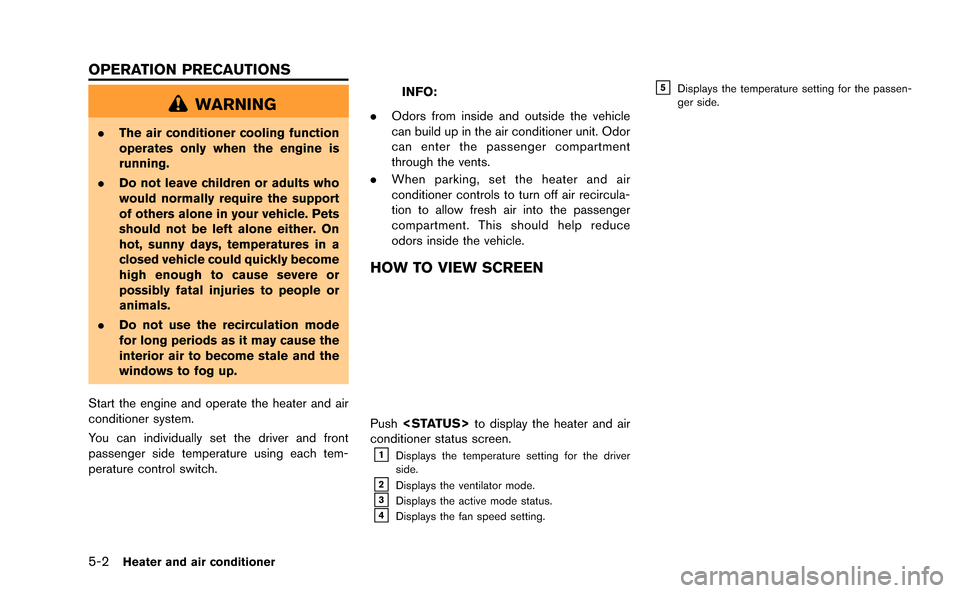
Push
conditioner status screen.
&1Displays the temperature setting for the driver
side.
&2Displays the ventilator mode.&3Displays the active mode status.&4Displays the fan speed setting.
&5Displays the temperature setting for the passen-
ger side.
OPERATION PRECAUTIONS
Page 158 of 298
COOLING AND/OR DEHUMIDIFIED
HEATING (AUTO)
This mode may be used all year round. The
system works automatically to control the inside
temperature, air flow distribution and fan speed
after the preferred temperature is set manually.
1. Push
the button will illuminate and AUTO will be
displayed.)
2. Operate the driver side temperature control dial to set the desired temperature.
Adjust the temperature to about 758 F
(248C) for normal operation.
.The temperature of the passenger com- partment will be maintained automati-
cally. Air flow distribution and fan speed
will also be controlled automatically.
3. You can individually set driver and front passenger side temperature using each
temperature control dial. When
control dial is operated, the DUAL indicator
will come on. To turn off the passenger side
temperature control, push
A visible mist may be seen coming from the
ventilators in hot, humid conditions as the air is
cooled rapidly. This does not indicate a mal-
function.
HEATING (A/C OFF)
The air conditioner does not activate in this
mode. When you need to heat only, use this
mode.
Heater and air conditioner5-3
AUTOMATIC OPERATION