fuel type NISSAN JUKE 2017 F15 / 1.G Owners Manual
[x] Cancel search | Manufacturer: NISSAN, Model Year: 2017, Model line: JUKE, Model: NISSAN JUKE 2017 F15 / 1.GPages: 416, PDF Size: 2.62 MB
Page 18 of 416

JVC0850X
Type A (if so equipped)1. Tachometer (P.2-9)
2. Vehicle information display (P.2-11)— Odometer/twin trip odometer (P.2-7)
— Trip computer (P.2-13)
— Torque vectoring AWD (AWD model)
(P.2-14)
— Outside air temperature (P.2-12) 3. Fuel gauge (P.2-11)
4. Speedometer (P.2-7)
5. Warning/indicator lights (P.2-15)
6. Instrument brightness control knob (P.2-43)
7. Continuously Variable Transmission (CVT) posi-
tion indicator* (P.2-12) 8. RESET switch for trip odometer (P.2-7)/Trip
computer mode switch (P.2-13)
*: if so equipped
Illustrated table of contents0-9
METERS AND GAUGES
Page 19 of 416

0-10Illustrated table of contents
SIC4601
Type B (if so equipped)1. Tachometer (P.2-9)
2. Engine coolant temperature gauge (P.2-10)
3. Vehicle information display (P.2-11)— Odometer/twin trip odometer (P.2-7)
— Trip computer (P.2-13)
— Torque vectoring AWD (AWD model)
(P.2-14) — Outside air temperature (P.2-12)
4. Fuel gauge (P.2-11)
5. Speedometer (P.2-7)
6. Warning/indicator lights (P.2-15)
7. Instrument brightness control knob (P.2-43)
8. Continuously Variable Transmission (CVT) posi- tion indicator* (P.2-12) 9. RESET switch for trip odometer (P.2-7)/Trip
computer mode switch (P.2-13)
*: if so equipped
Page 80 of 416

2 Instruments and controls
Cockpit ........................................................................\
................ 2-3
Instrument panel ........................................................................\
2-4
Meters and gauges ................................................................... 2-5Speedometer and odometer ............................................ 2-7
Tachometer ........................................................................\
... 2-9
Engine coolant temperature gauge (Type B) (if
so equipped) ..................................................................... 2-10
Fuel gauge ........................................................................\
. 2-11
Vehicle information display (Type A) (if
so equipped) ..................................................................... 2-11
Vehicle information display (Type B) (if
so equipped) ..................................................................... 2-12
Outside air temperature .................................................. 2-12
Continuously Variable Transmission (CVT) position
indicator (if so equipped) ............................................... 2-12
Trip computer .................................................................... 2-13
Warning lights, indicator lights and
audible reminders ................................................................... 2-15 Checking lights ................................................................. 2-16
Warning lights ................................................................... 2-16
Indicator lights ................................................................... 2-21
Audible reminders ............................................................ 2-23
Integrated control system (if so equipped) ..................... 2-24
Drive mode ........................................................................\
. 2-24
Setup function ................................................................... 2-25 Drive information ............................................................ 2-30
Eco information ............................................................... 2-31
Security systems ................................................................... 2-33
Vehicle Security System ............................................... 2-33
NISSAN Vehicle Immobilizer System ........................ 2-34
Wiper and washer switch ................................................... 2-36
Rear window wiper and washer switch .......................... 2-37
Rear window and outside mirror defroster switch ....... 2-38
Headlight and turn signal switch ....................................... 2-39 Xenon headlights (if so equipped) ............................ 2-39
Headlight switch ............................................................ 2-40
Turn signal switch .......................................................... 2-43
Fog light switch (if so equipped) .............................. 2-44
Horn ........................................................................\
.................. 2-44
Vehicle Dynamic Control (VDC) off switch .................... 2-44
Heated seats (if so equipped) ........................................... 2-45
Power outlet ........................................................................\
.... 2-46
Storage ........................................................................\
............ 2-47 Cup holders ..................................................................... 2-47
Cargo floor box ............................................................... 2-48
Glove box ........................................................................\
. 2-48
Coat hook ........................................................................\
2-48
Cargo cover (if so equipped) ..................................... 2-49
Windows ........................................................................\
......... 2-50 Power windows .............................................................. 2-50
Page 84 of 416

JVC0850X
Type A (if so equipped)1. Tachometer
2. Vehicle information display— Odometer/twin trip odometer
— Trip computer
— Torque vectoring AWD (AWD model)
— Outside air temperature
3. Fuel gauge 4. Speedometer
5. Warning/indicator lights
6. Instrument brightness control knob
7. Continuously Variable Transmission (CVT) posi-
tion indicator*
8. RESET switch for trip odometer/Trip computer mode switch *: if so equipped
The needle indicators may move slightly
after the ignition switch is placed in the
OFF or LOCK position. This is not a
malfunction.
Instruments and controls2-5
METERS AND GAUGES
Page 85 of 416
2-6Instruments and controls
SIC4601
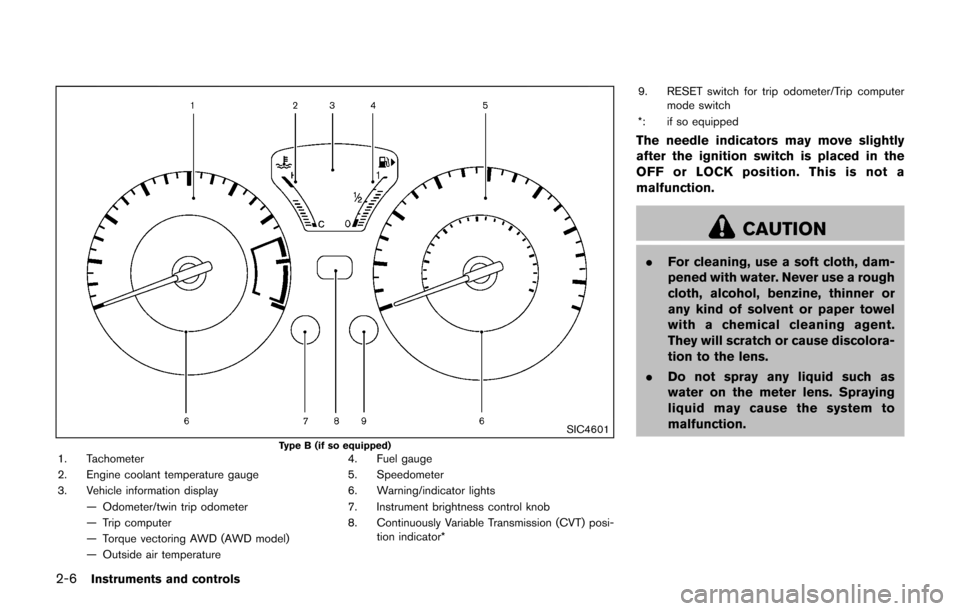
Type B (if so equipped)1. Tachometer
2. Engine coolant temperature gauge
3. Vehicle information display— Odometer/twin trip odometer
— Trip computer
— Torque vectoring AWD (AWD model)
— Outside air temperature 4. Fuel gauge
5. Speedometer
6. Warning/indicator lights
7. Instrument brightness control knob
8. Continuously Variable Transmission (CVT) posi-
tion indicator* 9. RESET switch for trip odometer/Trip computer
mode switch
*: if so equipped
The needle indicators may move slightly
after the ignition switch is placed in the
OFF or LOCK position. This is not a
malfunction.
CAUTION
. For cleaning, use a soft cloth, dam-
pened with water. Never use a rough
cloth, alcohol, benzine, thinner or
any kind of solvent or paper towel
with a chemical cleaning agent.
They will scratch or cause discolora-
tion to the lens.
. Do not spray any liquid such as
water on the meter lens. Spraying
liquid may cause the system to
malfunction.
Page 87 of 416

2-8Instruments and controls
SIC4571
Odometer/twin trip odometer
Odometer/twin trip odometer (Type B) (if
so equipped)
The odometer*1/twin trip odometer*2are
displayed when the ignition switch is in the ON
position.
The odometer records the total distance the
vehicle has been driven.
The twin trip odometer records the distance of
individual trips. Changing the display:
Pushing the reset switch
*3located on the
meter panel changes the display as follows:
TRIP A ?TRIP B ?Trip computer mode ?
TRIP A
For trip computer information, see “Trip compu-
ter” (P.2-13) .
Resetting the trip odometer:
Pushing the reset switch
*3for approximately 1
second resets the trip odometer to zero.
SPA2809
Loose fuel cap warning message
Push the reset switch*Afor more than 1
second to reset the LOOSE FUEL CAP warning
message after the fuel cap has been tightened.
For additional information see “Fuel-filler cap”
(P.3-18) of this manual.
Page 90 of 416
FUEL GAUGE
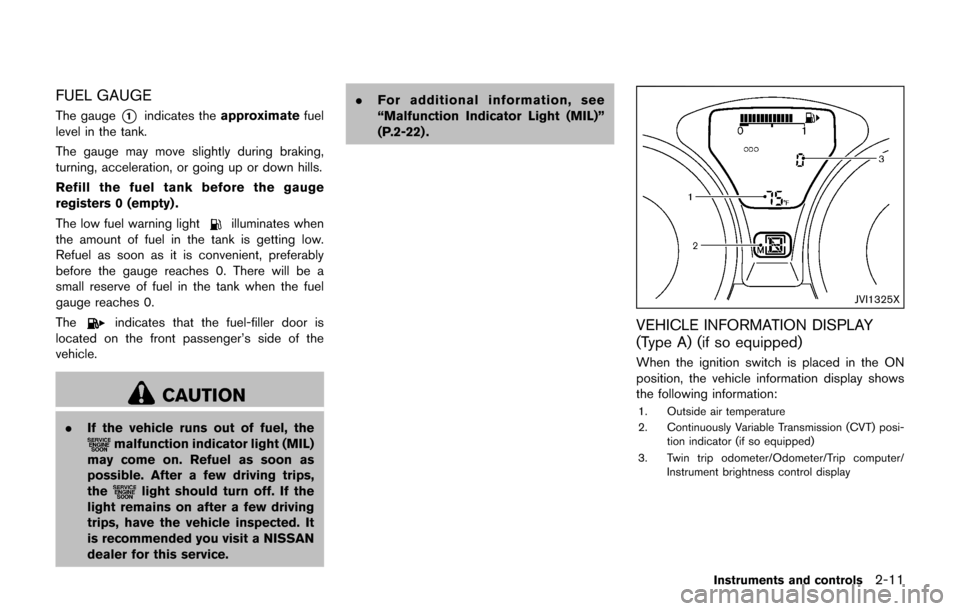
The gauge*1indicates theapproximate fuel
level in the tank.
The gauge may move slightly during braking,
turning, acceleration, or going up or down hills.
Refill the fuel tank before the gauge
registers 0 (empty) .
The low fuel warning light
illuminates when
the amount of fuel in the tank is getting low.
Refuel as soon as it is convenient, preferably
before the gauge reaches 0. There will be a
small reserve of fuel in the tank when the fuel
gauge reaches 0.
The
indicates that the fuel-filler door is
located on the front passenger’s side of the
vehicle.
CAUTION
. If the vehicle runs out of fuel, themalfunction indicator light (MIL)
may come on. Refuel as soon as
possible. After a few driving trips,
the
light should turn off. If the
light remains on after a few driving
trips, have the vehicle inspected. It
is recommended you visit a NISSAN
dealer for this service. .
For additional information, see
“Malfunction Indicator Light (MIL)”
(P.2-22) .
JVI1325X
VEHICLE INFORMATION DISPLAY
(Type A) (if so equipped)
When the ignition switch is placed in the ON
position, the vehicle information display shows
the following information:
1. Outside air temperature
2. Continuously Variable Transmission (CVT) posi-
tion indicator (if so equipped)
3. Twin trip odometer/Odometer/Trip computer/ Instrument brightness control display
Instruments and controls2-11
Page 92 of 416

TRIP COMPUTER
The switch for the trip computer is located on
the meter panel.
When the ignition switch is placed in the ON
position, modes of the trip computer can be
selected by pushing the trip computer mode
switch
*A.
Each time the trip computer mode switch
*Ais
pushed, the display will change as follows:
For Type A (if so equipped):
ODO ?(TRIP A ?TRIP B) ?Current fuel
consumption ?Distance to empty (dte) ?
Average fuel consumption ?Torque vectoring
AWD (AWD model) ?ODO
For Type B (if so equipped):
(TRIP A ?TRIP B) ?Current fuel consumption
? Distance to empty (dte) ?Average fuel
consumption ?Elapsed time ?Torque vector-
ing AWD (AWD model) (? TRIP A)
Current fuel consumption
The current fuel consumption mode shows the
current fuel consumption.
Distance to empty (dte — mls or km)
The distance to empty (dte) mode provides you
with an estimation of the distance that can be
driven before refueling. The dte is constantly
being calculated, based on the amount of fuel in
the fuel tank and the actual fuel consumption.
The display is updated every 30 seconds.
The dte mode includes a low range warning
feature. When the fuel level is low, the dte mode
is automatically selected and the dte display will
blink. Push the trip computer mode switch
*A
to return to the mode that was selected before
the warning occurred.
When the fuel level drops even lower, the dte
display will change to “----”.
.If the amount of fuel added is small, the
display just before the ignition switch is
turned off may continue to be displayed.
. When driving uphill or rounding curves, the
fuel in the tank shifts, which may momenta-
rily change the display.
Average fuel consumption (mpg or l
(liter)/100 km)
The average fuel consumption mode shows the
average fuel consumption since the last reset.
Resetting is done by pushing the trip computer
mode switch
*Afor approximately 1 second. The display is updated every 30 seconds. At
about the first 1/3 mile (500 m) after a reset, the
display shows “---”.
Elapsed time (Type B) (if so equipped)
The elapsed time mode shows the time since
the last reset. The displayed time can be reset
by pushing the trip computer mode switch
*A
for approximately 1 second.
Instruments and controls2-13
Page 93 of 416

2-14Instruments and controls
JVI1327X
Type A (if so equipped)
SIC4600Type B (if so equipped)
Torque vectoring AWD (AWD model)
The Torque vectoring mode shows the current
amount of torque distributed to each wheel.
Each torque indicator is displayed as a bar
graph
*1divided into 3 segments. The upper
indicator displays the current amount of torque
distribution (left and right) for the front wheels.
The lower indicator displays the current amount
of torque distribution (left and right) for the rear
wheels. The number of segments shows the
amount of torque currently distributed to each
wheel.
Resetting displays
For Type A (if so equipped):
When the average fuel consumption or TRIP B
is displayed, push the trip computer mode
switch
*Afor longer than 3 seconds. The
average fuel consumption and trip odometer
(TRIP B only) displays will be reset at the same
time.
For Type B (if so equipped):
When the average fuel consumption, elapsed
time or TRIP B is displayed, push the trip
computer mode switch
*Afor longer than 3
seconds. The average fuel consumption,
elapsed time and trip odometer (TRIP B only)
displays will be reset at the same time.
Page 153 of 416
3-18Pre-driving checks and adjustments
SPA2336
OPENING THE FUEL-FILLER DOOR
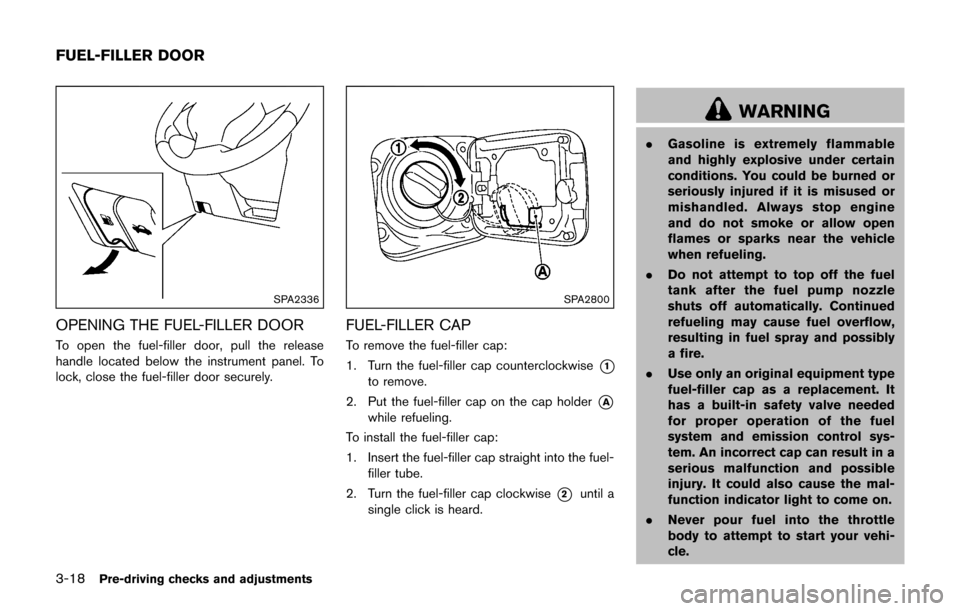
To open the fuel-filler door, pull the release
handle located below the instrument panel. To
lock, close the fuel-filler door securely.
SPA2800
FUEL-FILLER CAP
To remove the fuel-filler cap:
1. Turn the fuel-filler cap counterclockwise
*1
to remove.
2. Put the fuel-filler cap on the cap holder
*A
while refueling.
To install the fuel-filler cap:
1. Insert the fuel-filler cap straight into the fuel- filler tube.
2. Turn the fuel-filler cap clockwise
*2until a
single click is heard.
WARNING
. Gasoline is extremely flammable
and highly explosive under certain
conditions. You could be burned or
seriously injured if it is misused or
mishandled. Always stop engine
and do not smoke or allow open
flames or sparks near the vehicle
when refueling.
. Do not attempt to top off the fuel
tank after the fuel pump nozzle
shuts off automatically. Continued
refueling may cause fuel overflow,
resulting in fuel spray and possibly
a fire.
. Use only an original equipment type
fuel-filler cap as a replacement. It
has a built-in safety valve needed
for proper operation of the fuel
system and emission control sys-
tem. An incorrect cap can result in a
serious malfunction and possible
injury. It could also cause the mal-
function indicator light to come on.
. Never pour fuel into the throttle
body to attempt to start your vehi-
cle.
FUEL-FILLER DOOR