turn signal NISSAN JUKE 2017 F15 / 1.G Owners Manual
[x] Cancel search | Manufacturer: NISSAN, Model Year: 2017, Model line: JUKE, Model: NISSAN JUKE 2017 F15 / 1.GPages: 416, PDF Size: 2.62 MB
Page 12 of 416

JVC0977X
1. Hood (P.3-15)
2. Windshield wiper and washer— Switch operation (P.2-36)
— Blade replacement (P.8-15)
— Window washer fluid (P.8-9) 3. Parking lights, turn signal lights and front side
marker lights
— Switch operation (P.2-39)
— Bulb replacement (P.8-26)
4. Moonroof* (P.2-52)
5. Power windows (P.2-50)
6. Outside mirrors (P.3-22) 7. Side turn signal lights
— Switch operation (P.2-43)
— Bulb replacement (P.8-26)
8. Front view camera* (P.4-13)
9. License plate installation (P.10-13)
10. Fog lights* — Switch operation (P.2-44)
— Bulb replacement (P.8-26)
11. Headlights — Switch operation (P.2-39)
— Bulb replacement (P.8-23)
12. Tires — Wheels and tires (P.8-28, P.10-9)
— Flat tire (P.6-3)
— Tire Pressure Monitoring System (TPMS)
(P.2-18, P.5-3)
13. Side view camera* (P.4-13)
14. Doors — Keys (P.3-2)
— Door locks (P.3-4)
— Intelligent Key system (P.3-6)
— Security system (P.2-33)
*: if so equipped
Illustrated table of contents0-3
EXTERIOR FRONT
Page 16 of 416

JVC0725X
1. Outside mirror remote control switch (P.3-22)
2. Headlight, fog light and turn signal switch— Headlight (P.2-40)
— Turn signal light (P.2-43)
— Fog light* (P.2-44)
3. Paddle shifter* (P.5-16) 4. Steering wheel
— Electric power steering (P.5-34)
— Horn (P.2-44)
— Driver’s supplemental air bag (P.1-38)
5. Wiper and washer switch (P.2-36) 6. Shift lever
— Continuously Variable Transmission (CVT)
(P.5-14)
— Manual Transmission (MT) (P.5-19)
7. Fuse box cover (P.8-19)
8. Vehicle Dynamic Control (VDC) OFF switch (P.5-37)
9. All-Wheel Drive (AWD) switch* (P.5-29)
10. Tilting steering wheel lever (P.3-20)
11. Steering-wheel-mounted controls (left side)
— Audio control (P.4-73)
— Siri
ŠEyes Free (P.4-76)
— BluetoothŠHands-Free Phone System con-
trol (P.4-80, P.4-89)
— NISSAN Voice Recognition System (with
navigation system)* (P.4-96)
12. Steering-wheel-mounted controls (right side) — Cruise control switches (P.5-26)
13. Heated seat switch* (P.2-45)
*: if so equipped
Illustrated table of contents0-7
COCKPIT
Page 21 of 416

0-12Illustrated table of contents
Warninglight Name
Page
All-Wheel Drive (AWD) warning
light (yellow) (AWD model) 2-16
Anti-lock Braking System
(ABS) warning light2-16
Brake warning light
2-16
Charge warning light2-17
Door open warning light2-17
Electric power steering warning
light2-17
Engine oil pressure warning
light2-17
High temperature warning light
(if so equipped)
2-18
Intelligent Key system warning
light2-18
Low fuel warning light
2-18
Low tire pressure warning light2-18
Low washer fluid warning light
(if so equipped)2-20
P position selecting warning
light2-20Warning
light Name
Page
Seat belt warning light 2-20
Supplemental air bag warning
light2-20
Vehicle Dynamic Control (VDC)
warning light2-21Indicator
light Name
Page
All-Wheel Drive (AWD) indica-
tor light (green) (AWD model) 2-21
All-Wheel Drive (AWD) -V indi-
cator light (green) (AWD model)
2-21
Continuously Variable Trans-
mission (CVT) indicator light (if
so equipped)2-21
Cruise indicator light
2-21
Engine start operation indicator
light2-21
Exterior light indicator
2-22
Front fog light indicator light (if
so equipped)2-22
Front passenger air bag status
light2-22
High beam indicator light
2-22
Malfunction Indicator Light
(MIL)2-22
Security indicator light
2-23
Turn signal/hazard indicator
lights2-23
Vehicle Dynamic Control (VDC)
off indicator light
2-23
WARNING AND INDICATOR LIGHTS
Page 80 of 416

2 Instruments and controls
Cockpit ........................................................................\
................ 2-3
Instrument panel ........................................................................\
2-4
Meters and gauges ................................................................... 2-5Speedometer and odometer ............................................ 2-7
Tachometer ........................................................................\
... 2-9
Engine coolant temperature gauge (Type B) (if
so equipped) ..................................................................... 2-10
Fuel gauge ........................................................................\
. 2-11
Vehicle information display (Type A) (if
so equipped) ..................................................................... 2-11
Vehicle information display (Type B) (if
so equipped) ..................................................................... 2-12
Outside air temperature .................................................. 2-12
Continuously Variable Transmission (CVT) position
indicator (if so equipped) ............................................... 2-12
Trip computer .................................................................... 2-13
Warning lights, indicator lights and
audible reminders ................................................................... 2-15 Checking lights ................................................................. 2-16
Warning lights ................................................................... 2-16
Indicator lights ................................................................... 2-21
Audible reminders ............................................................ 2-23
Integrated control system (if so equipped) ..................... 2-24
Drive mode ........................................................................\
. 2-24
Setup function ................................................................... 2-25 Drive information ............................................................ 2-30
Eco information ............................................................... 2-31
Security systems ................................................................... 2-33
Vehicle Security System ............................................... 2-33
NISSAN Vehicle Immobilizer System ........................ 2-34
Wiper and washer switch ................................................... 2-36
Rear window wiper and washer switch .......................... 2-37
Rear window and outside mirror defroster switch ....... 2-38
Headlight and turn signal switch ....................................... 2-39 Xenon headlights (if so equipped) ............................ 2-39
Headlight switch ............................................................ 2-40
Turn signal switch .......................................................... 2-43
Fog light switch (if so equipped) .............................. 2-44
Horn ........................................................................\
.................. 2-44
Vehicle Dynamic Control (VDC) off switch .................... 2-44
Heated seats (if so equipped) ........................................... 2-45
Power outlet ........................................................................\
.... 2-46
Storage ........................................................................\
............ 2-47 Cup holders ..................................................................... 2-47
Cargo floor box ............................................................... 2-48
Glove box ........................................................................\
. 2-48
Coat hook ........................................................................\
2-48
Cargo cover (if so equipped) ..................................... 2-49
Windows ........................................................................\
......... 2-50 Power windows .............................................................. 2-50
Page 82 of 416

JVC0725X
1. Outside mirror remote control switch
2. Headlight, fog light and turn signal switch— Headlight
— Turn signal light
— Fog light*
3. Paddle shifter* 4. Steering wheel
— Electric power steering
— Horn
— Driver’s supplemental air bag
5. Wiper and washer switch 6. Shift lever
— Continuously Variable Transmission (CVT)
— Manual Transmission (MT)
7. Fuse box cover
8. Vehicle Dynamic Control (VDC) OFF switch
9. All-Wheel Drive (AWD) switch*
10. Tilting steering wheel lever
11. Steering-wheel-mounted controls (left side) — Audio control
— Siri
ŠEyes Free
— BluetoothŠHands-Free Phone System con-
trol
— NISSAN Voice Recognition System (with
navigation system)*
12. Steering-wheel-mounted controls (right side) — Cruise control switches
13. Heated seat switch*
*: if so equipped
Instruments and controls2-3
COCKPIT
Page 94 of 416

All-Wheel Drive (AWD) warning light (AWD
model) (if so equipped)Low fuel warning lightEngine start operation indicator light
Anti-lock Braking System (ABS) warning
lightLow tire pressure warning lightExterior light indicator
Low washer fluid warning light (if so
equipped)Front fog light indicator light (if so equipped)
Brake warning lightP position selecting warning lightFront passenger air bag status light
Seat belt warning lightHigh beam indicator light
Charge warning lightSupplemental air bag warning lightMalfunction Indicator Light (MIL)
Door open warning lightVehicle Dynamic Control (VDC) warning lightSecurity indicator light
Electric power steering warning lightAll-Wheel Drive (AWD) indicator light (AWD
model) (if so equipped)Turn signal/hazard indicator lights
Engine oil pressure warning lightAll-Wheel Drive (AWD) -V indicator light
(AWD model) (if so equipped)Vehicle Dynamic Control (VDC) off indicator
light
High temperature warning light (if so
equipped)Continuously Variable Transmission (CVT)
indicator light (if so equipped)
Intelligent Key system warning lightCruise indicator light
Instruments and controls2-15
WARNING LIGHTS, INDICATOR
LIGHTS AND AUDIBLE REMINDERS
Page 102 of 416
blinking and remain on.
Have the vehicle inspected. It is recom-
mended you visit a NISSAN dealer for this
service. You do not need to have your
vehicle towed to the dealer.
CAUTION
Continued vehicle operation without
having the emission control system
and/or CVT system checked and re-
paired as necessary could lead to poor
driveability, reduced fuel economy, and
possible damage to the emission con-
trol system.
Security indicator light
The light blinks when the ignition switch is in the
ACC, OFF or LOCK position. This function
indicates the security system equipped on the
vehicle is operational.
If the security system is malfunctioning, this light
will remain on while the ignition switch is in the
ON position. For additional information, see
“Security systems” (P.2-33) .
Turn signal/hazard indicator lights
The light flashes when the turn signal switch
lever or hazard switch is turned on.
Vehicle Dynamic Control (VDC) off
indicator light
When the ignition switch is in the “ON” position,
the Vehicle Dynamic Control (VDC) off indicator
light illuminates and then turns off.
The light comes on when the Vehicle Dynamic
Control (VDC) off switch is pushed to OFF. This
indicates that the VDC system and traction
control system are not operating.
AUDIBLE REMINDERS
Key reminder chime
A chime will sound if the driver side door is
opened while the ignition switch is pushed to
the ACC position.
Make sure the ignition switch is pushed to the
OFF position, and take the Intelligent Key with
you when leaving the vehicle.
Light reminder chime
The light reminder chime will sound when the
driver side door is opened with the headlight
switch in the
orposition, and the
ignition switch is in the ACC, OFF or LOCK
position.
Turn the light switch off when you leave the
vehicle.
Brake pad wear warning
The disc brake pads have audible wear warn-
ings. When a brake pad requires replacement, it
will make a high pitched scraping sound when
the vehicle is in motion. This scraping sound will
first occur only when the brake pedal is
depressed. After more wear of the brake pad,
the sound will always be heard even if the brake
pedal is not depressed. Have the brakes
checked as soon as possible if the warning
sound is heard.
Parking brake reminder chime
The parking brake reminder chime will sound if
the vehicle is driven at more than 4 MPH (7
km/h) with the parking brake applied. Stop the
vehicle and release the parking brake.
Instruments and controls2-23
Page 118 of 416
To defog/defrost the rear window glass and
outside mirrors (if so equipped) , start the engine
and push the switch
*1on. The indicator light
*2will illuminate. Push the switch again to turn
the defroster off.
It will automatically turn off in approximately 15
minutes.
CAUTION
When cleaning the inner side of the rear
window, be careful not to scratch or
damage the rear window defroster.
XENON HEADLIGHTS (if so equipped)
WARNING
HIGH VOLTAGE
. When xenon headlights are on, they
produce a high voltage. To prevent
an electric shock, never attempt to
modify or disassemble. It is recom-
mended to have your xenon head-
lights replaced at a NISSAN dealer.
. Xenon headlights provide consider-
ably more light than conventional
headlights. If they are not correctly
aimed, they might temporarily blind
an oncoming driver or the driver
ahead of you and cause a serious
accident. If headlights are not aimed
correctly, it is recommended to take
your vehicle to a NISSAN dealer and
have the headlights adjusted cor-
rectly.
When the xenon headlight is initially turned on,
its brightness or color varies slightly. However,
the color and brightness will soon stabilize.
. The life of xenon headlights will be
shortened by frequent on-off opera- tion. It is generally desirable not to turn
off the headlights for short intervals
(for example, when the vehicle stops at
a traffic signal) .
. If the xenon headlight bulb is close to
burning out, the brightness will drasti-
cally decrease, the light will start
blinking, or the color of the light will
become reddish. If one or more of the
above signs appear, it is recommended
you visit a NISSAN dealer.
Instruments and controls2-39
HEADLIGHT AND TURN SIGNAL
SWITCH
Page 122 of 416

Instrument brightness control
The instrument brightness control operates
when the ignition switch is in the ON position.
Push the control knob
*Ato adjust the bright-
ness of the instrument panel lights. The bright-
ness indicator
*Bwill be shown briefly in the
vehicle information display when the control is
turned.
When the brightness level reaches the maximum
or minimum, a beep will sound.
SIC3671
TURN SIGNAL SWITCH
*1Turn signal
Move the lever up or down to signal the turning
direction. When the turn is completed, the turn
signals cancel automatically.
*2Lane change signal
Move the lever up or down until the turn signal
begins to flash, but the lever does not latch, to
signal a lane change. Hold the lever until the lane
change is completed.
Move the lever up or down until the turn signal
begins to flash, but the lever does not latch, and
release the lever. The turn signal will automati-
cally flash three times. Choose the appropriate method to signal a lane
change based on road and traffic conditions.
Instruments and controls2-43
Page 176 of 416
eye view is displayed.
In addition, the non-viewable corners are dis-
played in red (blink for the first 3 seconds)
*3
to remind the drivers to be cautious.
WARNING
.Objects in the bird’s-eye view will
appear farther than the actual dis-
tance because the bird’s-eye view is
a pseudo view that is processed by
combining the views from the cam-
eras on the outside mirrors, the
front and the rear of the vehicle.
. Tall objects, such as a curb or
vehicle, may be misaligned or not
displayed at the seam of the views.
. Objects that are above the camera
cannot be displayed.
. The view for the bird’s-eye view may
be misaligned when the camera
position alters.
. A line on the ground may be mis-
aligned and is not seen as being
straight at the seam of the views.
The misalignment will increase as
the line proceeds away from the
vehicle.
SAA3571
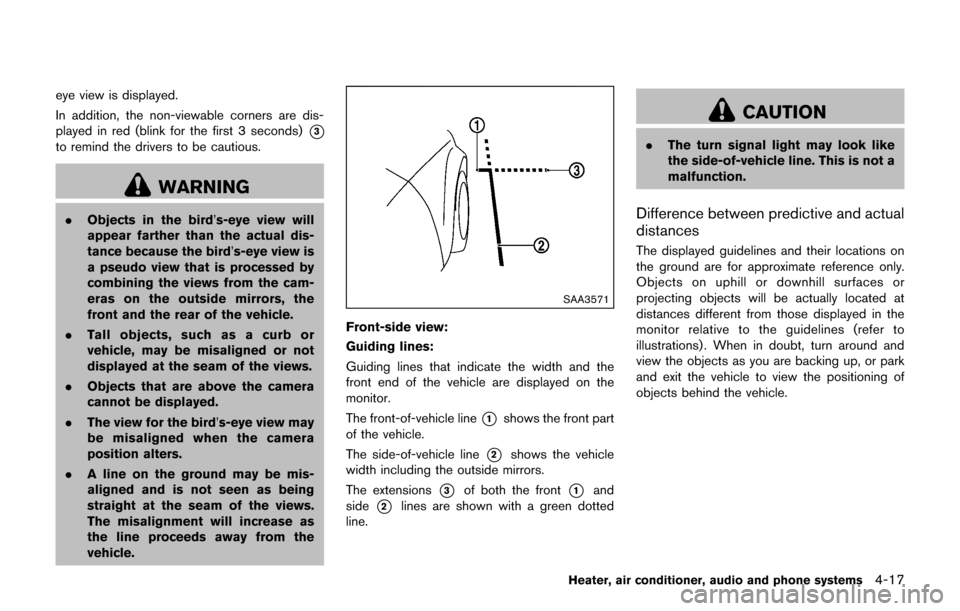
Front-side view:
Guiding lines:
Guiding lines that indicate the width and the
front end of the vehicle are displayed on the
monitor.
The front-of-vehicle line
*1shows the front part
of the vehicle.
The side-of-vehicle line
*2shows the vehicle
width including the outside mirrors.
The extensions
*3of both the front*1and
side
*2lines are shown with a green dotted
line.
CAUTION
. The turn signal light may look like
the side-of-vehicle line. This is not a
malfunction.
Difference between predictive and actual
distances
The displayed guidelines and their locations on
the ground are for approximate reference only.
Objects on uphill or downhill surfaces or
projecting objects will be actually located at
distances different from those displayed in the
monitor relative to the guidelines (refer to
illustrations) . When in doubt, turn around and
view the objects as you are backing up, or park
and exit the vehicle to view the positioning of
objects behind the vehicle.
Heater, air conditioner, audio and phone systems4-17