ice NISSAN JUKE 2018 User Guide
[x] Cancel search | Manufacturer: NISSAN, Model Year: 2018, Model line: JUKE, Model: NISSAN JUKE 2018Pages: 1672, PDF Size: 2.45 MB
Page 141 of 1672
Pulling up the wiper arm:
The windshield wipers must be in the service
position in order to replace the wiper blades.
To move the wiper blades to the service position,
follow this procedure:
.When the ignition switch is in the “ON”
position or within 60 seconds of placing the
ignition switch to the “OFF” position, lift the
lever up
*4two times in less than 0.5
seconds. The windshield wipers will move to
the service position automatically, and the
wiper blades can now be replaced. To
replace the wiper blades, see “Windshield
wiper blades” (P.8-15).
To move the wiper blades back to the original
position:
. Lift the lever up
*4or push the lever down
to operate at any wiper speed.
Page 142 of 1672
window washer reservoir tank to
mix the washer fluid concentrate
and water.
If the rear window wiper operation is
interrupted by snow or ice, the wiper may
stop moving to protect its motor. If this
occurs, turn the wiper switch to the OFF
position and remove the snow or ice that is
on and around the wiper arms. In approxi-
mately 1 minute, turn the switch on again
to operate the wiper.
Page 179 of 1672
.Do not fill a portable fuel container
in the vehicle or trailer. Static elec-
tricity can cause an explosion of
flammable liquid, vapor or gas in
any vehicle or trailer. To reduce the
risk of serious injury or death when
filling portable fuel containers:
— Always place the container on
the ground when filling.
— Do not use electronic devices when filling.
— Keep the pump nozzle in contact with the container while you are
filling it.
— Use only approved portable fuel containers for flammable liquid.
Page 187 of 1672
WARNING
.Do not disassemble or modify this
system. If you do, it may result in
accidents, fire, or electric shock.
. Do not use this system if you notice
any abnormality, such as a frozen
screen or lack of sound. Continued
use of the system may result in
accident, fire or electric shock.
. In case you notice any foreign
object in the system hardware, spill
liquid on it, or notice smoke or smell
coming from it, stop using the
system immediately. It is recom-
mended you visit a NISSAN dealer
for servicing. Ignoring such condi-
tions may lead to accidents, fire, or
electric shock.
Do not attempt to operate the system in
extreme temperature conditions [below
í 48F( í208 C) and above 1588 F (708C)].
Operating this system under these condi-
tions may result in system malfunctions.
Page 219 of 1672
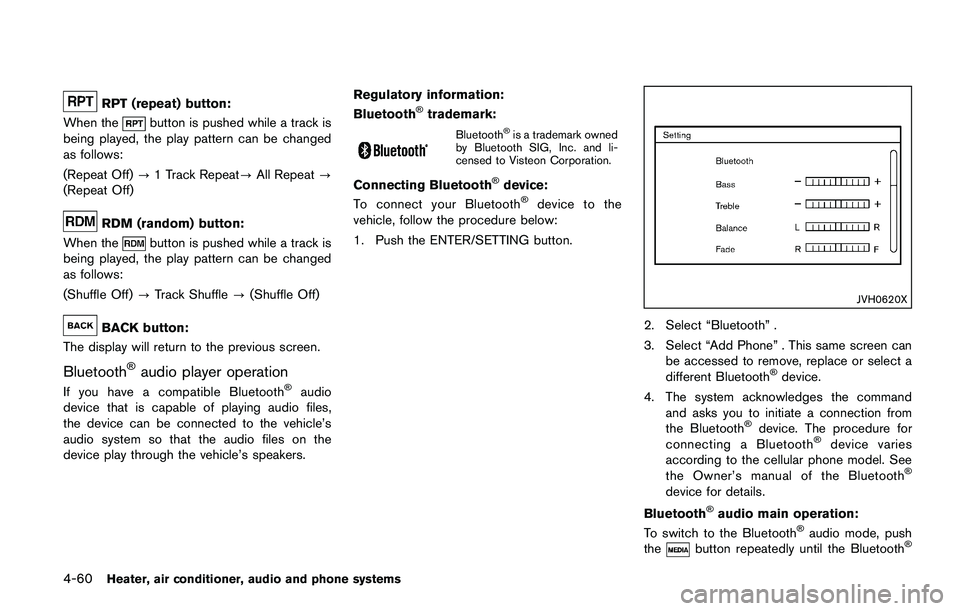
OPERATING TIPS (for automatic air
conditioner)
.When the engine coolant temperature and
outside air temperature are low, the air flow
from the foot outlets may not operate. This is
not a malfunction. After the coolant tem-
perature warms up, air will flow normally
from the foot outlets.
. The automatic air conditioner is equipped
with sensors as illustrated. The sensors
*A
and*Bon the instrument panel help
maintain a constant temperature. Do not
put anything on or around these sensors.
IN-CABIN MICROFILTER
The air conditioning system is equipped with an
in-cabin microfilter which collects dirt, pollen,
dust, etc. To make sure the air conditioner heats,
defogs, and ventilates efficiently, replace the
filter in accordance with the specified main-
tenance intervals listed in the “9. Maintenance
and schedules” section. It is recommended to
see a NISSAN dealer to replace the filter.
The filter should be replaced if the air flow
decreases significantly or if windows fog
up easily when operating the heater or air
conditioning system.
SERVICING AIR CONDITIONER
The air conditioner system in your vehicle is
charged with a refrigerant designed with the
environment in mind. This refrigerant will not
harm the earth’s ozone layer. Special char-
ging equipment and lubricant are required when
servicing your vehicle air conditioner. Using
improper refrigerants or lubricants will cause
severe damage to your air conditioner system.
(See “Capacities and recommended fluids/
lubricants” (P.10-2) for air conditioner system
refrigerant and lubricant recommendations.)
Your NISSAN dealer will be able to service your
environmentally friendly air conditioner system.
Page 233 of 1672
SAA3444
USB main operation:
The USB connection port is located on the
lower part of the instrument panel. Connect a
USB memory device into the connector. When
the audio system operates, the system will
switch to the USB memory device mode
automatically.
If the system has been turned off while the USB
memory device was playing, pushing the Power
button will start the USB memory device.
Page 234 of 1672
CAUTION
.Do not force the USB device into the
USB port. Inserting the USB device
tilted or up-side-down into the port
may damage the port. Make sure
that the USB device is connected
correctly into the USB port.
. Do not grab the USB port cover (if
so equipped) when pulling the USB
device out of the port. This could
damage the port and the cover.
. Do not leave the USB cable in a
place where it can be pulled unin-
tentionally. Pulling the cable may
damage the port.
Refer to your device manufacturer’s owner
information regarding the proper use and care
of the device.
Connecting iPod
Š:
The USB connection port is located on the
lower part of the instrument panel. Connect the
iPod
Šcable to the USB connector. See “USB
(Universal Serial Bus) connection port” (P.4-48) .
When the audio system operates, the system
will switch to the iPod
Šmode automatically. The
battery of the iPodŠis charged while the cable is connected to the vehicle.
Depending on the version of the iPod
Š, the
display on the iPodŠshows a NISSAN or
Accessory Attached screen when the connec-
tion is completed. When the iPod
Šis connected
to the vehicle, the iPodŠmusic library can only
be operated by the vehicle audio controls.
*iPod
Šand iPhoneŠare a trademark of Apple
Inc., registered in the U.S. and other countries.
Compatibility:
The following models are compatible:
. iPod nano
Š1G (Firmware version 1.3.1 -)
. iPod nanoŠ2G (Firmware version 1.1.3 -)
. iPod nanoŠ3G (Firmware version 1.0.0 -)
. iPod nanoŠ4G (Firmware version 1.0.2 -)
. iPod nanoŠ5G (Firmware version 1.0.1 -)
. iPod nanoŠ6G (Firmware version 1.0 -)
. iPod nanoŠ7G (Firmware version 1.0.0 -)
. iPodŠ5G (Firmware version 1.2.1 -)
. iPod classicŠ(Firmware version 1.0.0 -)
. iPod TouchŠ(iOS 1.1 -)
. iPod TouchŠ2G (iOS 2.1.1 -)
. iPod TouchŠ3G (iOS 3.1 -)
. iPod TouchŠ4G (iOS 4.1 -)
. iPod TouchŠ5G (iOS 6.0.0 -) .
iPhone
Š(iOS 1.0.0 - 2.2.1)
. iPhoneŠ3G (iOS 2.1 -)
. iPhoneŠ3GS (iOS 3.0 -)
. iPhoneŠ4/4S (iOS 4.0 -)
. iPhoneŠ5 (iOS 6.0.0 -)
Operations attributable to firmware update by
Apple are not guaranteed.
iPod
Šmain operation:
The system operates when the ignition switch is
in the ON or ACC position. Push the
Page 251 of 1672
JVH0742X
USB (Universal Serial Bus) connection
port
Connecting a device to the USB port:
Page 253 of 1672
CAUTION
.Do not force the USB device into the
USB port. Inserting the USB device
tilted or up-side-down into the port
may damage the port. Make sure
that the USB device is connected
correctly into the USB port.
. Do not grab the USB port cover (if
so equipped) when pulling the USB
device out of the port. This could
damage the port and the cover.
. Do not leave the USB cable in a
place where it can be pulled unin-
tentionally. Pulling the cable may
damage the port.
Refer to your device manufacturer’s owner
information regarding the proper use and care
of the device.
To connect an iPod
Što the vehicle so that the
iPodŠcan be controlled with the audio system
controls and display screen, use the USB port
located on the lower center of the instrument
panel. Connect the iPod
Š-specific end of the
cable to the iPodŠand the USB end of the cable
to the USB port on the vehicle. If your iPodŠ
supports charging via a USB connection, its battery will be charged while connected to the
vehicle with the ignition switch in the ACC or
ON position.
While connected to the vehicle, the iPod
Šmay
only be able to be operated by the vehicle audio
controls.
To disconnect the iPod
Šfrom the vehicle,
remove the USB end of the cable from the
USB port on the vehicle, then remove the cable
from the iPod
Š.
iPodŠis a trademark of Apple Inc., registered in
the U.S. and other countries.
Compatibility:
The following models are compatible:
. iPod Classic
Š5th generation (firmware
version 1.3.0 or later)
. iPod Classic
Š6th generation (firmware
version 2.0.1 or later)
. iPod Classic
Š6th (6.1) generation (firmware
version 2.0.1 or later)
. iPod Classic
Š6th (6.2) generation (firmware
version 2.0.4 or later)
. iPod Touch
Š2nd generation (firmware ver-
sion 4.2.1 or later)*
. iPod Touch
Š3rd generation (firmware ver-
sion 5.1.1 or later) .
iPod Touch
Š4th generation (firmware ver-
sion 6.1.3 or later)
. iPod Touch
Š5th generation (firmware ver-
sion 6.1.3 or later)
. iPod nano
Š- 2nd generation (firmware
version 1.1.3 or later)
. iPod nano
Š- 3rd generation (firmware
version 1.1.3 or later)
. iPod nano
Š- 4th generation (firmware
version 1.0.4 or later)
. iPod nano
Š- 5th generation (firmware
version 1.0.2 or later)
. iPod nano
Š- 6th generation (firmware
version 1.2 or later)
. iPod nano
Š- 7th generation (firmware
version 1.2 or later)
. iPhone
Š3G (firmware version 4.2.1 or later)
. iPhoneŠ3GS (firmware version 5.1.1or
later)
. iPhone
Š4 (firmware version 6.1.3 or later)
. iPhoneŠ4S (firmware version 6.1.3 or later)
. iPhoneŠ5 (firmware version 6.1.3 or later)
* Some features of this iPodŠmay not be fully
functional.
Make sure that your iPod
Šfirmware is updated
to the version indicated above.
Heater, air conditioner, audio and phone systems4-69
Page 271 of 1672
.Use the text messaging feature after
stopping your vehicle in a safe
location. If you have to use the
feature while driving, exercise ex-
treme caution at all times so full
attention may be given to vehicle
operation.
. If you are unable to devote full
attention to vehicle operation while
using the text messaging feature,
pull off the road to a safe location
and stop your vehicle.
NOTE:
. This feature is automatically disabled if
the connected device does not support
the Message Access Profile (MAP) . See
the phone’s Owner’s Manual for details
and instructions.
. Many phones may require special per-
mission to enable text messaging.
Check the phone’s screen during Blue-
tooth
Špairing. For some phones, you
may need to enable “Notifications”in
the phone’s Bluetooth
Šmenu for text
messages to appear on the vehicle
audio system. See the phone’s Owner’s
Manual for details. Text message inte-
gration requires that the phone support MAP (Message Access Profile) for both
receiving and sending text messages.
Some phones may not support all text
messaging features. Refer to www.
nissanusa.com/bluetooth or www.
nissan.ca/bluetooth for compatibility
information, as well as your device’s
Owner’s Manual.
The system allows for the sending and receiving
of text messages through the vehicle interface.
Sending a text message:
1. Push the