auto NISSAN JUKE 2021 Owners Manual
[x] Cancel search | Manufacturer: NISSAN, Model Year: 2021, Model line: JUKE, Model: NISSAN JUKE 2021Pages: 1672, PDF Size: 2.45 MB
Page 19 of 1672
PRECAUTIONS ON CRUISE CON-
TROL
.If the cruise control system malfunctions, it
will cancel automatically. The CRUISE in-
dicator light on the meter panel will then
blink to warn the driver.
. If the engine coolant temperature becomes
excessively high, the cruise control system
will cancel automatically.
. If the CRUISE indicator light blinks, turn the
cruise control MAIN switch off and have the
system checked. It is recommended you visit
a NISSAN dealer for this service.
. The CRUISE indicator light may blink when
the cruise control MAIN switch is turned ON
while pushing the ACCEL/RES, COAST/
SET or CANCEL switch. To properly set the
cruise control system, perform the following
procedures.
Page 20 of 1672
accelerator pedal. Your vehicle will maintain the
set speed.
.To pass another vehicle, depress the
accelerator pedal. When you release the
pedal, the vehicle will return to the previously
set speed.
. The vehicle may not maintain the set speed
on winding or hilly roads. If this happens,
drive without the cruise control.
To cancel the preset speed, use one of the
following methods:
a) Push the CANCEL switch.
b) Tap the brake pedal.
c) Turn the MAIN switch off. The CRUISE indicator light will turn off.
.If you depress the brake pedal while pushing
the ACCEL/RES or COAST/SET switch and
reset at the cruising speed, the cruise
control will disengage. Turn the MAIN switch
off once and then turn it on again.
. The cruise control will automatically cancel if
the vehicle slows more than 8 MPH (13
km/h) below the set speed.
. If you move the shift lever to the N (Neutral)
position (Continuously Variable Transmis-
sion models) or depressing the clutch pedal
(Manual Transmission models) , the cruise
control will be canceled. To reset at a faster cruising speed,
use one
of the following methods:
. Depress the accelerator pedal. When the
vehicle attains the desired speed, push and
release the COAST/SET switch.
. Push and hold the ACCEL/RES switch.
When the vehicle attains the desired speed,
release the switch.
. Push, then quickly release the ACCEL/RES
switch. Each time you do this, the set speed
will increase by about 1 MPH (1.6 km/h) .
To reset at a slower cruising speed, use one
of the following methods:
. Lightly tap the brake pedal. When the
vehicle attains the desired speed, push the
COAST/SET switch and release it.
. Push and hold the COAST/SET switch.
Release the switch when the vehicle slows
down to the desired speed.
. Push, then quickly release the COAST/SET
switch. Each time you do this, the set speed
will decrease by about 1 MPH (1.6 km/h) .
To resume the preset speed, push and
release the ACCEL/RES switch. The vehicle
will resume the last set cruising speed when the
vehicle speed is over 25 MPH (40 km/h) .
Page 23 of 1672
.Use the text messaging feature after
stopping your vehicle in a safe
location. If you have to use the
feature while driving, exercise ex-
treme caution at all times so full
attention may be given to vehicle
operation.
. If you are unable to devote full
attention to vehicle operation while
using the text messaging feature,
pull off the road to a safe location
and stop your vehicle.
NOTE:
. This feature is automatically disabled if
the connected device does not support
the Message Access Profile (MAP) . See
the phone’s Owner’s Manual for details
and instructions.
. Many phones may require special per-
mission to enable text messaging.
Check the phone’s screen during Blue-
tooth
Špairing. For some phones, you
may need to enable “Notifications”in
the phone’s Bluetooth
Šmenu for text
messages to appear on the vehicle
audio system. See the phone’s Owner’s
Manual for details. Text message inte-
gration requires that the phone support MAP (Message Access Profile) for both
receiving and sending text messages.
Some phones may not support all text
messaging features. Refer to www.
nissanusa.com/bluetooth or www.
nissan.ca/bluetooth for compatibility
information, as well as your device’s
Owner’s Manual.
The system allows for the sending and receiving
of text messages through the vehicle interface.
Sending a text message:
1. Push the
Page 25 of 1672
.Text MessageSelect to turn on or off the vehicle’s text
messaging feature.
.New Text SoundSelect to adjust the volume of the sound
that plays when a new text is received by
a phone connected to the Bluetooth
Š
Hands-Free Phone System. The setting
all the way to the left indicates that the
new text sound will be muted.
.Show Incoming TextSelect “Driver Only” to have incoming
text messages displayed only in the
vehicle information display. Select “Both”
to have incoming text messages dis-
played in both the vehicle information
display and the center display screen.
Select “None” to have no display of
incoming text messages.
.Edit Custom MessagesSelect to set a custom message that will
be available with the standard options
when sending a text message. To set a
custom message, send a text message to
your own phone number while the phone
is connected to the system. Three
custom messages can be set. Custom
messages can only be set while the
vehicle is stationary.
.Auto ReplySelect to turn on or off the Auto Reply
function. When enabled, the vehicle will
automatically send a predefined text message to the sender when a text
message is received while driving.
.Auto Reply Message
Select to choose the message that is
sent when the Auto Reply function is
enabled. Choose from “I’m Driving” or
one of the three custom messages
stored in the system.
.Vehicle Signature On/OffSelect to choose whether or not the
vehicle signature is added to outgoing
text messages from the vehicle. This
message cannot be changed or custo-
mized.
Page 60 of 1672
of movement in the seat. The ELR locks the seat
belt when the vehicle slows down rapidly or
during certain impacts.
The Automatic Locking Retractor (ALR) mode
(child restraint mode) locks the seat belt for
child restraint installation.
When ALR mode is activated the seat belt
cannot be extended again until the seat belt
tongue is detached from the buckle and fully
retracted. The seat belt returns to the ELR mode
after the seat belt fully retracts. For additional
information, see “Child restraints” (P.1-18) .
The ALR mode should be used only for
child restraint installation. During normal
seat belt use by an occupant, the ALR
mode should not be activated. If it is
activated, it may cause uncomfortable seat
belt tension.
Page 91 of 1672
.Until you have confirmed with your
dealer that your passenger seat
occupant classification system is
working properly, position the occu-
pants in the rear seating positions.
This vehicle is equipped with the NISSAN
Advanced Air Bag System for the driver and
front passenger seats. This system is designed
to meet certification requirements under U.S.
regulations. It is also permitted in Canada. All of
the information, cautions and warnings in
this manual apply and must be followed.
The driver supplemental front-impact air bag is
located in the center of the steering wheel. The
passenger supplemental front-impact air bag is
mounted in the instrument panel above the glove
box. The front air bags are designed to inflate in
higher severity frontal collisions, although they
may inflate if the forces in another type of
collision are similar to those of a higher severity
frontal impact. They may not inflate in certain
frontal collisions. Vehicle damage (or lack of it) is
not always an indication of proper front air bag
operation.
The NISSAN Advanced Air Bag System has
dual stage air bag inflators. The system monitors
information from the Air bag Control Unit (ACU) ,
seat belt buckle sensors and the occupant classification sensors (weight sensors) . Inflator
operation is based on the severity of a collision
and seat belt usage for the driver. For the front
passenger, the occupant classification sensors
are also monitored. Based on information from
the sensors, only one front air bag may inflate in
a crash, depending on the crash severity and
whether the front occupants are belted or
unbelted. Additionally, the front passenger air
bag may be automatically turned OFF under
some conditions, depending on the information
provided by the occupant classification sensors.
If the front passenger air bag is OFF, the front
passenger air bag status light will be illuminated
(if the seat is unoccupied, the light will not be
illuminated, but the air bag will be off) . (See
“Front passenger air bag and status light” (P.1-
46) for further details.) One front air bag inflating
does not indicate improper performance of the
system.
If you have any questions about your air bag
system, it is recommended you visit a NISSAN
dealer to obtain information about the system. If
you are considering modification of your vehicle
due to a disability, you may also contact
NISSAN. Contact information is contained in
the front of this Owner’s Manual.
When a front air bag inflates, a fairly loud noise
may be heard, followed by release of smoke.
This smoke is not harmful and does not indicatea fire. Care should be taken not to inhale it, as it
may cause irritation and choking. Those with a
history of a breathing condition should get fresh
air promptly.
Front air bags, along with the use of seat belts,
help to cushion the impact force on the head
and chest of the front occupants. They can help
save lives and reduce serious injuries. However,
an inflating front air bag may cause facial
abrasions or other injuries. Front air bags do
not provide restraint to the lower body.
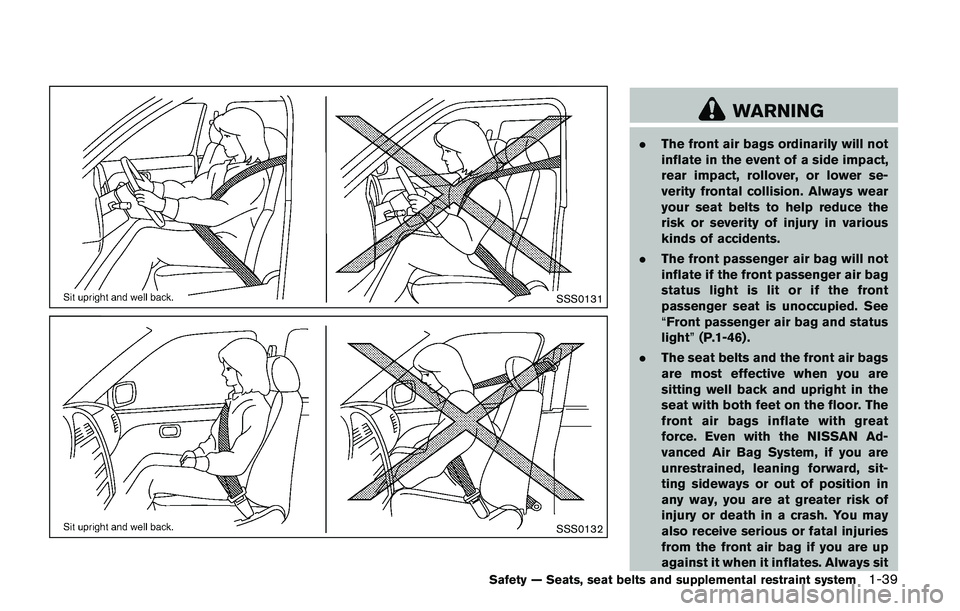
Even with NISSAN Advanced Air Bags, seat
belts should be correctly worn and the driver
and passenger seated upright as far as practical
away from the steering wheel or instrument
panel. The front air bags inflate quickly in order
to help protect the front occupants. Because of
this, the force of the front air bag inflating can
increase the risk of injury if the occupant is too
close to, or is against, the air bag module during
inflation.
The front air bags deflate quickly after a collision.
The front air bags operate only when the
ignition switch is in the ON position.
After the ignition is placed in the ON
position, the supplemental air bag warning
light illuminates. The supplemental air bag
warning light will turn off after about 7
seconds if the system is operational.
Safety — Seats, seat belts and supplemental restraint system1-45
Page 123 of 1672
pressure to the recommended COLD tire
pressure shown on the Tire and Loading
Information label. The low tire pressure warning
light does not automatically turn off when the tire
pressure is adjusted. After the tire is inflated to
the recommended pressure, the vehicle must be
driven at speeds above 16 MPH (25 km/h) to
activate the TPMS and turn off the low tire
pressure warning light. Use a tire pressure
gauge to check the tire pressure.
The low tire pressure warning light remains
illuminated until the tires are inflated to the
recommended COLD tire pressure. The CHECK
TIRE PRES warning message is displayed each
time the ignition switch is placed in the ON
position as long as the low tire pressure warning
light remains illuminated.
For additional information, see “Check tire
pressure warning message” (P.2-9) , “Tire Pres-
sure Monitoring System (TPMS)” (P.5-3) and
“Tire Pressure Monitoring System (TPMS)” (P.6-
3) .
TPMS malfunction:
If the TPMS is not functioning properly, the low
tire pressure warning light will flash for approxi-
mately 1 minute when the ignition switch is
placed in the ON position. The light will remain
on after 1 minute. The CHECK TIRE PRES
warning message is not displayed if the low tirepressure warning light illuminates to indicate a
TPMS malfunction. Have the system checked. It
is recommended you visit a NISSAN dealer for
this service.
For additional information, see “Tire Pressure
Monitoring System (TPMS)” (P.5-3) .
Page 141 of 1672
Pulling up the wiper arm:
The windshield wipers must be in the service
position in order to replace the wiper blades.
To move the wiper blades to the service position,
follow this procedure:
.When the ignition switch is in the “ON”
position or within 60 seconds of placing the
ignition switch to the “OFF” position, lift the
lever up
*4two times in less than 0.5
seconds. The windshield wipers will move to
the service position automatically, and the
wiper blades can now be replaced. To
replace the wiper blades, see “Windshield
wiper blades” (P.8-15).
To move the wiper blades back to the original
position:
. Lift the lever up
*4or push the lever down
to operate at any wiper speed.
Page 143 of 1672
To defog/defrost the rear window glass and
outside mirrors (if so equipped) , start the engine
and push the switch
*1on. The indicator light
*2will illuminate. Push the switch again to turn
the defroster off.
It will automatically turn off in approximately 15
minutes.
Page 145 of 1672
SAA1232
Be sure not to put anything on top of the
photo sensor
*1located on the top of the
instrument panel. The photo sensor con-
trols the autolight; if it is covered, the
photo sensor reacts as if it is dark and the
headlights will illuminate.
Automatic headlights off delay
You can keep the headlights on for up to 45
seconds after you place the ignition switch in the
OFF position and open any door then close all
the doors.