key NISSAN KICKS 2018 Owner´s Manual
[x] Cancel search | Manufacturer: NISSAN, Model Year: 2018, Model line: KICKS, Model: NISSAN KICKS 2018Pages: 435, PDF Size: 5.48 MB
Page 11 of 435
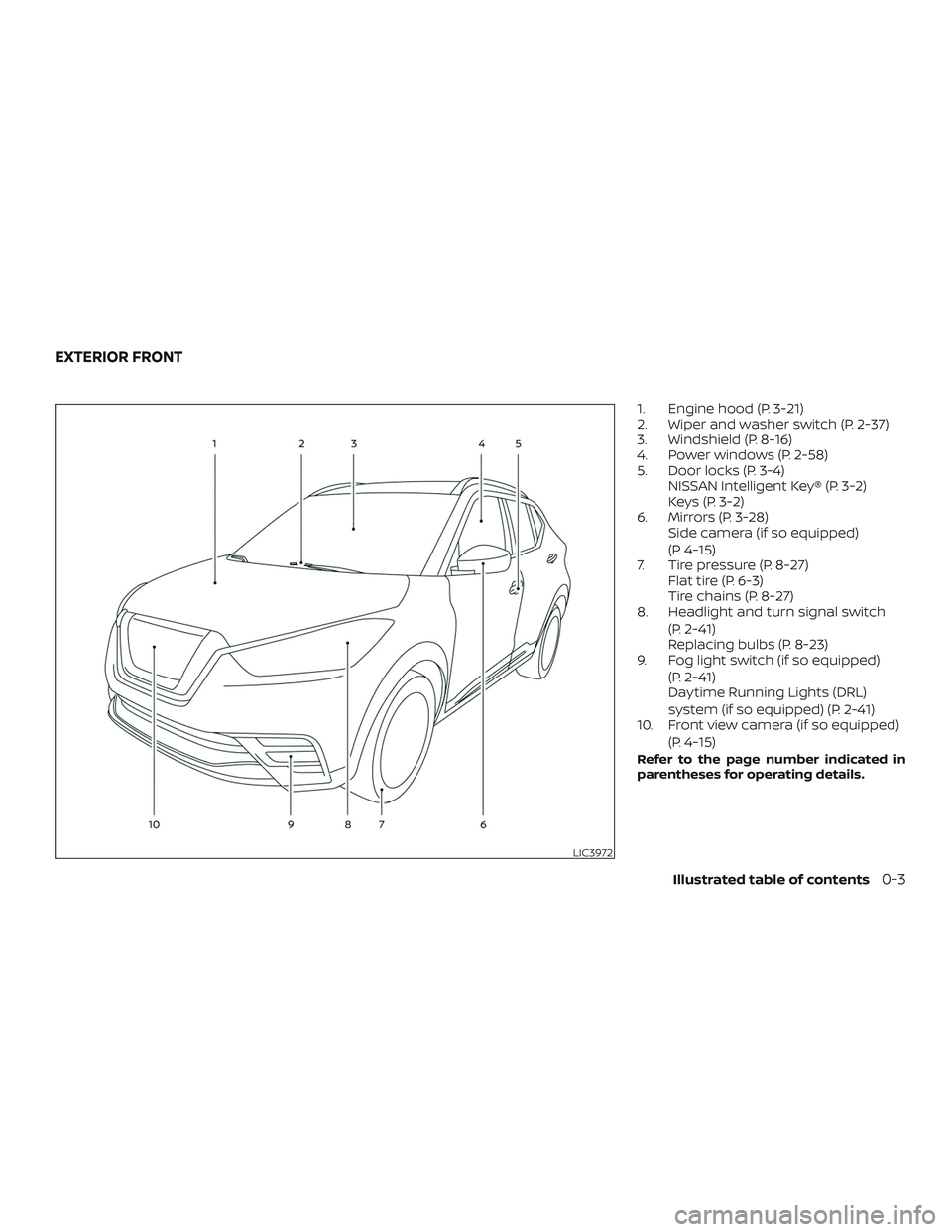
1. Engine hood (P. 3-21)
2. Wiper and washer switch (P. 2-37)
3. Windshield (P. 8-16)
4. Power windows (P. 2-58)
5. Door locks (P. 3-4)NISSAN Intelligent Key® (P. 3-2)
Keys (P. 3-2)
6. Mirrors (P. 3-28) Side camera (if so equipped)
(P. 4-15)
7. Tire pressure (P. 8-27) Flat tire (P. 6-3)
Tire chains (P. 8-27)
8. Headlight and turn signal switch
(P. 2-41)
Replacing bulbs (P. 8-23)
9. Fog light switch (if so equipped)
(P. 2-41)
Daytime Running Lights (DRL)
system (if so equipped) (P. 2-41)
10. Front view camera (if so equipped)
(P. 4-15)
Refer to the page number indicated in
parentheses for operating details.
LIC3972
EXTERIOR FRONT
Illustrated table of contents0-3
Page 17 of 435
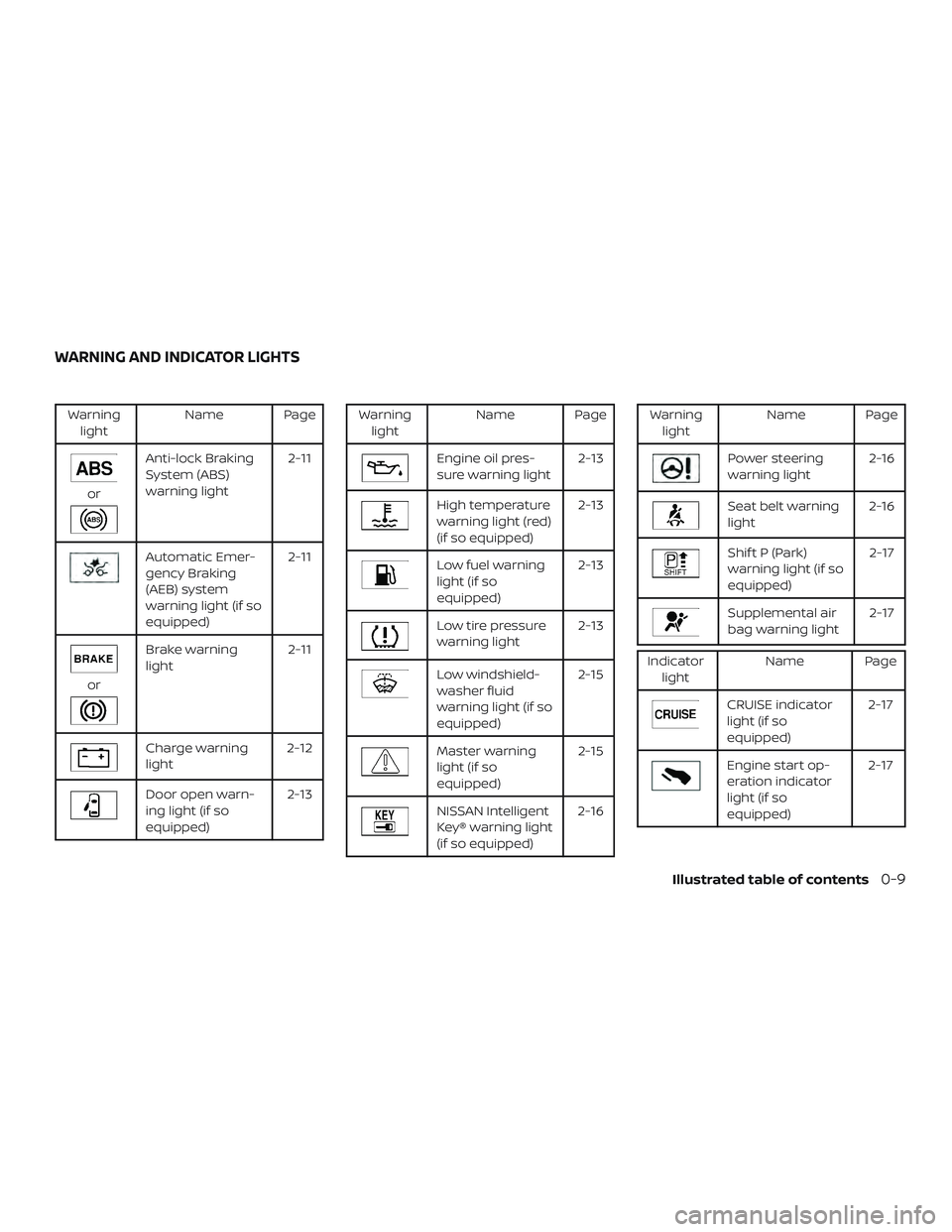
Warninglight Name Page
or
Anti-lock Braking
System (ABS)
warning light 2-11
Automatic Emer-
gency Braking
(AEB) system
warning light (if so
equipped)2-11
or
Brake warning
light
2-11
Charge warning
light2-12
Door open warn-
ing light (if so
equipped) 2-13
Warning
light Name Page
Engine oil pres-
sure warning light 2-13
High temperature
warning light (red)
(if so equipped)2-13
Low fuel warning
light (if so
equipped)2-13
Low tire pressure
warning light
2-13
Low windshield-
washer fluid
warning light (if so
equipped)2-15
Master warning
light (if so
equipped)
2-15
NISSAN Intelligent
Key® warning light
(if so equipped)2-16
Warning
light Name Page
Power steering
warning light 2-16
Seat belt warning
light2-16
Shif t P (Park)
warning light (if so
equipped) 2-17
Supplemental air
bag warning light
2-17
Indicator
light Name Page
CRUISE indicator
light (if so
equipped) 2-17
Engine start op-
eration indicator
light (if so
equipped)2-17
WARNING AND INDICATOR LIGHTS
Illustrated table of contents0-9
Page 94 of 435
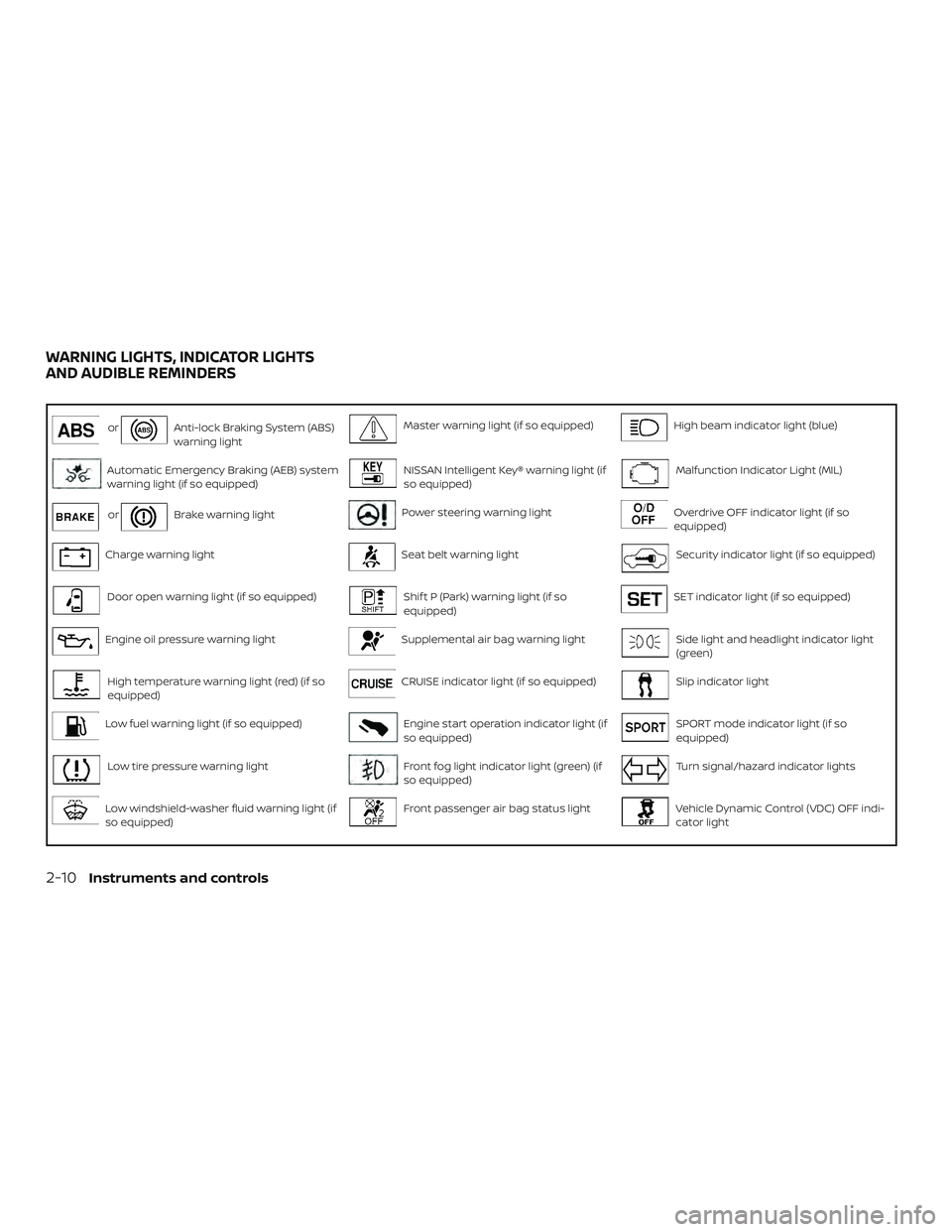
orAnti-lock Braking System (ABS)
warning lightMaster warning light (if so equipped)High beam indicator light (blue)
Automatic Emergency Braking (AEB) system
warning light (if so equipped)NISSAN Intelligent Key® warning light (if
so equipped)Malfunction Indicator Light (MIL)
orBrake warning lightPower steering warning lightOverdrive OFF indicator light (if so
equipped)
Charge warning lightSeat belt warning lightSecurity indicator light (if so equipped)
Door open warning light (if so equipped)Shif t P (Park) warning light (if so
equipped)SET indicator light (if so equipped)
Engine oil pressure warning lightSupplemental air bag warning lightSide light and headlight indicator light
(green)
High temperature warning light (red) (if so
equipped)CRUISE indicator light (if so equipped)Slip indicator light
Low fuel warning light (if so equipped)Engine start operation indicator light (if
so equipped)SPORT mode indicator light (if so
equipped)
Low tire pressure warning lightFront fog light indicator light (green) (if
so equipped)Turn signal/hazard indicator lights
Low windshield-washer fluid warning light (if
so equipped)Front passenger air bag status lightVehicle Dynamic Control (VDC) OFF indi-
cator light
WARNING LIGHTS, INDICATOR LIGHTS
AND AUDIBLE REMINDERS
2-10Instruments and controls
Page 99 of 435
∙ If the light illuminates while driving,avoid sudden steering maneuvers or
abrupt braking, reduce vehicle speed,
pull off the road to a safe location and
stop the vehicle as soon as possible.
Driving with under-inflated tires may
permanently damage the tires and in-
crease the likelihood of tire failure. Se-
rious vehicle damage could occur and
may lead to an accident and could re-
sult in serious personal injury or
death. Check the tire pressure for all
four tires. Adjust the tire pressure to
the recommended COLD tire pressure
show on the Tire and Loading Infor-
mation label located in the driver’s
door opening to turn the low tire pres-
sure warning light off. If the light still
illuminates while driving af ter adjust-
ing the tire pressure, a tire may be flat
or the TPMS may be malfunctioning. If
you have a flat tire, replace it with a
spare tire as soon as possible. If no tire
is flat and all tires are properly in-
flated, have the vehicle checked. It is
recommended that you visit a NISSAN
dealer for this service. ∙ When replacing a wheel without the
TPMS such as the spare tire, the TPMS
will not function and the low tire pres-
sure warning light will flash for ap-
proximately 1 minute. The light will re-
main on af ter 1 minute. Have your
tires replaced and/or TPMS system
reset as soon as possible. It is recom-
mended that you visit a NISSAN dealer
for these services.
∙ Replacing tires with those not origi- nally specified by NISSAN could affect
the proper operation of the TPMS.
CAUTION
∙ The TPMS is not a substitute for theregular tire pressure check. Be sure to
check the tire pressure regularly.
∙ If the vehicle is being driven at speeds of less than 16 mph (25 km/h), the
TPMS may not operate correctly.
∙ Be sure to install the specified size of tires to the four wheels correctly.
Low windshield-washer
fluid warning light (if so
equipped)
This light comes on when the windshield-
washer fluid is at a low level. Add
windshield-washer fluid as necessary. For
additional information, refer to “Windshield-
washer fluid” in the “Do-it-yourself ” section
of this manual.
Master warning light (if soequipped)
This light illuminates when various vehicle
information display warnings appear.
∙Nokey
∙ I-Key system warning
∙ Low washer fluid
∙ Door open
∙ Parking brake release
For additional information, refer to “Vehicle
information display” in this section.
Instruments and controls2-15
Page 100 of 435
NISSAN Intelligent Key®warning light (if so
equipped)
Af ter the ignition switch is placed in the ON
position, this light comes on for about
2 seconds and then turns off. This light illu-
minates or blinks as follows:
∙ The light blinks in yellow when the door is closed with the Intelligent Key lef t out-
side the vehicle and the ignition switch
in the ON position. Make sure that the
Intelligent Key is inside the vehicle.
∙ The light blinks in green when the Intel- ligent Key battery is running out of
power. Replace the battery with a new
one. For additional information, refer to
“Battery” in the “Do-it-yourself ” section
of this manual.
∙ The light illuminates in yellow when it warns of a malfunction with the electri-
cal steering lock system or the Intelli-
gent Key system.
If the warning light illuminates in yellow
while the engine is stopped, it may be im-
possible to free the steering lock or to start
the engine. If the light comes on while the
engine is running, you can drive the vehicle.
However, in these cases, have the vehicle checked and repaired as soon as possible.
It is recommended that you visit a NISSAN
dealer for this service.
For additional information, refer to “NISSAN
Intelligent Key®” in the “Pre-driving checks
and adjustments” section of this manual.
Power steering warning
light
WARNING
∙ If the engine is not running or is turned off while driving, the power as-
sist for the steering will not work.
Steering will be harder to operate.
∙ When the power steering warning light illuminates with the engine run-
ning, there will be no power assist for
the steering. You will still have control
of the vehicle, but the steering will be
harder to operate. Have the power
steering system checked. It is recom-
mended that you visit a NISSAN dealer
for this service.
When the ignition switch is placed in the ON
position, the power steering warning light
illuminates. Af ter starting the engine, the
power steering warning light turns off. This
indicates the power steering is operational. If the power steering warning light illumi-
nates while the engine is running, it may
indicate the power steering is not function-
ing properly and may need servicing. Have
the power steering checked. It is recom-
mended that you visit a NISSAN dealer for
this service.
When the power steering warning light illu-
minates with the engine running, there will
be no power assist for the steering, but you
will still have control of the vehicle. At this
time, greater steering effort is required to
operate the steering wheel, especially in
sharp turns and at low speeds.
For additional information, refer to “Power
steering” in the “Starting and driving” sec-
tion of this manual.
Seat belt warning light
The light reminds you to fasten your seat
belts. The light illuminates whenever the
ignition switch is placed in the ON or START
position and remains illuminated until the
driver’s seat belt is fastened.
The seat belt warning light may also illumi-
nate if the front passenger’s seat belt is not
fastened when the front passenger’s seat
is occupied.
2-16Instruments and controls
Page 101 of 435
For additional information, refer to “Seat
belts” in the “Safety—Seats, seat belts and
supplemental restraint system” section of
this manual.
Shif t P (Park) warning light(if so equipped)
This light blinks red and the key reminder
chime sounds if the shif t lever is in any
position other than P (Park) and the ignition
switch is in the OFF position. Return the
shif t lever to P (Park) with the ignition
switch in the OFF position and the light will
turn off. Place the ignition switch in the
LOCK position and the chime will turn off.
For additional information, refer to “NISSAN
Intelligent Key®” in the “Pre-driving checks
and adjustments” section of this manual.
Supplemental air bagwarning light
When the ignition switch is placed in the ON
or START position, the supplemental air
bag warning light illuminates for about
7 seconds and then turns off. This means
the system is operational.
If any of the following conditions occur, the
front air bag, side air bag, curtain air bag,
and pretensioner seat belt systems need
servicing: ∙ The supplemental air bag warning light
remains on af ter approximately 7 sec-
onds.
∙ The supplemental air bag warning light flashes intermittently.
∙ The supplemental air bag warning light does not come on at all.
It is recommended that you visit a NISSAN
dealer for these services.
Unless checked and repaired, the supple-
mental restraint system (air bag system)
and/or the pretensioner(s) may not func-
tion properly. For additional information, re-
fer to “Supplemental Restraint System
(SRS)” in the “Safety—Seats, seat belts and
supplemental restraint system” section of
this manual.
WARNING
If the supplemental air bag warning
light is on, it could mean that the front
air bag, side air bag, curtain air bag
and/or pretensioner systems will not
operate in an accident. To help avoid
injury to yourself or others, have your
vehicle checked as soon as possible. It is
recommended that you visit a NISSAN
dealer for this service.
INDICATOR LIGHTS
For additional information, refer to “Vehicle
information display” in this section.
CRUISE indicator light (if so equipped)
The light comes on when the cruise control
switch is pushed. The light goes out when
the switch is pushed again. When the
cruise indicator light comes on, the cruise
control system is operational. For addi-
tional information, refer to “Cruise control”
in the “Starting and driving” section of this
manual.
Engine start operationindicator light (if so
equipped)
For vehicles equipped with push-button ig-
nition this indicator illuminates when the
ignition switch is in the LOCK, OFF or ON
position with the shif t lever in the P (Park)
position.
This indicator means that the engine will
start by pushing the push-button ignition
switch with the brake pedal depressed.
Instruments and controls2-17
Page 104 of 435
For additional information, refer to “Con-
tinuously Variable Transmission (CVT)” in
the “Starting and driving” section of this
manual.
Turn signal/hazardindicator lights
The appropriate light flashes when the turn
signal switch is activated.
NOTE:
In case of a turn signal light bulb mal-
function, the turn signal will flash at a
higher frequency when the turn signal
switch is activated.
Both lights flash when the hazard switch is
turned on.
For additional information, refer to “Lights”
in the “Do-it-yourself ” section of this
manual.
Vehicle Dynamic Control (VDC) OFF indicator light
When the ignition switch is in the ON posi-
tion, the VDC OFF indicator light illuminates
and the turns off. The VDC OFF indicator light illuminates
when the VDC OFF switch is pushed to the
OFF position.
When the VDC OFF switch is pushed to the
OFF position, the VDC system is turned off.
For additional information, refer to “Vehicle
Dynamic Control (VDC) system” in the
“Starting and driving” section of this
manual.
AUDIBLE REMINDERS
Brake pad wear warning
The disc brake pads have audible wear
warnings. When a disc brake pad requires
replacement, it makes a high pitched
scraping sound when the vehicle is in mo-
tion, whether or not the brake pedal is de-
pressed. Have the brakes checked as soon
as possible if the warning sound is heard. It
is recommended that you visit a NISSAN
dealer for this service.
Light reminder chime
With the ignition switch placed in the OFF
position, a chime sounds when the driver’s
door is opened if the headlights or parking
lights are on.Turn the headlight control switch off or to
AUTO before leaving the vehicle.
NISSAN Intelligent Key® Lock-in
Prevention (if so equipped)
The Intelligent Key buzzer sounds if the In-
telligent Key is lef t inside the vehicle when
the doors are closed and locked. When the
buzzer sounds, be sure to take the Intelli-
gent Key with you when leaving the vehicle.
For additional information, refer to “NISSAN
Intelligent Key®” in the “Pre-driving checks
and adjustments” section of this manual.
Parking brake reminder chime
A chime sounds if the parking brake is set
and the vehicle is driven. The chime will
stop if the parking brake is released or the
vehicle speed returns to zero.
2-20Instruments and controls
Page 109 of 435
Vehicle Settings
The vehicle settings allow the user to
change the settings for lights, wipers, lock-
ing, keys, and other vehicle settings.
Menu itemResult
Lighting Displays the available lighting settings.
Welcome Headlight Displays the available welcome headlight options.
Welcome & Farewell Allows user to set the headlights to turn on when they approach and leave the vehicle.
Welcome Allows user to set the headlights to turn on when they approach the vehicle.
Farewell Allows user to set the headlights to turn on when they leave the vehicle.
OFF Allows user to set the headlights to turn off when not driving.
Auto Room Lamp Allows user to turn the auto room lamp on or off.
Light Sensitivity Allows user to change when the lights illuminate based on the brightness outside the vehicle.
Auto Light (if so equipped) Allows user to turn the auto light feature on or off.
Light Off Delay Allows user to change the duration of time, from 0 to 180 seconds, that the automatic headlights stay on af-
ter the vehicle is shut off.
Turn Indicator Displays the available turn indicator settings.
3 Flash Pass Allows user to turn the 3 flash pass feature on or off. For additional information, refer to “Headlight and turn
signal switch” in this section.
Locking Displays the available locking settings.
Ext. Door Switch Allows user to turn the exterior door switch on or off. When turned on, the request switch on the door is
activated.
Selective Unlock Allows user to turn the selective unlock feature on or off. When turned on, only the driver’s door is unlocked
af ter the door unlock operation. When the door handle request switch on the driver’s or front passenger’s
side door is pushed to be unlocked, only the corresponding door is unlocked first. All the doors can be un-
locked if the door unlock operation is performed again within 30 seconds. When this item is turned off, all the
doors will be unlocked af ter the door unlock operation is performed once.
Instruments and controls2-25
Page 110 of 435
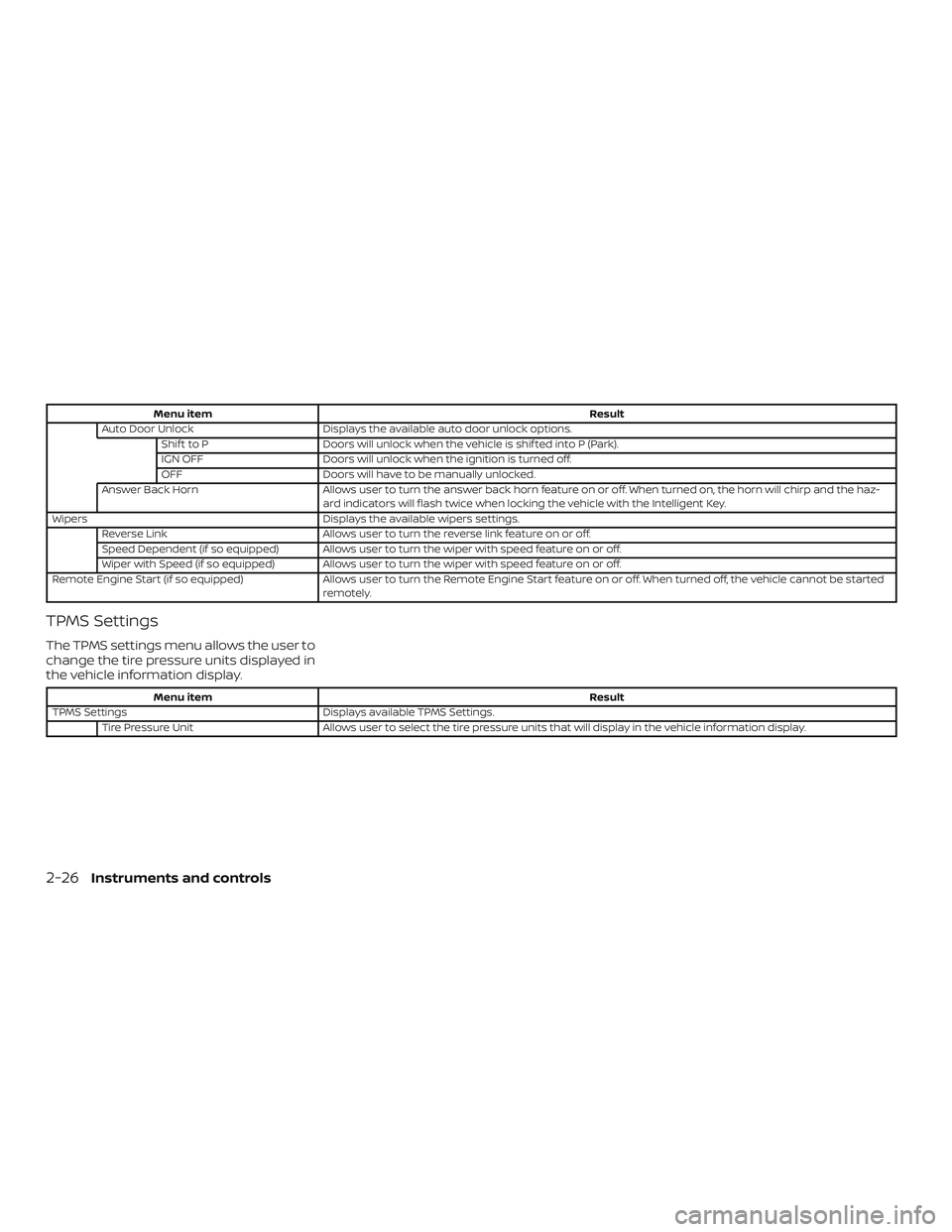
Menu itemResult
Auto Door Unlock Displays the available auto door unlock options.
Shif t to P Doors will unlock when the vehicle is shif ted into P (Park).
IGN OFF Doors will unlock when the ignition is turned off.
OFF Doors will have to be manually unlocked.
Answer Back Horn Allows user to turn the answer back horn feature on or off. When turned on, the horn will chirp and the haz-
ard indicators will flash twice when locking the vehicle with the Intelligent Key.
Wipers Displays the available wipers settings.
Reverse Link Allows user to turn the reverse link feature on or off.
Speed Dependent (if so equipped) Allows user to turn the wiper with speed feature on or off.
Wiper with Speed (if so equipped) Allows user to turn the wiper with speed feature on or off.
Remote Engine Start (if so equipped) Allows user to turn the Remote Engine Start feature on or off. When turned off, the vehicle cannot be started
remotely.
TPMS Settings
The TPMS settings menu allows the user to
change the tire pressure units displayed in
the vehicle information display.
Menu item Result
TPMS Settings Displays available TPMS Settings.
Tire Pressure Unit Allows user to select the tire pressure units that will display in the vehicle information display.
2-26Instruments and controls
Page 114 of 435
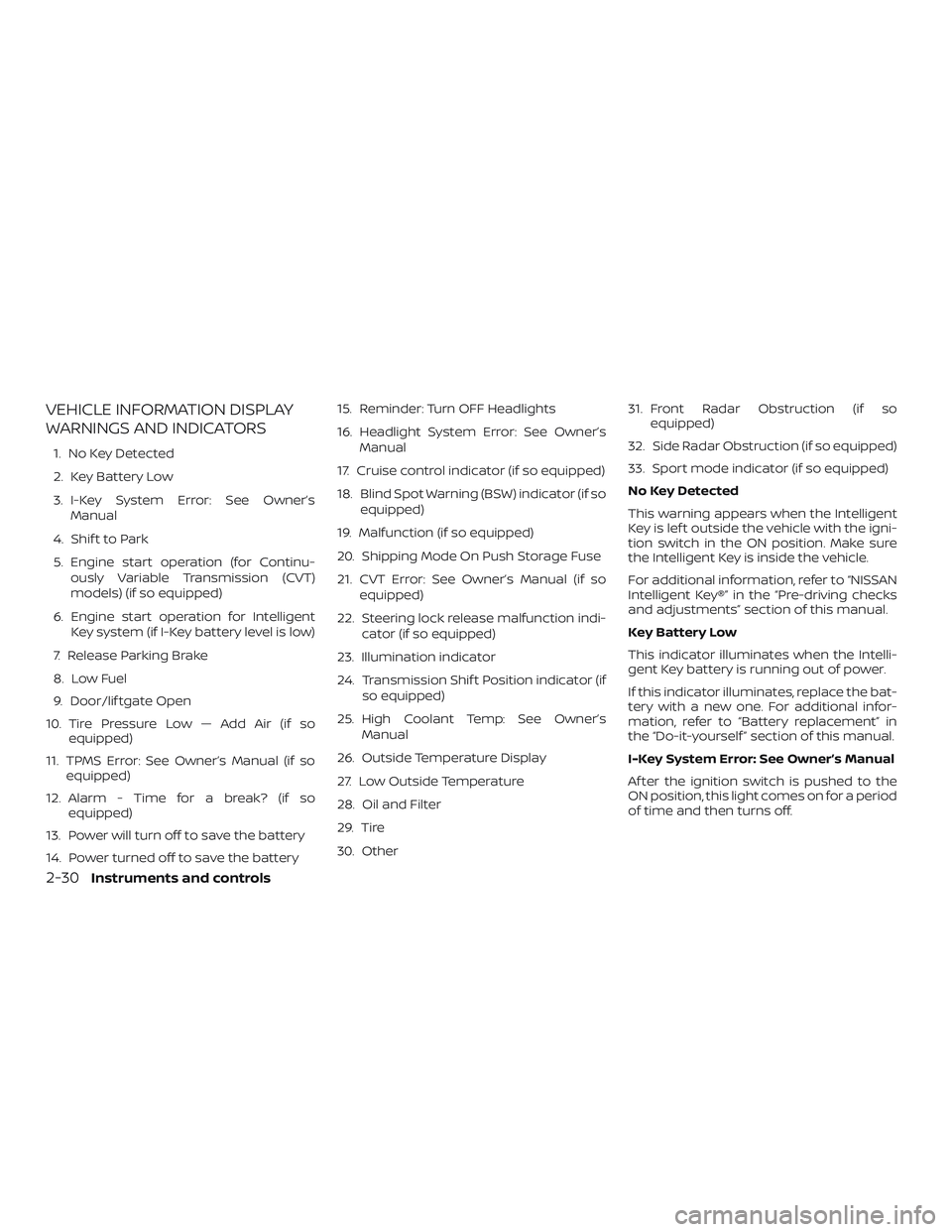
VEHICLE INFORMATION DISPLAY
WARNINGS AND INDICATORS
1. No Key Detected
2. Key Battery Low
3. I-Key System Error: See Owner’sManual
4. Shif t to Park
5. Engine start operation (for Continu- ously Variable Transmission (CVT)
models) (if so equipped)
6. Engine start operation for Intelligent Key system (if I-Key battery level is low)
7. Release Parking Brake
8. Low Fuel
9. Door/lif tgate Open
10. Tire Pressure Low — Add Air (if so equipped)
11. TPMS Error: See Owner’s Manual (if so equipped)
12. Alarm - Time for a break? (if so equipped)
13. Power will turn off to save the battery
14. Power turned off to save the battery 15. Reminder: Turn OFF Headlights
16. Headlight System Error: See Owner’s
Manual
17. Cruise control indicator (if so equipped)
18. Blind Spot Warning (BSW) indicator (if so equipped)
19. Malfunction (if so equipped)
20. Shipping Mode On Push Storage Fuse
21. CVT Error: See Owner’s Manual (if so equipped)
22. Steering lock release malfunction indi- cator (if so equipped)
23. Illumination indicator
24. Transmission Shif t Position indicator (if so equipped)
25. High Coolant Temp: See Owner’s Manual
26. Outside Temperature Display
27. Low Outside Temperature
28. Oil and Filter
29. Tire
30. Other 31. Front Radar Obstruction (if so
equipped)
32. Side Radar Obstruction (if so equipped)
33. Sport mode indicator (if so equipped)
No Key Detected
This warning appears when the Intelligent
Key is lef t outside the vehicle with the igni-
tion switch in the ON position. Make sure
the Intelligent Key is inside the vehicle.
For additional information, refer to “NISSAN
Intelligent Key®” in the “Pre-driving checks
and adjustments” section of this manual.
Key Battery Low
This indicator illuminates when the Intelli-
gent Key battery is running out of power.
If this indicator illuminates, replace the bat-
tery with a new one. For additional infor-
mation, refer to “Battery replacement” in
the “Do-it-yourself ” section of this manual.
I-Key System Error: See Owner’s Manual
Af ter the ignition switch is pushed to the
ON position, this light comes on for a period
of time and then turns off.
2-30Instruments and controls