child lock NISSAN KICKS 2020 Owner´s Manual
[x] Cancel search | Manufacturer: NISSAN, Model Year: 2020, Model line: KICKS, Model: NISSAN KICKS 2020Pages: 500, PDF Size: 3.43 MB
Page 59 of 500
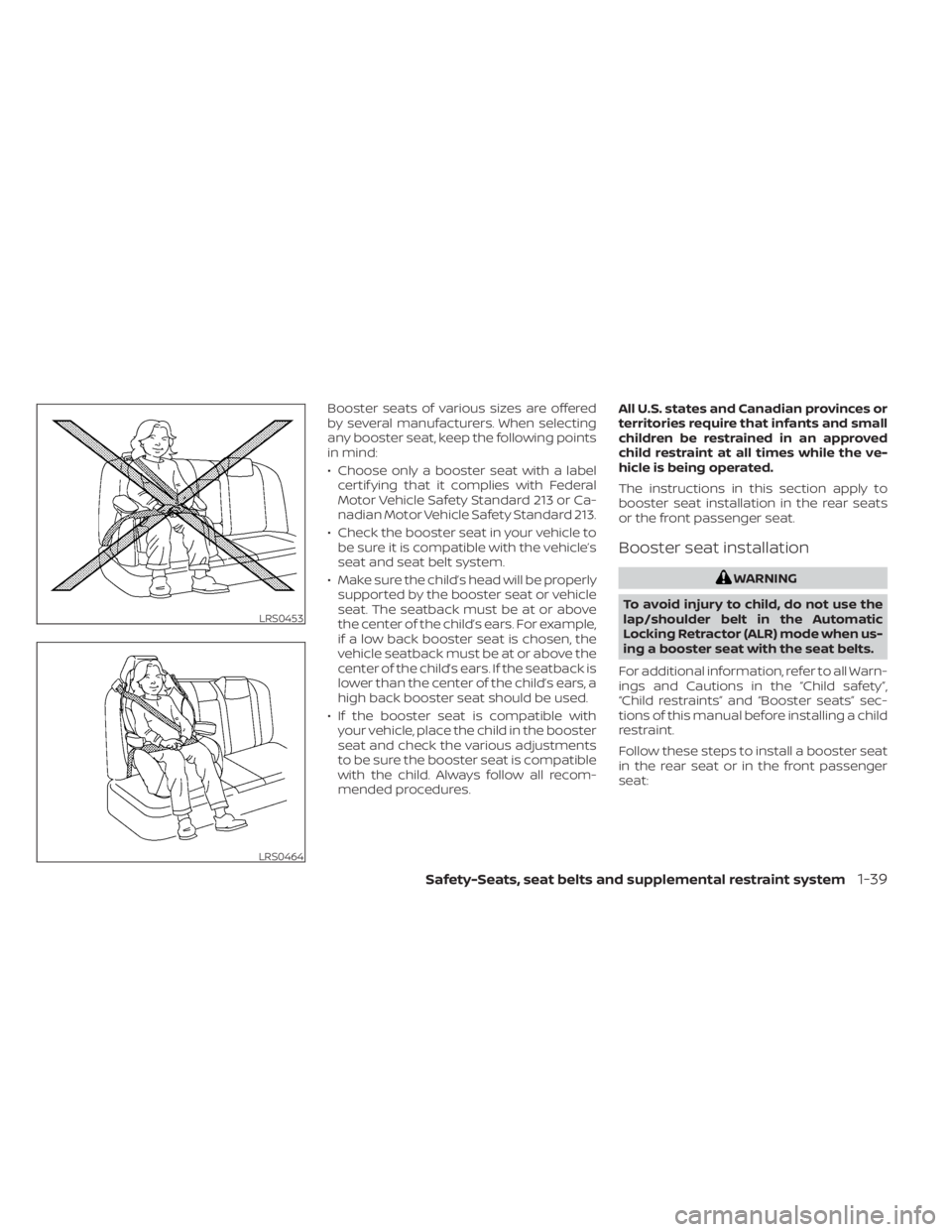
Booster seats of various sizes are offered
by several manufacturers. When selecting
any booster seat, keep the following points
in mind:
• Choose only a booster seat with a labelcertif ying that it complies with Federal
Motor Vehicle Safety Standard 213 or Ca-
nadian Motor Vehicle Safety Standard 213.
• Check the booster seat in your vehicle to be sure it is compatible with the vehicle’s
seat and seat belt system.
• Make sure the child’s head will be properly supported by the booster seat or vehicle
seat. The seatback must be at or above
the center of the child’s ears. For example,
if a low back booster seat is chosen, the
vehicle seatback must be at or above the
center of the child’s ears. If the seatback is
lower than the center of the child’s ears, a
high back booster seat should be used.
• If the booster seat is compatible with your vehicle, place the child in the booster
seat and check the various adjustments
to be sure the booster seat is compatible
with the child. Always follow all recom-
mended procedures. All U.S. states and Canadian provinces or
territories require that infants and small
children be restrained in an approved
child restraint at all times while the ve-
hicle is being operated.
The instructions in this section apply to
booster seat installation in the rear seats
or the front passenger seat.
Booster seat installation
WARNING
To avoid injury to child, do not use the
lap/shoulder belt in the Automatic
Locking Retractor (ALR) mode when us-
ing a booster seat with the seat belts.
For additional information, refer to all Warn-
ings and Cautions in the “Child safety”,
“Child restraints” and “Booster seats” sec-
tions of this manual before installing a child
restraint.
Follow these steps to install a booster seat
in the rear seat or in the front passenger
seat:
LRS0453
LRS0464
Safety-Seats, seat belts and supplemental restraint system1-39
Page 74 of 500
NOTE:
This vehicle’s occupant classification sen-
sor system generally keeps the classifica-
tion locked during driving, so it is impor-
tant that you confirm that the front
passenger is properly classified prior to
driving. However, the occupant classifica-
tion sensor may recalculate the weight of
the occupant under some conditions (both
while driving and when stopped), so front
passenger seat occupants should con-
tinue to remain seated as outlined above.
Troubleshooting
If you think the front passenger air bag
status light is incorrect:
1. If the light is ON with an adult occupyingthe front passenger seat:
• Occupant is a small adult — the air bag light is functioning as intended. The front
passenger air bag and passenger knee
air bag are suppressed.
However, if the occupant is not a small
adult, then this may be due to the following
conditions that may be interfering with the
weight sensors:
• Occupant is not sitting upright, leaning against the seatback, and centered on
the seat cushion with his/her feet com-
fortably extended to the floor. • A child restraint or other object pressing
against the rear of the seatback.
• A rear passenger pushing or pulling on the back of the front passenger seat.
• Forcing the front seat or seatback against an object on the seat or floor be-
hind it.
• An object placed under the front passen- ger seat.
• An object placed between the seat cush- ion and center console or between the
seat cushion and the door.
If the vehicle is moving, please come to a
stop when it is safe to do so. Check and
correct any of the above conditions. Re-
start the vehicle and wait 1 minute.
NOTE:
A system check will be performed during
which the front passenger air bag status
light will remain lit for about 7 seconds
initially.
If the light is still ON af ter this, the person
should be advised not to ride in the front
passenger seat and the vehicle should be
checked as soon as possible. It is recom-
mended that you visit a NISSAN dealer for
this service. 2. If the light is OFF with a small adult, child
or child restraint occupying the front
passenger seat.
This may be due to the following condi-
tions that may be interfering with the
weight sensors:
• Small adult or child is not sitting upright, leaning against the seatback, and cen-
tered on the seat cushion with his/her
feet comfortably extended to the floor.
• The child restraint is not properly in- stalled, as outlined in the “Child restraints”
section of this manual.
• An object weighing over 9.1 lbs. (4 kg) hanging on the seat or placed in the seat-
back pocket.
• A child restraint or other object pressing against the rear of the seatback.
• A rear passenger pushing or pulling on the back of the front passenger seat.
• Forcing the front seat or seatback against an object on the seat or floor be-
hind it.
• An object placed under the front passen- ger seat.
• An object placed between the seat cush- ion and center console.
1-54Safety-Seats, seat belts and supplemental restraint system
Page 152 of 500
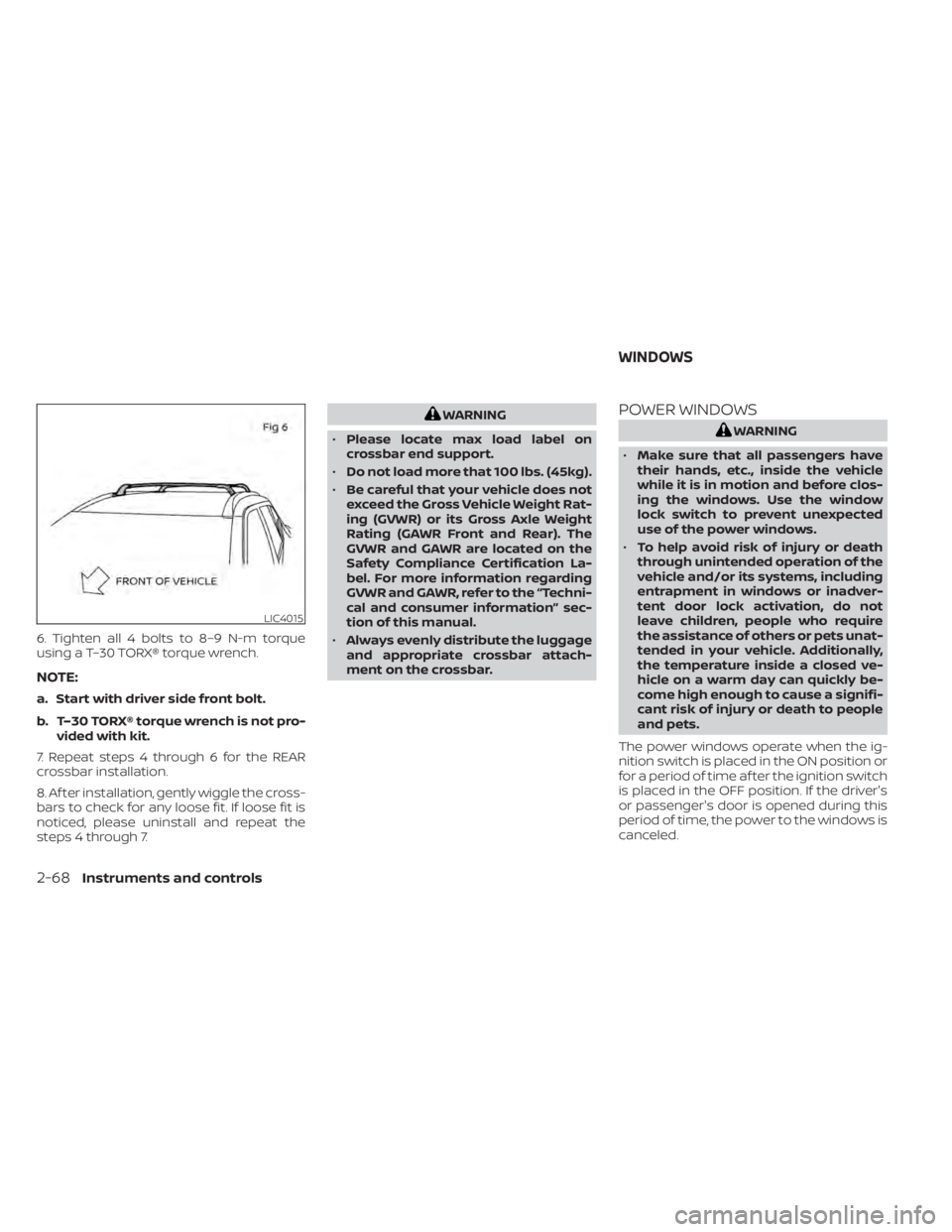
6. Tighten all 4 bolts to 8–9 N-m torque
using a T–30 TORX® torque wrench.
NOTE:
a. Start with driver side front bolt.
b. T–30 TORX® torque wrench is not pro-vided with kit.
7. Repeat steps 4 through 6 for the REAR
crossbar installation.
8. Af ter installation, gently wiggle the cross-
bars to check for any loose fit. If loose fit is
noticed, please uninstall and repeat the
steps 4 through 7.
WARNING
• Please locate max load label on
crossbar end support.
• Do not load more that 100 lbs. (45kg).
• Be careful that your vehicle does not
exceed the Gross Vehicle Weight Rat-
ing (GVWR) or its Gross Axle Weight
Rating (GAWR Front and Rear). The
GVWR and GAWR are located on the
Safety Compliance Certification La-
bel. For more information regarding
GVWR and GAWR, refer to the “Techni-
cal and consumer information” sec-
tion of this manual.
• Always evenly distribute the luggage
and appropriate crossbar attach-
ment on the crossbar.POWER WINDOWS
WARNING
• Make sure that all passengers have
their hands, etc., inside the vehicle
while it is in motion and before clos-
ing the windows. Use the window
lock switch to prevent unexpected
use of the power windows.
• To help avoid risk of injury or death
through unintended operation of the
vehicle and/or its systems, including
entrapment in windows or inadver-
tent door lock activation, do not
leave children, people who require
the assistance of others or pets unat-
tended in your vehicle. Additionally,
the temperature inside a closed ve-
hicle on a warm day can quickly be-
come high enough to cause a signifi-
cant risk of injury or death to people
and pets.
The power windows operate when the ig-
nition switch is placed in the ON position or
for a period of time af ter the ignition switch
is placed in the OFF position. If the driver's
or passenger's door is opened during this
period of time, the power to the windows is
canceled.
LIC4015
WINDOWS
2-68Instruments and controls
Page 159 of 500
3 Pre-driving checks and adjustments
Keys.............................................3-2NISSAN Intelligent Key® .......................3-2
NISSAN Vehicle Immobilizer System
keys..........................................3-3
Doors ...........................................3-4
Locking with key .............................3-5
Locking with inside lock knob ................3-5
Locking with power door lock switch .........3-6
Automatic door locks ........................3-6
Child safety rear door lock ....................3-6
NISSAN Intelligent Key® .......................... 3-7
Operating range .............................3-8
Door locks/unlocks precaution ...............3-8
NISSAN Intelligent Key® operation ............3-9
How to use the remote keyless entry
function ..................................... 3-12
Warning signals ............................. 3-15
Troubleshooting guide ......................3-16
Remote Engine Start (if so equipped) ...........3-18
Conditions the Remote Engine Start will
notwork .................................... 3-18
Remote Engine Start operating range .......3-19 Remote starting the vehicle
.................3-19
Extending engine run time ..................3-19
Canceling a Remote Engine Start ...........3-20
Conditions the Remote Engine Start will
notwork .................................... 3-20
Hood ........................................... 3-21
Lif tgate ........................................ 3-22
Opening the lif tgate ......................... 3-23
Closing the lif tgate .......................... 3-23
Secondary lif tgate unlock ...................3-24
Fuel-filler door .................................. 3-25
Opener operation ........................... 3-25
Fuel-filler cap ................................ 3-25
Steering wheel ................................. 3-26
Manual operation ........................... 3-26
Sun visors ...................................... 3-27
Vanity mirrors ............................... 3-27
Card holder (driver's side only) ...............3-28
Mirrors ......................................... 3-28
Manual anti-glare rearview mirror ...........3-28
Outside mirrors ............................. 3-28
Page 162 of 500
the NISSAN Vehicle Immobilizer System. Af-
ter the registration process, these compo-
nents will only recognize keys coded into
the NISSAN Vehicle Immobilizer System
during registration. Any key that is not
given to the dealer at the time of registra-
tion will no longer be able to start your
vehicle.
CAUTION
Do not allow the immobilizer system
key, which contains an electrical tran-
sponder, to come into contact with wa-
ter or salt water. This could affect sys-
tem function. When the doors are locked using one of the
following methods, the doors cannot be
opened using the inside or outside door
handles. The doors must be unlocked to
open the doors.
WARNING
• Always have the doors locked while
driving. Along with the use of seat
belts, this provides greater safety in
the event of an accident by helping to
prevent persons from being thrown
from the vehicle. This also helps keep
children and others from uninten-
tionally opening the doors, and will
help keep out intruders.
• Before opening any door, always look
for and avoid oncoming traffic. •
To help avoid risk of injury or death
through unintended operation of the
vehicle and/or its systems, including
entrapment in windows or inadver-
tent door lock activation, do not
leave children, people who require
the assistance of others or pets unat-
tended in your vehicle. Additionally,
the temperature inside a closed ve-
hicle on a warm day can quickly be-
come high enough to cause a signifi-
cant risk of injury or death to people
and pets.
DOORS
3-4Pre-driving checks and adjustments
Page 164 of 500
LOCKING WITH POWER DOOR
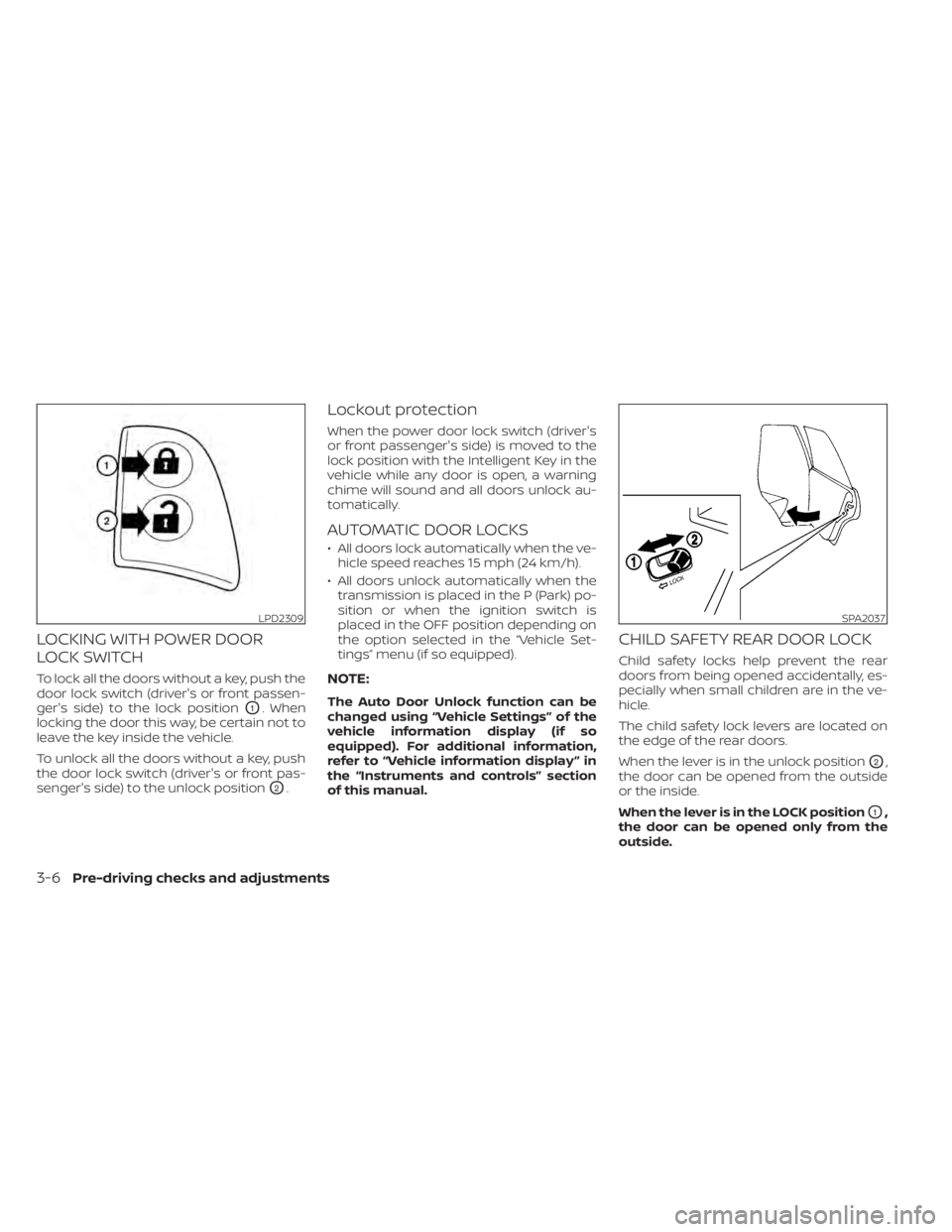
LOCK SWITCH
To lock all the doors without a key, push the
door lock switch (driver's or front passen-
ger's side) to the lock position
O1. When
locking the door this way, be certain not to
leave the key inside the vehicle.
To unlock all the doors without a key, push
the door lock switch (driver's or front pas-
senger's side) to the unlock position
O2.
Lockout protection
When the power door lock switch (driver's
or front passenger's side) is moved to the
lock position with the Intelligent Key in the
vehicle while any door is open, a warning
chime will sound and all doors unlock au-
tomatically.
AUTOMATIC DOOR LOCKS
• All doors lock automatically when the ve- hicle speed reaches 15 mph (24 km/h).
• All doors unlock automatically when the transmission is placed in the P (Park) po-
sition or when the ignition switch is
placed in the OFF position depending on
the option selected in the “Vehicle Set-
tings” menu (if so equipped).
NOTE:
The Auto Door Unlock function can be
changed using “Vehicle Settings” of the
vehicle information display (if so
equipped). For additional information,
refer to “Vehicle information display ” in
the “Instruments and controls” section
of this manual.
CHILD SAFETY REAR DOOR LOCK
Child safety locks help prevent the rear
doors from being opened accidentally, es-
pecially when small children are in the ve-
hicle.
The child safety lock levers are located on
the edge of the rear doors.
When the lever is in the unlock position
O2,
the door can be opened from the outside
or the inside.
When the lever is in the LOCK position
O1,
the door can be opened only from the
outside.
LPD2309SPA2037
3-6Pre-driving checks and adjustments
Page 369 of 500
•Do not leave children unattended in-
side the vehicle. They could unknow-
ingly activate switches or controls or
make the vehicle move. Unattended
children could become involved in
serious accidents.
• To help avoid risk of injury or death
through unintended operation of the
vehicle and/or its systems, do not
leave children, people who require
the assistance of others or pets unat-
tended in your vehicle. Additionally,
the temperature inside a closed ve-
hicle on a warm day can quickly be-
come high enough to cause a signifi-
cant risk of injury or death to people
and pets.
1. Firmly apply the parking brake.
2. Move the shif t lever into the P (Park) position.
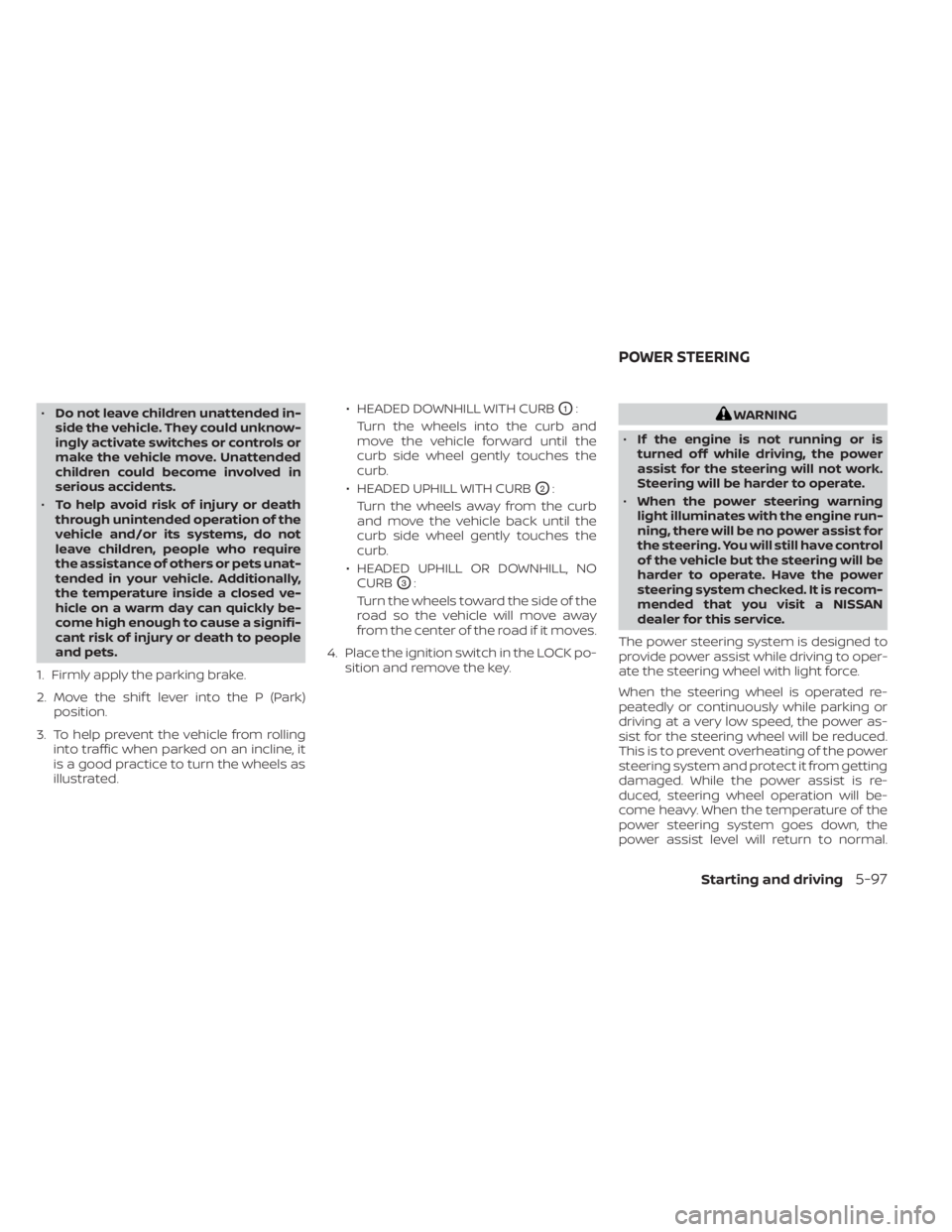
3. To help prevent the vehicle from rolling into traffic when parked on an incline, it
is a good practice to turn the wheels as
illustrated. • HEADED DOWNHILL WITH CURBO1:
Turn the wheels into the curb and
move the vehicle forward until the
curb side wheel gently touches the
curb.
• HEADED UPHILL WITH CURB
O2:
Turn the wheels away from the curb
and move the vehicle back until the
curb side wheel gently touches the
curb.
• HEADED UPHILL OR DOWNHILL, NO CURB
O3:
Turn the wheels toward the side of the
road so the vehicle will move away
from the center of the road if it moves.
4. Place the ignition switch in the LOCK po- sition and remove the key.
WARNING
• If the engine is not running or is
turned off while driving, the power
assist for the steering will not work.
Steering will be harder to operate.
• When the power steering warning
light illuminates with the engine run-
ning, there will be no power assist for
the steering. You will still have control
of the vehicle but the steering will be
harder to operate. Have the power
steering system checked. It is recom-
mended that you visit a NISSAN
dealer for this service.
The power steering system is designed to
provide power assist while driving to oper-
ate the steering wheel with light force.
When the steering wheel is operated re-
peatedly or continuously while parking or
driving at a very low speed, the power as-
sist for the steering wheel will be reduced.
This is to prevent overheating of the power
steering system and protect it from getting
damaged. While the power assist is re-
duced, steering wheel operation will be-
come heavy. When the temperature of the
power steering system goes down, the
power assist level will return to normal.
POWER STEERING
Starting and driving5-97
Page 416 of 500
Engine oil and filter
1. Place a large drain pan under the drainplug and oil filter.
2. Remove the oil filler cap.
3. Remove the drain plug with a wrench by turning it counterclockwise and com-
pletely drain the oil.
CAUTION
Be careful not to burn yourself, as the
engine oil is hot.
WARNING
• Prolonged and repeated contact
with used engine oil may cause skin
cancer.
• Try to avoid direct skin contact with
used oil. If skin contact is made, wash
thoroughly with soap or hand
cleaner as soon as possible.
• Keep used engine oil out of reach of
children. 4. Loosen the oil filter with an oil filter
wrench by turning it counterclockwise.
Remove the oil filter by turning it by
hand.
5. Wipe the engine oil filter mounting sur- face with a clean rag.
CAUTION
Be sure to remove any old gasket ma-
terial remaining on the sealing surface
of the engine. Failure to do so could
lead to an oil leak and engine damage.
• The dipstick must be inserted in
place to prevent oil spillage from the
dipstick hole when filling the engine
with oil.
6. Coat the gasket on the new filter with clean engine oil.
7. Screw in the oil filter clockwise until a slight resistance is felt, then tighten addi-
tionally more than 2/3 turn.
Oil filter tightening torque: 11 to 15 f t-lb (14.7 to 20.6 N·m)
8. Clean and re-install the drain plug with a new washer. Securely tighten the drain
plug with a wrench. Do not use exces-
sive force.
Drain plug tightening torque: 22 to 29 f t-lb (29.4 to 39.2 N·m)
9. Refill the engine with the recommended oil through the oil filler opening, and in-
stall the oil filler cap securely.
8-8Do-it-yourself
Page 486 of 500
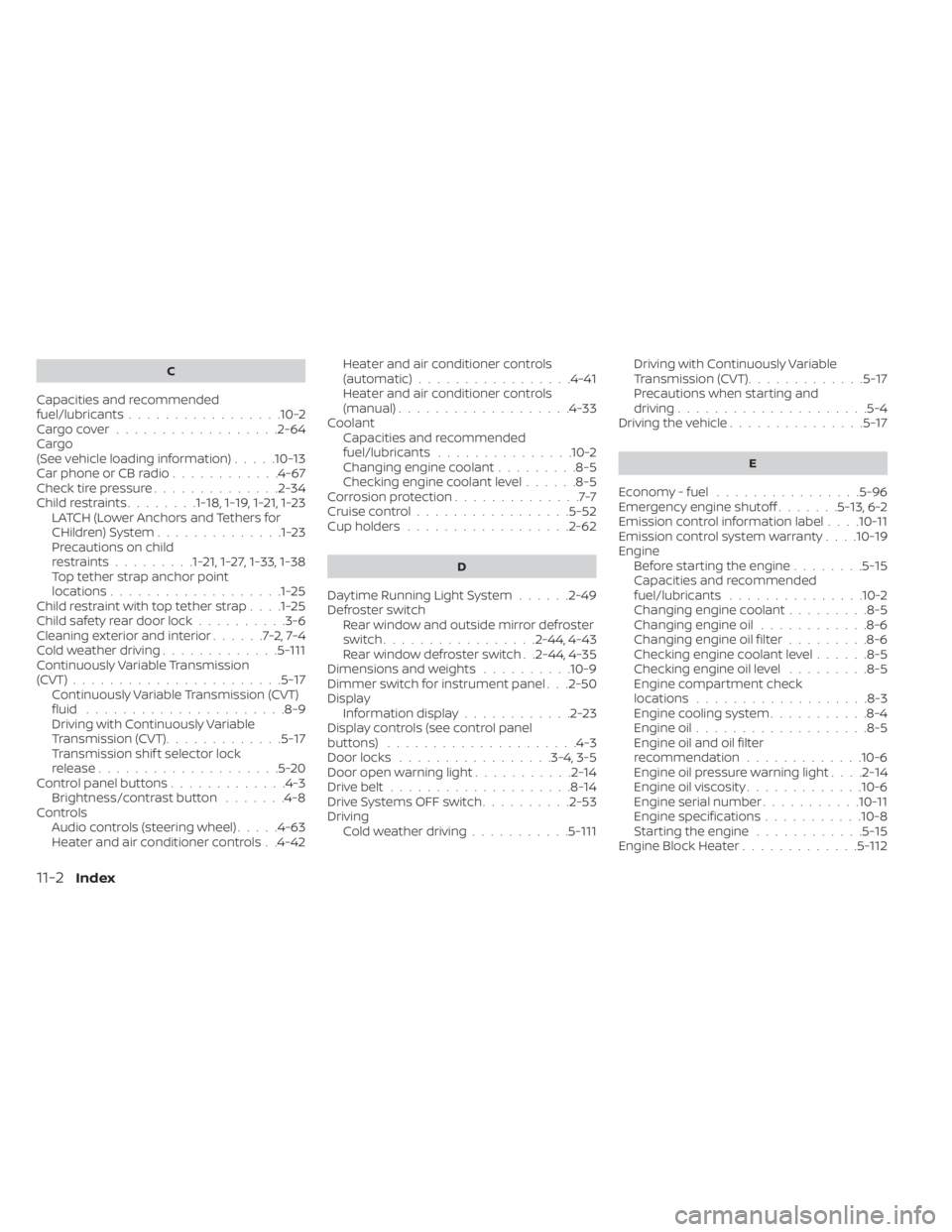
C
Capacities and recommended
fuel/lubricants.................10-2Cargo cover................. .2-64Cargo
(See vehicle loading information).....10-13Car phone or CB radio............4-67Check tire pressure..............2-34Child restraints........1-18,1-19,1-21,1-23LATCH (Lower Anchors and Tethers for
CHildren) System..............1-23Precautions on child
restraints.........1-21,1-27,1-33, 1-38Top tether strap anchor point
locations...................1-25Child restraint with top tether strap. . . .1-25Child safety rear door lock..........3-6Cleaning exterior and interior......7-2,7-4Cold weather driving.............5-111Continuously Variable Transmission
(CVT).......................5-17Continuously Variable Transmission (CVT)
fluid..................... .8-9Driving with Continuously Variable
Transmission (CVT).............5-17Transmission shif t selector lock
release....................5-20Control panel buttons.............4-3Brightness/contrast button.......4-8Controls
Audio controls (steering wheel).....4-63Heater and air conditioner controls. .4-42
Heater and air conditioner controls
(automatic)................ .4-41Heater and air conditioner controls
(manual).................. .4-33Coolant
Capacities and recommended
fuel/lubricants
...............10-2Changing engine coolant.........8-5Checking engine coolant level......8-5Corrosion protection..............7-7Cruise control................ .5-52Cup holders................. .2-62
D
Daytime Running Light System......2-49Defroster switch
Rear window and outside mirror defroster
switch
................ .2-44, 4-43Rear window defroster switch. .2-44, 4-35Dimensions and weights..........10-9Dimmer switch for instrument panel. . .2-50Display
Information display............2-23Display controls (see control panel
buttons).................... .4-3Door locks.................3-4, 3-5Door open warning light...........2-14Drive belt....................8-14Drive Systems OFF switch..........2-53Driving
Cold weather driving...........5-111
Driving with Continuously Variable
Transmission (CVT).............5-17Precautions when starting and
driving.................... .5-4Driving the vehicle...............5-17
E
Economy - fuel................5-96Emergency engine shutoff.......5-13,6-2Emission control information label. . . .10-11Emission control system warranty. . . .10-19Engine
Before starting the engine........5-15Capacities and recommended
fuel/lubricants...............10-2Changing engine coolant.........8-5Changing engine oil............8-6Changing engine oil filter.........8-6Checking engine coolant level......8-5Checking engine oil level.........8-5Engine compartment check
locations.................. .8-3Engine cooling system...........8-4Engine oil...................8-5Engine oil and oil filter
recommendation.............10-6Engine oil pressure warning light. . . .2-14Engine oil viscosity.............10-6Engine serial number...........10-11Engine specifications...........10-8Starting the engine............5-15Engine Block Heater.............5-112
11-2Index
Page 488 of 500
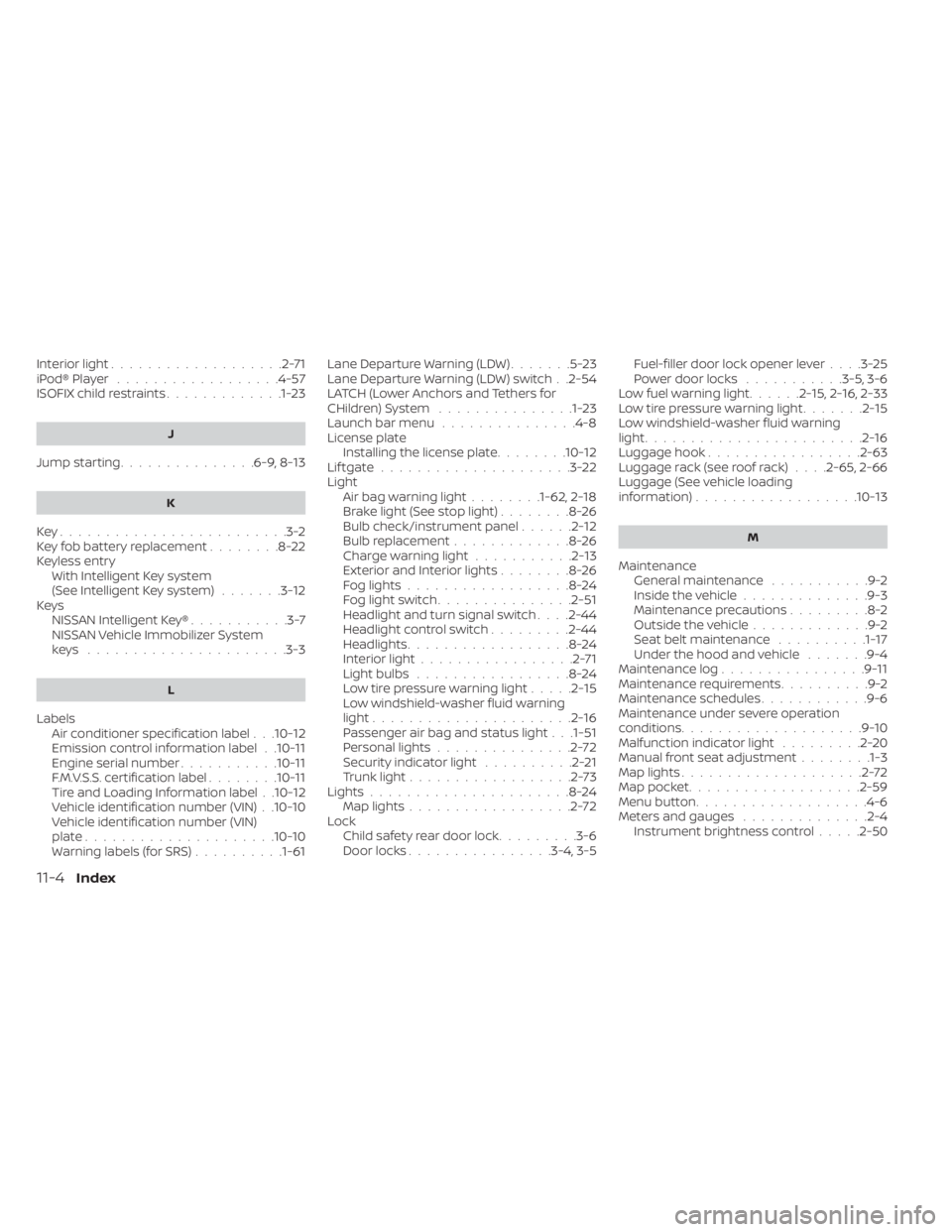
Interior light...................2-71iPod® Player..................4-57ISOFIX child restraints.............1-23
J
Jump starting...............6-9, 8-13
K
Key.........................3-2Key fob battery replacement........8-22Keyless entry
With Intelligent Key system
(See Intelligent Key system)
.......3-12KeysNISSAN Intelligent Key®...........3-7NISSAN Vehicle Immobilizer System
keys..................... .3-3
L
Labels
Air conditioner specification label. . .10-12Emission control information label. .10-11Engine serial number...........10-11F.M.V.S.S. certification label........10-11Tire and Loading Information label. .10-12Vehicle identification number (VIN). .10-10Vehicle identification number (VIN)
plate.................... .10-10Warning labels (for SRS)..........1-61
Lane Departure Warning (LDW).......5-23Lane Departure Warning (LDW) switch. .2-54LATCH (Lower Anchors and Tethers for
CHildren) System...............1-23Launch bar menu...............4-8License plate
Installing the license plate........10-12Lif tgate.....................3-22LightAir bag warning light........1-62, 2-18Brake light (See stop light)........8-26Bulb check/instrument panel......2-12Bulb replacement.............8-26Charge warning light...........2-13Exterior and Interior lights........8-26Fog lights..................8-24Fog light switch...............2-51Headlight and turn signal switch. . . .2-44Headlight control switch.........2-44Headlights..................8-24Interior light.................2-71Light bulbs.................8-24Low tire pressure warning light.....2-15Low windshield-washer fluid warning
light......................2-16Passenger air bag and status light. . .1-51Personal lights...............2-72Security indicator light..........2-21Trunk light..................2-73Lights......................8-24Map lights..................2-72LockChild safety rear door lock.........3-6Door locks................3-4, 3-5
Fuel-filler door lock opener lever. . . .3-25Power door locks...........3-5, 3-6Low fuel warning light......2-15,2-16, 2-33Low tire pressure warning light.......2-15Low windshield-washer fluid warning
light........................2-16Luggage hook................ .2-63Luggage rack (see roof rack). . . .2-65, 2-66Luggage (See vehicle loading
information)................. .10-13
M
Maintenance
General maintenance...........9-2Inside the vehicle..............9-3Maintenance precautions.........8-2Outside the vehicle.............9-2Seat belt maintenance..........1-17Under the hood and vehicle.......9-4Maintenance log................9-11Maintenance requirements..........9-2Maintenance schedules............9-6Maintenance under severe operation
conditions....................9-10Malfunction indicator light.........2-20Manual front seat adjustment........1-3Map lights....................2-72Map pocket.................. .2-59Menu button...................4-6Meters and gauges..............2-4Instrument brightness control.....2-50
11-4Index