rear view mirror NISSAN KICKS 2020 Owner´s Manual
[x] Cancel search | Manufacturer: NISSAN, Model Year: 2020, Model line: KICKS, Model: NISSAN KICKS 2020Pages: 500, PDF Size: 3.43 MB
Page 218 of 500
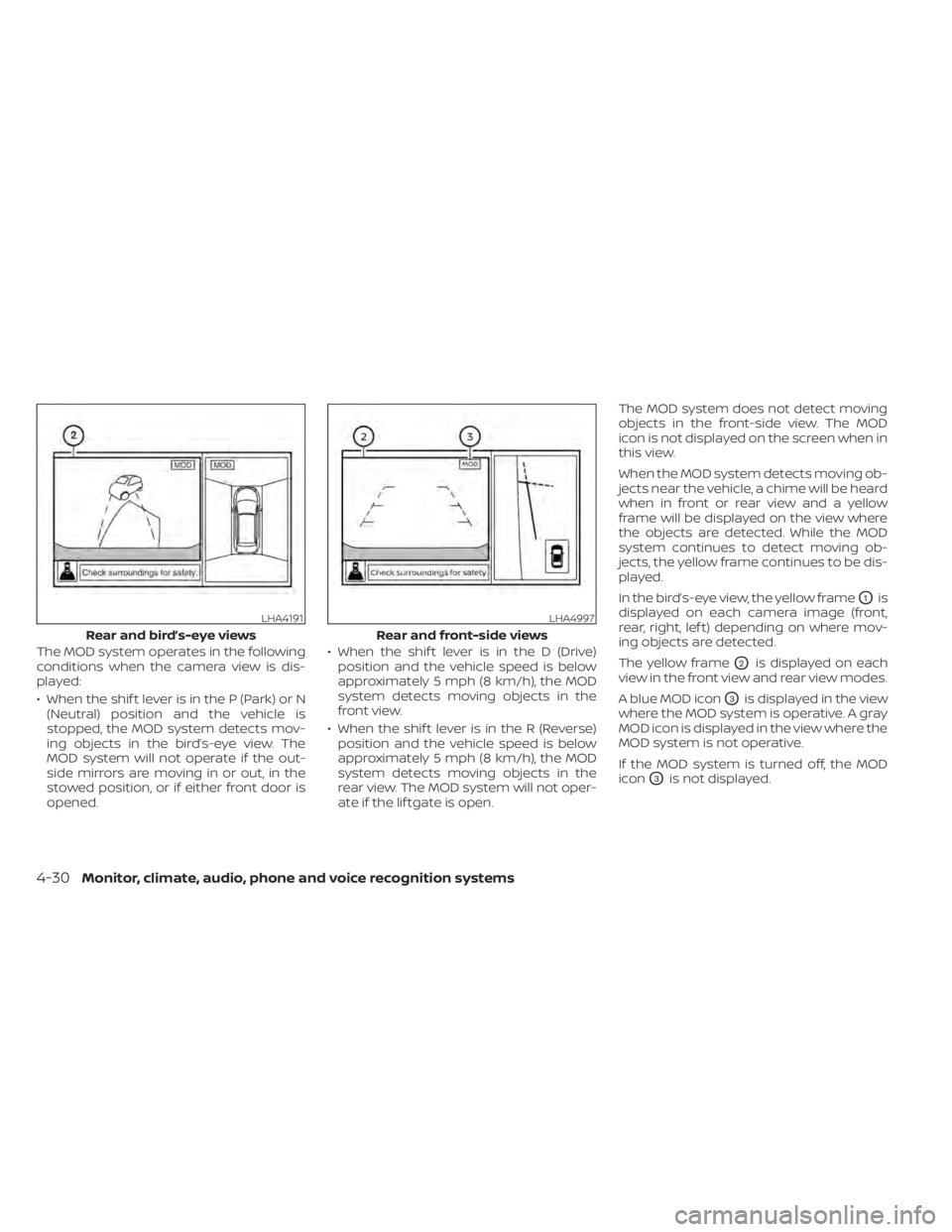
The MOD system operates in the following
conditions when the camera view is dis-
played:
• When the shif t lever is in the P (Park) or N(Neutral) position and the vehicle is
stopped, the MOD system detects mov-
ing objects in the bird’s-eye view. The
MOD system will not operate if the out-
side mirrors are moving in or out, in the
stowed position, or if either front door is
opened. • When the shif t lever is in the D (Drive)
position and the vehicle speed is below
approximately 5 mph (8 km/h), the MOD
system detects moving objects in the
front view.
• When the shif t lever is in the R (Reverse) position and the vehicle speed is below
approximately 5 mph (8 km/h), the MOD
system detects moving objects in the
rear view. The MOD system will not oper-
ate if the lif tgate is open. The MOD system does not detect moving
objects in the front-side view. The MOD
icon is not displayed on the screen when in
this view.
When the MOD system detects moving ob-
jects near the vehicle, a chime will be heard
when in front or rear view and a yellow
frame will be displayed on the view where
the objects are detected. While the MOD
system continues to detect moving ob-
jects, the yellow frame continues to be dis-
played.
In the bird’s-eye view, the yellow frame
O1is
displayed on each camera image (front,
rear, right, lef t) depending on where mov-
ing objects are detected.
The yellow frame
O2is displayed on each
view in the front view and rear view modes.
A blue MOD icon
O3is displayed in the view
where the MOD system is operative. A gray
MOD icon is displayed in the view where the
MOD system is not operative.
If the MOD system is turned off, the MOD
icon
O3is not displayed.
LHA4191
Rear and bird’s-eye views
LHA4997
Rear and front-side views
4-30Monitor, climate, audio, phone and voice recognition systems
Page 219 of 500
TURNING MOD ON AND OFF (if so
equipped)
Some vehicles include the option to allow
the MOD system to be turned on or off in
the vehicle information display.
To turn the MOD system on or off:
1. Using
buttons on the steering
wheel to select “Settings”.
2. Select “Driver Assistance” and press the OK button.
3. Select “Parking Aids”.
4. Toggle ON or OFF “Moving Object” using the OK button.
MOD SYSTEM LIMITATIONS
WARNING
Listed below are the system limitations
for MOD. Failure to operate the vehicle
in accordance with these system limi-
tations could result in serious injury or
death.
• Do not use the MOD system when
towing a trailer. The system may not
function properly. •
Excessive noise (for example, audio
system volume or open vehicle win-
dow) will interfere with the chime
sound, and it may not be heard.
• The MOD system performance will be
limited according to environmental
conditions and surrounding objects
such as:
– When there is low contrast be-
tween background and the mov-
ing objects.
– When there is a blinking source of
light.
– When strong light such as another
vehicle’s headlight or sunlight is
present.
– When camera orientation is not in
its usual position, such as when a
mirror is folded.
– When there is dirt, water drops or
snow on the camera lens.
– When the position of the moving
objects in the display is not
changed.
• The MOD system might detect flow-
ing water droplets on the camera
lens, white smoke from the muffler,
moving shadows, etc. •
The MOD system may not function
properly depending on the speed, di-
rection, distance or shape of the
moving objects.
• If your vehicle sustains damage to
the parts where the camera is in-
stalled, leaving it misaligned or bent,
the sensing zone may be altered and
the MOD system may not detect ob-
jects properly.
• When the temperature is extremely
high or low, the screen may not dis-
play objects clearly. This is not a
malfunction.
NOTE:
The blue MOD icon will change to or-
ange if one of the following has oc-
curred
• When the system is malfunctioning.
• When the component temperature reaches a high level (icon will blink).
• When the RearView camera has detected a blockage (icon will blink).
If the icon light continues to illuminate
orange, have the MOD system checked. It
is recommended that you visit a NISSAN
dealer for this service.
Monitor, climate, audio, phone and voice recognition systems4-31
Page 489 of 500
MirrorOutside mirrors..............3-28Rearview...................3-28Vanity mirror................3-27Mirrors......................3-28Moving Object Detection (MOD)......4-28
N
NISSAN Anti-Thef t System......2-39, 5-14NissanConnect® Owner's Manual......4-2NISSAN Intelligent Key™............3-2NISSAN Intelligent Key®............3-7NISSAN Intelligent Key® battery discharge
indicator.....................5-13NISSAN Vehicle Immobilizer
System................. .2-40, 5-14
O
Octane rating (See fuel octane rating). .10-5Oil
Capacities and recommended
fuel/lubricants
...............10-2Changing engine oil............8-6Changing engine oil filter.........8-6Checking engine oil level.........8-5Engine oil.................. .8-5Engine oil and oil filter
recommendation.............10-6Engine oil viscosity.............10-6Outside mirrors................3-28
Overheat
If your vehicle overheats.........6-11Owner's manual order form........10-21Owner's manual/service manual order
information................. .10-21
P
Parking
Parking brake operation.........5-23Parking/parking on hills.........5-96Personal lights.................2-72Phone, Bluetooth® hands-free system. .4-67PowerPower door locks...........3-5, 3-6Power outlet................2-57Powerrearwindows............2-70Power steering system..........5-97Power windows..............2-68Rear power windows...........2-70Power outlet................. .2-57Power steering................5-97Precautions
Maintenance precautions.........8-2On-pavement and off-road driving
precautions................. .5-9Precautions on booster
seats............1-21,1-27, 1-33, 1-38Precautions on child
restraints.........1-21,1-27,1-33, 1-38Precautions on seat belt usage.....1-10Precautions on supplemental restraint
system................... .1-42
Precautions when starting and
driving.................... .5-4Push starting..................6-11
R
Radio
Car phone or CB radio..........4-67FM/AM radio................4-49Steering wheel audio control switch. .4-63Radio frequency remote controlKey operation................3-9Readiness for inspection maintenance
(I/M) test................... .10-20Rear Automatic Braking (RAB).......5-54Rear Cross Traffic Alert (RCTA).......5-42Rear Door Alert.........2-36, 2-37, 2-56Rear power windows.............2-70Rear seat.................... .1-4Rear sonar system OFF switch.......2-55Rear Sonar System (RSS)..........5-105Rearview mirror................3-28RearView Monitor................4-9Adjusting the screen...........4-24Rear window and outside mirror defroster
switch..................2-44, 4-43Rear window defroster switch. . .2-44, 4-35Rear window wiper and washer
switches................... .2-43Recommended Fluids............10-2Recorders
Event Data................ .10-20Refrigerant recommendation........10-7
Index11-5