Front detect NISSAN KICKS 2020 Owner´s Manual
[x] Cancel search | Manufacturer: NISSAN, Model Year: 2020, Model line: KICKS, Model: NISSAN KICKS 2020Pages: 500, PDF Size: 3.43 MB
Page 360 of 500
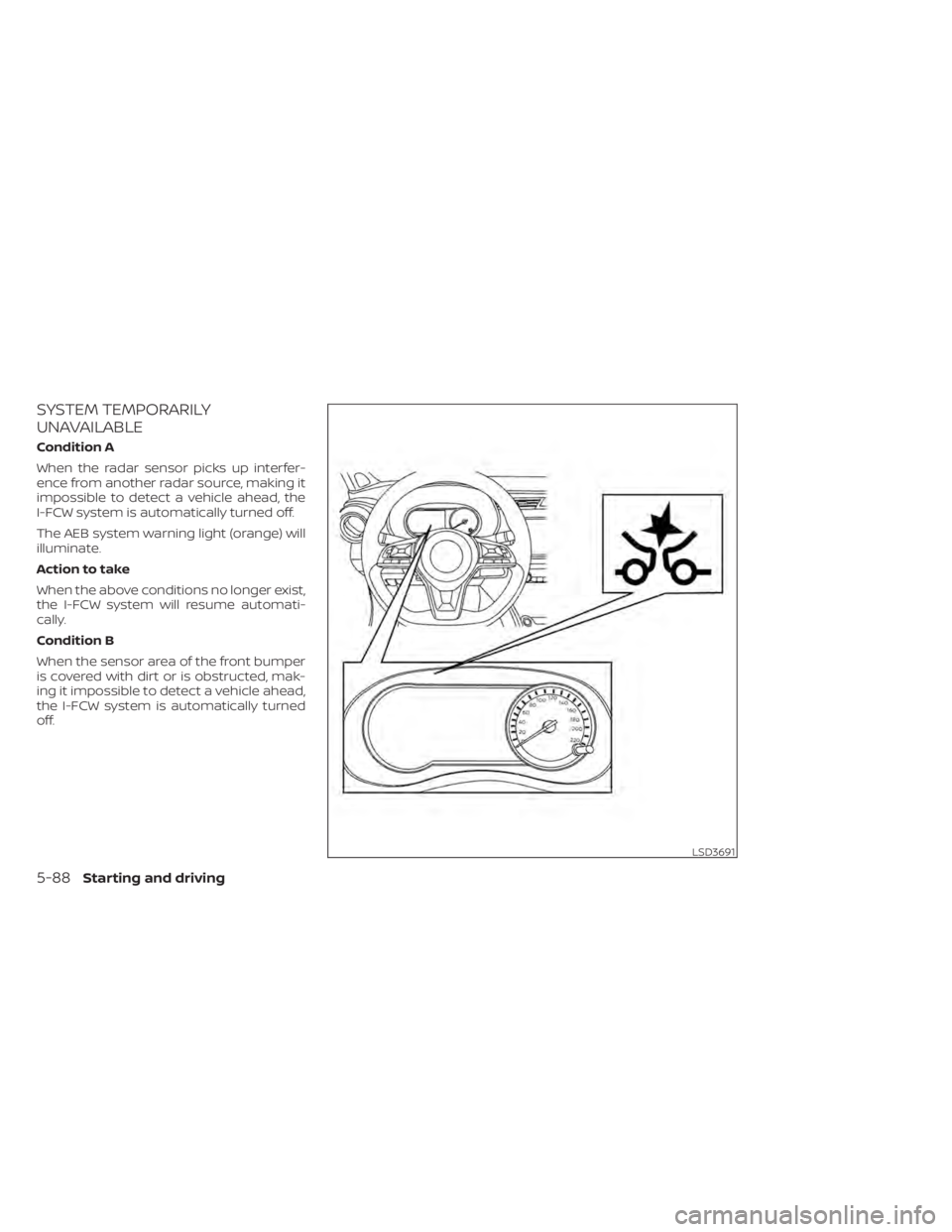
SYSTEM TEMPORARILY
UNAVAILABLE
Condition A
When the radar sensor picks up interfer-
ence from another radar source, making it
impossible to detect a vehicle ahead, the
I-FCW system is automatically turned off.
The AEB system warning light (orange) will
illuminate.
Action to take
When the above conditions no longer exist,
the I-FCW system will resume automati-
cally.
Condition B
When the sensor area of the front bumper
is covered with dirt or is obstructed, mak-
ing it impossible to detect a vehicle ahead,
the I-FCW system is automatically turned
off.
LSD3691
5-88Starting and driving
Page 371 of 500
Parking brake break-in
Break in the parking brake shoes whenever
the stopping effect of the parking brake is
weakened or whenever the parking brake
shoes and/or drums/rotors are replaced,
in order to assure the best braking perfor-
mance.
This procedure is described in the vehicle
service manual. It is recommended that
you visit a NISSAN dealer for this service.
ANTI-LOCK BRAKING SYSTEM (ABS)
WARNING
• The ABS is a sophisticated device, but
it cannot prevent accidents resulting
from careless or dangerous driving
techniques. It can help maintain ve-
hicle control during braking on slip-
pery surfaces. Remember that stop-
ping distances on slippery surfaces
will be longer than on normal sur-
faces even with ABS. Stopping dis-
tances may also be longer on rough,
gravel or snow covered roads, or if
you are using tire chains. Always
maintain a safe distance from the ve-
hicle in front of you. Ultimately, the
driver is responsible for safety. •
Tire type and condition may also af-
fect braking effectiveness.
– When replacing tires, install the
specified size of tires on all four
wheels.
– When installing a spare tire, make
sure that it is the proper size and
type as specified on the Tire and
Loading Information label. For ad-
ditional information, refer to “Tire
and Loading Information label” in
the “Technical and consumer in-
formation” section of this manual.
– For additional information, refer
to “Wheels and tires” in the “Do-it-
yourself ” section of this manual.
The ABS controls the brakes so the wheels
do not lock during hard braking or when
braking on slippery surfaces. The system
detects the rotation speed at each wheel
and varies the brake fluid pressure to pre-
vent each wheel from locking and sliding.
By preventing each wheel from locking, the
system helps the driver maintain steering
control and helps to minimize swerving
and spinning on slippery surfaces.
Using the system
Depress the brake pedal and hold it down.
Depress the brake pedal with firm steady
pressure, but do not pump the brakes. The
Anti-lock Braking System will operate to
prevent the wheels from locking up. Steer
the vehicle to avoid obstacles.
WARNING
Do not pump the brake pedal. Doing so
may result in increased stopping dis-
tances.
Self-test feature
The Anti-lock Braking System (ABS) in-
cludes electronic sensors, electric pumps,
hydraulic solenoids and a computer. The
computer has a built-in diagnostic feature
that tests the system each time you start
the engine and move the vehicle at a low
speed in forward or reverse. When the self-
test occurs, you may hear a “clunk” noise
and/or feel a pulsation in the brake pedal.
This is normal and does not indicate a mal-
function. If the computer senses a mal-
function, it switches the ABS off and illumi-
nates the ABS warning light on the
Starting and driving5-99
Page 485 of 500
11 Index
A
Active Ride Control (ARC).........5-104Air bag (See supplemental restraint
system).....................1-42Air bag system
Front (See supplemental front impact air
bag system)
................1-48Air bag warning labels............1-61Air bag warning light.........1-62, 2-18Air bag warning light,
supplemental..............1-62, 2-18Air cleaner housing filter..........8-16Air conditionerAir conditioner operation. . . .4-36, 4-42Air conditioner specification label. .10-12Air conditioner system refrigerant and oil
recommendations............10-7Air conditioner system refrigerant
recommendations............10-7Heater and air conditioner.......4-41Heater and air conditioner controls.4-42Servicing air conditioner........4-44Air flow charts................ .4-37Alarm system (See vehicle security
system)................... .2-38Anchor point locations...........1-25Antenna....................4-64Antifreeze...................5-111Anti-lock Braking System (ABS)......5-99Audio system.................4-44
AM/FM radio............4-49, 4-51AM radio operation............4-51AM radio reception............4-45Auxiliary (AUX) devices operation. . .4-53Bluetooth® audio.............4-60FM radio operation............4-52FM radio reception............4-45iPod® Player................4-57iPod® player operation..........4-57Radio................... .4-44Steering wheel audio control
switch....................4-63USB Connections.............4-55USB interface...............4-54Autolight switch...............2-45Automatic
Automatic power window switch. . .2-70Automatic door locks.............3-6Automatic Emergency Braking
(AEB)............2-12,2-13,2-17, 5-60Automatic Emergency Braking (AEB) with
Pedestrian Detection............5-69
B
Battery.................5-111, 8-12Charge warning light...........2-13Battery replacement............8-22Key fob...................8-22NISSAN Intelligent Key®.........8-22
Before starting the engine.........5-15Belt (See drive belt)..............8-14Blind Spot Warning (BSW).........5-30Blind Spot Warning (BSW) switch.....2-53Bluetooth® audio..............4-60Bluetooth® hands-free phone system. .4-67Bluetooth® connections.........4-81Connecting procedure..........4-72Phone indicators.............4-71Text messaging..............4-78Voice commands.............4-73Booster seats.................1-38Brake
Anti-lock Braking System (ABS). . . .5-99Brake fluid................. .8-9Brake light (See stop light).......8-26Brake system...............5-98Brake warning light............2-13Brake wear indicators.......2-22,8-18Parking brake operation.........5-23Self-adjusting brakes...........8-18Brake Assist.................5-100Brake fluid................... .8-9Brakes.....................8-18Brake system.................5-98Break-in schedule..............5-94Brightness/contrast button.........4-8Brightness control
Instrument panel.............2-50Bulb check/instrument panel.......2-12Bulb replacement..............8-26