Tire NISSAN KICKS 2020 Owner´s Manual
[x] Cancel search | Manufacturer: NISSAN, Model Year: 2020, Model line: KICKS, Model: NISSAN KICKS 2020Pages: 500, PDF Size: 3.43 MB
Page 11 of 500
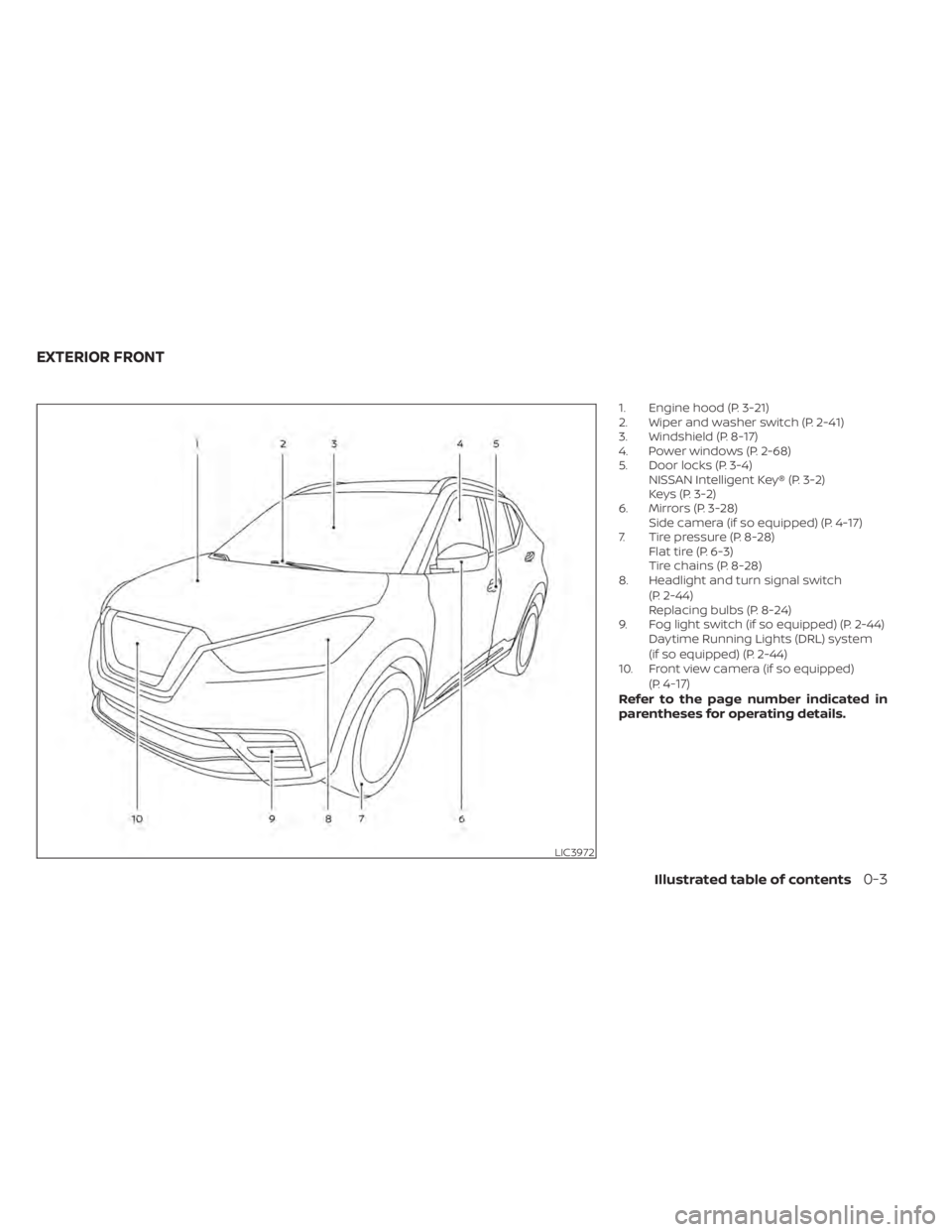
1. Engine hood (P. 3-21)
2. Wiper and washer switch (P. 2-41)
3. Windshield (P. 8-17)
4. Power windows (P. 2-68)
5. Door locks (P. 3-4)NISSAN Intelligent Key® (P. 3-2)
Keys (P. 3-2)
6. Mirrors (P. 3-28) Side camera (if so equipped) (P. 4-17)
7. Tire pressure (P. 8-28) Flat tire (P. 6-3)
Tire chains (P. 8-28)
8. Headlight and turn signal switch
(P. 2-44)
Replacing bulbs (P. 8-24)
9. Fog light switch (if so equipped) (P. 2-44) Daytime Running Lights (DRL) system
(if so equipped) (P. 2-44)
10. Front view camera (if so equipped)
(P.
4-17)Refer to the page number indicated in
parentheses for operating details.
LIC3972
EXTERIOR FRONT
Illustrated table of contents0-3
Page 17 of 500
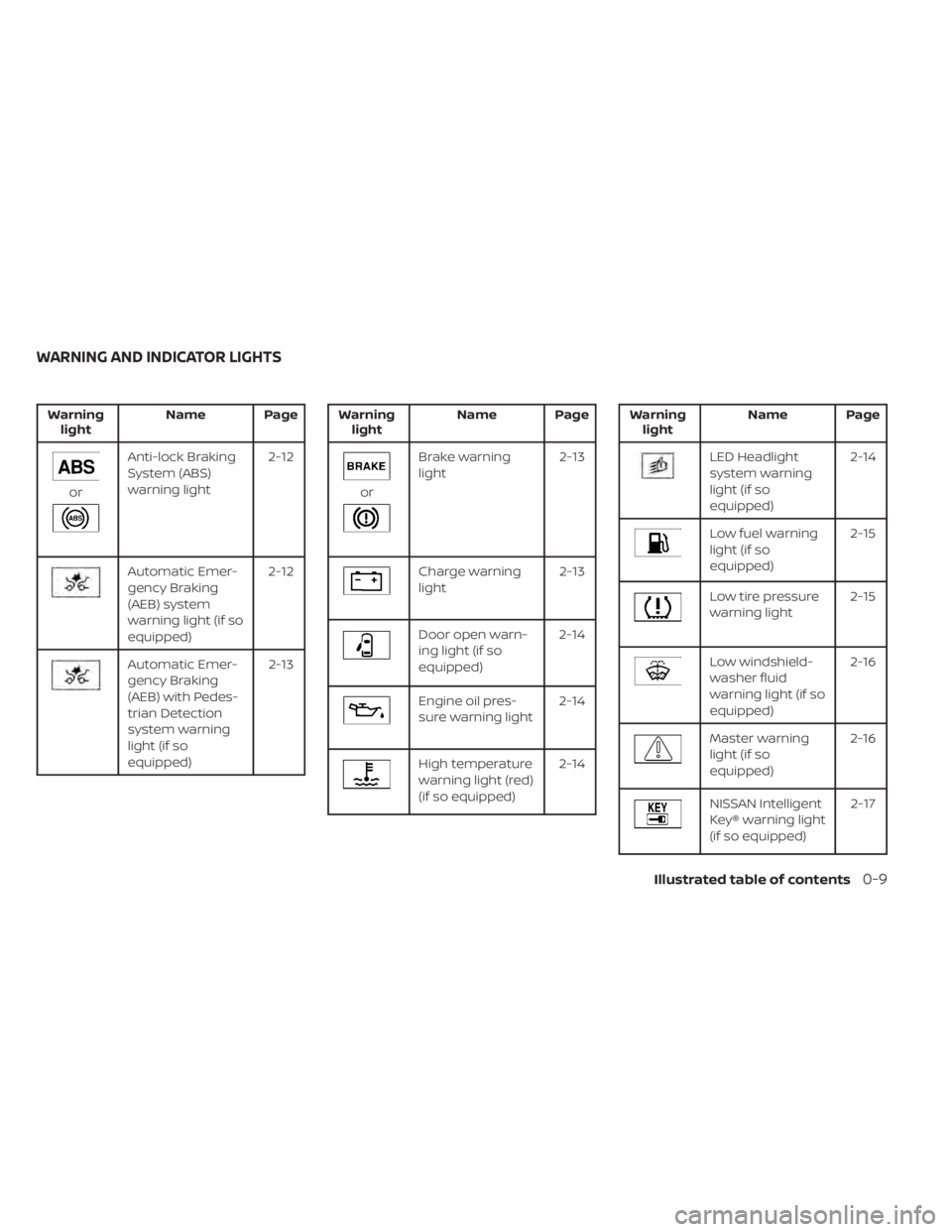
Warninglight Name Page
or
Anti-lock Braking
System (ABS)
warning light 2-12
Automatic Emer-
gency Braking
(AEB) system
warning light (if so
equipped)2-12
Automatic Emer-
gency Braking
(AEB) with Pedes-
trian Detection
system warning
light (if so
equipped) 2-13
Warning
light Name Page
or
Brake warning
light 2-13
Charge warning
light2-13
Door open warn-
ing light (if so
equipped)2-14
Engine oil pres-
sure warning light
2-14
High temperature
warning light (red)
(if so equipped)2-14
Warning
light Name Page
LED Headlight
system warning
light (if so
equipped) 2-14
Low fuel warning
light (if so
equipped)
2-15
Low tire pressure
warning light
2-15
Low windshield-
washer fluid
warning light (if so
equipped)2-16
Master warning
light (if so
equipped)
2-16
NISSAN Intelligent
Key® warning light
(if so equipped) 2-17
WARNING AND INDICATOR LIGHTS
Illustrated table of contents0-9
Page 31 of 500
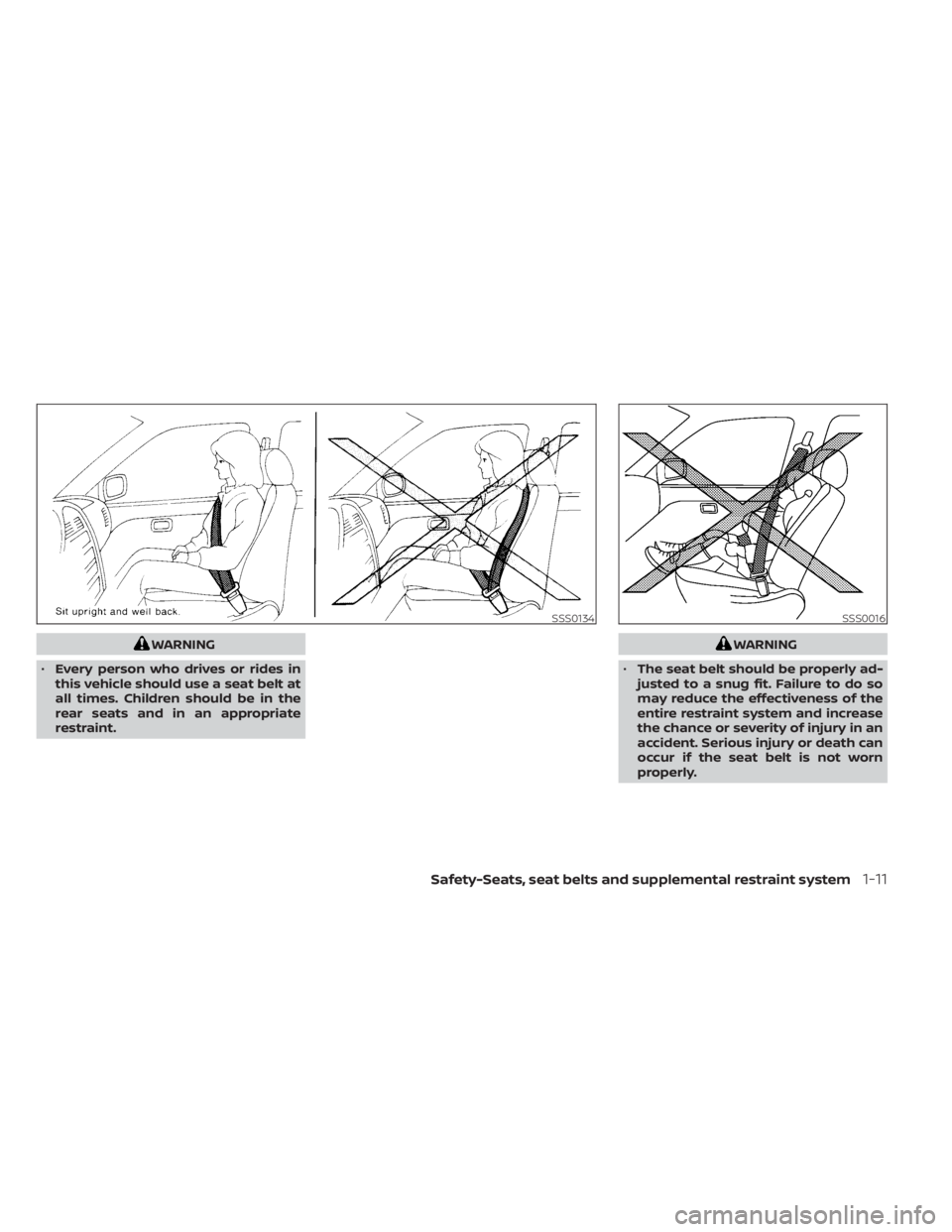
WARNING
• Every person who drives or rides in
this vehicle should use a seat belt at
all times. Children should be in the
rear seats and in an appropriate
restraint.WARNING
• The seat belt should be properly ad-
justed to a snug fit. Failure to do so
may reduce the effectiveness of the
entire restraint system and increase
the chance or severity of injury in an
accident. Serious injury or death can
occur if the seat belt is not worn
properly.
SSS0134SSS0016
Safety-Seats, seat belts and supplemental restraint system1-11
Page 37 of 500
WARNING
• Af ter adjustment, release the adjust-
ment button and try to move the
shoulder belt anchor up and down to
make sure it is securely fixed in
position.
• The shoulder belt anchor height
should be adjusted to the position
best for you. Failure to do so may re-
duce the effectiveness of the entire
restraint system and increase the
chance or severity of injury in an
accident.
Seat belt hook
When the seat belt is not in use and when
folding down the rear seats, hook the rear
seat belts on the seat belt hooks.
SEAT BELT EXTENDERS
If, because of body size or driving position, it
is not possible to properly fit the lap/
shoulder belt and fasten it, an extender
that is compatible with the installed seat
belts is available for purchase. The ex-
tender adds approximately 8 in (200 mm)
of length and may be used for either the
driver or front passenger seating position.
It is recommended that you visit a NISSAN dealer for assistance with purchasing an
extender if an extender is required.
WARNING
• Only NISSAN seat belt extenders,
made by the same company which
made the original equipment seat
belts, should be used with NISSAN
seat belts.
• Adults and children who can use the
standard seat belt should not use an
extender. Such unnecessary use
could result in serious personal injury
in the event of an accident.
• Never use seat belt extenders to in-
stall child restraints. If the child re-
straint is not secured properly, the
child could be seriously injured or
killed in a collision or a sudden stop.
SEAT BELT MAINTENANCE
• To clean the seat belt webbing, apply a
mild soap solution or any solution rec-
ommended for cleaning upholstery or
carpet. Then wipe with a cloth and allow
the seat belts to dry in the shade. Do not
allow the seat belts to retract until they
are completely dry.
LRS3082
Safety-Seats, seat belts and supplemental restraint system1-17
Page 38 of 500
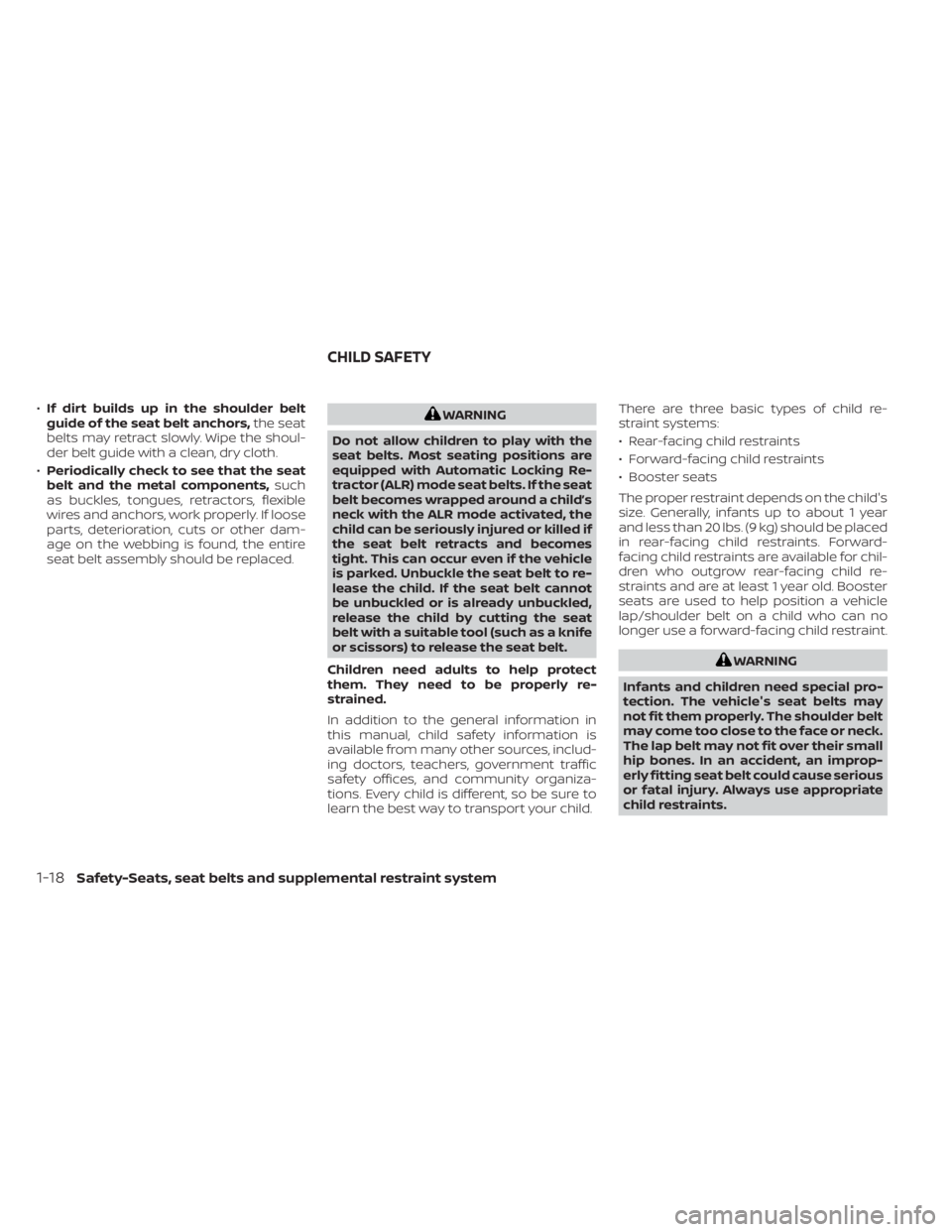
•If dirt builds up in the shoulder belt
guide of the seat belt anchors, the seat
belts may retract slowly. Wipe the shoul-
der belt guide with a clean, dry cloth.
• Periodically check to see that the seat
belt and the metal components, such
as buckles, tongues, retractors, flexible
wires and anchors, work properly. If loose
parts, deterioration, cuts or other dam-
age on the webbing is found, the entire
seat belt assembly should be replaced.WARNING
Do not allow children to play with the
seat belts. Most seating positions are
equipped with Automatic Locking Re-
tractor (ALR) mode seat belts. If the seat
belt becomes wrapped around a child’s
neck with the ALR mode activated, the
child can be seriously injured or killed if
the seat belt retracts and becomes
tight. This can occur even if the vehicle
is parked. Unbuckle the seat belt to re-
lease the child. If the seat belt cannot
be unbuckled or is already unbuckled,
release the child by cutting the seat
belt with a suitable tool (such as a knife
or scissors) to release the seat belt.
Children need adults to help protect
them. They need to be properly re-
strained.
In addition to the general information in
this manual, child safety information is
available from many other sources, includ-
ing doctors, teachers, government traffic
safety offices, and community organiza-
tions. Every child is different, so be sure to
learn the best way to transport your child. There are three basic types of child re-
straint systems:
• Rear-facing child restraints
• Forward-facing child restraints
• Booster seats
The proper restraint depends on the child's
size. Generally, infants up to about 1 year
and less than 20 lbs. (9 kg) should be placed
in rear-facing child restraints. Forward-
facing child restraints are available for chil-
dren who outgrow rear-facing child re-
straints and are at least 1 year old. Booster
seats are used to help position a vehicle
lap/shoulder belt on a child who can no
longer use a forward-facing child restraint.
WARNING
Infants and children need special pro-
tection. The vehicle's seat belts may
not fit them properly. The shoulder belt
may come too close to the face or neck.
The lap belt may not fit over their small
hip bones. In an accident, an improp-
erly fitting seat belt could cause serious
or fatal injury. Always use appropriate
child restraints.
CHILD SAFETY
1-18Safety-Seats, seat belts and supplemental restraint system
Page 40 of 500
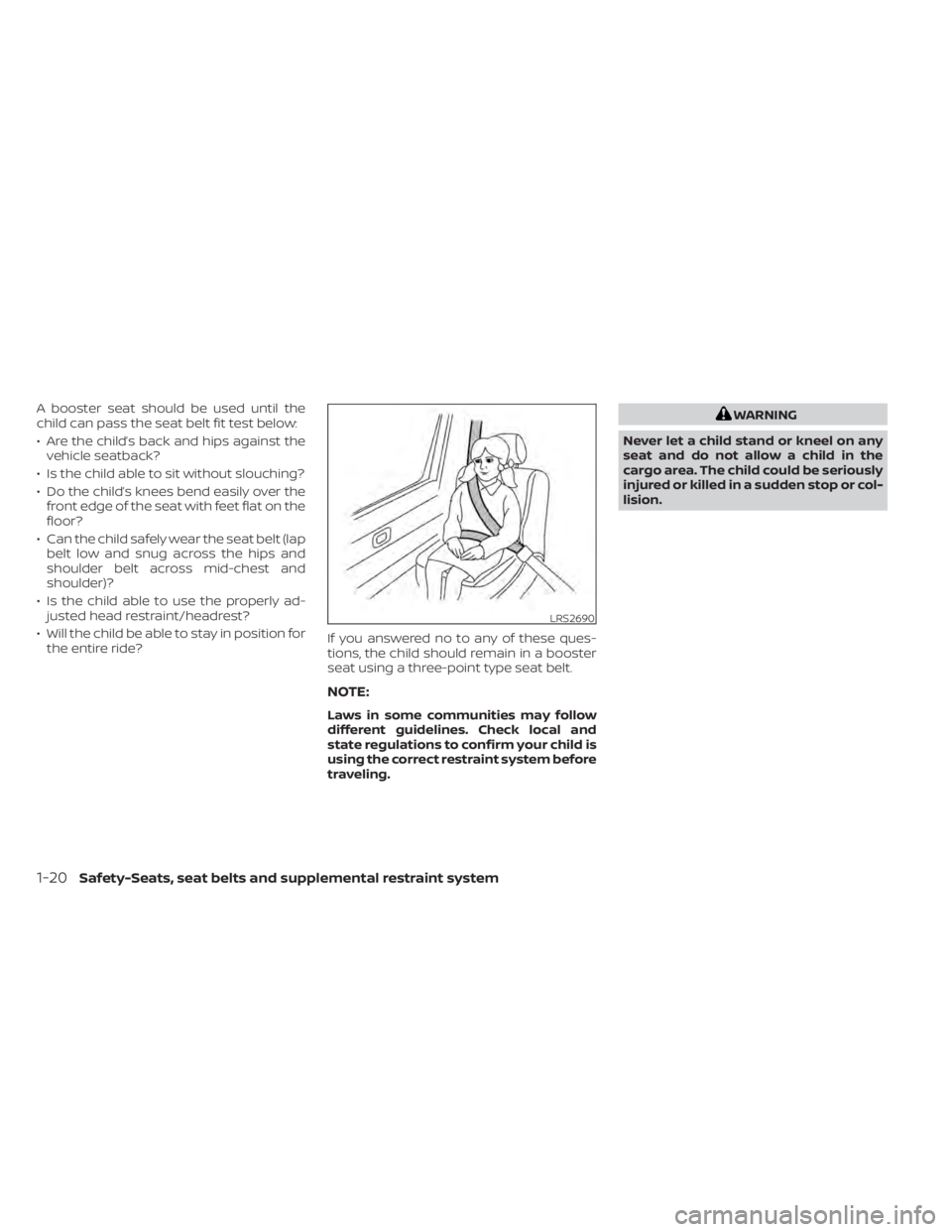
A booster seat should be used until the
child can pass the seat belt fit test below:
• Are the child’s back and hips against thevehicle seatback?
• Is the child able to sit without slouching?
• Do the child’s knees bend easily over the front edge of the seat with feet flat on the
floor?
• Can the child safely wear the seat belt (lap belt low and snug across the hips and
shoulder belt across mid-chest and
shoulder)?
• Is the child able to use the properly ad- justed head restraint/headrest?
• Will the child be able to stay in position for the entire ride? If you answered no to any of these ques-
tions, the child should remain in a booster
seat using a three-point type seat belt.
NOTE:
Laws in some communities may follow
different guidelines. Check local and
state regulations to confirm your child is
using the correct restraint system before
traveling.
WARNING
Never let a child stand or kneel on any
seat and do not allow a child in the
cargo area. The child could be seriously
injured or killed in a sudden stop or col-
lision.
LRS2690
1-20Safety-Seats, seat belts and supplemental restraint system
Page 96 of 500
Low fuel warning light (if so equipped)DRIVE SPORT mode indicator light (if so
equipped)Slip indicator light
Low tire pressure warning lightEngine start operation indicator light (if
so equipped)Turn signal/hazard indicator lights
Low windshield-washer fluid warning light (if
so equipped)Front fog light indicator light (green) (if
so equipped)Vehicle Dynamic Control (VDC) OFF indi-
cator light
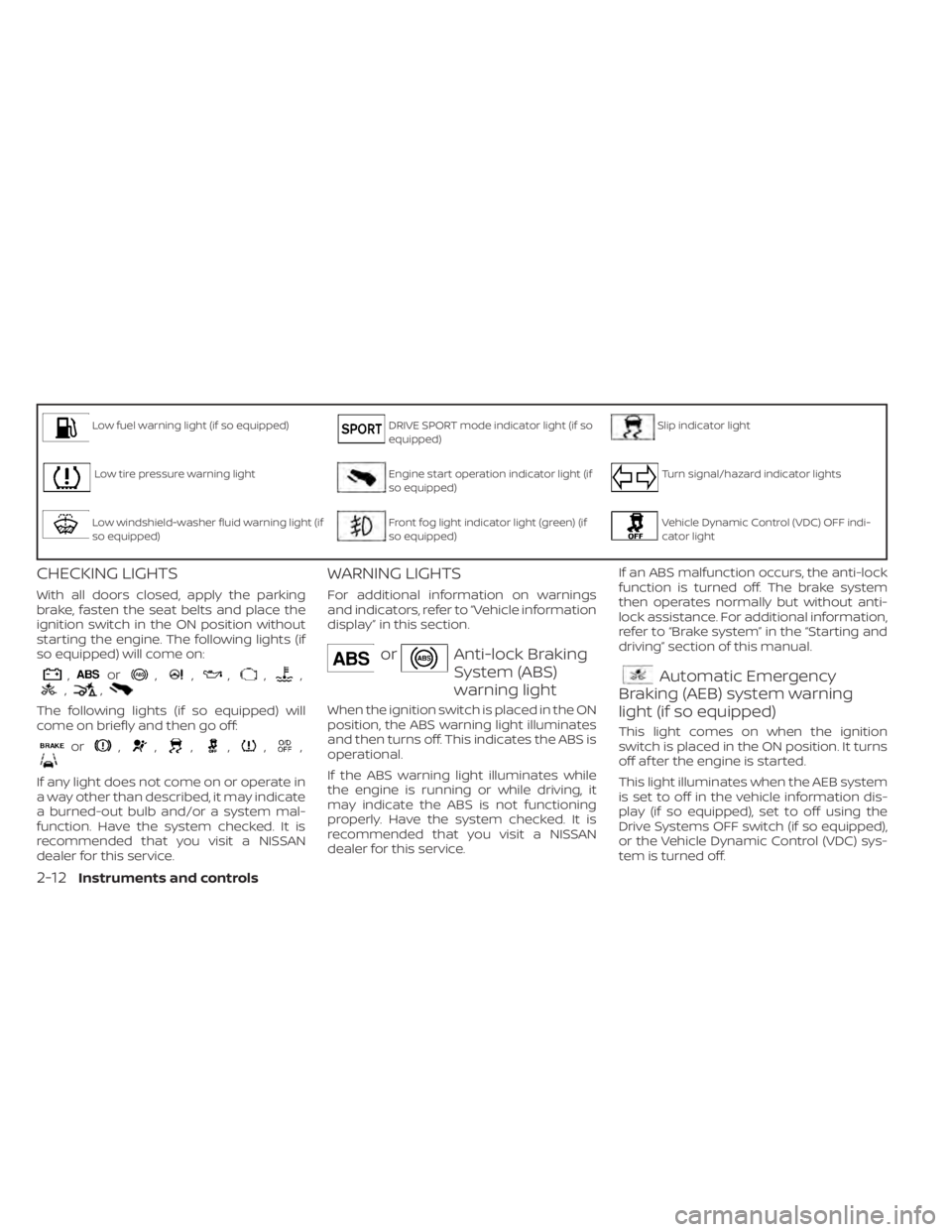
CHECKING LIGHTS
With all doors closed, apply the parking
brake, fasten the seat belts and place the
ignition switch in the ON position without
starting the engine. The following lights (if
so equipped) will come on:
,or,,,,,,,
The following lights (if so equipped) will
come on briefly and then go off:
or,,,,,,
If any light does not come on or operate in
a way other than described, it may indicate
a burned-out bulb and/or a system mal-
function. Have the system checked. It is
recommended that you visit a NISSAN
dealer for this service.
WARNING LIGHTS
For additional information on warnings
and indicators, refer to “Vehicle information
display” in this section.
orAnti-lock Braking
System (ABS)
warning light
When the ignition switch is placed in the ON
position, the ABS warning light illuminates
and then turns off. This indicates the ABS is
operational.
If the ABS warning light illuminates while
the engine is running or while driving, it
may indicate the ABS is not functioning
properly. Have the system checked. It is
recommended that you visit a NISSAN
dealer for this service.If an ABS malfunction occurs, the anti-lock
function is turned off. The brake system
then operates normally but without anti-
lock assistance. For additional information,
refer to “Brake system” in the “Starting and
driving” section of this manual.
Automatic Emergency
Braking (AEB) system warning
light (if so equipped)
This light comes on when the ignition
switch is placed in the ON position. It turns
off af ter the engine is started.
This light illuminates when the AEB system
is set to off in the vehicle information dis-
play (if so equipped), set to off using the
Drive Systems OFF switch (if so equipped),
or the Vehicle Dynamic Control (VDC) sys-
tem is turned off.
2-12Instruments and controls
Page 99 of 500
Low fuel warning light (if so
equipped)
This light comes on when the fuel level in
the fuel tank is getting low. Refuel as soon
as it is convenient, preferably before the
fuel gauge reaches 0 (Empty). There will be
a small reserve of fuel in the tank when
the fuel gauge reaches 0 (Empty).
Low tire pressure warning
light
Your vehicle is equipped with a Tire Pres-
sure Monitoring System (TPMS) that moni-
tors the tire pressure of all tires except the
spare.
The low tire pressure warning light warns
of low tire pressure or indicates that the
TPMS is not functioning properly.
Af ter the ignition switch is placed in the ON
position, this light illuminates for about 1
second and turns off.
Low tire pressure warning
If the vehicle is being driven with low tire
pressure, the warning light will illumi-
nate. The “CHECK TIRE PRES” (vehicles
without a vehicle information display)
also appears in the trip computer or the
“Tire Pressure Low – Add Air” (vehicles with a vehicle information display) ap-
pears in the vehicle information display.
When the low tire pressure warning light
illuminates, you should stop and adjust
the tire pressure of all four tires to the
recommended COLD tire pressure shown
on the Tire and Loading Information la-
bel located in the driver’s door opening.
The low tire pressure warning light does
not automatically turn off when the tire
pressure is adjusted. Af ter the tire is in-
flated to the recommended pressure,
the vehicle must be driven at speeds
above 16 mph (25 km/h) to activate the
TPMS and turn off the low tire pressure
warning light. Use a tire pressure gauge
to check the tire pressure.
For vehicles without a vehicle information
display, the low tire pressure warning light
remains illuminated until the tires are in-
flated to the recommended COLD tire
pressure. The “CHECK TIRE PRES” warning
message is displayed each time the igni-
tion switch is placed in the ON position as
long as the low tire pressure warning light
remains illuminated.
For vehicles with a vehicle information dis-
play, the “Tire Pressure Low - Add Air” warn-
ing appears each time the ignition switch is
placed in the ON position as long as the low
tire pressure warning light remains illumi-
nated.
For additional information, refer to “Vehicle
information display” in this section, “Tire
Pressure Monitoring System (TPMS)” in the
“Starting and driving” and “In case of emer-
gency” sections of this manual.
TPMS malfunction
If the TPMS is not functioning properly, the
low tire pressure warning light will flash for
approximately 1 minute when the ignition
switch is placed in the ON position. The
light will remain on af ter 1 minute. Have the
system checked. It is recommended that
you visit a NISSAN dealer for this service.
The "CHECK TIRE PRES" warning message
/”Tire Pressure Low— Add Air” warning does
not appear if the low tire pressure warning
light illuminates to indicate a TPMS mal-
function.
For additional information, refer to “Tire
Pressure Monitoring System (TPMS)” in the
“Starting and driving” section and “Tire
pressure” in the “Do-it-yourself ” section of
this manual.
Instruments and controls2-15
Page 100 of 500
WARNING
• Radio waves could adversely affect
electric medical equipment. Those
who use a pacemaker should contact
the electric medical equipment
manufacturer for the possible influ-
ences before use.
• If the light does not illuminate with
the ignition switch placed in the ON
position, have the vehicle checked as
soon as possible. It is recommended
that you visit a NISSAN dealer for this
service.
• If the light illuminates while driving,
avoid sudden steering maneuvers or
abrupt braking, reduce vehicle
speed, pull off the road to a safe loca-
tion and stop the vehicle as soon as
possible. Driving with under-inflated
tires may permanently damage the
tires and increase the likelihood of
tire failure. Serious vehicle damage
could occur and may lead to an acci-
dent and could result in serious per-
sonal injury or death. Check the tire
pressure for all four tires. Adjust the
tire pressure to the recommended COLD tire pressure show on the Tire
and Loading Information label lo-
cated in the driver’s door opening to
turn the low tire pressure warning
light off. If the light still illuminates
while driving af ter adjusting the tire
pressure, a tire may be flat or the
TPMS may be malfunctioning. If you
have a flat tire, replace it with a spare
tire as soon as possible. If no tire is
flat and all tires are properly inflated,
have the vehicle checked. It is recom-
mended that you visit a NISSAN
dealer for this service.
• When replacing a wheel without the
TPMS such as the spare tire, the TPMS
will not function and the low tire
pressure warning light will flash for
approximately 1 minute. The light will
remain on af ter 1 minute. Have your
tires replaced and/or TPMS system
reset as soon as possible. It is recom-
mended that you visit a NISSAN
dealer for these services.
• Replacing tires with those not origi-
nally specified by NISSAN could af-
fect the proper operation of the
TPMS.CAUTION
• The TPMS is not a substitute for the
regular tire pressure check. Be sure
to check the tire pressure regularly.
• If the vehicle is being driven at
speeds of less than 16 mph (25 km/h),
the TPMS may not operate correctly.
• Be sure to install the specified size of
tires to the four wheels correctly.
Low windshield-washer
fluid warning light (if so
equipped)
This light comes on when the windshield-
washer fluid is at a low level. Add windshield-
washer fluid as necessary. For additional in-
formation, refer to “Windshield-washer fluid”
in the “Do-it-yourself ” section of this manual.
Master warning light (if so
equipped)
This light illuminates when various vehicle
information display warnings appear.
•Nokey
• I-Key system warning
• Low washer fluid
• Door open
• Parking brake release
2-16Instruments and controls
Page 111 of 500
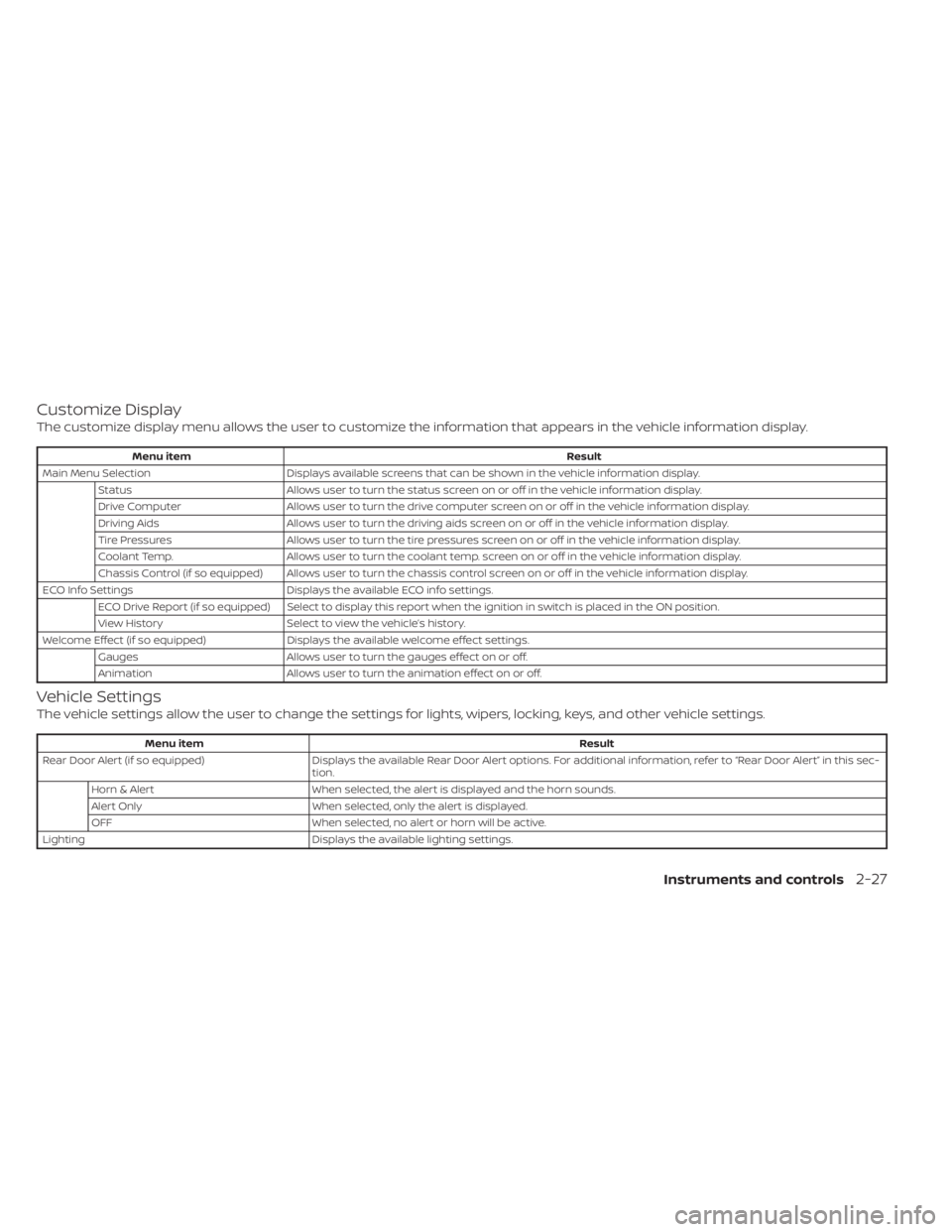
Customize Display
The customize display menu allows the user to customize the information that appears in the vehicle information display.
Menu itemResult
Main Menu Selection Displays available screens that can be shown in the vehicle information display.
Status Allows user to turn the status screen on or off in the vehicle information display.
Drive Computer Allows user to turn the drive computer screen on or off in the vehicle information display.
Driving Aids Allows user to turn the driving aids screen on or off in the vehicle information display.
Tire Pressures Allows user to turn the tire pressures screen on or off in the vehicle information display.
Coolant Temp. Allows user to turn the coolant temp. screen on or off in the vehicle information display.
Chassis Control (if so equipped) Allows user to turn the chassis control screen on or off in the vehicle information display.
ECO Info Settings Displays the available ECO info settings.
ECO Drive Report (if so equipped) Select to display this report when the ignition in switch is placed in the ON position.
View History Select to view the vehicle’s history.
Welcome Effect (if so equipped) Displays the available welcome effect settings.
Gauges Allows user to turn the gauges effect on or off.
Animation Allows user to turn the animation effect on or off.
Vehicle Settings
The vehicle settings allow the user to change the settings for lights, wipers, locking, keys, and other vehicle settings.
Menu item Result
Rear Door Alert (if so equipped) Displays the available Rear Door Alert options. For additional information, refer to “Rear Door Alert” in this sec-
tion.
Horn & Alert When selected, the alert is displayed and the horn sounds.
Alert Only When selected, only the alert is displayed.
OFF When selected, no alert or horn will be active.
Lighting Displays the available lighting settings.
Instruments and controls2-27