lock NISSAN KICKS 2021 User Guide
[x] Cancel search | Manufacturer: NISSAN, Model Year: 2021, Model line: KICKS, Model: NISSAN KICKS 2021Pages: 500, PDF Size: 3.24 MB
Page 34 of 500
•Do not allow children to play with the
seat belts. Most seating positions are
equipped with Automatic Locking
Retractor (ALR) mode seat belts. If
the seat belt becomes wrapped
around a child’s neck with the ALR
mode activated, the child can be se-
riously injured or killed if the seat belt
retracts and becomes tight. This can
occur even if the vehicle is parked.
Unbuckle the seat belt to release the
child. If the seat belt cannot be un-
buckled or is already unbuckled, re-
lease the child by cutting the seat
belt with a suitable tool (such as a
knife or scissors) to release the seat
belt.
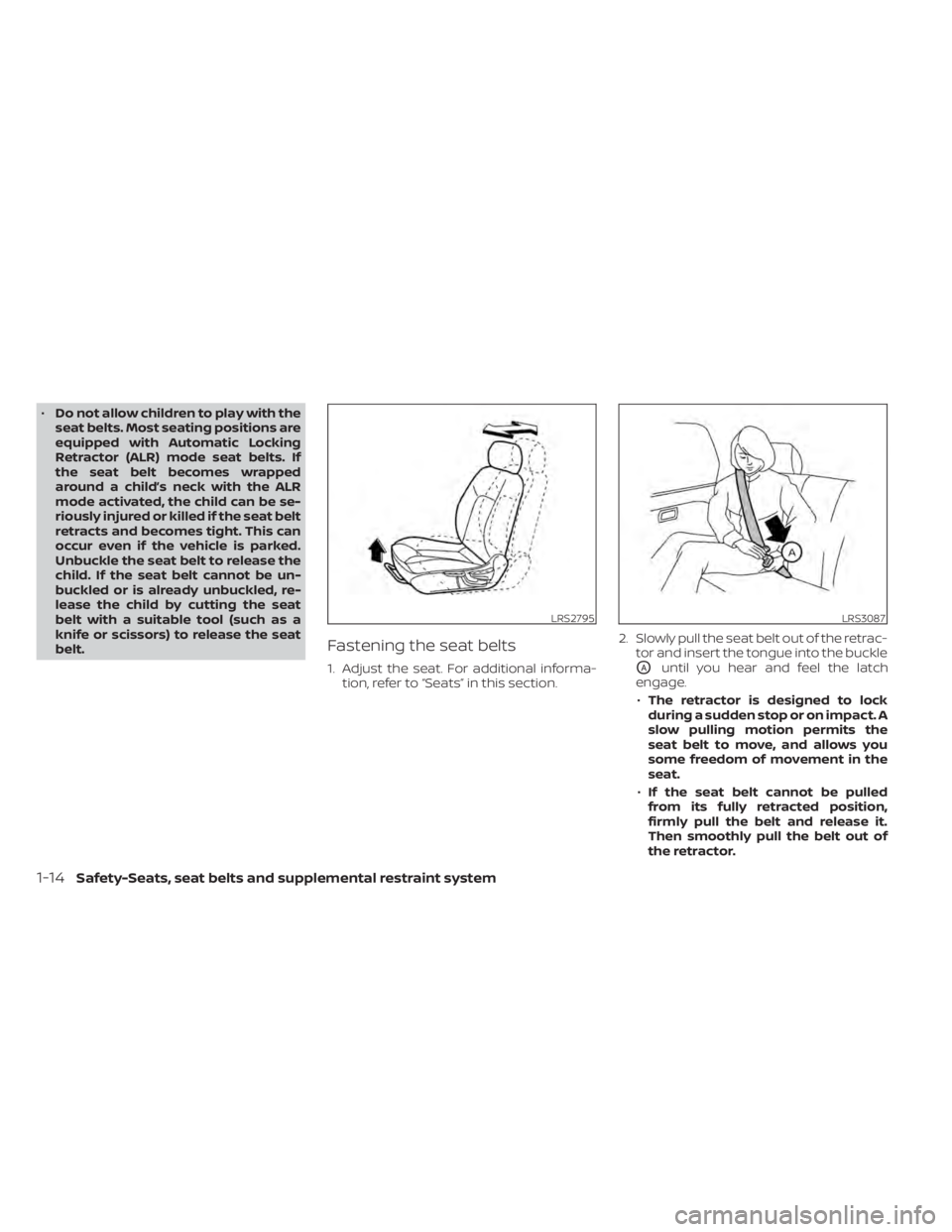
Fastening the seat belts
1. Adjust the seat. For additional informa- tion, refer to “Seats” in this section. 2. Slowly pull the seat belt out of the retrac-
tor and insert the tongue into the buckleOAuntil you hear and feel the latch
engage.
• The retractor is designed to lock
during a sudden stop or on impact. A
slow pulling motion permits the
seat belt to move, and allows you
some freedom of movement in the
seat.
• If the seat belt cannot be pulled
from its fully retracted position,
firmly pull the belt and release it.
Then smoothly pull the belt out of
the retractor.
LRS3087
1-14Safety-Seats, seat belts and supplemental restraint system
Page 35 of 500
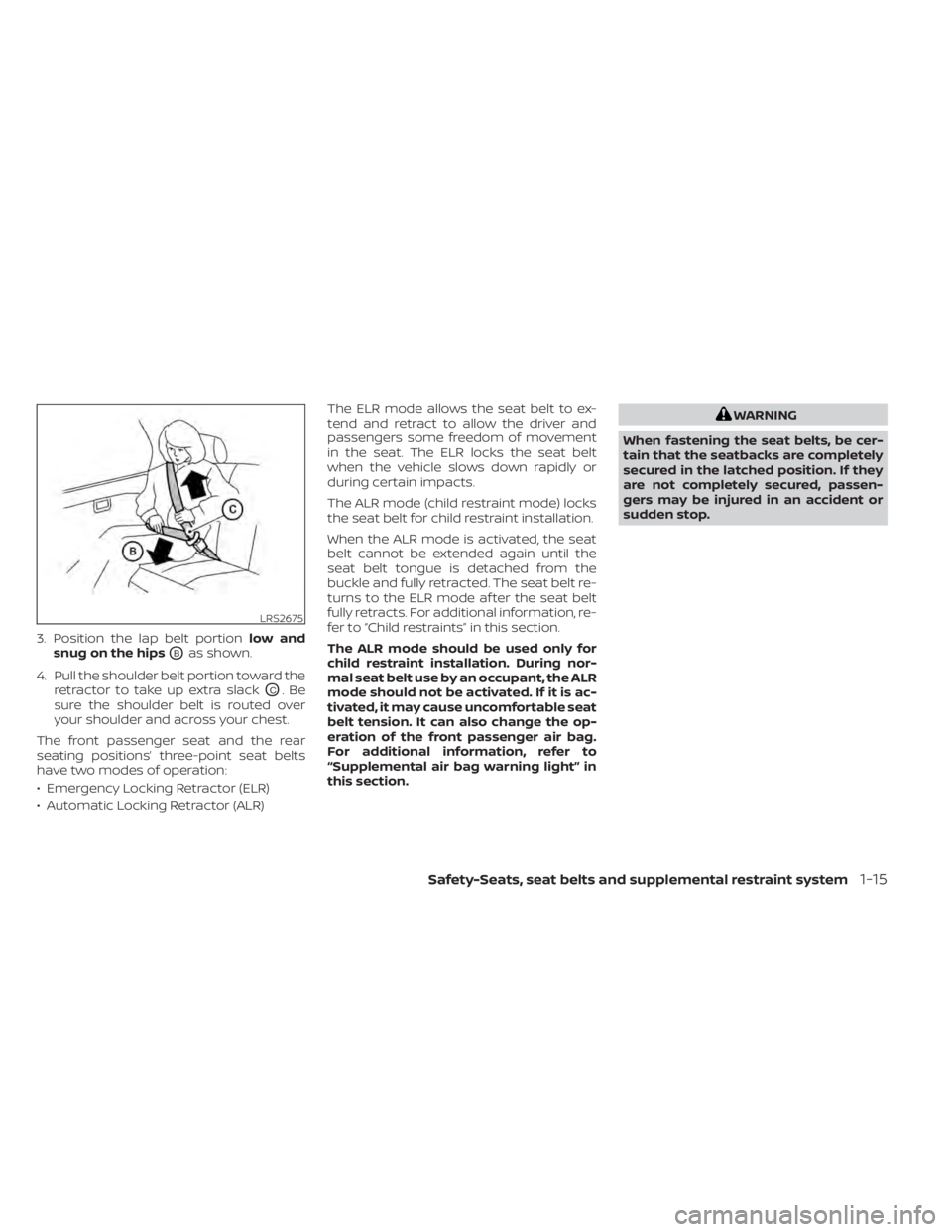
3. Position the lap belt portionlow and
snug on the hips
OBas shown.
4. Pull the shoulder belt portion toward the retractor to take up extra slack
OC.Be
sure the shoulder belt is routed over
your shoulder and across your chest.
The front passenger seat and the rear
seating positions’ three-point seat belts
have two modes of operation:
• Emergency Locking Retractor (ELR)
• Automatic Locking Retractor (ALR) The ELR mode allows the seat belt to ex-
tend and retract to allow the driver and
passengers some freedom of movement
in the seat. The ELR locks the seat belt
when the vehicle slows down rapidly or
during certain impacts.
The ALR mode (child restraint mode) locks
the seat belt for child restraint installation.
When the ALR mode is activated, the seat
belt cannot be extended again until the
seat belt tongue is detached from the
buckle and fully retracted. The seat belt re-
turns to the ELR mode af ter the seat belt
fully retracts. For additional information, re-
fer to “Child restraints” in this section.
The ALR mode should be used only for
child restraint installation. During nor-
mal seat belt use by an occupant, the ALR
mode should not be activated. If it is ac-
tivated, it may cause uncomfortable seat
belt tension. It can also change the op-
eration of the front passenger air bag.
For additional information, refer to
“Supplemental air bag warning light” in
this section.
WARNING
When fastening the seat belts, be cer-
tain that the seatbacks are completely
secured in the latched position. If they
are not completely secured, passen-
gers may be injured in an accident or
sudden stop.
Page 36 of 500
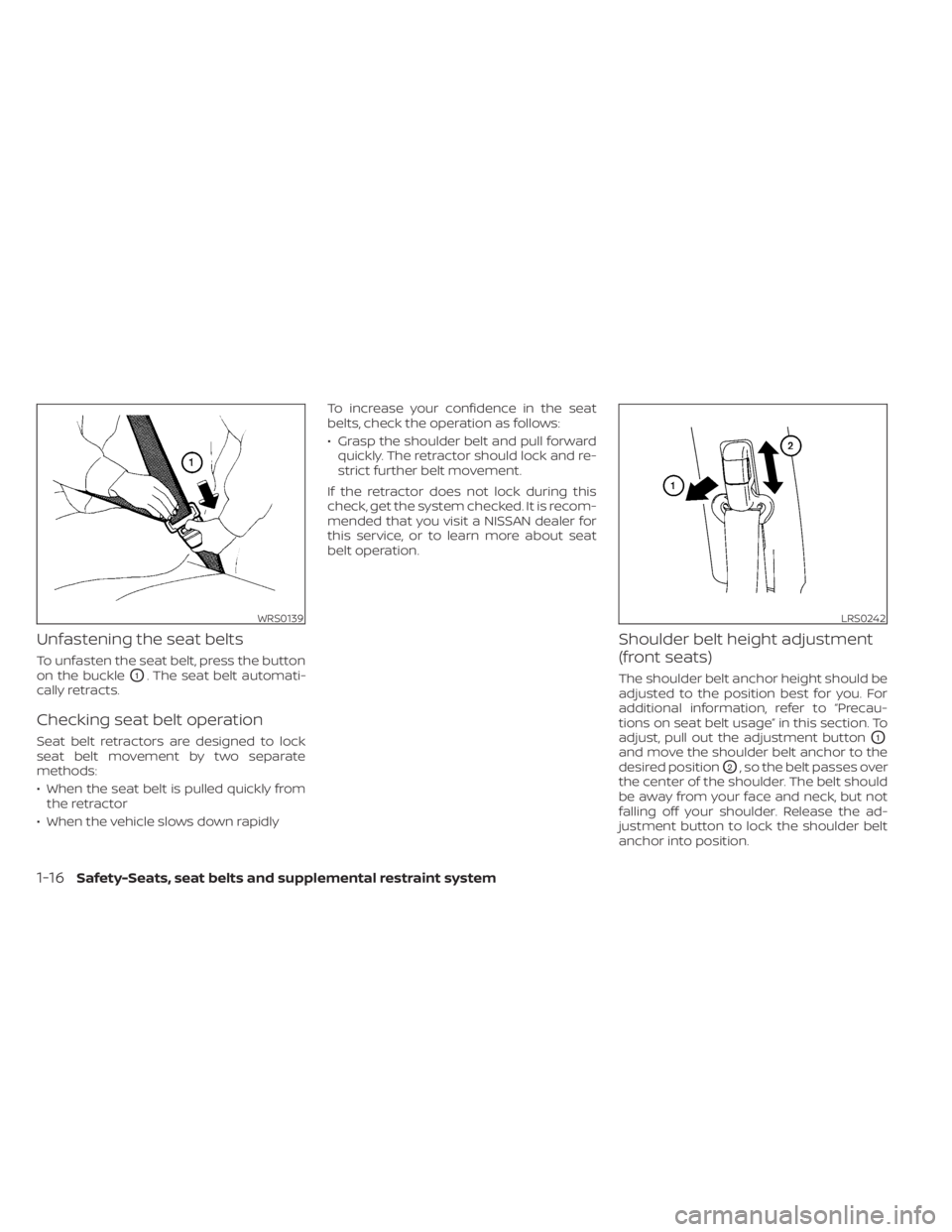
Unfastening the seat belts
To unfasten the seat belt, press the button
on the buckle
O1. The seat belt automati-
cally retracts.
Checking seat belt operation
Seat belt retractors are designed to lock
seat belt movement by two separate
methods:
• When the seat belt is pulled quickly from the retractor
• When the vehicle slows down rapidly To increase your confidence in the seat
belts, check the operation as follows:
• Grasp the shoulder belt and pull forward
quickly. The retractor should lock and re-
strict further belt movement.
If the retractor does not lock during this
check, get the system checked. It is recom-
mended that you visit a NISSAN dealer for
this service, or to learn more about seat
belt operation.
Shoulder belt height adjustment
(front seats)
The shoulder belt anchor height should be
adjusted to the position best for you. For
additional information, refer to “Precau-
tions on seat belt usage” in this section. To
adjust, pull out the adjustment button
O1
and move the shoulder belt anchor to the
desired position
O2, so the belt passes over
the center of the shoulder. The belt should
be away from your face and neck, but not
falling off your shoulder. Release the ad-
justment button to lock the shoulder belt
anchor into position.
WRS0139LRS0242
1-16Safety-Seats, seat belts and supplemental restraint system
Page 50 of 500
7. Check to make sure that the child re-straint is properly secured prior to each
use. If the seat belt is not locked, repeat
steps 2 through 6.
Af ter the child restraint is removed and the
seat belt fully retracted, the ALR mode
(child restraint mode) is canceled.
FORWARD-FACING CHILD
RESTRAINT INSTALLATION USING
LATCH
For additional information, refer to all Warn-
ings and Cautions in the “Child safety” and
“Child restraints” sections of this manual
before installing a child restraint.
Do not use the lower anchors if the com-
bined weight of the child and the child re-
straint exceeds 65 lbs. (29.5 kg). If the com-
bined weight of the child and the child
restraint is greater than 65 lbs. (29.5 kg) use
the vehicle's seat belt (not the lower an-
chors) to install the child restraint. Be sure
to follow the child restraint manufacturer's
instructions for installation.
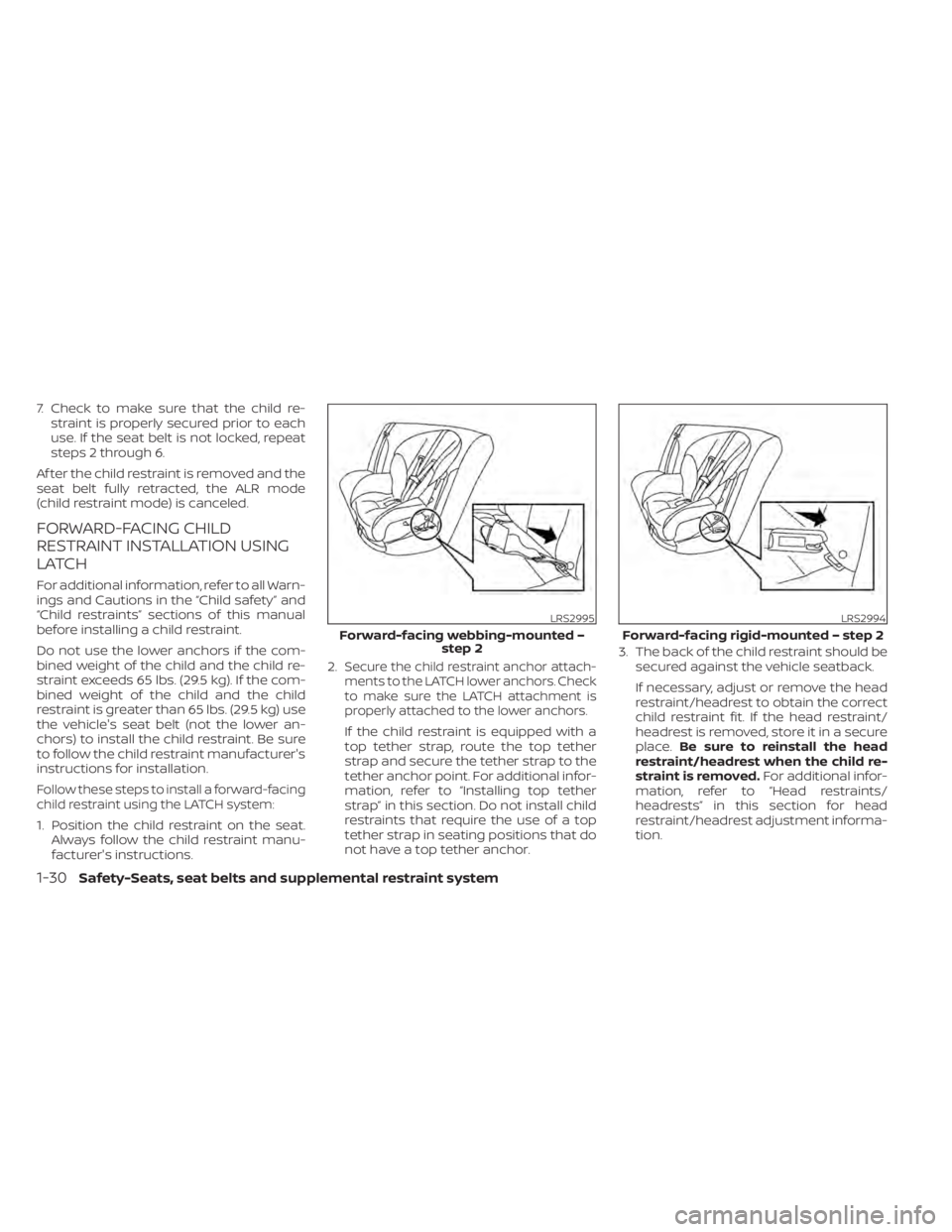
Follow these steps to install a forward-facing
child restraint using the LATCH system:
1. Position the child restraint on the seat. Always follow the child restraint manu-
facturer's instructions. 2.
Secure the child restraint anchor attach-
ments to the LATCH lower anchors. Check
to make sure the LATCH attachment is
properly attached to the lower anchors.
If the child restraint is equipped with a
top tether strap, route the top tether
strap and secure the tether strap to the
tether anchor point. For additional infor-
mation, refer to “Installing top tether
strap” in this section. Do not install child
restraints that require the use of a top
tether strap in seating positions that do
not have a top tether anchor. 3. The back of the child restraint should be
secured against the vehicle seatback.
If necessary, adjust or remove the head
restraint/headrest to obtain the correct
child restraint fit. If the head restraint/
headrest is removed, store it in a secure
place. Be sure to reinstall the head
restraint/headrest when the child re-
straint is removed. For additional infor-
mation, refer to “Head restraints/
headrests” in this section for head
restraint/headrest adjustment informa-
tion.
LRS2995
Forward-facing webbing-mounted – step 2
Page 55 of 500
Do not install child restraints that require
the use of a top tether strap in seating
positions that do not have a top tether
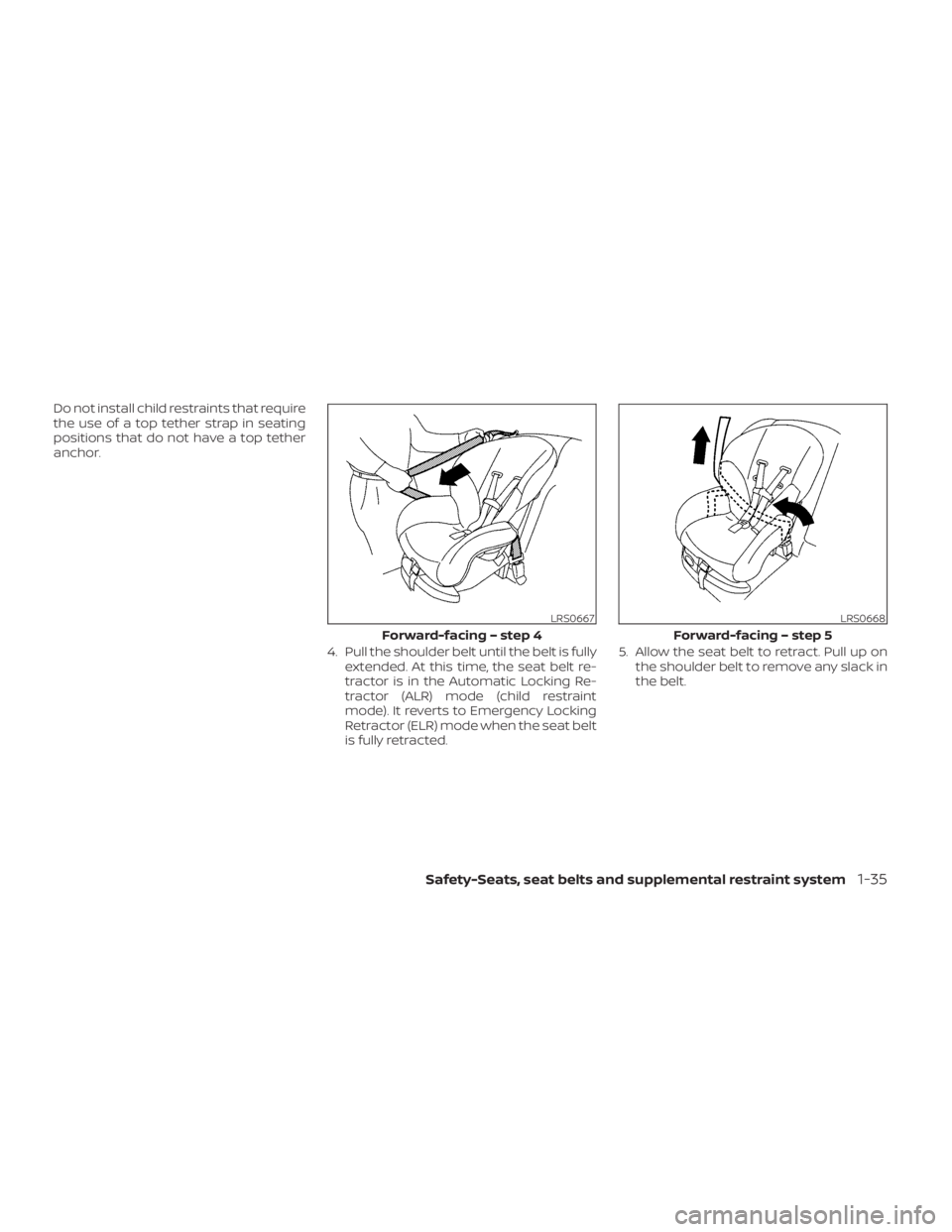
anchor.4. Pull the shoulder belt until the belt is fullyextended. At this time, the seat belt re-
tractor is in the Automatic Locking Re-
tractor (ALR) mode (child restraint
mode). It reverts to Emergency Locking
Retractor (ELR) mode when the seat belt
is fully retracted. 5. Allow the seat belt to retract. Pull up on
the shoulder belt to remove any slack in
the belt.
LRS0667
Forward-facing – step 4
Safety-Seats, seat belts and supplemental restraint system1-35
Page 56 of 500
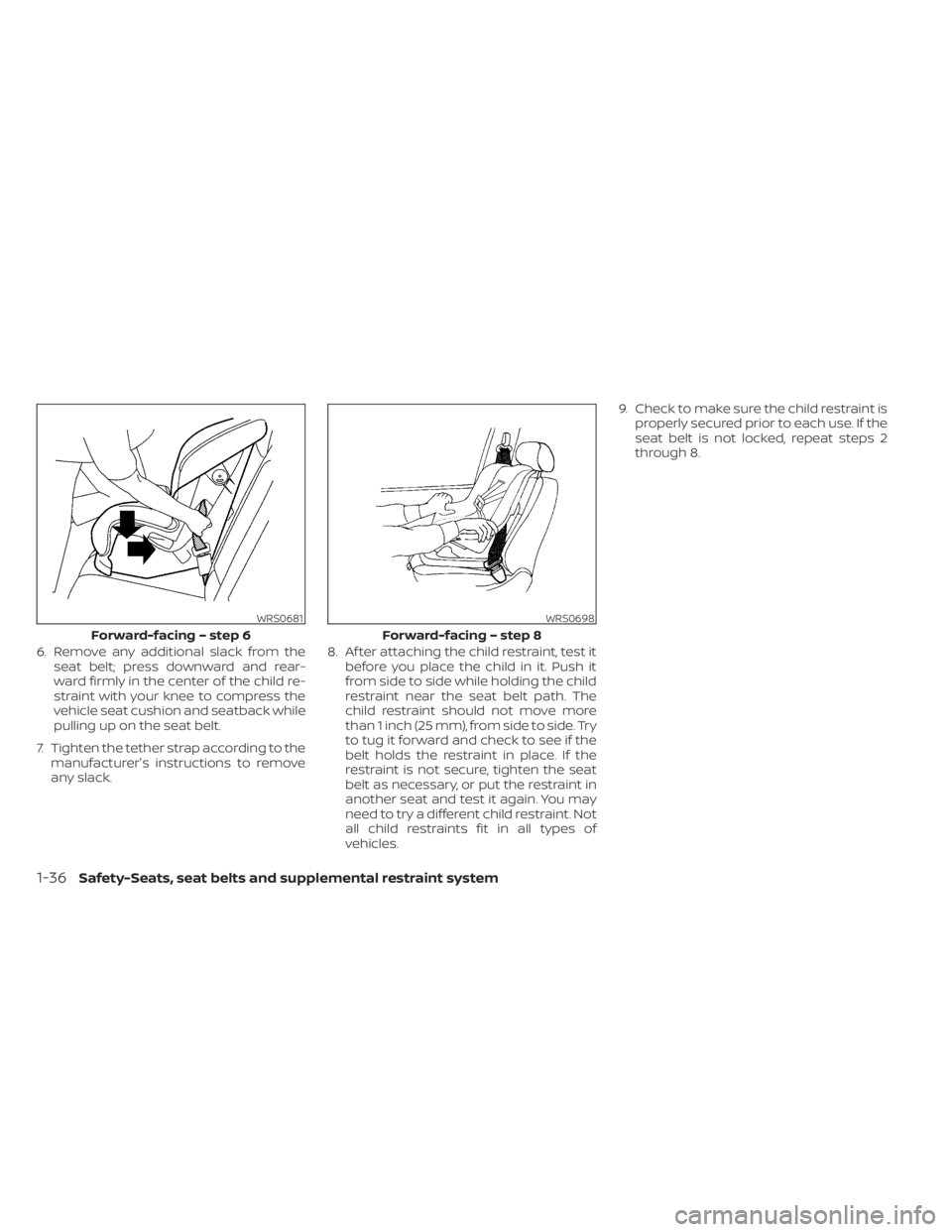
6. Remove any additional slack from theseat belt; press downward and rear-
ward firmly in the center of the child re-
straint with your knee to compress the
vehicle seat cushion and seatback while
pulling up on the seat belt.
7. Tighten the tether strap according to the manufacturer's instructions to remove
any slack. 8. Af ter attaching the child restraint, test it
before you place the child in it. Push it
from side to side while holding the child
restraint near the seat belt path. The
child restraint should not move more
than 1 inch (25 mm), from side to side. Try
to tug it forward and check to see if the
belt holds the restraint in place. If the
restraint is not secure, tighten the seat
belt as necessary, or put the restraint in
another seat and test it again. You may
need to try a different child restraint. Not
all child restraints fit in all types of
vehicles. 9. Check to make sure the child restraint is
properly secured prior to each use. If the
seat belt is not locked, repeat steps 2
through 8.
WRS0681
Forward-facing – step 6
Page 74 of 500
NOTE:
This vehicle’s occupant classification sen-
sor system generally keeps the classifica-
tion locked during driving, so it is impor-
tant that you confirm that the front
passenger is properly classified prior to
driving. However, the occupant classifica-
tion sensor may recalculate the weight of
the occupant under some conditions (both
while driving and when stopped), so front
passenger seat occupants should con-
tinue to remain seated as outlined above.
Troubleshooting
If you think the front passenger air bag
status light is incorrect:
1. If the light is ON with an adult occupyingthe front passenger seat:
• Occupant is a small adult — the air bag light is functioning as intended. The front
passenger air bag and passenger knee
air bag are suppressed.
However, if the occupant is not a small
adult, then this may be due to the following
conditions that may be interfering with the
weight sensors:
• Occupant is not sitting upright, leaning against the seatback, and centered on
the seat cushion with his/her feet com-
fortably extended to the floor. • A child restraint or other object pressing
against the rear of the seatback.
• A rear passenger pushing or pulling on the back of the front passenger seat.
• Forcing the front seat or seatback against an object on the seat or floor be-
hind it.
• An object placed under the front passen- ger seat.
• An object placed between the seat cush- ion and center console or between the
seat cushion and the door.
If the vehicle is moving, please come to a
stop when it is safe to do so. Check and
correct any of the above conditions. Re-
start the vehicle and wait 1 minute.
NOTE:
A system check will be performed during
which the front passenger air bag status
light will remain lit for about 7 seconds
initially.
If the light is still ON af ter this, the person
should be advised not to ride in the front
passenger seat and the vehicle should be
checked as soon as possible. It is recom-
mended that you visit a NISSAN dealer for
this service. 2. If the light is OFF with a small adult, child
or child restraint occupying the front
passenger seat.
This may be due to the following condi-
tions that may be interfering with the
weight sensors:
• Small adult or child is not sitting upright, leaning against the seatback, and cen-
tered on the seat cushion with his/her
feet comfortably extended to the floor.
• The child restraint is not properly in- stalled, as outlined in the “Child restraints”
section of this manual.
• An object weighing over 9.1 lbs. (4 kg) hanging on the seat or placed in the seat-
back pocket.
• A child restraint or other object pressing against the rear of the seatback.
• A rear passenger pushing or pulling on the back of the front passenger seat.
• Forcing the front seat or seatback against an object on the seat or floor be-
hind it.
• An object placed under the front passen- ger seat.
• An object placed between the seat cush- ion and center console.
1-54Safety-Seats, seat belts and supplemental restraint system
Page 83 of 500
When maintenance work is required on the
vehicle, the front air bags, side air bags,
curtain air bags, knee air bag, pretension-
er(s) and related parts should be pointed
out to the person performing the mainte-
nance. The ignition switch should always
be in the LOCK position when working un-
der the hood or inside the vehicle.
Page 87 of 500
17. Bluetooth® Hands-Free Phone System(P. 4-2, 4-67)
Cruise control switches (P. 5-52)
18. Driver supplemental knee air bag
(P. 1-42)
19. Tilt and telescopic steering wheel lock
lever (P. 3-26)
20. Hood release (P. 3-21) Fuel-filler door release (P. 3-25)
21. Steering wheel switches for audio con-
trol (P. 4-2, 4-63)
Control panel and vehicle information
display switches (if so equipped)
(P. 2-23)
22. Blind Spot Warning (BSW) switch
(if so equipped) (P. 2-53)
Drive Systems OFF switch
(if so equipped) (P. 2-53)
Lane Departure Warning (LDW) switch
(if so equipped) (P. 2-54)
Rear Sonar System (RSS) OFF switch
(if so equipped) (P. 2-55)
Vehicle Dynamic Control (VDC) OFF
switch (if so equipped) (P. 2-55)
Instrument panel pocket (if so
equipped) (P. 2-59)
Enter/select switch for trip computer (if
so equipped) (P. 2-9)
* Refer to the separate NissanConnect®
Owner's Manual (if so equipped). Refer to the page number indicated in
parentheses for operating details.
Instruments and controls2-3
Page 95 of 500
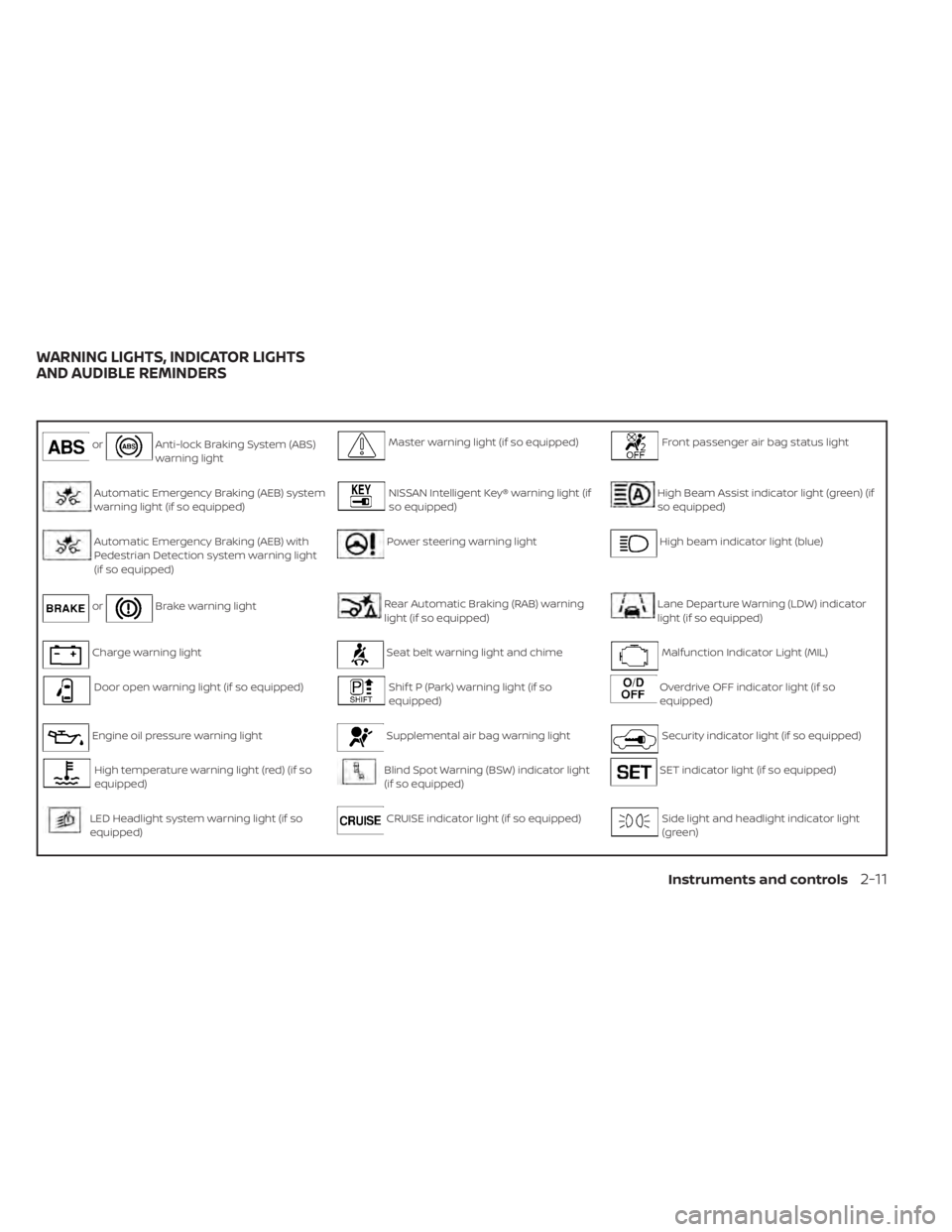
orAnti-lock Braking System (ABS)
warning lightMaster warning light (if so equipped)Front passenger air bag status light
Automatic Emergency Braking (AEB) system
warning light (if so equipped)NISSAN Intelligent Key® warning light (if
so equipped)High Beam Assist indicator light (green) (if
so equipped)
Automatic Emergency Braking (AEB) with
Pedestrian Detection system warning light
(if so equipped)Power steering warning lightHigh beam indicator light (blue)
orBrake warning lightRear Automatic Braking (RAB) warning
light (if so equipped)Lane Departure Warning (LDW) indicator
light (if so equipped)
Charge warning lightSeat belt warning light and chimeMalfunction Indicator Light (MIL)
Door open warning light (if so equipped)Shif t P (Park) warning light (if so
equipped)Overdrive OFF indicator light (if so
equipped)
Engine oil pressure warning lightSupplemental air bag warning lightSecurity indicator light (if so equipped)
High temperature warning light (red) (if so
equipped)Blind Spot Warning (BSW) indicator light
(if so equipped)SET indicator light (if so equipped)
LED Headlight system warning light (if so
equipped)CRUISE indicator light (if so equipped)Side light and headlight indicator light
(green)
WARNING LIGHTS, INDICATOR LIGHTS
AND AUDIBLE REMINDERS
Instruments and controls2-11