ECU NISSAN KICKS 2021 Owner's Manual
[x] Cancel search | Manufacturer: NISSAN, Model Year: 2021, Model line: KICKS, Model: NISSAN KICKS 2021Pages: 500, PDF Size: 3.24 MB
Page 72 of 500
Front passenger air bag
The front passenger air bag is designed to
automatically turn OFF when the vehicle is
operated under some conditions as de-
scribed below in accordance with U.S. regu-
lations. If the front passenger air bag is OFF,
it will not inflate in a crash. The driver air bag
and other air bags in your vehicle are not
part of this system.
The purpose of the regulation is to help
reduce the risk of injury or death from an
inflating air bag to certain front passenger
seat occupants, such as children, by requir-
ing the air bag to be automatically turned
OFF. Certain sensors are used to meet the
requirements.
The occupant classification sensor in this
vehicle is a weight sensor. It is designed to
detect an occupant and objects on the
seat by weight. For example, if a child is in
the front passenger seat, the NISSAN Ad-
vanced Air Bag System is designed to turn
the front passenger air bag OFF in accor-
dance with the regulations. Also, if a child
restraint of the type specified in the regula-
tions is on the seat, its weight and the
child’s weight can be detected and cause
the air bag to turn OFF.Front passenger seat adult occupants who
are properly seated and using the seat belt
as outlined in this manual should not
cause the front passenger air bag and pas-
senger knee air bag to be automatically
turned OFF. For small adults it may be
turned OFF, however if the occupant takes
his/her weight off the seat cushion (for ex-
ample, by not sitting upright, by sitting on
an edge of the seat, or by otherwise being
out of position), this could cause the sensor
to turn the front passenger air bag and
passenger knee air bag OFF. Always be
sure to be seated and wearing the seat belt
properly for the most effective protection
by the seat belt and supplemental air bag.
NISSAN recommends that pre-teens and
children be properly restrained in a rear
seat. NISSAN also recommends that ap-
propriate child restraints and booster
seats be properly installed in a rear seat. If
this is not possible, the occupant classifica-
tion sensor is designed to operate as de-
scribed above to turn the front passenger
air bag and passenger knee air bag OFF for
specified child restraints as required by the
regulations. Failing to properly secure child
restraints and to use the ALR mode may
allow the restraint to tip or move in a colli-
sion or sudden stop. This can also result in
the passenger air bag and passenger kneeair bag inflating in a crash instead of being
OFF. For additional information, refer to
“Child restraints” in this section.
If the front passenger seat is not occupied,
the front passenger air bag and passenger
knee air bag are designed not to inflate in a
crash. However, heavy objects placed on
the seat could result in air bag inflation,
because of the object’s weight detected by
the occupant classification sensor. Other
conditions could also result in air bag infla-
tion, such as if a child is standing on the
seat, or if two children are on the seat, con-
trary to the instructions in this manual. Al-
ways be sure that you and all vehicle occu-
pants are seated and restrained properly.
Using the front passenger air bag status
light, you can monitor when the front pas-
senger air bag and passenger knee air bag
are automatically turned OFF.
If an adult occupant is in the seat but the
front passenger air bag status light is illu-
minated (indicating that the front passen-
ger air bag and passenger knee air bag are
OFF), it could be that the person is a small
adult, or is not sitting on the seat properly
or not using the seat belt properly.
If a child restraint must be used in the front
seat, the front passenger air bag status light
1-52Safety-Seats, seat belts and supplemental restraint system
Page 84 of 500
2 Instruments and controls
Instrument panel................................2-2
Meters and gauges .............................2-4
Speedometer and odometer .................2-5
Tachometer .................................. 2-7
Fuel gauge ...................................2-8
Distance To Empty (DTE) .....................2-8
Trip computer (if so equipped) ................2-9
Warning lights, indicator lights and audible
reminders ....................................... 2-11
Checking lights .............................. 2-12
Warning lights ............................... 2-12
Indicator lights .............................. 2-19
Audible reminders ........................... 2-22
Vehicle information display (if so equipped) .....2-23
How to use the vehicle information
display ...................................... 2-23
Startup display .............................. 2-24
Settings ..................................... 2-24
Vehicle information display warnings
and indicators ............................... 2-31
Security systems (if so equipped) ...............2-38
Vehicle security system .....................2-38
NISSAN Anti-Thef t System (NATS)
(if so equipped) .............................. 2-39
NISSAN Vehicle Immobilizer System
(if so equipped) .............................. 2-40Wiper and washer switch
.......................2-41
Switch operation ............................ 2-41
Rear switch operation .......................2-43
Rear window and outside mirror
(if so equipped) defroster switch ...............2-44
Headlight and turn signal switch ...............2-44
Headlight control switch ....................2-44
Daytime Running Lights (DRL) system
(Type A) (if so equipped) .....................2-49
Instrument brightness control ..............2-50
Turn signal switch ........................... 2-51
Fog light switch (if so equipped) .............2-51
Horn ........................................... 2-52
Heated seat switches (if so equipped) ..........2-52
Blind Spot Warning (BSW) switch
(if so equipped) ................................. 2-53
Drive Systems OFF switch (if so equipped) ......2-53
Lane Departure Warning (LDW) switch
(if
so equipped) ................................. 2-54
Rear Sonar System (RSS) OFF switch
(if so equipped) ................................. 2-55
Vehicle Dynamic Control (VDC) OFF switch
(if so equipped) ................................. 2-55
Rear Door Alert (if so equipped) .................2-56
Power outlets .................................. 2-57
Page 95 of 500
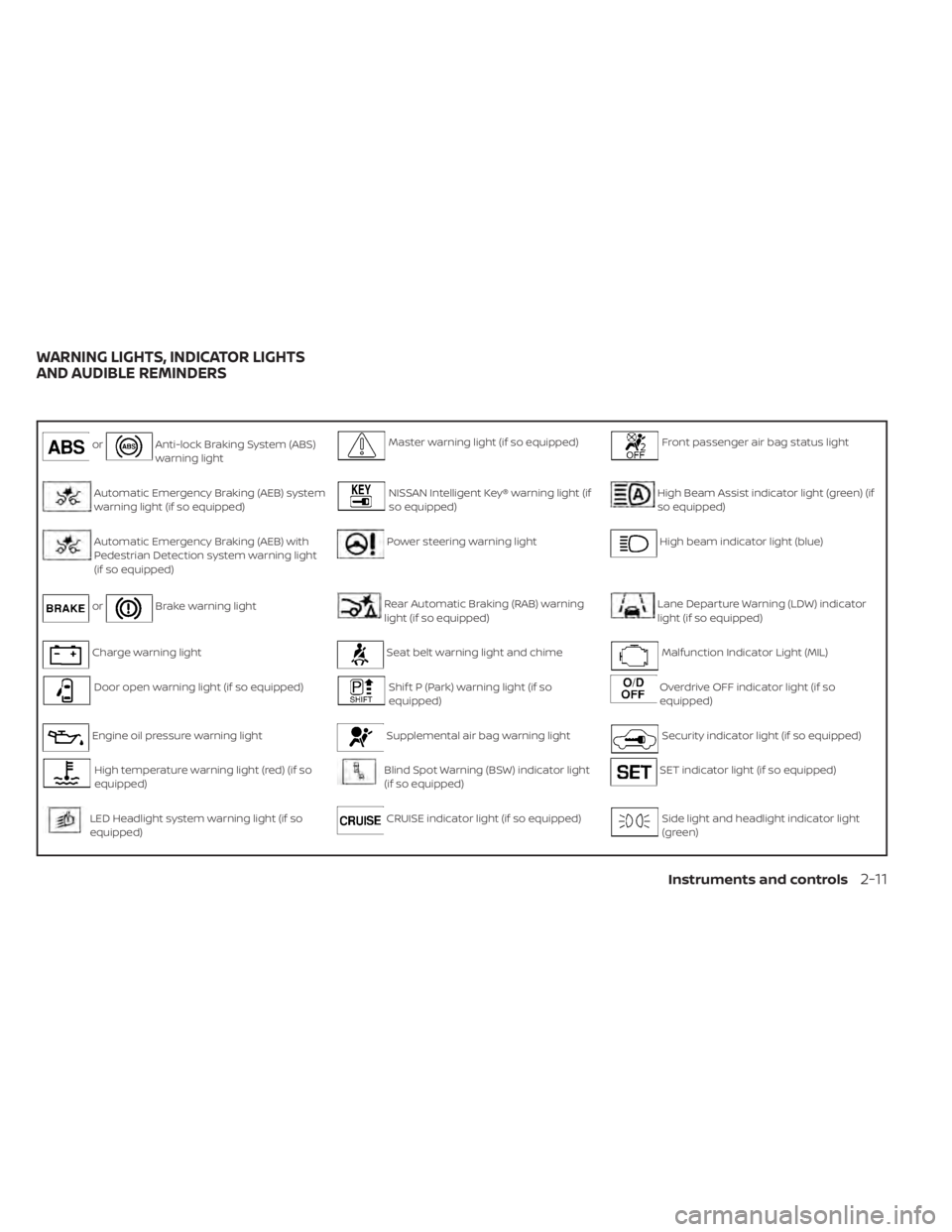
orAnti-lock Braking System (ABS)
warning lightMaster warning light (if so equipped)Front passenger air bag status light
Automatic Emergency Braking (AEB) system
warning light (if so equipped)NISSAN Intelligent Key® warning light (if
so equipped)High Beam Assist indicator light (green) (if
so equipped)
Automatic Emergency Braking (AEB) with
Pedestrian Detection system warning light
(if so equipped)Power steering warning lightHigh beam indicator light (blue)
orBrake warning lightRear Automatic Braking (RAB) warning
light (if so equipped)Lane Departure Warning (LDW) indicator
light (if so equipped)
Charge warning lightSeat belt warning light and chimeMalfunction Indicator Light (MIL)
Door open warning light (if so equipped)Shif t P (Park) warning light (if so
equipped)Overdrive OFF indicator light (if so
equipped)
Engine oil pressure warning lightSupplemental air bag warning lightSecurity indicator light (if so equipped)
High temperature warning light (red) (if so
equipped)Blind Spot Warning (BSW) indicator light
(if so equipped)SET indicator light (if so equipped)
LED Headlight system warning light (if so
equipped)CRUISE indicator light (if so equipped)Side light and headlight indicator light
(green)
WARNING LIGHTS, INDICATOR LIGHTS
AND AUDIBLE REMINDERS
Instruments and controls2-11
Page 105 of 500

The MIL may stop blinking and come on
steady. Have the vehicle inspected. It is rec-
ommended that you visit a NISSAN dealer
for this service. You do not need to have
your vehicle towed to the dealer.
Security indicator light (if so
equipped)
This light blinks when the ignition switch is
placed in the OFF or LOCK position. The blinking security indicator light indi-
cates that the security systems equipped
on the vehicle are operational.
For additional information, refer to “Security
systems” in this section.
SET indicator light (if so
equipped)
This light comes on while the vehicle speed
is controlled by the cruise control system. If
the light blinks while the engine is running,
it may indicate the cruise control system is
not functioning properly. Have the system
checked. It is recommended that you visit a
NISSAN dealer for this service.
For additional information, refer to “Cruise
control” in the “Starting and driving” section
of this manual.
Side light and headlight
indicator light (green)
The side light and headlight indicator light
illuminates when the side light or head-
lights are on. If the headlight switch is in the
AUTO position, the side light and headlight
indicator light will illuminate when the
headlights turn on. For additional informa-
tion, refer to “Headlight and turn signal
switch” in this section.
Slip indicator light
This indicator light will blink when the Ve-
hicle Dynamic Control (VDC) system is op-
erating, thus alerting the driver to the fact
that the road surface is slippery and the
vehicle is nearing its traction limits.
You may feel or hear the system working;
this is normal.
The light will blink for a few seconds af ter
the VDC system stops limiting wheel spin.
The
indicator light also comes on
when you place the ignition switch in the
ON position. The light will turn off af ter ap-
proximately 2 seconds if the system is op-
erational. If the light does not come on
have the system checked. It is recom-
mended that you visit a NISSAN dealer for
this service.
Turn signal/hazard indicator
lights
The appropriate light flashes when the turn
signal switch is activated.
Instruments and controls2-21
Page 122 of 500
Vehicle ahead detection indicator (if
so equipped)
This indicator shows when the Automatic
Emergency Braking (AEB) system is en-
gaged and has detected a vehicle.
For additional information, refer to “Auto-
matic Emergency Braking (AEB)” or “Auto-
matic Emergency Braking (AEB) with Pe-
destrian Detection” in the “Starting and
driving” section of this manual.
System Fault (if so equipped)
This warning appears if there is a malfunc-
tion in the Rear Automatic Braking (RAB)
system. For additional information, refer to
“Rear Automatic Braking (RAB)” in the “Start-
ing and driving” section of this manual.
Parking Sensor (if so equipped)
This indicator illuminates when the sensor
is activated. For additional information, re-
fer to “Rear Sonar System (RSS)” in the
“Starting and driving” section of this
manual.
Unavailable: High Cabin Temperature
(if so equipped)
This message appears when the camera
detects an interior temperature of more
than approximately 104°F (40°C). For addi-
tional information, refer to “Lane Departure
Warning (LDW)” in the “Starting and driving”
section of this manual.
Parking Sensor Error: See Owner’s
Manual (if so equipped)
This warning illuminates when there is an
error with the system. For additional infor-
mation, refer to “Rear Sonar System (RSS)”
in the “Starting and driving” section of this
manual.Your vehicle may have three types of secu-
rity systems:
• Vehicle security system
• NISSAN Anti-Thef t System
• NISSAN Vehicle Immobilizer System
VEHICLE SECURITY SYSTEM
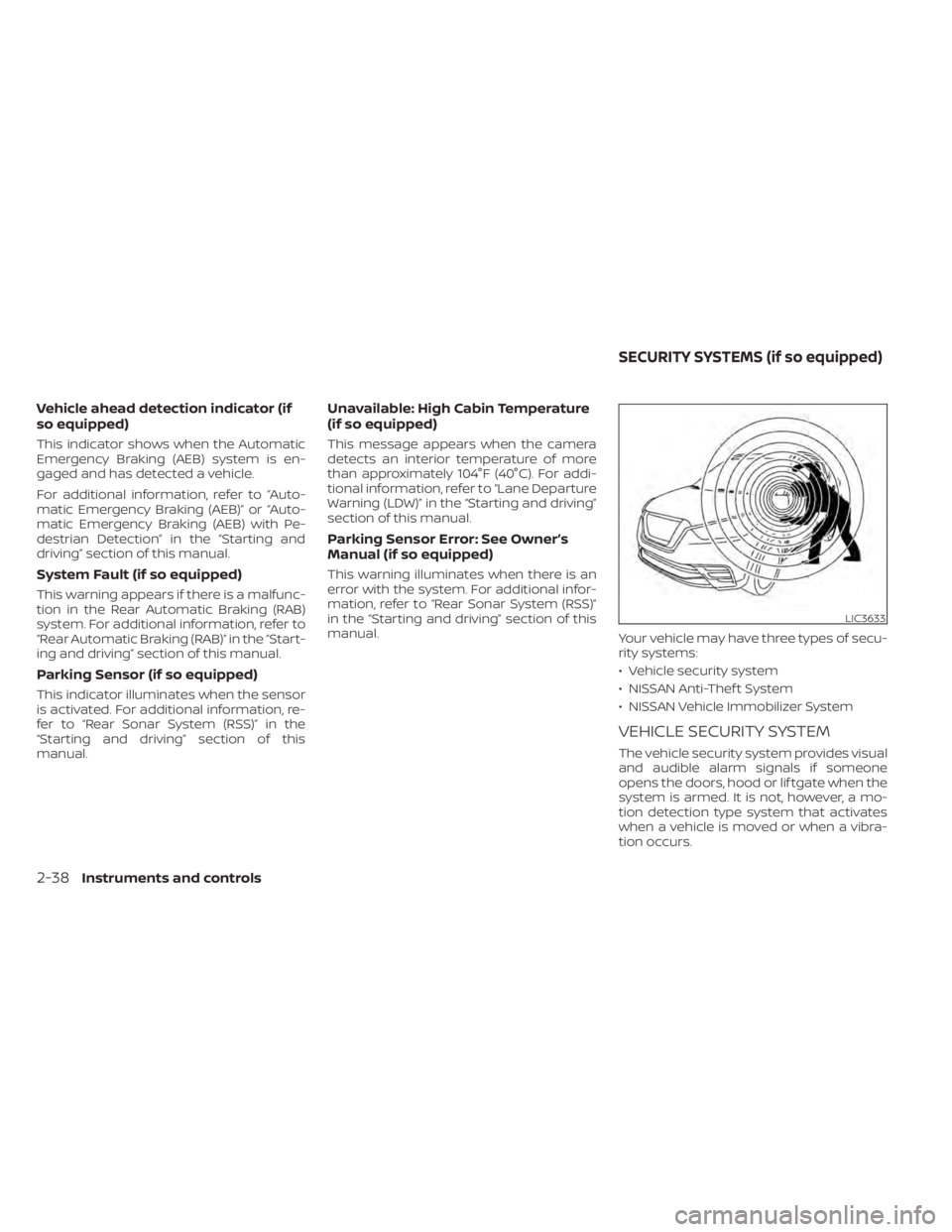
The vehicle security system provides visual
and audible alarm signals if someone
opens the doors, hood or lif tgate when the
system is armed. It is not, however, a mo-
tion detection type system that activates
when a vehicle is moved or when a vibra-
tion occurs.
LIC3633
SECURITY SYSTEMS (if so equipped)
Page 123 of 500
The system helps deter vehicle thef t but
cannot prevent it, nor can it prevent the
thef t of interior or exterior vehicle compo-
nents in all situations. Always secure your
vehicle even if parking for a brief period.
Never leave your keys in the vehicle, and
always lock the vehicle when unattended.
Be aware of your surroundings, and park in
secure, well-lit areas whenever possible.
Many devices offering additional protec-
tion, such as component locks, identifica-
tion markers, and tracking systems, are
available at auto supply stores and spe-
cialty shops. A NISSAN dealer may also offer
such equipment. Check with your insur-
ance company to see if you may be eligible
for discounts for various thef t protection
features.
How to arm the vehicle security
system
1. Close all windows.(The system can be
armed even if the windows are open.)
2. Remove the keys from the vehicle.
3. Close all doors, hood and lif tgate. Lock all doors. The doors can be locked with
the key fob, Intelligent Key, mechanical
key, or door handle request switch (if so
equipped). 4. Confirm that the
security indicator
light stays on for about 30 seconds. The
vehicle security system is now pre-
armed. The vehicle security system will
automatically shif t into the armed
phase. The
security light begins to
flash once every three seconds. If during
the pre-armed phase one of the follow-
ing occurs, the system will not arm:
• Any door is unlocked with the key fob, the Intelligent Key, mechanical key, or door
request switch (if so equipped).
•
Ignition switch is placed in the ON position.
• Even when the driver and/or passen-
gers are in the vehicle, the system will
activate with all the doors, hood and
lif tgate locked with the ignition switch
placed in the LOCK position. When plac-
ing the ignition switch in the ON posi-
tion, the system will be released.
Vehicle security system activation
The vehicle security system will give the
following alarm:
• The headlights or turn lamps blink and the horn sounds intermittently but syn-
chronously.
•
The alarm automatically turns off af ter a
period of time. However, the alarm reacti-
vates if the vehicle is tampered with again.
The alarm is activated by:
• opening any door, hood or the lif tgate without using the key or Intelligent Key
(even if the door is unlocked by releasing
the door inside lock knob).
How to stop an activated alarm
The alarm stops only by unlocking a door
or the lif tgate with the key fob, pressing the
button on the Intelligent Key, or push-
ing the request switch (if so equipped) on
the driver's or passenger's door with the
Intelligent Key in range of the door handle.
NISSAN ANTI-THEFT SYSTEM
(NATS) (if so equipped)
The NISSAN Anti-Thef t System will not al-
low the engine to start without the use of a
registered NATS key.
If the engine does not start using the reg-
istered NATS key, it may be due to interfer-
ence caused by:
• Another NATS key
• Automated toll road device
• Automated payment device
•
Other devices that transmit similar signals
Instruments and controls2-39
Page 125 of 500
Security indicator light (if so
equipped)
The security indicator light blinks whenever
the ignition switch is placed in the OFF or
LOCK position.
This function indicates the NISSAN Anti-
Thef t System (NATS) is operational.
If the NATS is malfunctioning, the light will
remain on while the ignition switch is
placed in the ON position.If the light still remains on and/or the
engine will not start, seek service for the
NATS as soon as possible. Please bring all
registered keys that you have. It is rec-
ommended that you visit a NISSAN
dealer for this service.
SWITCH OPERATION
LIC2661
WIPER AND WASHER SWITCH
Instruments and controls2-41
Page 147 of 500
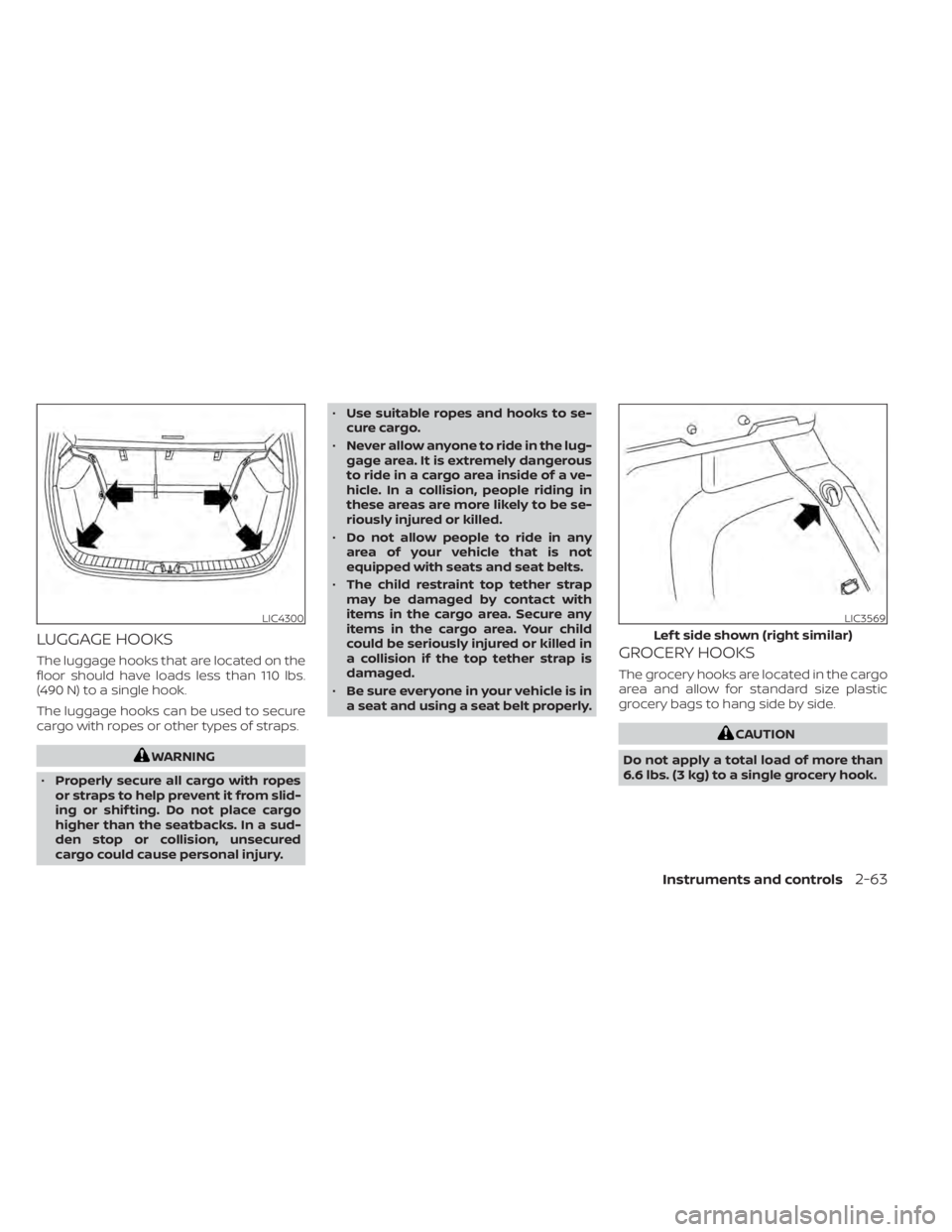
LUGGAGE HOOKS
The luggage hooks that are located on the
floor should have loads less than 110 lbs.
(490 N) to a single hook.
The luggage hooks can be used to secure
cargo with ropes or other types of straps.
LIC3569
Lef t side shown (right similar)
Instruments and controls2-63
Page 151 of 500
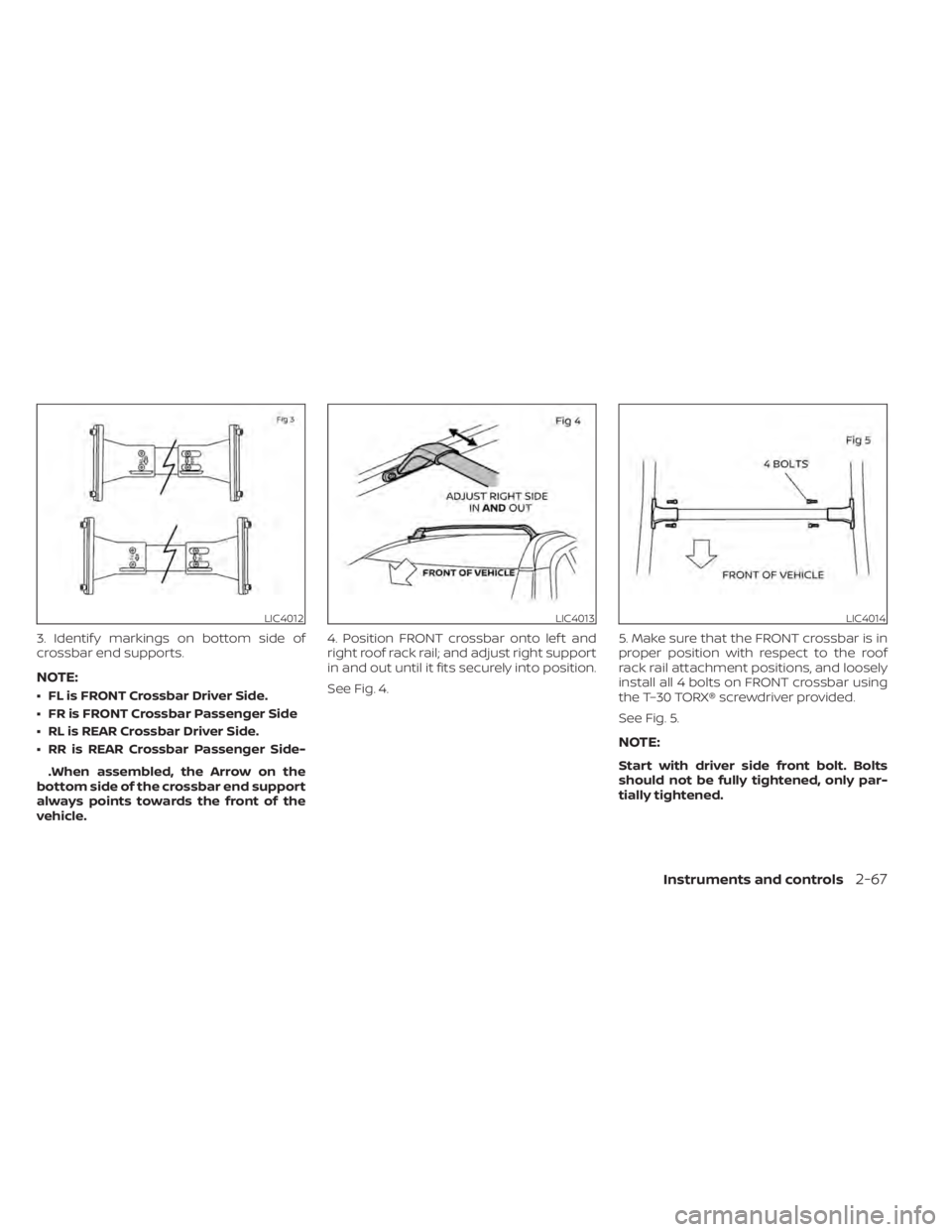
3. Identif y markings on bottom side of
crossbar end supports.
NOTE:
• FL is FRONT Crossbar Driver Side.
• FR is FRONT Crossbar Passenger Side
• RL is REAR Crossbar Driver Side.
• RR is REAR Crossbar Passenger Side-.When assembled, the Arrow on the
bottom side of the crossbar end support
always points towards the front of the
vehicle. 4. Position FRONT crossbar onto lef t and
right roof rack rail; and adjust right support
in and out until it fits securely into position.
See Fig. 4.
5. Make sure that the FRONT crossbar is in
proper position with respect to the roof
rack rail attachment positions, and loosely
install all 4 bolts on FRONT crossbar using
the T–30 TORX® screwdriver provided.
See Fig. 5.
NOTE:
Start with driver side front bolt. Bolts
should not be fully tightened, only par-
tially tightened.
LIC4013LIC4014
Page 166 of 500
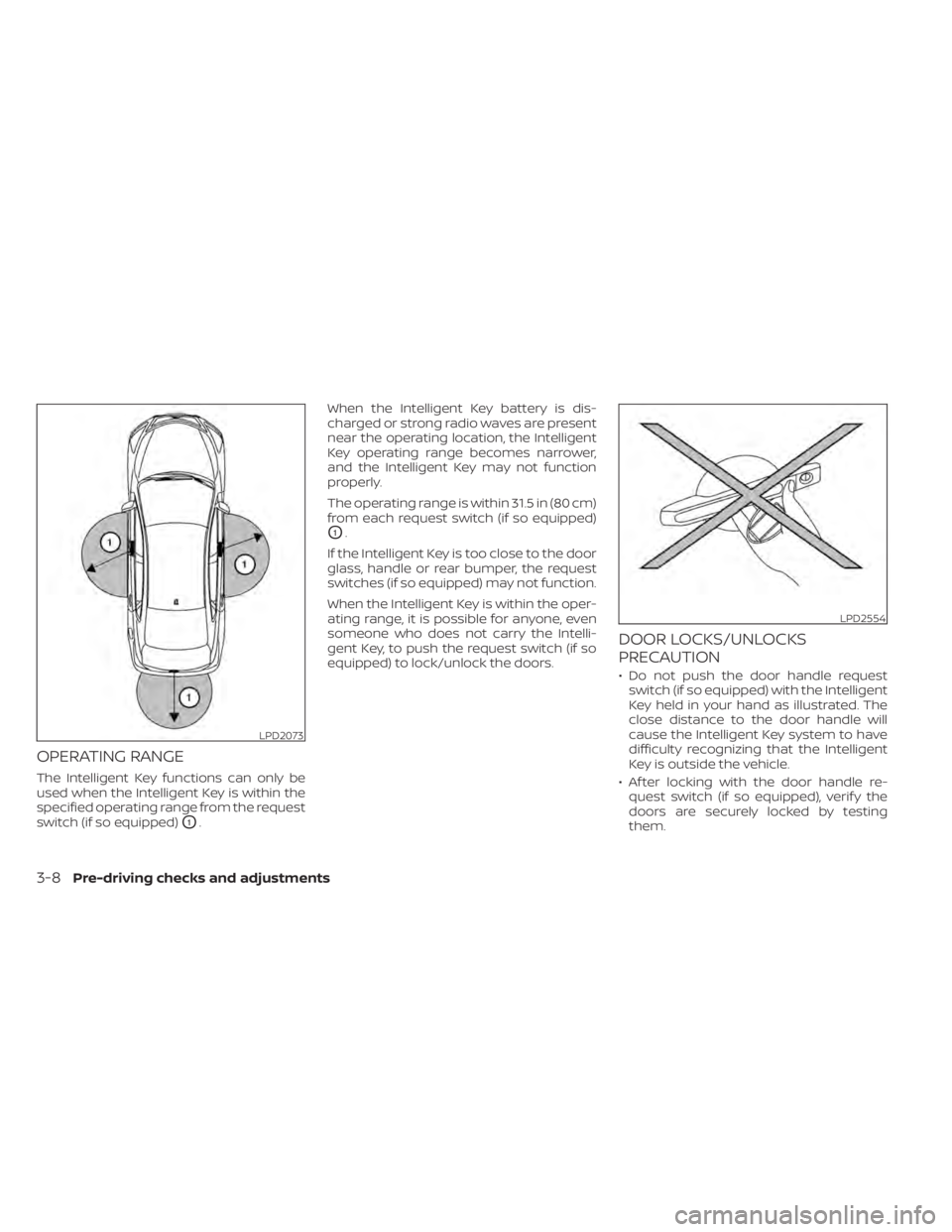
OPERATING RANGE
The Intelligent Key functions can only be
used when the Intelligent Key is within the
specified operating range from the request
switch (if so equipped)
O1.When the Intelligent Key battery is dis-
charged or strong radio waves are present
near the operating location, the Intelligent
Key operating range becomes narrower,
and the Intelligent Key may not function
properly.
The operating range is within 31.5 in (80 cm)
from each request switch (if so equipped)
O1.
If the Intelligent Key is too close to the door
glass, handle or rear bumper, the request
switches (if so equipped) may not function.
When the Intelligent Key is within the oper-
ating range, it is possible for anyone, even
someone who does not carry the Intelli-
gent Key, to push the request switch (if so
equipped) to lock/unlock the doors.
DOOR LOCKS/UNLOCKS
PRECAUTION
• Do not push the door handle request switch (if so equipped) with the Intelligent
Key held in your hand as illustrated. The
close distance to the door handle will
cause the Intelligent Key system to have
difficulty recognizing that the Intelligent
Key is outside the vehicle.
• Af ter locking with the door handle re- quest switch (if so equipped), verif y the
doors are securely locked by testing
them.
LPD2073
LPD2554
3-8Pre-driving checks and adjustments