audio NISSAN KICKS 2023 Owners Manual
[x] Cancel search | Manufacturer: NISSAN, Model Year: 2023, Model line: KICKS, Model: NISSAN KICKS 2023Pages: 558, PDF Size: 6.25 MB
Page 278 of 558
Volume & beeps
There are several methods to customize
the volume settings.
Volume & Beeps
The Volume & Beeps screen can be found
by pressing the
MENU button on the
control panel, touching the “Settings” key
on the screen and selecting “Volume &
Beeps”. To adjust the volume of the follow-
ing options, touch the “-” and “+” keys on the
screen.
The available settings are:
• Ringtone Adjust the volume level of the ringtone of
incoming calls.
• Outgoing Call Adjust the volume level of the outgoing
calls.
• Voice Prompt Vol. Adjust the volume level of the system
voice.
• Text-to-speech Vol. Adjust the volume of the replay voice for
text messaging.
• Button Beeps Turns on/off the button beep sounds and
alarm for prohibited operations. Volume Settings
The Volume settings screen can be found
by pressing the
button on the control
panel then touching the “Volume” key on
the screen. To adjust the volume of the
following options, touch the “-” and “+” keys
on the screen.
The available settings are:
• Ringtone Adjust the volume level of the ringtone of
incoming calls.
• Outgoing Call Adjust the volume level of the outgoing
calls. “Made for iPod”, “Made for iPhone” and
“Made for iPad” mean that an electronic
accessory has been designed to connect
specifically to iPod, iPhone or iPad, respec-
tively, and has been certified by the devel-
oper to meet Apple performance stan-
dards. Apple is not responsible for the
operation of this device or its compliance
with safety and regulatory standards.
Please note that the use of this accessory
with iPod, iPhone or iPad may affect wire-
less performance.
iPad, iPhone, iPod classic, iPod nano, iPod
shuffle and iPod touch are trademarks of
Apple Inc., registered in the U.S. and other
countries. Lightning is a trademark of
Apple Inc.
iPod®/iPhone®
4-82Monitor, climate, audio, phone and voice recognition systems
Page 291 of 558
ON (Normal operating position)
This position turns on the ignition system
and electrical accessories.
ON has a battery saver feature that will
place the ignition switch in the OFF posi-
tion, if the vehicle is not running, af ter some
time under the following conditions:
• The shif t lever is in P (Park).
• The hazard lamps are off.
• The turn signals are off.
The battery saver feature will be canceled if
any of the following occur:
• The shif t lever is moved out of the P (Park)position.
• The ignition switch changes position.
• The hazard lamps are turned on.
• The turn signals are turned on.
CAUTION
Do not leave the vehicle with the igni-
tion switch in the ON or AUTO ACC posi-
tion when the engine is not running for
an extended period. This can discharge
the battery. OFF
The ignition switch is in the OFF position
when the engine is turned off using the
ignition switch.
AUTO ACC:
With the vehicle in the P (Park) position, the
Intelligent Key with you, and the ignition
switch placed from the ON to the OFF po-
sition, the radio can still be used for a period
of time, or until the driver’s door is opened.
Af ter a period of time, functions such as
radio, navigation, and Bluetooth® Hands-
Free Phone System may be restarted by
pressing the “POWER button/VOLUME con-
trol knob” or the key fob unlock button.
For additional information, see “Monitor, cli-
mate, audio, phone and voice recognition
systems” (P. 4-2).EMERGENCY ENGINE SHUT OFF
To shut off the engine in an emergency
situation while driving, perform the follow-
ing procedure:
• Rapidly push the ignition switch three
consecutive times in less than 1.5 sec-
onds, or
• Push and hold the ignition switch for more than 2 seconds.
NISSAN INTELLIGENT KEY®
BATTERY DISCHARGE
If the battery of the NISSAN Intelligent Key®
is discharged or environmental conditions
interfere with the Intelligent Key operation,
start the engine according to the following
procedure:
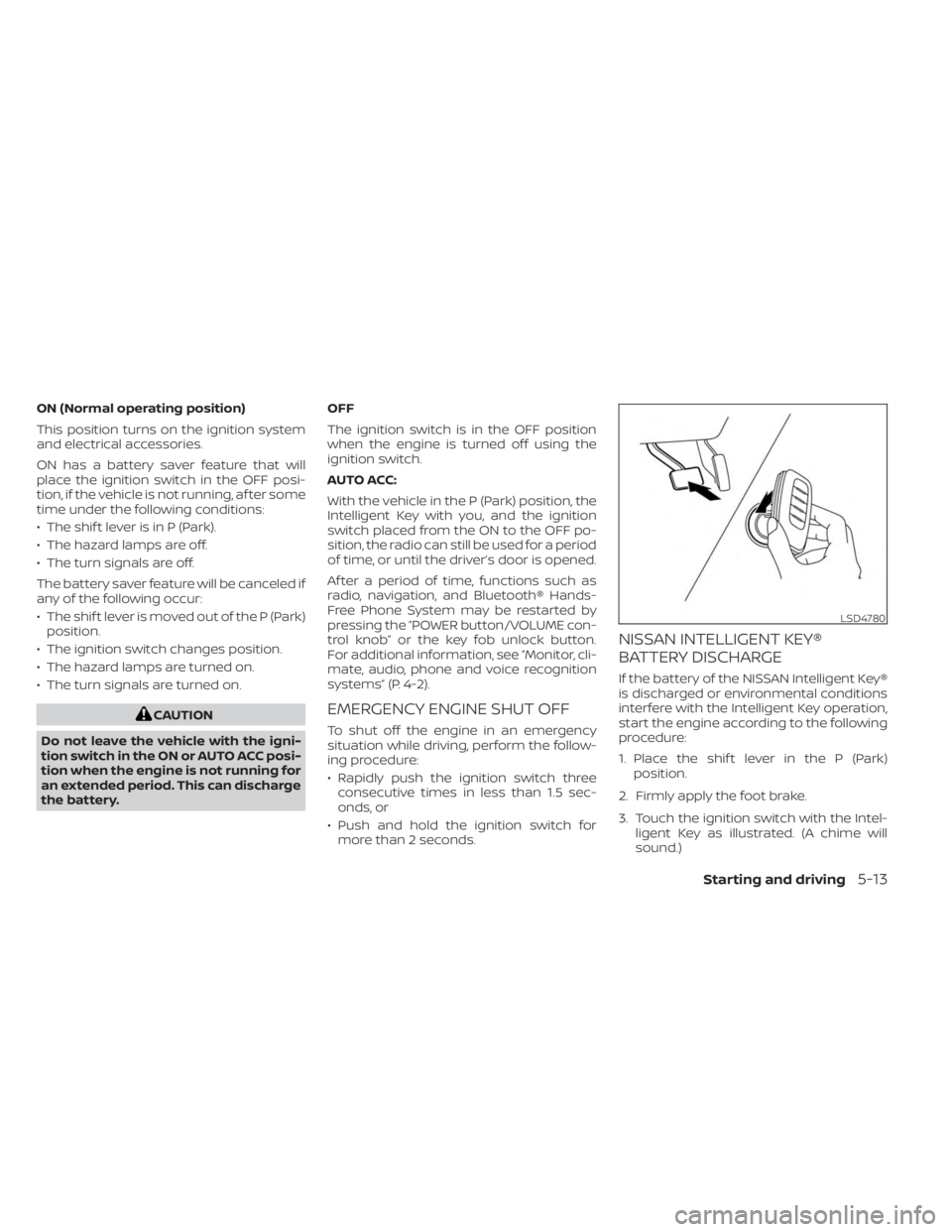
1. Place the shif t lever in the P (Park) position.
2. Firmly apply the foot brake.
3. Touch the ignition switch with the Intel- ligent Key as illustrated. (A chime will
sound.)
LSD4780
Starting and driving5-13
Page 318 of 558
BSW SYSTEM LIMITATIONS
WARNING
Listed below are the system limitations
for the BSW system. Failure to operate
the vehicle in accordance with these
system limitations could result in seri-
ous injury or death.
• The BSW system cannot detect all ve-
hicles under all conditions.
• The radar sensors may not be able to
detect and activate BSW when cer-
tain objects are present such as:
– Pedestrian, bicycles, animals.
– Vehicles such as motorcycles, low
height vehicles, or high ground
clearance vehicles.
– Oncoming vehicles.
– Vehicles remaining in the detec-
tion zone when you accelerate
from a stop.
– A vehicle merging into an adjacent
lane at a speed approximately the
same as your vehicle.
– A vehicle approaching rapidly
from behind.
– A vehicle which your vehicle over-
takes rapidly. –
A vehicle that passes through the
detection zone quickly.
– When overtaking several vehicles
in a row, the vehicles af ter the first
vehicle may not be detected if
they are traveling close together.
• The radar sensors’ detection zone is
designed based on a standard lane
width. When driving in a wider lane,
the radar sensors may not detect ve-
hicles in an adjacent lane. When driv-
ing in a narrow lane, the radar sen-
sors may detect vehicles driving two
lanes away.
• The radar sensors are designed to ig-
nore most stationary objects, how-
ever objects such as guardrails, walls,
foliage and parked vehicles may oc-
casionally be detected. This is a nor-
mal operation condition.
• The following conditions may reduce
the ability of the radar to detect other
vehicles:
– Severe weather
– Road spray
– Ice/frost/snow/dirt build-up on
the vehicle •
Do not attach stickers (including
transparent material), install acces-
sories or apply additional paint near
the radar sensors. These conditions
may reduce the ability of the radar to
detect other vehicles.
• Excessive noise (for example, audio
system volume, open vehicle win-
dow) will interfere with the chime
sound, and it may not be heard.
5-40Starting and driving
Page 331 of 558
–IllustrationOE: When the angle
formed by your vehicle and ap-
proaching vehicle is small.
• The following conditions may reduce
the ability of the radar to detect other
vehicles:
– Severe weather
– Road spray
– Ice/frost/snow/dirt build-up on
the vehicle
• Do not attach stickers (including
transparent material), install acces-
sories or apply additional paint near
the radar sensors. These conditions
may reduce the ability of the radar to
detect other vehicles.
• Excessive noise (e.g., audio system
volume, open vehicle window) will in-
terfere with the chime sound, and it
may not be heard.
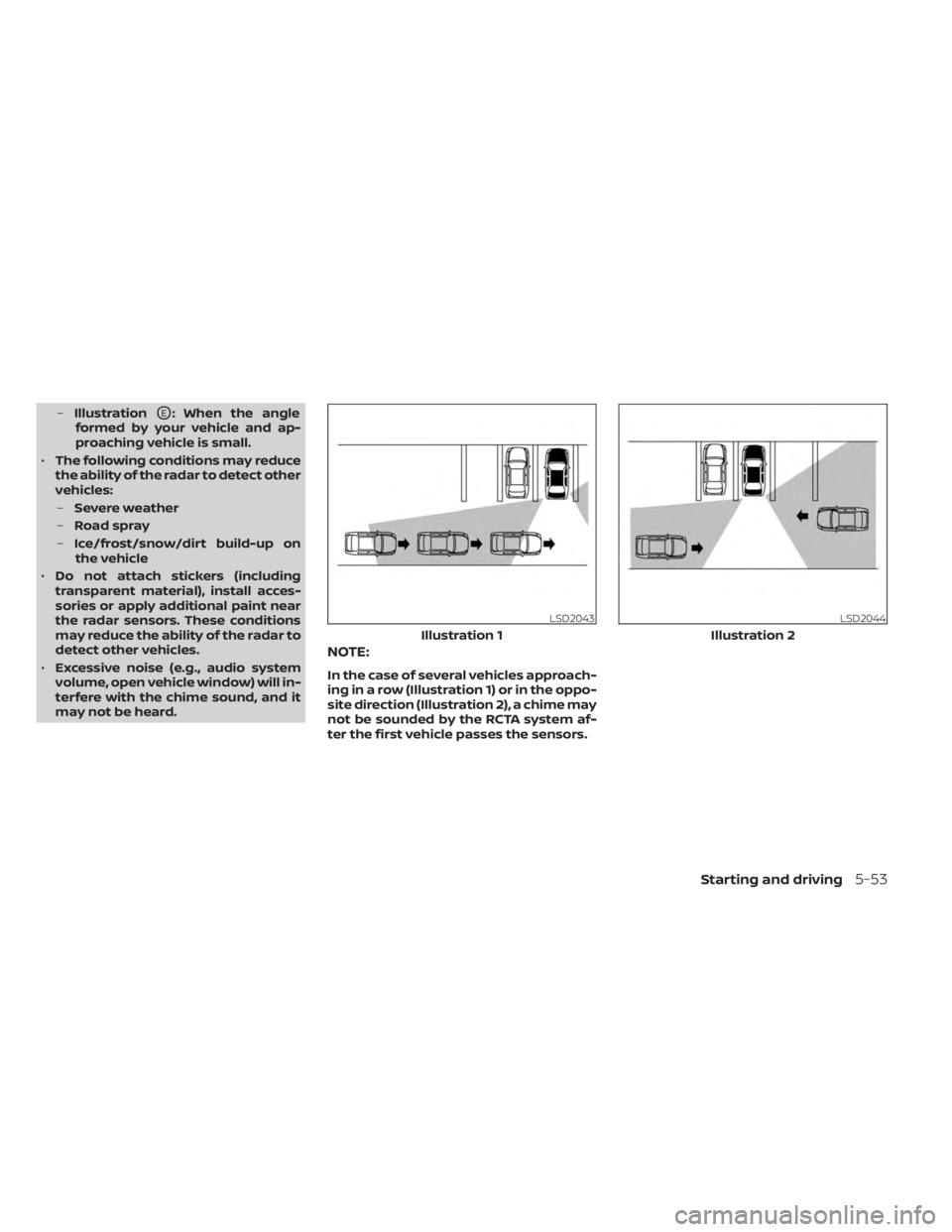
NOTE:
In the case of several vehicles approach-
ing in a row (Illustration 1) or in the oppo-
site direction (Illustration 2), a chime may
not be sounded by the RCTA system af-
ter the first vehicle passes the sensors.
LSD2043
Illustration 1
LSD2044
Illustration 2
Starting and driving5-53
Page 365 of 558
–Wheels or tires other than NISSAN
recommended are used.
– The brakes are cold at low ambi-
ent temperatures or immediately
af ter driving has started.
– The braking force becomes poor
due to wet brakes af ter driving
through a puddle or washing the
vehicle.
•
Turn the RAB system off in the follow-
ing conditions to prevent the occur-
rence of an unexpected accident re-
sulting from sudden system operation:
– The vehicle is towed.
– The vehicle is carried on a flatbed
truck.
– The vehicle is on the chassis
dynamometer.
– The vehicle drives on an uneven
road surface.
– The vehicle is towing an object (if
so equipped).
–
Suspension parts other than those designated as Genuine NISSAN
parts are used. (If the vehicle height
or the vehicle body inclination is
changed, the system may not de-
tect an obstacle correctly.)
– If the vehicle is using an accessory
like a bike rack, or cargo carrier
that blocks the sensors.
• Excessive noise (e.g., audio system
volume, an open vehicle window) will
interfere with the chime sound, and it
may not be heard.
SYSTEM MALFUNCTION
If the RAB system malfunctions, it will be
turned off automatically, and the RAB sys-
tem warning light will illuminate in the ve-
hicle information display.
Action to take:
If the warning light illuminates, park the ve-
hicle in a safe location, turn the engine off,
and restart the engine. If the warning light
continues to illuminate, have the RAB sys-
tem checked. It is recommended that you
visit a NISSAN dealer for this service.
NOTE:
If the RAB system cannot be operated
temporarily, the RAB system warning
light blinks.
SYSTEM MAINTENANCE
Observe the following items to ensure
proper operation of the system:
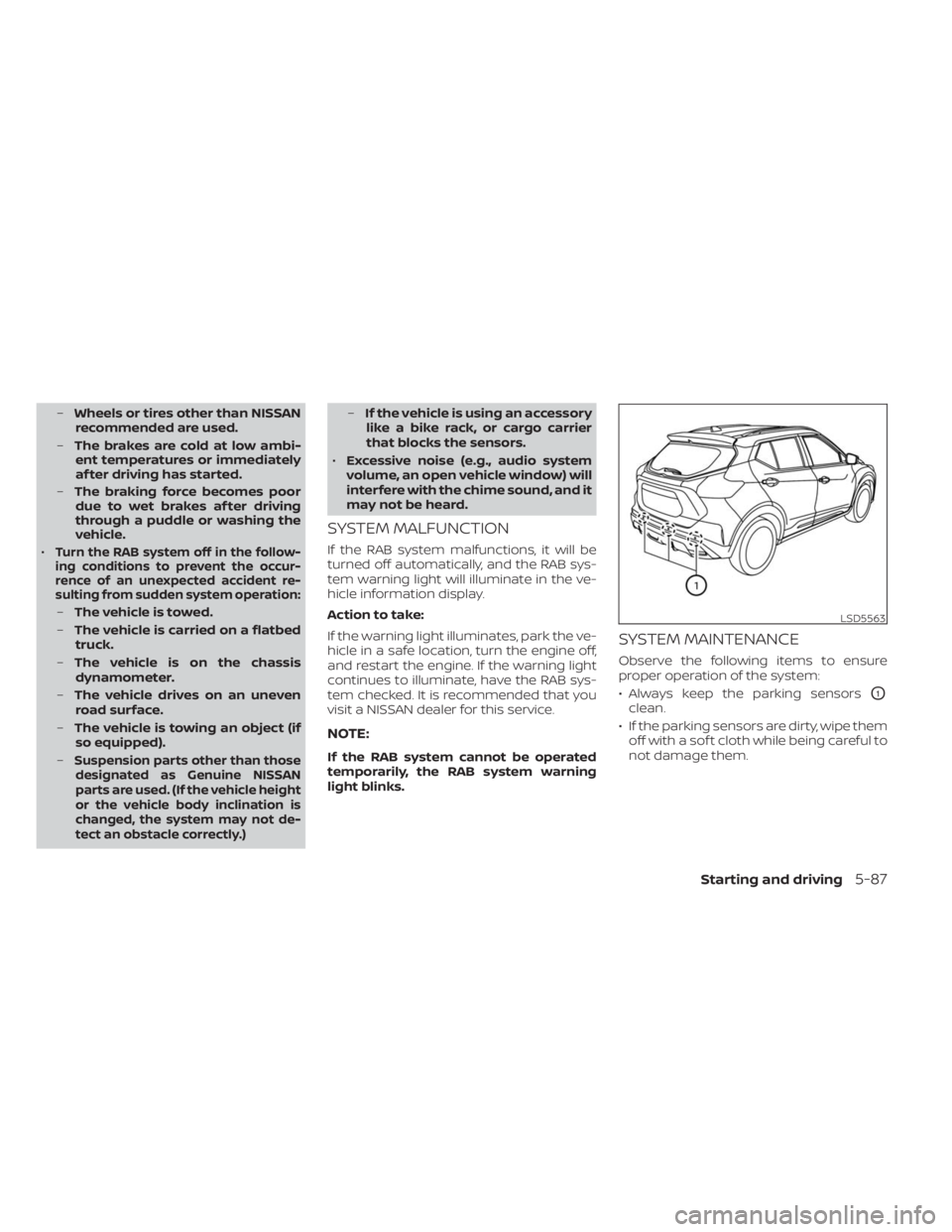
• Always keep the parking sensors
O1
clean.
• If the parking sensors are dirty, wipe them off with a sof t cloth while being careful to
not damage them.
LSD5563
Starting and driving5-87
Page 418 of 558
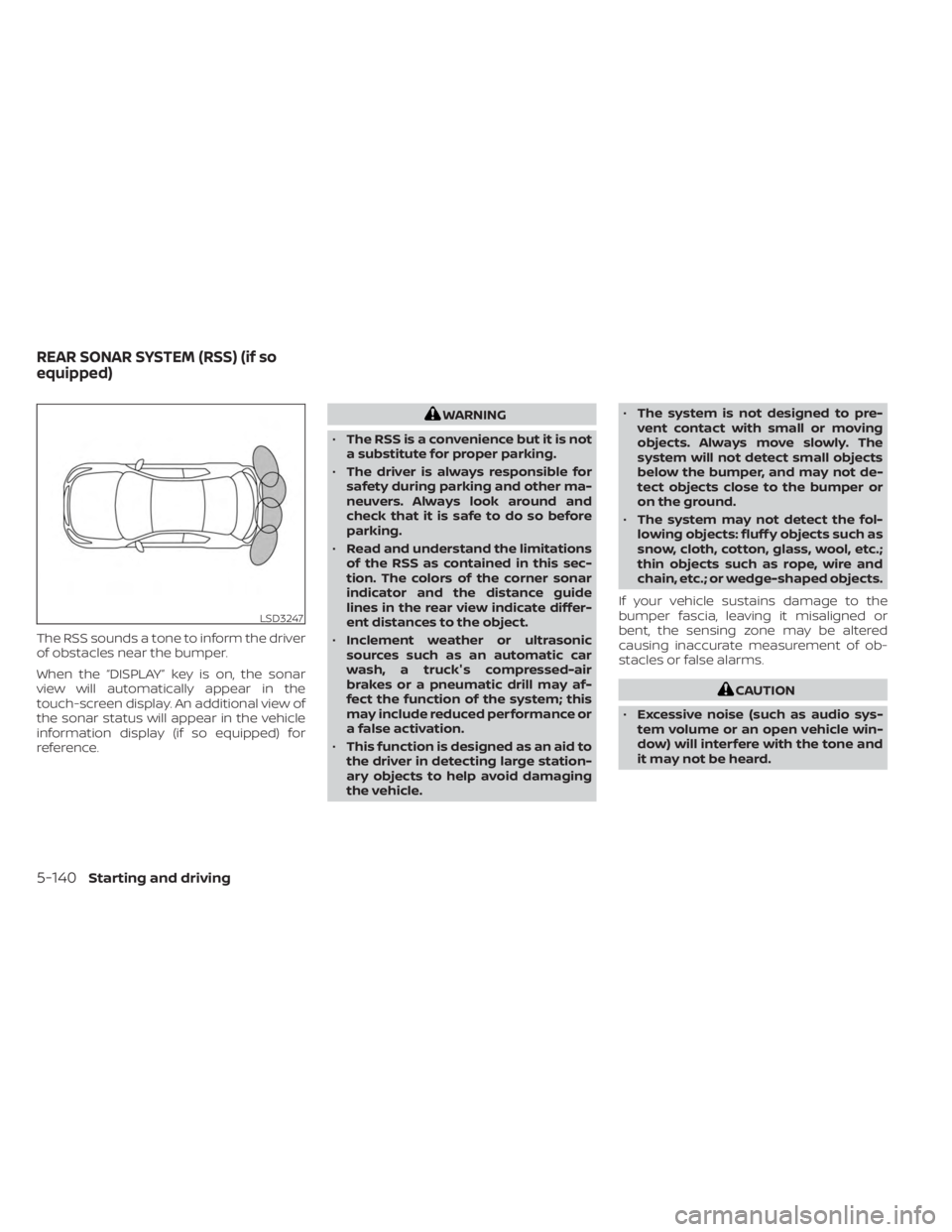
The RSS sounds a tone to inform the driver
of obstacles near the bumper.
When the “DISPLAY” key is on, the sonar
view will automatically appear in the
touch-screen display. An additional view of
the sonar status will appear in the vehicle
information display (if so equipped) for
reference.
WARNING
• The RSS is a convenience but it is not
a substitute for proper parking.
• The driver is always responsible for
safety during parking and other ma-
neuvers. Always look around and
check that it is safe to do so before
parking.
• Read and understand the limitations
of the RSS as contained in this sec-
tion. The colors of the corner sonar
indicator and the distance guide
lines in the rear view indicate differ-
ent distances to the object.
• Inclement weather or ultrasonic
sources such as an automatic car
wash, a truck's compressed-air
brakes or a pneumatic drill may af-
fect the function of the system; this
may include reduced performance or
a false activation.
• This function is designed as an aid to
the driver in detecting large station-
ary objects to help avoid damaging
the vehicle. •
The system is not designed to pre-
vent contact with small or moving
objects. Always move slowly. The
system will not detect small objects
below the bumper, and may not de-
tect objects close to the bumper or
on the ground.
• The system may not detect the fol-
lowing objects: fluff y objects such as
snow, cloth, cotton, glass, wool, etc.;
thin objects such as rope, wire and
chain, etc.; or wedge-shaped objects.
If your vehicle sustains damage to the
bumper fascia, leaving it misaligned or
bent, the sensing zone may be altered
causing inaccurate measurement of ob-
stacles or false alarms.
CAUTION
• Excessive noise (such as audio sys-
tem volume or an open vehicle win-
dow) will interfere with the tone and
it may not be heard.
LSD3247
REAR SONAR SYSTEM (RSS) (if so
equipped)
5-140Starting and driving
Page 547 of 558
11 Index
A
Active Ride Control (ARC).........5-138Air bag (See supplemental restraint
system).....................1-41Air bag system
Front (See supplemental front impact air
bag system)
................1-49Air bag warning labels............1-62Air bag warning light.........1-63, 2-15Air bag warning light,
supplemental..............1-63, 2-15Air cleaner housing filter..........8-15Air conditionerAir conditioner operation.....4-35, 4-41Air conditioner specification label. .10-12Air conditioner system refrigerant
recommendations............10-7Air conditioner system refrigerant and oil
recommendations............10-7Heater and air conditioner.......4-40Heater and air conditioner controls. .4-41Servicing air conditioner........4-43Air flow charts................4-36Alarm system (See vehicle security
system)................... .2-38Anchor point locations...........1-24Antenna....................4-62Anti-lock Braking System (ABS).....5-132Antifreeze...................5-145Audio system.................4-43
AM radio operation............4-50AM radio reception............4-44AM/FM radio............4-48, 4-50Auxiliary (AUX) devices operation. . .4-52Bluetooth® audio.............4-59FM radio operation............4-51FM radio reception............4-44iPod® Player................4-56iPod® player operation.........4-56Radio................... .4-43Steering wheel audio control
switch....................4-62USB Connections.............4-54USB interface...............4-53Autolight switch...............2-45Automatic
Automatic power window switch. . .2-73Automatic anti-glare inside mirror. . . .3-29Automatic brake hold............5-25Automatic door locks.............3-5Automatic Emergency Braking (AEB). .5-88Automatic Emergency Braking (AEB) with
Pedestrian Detection............5-98
B
Battery.................5- 145, 8-11Charge warning light...........2-14Battery replacement............8-22Key fob...................8-22
NISSAN Intelligent Key®.........8-23Before starting the engine.........5-15Belt (See drive belt)..............8-13Blind Spot Warning (BSW)..........5-35Blind Spot Warning (BSW) switch.....2-53Bluetooth® audio..............4-59Bluetooth® hands-free phone
system.................... .4-66Bluetooth® connections.........4-79Connecting procedure..........4-71Phone indicators.............4-70Text messaging..............4-76Voice commands.............4-72Booster seats.................1-37Brake
Anti-lock Braking System (ABS). . . .5-132Brake fluid................. .8-9Brake light (See stop light).......8-26Brake system...............5-132Brake warning light............2-13Brake wear indicators.......2-23,8-18Parking brake operation.........5-22Self-adjusting brakes...........8-17Brake Assist.................5-134Brake fluid................... .8-9Brake system................5-132Brakes.....................8-17Break-in schedule.............5-128Brightness control
Instrument panel.............2-50Brightness/contrast button.........4-7
Page 548 of 558
Bulb check/instrument panel........2-13Bulb replacement...............8-26
C
Capacities and recommended
fuel/lubricants.................10-2Car phone or CB radio............4-66Cargo
(See vehicle loading information).....10-14Cargo cover................. .2-66Chassis control................5-137Check tire pressure..............2-36Child restraint with top tether strap. . . .1-24Child restraints........1-17,1-18,1-19,1-21LATCH (Lower Anchors and Tethers for
CHildren) System..............1-21Precautions on child
restraints.........1-19,1-26,1-33, 1-38Top tether strap anchor point
locations...................1-24Child safety rear door lock..........3-6Cleaning exterior and interior......7-2,7-4Clock set.................... .4-5Cold weather driving............5-145Console box..................2-64Continuously Variable Transmission
(CVT).......................5-17Continuously Variable Transmission (CVT)
fluid..................... .8-9Driving with Continuously Variable
Transmission (CVT).............5-17
Transmission shif t selector lock
release....................5-20Control panel buttons.............4-3Brightness/contrast button........4-7Controls
Audio controls (steering wheel).....4-62Heater and air conditioner controls. .4-41Heater and air conditioner controls
(automatic)................ .4-40Heater and air conditioner controls
(manual).................. .4-32Coolant
Capacities and recommended
fuel/lubricants
...............10-2Changing engine coolant.........8-5Checking engine coolant level......8-5Corrosion protection..............7-7Cruise control................ .5-56Cup holders................. .2-64
D
Daytime Running Light System......2-49Defroster switch
Rear window and outside mirror defroster
switch
.............2-43, 4-34, 4-42Rear window defroster switch.....2-43Dimensions and weights..........10-9Dimmer switch for instrument panel. . .2-50DisplayInformation display............2-24Display controls (see control panel
buttons).................... .4-3
Door locks....................3-4Door open warning light...........2-14Drive belt....................8-13Drive Systems OFF switch..........2-54Driving
Cold weather driving...........5-145Driving with Continuously Variable
Transmission (CVT).............5-17Precautions when starting and
driving.................... .5-4Driving the vehicle...............5-17
E
Eco Drive Report................2-10Economy - fuel................5-129Emergency call (SOS) button........2-57Emergency engine shutoff.......5-13,6-2Emission control information label. . . .10-11Emission control system warranty. . . .10-21Engine
Before starting the engine........5-15Capacities and recommended
fuel/lubricants...............10-2Changing engine coolant.........8-5Changing engine oil............8-6Changing engine oil filter.........8-6Checking engine coolant level......8-5Checking engine oil level.........8-5Engine compartment check
locations.................. .8-3Engine cooling system...........8-4Engine oil...................8-5
11-2
Page 551 of 558
Maintenance precautions.........8-2Outside the vehicle.............9-3Seat belt maintenance..........1-16Under the hood and vehicle.......9-4Maintenance requirements..........9-2Maintenance schedules............9-7Malfunction indicator light..........2-19Manual front seat adjustment........1-3Map lights....................2-75Map pocket...................2-61Menu button...................4-5Meters and gauges..............2-4Instrument brightness control.....2-50Mirror
Automatic anti-glare inside mirror. . .3-29Heated mirrors...............3-30Outside mirrors..............3-29Rearview...................3-28Vanity mirror................3-28Mirrors......................3-28Moving Object Detection (MOD)......4-27
N
NISSAN Anti-Thef t System......2-39, 5-14NISSAN Intelligent Key®..........3-2,3-6NISSAN Intelligent Key® battery discharge
indicator.....................5-13NISSAN Vehicle Immobilizer
System................. .2-40, 5-14NissanConnect® Owner's Manual......4-2
O
Octane rating (See fuel octane rating). .10-5Oil
Capacities and recommended
fuel/lubricants
...............10-2Changing engine oil............8-6Changing engine oil filter.........8-6Checking engine oil level.........8-5Engine oil.................. .8-5Engine oil and oil filter
recommendation.............10-6Engine oil viscosity.............10-6Outside mirrors................3-29Overheat
If your vehicle overheats.........6-12Owner's manual order form........10-23Owner's manual/service manual order
information................. .10-23
P
Parking
Parking brake operation.........5-22Parking/parking on hills.........5-130Parking brake...........2-14,2-17,2-21Personal lights.................2-75Phone, Bluetooth® hands-free system. .4-66PowerPower door locks..............3-5Power outlet................2-59Powerrearwindows............2-72Power steering system.........5-131
Power windows...............2-71Rear power windows...........2-72Power outlet................. .2-59Power steering................5-131Precautions
Maintenance precautions.........8-2On-pavement and off-road driving
precautions................. .5-9Precautions on booster
seats............1-19,1-26, 1-33, 1-38Precautions on child
restraints.........1-19,1-26,1-33, 1-38Precautions on seat belt usage......1-9Precautions on supplemental restraint
system................... .1-41Precautions when starting and
driving.................... .5-4Push starting..................6-12
R
Radio
Car phone or CB radio..........4-66FM/AM radio................4-48Steering wheel audio control
switch................... .4-62Readiness for inspection maintenance (I/M)
test...................... .10-22Rear Automatic Braking (RAB).......5-81Rear Cross Traffic Alert (RCTA).......5-46Rear Door Alert.........2-32, 2-33, 2-58Rear power windows.............2-72Rear seat.....................1-4
11-5
Page 552 of 558
Rear Sonar System (RSS)..........5-140Rear sonar system OFF switch.......2-56Rear window and outside mirror defroster
switch...............2-43, 4-34, 4-42Rear window defroster switch.......2-43Rear window wiper and washer
switches....................2-42Rearview mirror................3-28RearView Monitor................4-8Adjusting the screen...........4-24Recommended Fluids............10-2Recorders
Event Data................ .10-23Refrigerant recommendation........10-7Registering a vehicle in another
country.................... .10-10Remote Engine Start..........3-18,5-16Reporting safety defects (US only). . . .10-21Roof rack.................2-67, 2-68
S
Safety
Child safety rear door lock.........3-6Child seat belts.....1-19,1-26, 1-33, 1-38Reporting safety defects (US only). . .10-21Seat adjustment
Front manual seat adjustment......1-3Rear seat adjustment............1-4Seat beltChild safety..................1-17Infants and small children........1-18Injured person................1-12
Larger children...............1-18Precautions on seat belt usage......1-9Pregnant women..............1-12Seat belt extenders............1-16Seat belt maintenance..........1-16Seat belts................1-9, 7-6Shoulder belt height adjustment. . . .1-15Three-point type with retractor.....1-13Seat belt extenders..............1-16Seat belt warning light.........1-12,2-15Seatback pockets...............2-62SeatsAdjustment..................1-2Front seats..................1-2Manual front seat adjustment......1-3Rear seat.................. .1-4Security indicator light............2-15Security system (NISSAN Anti-Thef t System),
engine start...............2-39, 5-14Security system (NISSAN Vehicle Immobilizer
System), engine start.........2-40, 5-14Security systems
Vehicle security system.........2-38Self-adjusting brakes.............8-17Service manual order form........10-23Servicing air conditioner...........4-43Shif tingContinuously Variable Transmission
(CVT)
.....................5-18Shoulder belt height adjustment......1-15Siri® Eyes-Free................ .4-63Sonar
Rear system................5-140Spark plug replacement...........8-14
Spark plugs...................8-14Specifications................ .10-8Speedometer...............2-5, 2-6SRS warning label...............1-62Stability control................5-134Standard maintenance............9-8Starting
Before starting the engine........5-15Jump starting............6-10,8-12Precautions when starting and
driving.................... .5-4Push starting................6-12Starting the engine............5-15Starting the engine..............5-15Steering
Power steering system.........5-131Steering wheel.................3-26Steering wheel audio control switch. . .4-62Stop light....................8-26Storage.................... .2-61Storage tray..................2-62Sun visors....................3-27Supplemental air bag warning labels. . .1-62Supplemental air bag warning
light................... .1-63, 2-15Supplemental front impact air bag
system..................... .1-49Supplemental restraint system
Information and warning labels.....1-62Precautions on supplemental restraint
system................... .1-41Supplemental restraint system
(Supplemental air bag system).......1-41
11-6