tow NISSAN KICKS 2023 User Guide
[x] Cancel search | Manufacturer: NISSAN, Model Year: 2023, Model line: KICKS, Model: NISSAN KICKS 2023Pages: 558, PDF Size: 6.25 MB
Page 194 of 558
WARNING
• Do not adjust the mirrors while driv-
ing. You could lose control of your ve-
hicle and cause an accident.
• Objects viewed in the outside mirror
on the passenger side are closer than
they appear. Be careful when moving
to the right. Using only this mirror
could cause an accident. Use the in-
side mirror or glance over your
shoulder to properly judge distances
to other objects.
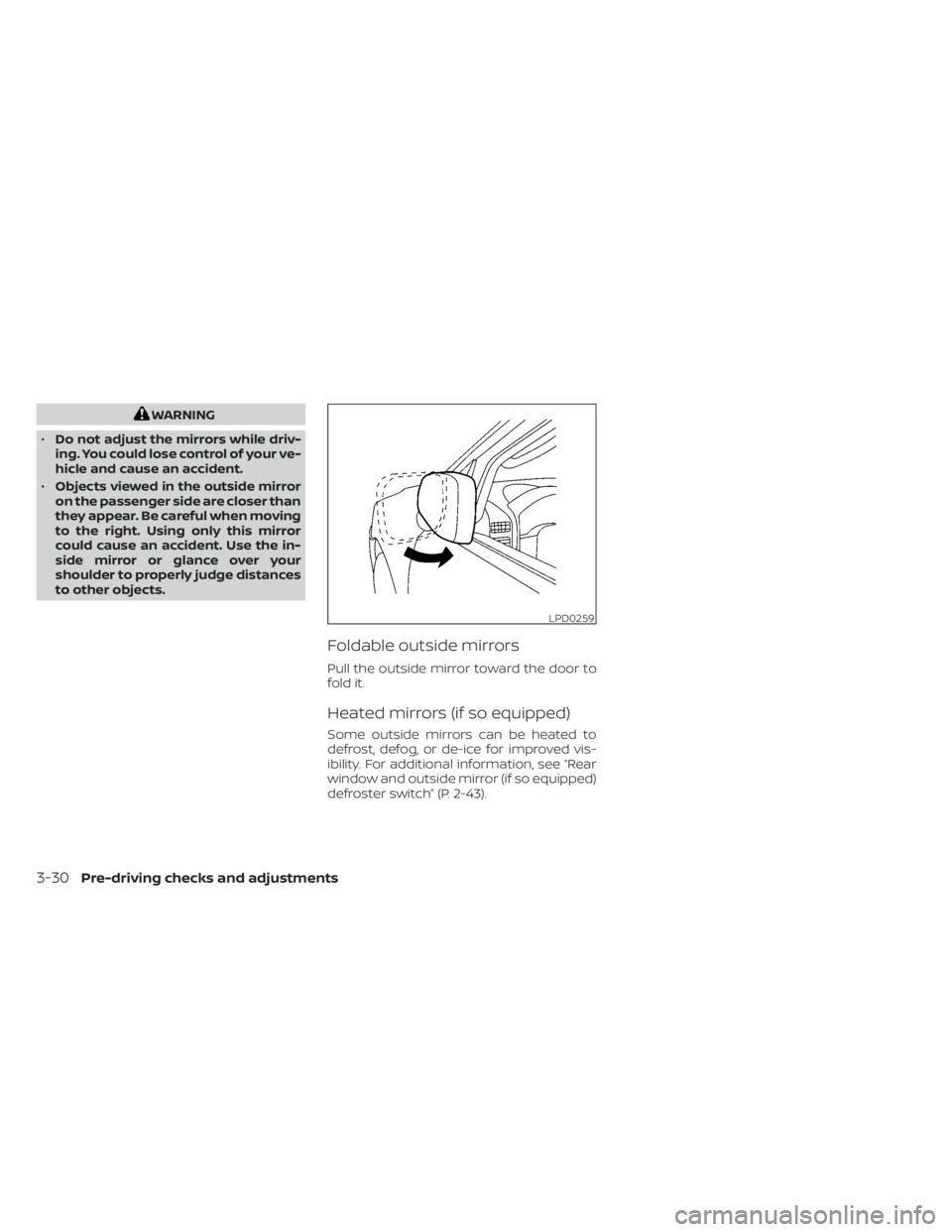
Foldable outside mirrors
Pull the outside mirror toward the door to
fold it.
Heated mirrors (if so equipped)
Some outside mirrors can be heated to
defrost, defog, or de-ice for improved vis-
ibility. For additional information, see “Rear
window and outside mirror (if so equipped)
defroster switch” (P. 2-43).
LPD0259
3-30Pre-driving checks and adjustments
Page 199 of 558
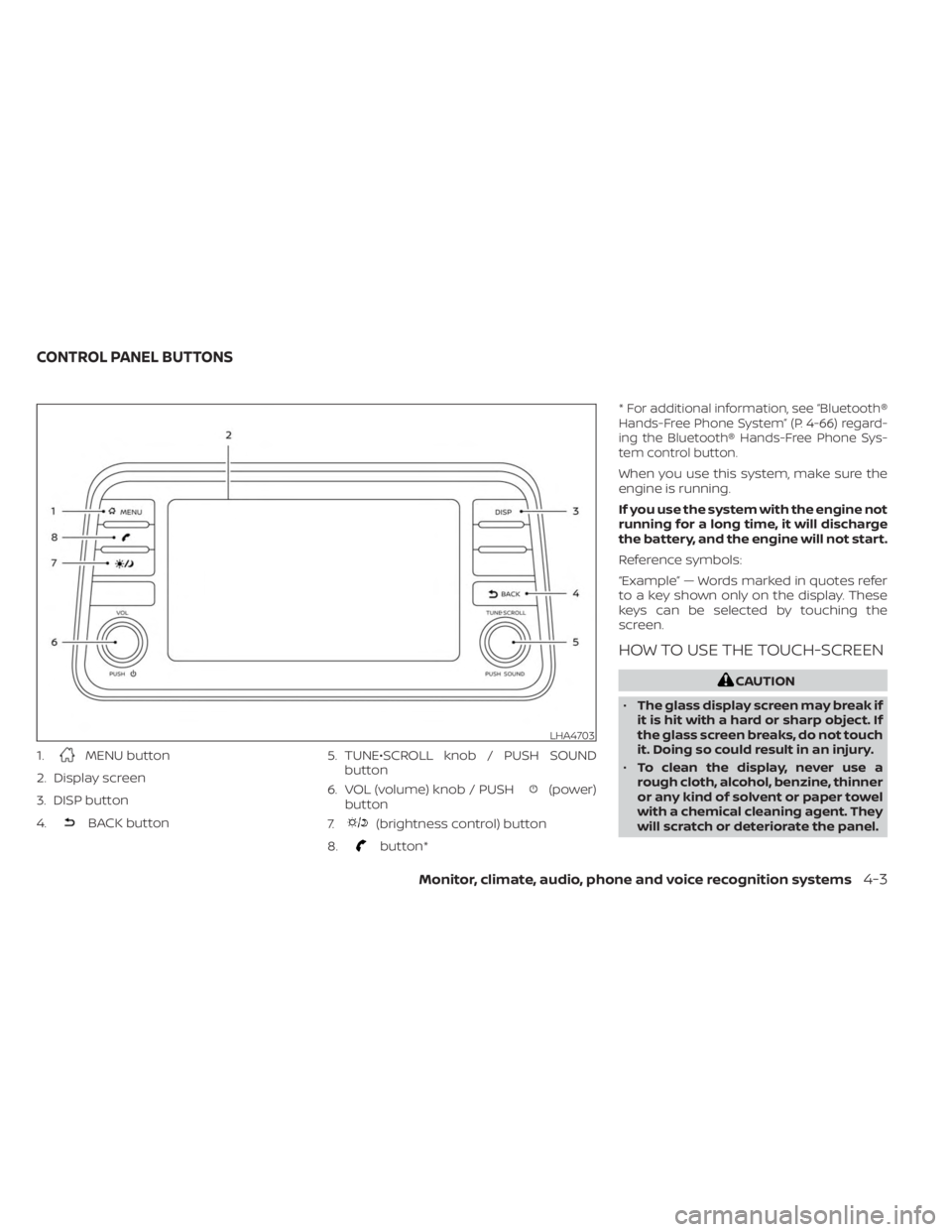
1.MENU button
2. Display screen
3. DISP button
4.
BACK button 5. TUNE•SCROLL knob / PUSH SOUND
button
6. VOL (volume) knob / PUSH
(power)
button
7.
(brightness control) button
8.
button* *
For additional information, see “Bluetooth®
Hands-Free Phone System” (P. 4-66) regard-
ing the Bluetooth® Hands-Free Phone Sys-
tem control button.
When you use this system, make sure the
engine is running.
If you use the system with the engine not
running for a long time, it will discharge
the battery, and the engine will not start.
Reference symbols:
“Example” — Words marked in quotes refer
to a key shown only on the display. These
keys can be selected by touching the
screen.
HOW TO USE THE TOUCH-SCREEN
CAUTION
• The glass display screen may break if
it is hit with a hard or sharp object. If
the glass screen breaks, do not touch
it. Doing so could result in an injury.
• To clean the display, never use a
rough cloth, alcohol, benzine, thinner
or any kind of solvent or paper towel
with a chemical cleaning agent. They
will scratch or deteriorate the panel.
LHA4703
CONTROL PANEL BUTTONS
Monitor, climate, audio, phone and voice recognition systems4-3
Page 224 of 558
WARNING
• Failure to follow the warnings and in-
structions for proper use of the Mov-
ing Object Detection (MOD) system
could result in serious injury or death.
• The MOD system is not a substitute
for proper vehicle operation and is
not designed to prevent contact with
objects surrounding the vehicle.
When maneuvering, always use the
outside mirrors and rearview mirror
and turn and check the surroundings
to ensure it is safe to maneuver.
• The system is deactivated at speeds
above 5 mph (8 km/h) . It is reacti-
vated at lower speeds.
•
The MOD system is not designed to de-
tect surrounding stationary objects.
The MOD system can inform the driver of
moving objects near the vehicle when
backing out of garages, maneuvering in
parking lots and in other such instances.
The MOD system detects moving objects
by using image processing technology on
the image shown in the display.
MOD SYSTEM OPERATION
The MOD system will turn on automatically
under the following conditions:
• When the shif t lever is in the R (Reverse) position.
• When the CAMERA button is pressed to activate the camera view on the display.
• When vehicle speed decreases below ap- proximately 5 mph (8 km/h) and the
camera screen is displayed.
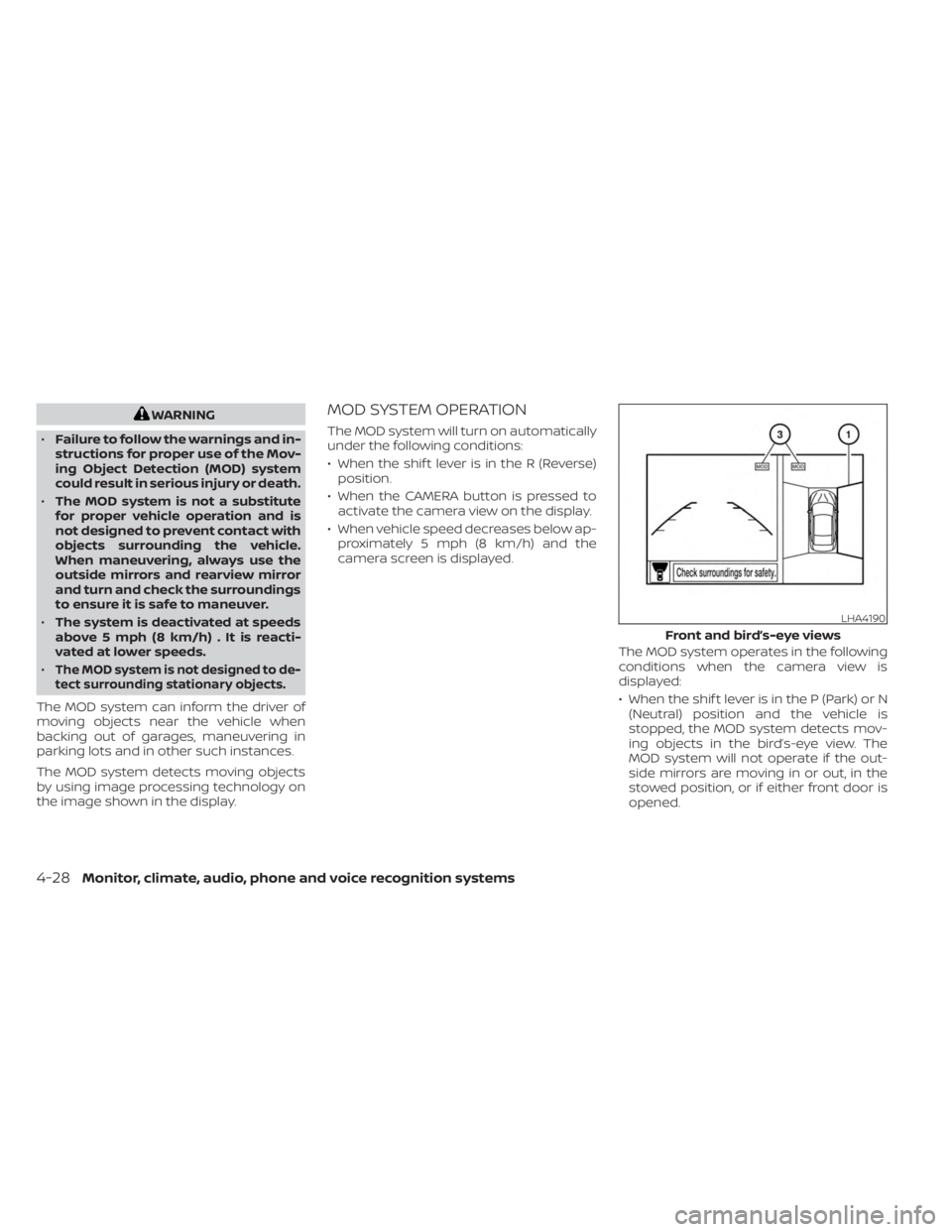
The MOD system operates in the following
conditions when the camera view is
displayed:
• When the shif t lever is in the P (Park) or N(Neutral) position and the vehicle is
stopped, the MOD system detects mov-
ing objects in the bird’s-eye view. The
MOD system will not operate if the out-
side mirrors are moving in or out, in the
stowed position, or if either front door is
opened.
LHA4190
Front and bird’s-eye views
4-28Monitor, climate, audio, phone and voice recognition systems
Page 226 of 558
MOD SYSTEM LIMITATIONS
WARNING
Listed below are the system limitations
for MOD. Failure to operate the vehicle
in accordance with these system limi-
tations could result in serious injury or
death.
• Do not use the MOD system when
towing a trailer. The system may not
function properly.
• Excessive noise (for example, audio
system volume or open vehicle win-
dow) will interfere with the chime
sound, and it may not be heard.
• The MOD system performance will be
limited according to environmental
conditions and surrounding objects
such as:
– When there is low contrast be-
tween background and the mov-
ing objects.
– When there is a blinking source of
light.
– When strong light such as another
vehicle’s headlight or sunlight is
present. –
When camera orientation is not in
its usual position, such as when a
mirror is folded.
– When there is dirt, water drops or
snow on the camera lens.
– When the position of the moving
objects in the display is not
changed.
• The MOD system might detect flow-
ing water droplets on the camera
lens, white smoke from the muffler,
moving shadows, etc.
• The MOD system may not function
properly depending on the speed, di-
rection, distance or shape of the
moving objects.
• If your vehicle sustains damage to
the parts where the camera is in-
stalled, leaving it misaligned or bent,
the sensing zone may be altered and
the MOD system may not detect ob-
jects properly.
• When the temperature is extremely
high or low, the screen may not dis-
play objects clearly. This is not a
malfunction.
NOTE:
The blue MOD icon will change to or-
ange if one of the following has oc-
curred
• When the system is malfunctioning.
• When the component temperature
reaches a high level (icon will blink).
• When the RearView camera has de-
tected a blockage (icon will blink).
If the icon light continues to illuminate
orange, have the MOD system checked. It
is recommended that you visit a NISSAN
dealer for this service.
4-30Monitor, climate, audio, phone and voice recognition systems
Page 283 of 558
WARNING
• The exhaust gas and the exhaust
system are very hot. Keep people,
animals or flammable materials
away from the exhaust system
components.
• Do not stop or park the vehicle over
flammable materials such as dry
grass, waste paper or rags. They may
ignite and cause a fire.
CAUTION
• Do not use leaded gasoline. Deposits
from leaded gasoline will seriously
reduce the three-way catalyst's abil-
ity to help reduce exhaust pollutants.
• Keep your engine tuned up. Malfunc-
tions in the ignition, fuel injection, or
electrical systems can cause overrich
fuel flow into the three-way catalyst,
causing it to overheat. Do not keep
driving if the engine misfires, or if no-
ticeable loss of performance or other
unusual operating conditions are de-
tected. Have the vehicle inspected
promptly. It is recommended that
you visit a NISSAN dealer for this
service. •
Avoid driving with an extremely low
fuel level. Running out of fuel could
cause the engine to misfire, damag-
ing the three-way catalyst.
• Do not race the engine while warm-
ing it up.
• Do not push or tow your vehicle to
start the engine.
TIRE PRESSURE MONITORING
SYSTEM (TPMS)
Each tire, including the spare (if provided),
should be checked monthly when cold and
inflated to the inflation pressure recom-
mended by the vehicle manufacturer on
the vehicle placard or tire inflation pressure
label. (If your vehicle has tires of a different
size than the size indicated on the vehicle
placard or tire inflation pressure label, you
should determine the proper tire inflation
pressure for those tires.)
As an added safety feature, your vehicle
has been equipped with a Tire Pressure
Monitoring System (TPMS) that illuminates
a low tire pressure telltale when one or
more of your tires is significantly under-
inflated. Accordingly, when the low tire
pressure telltale illuminates, you should
stop and check all your tires as soon as
possible, and inflate them to the proper pressure. Driving on a significantly under-
inflated tire causes the tire to overheat and
can lead to tire failure. Under-inflation also
reduces fuel efficiency and tire tread life,
and may affect the vehicle’s handling and
stopping ability.
Please note that the TPMS is not a substi-
tute for proper tire maintenance, and it is
the driver’s responsibility to maintain cor-
rect tire pressure, even if under-inflation
has not reached the level to trigger illumi-
nation of the TPMS low tire pressure telltale.
Your vehicle has also been equipped with a
TPMS malfunction indicator to indicate
when the system is not operating properly.
The TPMS malfunction indicator is com-
bined with the low tire pressure telltale.
When the system detects a malfunction,
the telltale will flash for approximately one
minute and then remain continuously illu-
minated. This sequence will continue upon
subsequent vehicle start-ups as long as
the malfunction exists. When the malfunc-
tion indicator is illuminated, the system
may not be able to detect or signal low tire
pressure as intended. TPMS malfunctions
may occur for a variety of reasons, includ-
ing the installation of replacement or alter-
nate tires or wheels on the vehicle that
Starting and driving5-5
Page 298 of 558
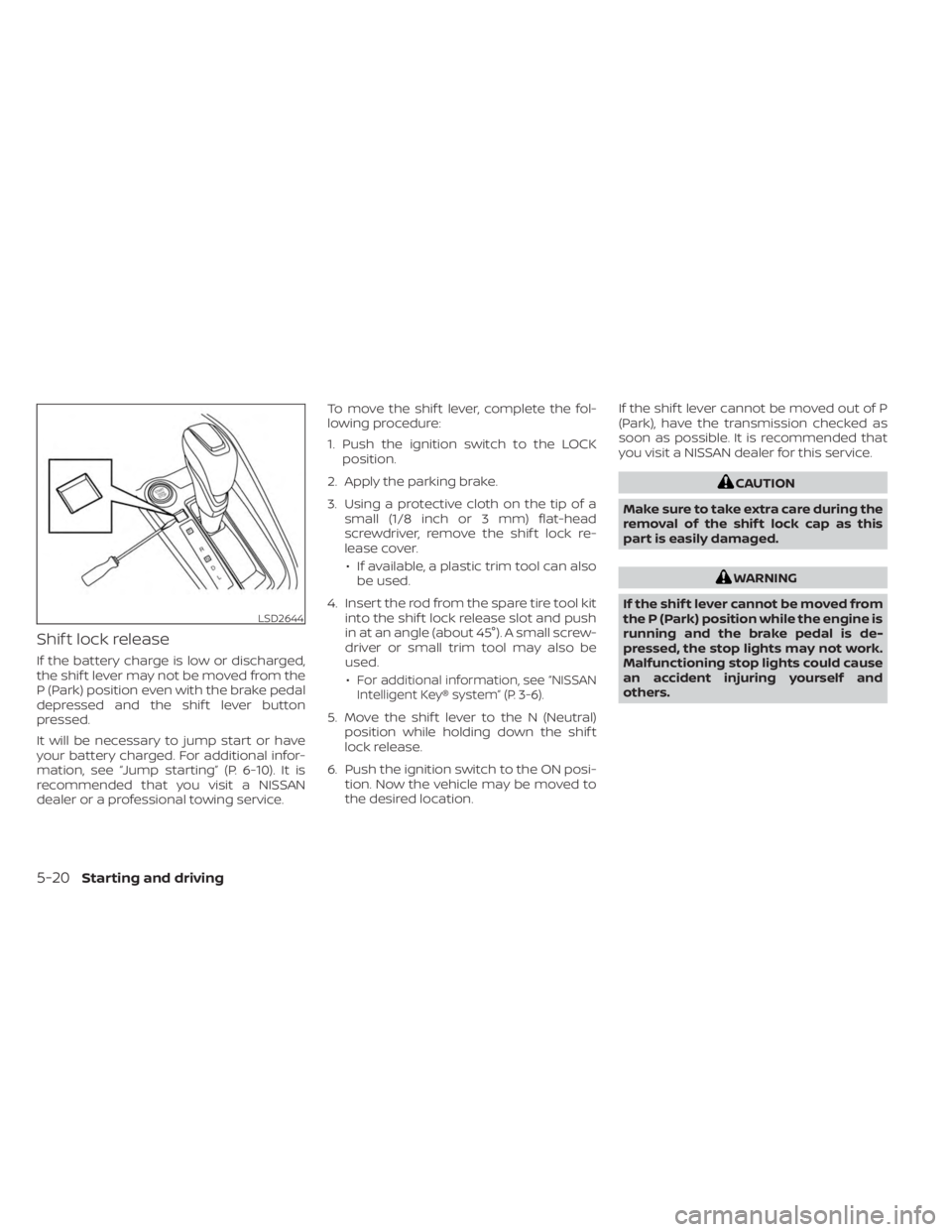
Shif t lock release
If the battery charge is low or discharged,
the shif t lever may not be moved from the
P (Park) position even with the brake pedal
depressed and the shif t lever button
pressed.
It will be necessary to jump start or have
your battery charged. For additional infor-
mation, see “Jump starting” (P. 6-10). It is
recommended that you visit a NISSAN
dealer or a professional towing service.To move the shif t lever, complete the fol-
lowing procedure:
1. Push the ignition switch to the LOCK
position.
2. Apply the parking brake.
3. Using a protective cloth on the tip of a small (1/8 inch or 3 mm) flat-head
screwdriver, remove the shif t lock re-
lease cover.
• If available, a plastic trim tool can also be used.
4. Insert the rod from the spare tire tool kit into the shif t lock release slot and push
in at an angle (about 45°). A small screw-
driver or small trim tool may also be
used.
•
For additional information, see “NISSAN
Intelligent Key® system” (P. 3-6).
5. Move the shif t lever to the N (Neutral) position while holding down the shif t
lock release.
6. Push the ignition switch to the ON posi- tion. Now the vehicle may be moved to
the desired location. If the shif t lever cannot be moved out of P
(Park), have the transmission checked as
soon as possible. It is recommended that
you visit a NISSAN dealer for this service.
CAUTION
Make sure to take extra care during the
removal of the shif t lock cap as this
part is easily damaged.
WARNING
If the shif t lever cannot be moved from
the P (Park) position while the engine is
running and the brake pedal is de-
pressed, the stop lights may not work.
Malfunctioning stop lights could cause
an accident injuring yourself and
others.
LSD2644
5-20Starting and driving
Page 299 of 558
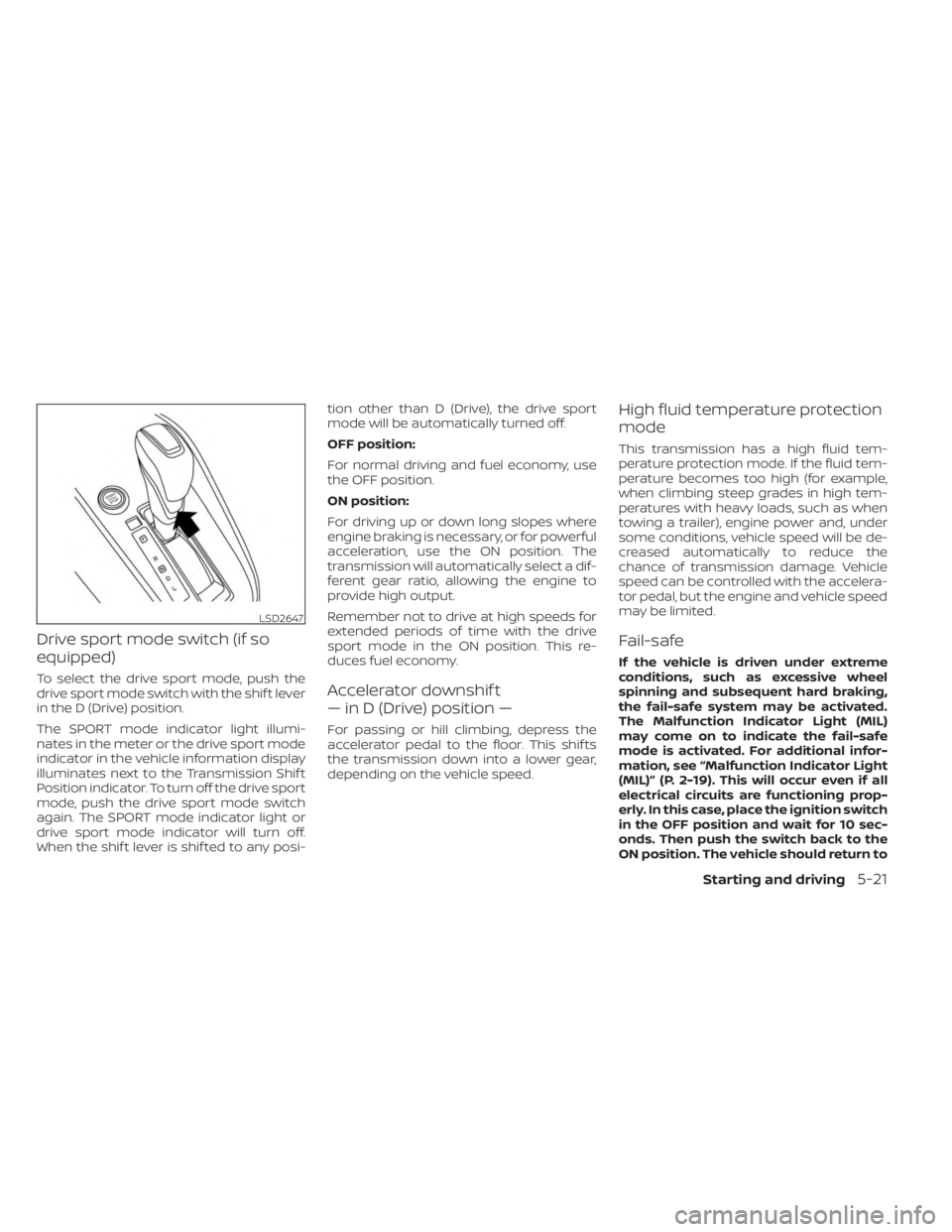
Drive sport mode switch (if so
equipped)
To select the drive sport mode, push the
drive sport mode switch with the shif t lever
in the D (Drive) position.
The SPORT mode indicator light illumi-
nates in the meter or the drive sport mode
indicator in the vehicle information display
illuminates next to the Transmission Shif t
Position indicator. To turn off the drive sport
mode, push the drive sport mode switch
again. The SPORT mode indicator light or
drive sport mode indicator will turn off.
When the shif t lever is shif ted to any posi-tion other than D (Drive), the drive sport
mode will be automatically turned off.
OFF position:
For normal driving and fuel economy, use
the OFF position.
ON position:
For driving up or down long slopes where
engine braking is necessary, or for powerful
acceleration, use the ON position. The
transmission will automatically select a dif-
ferent gear ratio, allowing the engine to
provide high output.
Remember not to drive at high speeds for
extended periods of time with the drive
sport mode in the ON position. This re-
duces fuel economy.Accelerator downshif t
— in D (Drive) position —
For passing or hill climbing, depress the
accelerator pedal to the floor. This shif ts
the transmission down into a lower gear,
depending on the vehicle speed.
High fluid temperature protection
mode
This transmission has a high fluid tem-
perature protection mode. If the fluid tem-
perature becomes too high (for example,
when climbing steep grades in high tem-
peratures with heavy loads, such as when
towing a trailer), engine power and, under
some conditions, vehicle speed will be de-
creased automatically to reduce the
chance of transmission damage. Vehicle
speed can be controlled with the accelera-
tor pedal, but the engine and vehicle speed
may be limited.
Fail-safe
If the vehicle is driven under extreme
conditions, such as excessive wheel
spinning and subsequent hard braking,
the fail-safe system may be activated.
The Malfunction Indicator Light (MIL)
may come on to indicate the fail-safe
mode is activated. For additional infor-
mation, see “Malfunction Indicator Light
(MIL)” (P. 2-19). This will occur even if all
electrical circuits are functioning prop-
erly. In this case, place the ignition switch
in the OFF position and wait for 10 sec-
onds. Then push the switch back to the
ON position. The vehicle should return to
LSD2647
Starting and driving5-21
Page 303 of 558
The automatic brake hold function main-
tains the braking force without the driver
having to depress the brake pedal when
the vehicle is stopped at a traffic light or
intersection. As soon as the driver de-
presses the accelerator pedal again, the
automatic brake hold function is deacti-
vated and the braking force is released. The
operating status of the automatic brake
hold can be displayed on the vehicle infor-
mation display. For additional information,
see “Vehicle information display” (P. 2-24).
WARNING
• The automatic brake hold function is
not designed to hold the vehicle on a
steep hill or slippery road. Never use
the automatic brake hold when the
vehicle is stopped on a steep hill or
slippery road. Failure to do so may
cause the vehicle to move.
• The automatic brake hold warning
may appear in the vehicle informa-
tion display to request that the driver
retake control by depressing the
brake pedal •
When the automatic brake hold func-
tion is activated but fails to maintain
the vehicle at a standstill, depress the
brake pedal to stop the vehicle. If the
vehicle unexpectedly moves due to
outside conditions, the chime may
sound and automatic brake hold
warning may illuminate in the vehicle
information display.
• Be sure to deactivate the automatic
brake hold function when using a car
wash or towing your vehicle.
• Make sure to place the shif t lever in
the P (Park) position and apply the
parking brake when parking your ve-
hicle, entering or exiting the vehicle,
or loading luggage. Failure to do so
could cause the vehicle to move or
roll away unexpectedly and result in
serious personal injury or property
damage. •
If any of the following conditions
occur, the automatic brake hold
function may not function. Have the
system checked promptly. It is rec-
ommended that you visit a NISSAN
dealer for this service. Failure to op-
erate the vehicle in accordance with
these conditions could cause the ve-
hicle to move or roll away unexpect-
edly and result in serious personal in-
jury or property damage.
– A warning message appears in the
vehicle information display.
– The indicator light on the auto-
matic brake hold switch does not
illuminate when the switch is
pushed.
• The automatic brake hold function
will not be activated if the Slip indica-
tor light, electronic parking brake
warning light or master warning light
illuminate and the chassis control
system fault message appears in the
vehicle information display.
•
To maintain the braking force to keep
the vehicle to a standstill, a noise may
be heard. This is not a malfunction.
AUTOMATIC BRAKE HOLD (if so
equipped)
Starting and driving5-25
Page 311 of 558
–When driving without normal tire
conditions (for example, tire wear,
low tire pressure, installation of
spare tire, tire chains, nonstan-
dard wheels).
– When the vehicle is equipped with
non-original brake parts or sus-
pension parts.
– When you are towing a trailer or
other vehicle.
• The system may not function prop-
erly under the following conditions:
– On roads where there are multiple
parallel lane markers; lane mark-
ers that are faded or not painted
clearly; yellow painted lane mark-
ers; non-standard lane markers;
or lane markers covered with wa-
ter, dirt, snow, etc.
– On roads where the discontinued
lane markers are still detectable.
– On roads where there are sharp
curves. –
On roads where there are sharply
contrasting objects, such as shad-
ows, snow, water, wheel ruts,
seams or lines remaining af ter
road repairs. (The LDW system
could detect these items as lane
markers.)
– On roads where the traveling lane
merges or separates.
– When the vehicle’s traveling direc-
tion does not align with the lane
marker.
– When traveling close to the ve-
hicle in front of you, which ob-
structs the lane camera unit de-
tection range.
– When rain, snow, dirt or an object
adheres to the windshield in front
of the lane camera unit.
–
When the headlights are not bright due to dirt on the lens or if the aim-
ing is not adjusted properly.
– When strong light enters the lane
camera unit. (For example, the
light directly shines on the front of
the vehicle at sunrise or sunset.) –
When a sudden change in bright-
ness occurs. (For example, when
the vehicle enters or exits a tunnel
or under a bridge.)
SYSTEM TEMPORARILY
UNAVAILABLE
If the vehicle is parked in direct sunlight
under high temperature conditions (over
approximately 104°F [40°C]) and then
started, the LDW system may be deacti-
vated automatically and the following
message will appear in the vehicle infor-
mation display (if so equipped): “Unavail-
able: High Cabin Temperature.”
When the interior temperature is reduced,
the LDW system will resume operating
automatically.
The LDW system is not designed to warn
under the following conditions:
• When you operate the lane change signal and change traveling lanes in the direc-
tion of the signal. (The LDW system will
become operable again approximately 2
seconds af ter the lane change signal is
turned off.)
• When the vehicle speed lowers to less than approximately 37 mph (60 km/h).
Starting and driving5-33
Page 348 of 558
•Always pay attention to the opera-
tion of the vehicle and be ready to
manually control the proper follow-
ing distance. The ICC system may not
be able to maintain the selected dis-
tance between vehicles (following
distance) or selected vehicle speed
under some circumstances.
• The system may not detect the ve-
hicle in front of you in certain road or
weather conditions. To avoid acci-
dents, never use the ICC system un-
der the following conditions:
– On roads where the traffic is heavy
or there are sharp curves
– On slippery road surfaces such as
on ice or snow, etc.
– During bad weather (rain, fog,
snow, etc.)
– When rain, snow or dirt adhere to
the bumper around the distance
sensor
– On steep downhill roads (the ve-
hicle may go beyond the set ve-
hicle speed and frequent braking
may result in overheating the
brakes) –
On repeated uphill and downhill
roads
–
When traffic conditions make it dif-
ficult to keep a proper distance be-
tween vehicles because of frequent
acceleration or deceleration
–Interference by other radar sources
• Do not use the ICC system if you are
towing a trailer. The system may not
detect a vehicle ahead.
• In some road or traffic conditions, a
vehicle or object can unexpectedly
come into the sensor detection zone
and cause automatic braking. Al-
ways stay alert and avoid using the
ICC system where not recommended
in this warning section.
The radar sensor will not detect the follow-
ing objects:
• Stationary and slow moving vehicles
• Pedestrians or objects in the roadway
• Oncoming vehicles in the same lane
• Motorcycles traveling offset in the travel lane The sensor generally detects the signals
returned from the vehicle ahead. Therefore,
if the sensor cannot detect the reflection
from the vehicle ahead, the ICC system
may not maintain the selected distance.
The following are some conditions in which
the sensor cannot properly detect a ve-
hicle ahead and the system may not oper-
ate properly:
• When snow or road spray from traveling
vehicles reduces the sensor’s detection.
• When excessively heavy baggage is loaded in the rear seat or cargo area of
your vehicle.
The ICC system is designed to automati-
cally check the sensor’s operation within
the limitations of the system.
When the sensor is covered with dirt or is
obstructed, the system will automatically
be canceled. If the sensor is covered with
ice, a transparent or translucent vinyl bag,
etc., the ICC system may not detect them.
In these instances, the vehicle-to-vehicle
distance control mode may not cancel and
may not be able to maintain the selected
following distance from the vehicle ahead.
Be sure to check and clean the sensor
regularly.
5-70Starting and driving