instrument panel NISSAN LATIO 2007 Service Workshop Manual
[x] Cancel search | Manufacturer: NISSAN, Model Year: 2007, Model line: LATIO, Model: NISSAN LATIO 2007Pages: 2896, PDF Size: 64.73 MB
Page 2122 of 2896
IP-22
INSTRUMENT PANEL ASSEMBLY
Revision: June 20062007 Versa
CENTER CONSOLE ASSEMBLY
Removal
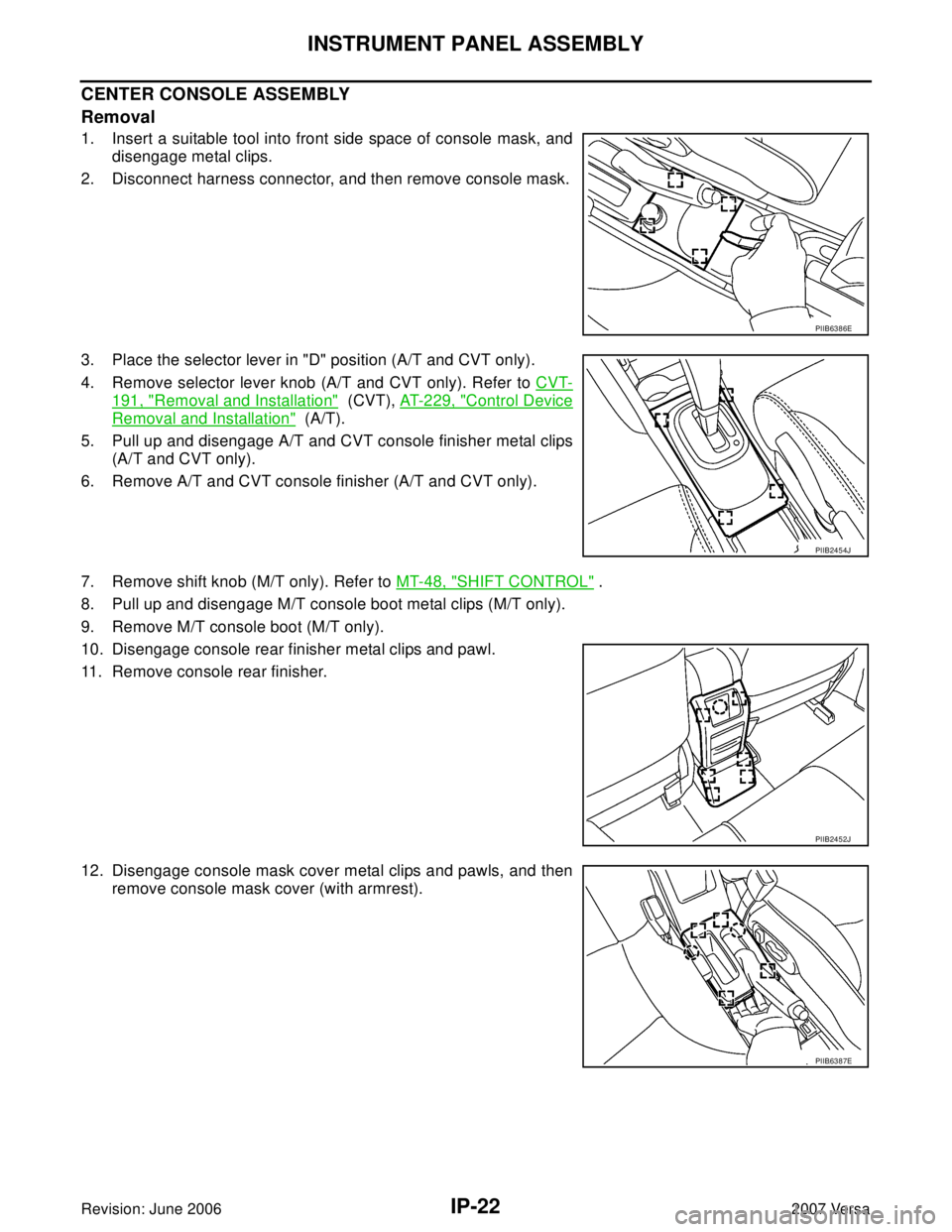
1. Insert a suitable tool into front side space of console mask, and
disengage metal clips.
2. Disconnect harness connector, and then remove console mask.
3. Place the selector lever in "D" position (A/T and CVT only).
4. Remove selector lever knob (A/T and CVT only). Refer to CVT-
191, "Removal and Installation" (CVT), AT-229, "Control Device
Removal and Installation" (A/T).
5. Pull up and disengage A/T and CVT console finisher metal clips
(A/T and CVT only).
6. Remove A/T and CVT console finisher (A/T and CVT only).
7. Remove shift knob (M/T only). Refer to MT-48, "
SHIFT CONTROL" .
8. Pull up and disengage M/T console boot metal clips (M/T only).
9. Remove M/T console boot (M/T only).
10. Disengage console rear finisher metal clips and pawl.
11. Remove console rear finisher.
12. Disengage console mask cover metal clips and pawls, and then
remove console mask cover (with armrest).
PIIB6386E
PIIB2454J
PIIB2452J
PIIB6387E
Page 2123 of 2896
INSTRUMENT PANEL ASSEMBLY
IP-23
C
D
E
F
G
H
J
K
L
MA
B
IP
Revision: June 20062007 Versa
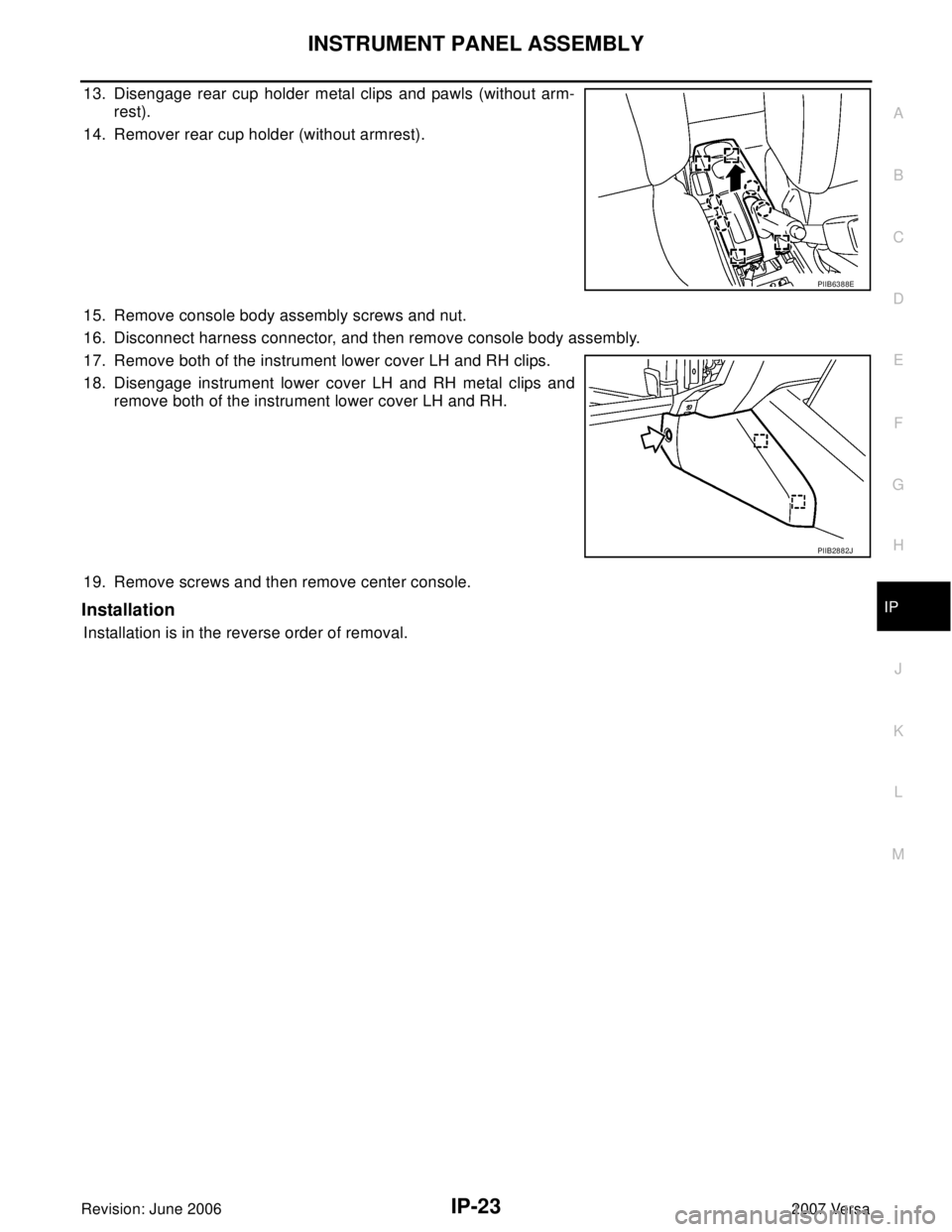
13. Disengage rear cup holder metal clips and pawls (without arm-
rest).
14. Remover rear cup holder (without armrest).
15. Remove console body assembly screws and nut.
16. Disconnect harness connector, and then remove console body assembly.
17. Remove both of the instrument lower cover LH and RH clips.
18. Disengage instrument lower cover LH and RH metal clips and
remove both of the instrument lower cover LH and RH.
19. Remove screws and then remove center console.
Installation
Installation is in the reverse order of removal.
PIIB6388E
PIIB2882J
Page 2124 of 2896
IP-24
INSTRUMENT PANEL ASSEMBLY
Revision: June 20062007 Versa
Disassembly and AssemblyEIS0097A
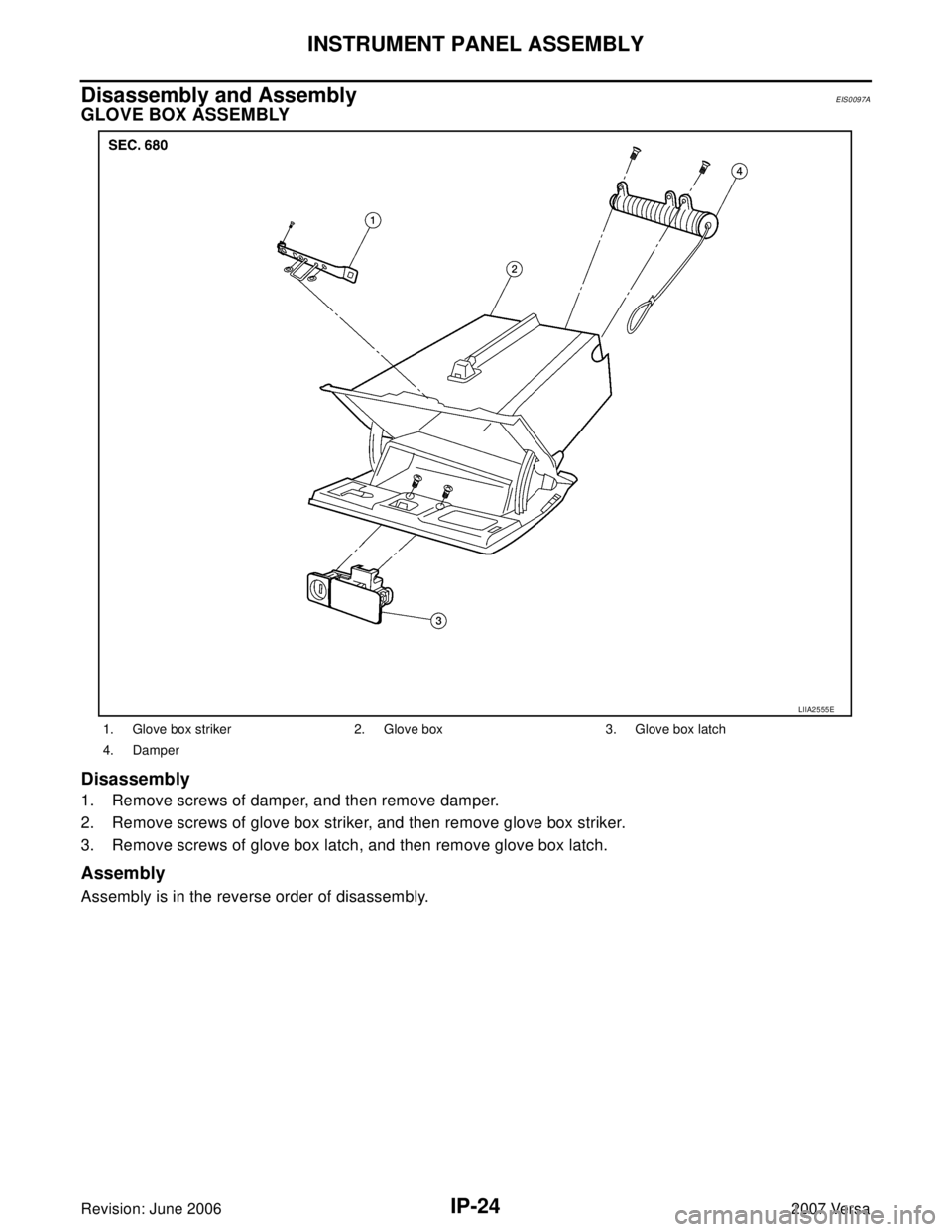
GLOVE BOX ASSEMBLY
Disassembly
1. Remove screws of damper, and then remove damper.
2. Remove screws of glove box striker, and then remove glove box striker.
3. Remove screws of glove box latch, and then remove glove box latch.
Assembly
Assembly is in the reverse order of disassembly.
1. Glove box striker 2. Glove box 3. Glove box latch
4. Damper
LIIA2555E
Page 2125 of 2896
INSTRUMENT PANEL ASSEMBLY
IP-25
C
D
E
F
G
H
J
K
L
MA
B
IP
Revision: June 20062007 Versa
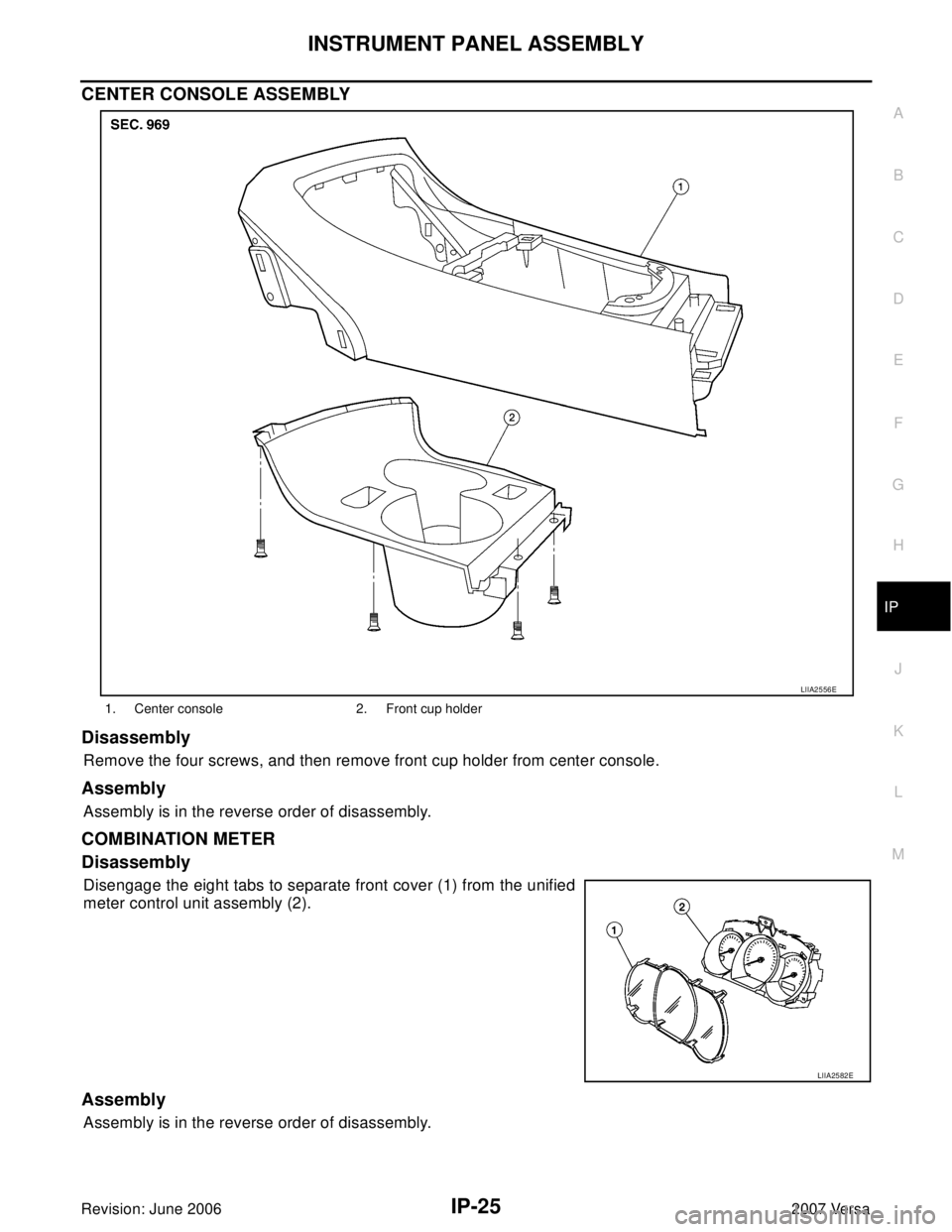
CENTER CONSOLE ASSEMBLY
Disassembly
Remove the four screws, and then remove front cup holder from center console.
Assembly
Assembly is in the reverse order of disassembly.
COMBINATION METER
Disassembly
Disengage the eight tabs to separate front cover (1) from the unified
meter control unit assembly (2).
Assembly
Assembly is in the reverse order of disassembly.
1. Center console 2. Front cup holder
LIIA2556E
LIIA2582E
Page 2126 of 2896

IP-26
INSTRUMENT PANEL ASSEMBLY
Revision: June 20062007 Versa
Page 2273 of 2896
LIGHTING AND TURN SIGNAL SWITCH
LT-65
C
D
E
F
G
H
I
J
L
MA
B
LT
Revision: June 20062007 Versa
LIGHTING AND TURN SIGNAL SWITCHPFP:25540
Removal and InstallationEKS00HYH
REMOVAL
1. Remove steering column cover. Refer to IP-10, "INSTRUMENT PANEL ASSEMBLY" .
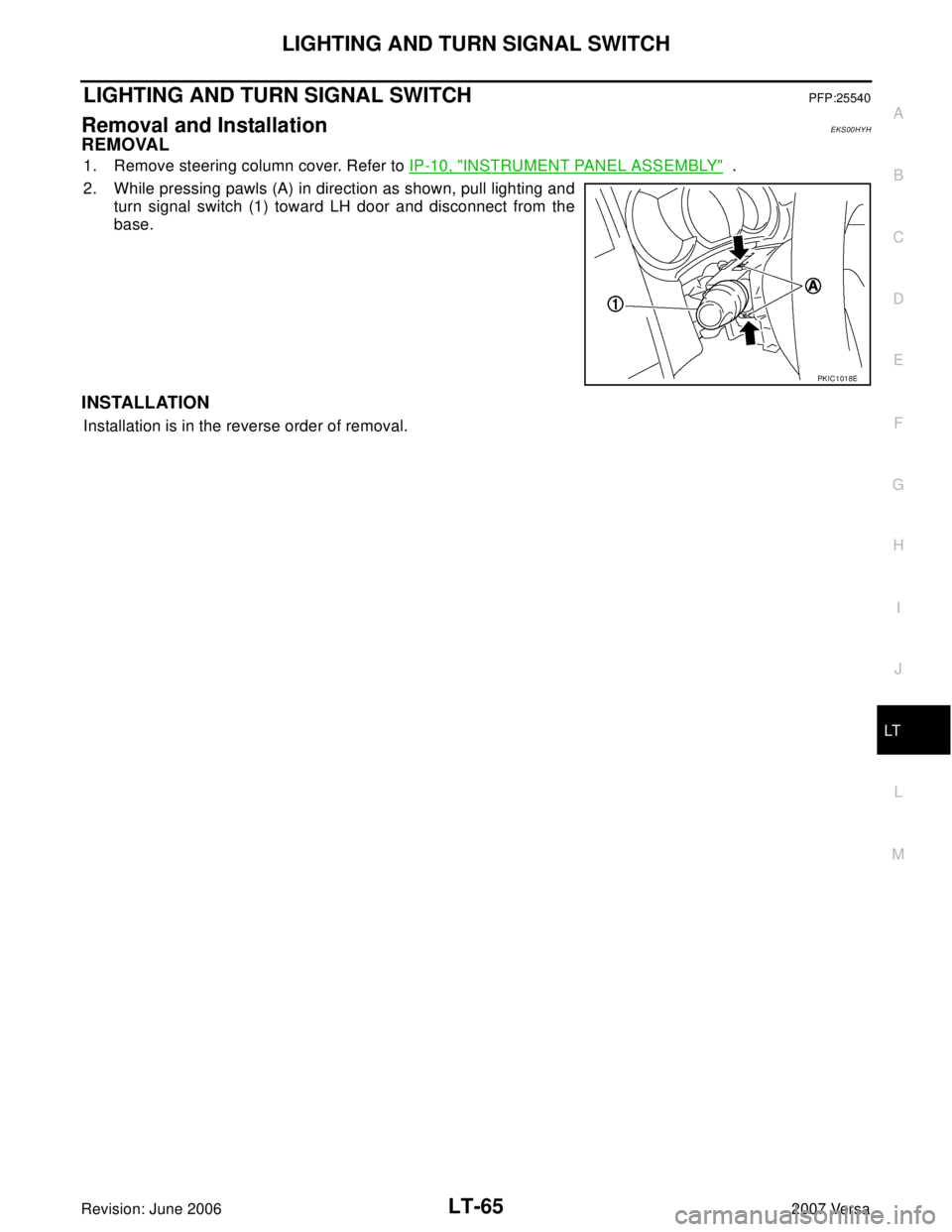
2. While pressing pawls (A) in direction as shown, pull lighting and
turn signal switch (1) toward LH door and disconnect from the
base.
INSTALLATION
Installation is in the reverse order of removal.
PKIC1018E
Page 2274 of 2896
LT-66
HAZARD SWITCH
Revision: June 20062007 Versa
HAZARD SWITCHPFP:25290
Removal and InstallationEKS00HYI
REMOVAL
1. Remove cluster lid C. Refer to IP-10, "INSTRUMENT PANEL ASSEMBLY" .
2. Disconnect hazard switch connector.
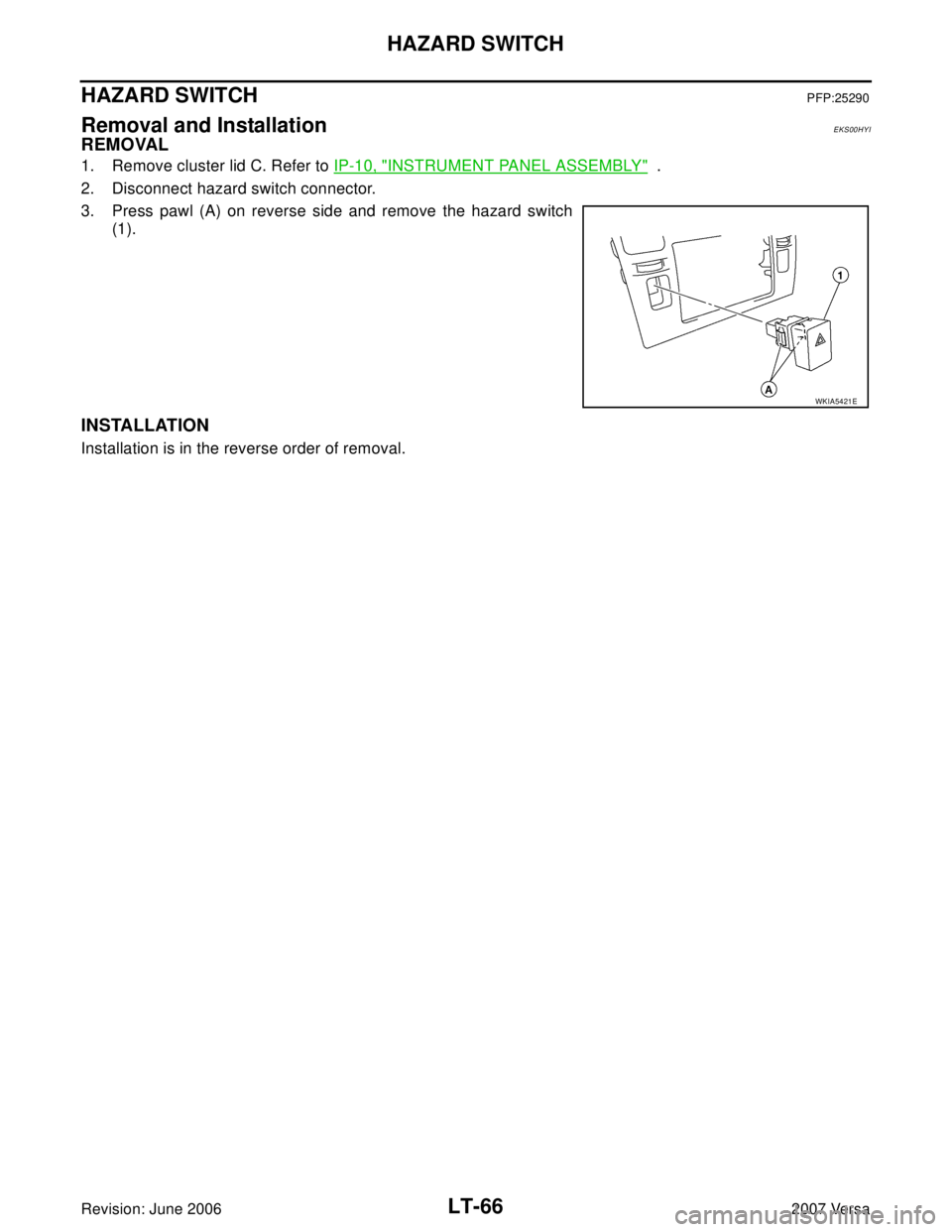
3. Press pawl (A) on reverse side and remove the hazard switch
(1).
INSTALLATION
Installation is in the reverse order of removal.
WKIA5421E
Page 2323 of 2896
ILLUMINATION
LT-115
C
D
E
F
G
H
I
J
L
MA
B
LT
Revision: June 20062007 Versa
Bulb ReplacementEKS00HZZ
GLOVE BOX LAMP
1. Remove glove box assembly. Refer to IP-10, "INSTRUMENT PANEL ASSEMBLY" .
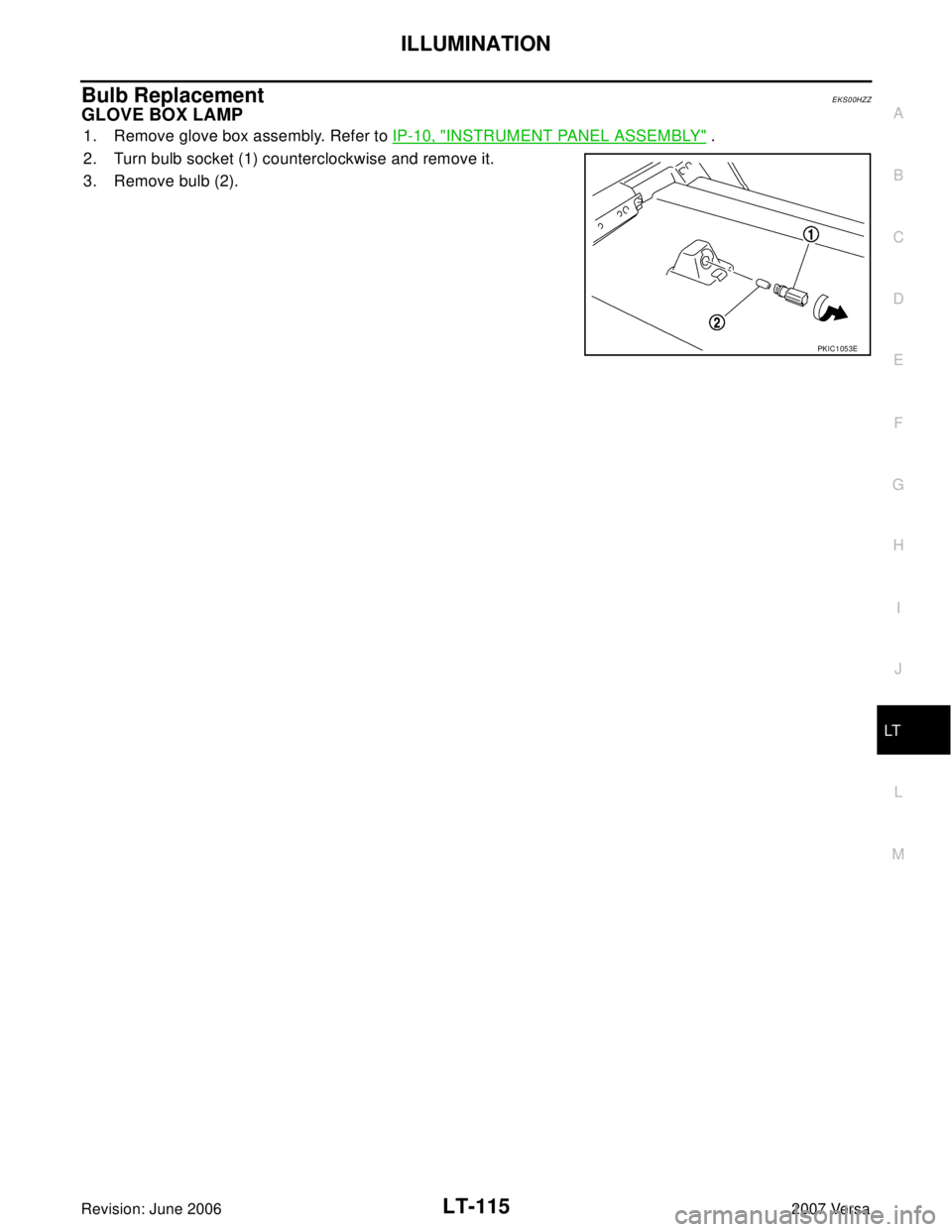
2. Turn bulb socket (1) counterclockwise and remove it.
3. Remove bulb (2).
PKIC1053E
Page 2354 of 2896
MA-20
CHASSIS AND BODY MAINTENANCE
Revision: June 20062007 Versa
CHASSIS AND BODY MAINTENANCEPFP:00100
Changing In-cabin MicrofilterELS0022D
1. Remove the glove box assembly. Refer to IP-10, "INSTRUMENT PANEL ASSEMBLY" .
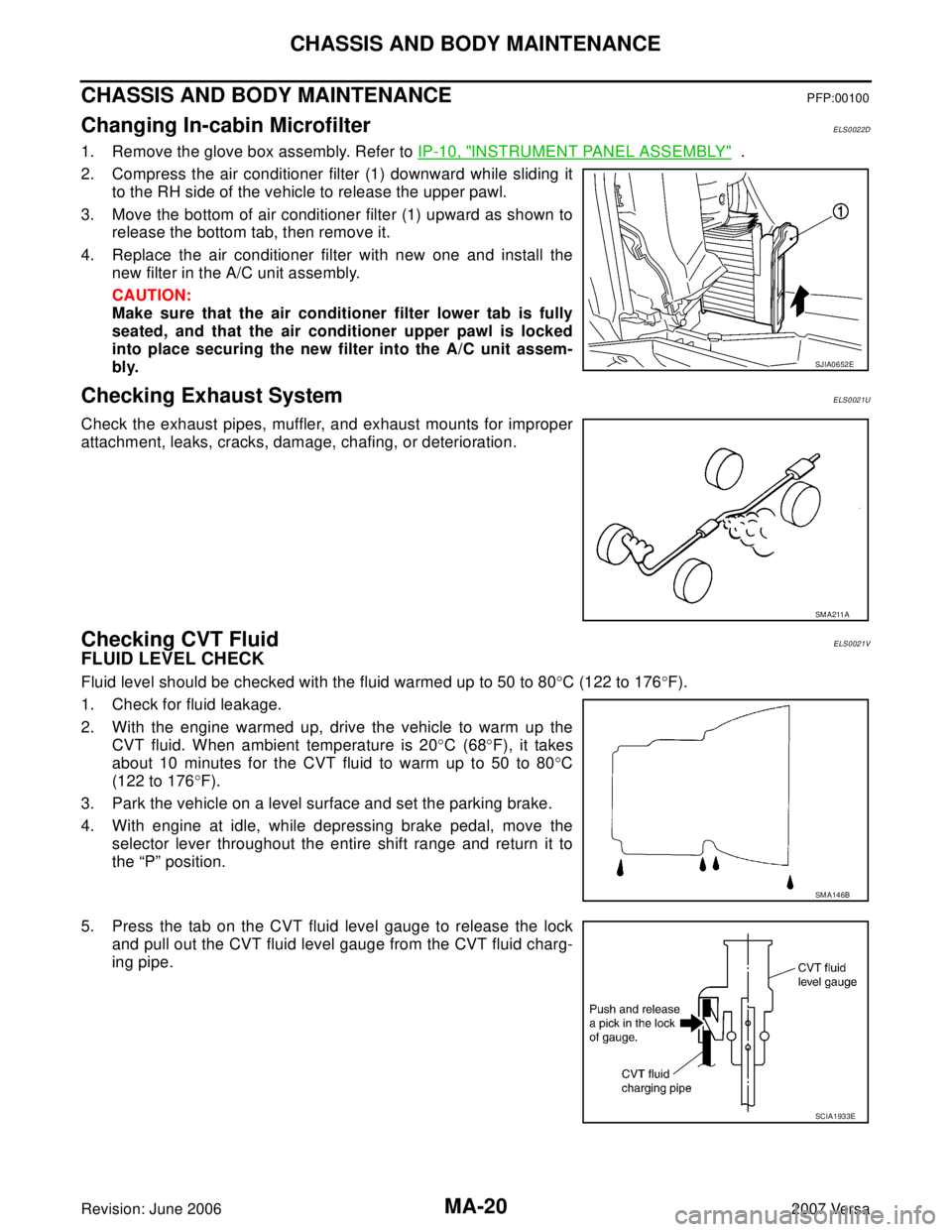
2. Compress the air conditioner filter (1) downward while sliding it
to the RH side of the vehicle to release the upper pawl.
3. Move the bottom of air conditioner filter (1) upward as shown to
release the bottom tab, then remove it.
4. Replace the air conditioner filter with new one and install the
new filter in the A/C unit assembly.
CAUTION:
Make sure that the air conditioner filter lower tab is fully
seated, and that the air conditioner upper pawl is locked
into place securing the new filter into the A/C unit assem-
bly.
Checking Exhaust SystemELS0021U
Check the exhaust pipes, muffler, and exhaust mounts for improper
attachment, leaks, cracks, damage, chafing, or deterioration.
Checking CVT FluidELS0021V
FLUID LEVEL CHECK
Fluid level should be checked with the fluid warmed up to 50 to 80°C (122 to 176°F).
1. Check for fluid leakage.
2. With the engine warmed up, drive the vehicle to warm up the
CVT fluid. When ambient temperature is 20°C (68°F), it takes
about 10 minutes for the CVT fluid to warm up to 50 to 80°C
(122 to 176°F).
3. Park the vehicle on a level surface and set the parking brake.
4. With engine at idle, while depressing brake pedal, move the
selector lever throughout the entire shift range and return it to
the “P” position.
5. Press the tab on the CVT fluid level gauge to release the lock
and pull out the CVT fluid level gauge from the CVT fluid charg-
ing pipe.
SJIA0652E
SM A211 A
SM A14 6B
SCIA1933E
Page 2473 of 2896
CONTROLLER
MTC-61
C
D
E
F
G
H
I
K
L
MA
B
MTC
Revision: June 20062007 Versa
CONTROLLERPFP:28074
Removal and InstallationEJS00580
REMOVAL
1. Remove cluster lid C and instrument finisher D. Refer to IP-10, "INSTRUMENT PANEL ASSEMBLY" .
2. Remove intake door lever knob. Refer to MTC-62, "
Disassembly
and Assembly" .
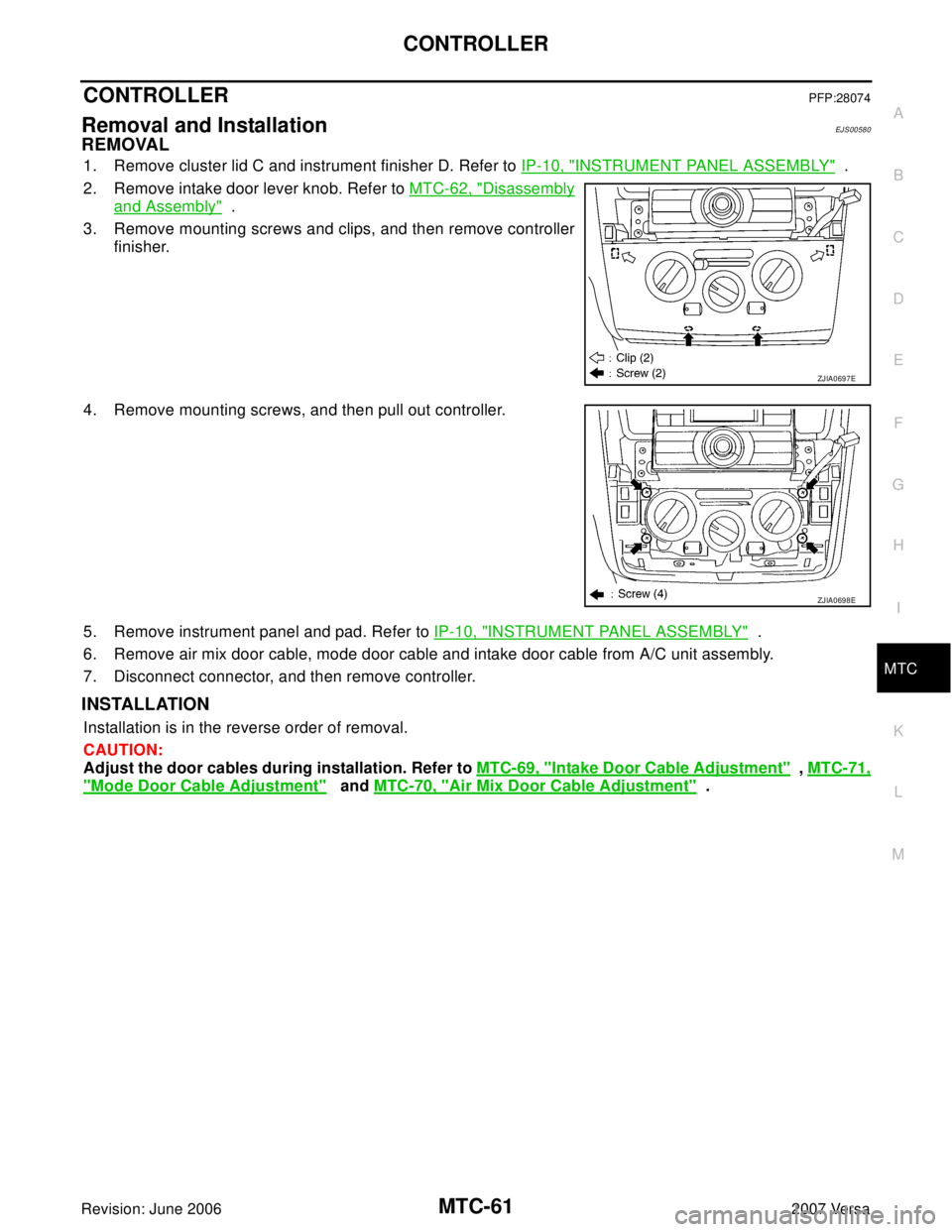
3. Remove mounting screws and clips, and then remove controller
finisher.
4. Remove mounting screws, and then pull out controller.
5. Remove instrument panel and pad. Refer to IP-10, "
INSTRUMENT PANEL ASSEMBLY" .
6. Remove air mix door cable, mode door cable and intake door cable from A/C unit assembly.
7. Disconnect connector, and then remove controller.
INSTALLATION
Installation is in the reverse order of removal.
CAUTION:
Adjust the door cables during installation. Refer to MTC-69, "
Intake Door Cable Adjustment" , MTC-71,
"Mode Door Cable Adjustment" and MTC-70, "Air Mix Door Cable Adjustment" .
ZJIA0697E
ZJIA0698E