check engine NISSAN LATIO 2009 Service Repair Manual
[x] Cancel search | Manufacturer: NISSAN, Model Year: 2009, Model line: LATIO, Model: NISSAN LATIO 2009Pages: 4331, PDF Size: 58.04 MB
Page 4062 of 4331
Removal and Instal-
lation " .
CHECKING STEERING WHEEL PLAY
• Turn steering wheel so that front wheels come to the straight-ahead position. Start engine and lightly turn
steering wheel to the left and right until front wheels start to move. Measure steering wheel movement on the
outer circumference.
• When the measurement value is outside the standard val ue, check backlash for each joint of steering col-
umn assembly and installation condition of steering gear assembly.
CHECKING NEUTRAL POSITION STEERING WHEEL
• Make sure that steering gear assembly, steering colu mn assembly and steering wheel are installed in the
correct position.
• Perform neutral position inspection after wheel alignment. Refer to PS-2, " Precaution for Supplemental
Restraint System (SRS) "AIR BA
G" and "SEAT BELT PRE-TENSIONER" " .
• Set vehicle to the straight-ahead position and c onfirm steering wheel is in the neutral position.
• Loosen outer socket lock nut and turn inner socket to left and right equally to make fine adjustments if steer-
ing wheel is not in the neutral position.
CHECKING STEERING WHEEL TURNING FORCE
1. Park vehicle on a level and dry surface, set parking brake.
2. Start engine.
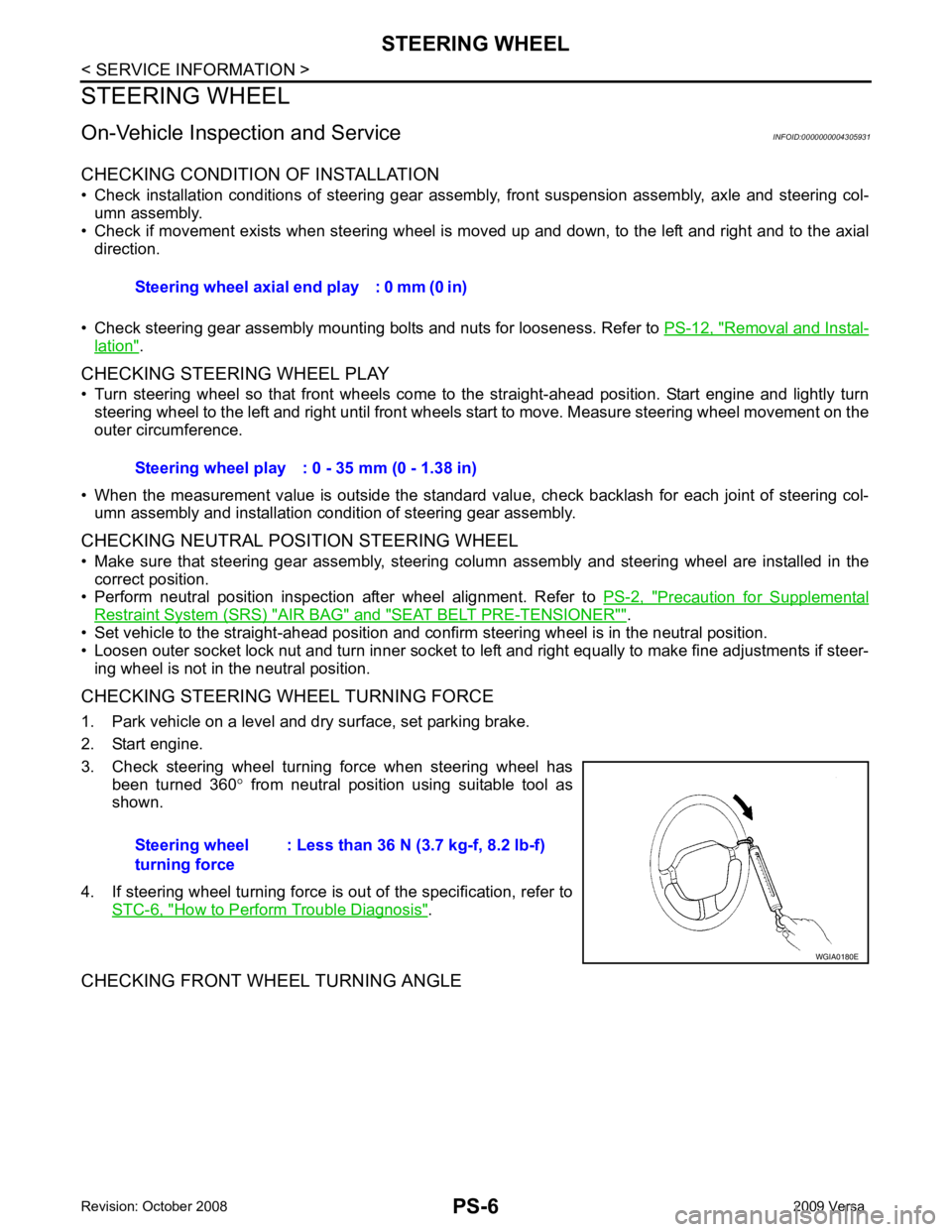
3. Check steering wheel turning force when steering wheel has been turned 360 ° from neutral position using suitable tool as
shown.
4. If steering wheel turning force is out of the specification, refer to STC-6, " How to Perform Trouble Diagnosis " .
CHECKING FRONT WHEEL TURNING ANGLE Steering wheel axial end play : 0 mm (0 in)
Steering wheel play : 0 - 35 mm (0 - 1.38 in)
Steering wheel
turning force : Less than 36 N (3.7 kg-f, 8.2 lb-f)
Page 4063 of 4331
PS
N
O P
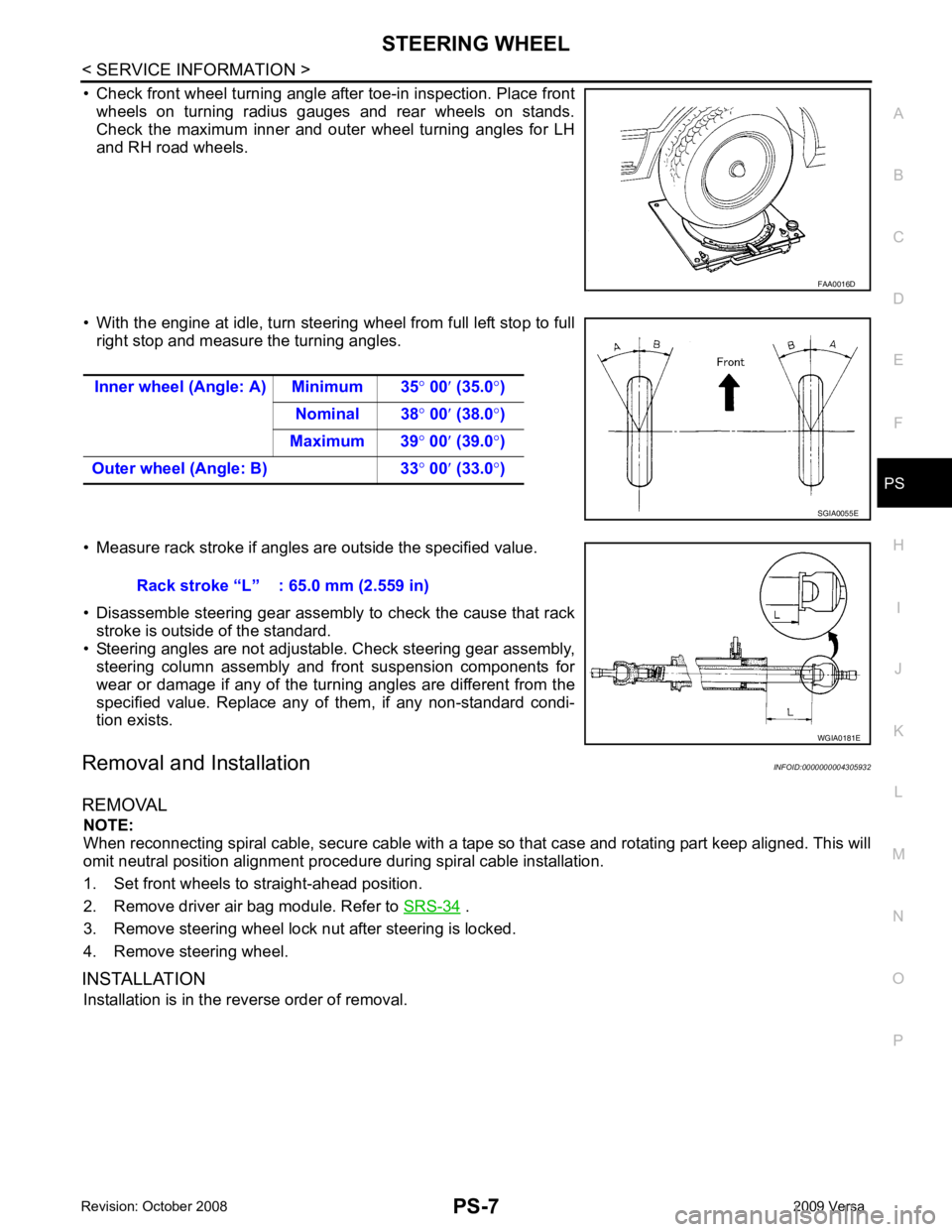
• Check front wheel turning angle after toe-in inspection. Place front
wheels on turning radius gauges and rear wheels on stands.
Check the maximum inner and outer wheel turning angles for LH
and RH road wheels.
• With the engine at idle, turn steering wheel from full left stop to full right stop and measure the turning angles.
• Measure rack stroke if angles are outside the specified value.
• Disassemble steering gear assembly to check the cause that rack stroke is outside of the standard.
• Steering angles are not adjustabl e. Check steering gear assembly,
steering column assembly and front suspension components for
wear or damage if any of the turning angles are different from the
specified value. Replace any of them, if any non-standard condi-
tion exists.
Removal and Installation INFOID:0000000004305932
REMOVAL NOTE:
When reconnecting spiral cable, secure cable with a tape so that case and rotating part keep aligned. This will
omit neutral position alignment procedure during spiral cable installation.
1. Set front wheels to straight-ahead position.
2. Remove driver air bag module. Refer to SRS-34 .
3. Remove steering wheel lock nut after steering is locked.
4. Remove steering wheel.
INSTALLATION Installation is in the reverse order of removal.
Page 4114 of 4331

RSU
N
O P
5. When the repair work is completed, return the ignition switch to the
″LOCK ″ position before connecting
the battery cables. (At this time, the steering lock mechanism will engage.)
6. Perform a self-diagnosis check of al l control units using CONSULT-III.
Precaution for Rear Suspension INFOID:0000000004305875
• When installing the rubber bushings, the final tightening must be done under unladen condition and with the tires on level ground. Oil will shorten the life of the rubber bushings, so wipe off any spilled oil immediately.
• Unladen condition means the fuel tank, engine coolant and l ubricants are at the full specification. The spare
tire, jack, hand tools, and mats are in their designated positions.
• After installing suspension components, check the wheel alignment.
• Caulking nuts are not reusable. Always use new caulking nuts for installation. New caulking nuts are pre-
oiled, do not apply any additional lubrication.
Page 4141 of 4331
SC
N
O P
BATTERY
How to Handle Battery INFOID:0000000004306818
CAUTION:
• If it becomes necessary to start the engine with a booster battery and jumper cables, use a 12-volt
booster battery.
• After connecting battery cables, ensure that they are tightly clamped to battery terminals for good
contact.
• Never add distilled water through the hole used to check specific gravity.
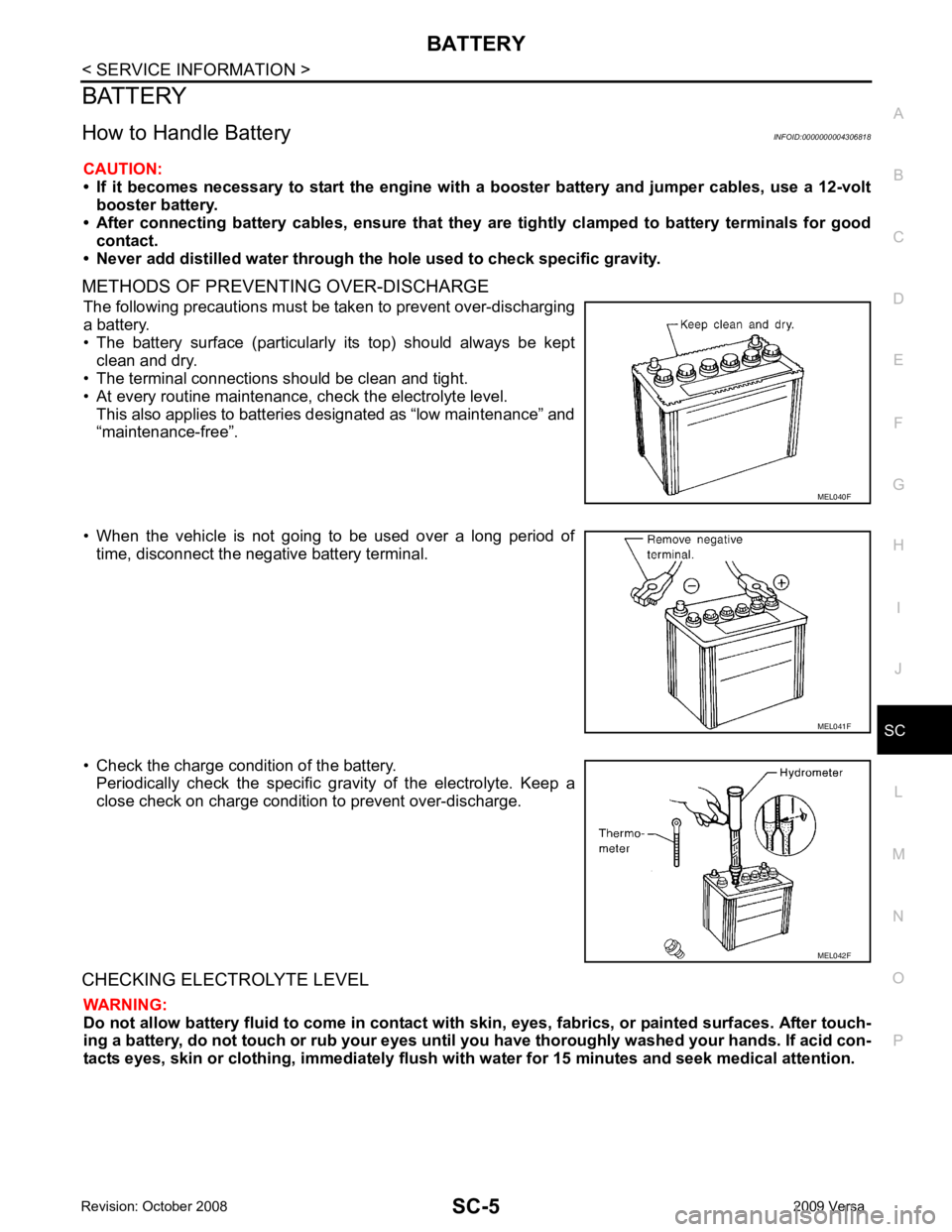
METHODS OF PREVENTING OVER-DISCHARGE The following precautions must be taken to prevent over-discharging
a battery.
• The battery surface (particularly its top) should always be kept clean and dry.
• The terminal connections should be clean and tight.
• At every routine maintenance, check the electrolyte level. This also applies to batteries designated as “low maintenance” and
“maintenance-free”.
• When the vehicle is not going to be used over a long period of time, disconnect the negative battery terminal.
• Check the charge condition of the battery. Periodically check the specific gr avity of the electrolyte. Keep a
close check on charge condition to prevent over-discharge.
CHECKING ELECTROLYTE LEVEL WARNING:
Do not allow battery fluid to come in contact with skin, eyes, fabrics, or painted surfaces. After touch-
ing a battery, do not touch or rub your eyes until yo u have thoroughly washed your hands. If acid con-
tacts eyes, skin or clothing, imme diately flush with water for 15 minutes and seek medical attention. MEL041F
Page 4155 of 4331
SC
N
O P
• 10A fuse (No. 49, M/T model
s, located in the IPDM E/R)
• 15A fuse (No. 52, located in the IPDM E/R)
• 20A fuse (No. 53, located in the IPDM E/R)
• PNP switch, clutch interlock switch or TCM depending on equipment
• Ignition switch
• Ignition relay IPDM E/R
• Starter relay IPDM E/R
• Starter relay request ON signal from BCM
• Harness for open or short circuit OK >> Magnetic switch circuit is
OK. Further inspection is nec-
essary. Refer to "WORK FLOW".
NG >> Check harness, components and connections between the battery and the magnetic switch for poor continuity.
MINIMUM SPECIFICATION OF CRANKING VO LTAGE REFERENCING COOLANT TEMPERA-
TURE
Removal and Installation HR16DE INFOID:0000000004803454
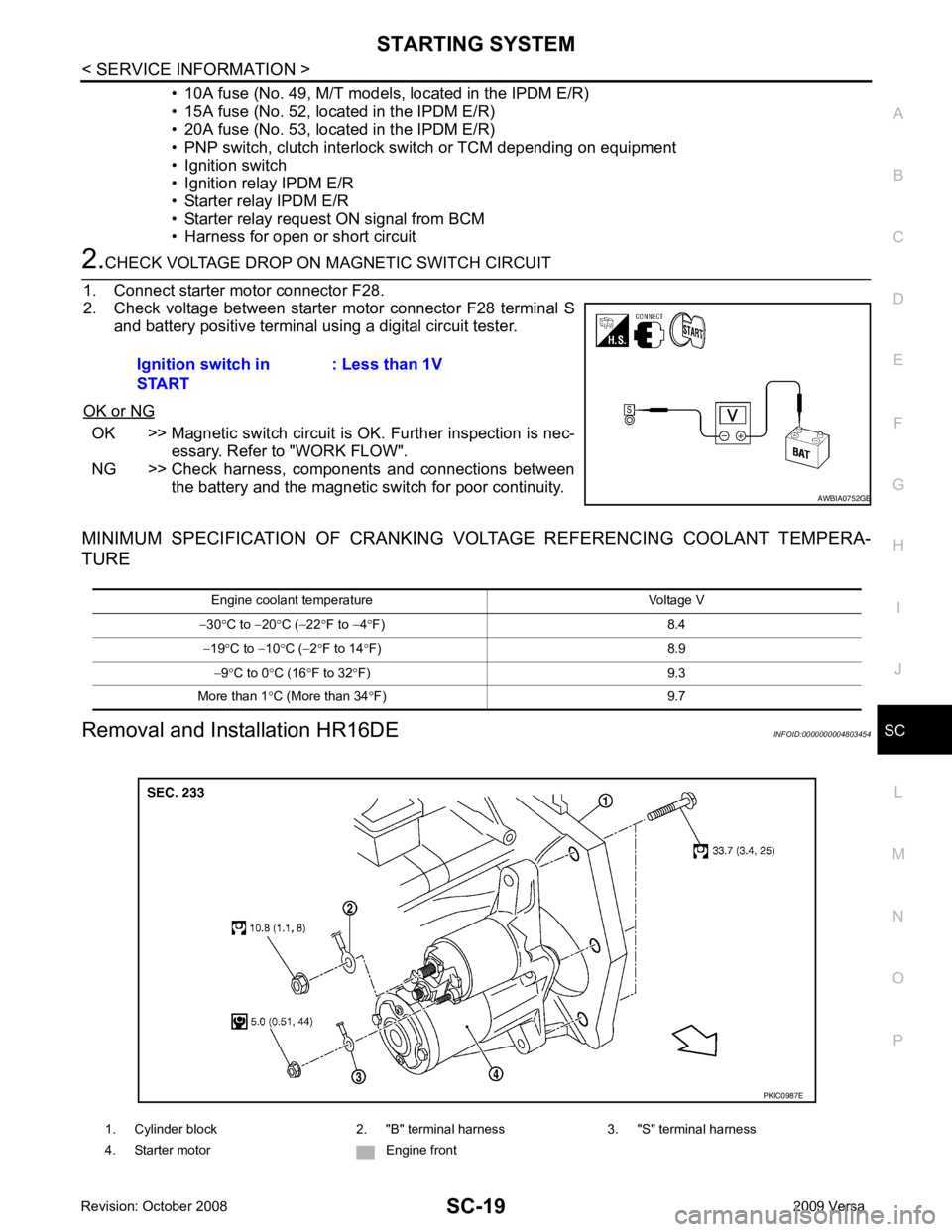
Ignition switch in
START : Less than 1V1. Cylinder block 2. "B" terminal harness 3. "S" terminal harness
4. Starter motor Engine front
Page 4253 of 4331
STC
N
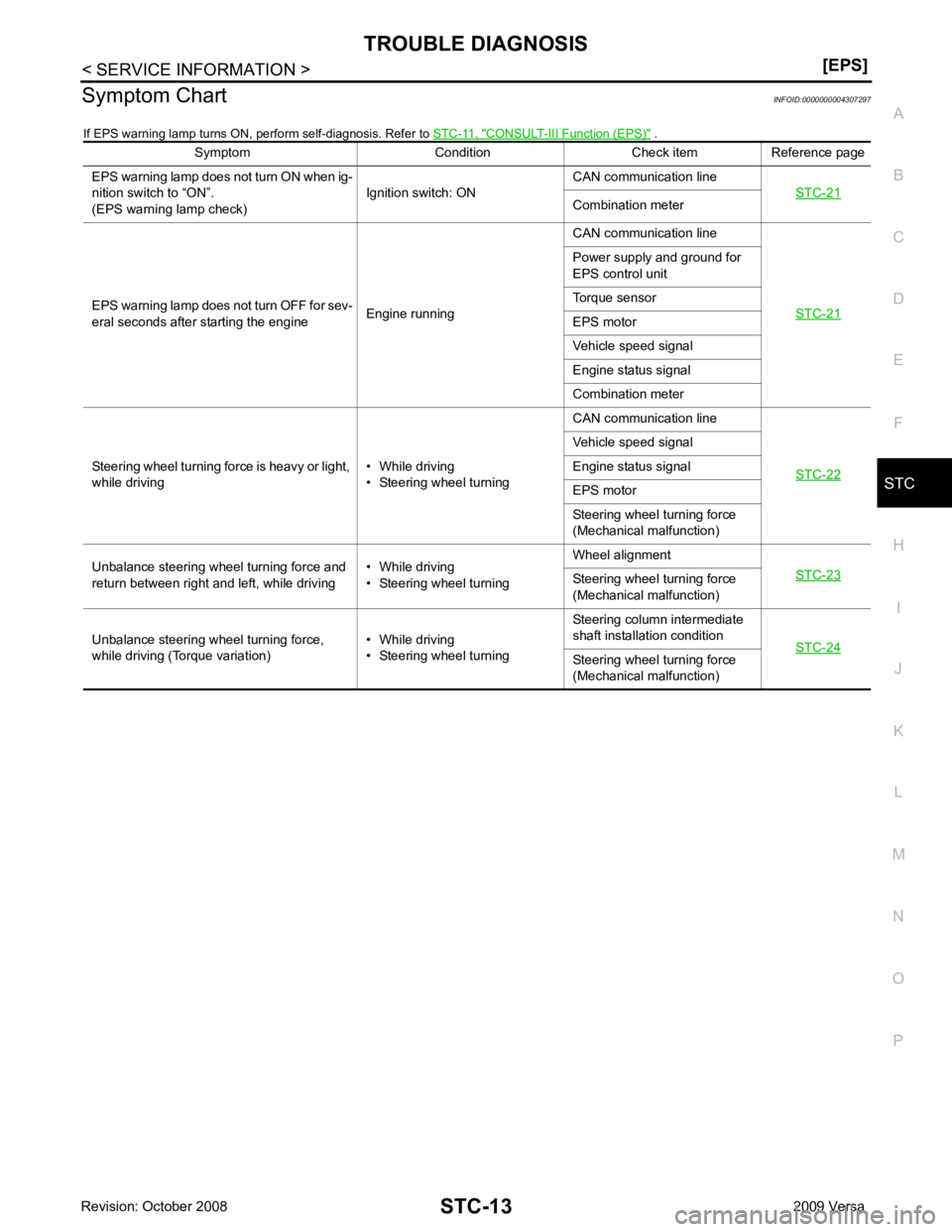
O P
Symptom Chart
INFOID:0000000004307297
If EPS warning lamp turns ON, perform self-diagnosis. Refer to STC-11, " CONSULT-III Function (EPS) " .
Symptom Condition Check item Reference page
EPS warning lamp does not turn ON when ig-
nition switch to “ON”.
(EPS warning lamp check) Ignition switch: ONCAN communication line
STC-21 Combination meter
EPS warning lamp does not turn OFF for sev-
eral seconds after starting the engine Engine runningCAN communication line
STC-21 Power supply and ground for
EPS control unit
Torque sensor
EPS motor
Vehicle speed signal
Engine status signal
Combination meter
Steering wheel turning force is heavy or light,
while driving • While driving
• Steering wheel turning CAN communication line
STC-22 Vehicle speed signal
Engine status signal
EPS motor
Steering wheel turning force
(Mechanical malfunction)
Unbalance steering wheel turning force and
return between right and left, while driving • While driving
• Steering wheel turning Wheel alignment
STC-23 Steering wheel
turning force
(Mechanical malfunction)
Unbalance steering wheel turning force,
while driving (Torque variation) • While driving
• Steering wheel turning Steering column intermediate
shaft installation condition STC-24 Steering wheel
turning force
(Mechanical malfunction)
Page 4255 of 4331
STC
N
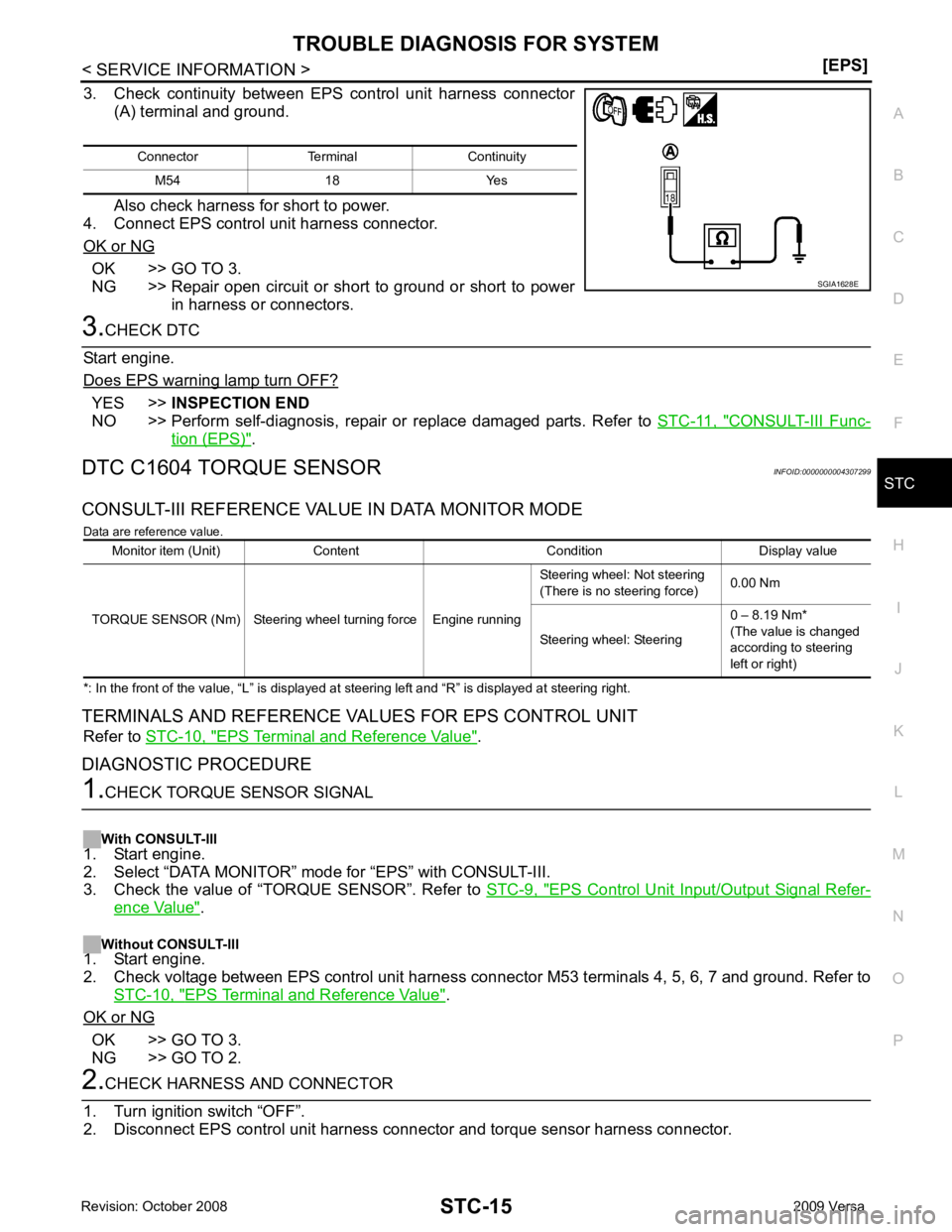
O P
3. Check continuity between EPS control unit harness connector
(A) terminal and ground.
Also check harness for short to power.
4. Connect EPS control unit harness connector.
OK or NG OK >> GO TO 3.
NG >> Repair open circuit or short to ground or short to power
in harness or connectors. YES >>
INSPECTION END
NO >> Perform self-diagnosis, repair or replace damaged parts. Refer to STC-11, " CONSULT-III Func-
tion (EPS) " .
DTC C1604 TORQUE SENSOR INFOID:0000000004307299
CONSULT-III REFERENCE VALUE IN DATA MONITOR MODE Data are reference value.
*: In the front of the value, “L” is displayed at steering left and “R” is displayed at steering right.
TERMINALS AND REFERENCE VA LUES FOR EPS CONTROL UNIT
Refer to STC-10, " EPS Terminal and Reference Value " .
DIAGNOSTIC PROCEDURE EPS Control Unit Input/Output Signal Refer-
ence Value " .
Without CONSULT-III
1. Start engine.
2. Check voltage between EPS control unit harness connec tor M53 terminals 4, 5, 6, 7 and ground. Refer to
STC-10, " EPS Terminal and Reference Value " .
OK or NG OK >> GO TO 3.
NG >> GO TO 2.
Page 4257 of 4331
STC
N
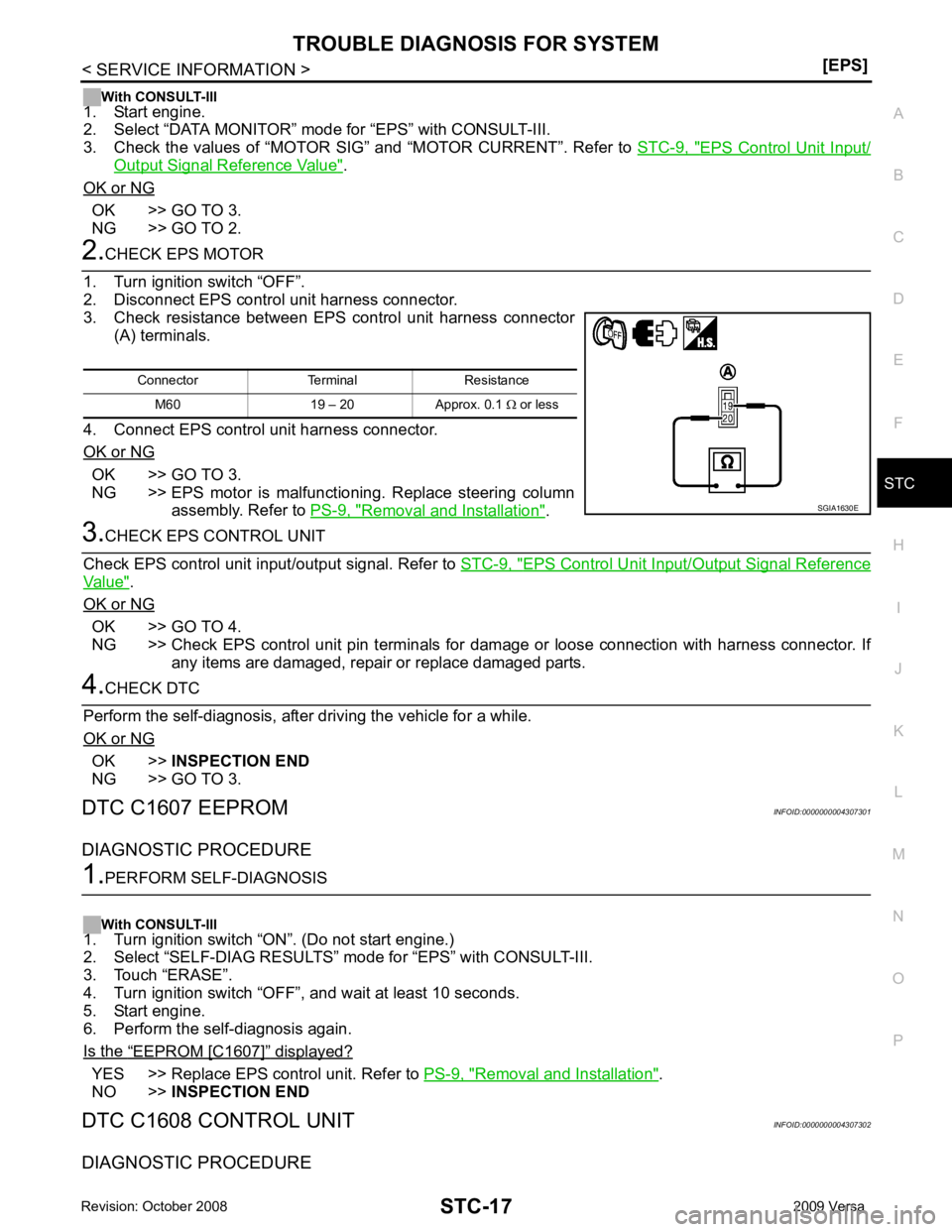
O P
With CONSULT-III
1. Start engine.
2. Select “DATA MONITOR” mode for “EPS” with CONSULT-III.
3. Check the values of “MOTOR SIG” and “MOTOR CURRENT”. Refer to STC-9, " EPS Control Unit Input/
Output Signal Reference Value " .
OK or NG OK >> GO TO 3.
NG >> GO TO 2. OK >> GO TO 3.
NG >> EPS motor is malfunctioning. Replace steering column
assembly. Refer to PS-9, " Removal and Installation " .
EPS Control Unit Input/Output Signal Reference
Value " .
OK or NG OK >> GO TO 4.
NG >> Check EPS control unit pin terminals for damage or loose connection with harness connector. If
any items are damaged, repair or replace damaged parts. OK >>
INSPECTION END
NG >> GO TO 3.
DTC C1607 EEPROM INFOID:0000000004307301
DIAGNOSTIC PROCEDURE “ EEPROM [C1607] ” displayed?
YES >> Replace EPS control unit. Refer to
PS-9, " Removal and Installation " .
NO >> INSPECTION END
DTC C1608 CONTROL UNIT INFOID:0000000004307302
DIAGNOSTIC PROCEDURE
Page 4259 of 4331
STC
N
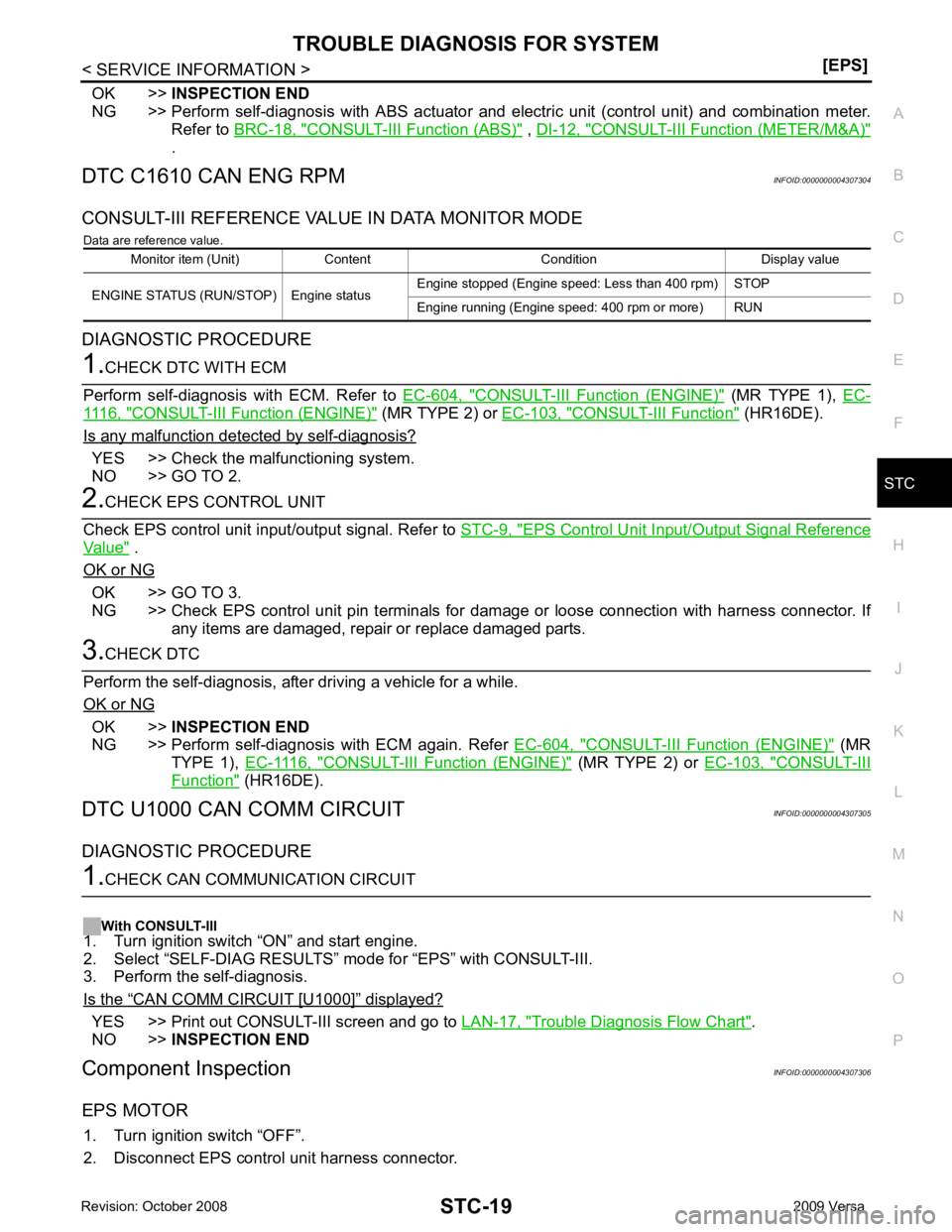
O P
OK >>
INSPECTION END
NG >> Perform self-diagnosis with ABS actuator and el ectric unit (control unit) and combination meter.
Refer to BRC-18, " CONSULT-III Function (ABS) " ,
DI-12, " CONSULT-III Function (METER/M&A) "
.
DTC C1610 CAN ENG RPM INFOID:0000000004307304
CONSULT-III REFERENCE VALUE IN DATA MONITOR MODE Data are reference value.
DIAGNOSTIC PROCEDURE CONSULT-III Function (ENGINE) " (MR TYPE 1),
EC-1116, " CONSULT-III F
unction (ENGINE) " (MR TYPE 2) or
EC-103, " CONSULT-III Function " (HR16DE).
Is any malfunction detected by self-diagnosis? YES >> Check the malfunctioning system.
NO >> GO TO 2. EPS Control Unit Input/Output Signal Reference
Value " .
OK or NG OK >> GO TO 3.
NG >> Check EPS control unit pin terminals for damage or loose connection with harness connector. If
any items are damaged, repair or replace damaged parts. OK >>
INSPECTION END
NG >> Perform self-diagnosis with ECM again. Refer EC-604, " CONSULT-III Function (ENGINE) " (MR
TYPE 1), EC-1116, " CONSULT-III Function (ENGINE) " (MR TYPE 2) or
EC-103, " CONSULT-III
Function " (HR16DE).
DTC U1000 CAN COMM CIRCUIT INFOID:0000000004307305
DIAGNOSTIC PROCEDURE “ CAN COMM CIRCUIT [U1000] ” displayed?
YES >> Print out CONSULT-III screen and go to
LAN-17, " Trouble Diagnosis Flow Chart " .
NO >> INSPECTION END
Component Inspection INFOID:0000000004307306
EPS MOTOR 1. Turn ignition switch “OFF”.
2. Disconnect EPS control unit harness connector. Monitor item (Unit) Content Condition Display value
ENGINE STATUS (RUN/STOP) Engine status Engine stopped (Engine speed: Less than 400 rpm) STOP
Engine running (Engine speed: 400 rpm or more) RUN
Page 4261 of 4331
![NISSAN LATIO 2009 Service Repair Manual TROUBLE DIAGNOSIS FOR SYMPTOMS
STC-21
< SERVICE INFORMATION >
[EPS] C
D E
F
H I
J
K L
M A
B STC
N
O
P
TROUBLE DIAGNOSIS FOR SYMPTOMS
EPS Warning Lamp Does Not Turn ON INFOID:0000000004307307
SYMPTOM:](/img/5/57359/w960_57359-4260.png "NISSAN LATIO 2009 Service Repair Manual TROUBLE DIAGNOSIS FOR SYMPTOMS
STC-21
< SERVICE INFORMATION >
[EPS] C
D E
F
H I
J
K L
M A
B STC
N
O
P
TROUBLE DIAGNOSIS FOR SYMPTOMS
EPS Warning Lamp Does Not Turn ON INFOID:0000000004307307
SYMPTOM:")
TROUBLE DIAGNOSIS FOR SYMPTOMS
STC-21
< SERVICE INFORMATION >
[EPS] C
D E
F
H I
J
K L
M A
B STC
N
O
P
TROUBLE DIAGNOSIS FOR SYMPTOMS
EPS Warning Lamp Does Not Turn ON INFOID:0000000004307307
SYMPTOM: EPS warning lamp does not turn ON when ignition switch to “ON”.
DIAGNOSTIC PROCEDURE 1.
CHECK SYSTEM FOR CAN COMMUNICATION LINE
Perform self-diagnosis. Refer to STC-11, " CONSULT-III Function (EPS) " .
Is the “ CAN COMM CIRCUIT [U1000] ” displayed?
YES >> Perform trouble diagnosis for CAN communication line. Refer to
STC-19, " DTC U1000 CAN
COMM CIRCUIT " .
NO >> GO TO 2. 2.
CHECK EPS CONTROL UNIT
Check EPS control unit input/output signal. Refer to STC-9, " EPS Control Unit Input/Output Signal Reference
Value " .
OK or NG OK >> GO TO 3.
NG >> Check EPS control unit pin terminals for damage or loose connection with harness connector. If
any items are damaged, repair or replace damaged parts. 3.
SYMPTOM CHECK
Check again.
OK or NG OK >>
INSPECTION END
NG >> Replace combination meter. Refer to DI-19, " Removal and Installation " .
EPS Warning Lamp Does Not Turn OFF INFOID:0000000004307308
SYMPTOM: EPS warning lamp does not turn OFF for several seconds after starting the engine.
DIAGNOSTIC PROCEDURE 1.
CHECK SELF-DIAGNOSTIC RESULTS
Perform self-diagnosis. Refer to STC-11, " CONSULT-III Function (EPS) " .
Is any malfunction detected by self-diagnosis? YES >> Check the malfunctioning system.
NO >> GO TO 2. 2.
CHECK EPS CONTROL UNI T POWER SUPPLY CIRCUIT
1. Turn ignition switch “OFF”.
2. Disconnect EPS control unit harness connector.
3. Turn ignition switch “ON”. (Do not start engine.)
4. Check voltage between EPS control unit harness connector (A) terminals and ground.
Connector Terminal VoltageM53 10 – Ground Battery voltage
M54 17 – Ground Battery voltage SGIA1626E