O2 sensor NISSAN LATIO 2010 Service Repair Manual
[x] Cancel search | Manufacturer: NISSAN, Model Year: 2010, Model line: LATIO, Model: NISSAN LATIO 2010Pages: 3745, PDF Size: 73.67 MB
Page 649 of 3745
BL-140
< SERVICE INFORMATION >
INTELLIGENT KEY SYSTEM
OK or NG
OK >> GO TO 5
NG >> Repair or replace trunk opener request switch groundcircuit.
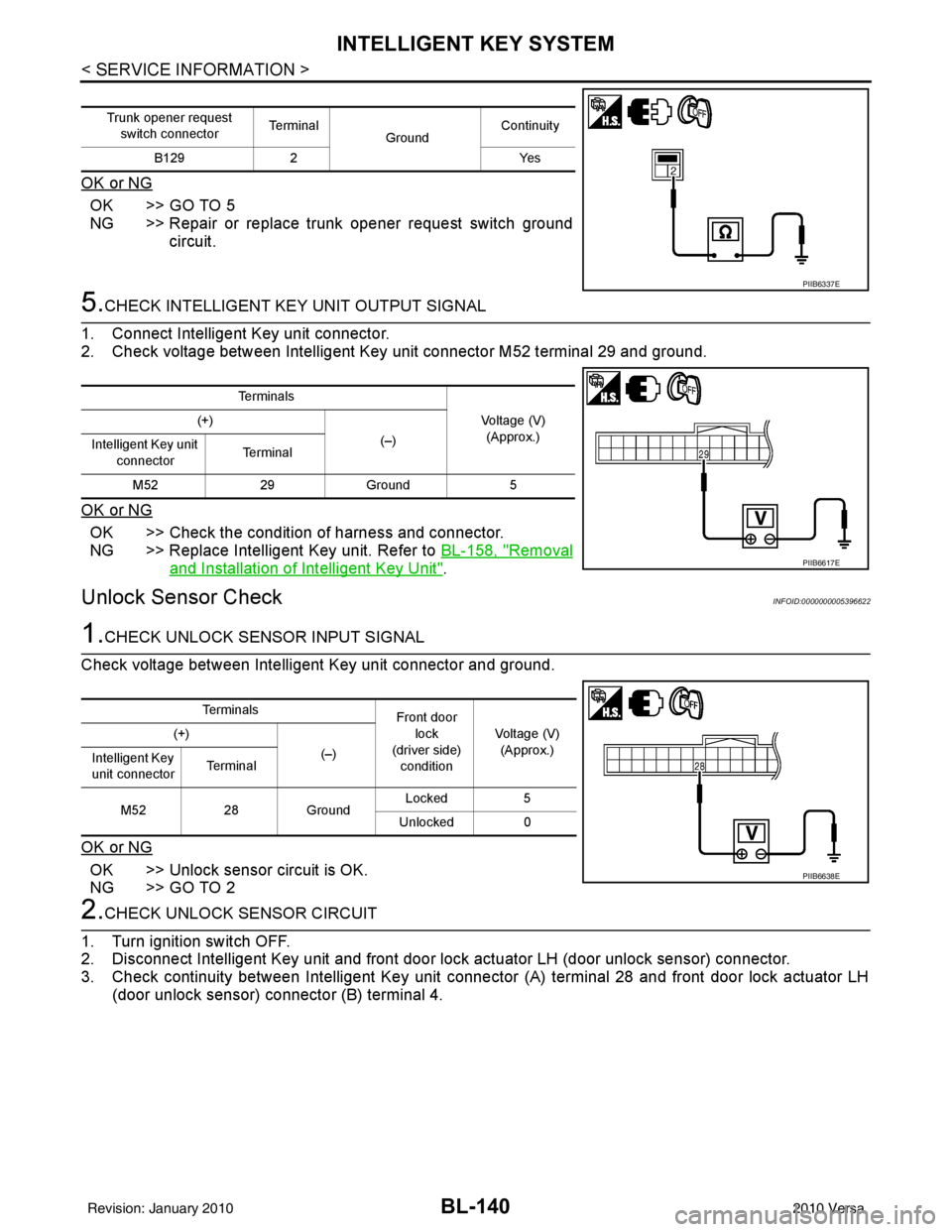
5.CHECK INTELLIGENT KEY UNIT OUTPUT SIGNAL
1. Connect Intelligent Key unit connector.
2. Check voltage between Intelligent Key unit connector M52 terminal 29 and ground.
OK or NG
OK >> Check the condition of harness and connector.
NG >> Replace Intelligent Key unit. Refer to BL-158, "
Removal
and Installation of Intelligent Key Unit".
Unlock Sensor CheckINFOID:0000000005396622
1.CHECK UNLOCK SENSOR INPUT SIGNAL
Check voltage between Intelligent Key unit connector and ground.
OK or NG
OK >> Unlock sensor circuit is OK.
NG >> GO TO 2
2.CHECK UNLOCK SENSOR CIRCUIT
1. Turn ignition switch OFF.
2. Disconnect Intelligent Key unit and front door lock actuator LH (door unlock sensor) connector.
3. Check continuity between Intelligent Key unit connec tor (A) terminal 28 and front door lock actuator LH
(door unlock sensor) connector (B) terminal 4.
Trunk opener request
switch connector Te r m i n a l
GroundContinuity
B129 2 Yes
PIIB6337E
Te r m i n a l s
Voltage (V)(Approx.)
(+)
(–)
Intelligent Key unit
connector Te r m i n a l
M52 29Ground 5
PIIB6617E
Te r m i n a l s
Front door
lock
(driver side)
condition Voltage (V)
(Approx.)
(+)
(–)
Intelligent Key
unit connector Te r m i n a l
M52 28Ground Locked
5
Unlocked 0
PIIB6638E
Revision: January 20102010 Versa
Page 650 of 3745
INTELLIGENT KEY SYSTEMBL-141
< SERVICE INFORMATION >
C
DE
F
G H
J
K L
M A
B
BL
N
O P
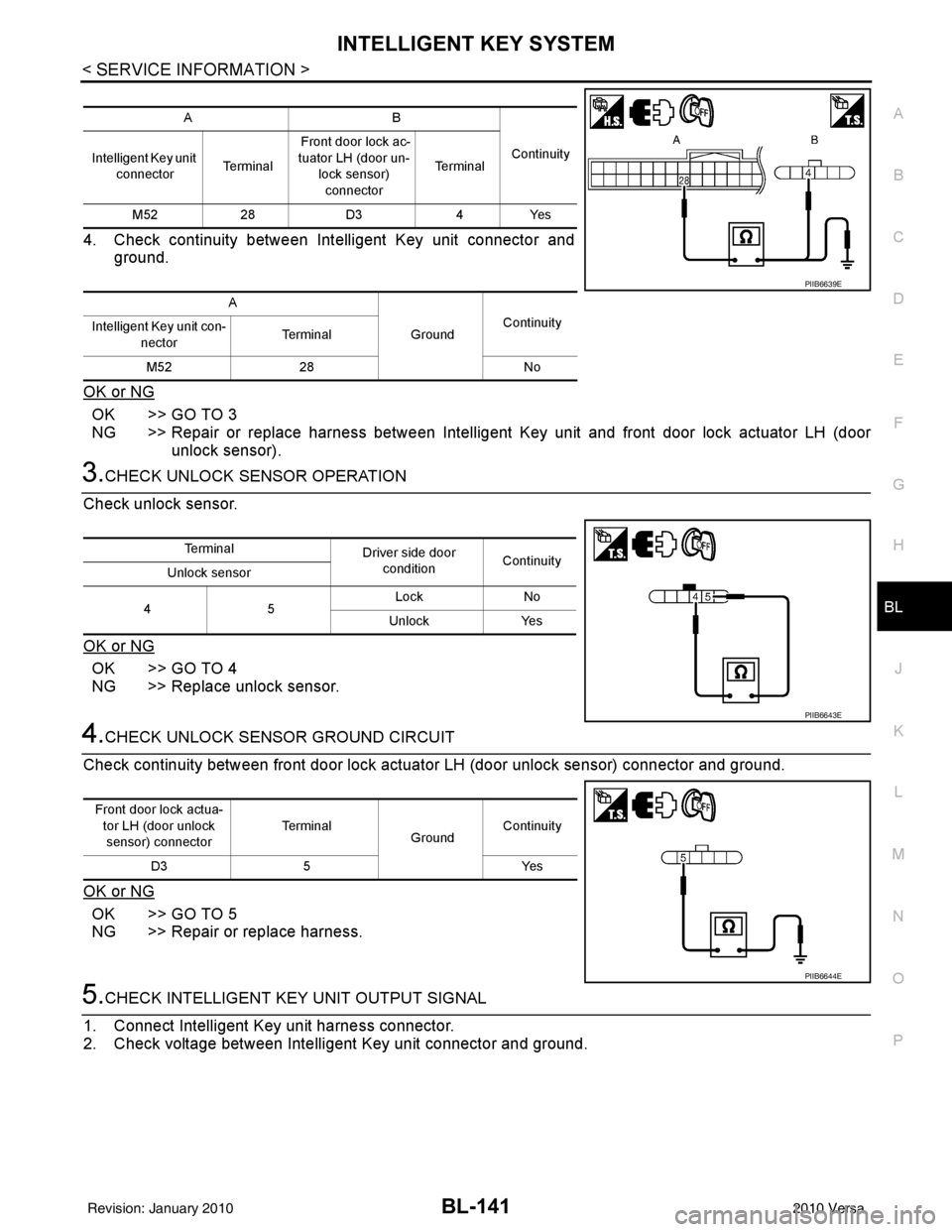
4. Check continuity between Intelligent Key unit connector and ground.
OK or NG
OK >> GO TO 3
NG >> Repair or replace harness between Intelligent Key unit and front door lock actuator LH (door
unlock sensor).
3.CHECK UNLOCK SENSOR OPERATION
Check unlock sensor.
OK or NG
OK >> GO TO 4
NG >> Replace unlock sensor.
4.CHECK UNLOCK SENSOR GROUND CIRCUIT
Check continuity between front door lock actuator LH (door unlock sensor) connector and ground.
OK or NG
OK >> GO TO 5
NG >> Repair or replace harness.
5.CHECK INTELLIGENT KEY UNIT OUTPUT SIGNAL
1. Connect Intelligent Key unit harness connector.
2. Check voltage between Intelligent Key unit connector and ground.
AB
Continuity
Intelligent Key unit
connector Te r m i n a l Front door lock ac-
tuator LH (door un-
lock sensor) connector Te r m i n a l
M52 28D3 4Yes
A GroundContinuity
Intelligent Key unit con-
nector Te r m i n a l
M52 28 No
PIIB6639E
Te r m i n a l
Driver side door
condition Continuity
Unlock sensor
45 Lock
No
Unlock Yes
PIIB6643E
Front door lock actua-
tor LH (door unlock
sensor) connector Te r m i n a l
GroundContinuity
D3 5 Yes
PIIB6644E
Revision: January 20102010 Versa
Page 681 of 3745
BL-172
< SERVICE INFORMATION >
BACK DOOR LOCK
BACK DOOR LOCK
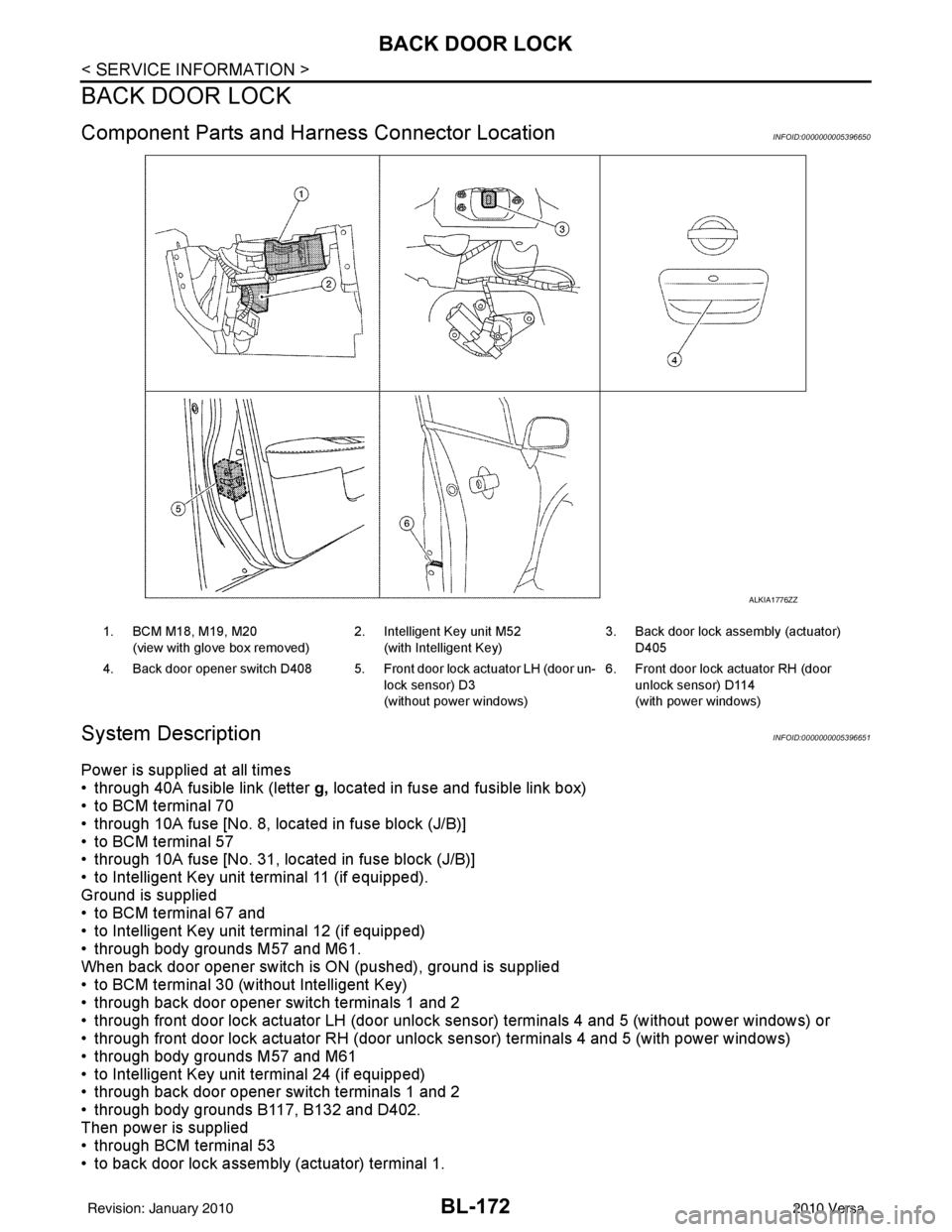
Component Parts and Harness Connector LocationINFOID:0000000005396650
System DescriptionINFOID:0000000005396651
Power is supplied at all times
• through 40A fusible link (letter g, located in fuse and fusible link box)
• to BCM terminal 70
• through 10A fuse [No. 8, located in fuse block (J/B)]
• to BCM terminal 57
• through 10A fuse [No. 31, located in fuse block (J/B)]
• to Intelligent Key unit terminal 11 (if equipped).
Ground is supplied
• to BCM terminal 67 and
• to Intelligent Key unit terminal 12 (if equipped)
• through body grounds M57 and M61.
When back door opener switch is ON (pushed), ground is supplied
• to BCM terminal 30 (without Intelligent Key)
• through back door opener switch terminals 1 and 2
• through front door lock actuator LH (door unlock s ensor) terminals 4 and 5 (without power windows) or
• through front door lock actuator RH (door unlock sensor) terminals 4 and 5 (with power windows)
• through body grounds M57 and M61
• to Intelligent Key unit terminal 24 (if equipped)
• through back door opener switch terminals 1 and 2
• through body grounds B117, B132 and D402.
Then power is supplied
• through BCM terminal 53
• to back door lock assembly (actuator) terminal 1.
ALKIA1776ZZ
1. BCM M18, M19, M20
(view with glove box removed) 2. Intelligent Key unit M52
(with Intelligent Key) 3. Back door lock assembly (actuator)
D405
4. Back door opener switch D408 5. Front door lock actuator LH (door un- lock sensor) D3
(without power windows)6. Front door lock actuator RH (door
unlock sensor) D114
(with power windows)
Revision: January 20102010 Versa
Page 689 of 3745
BL-180
< SERVICE INFORMATION >
BACK DOOR LOCK
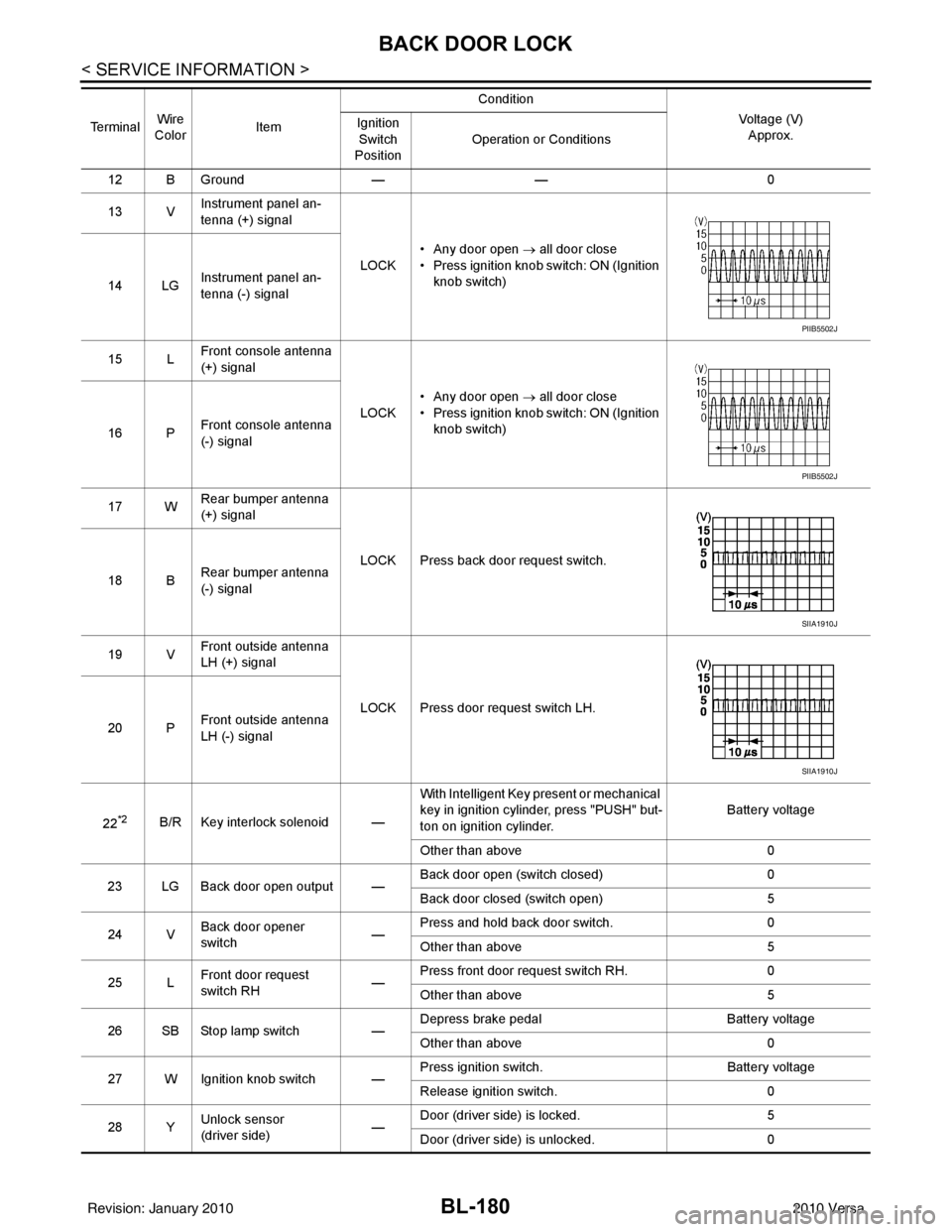
12 B Ground—— 0
13 V Instrument panel an-
tenna (+) signal
LOCK• Any door open
→ all door close
• Press ignition knob switch: ON (Ignition knob switch)
14 LG Instrument panel an-
tenna (-) signal
15 L Front console antenna
(+) signal
LOCK• Any door open
→ all door close
• Press ignition knob switch: ON (Ignition knob switch)
16 P Front console antenna
(-) signal
17 W Rear bumper antenna
(+) signal
LOCK Press back door request switch.
18 B Rear bumper antenna
(-) signal
19 V Front outside antenna
LH (+) signal
LOCK Press door request switch LH.
20 P Front outside antenna
LH (-) signal
22
*2B/R Key interlock solenoid — With Intelligent Key present or mechanical
key in ignition cylinder, press "PUSH" but-
ton on ignition cylinder.
Battery voltage
Other than above 0
23 LG Back door open output — Back door open (switch closed)
0
Back door closed (switch open) 5
24 V Back door opener
switch —Press and hold back door switch.
0
Other than above 5
25 L Front door request
switch RH —Press front door request switch RH.
0
Other than above 5
26 SB Stop lamp switch —Depress brake pedal
Battery voltage
Other than above 0
27 W Ignition knob switch — Press ignition switch.
Battery voltage
Release ignition switch. 0
28 Y Unlock sensor
(driver side) —Door (driver si
de) is locked. 5
Door (driver side ) is unlocked. 0
Te r m i n a l
Wire
Color Item Condition
Voltage (V)Approx.
Ignition
Switch
Position Operation or Conditions
PIIB5502J
PIIB5502J
SIIA1910J
SIIA1910J
Revision: January 20102010 Versa
Page 693 of 3745
BL-184
< SERVICE INFORMATION >
BACK DOOR LOCK
OK or NG
OK >> Back door opener switch is OK.
NG >> GO TO 2
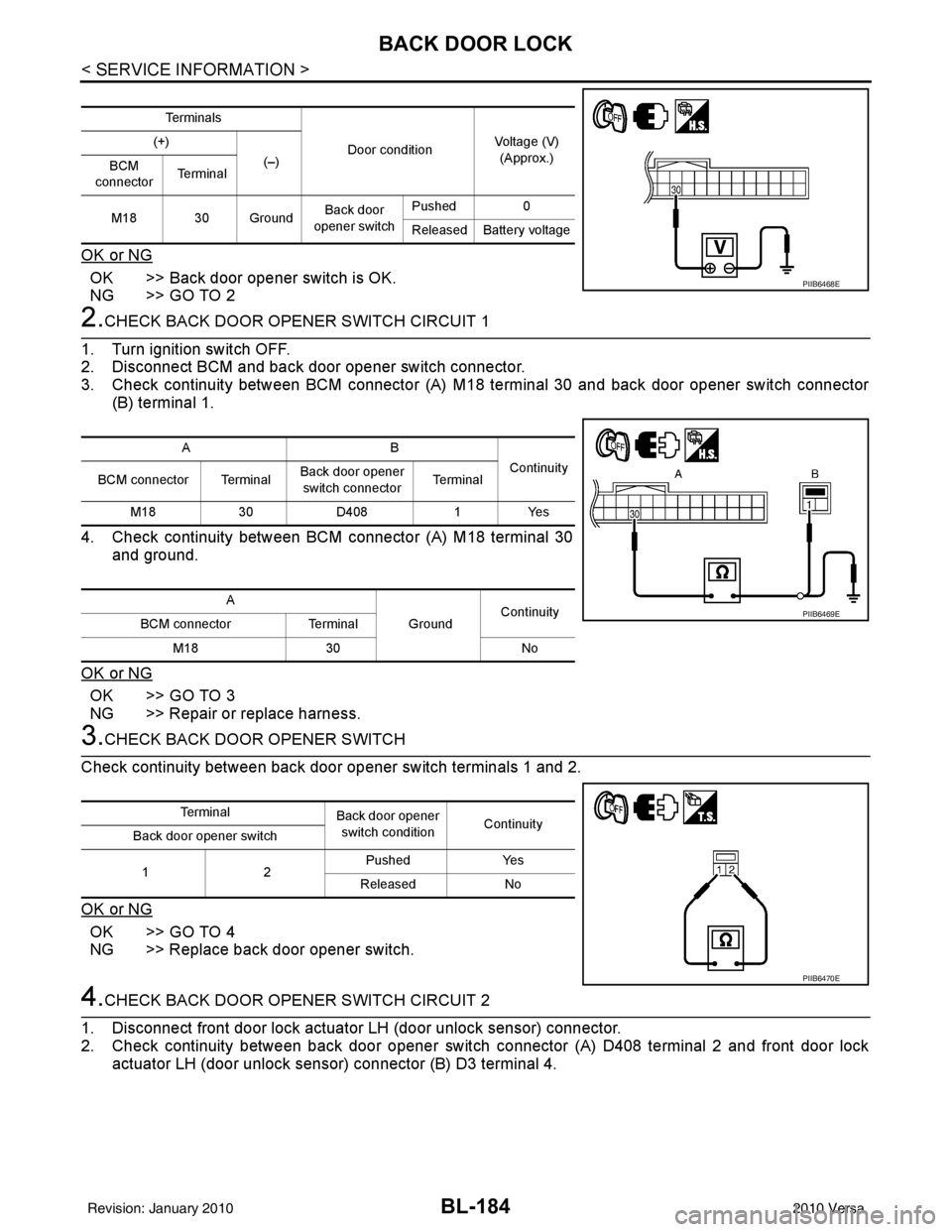
2.CHECK BACK DOOR OPENER SWITCH CIRCUIT 1
1. Turn ignition switch OFF.
2. Disconnect BCM and back door opener switch connector.
3. Check continuity between BCM connector (A) M18 terminal 30 and back door opener switch connector (B) terminal 1.
4. Check continuity between BCM connector (A) M18 terminal 30 and ground.
OK or NG
OK >> GO TO 3
NG >> Repair or replace harness.
3.CHECK BACK DOOR OPENER SWITCH
Check continuity between back door opener switch terminals 1 and 2.
OK or NG
OK >> GO TO 4
NG >> Replace back door opener switch.
4.CHECK BACK DOOR OPENER SWITCH CIRCUIT 2
1. Disconnect front door lock actuator LH (door unlock sensor) connector.
2. Check continuity between back door opener switch connector (A) D408 terminal 2 and front door lock
actuator LH (door unlock sensor) connector (B) D3 terminal 4.
Te r m i n a l s
Door conditionVoltage (V)
(Approx.)
(+)
(–)
BCM
connector Te r m i n a l
M18 30 Ground Back door
opener switch Pushed
0
Released Battery voltage
PIIB6468E
AB Continuity
BCM connector Terminal Back door opener
switch connector Te r m i n a l
M18 30D408 1Yes
A GroundContinuity
BCM connector Terminal
M18 30 No
PIIB6469E
Te r m i n a l
Back door opener
switch condition Continuity
Back door opener switch
12 Pushed Yes
Released No
PIIB6470E
Revision: January 20102010 Versa
Page 694 of 3745
BACK DOOR LOCKBL-185
< SERVICE INFORMATION >
C
DE
F
G H
J
K L
M A
B
BL
N
O P
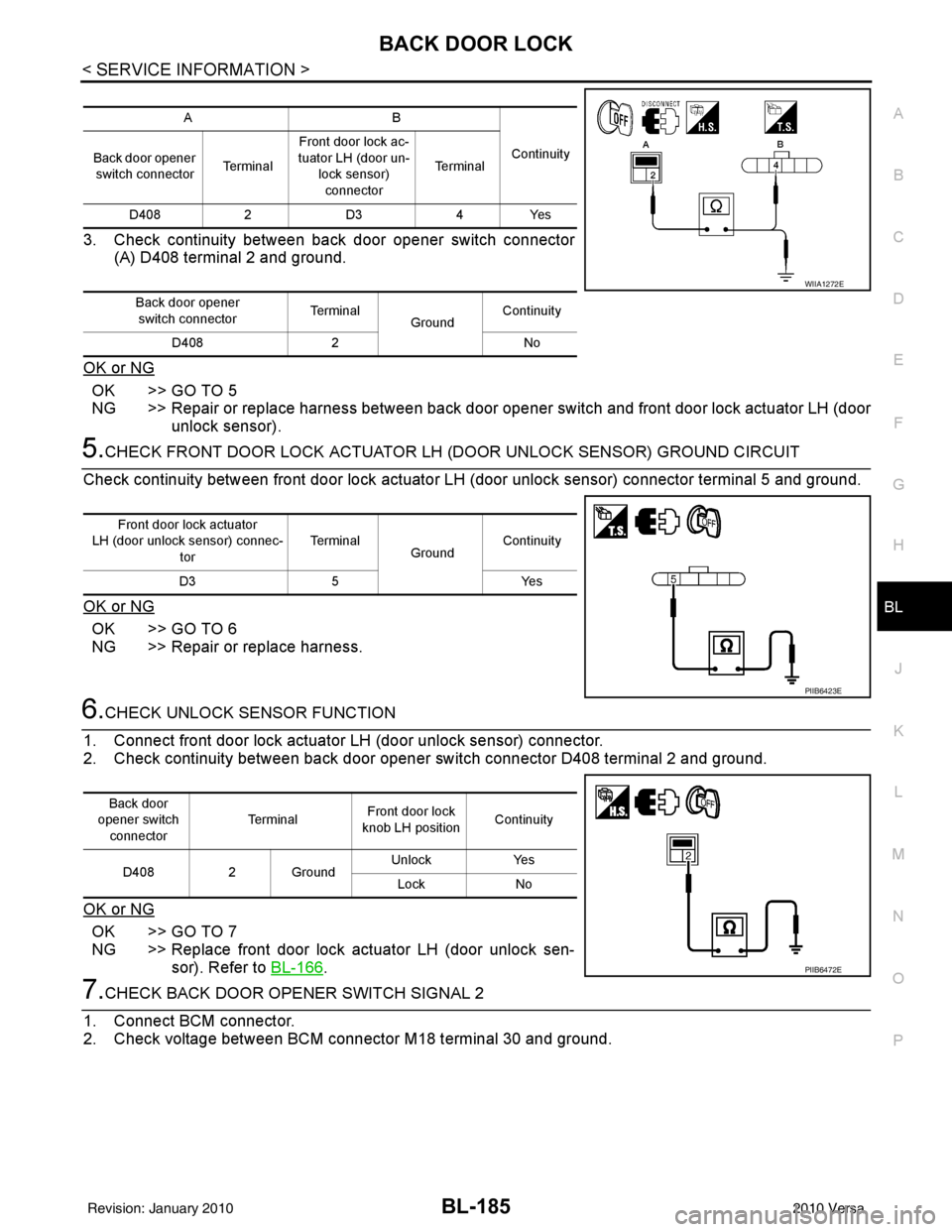
3. Check continuity between back door opener switch connector (A) D408 terminal 2 and ground.
OK or NG
OK >> GO TO 5
NG >> Repair or replace harness between back door opener switch and front door lock actuator LH (door
unlock sensor).
5.CHECK FRONT DOOR LOCK ACTUATOR LH (DOOR UNLOCK SENSOR) GROUND CIRCUIT
Check continuity between front door lock actuator LH (door unlock sensor) connector terminal 5 and ground.
OK or NG
OK >> GO TO 6
NG >> Repair or replace harness.
6.CHECK UNLOCK SENSOR FUNCTION
1. Connect front door lock actuator LH (door unlock sensor) connector.
2. Check continuity between back door opener switch connector D408 terminal 2 and ground.
OK or NG
OK >> GO TO 7
NG >> Replace front door lock actuator LH (door unlock sen- sor). Refer to BL-166
.
7.CHECK BACK DOOR OPENER SWITCH SIGNAL 2
1. Connect BCM connector.
2. Check voltage between BCM connector M18 terminal 30 and ground.
AB
Continuity
Back door opener
switch connector Te r m i n a lFront door lock ac-
tuator LH (door un-
lock sensor)connector Te r m i n a l
D408 2D3 4Yes
Back door opener switch connector Te r m i n a l
GroundContinuity
D408 2 No
WIIA1272E
Front door lock actuator
LH (door unlock sensor) connec-
tor Te r m i n a l
GroundContinuity
D3 5 Yes
PIIB6423E
Back door
opener switch connector Te r m i n a l
Front door lock
knob LH position Continuity
D408 2 Ground Unlock
Yes
Lock No
PIIB6472E
Revision: January 20102010 Versa
Page 696 of 3745
BACK DOOR LOCKBL-187
< SERVICE INFORMATION >
C
DE
F
G H
J
K L
M A
B
BL
N
O P
OK or NG
OK >> GO TO 3
NG >> Repair or replace harness.
3.CHECK BACK DOOR OPENER SWITCH
Check continuity between back door opener switch terminals 1 and 2.
OK or NG
OK >> GO TO 4
NG >> Replace back door opener switch.
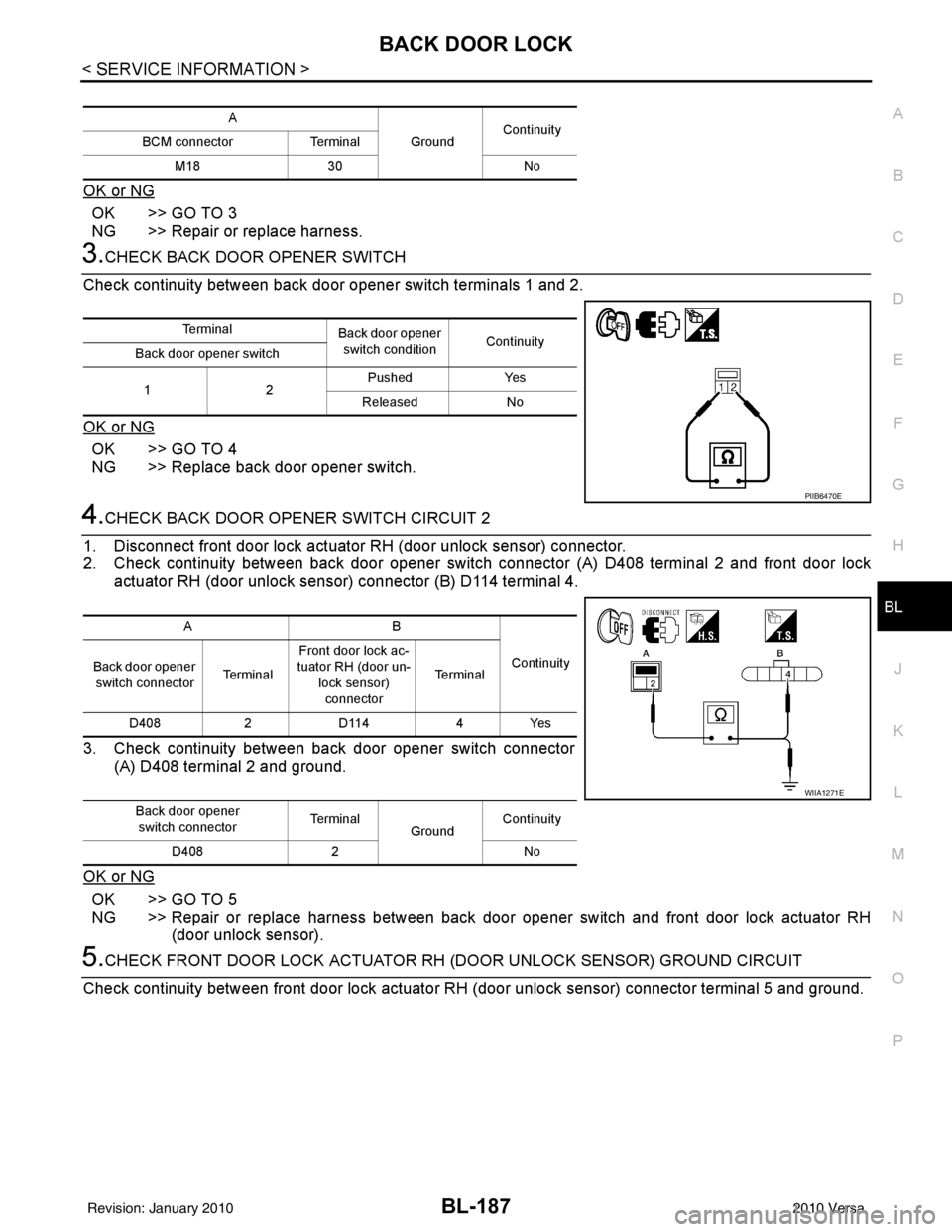
4.CHECK BACK DOOR OPENER SWITCH CIRCUIT 2
1. Disconnect front door lock actuator RH (door unlock sensor) connector.
2. Check continuity between back door opener switch connector (A) D408 terminal 2 and front door lock actuator RH (door unlock sensor) connector (B) D114 terminal 4.
3. Check continuity between back door opener switch connector (A) D408 terminal 2 and ground.
OK or NG
OK >> GO TO 5
NG >> Repair or replace harness between back door opener switch and front door lock actuator RH (door unlock sensor).
5.CHECK FRONT DOOR LOCK ACTUATOR RH (DOOR UNLOCK SENSOR) GROUND CIRCUIT
Check continuity between front door lock actuator RH (door unlock sensor) connector terminal 5 and ground.
A
GroundContinuity
BCM connector Terminal
M18 30 No
Te r m i n a l
Back door opener
switch condition Continuity
Back door opener switch
12 Pushed
Yes
Released No
PIIB6470E
AB
Continuity
Back door opener
switch connector Te r m i n a lFront door lock ac-
tuator RH (door un- lock sensor)
connector Te r m i n a l
D408 2 D114 4 Yes
Back door opener switch connector Te r m i n a l
GroundContinuity
D408 2 No
WIIA1271E
Revision: January 20102010 Versa
Page 697 of 3745
BL-188
< SERVICE INFORMATION >
BACK DOOR LOCK
OK or NG
OK >> GO TO 6
NG >> Repair or replace harness.
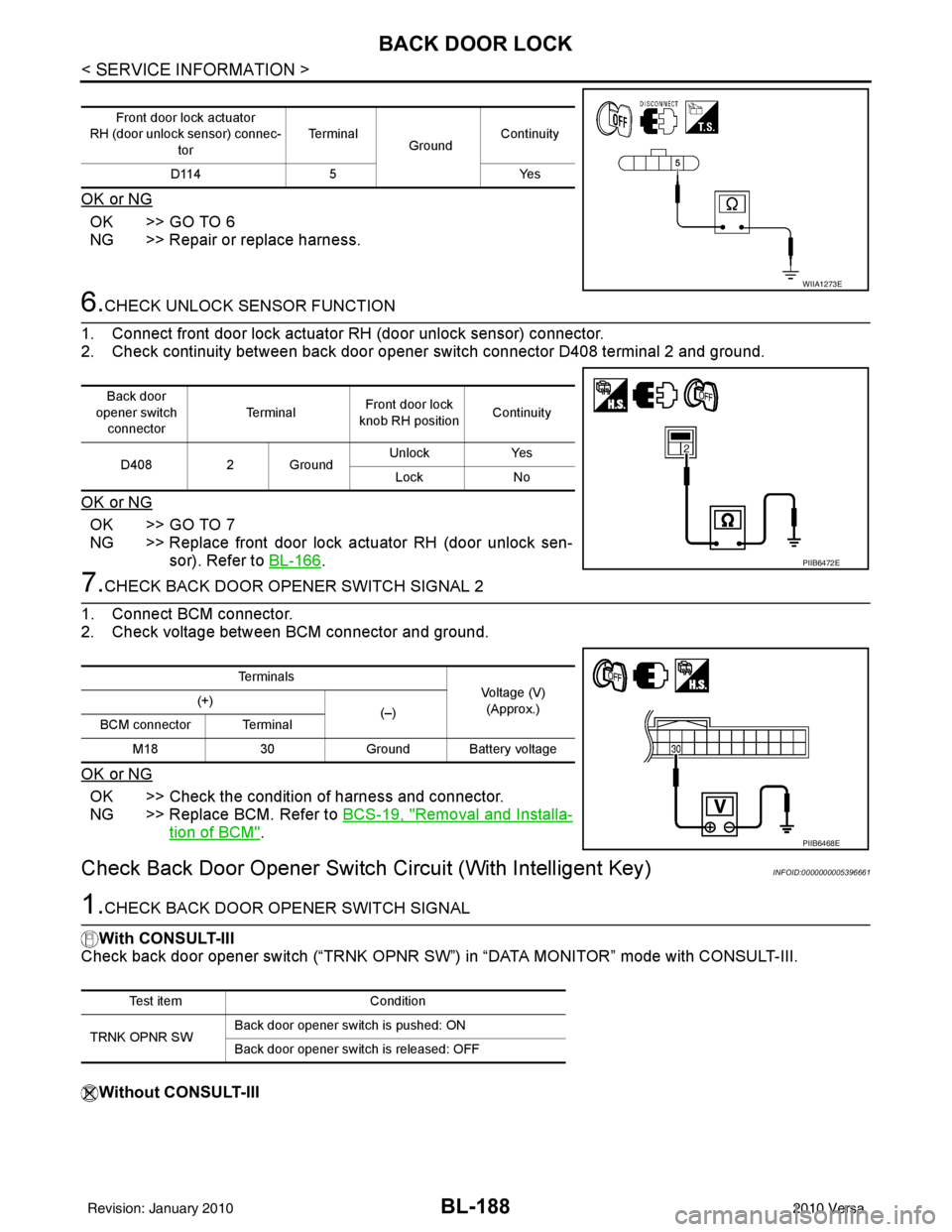
6.CHECK UNLOCK SENSOR FUNCTION
1. Connect front door lock actuator RH (door unlock sensor) connector.
2. Check continuity between back door opener switch connector D408 terminal 2 and ground.
OK or NG
OK >> GO TO 7
NG >> Replace front door lock actuator RH (door unlock sen- sor). Refer to BL-166
.
7.CHECK BACK DOOR OPENER SWITCH SIGNAL 2
1. Connect BCM connector.
2. Check voltage between BCM connector and ground.
OK or NG
OK >> Check the condition of harness and connector.
NG >> Replace BCM. Refer to BCS-19, "
Removal and Installa-
tion of BCM".
Check Back Door Opener Switch Circuit (With Intelligent Key)INFOID:0000000005396661
1.CHECK BACK DOOR OPENER SWITCH SIGNAL
With CONSULT-III
Check back door opener switch (“TRNK OPNR SW”) in “DATA MONITOR” mode with CONSULT-III.
Without CONSULT-III
Front door lock actuator
RH (door unlock sensor) connec-
tor Te r m i n a l
GroundContinuity
D114 5 Yes
WIIA1273E
Back door
opener switch connector Te r m i n a l
Front door lock
knob RH position Continuity
D408 2 Ground Unlock
Yes
Lock No
PIIB6472E
Te r m i n a l s
Voltage (V)
(Approx.)
(+)
(–)
BCM connector Terminal
M18 30Ground Battery voltage
PIIB6468E
Test item Condition
TRNK OPNR SW Back door opener switch is pushed: ON
Back door opener switch is released: OFF
Revision: January 20102010 Versa
Page 705 of 3745
BL-196
< SERVICE INFORMATION >
TRUNK LID OPENER
TRUNK LID OPENER
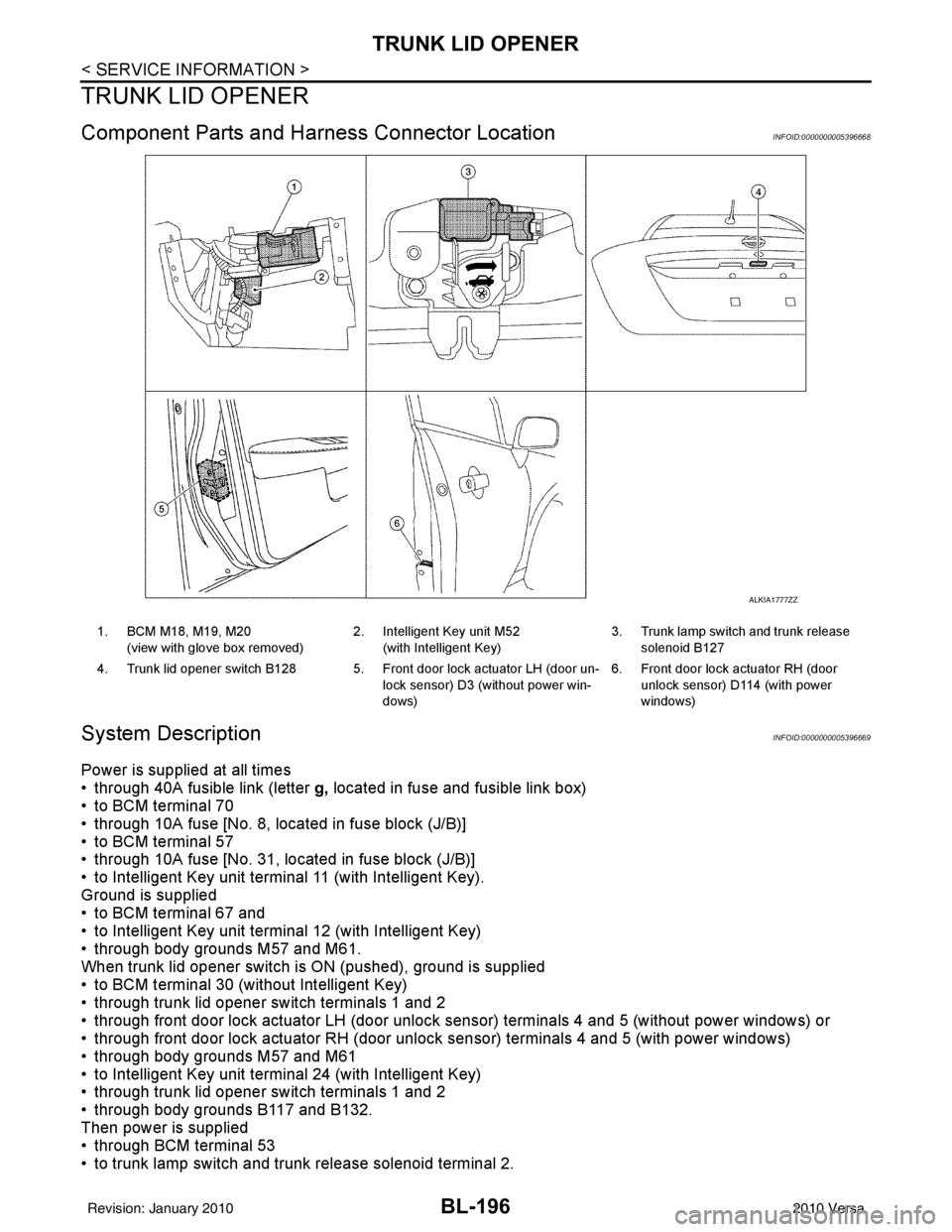
Component Parts and Harness Connector LocationINFOID:0000000005396668
System DescriptionINFOID:0000000005396669
Power is supplied at all times
• through 40A fusible link (letter g, located in fuse and fusible link box)
• to BCM terminal 70
• through 10A fuse [No. 8, located in fuse block (J/B)]
• to BCM terminal 57
• through 10A fuse [No. 31, located in fuse block (J/B)]
• to Intelligent Key unit terminal 11 (with Intelligent Key).
Ground is supplied
• to BCM terminal 67 and
• to Intelligent Key unit terminal 12 (with Intelligent Key)
• through body grounds M57 and M61.
When trunk lid opener switch is ON (pushed), ground is supplied
• to BCM terminal 30 (without Intelligent Key)
• through trunk lid opener switch terminals 1 and 2
• through front door lock actuator LH (door unlock s ensor) terminals 4 and 5 (without power windows) or
• through front door lock actuator RH (door unlock sensor) terminals 4 and 5 (with power windows)
• through body grounds M57 and M61
• to Intelligent Key unit terminal 24 (with Intelligent Key)
• through trunk lid opener switch terminals 1 and 2
• through body grounds B117 and B132.
Then power is supplied
• through BCM terminal 53
• to trunk lamp switch and trunk release solenoid terminal 2.
ALKIA1777ZZ
1. BCM M18, M19, M20
(view with glove box removed) 2. Intelligent Key unit M52
(with Intelligent Key) 3. Trunk lamp switch and trunk release
solenoid B127
4. Trunk lid opener switch B128 5. Front door lock actuator LH (door un- lock sensor) D3 (without power win-
dows)6. Front door lock actuator RH (door
unlock sensor) D1 14 (with power
windows)
Revision: January 20102010 Versa
Page 713 of 3745
BL-204
< SERVICE INFORMATION >
TRUNK LID OPENER
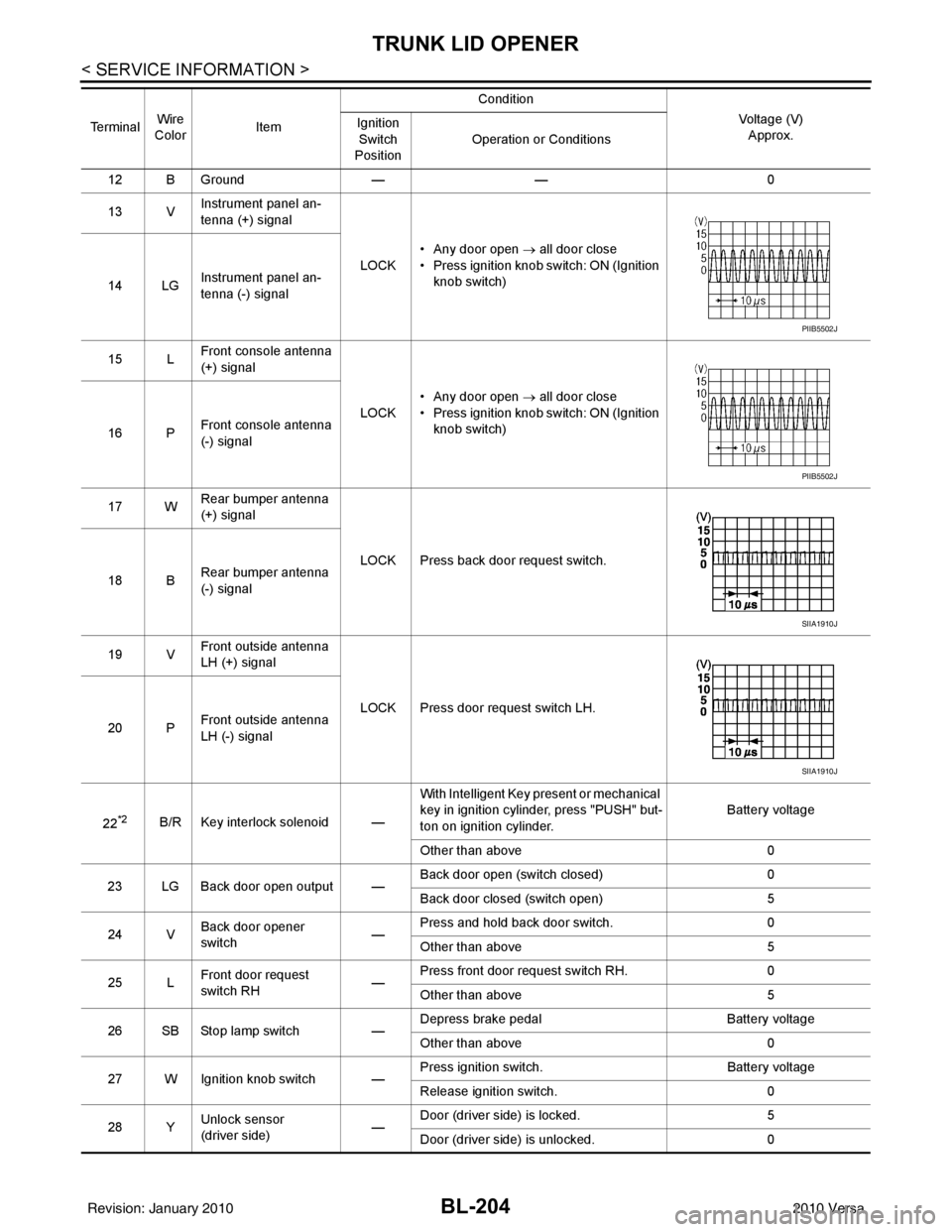
12 B Ground—— 0
13 V Instrument panel an-
tenna (+) signal
LOCK• Any door open
→ all door close
• Press ignition knob switch: ON (Ignition knob switch)
14 LG Instrument panel an-
tenna (-) signal
15 L Front console antenna
(+) signal
LOCK• Any door open
→ all door close
• Press ignition knob switch: ON (Ignition knob switch)
16 P Front console antenna
(-) signal
17 W Rear bumper antenna
(+) signal
LOCK Press back door request switch.
18 B Rear bumper antenna
(-) signal
19 V Front outside antenna
LH (+) signal
LOCK Press door request switch LH.
20 P Front outside antenna
LH (-) signal
22
*2B/R Key interlock solenoid — With Intelligent Key present or mechanical
key in ignition cylinder, press "PUSH" but-
ton on ignition cylinder.
Battery voltage
Other than above 0
23 LG Back door open output — Back door open (switch closed)
0
Back door closed (switch open) 5
24 V Back door opener
switch —Press and hold back door switch.
0
Other than above 5
25 L Front door request
switch RH —Press front door request switch RH.
0
Other than above 5
26 SB Stop lamp switch —Depress brake pedal
Battery voltage
Other than above 0
27 W Ignition knob switch — Press ignition switch.
Battery voltage
Release ignition switch. 0
28 Y Unlock sensor
(driver side) —Door (driver si
de) is locked. 5
Door (driver side ) is unlocked. 0
Te r m i n a l
Wire
Color Item Condition
Voltage (V)Approx.
Ignition
Switch
Position Operation or Conditions
PIIB5502J
PIIB5502J
SIIA1910J
SIIA1910J
Revision: January 20102010 Versa