key fob NISSAN LATIO 2011 Service User Guide
[x] Cancel search | Manufacturer: NISSAN, Model Year: 2011, Model line: LATIO, Model: NISSAN LATIO 2011Pages: 3787, PDF Size: 78.35 MB
Page 570 of 3787
BL-60
< SERVICE INFORMATION >
REMOTE KEYLESS ENTRY SYSTEM
With CONSULT-III
Hazard reminder can be changed using “HAZARD LAMP SET” mode in “WORK SUPPORT”.
Horn reminder can be changed using “HORN CHIRP SET” mode in “WORK SUPPORT”.
Refer to BL-69, "
CONSULT-III Function (BCM)" .
Without CONSULT-III
Refer to Owner's Manual for instructions.
Auto Door Lock Operation
Auto lock function signal is sent for operation when any of the following signals are not sent within 1 minute
after the unlock signal is sent from the keyfob:
• when door switch is turned ON for open.
• when the key switch is turned ON.
• when the lock signal is sent from the keyfob.
Auto door lock mode can be changed using “AUT O LOCK SET” mode in “WORK SUPPORT”.
Refer to BL-69, "
CONSULT-III Function (BCM)" .
Panic Alarm Operation
When key switch is OFF (when ignition key is not inserted in key cylinder), BCM turns on and off horn intermit-
tently with input of PANIC ALARM signal from keyfob.
BCM outputs to IPDM E/R for panic alarm signal (horn signal) as DATA LINE (CAN H line and CAN L line).
The alarm automatically turns off after 25 seconds or when BCM receives any signal from keyfob.
Panic alarm operation mode can be changed using “P ANIC ALARM SET” mode in “WORK SUPPORT”.
Refer to BL-69, "
CONSULT-III Function (BCM)" .
Interior Lamp Operation
When the following conditions come:
• condition of interior lamp switch is in the DOOR position;
• door switch OFF (when all the doors are closed);
Remote keyless entry system turns on interior lamp (for 30 seconds) with input of UNLOCK signal from key-
fob. For detailed description, refer to LT- 9 3
.
CAN Communication System DescriptionINFOID:0000000005929304
Refer to LAN-7 .
Revision: May 2010 2011 Versa
Page 576 of 3787
BL-66
< SERVICE INFORMATION >
REMOTE KEYLESS ENTRY SYSTEM
15 WTire pressure warning
check connector
Input OFF
—5V
18 V Remote keyless entry
receiver (ground) Output OFF
—0V
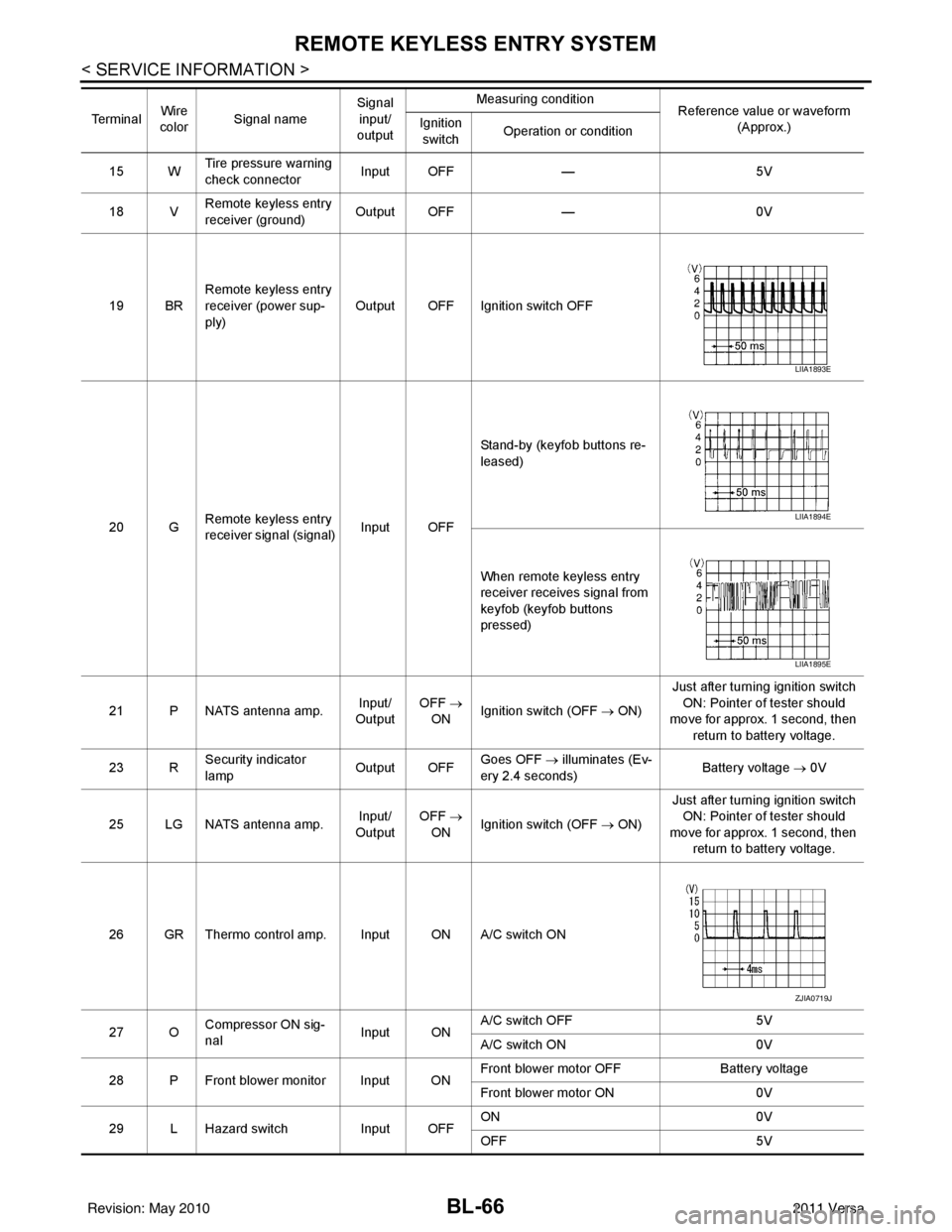
19 BR Remote keyless entry
receiver (power sup-
ply) Output OFF Ignition switch OFF
20 G Remote keyless entry
receiver signal (signal)
Input OFFStand-by (keyfob buttons re-
leased)
When remote keyless entry
receiver receives signal from
keyfob (keyfob buttons
pressed)
21 P NATS antenna amp. Input/
Output OFF
→
ON Ignition switch (OFF
→ ON)Just after turning ignition switch
ON: Pointer of tester should
move for approx. 1 second, then
return to battery voltage.
23 R Security indicator
lamp Output OFF
Goes OFF
→ illuminates (Ev-
ery 2.4 seconds) Battery voltage
→ 0V
25 LG NATS antenna amp. Input/
Output OFF
→
ON Ignition switch (OFF
→ ON)Just after turning ignition switch
ON: Pointer of tester should
move for approx. 1 second, then return to battery voltage.
26 GR Thermo control amp. Input ON A/C switch ON
27 O Compressor ON sig-
nal Input ONA/C switch OFF
5V
A/C switch ON 0V
28 P Front blower monitor Input ON Front blower motor OFF
Battery voltage
Front blower motor ON 0V
29 L Hazard switch Input OFFON
0V
OFF 5V
Te r m i n a l
Wire
color Signal name Signal
input/
output Measuring condition
Reference value or waveform
(Approx.)
Ignition
switch Operation or condition
LIIA1893E
LIIA1894E
LIIA1895E
ZJIA0719J
Revision: May 2010
2011 Versa
Page 580 of 3787

BL-70
< SERVICE INFORMATION >
REMOTE KEYLESS ENTRY SYSTEM
CONSULT-III APPLICATION ITEMS
Work Support
HAZARD LAMP SET
AUTO LOCK SET
PANIC ALARM SET
TRUNK OPEN SET
Data Monitor
Diagnostic modeDescription
WORK SUPPORT Supports inspections and adjustments. Commands are transmitted to the BCM for setting
the status suitable for required operation, input/output signals are received from the BCM
and received date is displayed.
DATA MONITOR Displays BCM input/output data in real time.
ACTIVE TEST Operation of electrical loads can be checked by sending drive signal to them.
SELF DIAGNOSTIC RESULT Displays BCM self-diagnosis results. CAN DIAG SUPPORT MNTR The result of transmit/receive diagnosis of CAN communication can be read. ECU IDENTIFICATION BCM part number can be read.CONFIGURATION Performs BCM configuration read/write functions.
Te s t I t e m D e s c r i p t i o n
HORN CHIRP SET Horn chirp (On/Off) when keyfob Lock or Unlock is pressed can be selected.
REMO CONT ID REGIST Keyfob ID code can be registered.
REMO CONT ID ERASER Keyfob ID code can be erased.
REMO CONT ID CONFIR Keyfob ID code can be checked whether it is registered or not.
MODE 1 MODE 2MODE 3 MODE 4
Hazard lamp operation mode NothingUnlock only Lock only Lock and Unlock
MODE 1 MODE 2MODE 3
Auto locking function 30 secondsNothing1 minutes
MODE 1 MODE 2MODE 3
Keyfob operation 0.5 secondsNothing1.5 seconds
MODE 1 MODE 2MODE 3
Keyfob operation 0.5 secondsNothing1.5 seconds
Monitored Item Description
IGN ON SW Indicates [ON/OFF] condition of ignition switch in ON position.
KEY ON SW Indicates [ON/OFF] condition of key switch.
ACC ON SW Indicates [ON/OFF] condition of ignition switch in ACC position.
KEYLESS LOCK Indicates [ON/OFF] condition of lock signal from keyfob.
KEYLESS UNLOCK Indicates [ON/OFF] condition of unlock signal from keyfob.
KEYLESS PANIC Indicates [ON/OFF] condition of panic alarm signal from keyfob.
DOOR SW-DR Indicates [ON/OFF] condition of front door switch driver side.
DOOR SW-AS Indicates [ON/OFF] condition of front door switch passenger side.
DOOR SW-RR Indicates [ON/OFF] condition of rear door switch RH.
DOOR SW-RL Indicates [ON/OFF] condition of rear door switch LH.
TRNK OPN MNTR Indicates [ON/OFF] condition of trunk room lamp switch (sedan).
BACK DOOR SW Indicates [ON/OFF] condition of back door switch (hatchback).
CDL LOCK SW Indicates [ON/OFF] condition of lock signal from door lock and unlock switch.
Revision: May 2010 2011 Versa
Page 581 of 3787
REMOTE KEYLESS ENTRY SYSTEMBL-71
< SERVICE INFORMATION >
C
DE
F
G H
J
K L
M A
B
BL
N
O P
Active Test
Work FlowINFOID:0000000005929311
1. Check the symptom and customer's requests.
2. Understand outline of system. Refer to
BL-58, "
System Description" .
3. Confirm that power door lock system operates normally. Refer to BL-22
.
4. Repair or replace any malfunctioning parts. Refer to BL-71, "
Trouble Diagnosis Symptom Chart" .
5. Does remote keyless entry system operate normally? If Yes, GO TO 6. If No, GO TO 4.
6. INSPECTION END
Trouble Diagnosis Symptom ChartINFOID:0000000005929312
NOTE:
• Always check the “Work Flow” before troubleshooting. Refer to BL-71, "
Work Flow" .
• Always check keyfob battery before replacing keyfob.
CDL UNLOCK SW Indicates [ON/OFF] condition of unlock signal from door lock and unlock switch.
KEY CYL LK SW Indicates [ON/OFF] condition of driver key cylinder lock signal.
Monitored Item
Description
Test ItemDescription
DOOR LOCK This test is able to check all door lock actuators operation [OTR ULK/DR UNLK/ALL ULK/ALL LCK].
FLASHER This test is able to check right and left hazard reminder operation. [LH/RH]
HORN This test is able to check horn reminder operation. [ON/OFF]
TRUNK/BACK DOOR This test is able to check trunk release solenoid (sedan) or back door actuator (hatchback) operation
[OFF/OPEN].
Symptom
Diagnoses/service procedureReference
page
All function of remote keyless entry system do not
operate. 1. Check key switch.
BL-78
2. Check keyfob battery and function.
NOTE:
If the result of keyfob function check with CONSULT-III is OK, key-
fob is not malfunctioning.BL-72
3. Check remote keyless entry receiver.
BL-80
4. Refer to ID Code Entry Procedure.BL-83
5. Replace BCM.BCS-19
The new ID of keyfob cannot be entered.1. Check keyfob battery and function.
NOTE:
If the result of keyfob function check with CONSULT-III is OK, key-
fob is not malfunctioning.
BL-72
2. Check key switch.
BL-78
3. Check door switch (hatchback).BL-74
4. Check door switch (sedan).BL-76
5. Check ACC switch.BL-74
6. Replace keyfob. Refer to ID Code Entry Procedure.BL-83
7. Replace BCM.BCS-19
Revision: May 2010 2011 Versa
Page 582 of 3787

BL-72
< SERVICE INFORMATION >
REMOTE KEYLESS ENTRY SYSTEM
Keyfob Battery and Function Check
INFOID:0000000005929313
1.CHECK KEYFOB FUNCTION
With CONSULT-III
Check keyfob function in “DATA MONITOR” mode with CONSULT-III. When pushing each button of keyfob,
the corresponding monitor item should be turned as follows.
Without CONSULT-III
Door lock does not function with keyfob.
(Power door lock system is “OK”.) 1. Check keyfob function. (Lock)
NOTE:
If the result of keyfob function check with CONSULT-III is OK, key-
fob is not malfunctioning.
BL-822. Replace keyfob. Refer to ID Code Entry Procedure.
BL-83
3. Check door switch (hatchback).BL-74
4. Check door switch (sedan).BL-76
5. Replace BCM.BCS-19
Door unlock does not function with keyfob
(Power door lock system is “OK”)1. Check keyfob function. (Unlock)
BL-82
2. Replace keyfob. Refer to ID Code Entry Procedure.
NOTE:
If the result of keyfob function check with CONSULT-III is OK, key-
fob is not malfunctioning.BL-83
3. Replace BCM.
BCS-19
Hazard reminder does not activate properly when
pressing lock or unlock button of keyfob.1. Check hazard reminder mode.*
*: Hazard reminder mode can be changed.
First check the hazard reminder setting.
BL-69
2. Check hazard function.
BL-79
3. Replace BCM.BCS-19
Panic alarm does not activate when panic alarm but-
ton is continuously pressed.1. Check panic alarm mode.*
*: Panic alarm mode can be changed.
First check the panic alarm setting.
BL-69
2. Check keyfob battery and function.
NOTE:
If the result of keyfob function check with CONSULT-III is OK, key-
fob is not malfunctioning.BL-72
3. Check horn function.
BL-79
4. Check key switch.BL-78
5. Replace keyfob. Refer to ID Code Entry Procedure.BL-83
6. Replace BCM.BCS-19
Auto door lock operation does not activate properly.
(All other remote keyless entry system functions are
OK.)1. Check auto door lock operation mode.*
*: Auto door lock operation mode can be changed.
First check the auto door lock operation setting.
BL-69
2. Replace BCM.
BCS-19
Interior lamp operation does not activate properly.1. Check interior lamp operation.
BL-802. Replace BCM.BCS-19
SymptomDiagnoses/service procedureReference
page
Condition Monitor item
Pushing LOCK KEYLESS LOCK: ON
Pushing UNLOCK KEYLESS UNLOCK: ON
Pushing PANIC KEYLESS PANIC: ON
Revision: May 2010 2011 Versa
Page 583 of 3787
REMOTE KEYLESS ENTRY SYSTEMBL-73
< SERVICE INFORMATION >
C
DE
F
G H
J
K L
M A
B
BL
N
O P
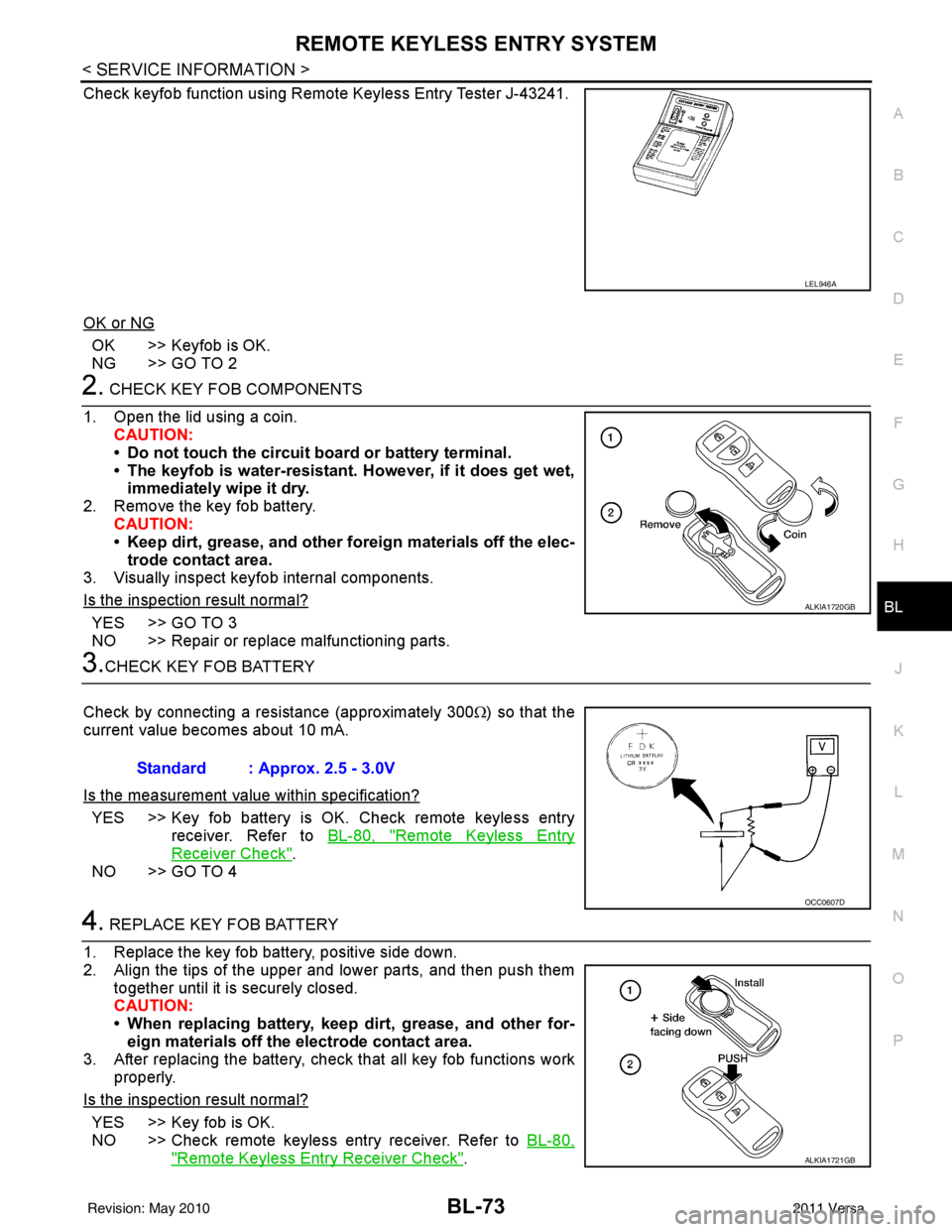
Check keyfob function using Remote Keyless Entry Tester J-43241.
OK or NG
OK >> Keyfob is OK.
NG >> GO TO 2
2. CHECK KEY FOB COMPONENTS
1. Open the lid using a coin. CAUTION:
• Do not touch the circuit board or battery terminal.
• The keyfob is water-resistant. However, if it does get wet,immediately wipe it dry.
2. Remove the key fob battery. CAUTION:
• Keep dirt, grease, and other fo reign materials off the elec-
trode contact area.
3. Visually inspect keyfob internal components.
Is the inspection result normal?
YES >> GO TO 3
NO >> Repair or replace malfunctioning parts.
3.CHECK KEY FOB BATTERY
Check by connecting a resistance (approximately 300 Ω) so that the
current value becomes about 10 mA.
Is the measurement val ue within specification?
YES >> Key fob battery is OK. Check remote keyless entry
receiver. Refer to BL-80, "
Remote Keyless Entry
Receiver Check".
NO >> GO TO 4
4. REPLACE KEY FOB BATTERY
1. Replace the key fob battery, positive side down.
2. Align the tips of the upper and lower parts, and then push them together until it is securely closed.
CAUTION:
• When replacing battery, keep dirt, grease, and other for-eign materials off the electrode contact area.
3. After replacing the battery, check that all key fob functions work properly.
Is the inspection result normal?
YES >> Key fob is OK.
NO >> Check remote keyless entry receiver. Refer to BL-80,
"Remote Keyless Entry Receiver Check".
LEL946A
ALKIA1720GB
Standard : Approx. 2.5 - 3.0V
OCC0607D
ALKIA1721GB
Revision: May 2010 2011 Versa
Page 590 of 3787
BL-80
< SERVICE INFORMATION >
REMOTE KEYLESS ENTRY SYSTEM
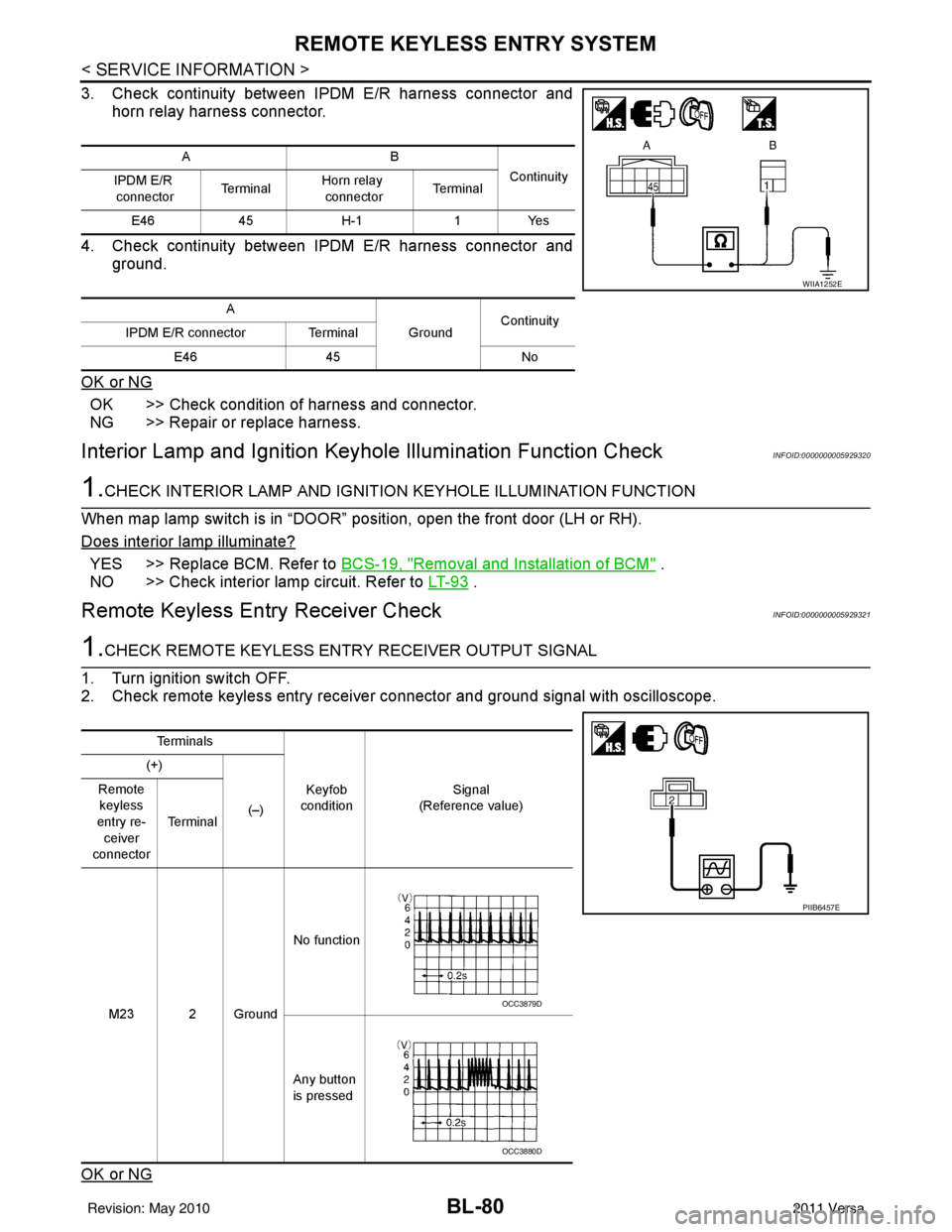
3. Check continuity between IPDM E/R harness connector andhorn relay harness connector.
4. Check continuity between IPDM E/R harness connector and ground.
OK or NG
OK >> Check condition of harness and connector.
NG >> Repair or replace harness.
Interior Lamp and Ignition Keyhole Illumination Function CheckINFOID:0000000005929320
1.CHECK INTERIOR LAMP AND IGNITION KEYHOLE ILLUMINATION FUNCTION
When map lamp switch is in “DOOR” position, open the front door (LH or RH).
Does interior lamp illuminate?
YES >> Replace BCM. Refer to BCS-19, "Removal and Installation of BCM" .
NO >> Check interior lamp circuit. Refer to LT- 9 3
.
Remote Keyless Entry Receiver CheckINFOID:0000000005929321
1.CHECK REMOTE KEYLESS ENTRY RECEIVER OUTPUT SIGNAL
1. Turn ignition switch OFF.
2. Check remote keyless entry receiver connector and ground signal with oscilloscope.
OK or NG
AB Continuity
IPDM E/R
connector Te r m i n a lHorn relay
connector Te r m i n a l
E46 45H-1 1Yes
A GroundContinuity
IPDM E/R connector Terminal
E46 45 No
WIIA1252E
Te r m i n a l s
Keyfob
condition Signal
(Reference value)
(+)
(–)
Remote
keyless
entry re- ceiver
connector Te r m i n a l
M23 2 Ground No function
Any button
is pressed
PIIB6457E
OCC3879D
OCC3880D
Revision: May 2010 2011 Versa
Page 592 of 3787
BL-82
< SERVICE INFORMATION >
REMOTE KEYLESS ENTRY SYSTEM
OK or NG
OK >> Replace BCM. Refer to BCS-19, "Removal and Installa-
tion of BCM" .
NG >> Repair or replace the harness.
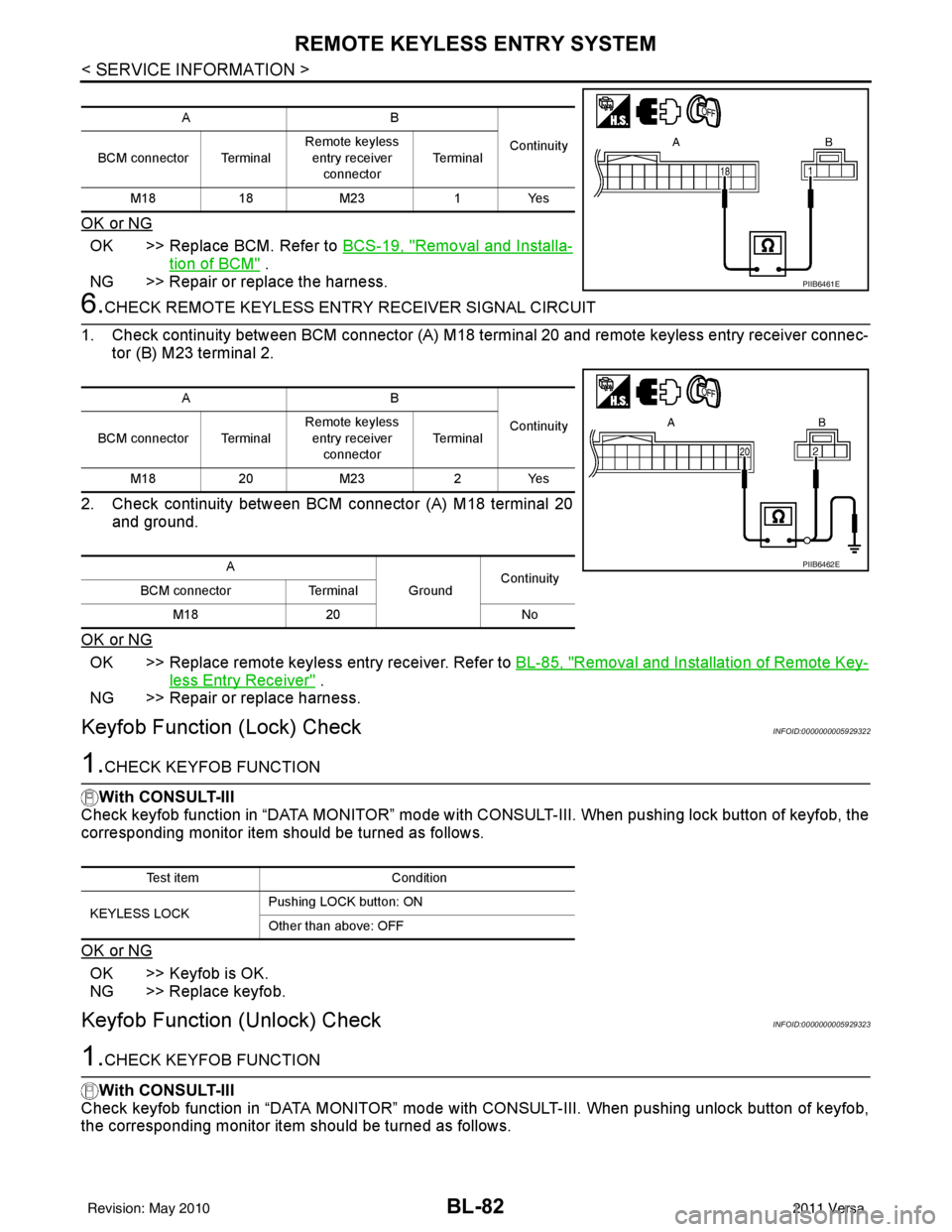
6.CHECK REMOTE KEYL ESS ENTRY RECEIVER SIGNAL CIRCUIT
1. Check continuity between BCM connector (A) M18 terminal 20 and remote keyless entry receiver connec- tor (B) M23 terminal 2.
2. Check continuity between BCM connector (A) M18 terminal 20 and ground.
OK or NG
OK >> Replace remote keyless entry receiver. Refer to BL-85, "Removal and Installation of Remote Key-
less Entry Receiver" .
NG >> Repair or replace harness.
Keyfob Function (Lock) CheckINFOID:0000000005929322
1.CHECK KEYFOB FUNCTION
With CONSULT-III
Check keyfob function in “DATA MONITOR” mode with CO NSULT-III. When pushing lock button of keyfob, the
corresponding monitor item should be turned as follows.
OK or NG
OK >> Keyfob is OK.
NG >> Replace keyfob.
Keyfob Function (Unlock) CheckINFOID:0000000005929323
1.CHECK KEYFOB FUNCTION
With CONSULT-III
Check keyfob function in “DATA MONITOR” mode with CONSULT-III. When pushing unlock button of keyfob,
the corresponding monitor item should be turned as follows.
AB
Continuity
BCM connector Terminal Remote keyless
entry receiver
connector Te r m i n a l
M18 18M23 1Yes
PIIB6461E
AB
Continuity
BCM connector Terminal Remote keyless
entry receiver
connector Te r m i n a l
M18 20M23 2Yes
A GroundContinuity
BCM connector Terminal
M18 20 No
PIIB6462E
Test item Condition
KEYLESS LOCK Pushing LOCK button: ON
Other than above: OFF
Revision: May 2010
2011 Versa
Page 593 of 3787

REMOTE KEYLESS ENTRY SYSTEMBL-83
< SERVICE INFORMATION >
C
DE
F
G H
J
K L
M A
B
BL
N
O P
OK or NG
OK >> Keyfob is OK.
NG >> Replace keyfob.
ID Code Entry ProcedureINFOID:0000000005929324
KEYFOB ID SET UP WITH CONSULT-III
NOTE:
• If a keyfob is lost, the ID code of the lost keyfob must be erased to prevent unauthorized use. A spe-
cific ID code can be erased with CONSULT-III. However, when the ID code of a lost keyfob is not
known, all controller ID codes should be erased. After all ID codes are erased, the ID codes of all
remaining and/or new keyfobs must be re-registered.
• When registering an addi tional keyfob, the existing ID codes in memory may or may not be erased. If
five ID codes are stored in memory , when an additional code is registered, only the oldest code is
erased. If less than five ID codes are stored in memory, when an additional ID code is registered, the
new ID code is added and no ID codes are erased.
• Entry of maximum five ID codes is allowed. When more than five ID codes are entered, the oldest ID
code will be erased.
• Even if same ID code that is already in the memo ry is input, the same ID code can be entered. The
code is counted as an additional code.
1. Touch “MULTI REMOTE ENT”.
2. Touch “WORK SUPPORT”.
3. The items are shown on the figure can be set up. • “REMO CONT ID CONFIR”Use this mode to confirm if a keyfob ID code is registered or not.
• “REMO CONT ID REGIST” Use this mode to register a keyfob ID code.
NOTE:
Register the ID code when keyfob or BCM is replaced, or when additional keyfob is required.
• “REMO CONT ID ERASUR” Use this mode to erase a keyfob ID code.
Test item Condition
KEYLESS UNLOCK Pushing UNLOCK button: ON
Other than above: OFF
Revision: May 2010
2011 Versa
Page 594 of 3787
BL-84
< SERVICE INFORMATION >
REMOTE KEYLESS ENTRY SYSTEM
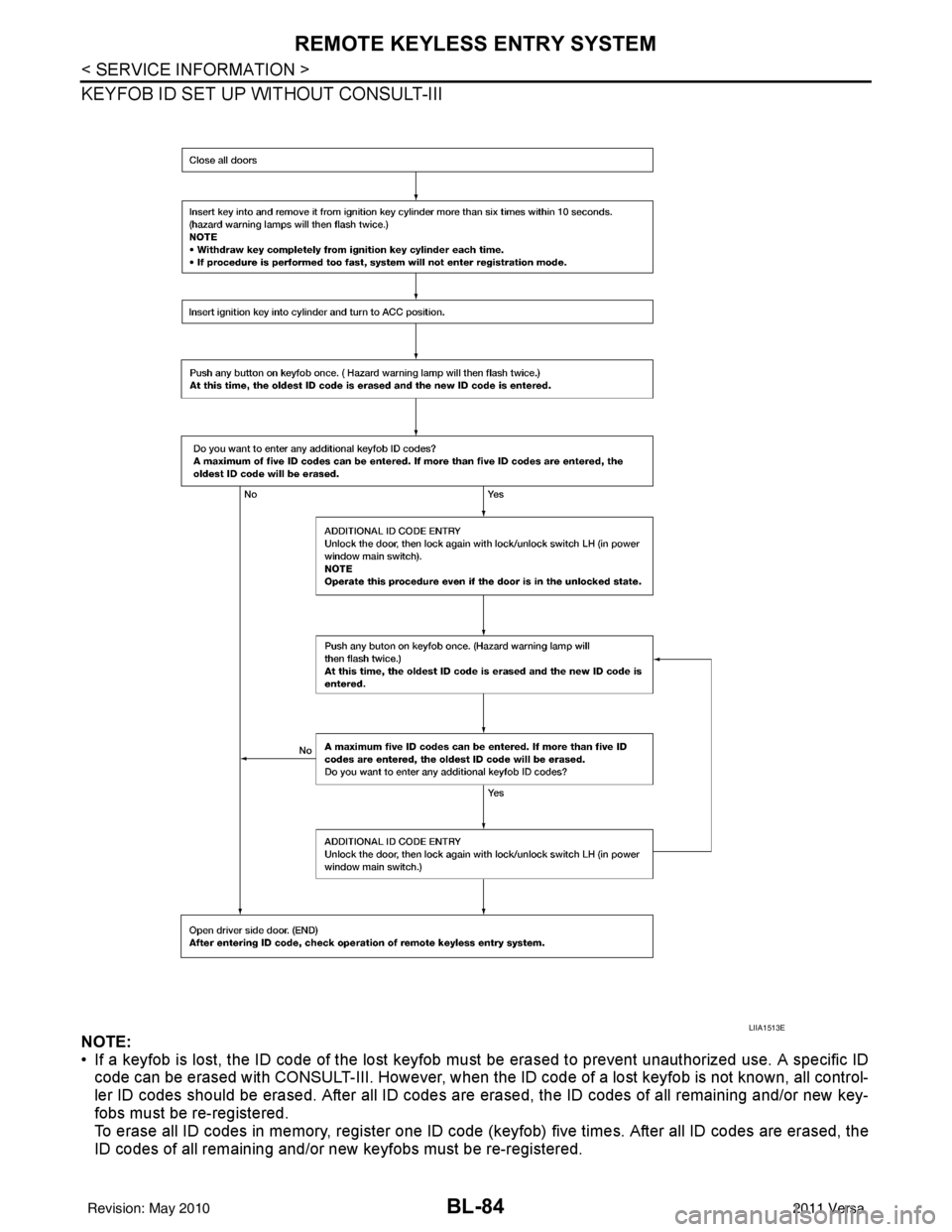
KEYFOB ID SET UP WITHOUT CONSULT-III
NOTE:
• If a keyfob is lost, the ID code of the lost keyfob must be erased to prevent unauthorized use. A specific ID
code can be erased with CONSULT-III. However, when the ID code of a lost keyfob is not known, all control-
ler ID codes should be erased. After all ID codes are erased, the ID codes of all remaining and/or new key-
fobs must be re-registered.
To erase all ID codes in memory, register one ID code (keyfob) five times. After all ID codes are erased, the
ID codes of all remaining and/or new keyfobs must be re-registered.
LIIA1513E
Revision: May 2010 2011 Versa