lock NISSAN LEAF 2012 Owner's Manual
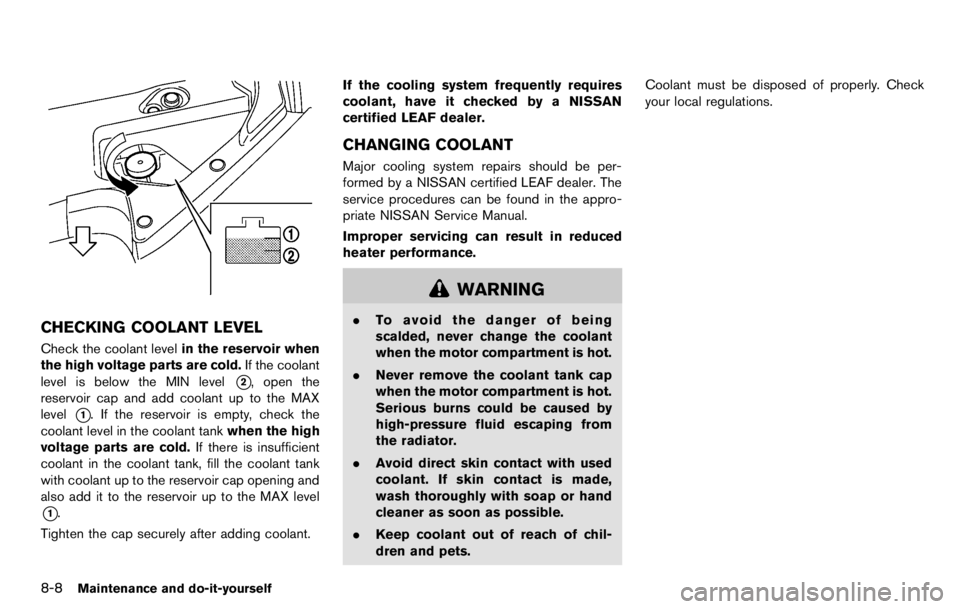
[x] Cancel search | Manufacturer: NISSAN, Model Year: 2012, Model line: LEAF, Model: NISSAN LEAF 2012Pages: 1062, PDF Size: 3.63 MB
Page 260 of 1062
WARNING
.If you use any medical electric
devices, such as an implantable
cardiac pacemaker or an implanta-
ble cardiovascular defibrillator,
check with the electric medical de-
vice manufacturer concerning the
effects that charging may have on
implanted devices before starting
the charge operation. Charging
may affect the operation.
. If you have an implantable cardiac
pacemaker or an implantable cardi-
ovascular defibrillator, while the Li-
ion battery is charging:
— Do not stay inside the vehicle.
— Do not go inside the vehicle, for
example to remove or place an
item in the passenger compart-
ment.
— Do not open the rear hatch, for example to remove or place an
item in the cargo area.
Charging may affect the operation
of electric medical device and result
in serious personal injury or death. .
Make sure there is no water or
foreign materials in the charge port,
charge connector or electrical plug,
and that they are not damaged or
affected by rust or corrosion. If any
of these conditions are noticeable,
do not charge the Li-ion battery.
This may result in a short circuit or
electric shock and could cause a fire
which may result in serious perso-
nal injury or death.
. To avoid serious personal injury or
death when the Li-ion battery is
charging, be aware of the following
precautions.
— Do not touch the metal contacts
of the charge port, charge con-
nector or electrical plug.
— Do not touch the vehicle and charger when there is lightning.
A lightning strike may back feed
into the charger causing da-
mage and possible personal in-
jury or death.
. Make sure the charge connector is
removed from the charge port be-
fore starting your vehicle. If the
charge connector is only partially engaged and the connector latch is
unlocked, it is possible to place the
EV (Electric Vehicle) in the READY
to drive position.
. Do not plug in or unplug the plug
with wet hands and do not stand in
water, liquid or snow. This may
cause an electric shock which may
result in serious personal injury or
death.
. Do not disassemble or modify the
charge port or the EVSE (Electric
Vehicle Supply Equipment) . This
may cause a fire.
. If you notice an unusual odor or
smoke coming from the vehicle,
stop charging immediately.
. Be careful not to allow your hands,
hair, jewelry or clothing to come into
contact with, or get caught in, the
traction motor cooling fan. The cool-
ing fan can start at any time during
charging.
PRECAUTIONS ON CHARGING
Page 273 of 1062
To stop trickle charge:
1. Press the button on the charge connector,release the lock and remove the charge
connector from the charge port.
2. Attach the safety cap to the EVSE (Electric Vehicle Supply Equipment) .
3. Remove the electrical plug from the AC 110 - 120 volt, 15A dedicated electrical outlet.
WARNING
Page 274 of 1062
NOTE:
To stop charging mid-charge, remove the
charge connector. Charging automatically
stops.
HOW TO QUICK CHARGE (if so
equipped)
Quick charge uses public charging stations (up
to 50 kW of power) to charge the battery in a
short period of time.
WARNING
.Always use a quick charger that is
compatible with the LEAF. Using an
incompatible quick charger may
cause a fire or malfunction resulting
in serious personal injury or death.
. Before starting the quick charge,
carefully read the instructions pro-
vided on the quick charger and
make sure the quick charge con-
nector is properly connected and
locked. Failure to connector or op-
erate the quick charger correctly
could cause damage to the vehicle
or the charging equipment. NOTE:
Quick charging is possible (even several
times a day) if the battery temperature is
not near the red zone. If the battery
temperature reaches the red zone, in order
to protect the battery, quick charging is not
allowed and the power limitation mode
will be triggered.
Page 276 of 1062
.When the possible charge time set for the
quick charger is exceeded
NOTE:
. Charging may automatically stop even
if it is not completed.
. If charging stops mid-charge, you can
restart charging by pressing the start
button on the quick charger again.
. The charge connector is locked to the
charge port during charging and can
not be disconnected. Follow the in-
structions on the quick charge equip-
ment to stop charging. Confirm
charging is stopped by looking at the
indicators on the dash. The charge
connector can be disconnected from
the vehicle when charging is stopped.
. When quick charging, the Li-ion battery
charging rate is slower as the percen-
tage available battery charge available
increases.CAUTION
.As the quick charge connector is
heavier in comparison to the other
charge connectors, allowing it to
drop could cause damage to the
vehicle or charge connector or per-
sonal injury. When removing the
connector, be sure to pull it out
straight and as carefully as possible.
Page 297 of 1062
Removal
Use the following procedure to remove the
adjustable head restraints.
1. Pull the head restraint up to the highestposition.
2. Push and hold the lock knob.
3. Remove the head restraint from the seat.
4. Store the head restraint properly in a secure place so it is not loose in the vehicle.
5. Reinstall and properly adjust the head restraint before an occupant uses the
seating position.
Page 304 of 1062
of movement in the seat. The ELR locks the seat
belt when the vehicle slows down rapidly or
during certain impacts.
The Automatic Locking Retractor (ALR) mode
(child restraint mode) locks the seat belt for
child restraint installation.
When ALR mode is activated the seat belt
cannot be extended again until the seat belt
tongue is detached from the buckle and fully
retracted. The seat belt returns to the ELR mode
after the seat belt fully retracts. For additional
information, see “Child restraints” later in this
section.
The ALR mode should be used only for
child restraint installation. During normal
seat belt use by an occupant, the ALR
mode should not be activated. If it is
activated, it may cause uncomfortable seat
belt tension.
Page 305 of 1062
Shoulder belt height adjustment (for
front seats)
The shoulder belt anchor height should be
adjusted to the position that is best for you.
See “Precautions on seat belt usage” earlier in
this section.
To adjust, pull the adjustment button
*1, and
then move the shoulder belt anchor to the
preferred position
*2so that the belt passes
over the center of the shoulder. The belt should
be away from your face and neck, but not falling
off of your shoulder. Release the adjustment
button to lock the shoulder belt anchor into
position.
Page 337 of 1062
ceed 1408F (608C) .
— Do not change or modify the Intelligent Key.
— Do not use a magnet key holder.
— Do not place the Intelligent Key near an electric appliance such
as a television set, personal
computer or cellular phone.
— Do not allow the Intelligent Key to come into contact with water
or salt water, and do not wash it
in a washing machine. This
could affect the system function.
. If an Intelligent Key is lost or stolen,
NISSAN recommends erasing the ID
code of that Intelligent Key. This will
prevent the Intelligent Key from
unauthorized use to unlock the
vehicle. For information regarding
the erasing procedure, contact a
NISSAN certified LEAF dealer.
Page 340 of 1062

for more than 5 seconds.
4. When activated, the hazard warning lights will flash twice. When deactivated, the
hazard warning lights will flash once.
5. The power switch must be placed in the OFF and ON position again between each
setting change.
When the automatic door unlock system is
deactivated, the doors do not unlock when the
power is placed in the OFF position. To unlock
the door manually, use the inside lock knob or
the power door lock switch (driver’s or front
passenger’s side).
Page 344 of 1062
INTELLIGENT KEY OPERATION
You can lock or unlock the doors without taking
the key out from your pocket or bag.
When you carry the Intelligent Key with you, you
can lock or unlock all doors by pushing the door
handle request switch (driver’s or front passen-
ger’s)
*Aor rear hatch request switch*Bwithin
the range of operation.
When you lock or unlock the doors or the rear
hatch, the hazard indicator will flash and the horn
(or the outside chime) will sound as a confirma-
tion. For details, see “Setting hazard indicator
and horn mode” later in this section.
Locking doors
1. Push the power switch into the OFF position and make sure you carry the Intelligent Key
with you.*1
2. Close all the doors and the rear hatch.
3. Push the door handle request switch (dri- ver’s or front passenger’s)
*Aor the rear
hatch request switch
*Bwhile carrying the
Intelligent Key with you.*2
4. All the doors and the rear hatch will lock.
5. The hazard indicator flashes twice and the outside chime sounds twice.
*1: Doors will not lock with the Intelligent Key
while the power switch is in the ACC or ON
position.
*2: Doors will not lock by pushing the door
handle request switch when the Intelligent Key is
left inside the vehicle. However, when an
Intelligent Key is inside the vehicle, doors can
be locked with another registered Intelligent Key.