audio NISSAN LEAF 2013 1.G Navigation Manual
[x] Cancel search | Manufacturer: NISSAN, Model Year: 2013, Model line: LEAF, Model: NISSAN LEAF 2013 1.GPages: 275, PDF Size: 6.66 MB
Page 130 of 275
![NISSAN LEAF 2013 1.G Navigation Manual 3-74Navigation
2. Touch [Audio Display on Map]. The indicatorilluminates when the item is set.
3. Push the MAPbutton to return to the
current location map screen.
4. On the bottom of the map screen, t](/img/5/324/w960_324-129.png "NISSAN LEAF 2013 1.G Navigation Manual 3-74Navigation
2. Touch [Audio Display on Map]. The indicatorilluminates when the item is set.
3. Push the MAPbutton to return to the
current location map screen.
4. On the bottom of the map screen, t")
3-74Navigation
2. Touch [Audio Display on Map]. The indicatorilluminates when the item is set.
3. Push the MAPbutton to return to the
current location map screen.
4. On the bottom of the map screen, the
operating status of an audio/visual function
is displayed at all times.
Customizing Nearby Places
The categories can be customized for searching
places of interest nearby.
The modified list of points of interest can be
used for searching for a location using [Nearby
Points of Interest].
1. Touch [Others].
2. Touch [Customize Nearby Places].
3. Touch the preferred item. The main categorylist is displayed.
4. Touch a main category. The sub category listis displayed.
5. Touch a sub category. The category settingis modified.
Settings keyboard layout of charac-
ter input screen
The keyboard layout of the character input
screen can be set to either the ABC or
QWERTY layout, depending on the user’s
preference.
Example: Switching to the QWERTY layout
1. Touch [Others].
2. Touch [Keyboard Type].
Page 135 of 275

4 Audio system
Audio operation precautions ................................................... 4-2Radio ........................................................................\
............... 4-2
Compact Disc (CD) player ................................................ 4-3
USB (Universal Serial Bus) ............................................... 4-4
iPod
®player and iPhone®................................................. 4-6
Compressed Audio Files (MP3/WMA) .......................... 4-7
Bluetooth
®streaming audio ........................................... 4-11
FM-AM-SAT radio with compact disc (CD) player ........ 4-11 Audio main operation ....................................................... 4-11 FM-AM-SAT radio operation ........................................ 4-12
Compact Disc (CD) player operation........................ 4-14
iPod
®player operation .................................................. 4-16
Pandora®operation (if so equipped) ........................ 4-17
USB memory operation ................................................. 4-19
Bluetooth
®streaming audio operation ...................... 4-20
Auxiliary input jack .......................................................... 4-23
Steering wheel switches for audio control .............. 4-24
Page 136 of 275
4-2Audio system
RADIO
Push the power switch to the "ACC" or "ON"
position and push the radio band select button
to turn on the radio. If you listen to the radio with
the READY to drive indicator light is OFF, the
power switch should be pushed to the "ACC"
position.
Radio reception is affected by station signal
strength, distance from radio transmitter, build-
ings, bridges, mountains and other external
influences. Intermittent changes in reception
quality normally are caused by these external
influences.
Using a cellular phone in or near the
vehicle may influence radio reception
quality.
Radio reception
Your NISSAN radio system is equipped with
state-of-the-art electronic circuits to enhance
radio reception. These circuits are designed to
extend reception range, and to enhance the
quality of that reception.
However there are some general characteristics
of both FM and AM radio signals that can affect
radio reception quality in a moving vehicle, even
when the finest equipment is used. These
characteristics are completely normal in a given
reception area, and do not indicate any mal-function in your NISSAN radio system.
Reception conditions will constantly change
because of vehicle movement. Buildings, terrain,
signal distance and interference from other
vehicles can work against ideal reception.
Described below are some of the factors that
can affect your radio reception.
Some cellular phones or other devices may
cause interference or a buzzing noise to come
from the audio system speakers. Storing the
device in a different location may reduce or
eliminate the noise.
While charging the vehicle, radio programs may
not be tuned in to because the reception of the
radio becomes weak.
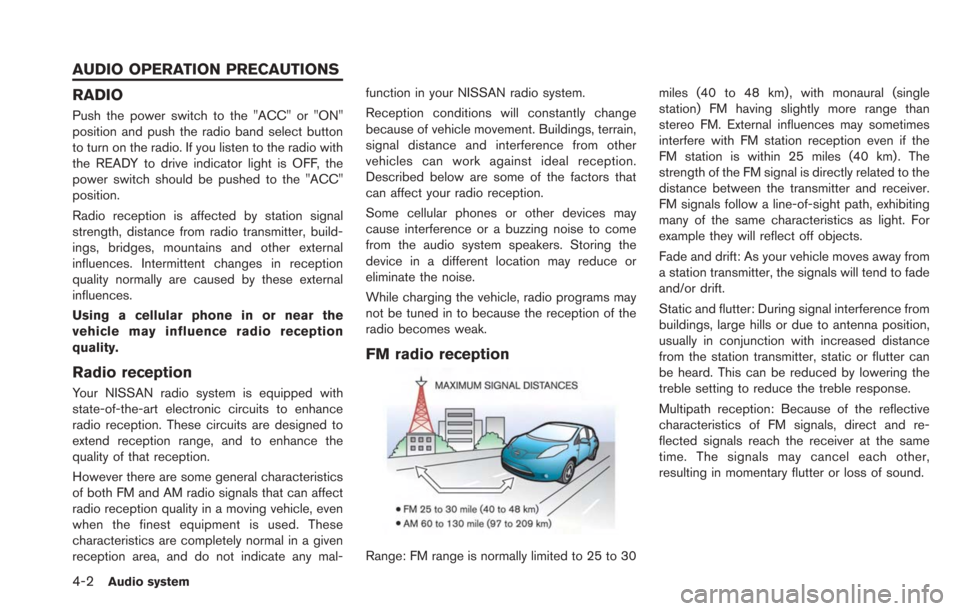
FM radio reception
Range: FM range is normally limited to 25 to 30
miles (40 to 48 km) , with monaural (single
station) FM having slightly more range than
stereo FM. External influences may sometimes
interfere with FM station reception even if the
FM station is within 25 miles (40 km). The
strength of the FM signal is directly related to the
distance between the transmitter and receiver.
FM signals follow a line-of-sight path, exhibiting
many of the same characteristics as light. For
example they will reflect off objects.
Fade and drift: As your vehicle moves away from
a station transmitter, the signals will tend to fade
and/or drift.
Static and flutter: During signal interference from
buildings, large hills or due to antenna position,
usually in conjunction with increased distance
from the station transmitter, static or flutter can
be heard. This can be reduced by lowering the
treble setting to reduce the treble response.
Multipath reception: Because of the reflective
characteristics of FM signals, direct and re-
flected signals reach the receiver at the same
time. The signals may cancel each other,
resulting in momentary flutter or loss of sound.
AUDIO OPERATION PRECAUTIONS
Page 137 of 275
AM radio reception
AM signals, because of their low frequency, can
bend around objects and skip along the ground.
In addition, the signals can bounce off the
ionosphere and be bent back to earth. Because
of these characteristics, AM signals are also
subject to interference as they travel from
transmitter to receiver.
Fading: Occurs while the vehicle is passing
through freeway underpasses or in areas with
many tall buildings. It can also occur for several
seconds during ionospheric turbulence even in
areas where no obstacles exist.
Static: Caused by thunderstorms, electrical
power lines, electric signs and even traffic lights.
Satellite radio reception
When the satellite radio is used for the first time
or the battery has been replaced, the satellite
radio may not work properly. This is not a
malfunction. Wait more than 10 minutes with the
satellite radio ON and the vehicle outside of any
metal or large building for the satellite radio to
receive all of the necessary data.
The satellite radio mode requires an active
SiriusXM Satellite Radio subscription. The sa-
tellite radio is not available in Alaska, Hawaii and
Guam.
The satellite radio performance may be affectedif cargo carried on the roof blocks the satellite
radio signal.
If possible, do not put cargo near the satellite
antenna.
A build up of ice on the satellite radio antenna
can affect satellite radio performance. Remove
the ice to restore satellite radio reception.
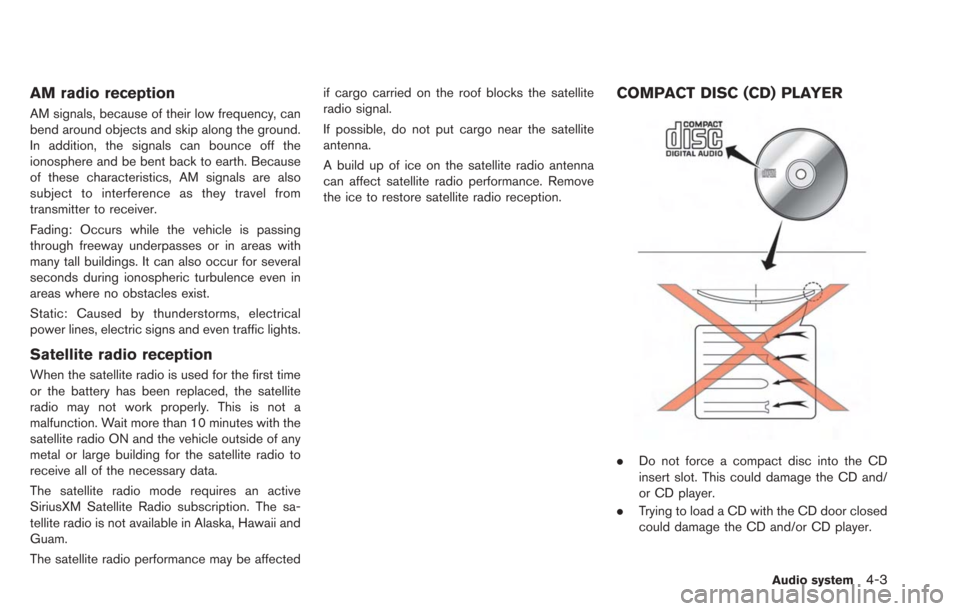
COMPACT DISC (CD) PLAYER
.
Do not force a compact disc into the CD
insert slot. This could damage the CD and/
or CD player.
. Trying to load a CD with the CD door closed
could damage the CD and/or CD player.
Audio system4-3
Page 138 of 275
4-4Audio system
.During cold weather or rainy days, the player
may malfunction due to the humidity. If this
occurs, remove the CD and dehumidify or
ventilate the player completely.
. The player may skip while driving on rough
roads.
. The CD player sometimes cannot function
when the passenger compartment tempera-
ture is extremely high. Decrease the tem-
perature before use.
. Only use high quality 4.7 in (12 cm) round
discs that have the "COMPACT disc DIGI-
TAL AUDIO" logo on the disc or packaging.
. Do not expose the CD to direct sunlight.
. CDs that are of poor quality, dirty, scratched,
covered with fingerprints, or that have pin
holes may not work properly.
. The following CDs may not work properly:
— Copy control compact discs (CCCD)
— Recordable compact discs (CD-R)
— Rewritable compact discs (CD-RW)
. Do not use the following CDs as they may
cause the CD player to malfunction.
— 3.1 in (8 cm) discs
— CDs that are not round
— CDs with a paper label — CDs that are warped, scratched, or have
abnormal edges
. This audio system can only play prerecorded
CDs. It has no capabilities to record or burn
CDs.
. If the CD cannot be played, one of the
following messages will be displayed.
CHECK DISC:
— Confirm that the CD is inserted correctly
(the label side is facing up, etc.).
— Confirm that the CD is not bent or warped and it is free of scratches.
PUSH EJECT:
This is an error due to the temperature inside
the player being too high. Remove the CD
by pushing the
button, and after a short
time reinsert the CD. The CD can be played
when the temperature of the player returns
to normal.
UNPLAYABLE:
The file is unplayable in this audio system
(the system only supports CDs containing
MP3 or WMA files) .
USB (Universal Serial Bus)
WARNING
Do not connect or disconnect the USB
device while driving. Doing so can be a
distraction. If distracted you could lose
control of your vehicle and cause an
accident or serious injury.
CAUTION
. Do not force the USB device into the
USB port. Inserting the USB device
tilted or up-side-down into the port
may damage the USB device and
the port. Make sure that the USB
device is connected correctly into
the USB port.
. Do not grab the USB port cover (if
so equipped) when pulling the USB
device out of the port. This could
damage the port and the cover.
. Do not leave the USB cable in a
place where it can be pulled unin-
tentionally. Pulling the cable may
break the wire, USB device or the
port.
Page 139 of 275
.To avoid damage and loss of func-
tion when using a USB device, note
the following precautions.
— Do not bend the cable exces-
sively 1.6 in (40 mm) radius
minimum.
— Do not twist the cable exces- sively (more than 180 degrees) .
— Do not pull or drop the cable.
— Do not hit or press the USB port or USB device with hands, feet,
or objects.
— Do not store objects with sharp edges in the storage area where
the cable is stored.
— Do not leave the USB device and attached devices in the vehicle
compartment. When not in use
for extended periods of time,
store the cable and USB device
in a clean, dust free environment
at room temperature and with-
out direct sun exposure.
— Do not use the cable for any other purposes than its intended
use in the vehicle. The vehicle is not equipped with a USB device.
USB devices should be purchased separately
as necessary.
This system cannot be used to format USB
devices. To format a USB device, use a personal
computer.
In some states/area, the USB device for the
front seats plays only sound without images for
regulatory reasons, even when the vehicle is
parked.
This system supports various USB memory
devices, USB hard drives, iPhone
®and iPod®
players. Some USB devices may not be
supported by this system.
.
Partitioned USB devices may not play
correctly.
. Some characters used in other languages
(Chinese, Japanese, etc.) may not appear
properly in the display. Using English lan-
guage characters with a USB device is
recommended.
General notes for USB use:
. The USB device may not function when the
passenger compartment temperature is ex-
tremely high. Lower the temperature before
use. .
During cold weather or rainy days, the player
may malfunction due to humidity. If this
occurs, remove the USB device and dehu-
midify or ventilate the USB player comple-
tely.
. Do not connect a USB device if a connector,
cable or USB port is wet. Allow the
connector, cable, and USB port to dry
completely before connecting the USB
device. (Wait for 24 hours or more until it
is dry.) If the connector and USB port are
exposed to fluids other than water, evapora-
tive residue may cause a short circuit
between the connector pins and USB port.
In this case, replace the cable and USB port.
Otherwise damage to the USB device and a
loss of function may occur.
. If the cable is damaged (insulation cut,
connectors cracked, contamination such as
liquids, dust, dirt, etc. in the connectors) , do
not use the cable. Replace the cable with a
new one.
. Do not put a USB device in a location where
static electricity occurs, electrical noise is
generated or hot air from the air conditioner
blows directly on it. Doing so may cause the
data stored on the USB device to be
corrupted.
Audio system4-5
Page 140 of 275
4-6Audio system
Notes for iPod®use:
iPod®is a trademark of Apple Inc., registered in
the U.S. and other countries.
. Improperly plugging in the iPod
®may cause
a checkmark to be displayed on and off
(flickering) . Always make sure that the iPod
®
is connected properly.
. An iPod nano®(1st Generation) may remain
in fast forward or rewind mode if it is
connected during a seek operation. In this
case, please manually reset the iPod
®.
. An iPod nano®(2nd Generation) will con-
tinue to fast-forward or rewind if it is
disconnected during a seek operation.
. An incorrect song title may appear when the
Play Mode is changed while using an iPod
nano
®(2nd Generation)
. Audiobooks may not play in the same order
as they appear on an iPod
®.
. Large video files cause slow responses in an
iPod
®. The vehicle display may momentarily
black out, but will soon recover.
. If an iPod
®automatically selects large video
files while in the shuffle mode, the vehicle
display may momentarily black out, but will
soon recover.
iPod®PLAYER AND iPhone®
This system supports iPod®and iPhone®
models.
. A USB cable for connecting an iPod®or
iPhone®is not included with this system.
Use your own USB cable to connect an
iPod
®or iPhone®.
. Once connected to the system, operation
will not be possible from an iPod
®or
iPhone®.
. Some functions may be limited depending
on the model of iPod
®or iPhone®and/or the
version of the firmware currently installed.
. When connected to the system, the battery
of an iPod
®or iPhone®will be recharged.
. Do not use headphones or other acces-
sories when an iPod
®or iPhone®is con-
nected to the system. Doing so could
prevent the system from operating properly.
. NISSAN does not accept any responsibility
for any data that may be lost from an iPod
®
or iPhone®while it is connected to the
system.
. Please refer to the Owner’s Manual of the
iPod
®or iPhone®that is connected to the
system. .
Large video files cause slow responses in an
iPod
®. The vehicle center display may
momentarily black out, but it will soon
recover.
. If an iPod
®automatically selects large video
files while in the shuffle mode, the vehicle
center display may momentarily black out,
but it will soon recover.
. An iPod nano
®(1st Generation) may remain
in fast forward or rewind mode if it is
connected during a seek operation. In this
case, please manually reset the iPod
®.
. After the Album Shuffle setting has been set
when an iPod touch
®1G is connected, if the
USB cable is pulled out and inserted again,
or if the power switch is placed in the "ACC"
or "OFF" positions from the "ON" position,
the song that was last played will not be
saved.
. Songs that are being played back cannot be
cued using the track down operation of an
iPod touch
®1G. To use this function,
update the firmware of the iPod®that is
being used (version 2.2.1 or later) .
. After the Album Shuffle setting has been set
when an iPod touch
®2G is connected, if the
USB cable is pulled out and inserted again,
or if the power switch is placed in the "ACC"
or "OFF" positions from the "ON" position,
Page 141 of 275
the song that was last played will not be
saved. This can be fixed by updating the
iPod
®’s firmware (version 4.0 or later) .
. After the Album Shuffle setting has been set
when an iPhone
®is connected, if the USB
cable is pulled out and inserted again, or if
the power switch is placed in the "ACC" or
"OFF" positions from the "ON" position, the
song that was last played will not be saved.
. After the Album Shuffle setting has been set
when an iPhone
®3G or iPhone®3GS is
connected, if the USB cable is pulled out
and inserted again, or if the power switch is
placed in the "ACC" or "OFF" positions from
the "ON" position, the song that was last
played will not be saved. This can be fixed
by updating the iPhone
®’s firmware (version
4.0 or later) .
. When an iPhone
®3G, iPhone®3GS or
iPhone®4 is playing back music, if a
Bluetooth®audio device is connected, or if
the iPod®mode is switched to again after
switching to the Bluetooth®streaming audio
mode and playing back Bluetooth®audio,
there may be no audio output. In this case,
disconnect the iPhone
®from the system and
then reconnect it again. .
There may be no audio output of Bluetooth
®
streaming audio if an iPhone®3G or an
iPhone®3GS and a Bluetooth®audio
device are connected to the system and
the audio mode is toggled back and forth
between the Bluetooth
®streaming audio
mode and the iPod®mode. In this case,
disconnect the Bluetooth®streaming audio
from the system and connect again. Addi-
tionally, this can be fixed by updating the
iPhone
®’s firmware (version 4.0 or later) .
iPod®and iPhone®are a trademark of Apple
Inc., registered in the U.S. and other countries.
Compatibility
The following models are available.
. Fifth generation iPod®(firmware version 1.3
or later)
. iPod Classic
®(firmware version 1.1.2 or
later)
. First generation iPod touch
®(firmware ver-
sion 2.2.1 or later)
. Second generation iPod touch
®(firmware
version 2.2.1 or later)
. Third generation iPod touch
®(firmware
version 5.1.1 or later)
. First generation iPod nano
®(firmware ver-
sion 1.3.1 or later) .
Second generation iPod nano
®(firmware
version 1.1.3 or later)
. Third generation iPod nano
®(firmware ver-
sion 1.1 or later)
. Fourth generation iPod nano
®(firmware
version 1.0.3 or later)
. Fifth generation iPod nano
®(firmware ver-
sion 1.0.1PC or later)
. iPhone
®(firmware version 3.1.3 or later)
. iPhone®3G (firmware version 3.1.3 or later)
. iPhone®3GS (firmware version 3.1.3 or
later)
. iPhone
®4 (firmware version 4.0 or later)
. iPhone®4S (firmware version 5.0 or later)
Make sure that the iPod®firmware version is
updated.
COMPRESSED AUDIO FILES (MP3/
WMA)
Explanation of terms
. MP3 — MP3 is short for Moving Pictures
Experts Group Audio Layer 3. MP3 is the
most well known compressed digital audio
file format. This format allows for near "CD
quality" sound, but at a fraction of the size of
normal audio files. MP3 conversion of an
audio track can reduce the file size by
approximately a 10:1 ratio (Sampling: 44.1
Audio system4-7
Page 142 of 275
4-8Audio system
kHz, Bit rate: 128 kbps) with virtually no
perceptible loss in quality. The compression
reduces certain parts of sound that seem
inaudible to most people.
. WMA — Windows Media Audio (WMA) is a
compressed audio format created by Micro-
soft as an alternative to MP3. The WMA
codec offers greater file compression than
the MP3 codec, enabling storage of more
digital audio tracks in the same amount of
space when compared to MP3s at the same
level of quality.
. Bit rate — Bit rate denotes the number of
bits per second used by a digital music file.
The size and quality of a compressed digital
audio file is determined by the bit rate used
when encoding the file.
. Sampling frequency — Sampling frequency
is the rate at which the samples of a signal
are converted from analog to digital (A/D
conversion) per second.
. Multisession — Multisession is one of the
methods for writing data to media. Writing
data once to the media is called a single
session, and writing more than once is
called a multisession.
. ID3/WMA Tag — The ID3/WMA tag is the
part of the encoded MP3 or WMA file that
contains information about the digital music file such as song title, artist, album title,
encoding bit rate, track time duration, etc.
ID3 tag information is displayed on the
Album/Artist/Track title line on the display.
* Windows
®and Windows Media®are regis-
tered trademarks or trademarks of Microsoft
Corporation in the United States of America
and/or other countries.
Playback order
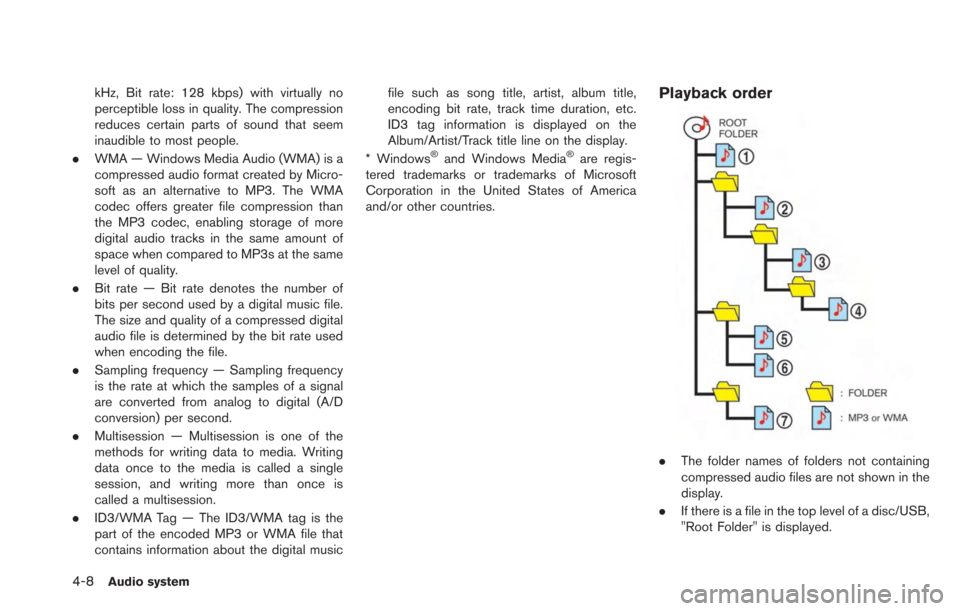
. The folder names of folders not containing
compressed audio files are not shown in the
display.
. If there is a file in the top level of a disc/USB,
"Root Folder" is displayed.
Page 143 of 275

.The playback order is the order in which the
files were written by the writing software, so
the files might not play in the desired order.
. Music playback order of compressed audio
files is as illustrated.
Audio system4-9