stop start NISSAN LEAF 2014 1.G User Guide
[x] Cancel search | Manufacturer: NISSAN, Model Year: 2014, Model line: LEAF, Model: NISSAN LEAF 2014 1.GPages: 397, PDF Size: 9.45 MB
Page 65 of 397
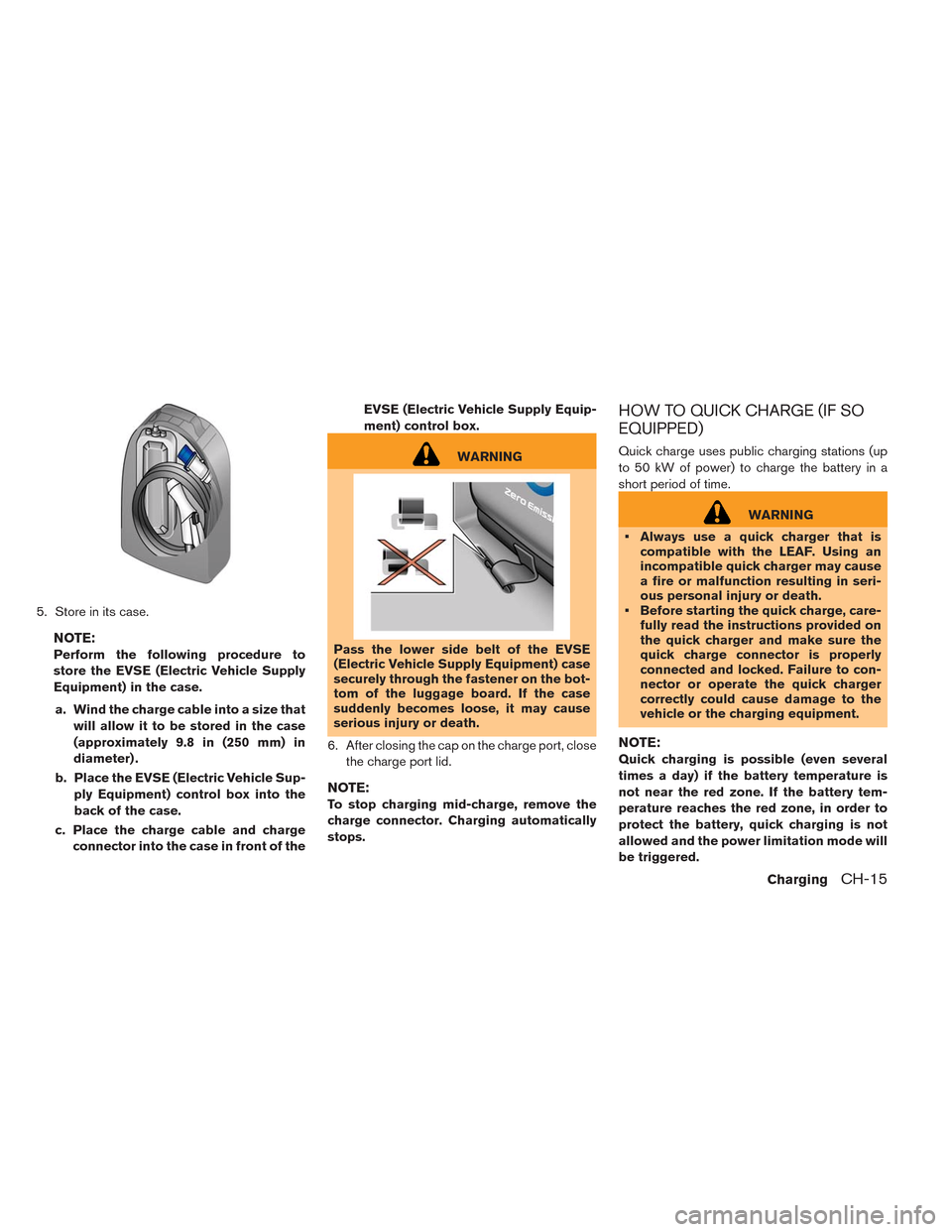
5. Store in its case.
NOTE:
Perform the following procedure to
store the EVSE (Electric Vehicle Supply
Equipment) in the case.
a. Wind the charge cable into a size that
will allow it to be stored in the case
(approximately 9.8 in (250 mm) in
diameter) .
b. Place the EVSE (Electric Vehicle Sup-
ply Equipment) control box into the
back of the case.
c. Place the charge cable and charge
connector into the case in front of theEVSE (Electric Vehicle Supply Equip-
ment) control box.
WARNING
Pass the lower side belt of the EVSE
(Electric Vehicle Supply Equipment) case
securely through the fastener on the bot-
tom of the luggage board. If the case
suddenly becomes loose, it may cause
serious injury or death.
6. After closing the cap on the charge port, close
the charge port lid.
NOTE:
To stop charging mid-charge, remove the
charge connector. Charging automatically
stops.
HOW TO QUICK CHARGE (IF SO
EQUIPPED)
Quick charge uses public charging stations (up
to 50 kW of power) to charge the battery in a
short period of time.
WARNING
• Always use a quick charger that is
compatible with the LEAF. Using an
incompatible quick charger may cause
a fire or malfunction resulting in seri-
ous personal injury or death.
• Before starting the quick charge, care-
fully read the instructions provided on
the quick charger and make sure the
quick charge connector is properly
connected and locked. Failure to con-
nector or operate the quick charger
correctly could cause damage to the
vehicle or the charging equipment.
NOTE:
Quick charging is possible (even several
times a day) if the battery temperature is
not near the red zone. If the battery tem-
perature reaches the red zone, in order to
protect the battery, quick charging is not
allowed and the power limitation mode will
be triggered.
ChargingCH-15
Page 67 of 397
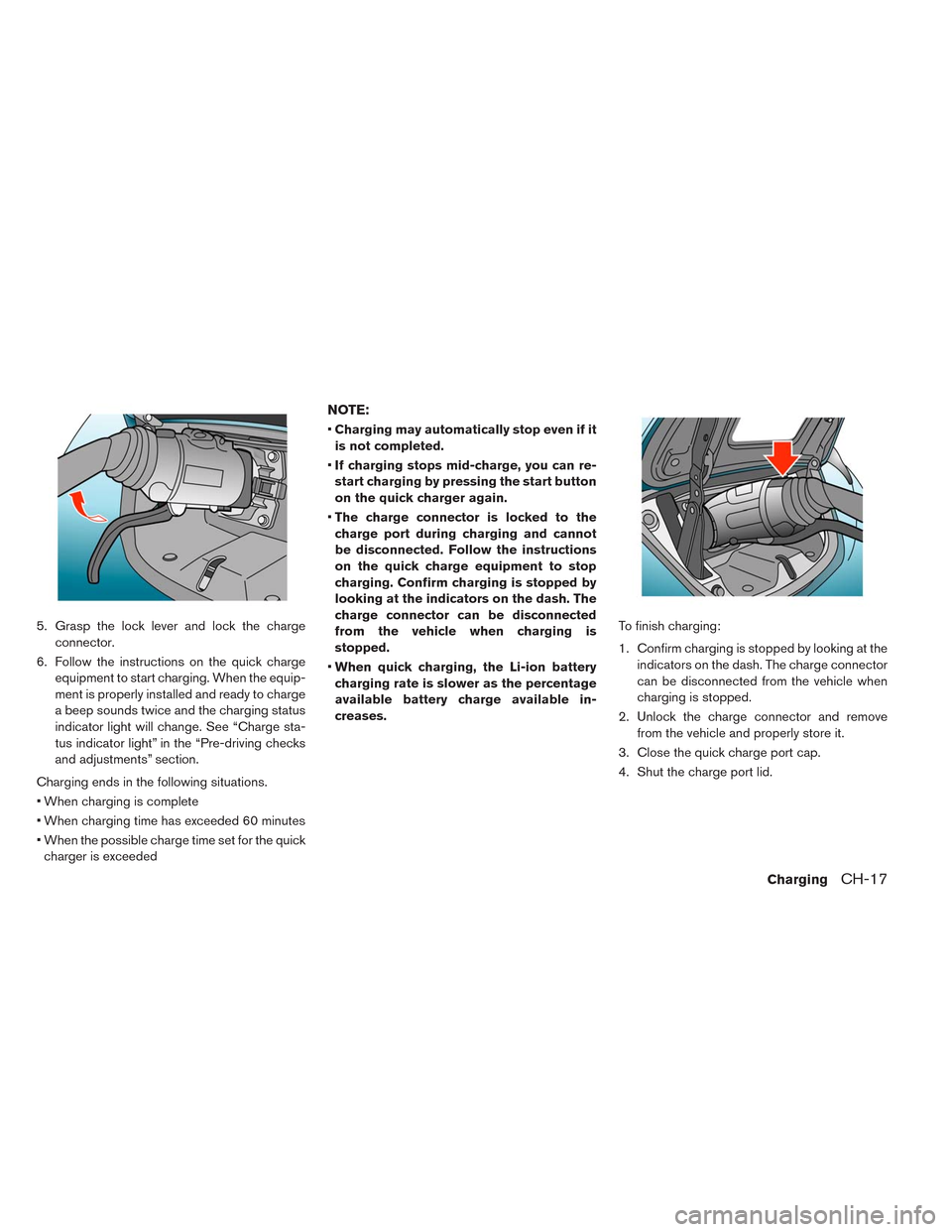
5. Grasp the lock lever and lock the charge
connector.
6. Follow the instructions on the quick charge
equipment to start charging. When the equip-
ment is properly installed and ready to charge
a beep sounds twice and the charging status
indicator light will change. See “Charge sta-
tus indicator light” in the “Pre-driving checks
and adjustments” section.
Charging ends in the following situations.
• When charging is complete
• When charging time has exceeded 60 minutes
• When the possible charge time set for the quick
charger is exceeded
NOTE:
•Charging may automatically stop even if it
is not completed.
•If charging stops mid-charge, you can re-
start charging by pressing the start button
on the quick charger again.
•The charge connector is locked to the
charge port during charging and cannot
be disconnected. Follow the instructions
on the quick charge equipment to stop
charging. Confirm charging is stopped by
looking at the indicators on the dash. The
charge connector can be disconnected
from the vehicle when charging is
stopped.
•When quick charging, the Li-ion battery
charging rate is slower as the percentage
available battery charge available in-
creases.To finish charging:
1. Confirm charging is stopped by looking at the
indicators on the dash. The charge connector
can be disconnected from the vehicle when
charging is stopped.
2. Unlock the charge connector and remove
from the vehicle and properly store it.
3. Close the quick charge port cap.
4. Shut the charge port lid.
ChargingCH-17
Page 72 of 397
![NISSAN LEAF 2014 1.G User Guide 3. Enter the Li-ion battery charge start time.
Touch [END Time] to change the time to stop
charging.
NOTE:
Charging timer is performed according
to the current time setting on the bottom
right of the](/img/5/375/w960_375-71.png "NISSAN LEAF 2014 1.G User Guide 3. Enter the Li-ion battery charge start time.
Touch [END Time] to change the time to stop
charging.
NOTE:
Charging timer is performed according
to the current time setting on the bottom
right of the")
3. Enter the Li-ion battery charge start time.
Touch [END Time] to change the time to stop
charging.
NOTE:
Charging timer is performed according
to the current time setting on the bottom
right of the display. When setting the
charging timer function, be sure to check
that the current time displayed is correct.4. Touch [Assign Days] to set the charging timer
for different days of the week. Either Timer 1
or Timer 2 or OFF can be set for each day of
the week. Touch [OK] when the settings are
complete.
5. Touch [OK] when the settings are complete
and a settings confirmation screen is
displayed.
NOTE:
If OFF is selected for a day of the week,
the charging timer will not operate on
that day. The system will wait until the
next charging timer set to perform
charging.6. Touch [Yes] if the settings shown on the
screen are correct.
CH-22Charging
Page 73 of 397
![NISSAN LEAF 2014 1.G User Guide 7. The [Timer 1] indicator illuminates after the
charging timer is set. Use the same procedure
to set the Timer 2 setting.
8. Place the power switch in the OFF position,
and then connect the charge co](/img/5/375/w960_375-72.png "NISSAN LEAF 2014 1.G User Guide 7. The [Timer 1] indicator illuminates after the
charging timer is set. Use the same procedure
to set the Timer 2 setting.
8. Place the power switch in the OFF position,
and then connect the charge co")
7. The [Timer 1] indicator illuminates after the
charging timer is set. Use the same procedure
to set the Timer 2 setting.
8. Place the power switch in the OFF position,
and then connect the charge connector to the
vehicle.
NOTE:
•Always place the power switch in the OFF
position after setting the charging timers.
When the power switch is in the ON posi-
tion, the Li-ion battery will not start charg-
ing.
•The Li-ion battery may not be charged to
the expected level if the charging timerstart time and end time are set so there is
not enough time to charge the Li-ion bat-
tery.
•When either the charge start time or
charge end time is set, the charging timer
function is activated.
•When only the charging timer end time is
set, the system automatically determines
when to begin charging. The Li-ion battery
may not be charged to the expected level
in the following conditions:
– The Li-ion battery is charged in cold
weather.
– The charge connector is connected to
the vehicle too close to the scheduled
charging end time.
•When only the charging timer end time is
set, the system automatically stops charg-
ing when the Li-ion battery charges to a
full charge. Charging may stop before the
scheduled end time.
•Touch [Timer 1] or [Timer 2] to turn off the
charging timer function. Touch [Yes] if the
settings shown on the screen are correct.
After this operation has been performed,
the indicator disappears and the charging
timer function is turned off. The start andstop time settings are not deleted, even if
the charging timer function is turned off.
•If charging timer and the Climate Ctrl.
Timer are operating at the same time due
to an overlap of the timer settings, you can
prioritize which function receives electri-
cal power first. See LEAF Navigation Sys-
tem Owner’s Manual.
•When charging is set as the first priority,
the Climate Ctrl. Timer does not start until
10 segments of the Li-ion battery avail-
able charge gauge are illuminated.
•When the climate control is set as the first
priority, the climate control system will be
turned on as scheduled by the Climate
Ctrl. Timer regardless of the remaining
battery energy.
•Even when the climate control is set as the
first priority, the climate control system
will be turned off when the electric de-
mands of the climate control system is
more than can be provided to the Li-ion
battery for charging.
•Some charging stations used to perform
normal charge are equipped with timer
functions. If the charger timer function
and the vehicle timer are both set, and the
ChargingCH-23
Page 83 of 397
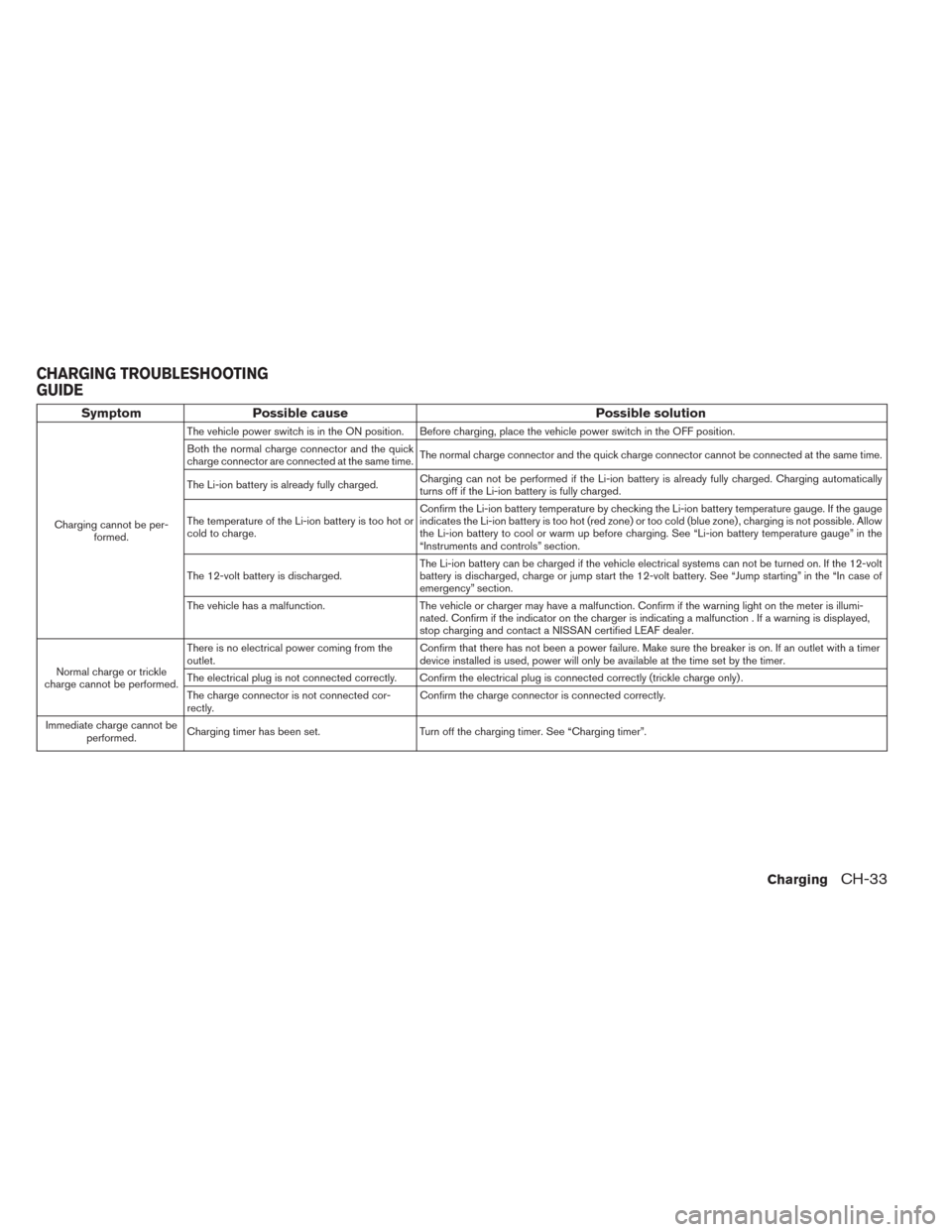
Symptom Possible cause Possible solution
Charging cannot be per-
formed.The vehicle power switch is in the ON position. Before charging, place the vehicle power switch in the OFF position.
Both the normal charge connector and the quick
charge connector are connected at the same time.The normal charge connector and the quick charge connector cannot be connected at the same time.
The Li-ion battery is already fully charged.Charging can not be performed if the Li-ion battery is already fully charged. Charging automatically
turns off if the Li-ion battery is fully charged.
The temperature of the Li-ion battery is too hot or
cold to charge.Confirm the Li-ion battery temperature by checking the Li-ion battery temperature gauge. If the gauge
indicates the Li-ion battery is too hot (red zone) or too cold (blue zone) , charging is not possible. Allow
the Li-ion battery to cool or warm up before charging. See “Li-ion battery temperature gauge” in the
“Instruments and controls” section.
The 12-volt battery is discharged.The Li-ion battery can be charged if the vehicle electrical systems can not be turned on. If the 12-volt
battery is discharged, charge or jump start the 12-volt battery. See “Jump starting” in the “In case of
emergency” section.
The vehicle has a malfunction. The vehicle or charger may have a malfunction. Confirm if the warning light on the meter is illumi-
nated. Confirm if the indicator on the charger is indicating a malfunction . If a warning is displayed,
stop charging and contact a NISSAN certified LEAF dealer.
Normal charge or trickle
charge cannot be performed.There is no electrical power coming from the
outlet.Confirm that there has not been a power failure. Make sure the breaker is on. If an outlet with a timer
device installed is used, power will only be available at the time set by the timer.
The electrical plug is not connected correctly. Confirm the electrical plug is connected correctly (trickle charge only) .
The charge connector is not connected cor-
rectly.Confirm the charge connector is connected correctly.
Immediate charge cannot be
performed.Charging timer has been set. Turn off the charging timer. See “Charging timer”.
CHARGING TROUBLESHOOTING
GUIDE
ChargingCH-33
Page 85 of 397
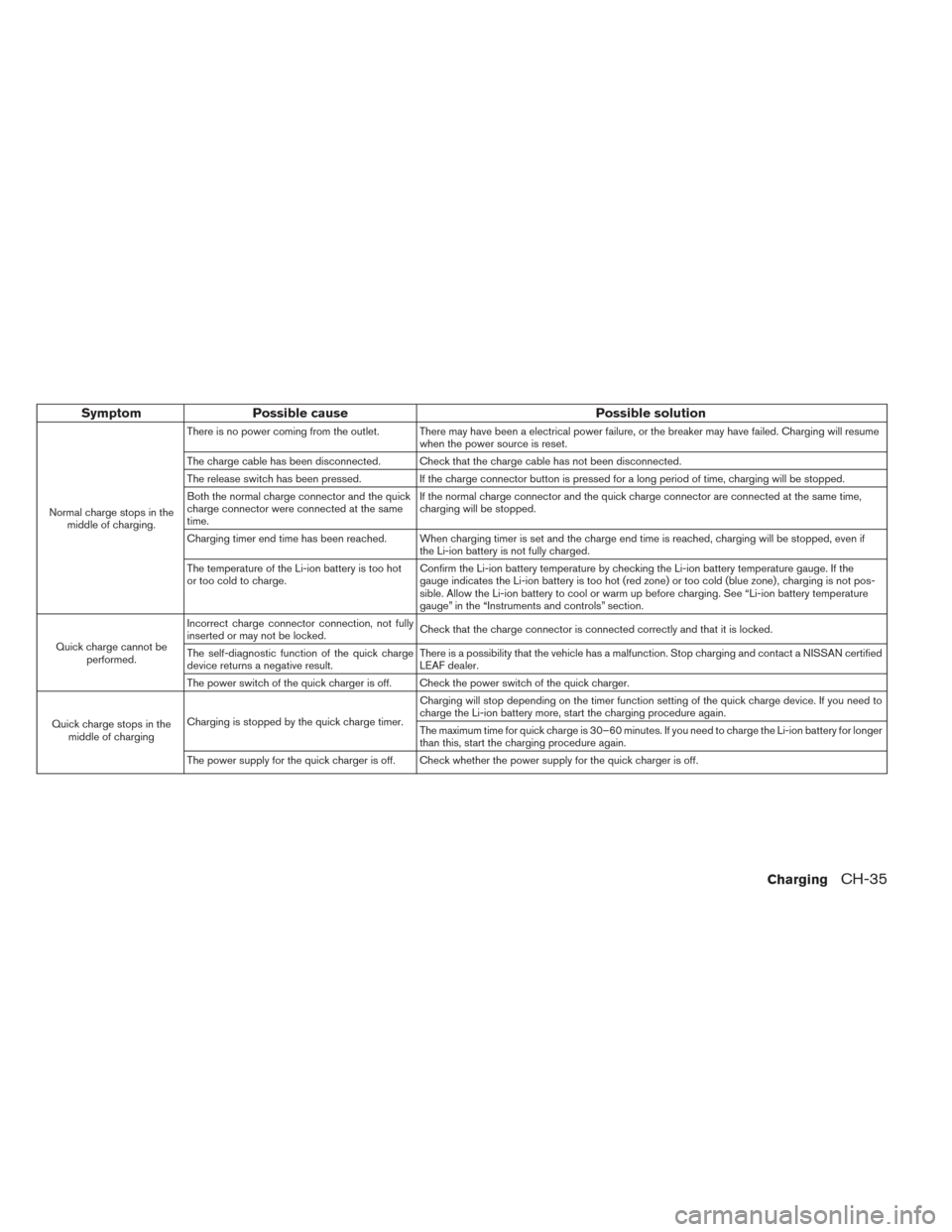
Symptom Possible cause Possible solution
Normal charge stops in the
middle of charging.There is no power coming from the outlet. There may have been a electrical power failure, or the breaker may have failed. Charging will resume
when the power source is reset.
The charge cable has been disconnected. Check that the charge cable has not been disconnected.
The release switch has been pressed. If the charge connector button is pressed for a long period of time, charging will be stopped.
Both the normal charge connector and the quick
charge connector were connected at the same
time.If the normal charge connector and the quick charge connector are connected at the same time,
charging will be stopped.
Charging timer end time has been reached. When charging timer is set and the charge end time is reached, charging will be stopped, even if
the Li-ion battery is not fully charged.
The temperature of the Li-ion battery is too hot
or too cold to charge.Confirm the Li-ion battery temperature by checking the Li-ion battery temperature gauge. If the
gauge indicates the Li-ion battery is too hot (red zone) or too cold (blue zone) , charging is not pos-
sible. Allow the Li-ion battery to cool or warm up before charging. See “Li-ion battery temperature
gauge” in the “Instruments and controls” section.
Quick charge cannot be
performed.Incorrect charge connector connection, not fully
inserted or may not be locked.Check that the charge connector is connected correctly and that it is locked.
The self-diagnostic function of the quick charge
device returns a negative result.There is a possibility that the vehicle has a malfunction. Stop charging and contact a NISSAN certified
LEAF dealer.
The power switch of the quick charger is off. Check the power switch of the quick charger.
Quick charge stops in the
middle of chargingCharging is stopped by the quick charge timer.Charging will stop depending on the timer function setting of the quick charge device. If you need to
charge the Li-ion battery more, start the charging procedure again.
The maximum time for quick charge is 30–60 minutes. If you need to charge the Li-ion battery for longer
than this, start the charging procedure again.
The power supply for the quick charger is off. Check whether the power supply for the quick charger is off.
ChargingCH-35
Page 148 of 397
NOTE:
This clock is not synchronized with the
clock displayed on the navigation system
screen. The charging timer starts and stops
charging base on the time displayed on the
navigation system screen. See LEAF Navi-
gation System Owner’s Manual.
2-12Instruments and controls
Page 152 of 397
cooperative regenerative brake and/or the elec-
tronically driven intelligent brake systems are not
functioning properly. Have the system checked
by a NISSAN certified LEAF dealer. If the BRAKE
warning light (red) also illuminates, stop the ve-
hicle immediately and contact a NISSAN certified
LEAF dealer. For additional information, see
“Brakes” in the “Starting and driving” section.
WARNING
• Pressing the brake pedal when the
power switch position is not in the ON
or READY to drive position and/or low
brake fluid level may increase the
stopping distance and braking will re-
quire greater pedal effort as well as
pedal travel.
• If the brake fluid level is below the
minimum or MIN mark on the brake
fluid reservoir, do not drive until the
brake system has been checked at a
NISSAN certified LEAF dealer.• The cooperative regenerative brake
system may not be working properly if
the brake system warning light illumi-
nates when the READY to drive indica-
tor light is ON. If you judge it to be safe,
drive carefully to the nearest service
station for repairs. Otherwise, have
your vehicle towed because driving
could be dangerous.orBRAKE warning
light (red)
When the power switch is placed in the ON
position or in the READY to drive position, the
light remains illuminated for about a few seconds.
If the light illuminates at any other time, it may
indicate that the hydraulic brake system is not
functioning properly. If the BRAKE warning light
illuminates, stop the vehicle immediately and
contact a NISSAN certified LEAF dealer.
Parking brake indicator:
When the ignition switch is placed in the ON
position, the light comes on when the parking
brake is applied.
Low brake fluid warning light:
When the power switch is in the ON position, the
light warns of a low brake fluid level. If this warn-ing light illuminates, the Vehicle Dynamic Control
(VDC) warning light and the brake system warn-
ing light (yellow) also illuminate.
If the light illuminates while the power switch is in
the READY to drive position with the parking
brake not applied, stop the vehicle and perform
the following items.
1. Check the brake fluid level. If brake fluid is
necessary, add fluid and have the system
checked by a NISSAN certified LEAF dealer.
See “Brake fluid” in the “Maintenance and
do-it-yourself” section.
2. If the brake fluid level is correct, have the
warning system checked by a NISSAN certi-
fied LEAF dealer.
WARNING
• Your brake system may not be working
properly if the warning light is on. Driv-
ing could be dangerous. If you judge
the brake system to be safe, drive care-
fully to the nearest service station for
repairs. Otherwise, have your vehicle
towed because driving it could be dan-
gerous.
2-16Instruments and controls
Page 154 of 397
When the low tire pressure warning light illumi-
nates, you should stop and adjust the tire pres-
sure to the recommended COLD tire pressure
shown on the Tire and Loading Information label.
The low tire pressure warning light does not
automatically turn off when the tire pressure is
adjusted. After the tire is inflated to the recom-
mended pressure, the vehicle must be driven at
speeds above 16 MPH (25 km/h) to activate the
TPMS and turn off the low tire pressure warning
light. Use a tire pressure gauge to check the tire
pressure.
The CHECK TIRE PRESSURE warning appears
each time the ignition switch is placed in the ON
position as long as the low tire pressure warning
light remains illuminated.
For additional information, see “Vehicle Informa-
tion Display” in the “Instruments and Controls”
section and “Tire Pressure Monitoring System
(TPMS)” in the “Starting and driving section and
“In case of emergency” section.
TPMS malfunction:
If the TPMS is not functioning properly, the low
tire pressure warning light will flash for approxi-
mately 1 minute when the power switch is placed
in the ON position. The light will remain on after
the 1 minute. Have the system checked by aNISSAN certified LEAF dealer. The CHECK TIRE
PRESSURE warning does not appear if the low
tire pressure warning light illuminates to indicate
a TPMS malfunction.
For additional information, see “Vehicle informa-
tion display” and “Tire Pressure Monitoring Sys-
tem (TPMS)” in the “Starting and driving” section.
WARNING
• Radio waves could adversely affect
electric medical equipment. Those
who use a pacemaker should contact
the electric medical equipment manu-
facturer for the possible influences be-
fore use.
• If the light does not illuminate when
the power switch is placed in the ON
position, have the vehicle checked by a
NISSAN certified LEAF dealer as soon
as possible.
• If the light illuminates while driving,
avoid sudden steering maneuvers or
abrupt braking, reduce vehicle speed,
pull off the road to a safe location and
stop the vehicle as soon as possible.
Driving with under-inflated tires may
permanently damage the tires and in-
crease the likelihood of tire failure.
Serious vehicle damage could occurand may lead to an accident and could
result in serious personal injury. Check
the tire pressure for all four tires. Ad-
just the tire pressure to the recom-
mended COLD tire pressure shown on
the Tire and Loading Information label
to turn the low tire pressure warning
light OFF. If the light still illuminates
while driving after adjusting the tire
pressure, a tire may be flat. If you have
a flat tire, repair it as soon as possible.
• When a wheel is replaced, the TPMS
will not function and the low tire pres-
sure warning light will flash for ap-
proximately 1 minute. The light will re-
main on after 1 minute. Contact your
NISSAN certified LEAF dealer as soon
as possible for tire replacement
and/or system resetting.
• Replacing tires with those not origi-
nally specified by NISSAN could affect
the proper operation of the TPMS.
CAUTION
• The TPMS is not a substitute for the
regular tire pressure check. Be sure to
check the tire pressure regularly.
2-18Instruments and controls
Page 158 of 397
charged in order to be driven. See “Low battery
charge warning light”.
Security indicator light
This light blinks when the power switch is in the
ACC, OFF or LOCK position. This function indi-
cates the security system equipped on the ve-
hicle is operational.
If the security system is malfunctioning, this light
will remain on while the power switch is in the ON
position. For additional information, see “Security
systems.
Turn signal/hazard indicator
lights
This light flashes when the turn signal switch
lever or hazard switch is turned on.
Vehicle Dynamic Control
(VDC) off indicator light
This light illuminates when the Vehicle Dynamic
Control (VDC) switch is pushed to OFF. This
indicates that the VDC system is not operating.
See “Vehicle Dynamic Control (VDC) system” in
the “Starting and driving” section.
AUDIBLE REMINDERS
Brake pad wear warning
The disc brake pads have audible wear warnings.
When a brake pad requires replacement, it will
make a high pitched scraping sound when the
vehicle is in motion. This scraping sound will first
occur only when the brake pedal is depressed.
After more wear of the brake pad, the sound will
always be heard even if the brake pedal is not
depressed. Have the brakes checked as soon as
possible if the warning sound is heard.
Electric shift control system reminder
chime
If an improper shift operation is performed, for
safety reasons a chime will sound and at the
same time, depending on the conditions, the
operation will be cancelled or the shift position
will switch to the N position.
For more details, see “Driving vehicle” in the
“Starting and driving” section.
Key reminder chime
A chime will sound if the driver’s side door is
opened while the power switch is pushed to the
ON or ACC position.Make sure that the power switch is pushed to the
OFF position, and take the Intelligent Key with
you when leaving the vehicle.
Light reminder chime
The light reminder chime will sound when the
driver side door is opened with the light switch in
the
orposition, and the power
switch in the ACC, OFF or LOCK position.
Turn the light switch off when you leave the
vehicle.
Parking brake reminder chime
A chime sounds if the parking brake is set and the
vehicle is driven. The chime will stop if the parking
brake is released or the vehicle speed returns to
zero.
Power switch reminder chime (if so
equipped)
The power switch reminder chime will sound
when the driver’s door is opened while the power
switch is in the ON or READY position. Push the
power switch to the OFF position.
2-22Instruments and controls