bluetooth NISSAN LEAF 2014 1.G Owners Manual
[x] Cancel search | Manufacturer: NISSAN, Model Year: 2014, Model line: LEAF, Model: NISSAN LEAF 2014 1.GPages: 397, PDF Size: 9.45 MB
Page 2 of 397
Owner’s Manual Supplement
The 2014 – 2015 NISSAN LEAF Owner’s Manual states that this vehicle is
equipped with Bluetooth® streaming audio. This vehicle may not be equipped with
this feature. Sorry for any inconvenience this may have caused.
Printing: March 2014 (11)
Publication No. SU15EA 0ZE0U0
Page 5 of 397
![NISSAN LEAF 2014 1.G Owners Manual Arrows in an illustration that are similar to those
above call attention to an item in the illustration.
[]:
Indicates a key/item displayed on the screen.
CALIFORNIA PROPOSITION 65
WARNING
WARNING
Cer](/img/5/375/w960_375-4.png "NISSAN LEAF 2014 1.G Owners Manual Arrows in an illustration that are similar to those
above call attention to an item in the illustration.
[]:
Indicates a key/item displayed on the screen.
CALIFORNIA PROPOSITION 65
WARNING
WARNING
Cer")
Arrows in an illustration that are similar to those
above call attention to an item in the illustration.
[]:
Indicates a key/item displayed on the screen.
CALIFORNIA PROPOSITION 65
WARNING
WARNING
Certain vehicle components contain or
emit chemicals known to the State of
California to cause cancer and birth de-
fects or other reproductive harm. In addi-
tion, certain fluids contained in vehicles
and certain products of component wear
contain or emit chemicals known to the
State of California to cause cancer and
birth defects or other reproductive harm.
CALIFORNIA PERCHLORATE
ADVISORY
Some vehicle parts, such as lithium batter-
ies, may contain perchlorate material. The
following advisory is provided: “Perchlo-
rate Material - special handling may apply,
see www.dtsc.ca.gov/hazardouswaste/
perchlorate.”
Bluetooth® is a trademark
owned by Bluetooth SIG, Inc.
and licensed to Visteon.
SiriusXM Satellite Radio re-
quires subscription, sold
separately. Not available in
Alaska, Hawaii or Guam. For
more information, visit
www.siriusxm.com.
© 2013 NISSAN MOTOR CO., LTD.
All rights reserved. No part of this Owner’s
Manual may be reproduced or stored in a retrieval
system, or transmitted in any form, or by any
means, electronic, mechanical, photocopying,
recording or otherwise, without the prior written
permission of Nissan Motor Co., Ltd.
Page 13 of 397
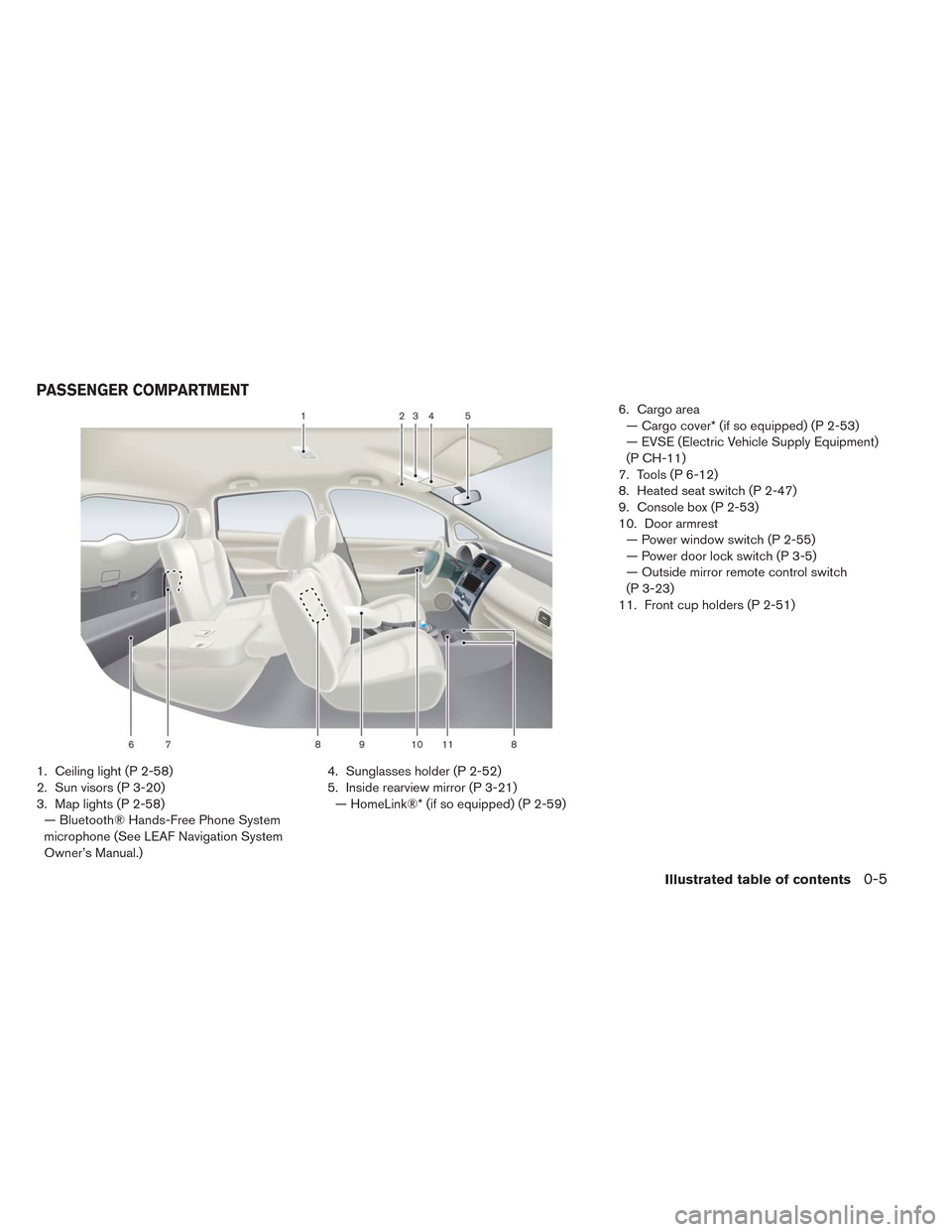
1. Ceiling light (P 2-58)
2. Sun visors (P 3-20)
3. Map lights (P 2-58)
— Bluetooth® Hands-Free Phone System
microphone (See LEAF Navigation System
Owner’s Manual.)4. Sunglasses holder (P 2-52)
5. Inside rearview mirror (P 3-21)
— HomeLink®* (if so equipped) (P 2-59)6. Cargo area
— Cargo cover* (if so equipped) (P 2-53)
— EVSE (Electric Vehicle Supply Equipment)
(P CH-11)
7. Tools (P 6-12)
8. Heated seat switch (P 2-47)
9. Console box (P 2-53)
10. Door armrest
— Power window switch (P 2-55)
— Power door lock switch (P 3-5)
— Outside mirror remote control switch
(P 3-23)
11. Front cup holders (P 2-51)
PASSENGER COMPARTMENT
Illustrated table of contents0-5
Page 14 of 397
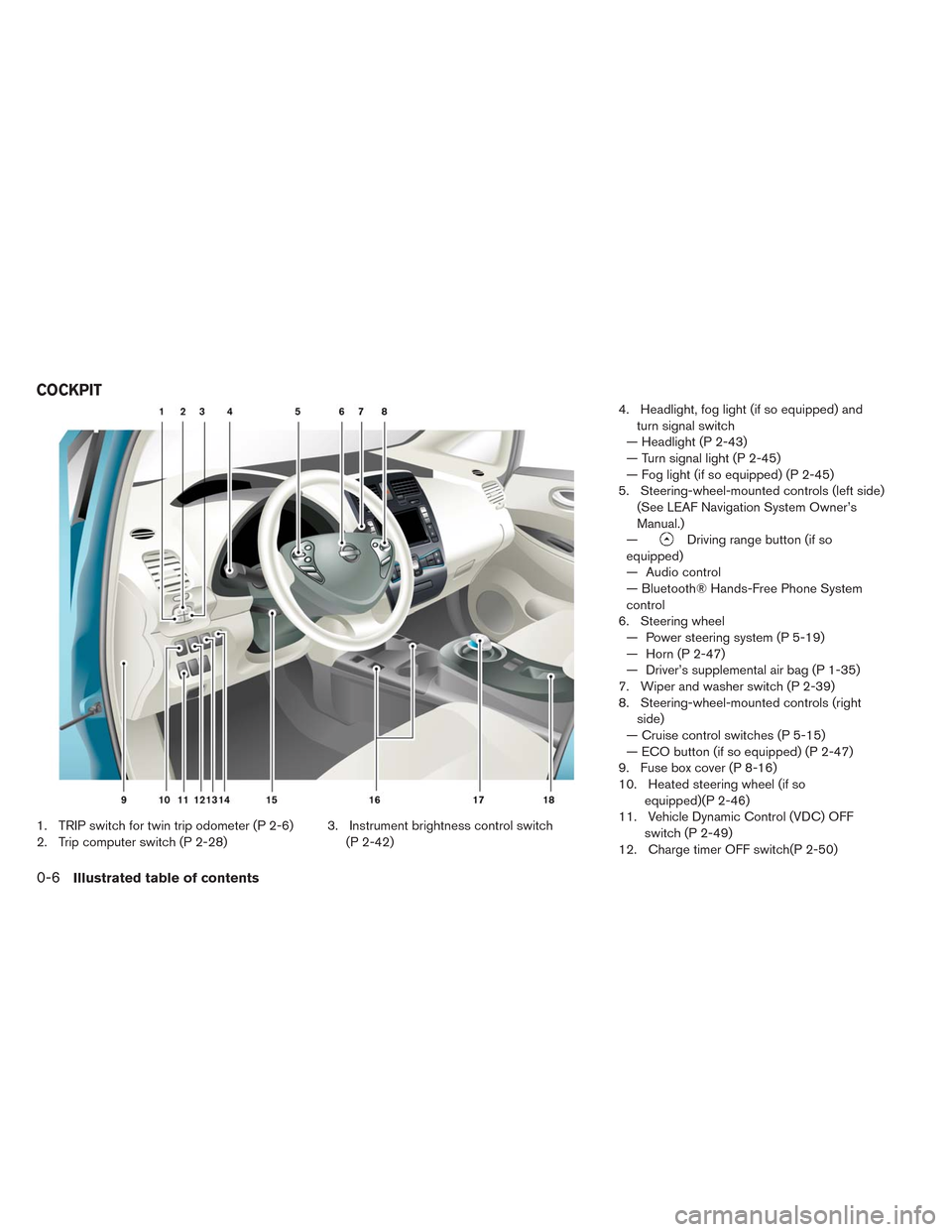
1. TRIP switch for twin trip odometer (P 2-6)
2. Trip computer switch (P 2-28)3. Instrument brightness control switch
(P 2-42)4. Headlight, fog light (if so equipped) and
turn signal switch
— Headlight (P 2-43)
— Turn signal light (P 2-45)
— Fog light (if so equipped) (P 2-45)
5. Steering-wheel-mounted controls (left side)
(See LEAF Navigation System Owner’s
Manual.)
—
Driving range button (if so
equipped)
— Audio control
— Bluetooth® Hands-Free Phone System
control
6. Steering wheel
— Power steering system (P 5-19)
— Horn (P 2-47)
— Driver’s supplemental air bag (P 1-35)
7. Wiper and washer switch (P 2-39)
8. Steering-wheel-mounted controls (right
side)
— Cruise control switches (P 5-15)
— ECO button (if so equipped) (P 2-47)
9. Fuse box cover (P 8-16)
10. Heated steering wheel (if so
equipped)(P 2-46)
11. Vehicle Dynamic Control (VDC) OFF
switch (P 2-49)
12. Charge timer OFF switch(P 2-50)
COCKPIT
0-6Illustrated table of contents
Page 16 of 397
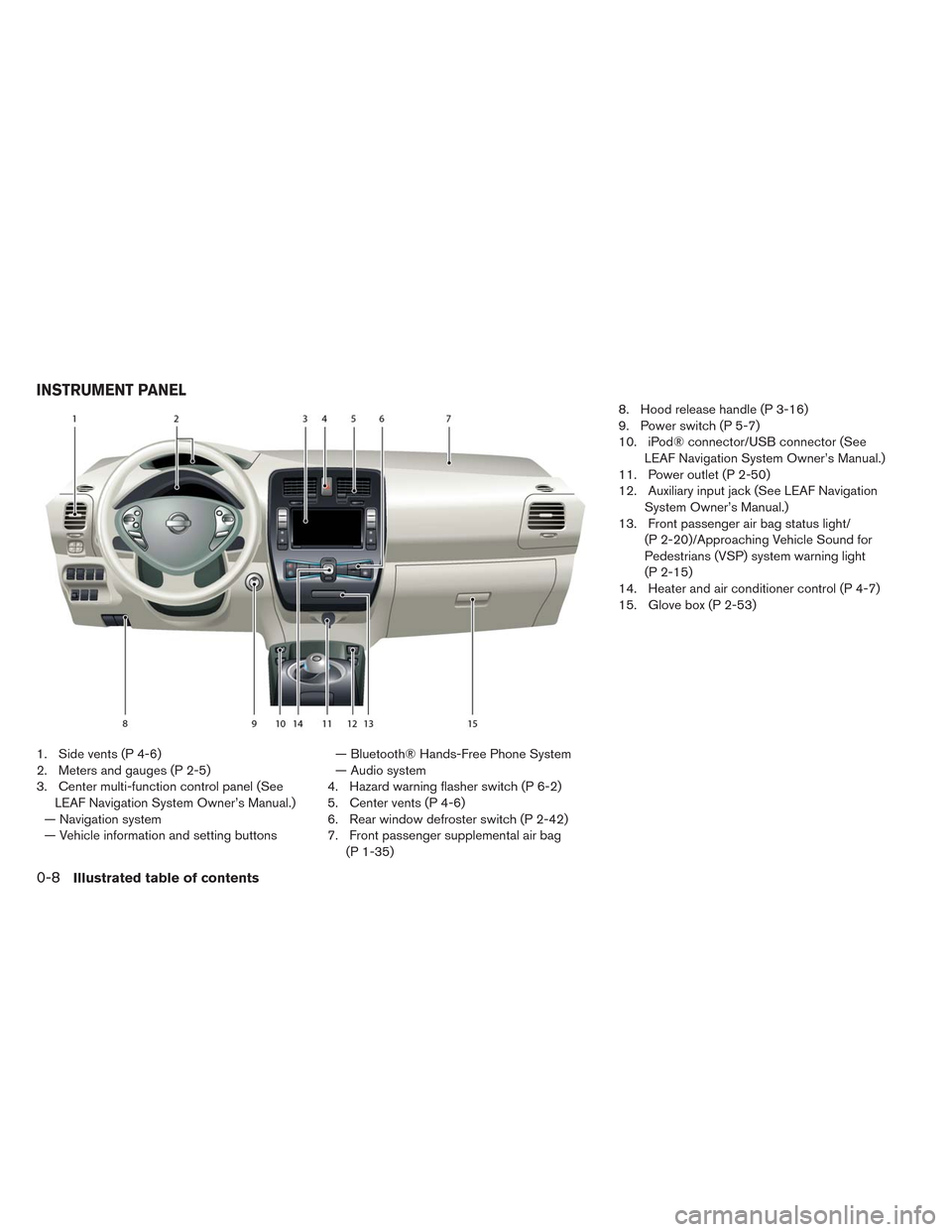
1. Side vents (P 4-6)
2. Meters and gauges (P 2-5)
3. Center multi-function control panel (See
LEAF Navigation System Owner’s Manual.)
— Navigation system
— Vehicle information and setting buttons— Bluetooth® Hands-Free Phone System
— Audio system
4. Hazard warning flasher switch (P 6-2)
5. Center vents (P 4-6)
6. Rear window defroster switch (P 2-42)
7. Front passenger supplemental air bag
(P 1-35)8. Hood release handle (P 3-16)
9. Power switch (P 5-7)
10. iPod® connector/USB connector (See
LEAF Navigation System Owner’s Manual.)
11. Power outlet (P 2-50)
12. Auxiliary input jack (See LEAF Navigation
System Owner’s Manual.)
13. Front passenger air bag status light/
(P 2-20)/Approaching Vehicle Sound for
Pedestrians (VSP) system warning light
(P 2-15)
14. Heater and air conditioner control (P 4-7)
15. Glove box (P 2-53)
INSTRUMENT PANEL
0-8Illustrated table of contents
Page 139 of 397
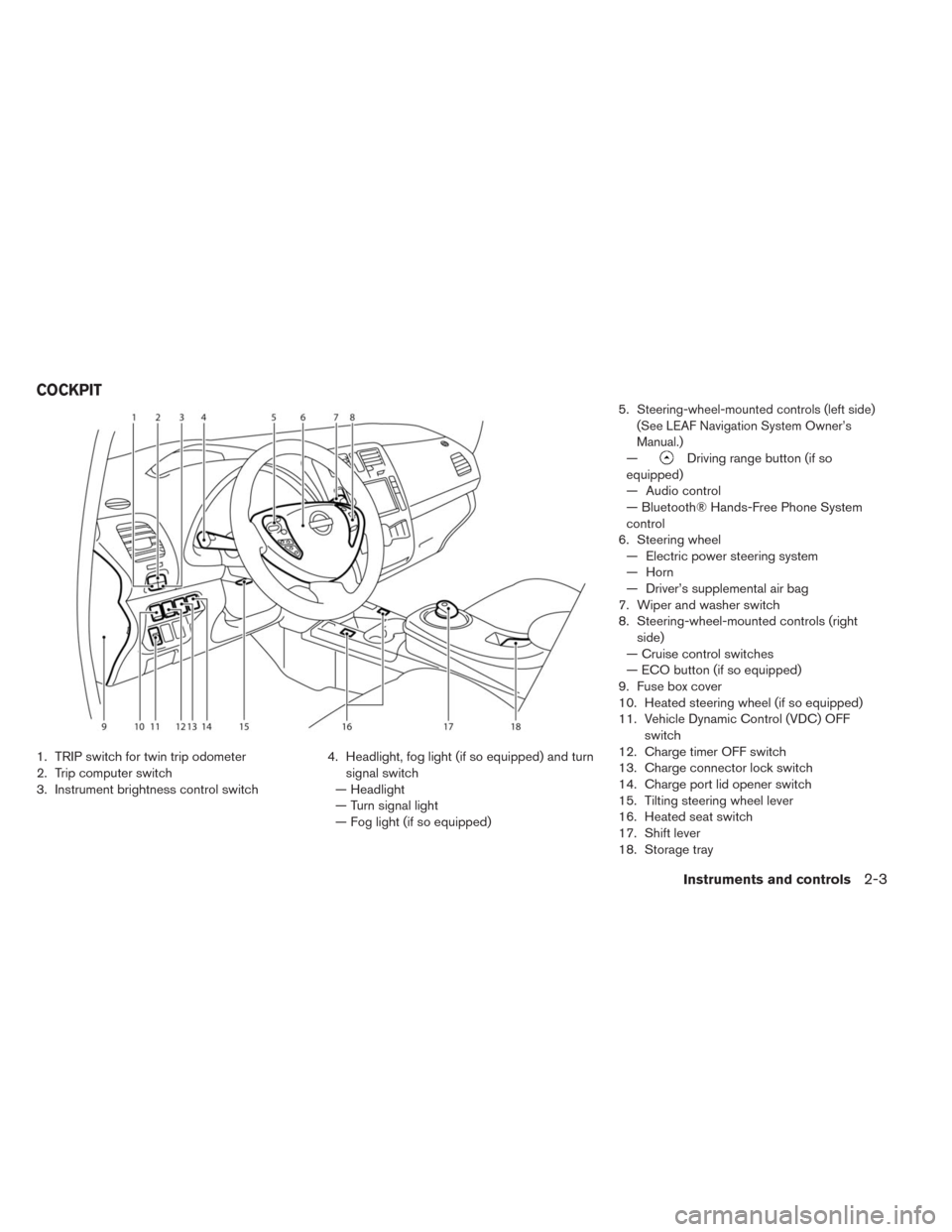
1. TRIP switch for twin trip odometer
2. Trip computer switch
3. Instrument brightness control switch4. Headlight, fog light (if so equipped) and turn
signal switch
— Headlight
— Turn signal light
— Fog light (if so equipped)5.
Steering-wheel-mounted controls (left side)
(See LEAF Navigation System Owner’s
Manual.)
—Driving range button (if so
equipped)
— Audio control
— Bluetooth® Hands-Free Phone System
control
6. Steering wheel
— Electric power steering system
— Horn
— Driver’s supplemental air bag
7. Wiper and washer switch
8. Steering-wheel-mounted controls (right
side)
— Cruise control switches
— ECO button (if so equipped)
9. Fuse box cover
10. Heated steering wheel (if so equipped)
11. Vehicle Dynamic Control (VDC) OFF
switch
12. Charge timer OFF switch
13. Charge connector lock switch
14. Charge port lid opener switch
15. Tilting steering wheel lever
16. Heated seat switch
17. Shift lever
18. Storage tray
COCKPIT
Instruments and controls2-3
Page 140 of 397
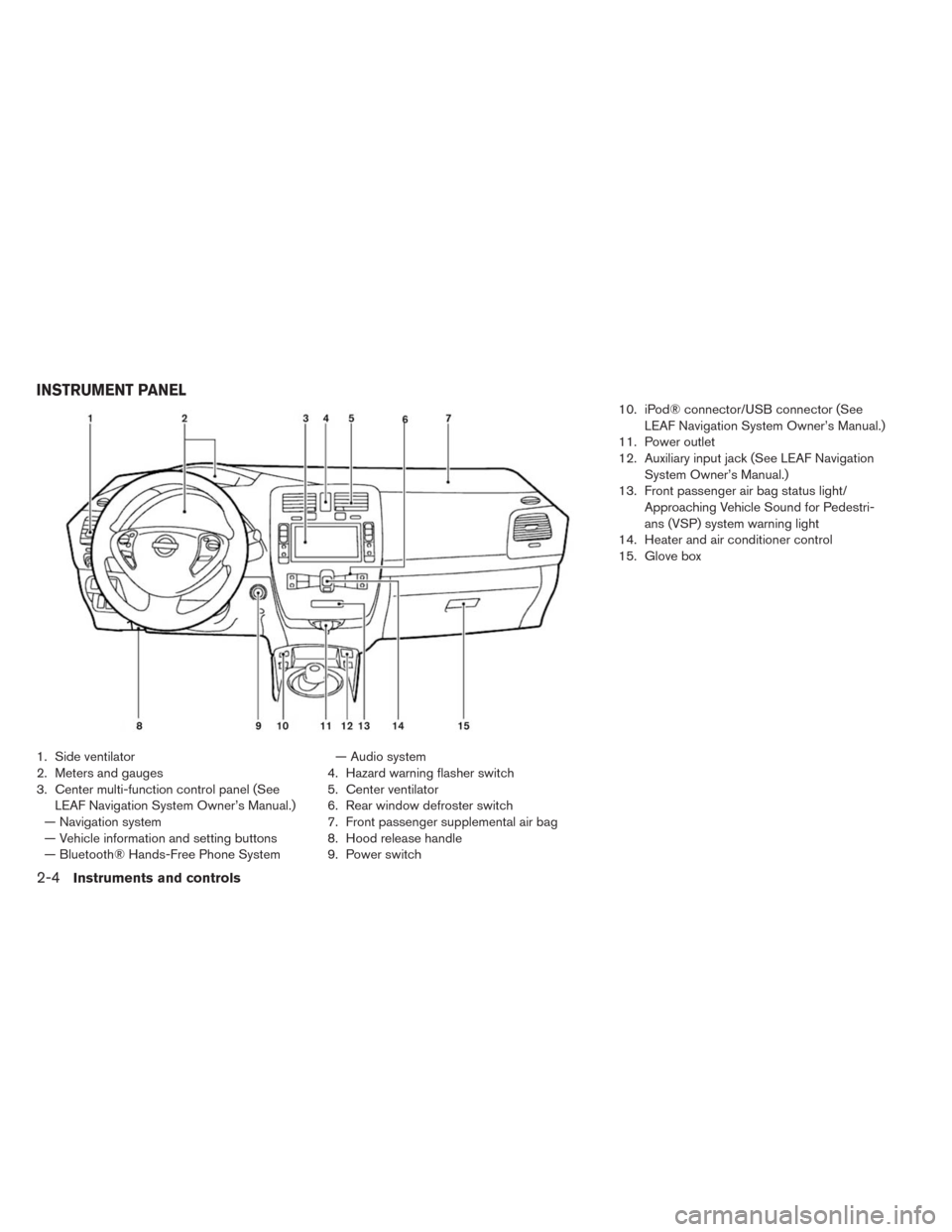
1. Side ventilator
2. Meters and gauges
3. Center multi-function control panel (See
LEAF Navigation System Owner’s Manual.)
— Navigation system
— Vehicle information and setting buttons
— Bluetooth® Hands-Free Phone System— Audio system
4. Hazard warning flasher switch
5. Center ventilator
6. Rear window defroster switch
7. Front passenger supplemental air bag
8. Hood release handle
9. Power switch10. iPod® connector/USB connector (See
LEAF Navigation System Owner’s Manual.)
11. Power outlet
12. Auxiliary input jack (See LEAF Navigation
System Owner’s Manual.)
13. Front passenger air bag status light/
Approaching Vehicle Sound for Pedestri-
ans (VSP) system warning light
14. Heater and air conditioner control
15. Glove box
INSTRUMENT PANEL
2-4Instruments and controls
Page 225 of 397
4 Heater, air conditioner, audio and phone
systems
Rearview monitor (if so equipped).............4-2
How to read the displayed lines.............4-3
Difference between predicted and actual
distances..........................4-3
Adjusting the screen...................4-5
Operating tips.......................4-5
Vents..............................4-6
Center vents........................4-6
Side vents.........................4-6
Climate control system....................4-7
Automatic climate control (models without
Navigation System)...................4-10
Automatic climate control (models with
Navigation System)...................4-16
Audio system (models without Navigation System). . .4-24
Radio...........................4-24
FM radio reception...................4-25
AM radio reception...................4-25
Satellite radio reception................4-25
Audio operation precautions..............4-26FM-AM-SAT radio with compact disc (CD)
player (models without Navigation System).....4-32
USB memory operation.................4-37
iPod® player operation................4-38
CD Care and cleaning.................4-40
Steering wheel switch for audio control.......4-40
Antenna..........................4-42
Car phone or CB radio.................4-42
Bluetooth® hands-free phone system without
navigation system (if so equipped)............4-43
Regulatory information.................4-44
Using the system....................4-45
Control buttons.....................4-46
Getting started......................4-47
List of voice commands................4-48
Voice adaptation (VA) mode..............4-53
Manual control......................4-54
Troubleshooting guide.................4-54
Page 255 of 397
USB (Universal Serial Bus) memory
WARNING
Do not connect, disconnect or operate
the USB device while driving. Doing so
can be a distraction. If distracted you
could lose control of your vehicle and
cause an accident or serious injury.
CAUTION
• Do not force the USB device into the
USB port. Inserting the USB device
tilted or up-side-down into the port
may damage the port. Make sure that
the USB device is connected correctly
into the USB port.
• Do not grab the USB port cover (if so
equipped) when pulling the USB de-
vice out of the port. This could damage
the port and the cover.
• Do not leave the USB cable in a place
where it can be pulled unintentionally.
Pulling the cable may damage the port.
The vehicle is not equipped with a USB device.
USB devices should be purchased separately as
necessary. This system cannot be used to format
USB devices. To format a USB device, use apersonal computer. In some states/area, the USB
device for the front seats plays only sound with-
out images for regulatory reasons, even when the
vehicle is parked.
This system supports various USB memory de-
vices, USB hard drives and iPod® players. Some
USB devices may not be supported by this sys-
tem.
Partitioned USB devices may not play correctly.
Some characters used in other languages (Chi-
nese, Japanese, etc.) may not appear properly in
the display. Using English language characters
with a USB device is recommended.
General notes for USB use:
Refer to your device manufacturer’s owner infor-
mation regarding the proper use and care of the
device.
Notes for iPod® use:
iPod® is a trademark of Apple Inc., registered in
the U.S. and other countries.
• Improperly plugging in the iPod may cause a
checkmark to be displayed on and off (flicker-
ing) . Always make sure that the iPod is con-
nected properly.• An iPod® nano (1st Generation) may remain in
fast forward or rewind mode if it is connected
during a seek operation. In this case, please
manually reset the iPod.
• An iPod® nano (2nd Generation) will continue
to fast-forward or rewind if it is disconnected
during a seek operation.
• An incorrect song title may appear when the
Play Mode is changed while using an iPod®
nano (2nd Generation) .
• Audiobooks may not play in the same order as
they appear on an iPod®.
• Large video files cause slow responses in an
iPod®. The vehicle center display may momen-
tarily black out, but will soon recover.
• If an iPod® automatically selects large video
files while in the shuffle mode, the vehicle center
display may momentarily black out, but will soon
recover.
Bluetooth® streaming audio
• Some Bluetooth® audio devices may not be
recognized by the in-vehicle audio system.
• It is necessary to set up the wireless connection
between a compatible Bluetooth® audio device
and the in-vehicle Bluetooth® module before
using the Bluetooth® audio.
Heater, air conditioner, audio and phone systems4-31
Page 256 of 397
• Operating procedure of the Bluetooth® audio
will vary depending on the devices. Make sure
how to operate your audio device before using it
with this system.
• The Bluetooth® audio may be stopped under
the following conditions:
– Receiving a call on the Hands-Free Phone
System.
– Checking the connection to the hands-free
phone.
• Do not place the Bluetooth® audio device in an
area surrounded by metal or far away from the
in-vehicle Bluetooth® module to prevent tone
quality degradation and wireless connection
disruption.
• While an audio device is connected through the
Bluetooth® wireless connection, the battery
power of the device may discharge quicker than
usual.
• This system supports the Bluetooth® Audio
Distribution Profile (A2DP, AVRCP) .
BLUETOOTH® is a trademark
owned by Bluetooth SIG, Inc. and licensed to
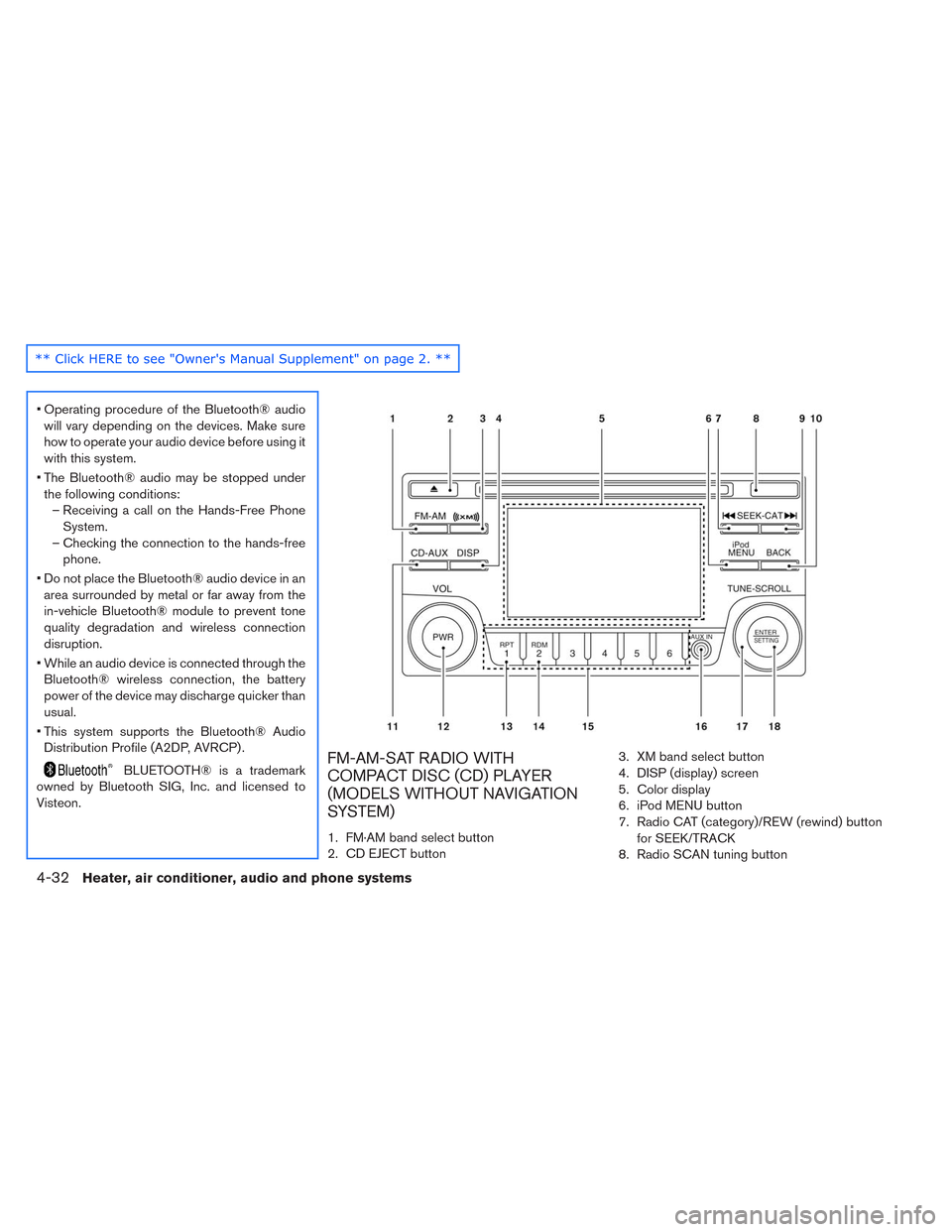
Visteon.FM-AM-SAT RADIO WITH
COMPACT DISC (CD) PLAYER
(MODELS WITHOUT NAVIGATION
SYSTEM)
1. FM·AM band select button
2. CD EJECT button3. XM band select button
4. DISP (display) screen
5. Color display
6. iPod MENU button
7. Radio CAT (category)/REW (rewind) button
for SEEK/TRACK
8. Radio SCAN tuning button
4-32Heater, air conditioner, audio and phone systems